
201871010117--石欣钰--《面向对象程序设计(java)》第十六周学习总结
|
项目 |
内容 |
|
这个作业属于哪个课程 |
https://www.cnblogs.com/nwnu-daizh |
|
这个作业的要求在哪里 |
https://www.cnblogs.com/nwnu-daizh/p/12031970.html |
|
作业学习目标 |
(1) 掌握Java应用程序的打包操作; (2) 掌握线程概念; (3) 掌握线程创建的两种技术。 (4)学习应用程序的GUI |
14.1什么是线程
1.进程--概念
要解释线程,就必须明白什么是进程。
什么是进程呢?
进程是指运行中的应用程序,每个进程都有自己独立的地址空间(内存空间),比如用户点击桌面的IE浏览器,就启动了一个进程,操作系统就会为该进程分配独立的地址空间。当用户再次点击左面的IE浏览器,又启动了一个进程,操作系统将为新的进程分配新的独立的地址空间。目前操作系统都支持多进程。
要点:用户每启动一个进程,操作系统就会为该进程分配一个独立的内存空间。
2.线程--概念
在明白进程后,就比较容易理解线程的概念。
什么是线程呢?
是进程中的一个实体,是被系统独立调度和分派的基本单位,线程自己不拥有系统资源,只拥有一点在运行中必不可少的资源,但它可与同属一个进程的其它线程共享进程所拥有的全部资源。一个线程可以创建和撤消另一个线程,同一进程中的多个线程之间可以并发执行。线程有就绪、阻塞和运行三种基本状态。
3.线程
1、线程是轻量级的进程
2、线程没有独立的地址空间(内存空间)
3、线程是由进程创建的(寄生在进程)
4、一个进程可以拥有多个线程-->这就是我们常说的多线程编程
5、线程有几种状态:
a、新建状态(new)
b、就绪状态(Runnable)
c、运行状态(Running)
d、阻塞状态(Blocked)
e、死亡状态(Dead)
4.线程有什么用处
java程序中流传一句话,不会使用线程就别跟别人说自己学过java。目前绝大部分应用程序都会涉及到多并发的问题。只要应用程序涉及到并发,就离不开多线程编程。
5.线程--如何使用
在java中一个类要当作线程来使用有两种方法。
1、继承Thread类,并重写run函数
2、实现Runnable接口,并重写run函数
因为java是单继承的,在某些情况下一个类可能已经继承了某个父类,这时在用继承Thread类方法来创建线程显然不可能java设计者们提供了另外一个方式创建线程,就是通过实现Runnable接口来创建线程。
14.2中断线程
Terminated (被终止) 线程被终止的原因有二:
(1)一是run()方法中最后一个语句执行完毕而自 然死亡。
(2)二是因为一个没有捕获的异常终止了run方法 而意外死亡。
可以调用线程的stop 方 法 杀 死 一 个 线 程 (thread.stop();),但是,stop方法已过时, 不要在自己的代码中调用它。
其他判断和影响线程状态的方法:
(1)join():等待指定线程的终止。
(2)join(long millis):经过指定时间等待终止指定 的线程。
(3)isAlive():测试当前线程是否在活动。
(4)yield():让当前线程由“运行状态”进入到“就 绪状态”,从而让其它具有相同优先级的等待线程 获取执行权。
14.3线程状态
Java中线程的状态分为6种。
1. 初始(NEW):新创建了一个线程对象,但还没有调用start()方法。
2. 运行(RUNNABLE):Java线程中将就绪(ready)和运行中(running)两种状态笼统的称为“运行”。
线程对象创建后,其他线程(比如main线程)调用了该对象的start()方法。该状态的线程位于可运行线程池中,等待被线程调度选中,获取CPU的使用权,此时处于就绪状态(ready)。就绪状态的线程在获得CPU时间片后变为运行中状态(running)。
3. 阻塞(BLOCKED):表示线程阻塞于锁。
4. 等待(WAITING):进入该状态的线程需要等待其他线程做出一些特定动作(通知或中断)。
5. 超时等待(TIMED_WAITING):该状态不同于WAITING,它可以在指定的时间后自行返回。
6. 终止(TERMINATED):表示该线程已经执行完毕。
这6种状态定义在Thread类的State枚举中,可查看源码进行一一对应。
线程的状态图 
第二部分:实验部分
1、实验目的与要求
(1) 掌握Java应用程序的打包操作;
(2) 掌握线程概念;
(3) 掌握线程创建的两种技术。
2、实验内容和步骤
实验1: 导入第13章示例程序,测试程序并进行代码注释。
测试程序1
l 在elipse IDE中调试运行教材585页程序13-1,结合程序运行结果理解程序;
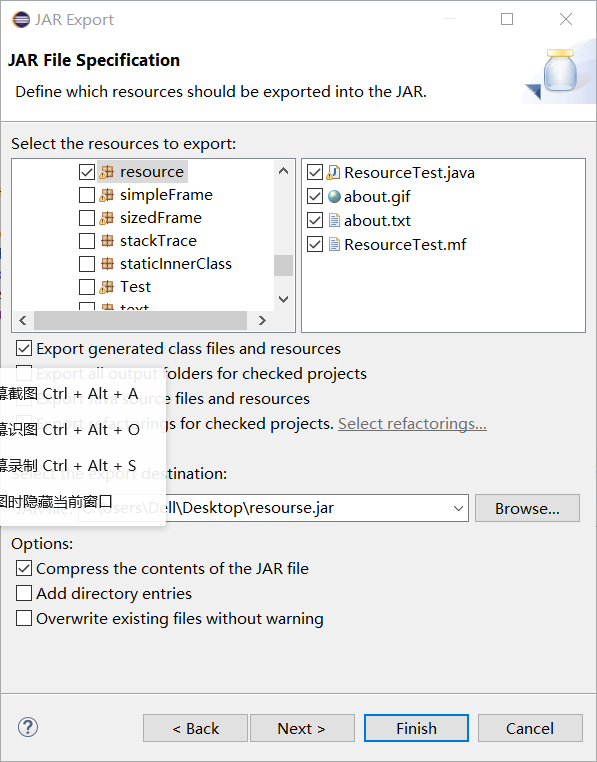
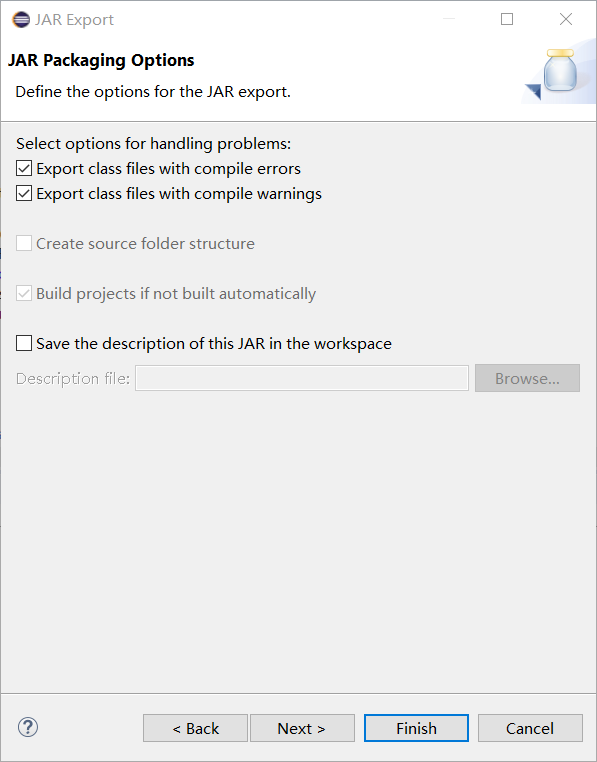
l 将所生成的JAR文件移到另外一个不同的目录中,再运行该归档文件,以便确认程序是从JAR文件中,而不是从当前目录中读取的资源。
l 掌握创建JAR文件的方法;
程序代码如下:
package resource;

import java.awt.*;

import java.io.*;

import java.net.*;

import java.util.*;

import javax.swing.*;

/**

 * @version 1.41 2015-06-12

 * @author Cay Horstmann

 */

public class ResourceTest

{

   public static void main(String[] args)

   {

      EventQueue.invokeLater(() -> {

         JFrame frame = new ResourceTestFrame();

         frame.setTitle("ResourceTest");

         frame.setDefaultCloseOperation(JFrame.EXIT_ON_CLOSE);

         frame.setVisible(true);

      });

   }

}

/**

 * A frame that loads image and text resources.

 */

class ResourceTestFrame extends JFrame

{

   private static final int DEFAULT_WIDTH = 300;

   private static final int DEFAULT_HEIGHT = 300;

   public ResourceTestFrame()

   {

      setSize(DEFAULT_WIDTH, DEFAULT_HEIGHT);

      URL aboutURL = getClass().getResource("about.gif");//找到指定位置的图像文件,返回一个可以加载资源的URL

      Image img = new ImageIcon(aboutURL).getImage();//将加载的about.gif图像设置为图标

      setIconImage(img);

      JTextArea textArea = new JTextArea();

      InputStream stream = getClass().getResourceAsStream("about.txt");//读取about.txt文本文件内容

      try (Scanner in = new Scanner(stream, "UTF-8"))//将读取到的about.txt文本文件里内容显示到文本区

      {

         while (in.hasNext())//读取文本文件

            textArea.append(in.nextLine() + "\n");

      }

      add(textArea);

   }

}
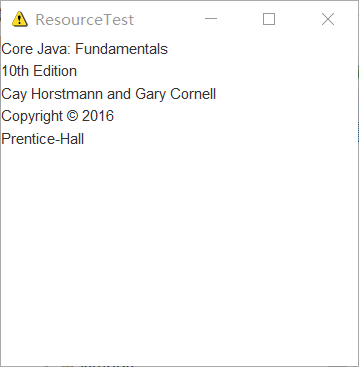
归档:



实验1:测试程序2(10分)
在elipse IDE中调试运行ThreadTest,结合程序运行结果理解程序;
掌握线程概念;
掌握用Thread的扩展类实现线程的方法;
利用Runnable接口改造程序,掌握用Runnable接口创建线程的方法。
代码如下:
class Lefthand extends Thread {

   public void run()

   {

       for(int i=0;i<=5;i++)

       {  System.out.println("You are Students!");

           try{   sleep(500);   }

           catch(InterruptedException e)

           { System.out.println("Lefthand error.");}

       }

  }

}

class Righthand extends Thread {

    public void run()

    {

         for(int i=0;i<=5;i++)

         {   System.out.println("I am a Teacher!");

             try{  sleep(300);  }

             catch(InterruptedException e)

             { System.out.println("Righthand error.");}

         }

    }

}

public class ThreadTest

{

     static Lefthand left;

     static Righthand right;

     public static void main(String[] args)

     {     left=new Lefthand();

           right=new Righthand();

           left.start();

           right.start();

     }

}
实验输出结果截图为:

利用Runnable接口改造后的程序代码为:
package Thread;

 class Lefthands  implements Runnable{

      public void run() {

          for(int i=0;i<=5;i++)

             {  System.out.println("You are Students!");

                 try{   Thread.sleep(500);   }     //休眠时间为500ms

                 catch(InterruptedException e)     //中断异常

                 { System.out.println("Lefthand error.");}

            }

       }

  }

 class Righthands  implements Runnable{

     public void run() {

         for(int i=0;i<=5;i++)

            {  System.out.println("I am a Teacher!");

                try{   Thread.sleep(300);   }

                catch(InterruptedException e)

                { System.out.println("Righthand error.");}

            }

       }

  }

    public class TheadTest01 {

         public static void main(String args[]) {

             Lefthands L=new Lefthands();

             Righthands R=new Righthands();

             new Thread(L).start();//启动线程

             new Thread(R).start();

     }

}
实验输出结果截图为:

可以通过两种方法实现多线程,分别为:(1)利用Thread类的子类(2)用Runnable()接口实现线程
(1)——定义Thread类的子类并实现用户线程操作,即 run()方法的实现。
——在适当的时候启动线程。
(2)——首先设计一个实现Runnable接口的类;
——然后在类中根据需要重写run方法;
——再创建该类对象,以此对象为参数建立Thread 类的对象;
——调用Thread类对象的start方法启动线程,将 CPU执行权转交到run方法。
测试程序3:
l 在Elipse环境下调试教材625页程序14-1、14-2 、14-3,结合程序运行结果理解程序;
l 在Elipse环境下调试教材631页程序14-4,结合程序运行结果理解程序;
l 对比两个程序,理解线程的概念和用途;
l 掌握线程创建的两种技术。
package bounce;

import java.awt.geom.*;

/**

 * A ball that moves and bounces off the edges of a rectangle

 * @version 1.33 2007-05-17

 * @author Cay Horstmann

 */

public class Ball

{

   private static final int XSIZE = 15;

   private static final int YSIZE = 15;

   private double x = 0;

   private double y = 0;

   private double dx = 1;

   private double dy = 1;

   /**

    * Moves the ball to the next position, reversing direction if it hits one of the edges

    */

   public void move(Rectangle2D bounds)

   {

      x += dx;

      y += dy;

      if (x < bounds.getMinX())

      {

         x = bounds.getMinX();

         dx = -dx;//当球碰壁时回调球的位置

      }

      if (x + XSIZE >= bounds.getMaxX())

      {

         x = bounds.getMaxX() - XSIZE;

         dx = -dx;

      }

      if (y < bounds.getMinY())

      {

         y = bounds.getMinY();

         dy = -dy;

      }

      if (y + YSIZE >= bounds.getMaxY())

      {

         y = bounds.getMaxY() - YSIZE;

         dy = -dy;

      }

   }

   /**

    * Gets the shape of the ball at its current position.

    */

   public Ellipse2D getShape()

   {

      return new Ellipse2D.Double(x, y, XSIZE, YSIZE);

   }

}
package bounce;

import java.awt.*;

import java.util.*;

import javax.swing.*;

/**

 * The component that draws the balls.

 * @version 1.34 2012-01-26

 * @author Cay Horstmann

 */

public class BallComponent extends JPanel

{

   private static final int DEFAULT_WIDTH = 450;

   private static final int DEFAULT_HEIGHT = 350;

   private java.util.List<Ball> balls = new ArrayList<>();

   /**

    * Add a ball to the component.

    * @param b the ball to add

    */

   public void add(Ball b)

   {

      balls.add(b);

   }

   public void paintComponent(Graphics g)

   {

      super.paintComponent(g); // erase background

      Graphics2D g2 = (Graphics2D) g;

      for (Ball b : balls)

      {

         g2.fill(b.getShape());

      }

   }

   public Dimension getPreferredSize() { return new Dimension(DEFAULT_WIDTH, DEFAULT_HEIGHT); }

}
package bounce;

import java.awt.*;

import java.awt.event.*;

import javax.swing.*;

/**

 * Shows an animated bouncing ball.

 * @version 1.34 2015-06-21

 * @author Cay Horstmann

 */

public class Bounce

{

   public static void main(String[] args)

   {

      EventQueue.invokeLater(() -> {

         JFrame frame = new BounceFrame();

         frame.setDefaultCloseOperation(JFrame.EXIT_ON_CLOSE);

         frame.setVisible(true);

      });

   }

}

/**

 * The frame with ball component and buttons.

 */

class BounceFrame extends JFrame

{

   private BallComponent comp;

   public static final int STEPS = 1000;

   public static final int DELAY = 3;

   /**

    * Constructs the frame with the component for showing the bouncing ball and

    * Start and Close buttons

    */

   public BounceFrame()

   {

      setTitle("Bounce");

      comp = new BallComponent();

      add(comp, BorderLayout.CENTER);

      JPanel buttonPanel = new JPanel();

      addButton(buttonPanel, "Start", event -> addBall()); //start表示加入一个球

      addButton(buttonPanel, "Close", event -> System.exit(0));//系统退出

      add(buttonPanel, BorderLayout.SOUTH);

      pack();

   }

   /**

    * Adds a button to a container.

    * @param c the container

    * @param title the button title

    * @param listener the action listener for the button

    */

   public void addButton(Container c, String title, ActionListener listener)

   {

      JButton button = new JButton(title);

      c.add(button);

      button.addActionListener(listener);

   }

   /**

    * Adds a bouncing ball to the panel and makes it bounce 1,000 times.

    */

   public void addBall()

   {

      try

      {

         Ball ball = new Ball();

         comp.add(ball);

         for (int i = 1; i <= STEPS; i++)

         {

            ball.move(comp.getBounds());

            comp.paint(comp.getGraphics());

            Thread.sleep(DELAY);

         }

      }

      catch (InterruptedException e)//中断异常

      {

      }

   }

}
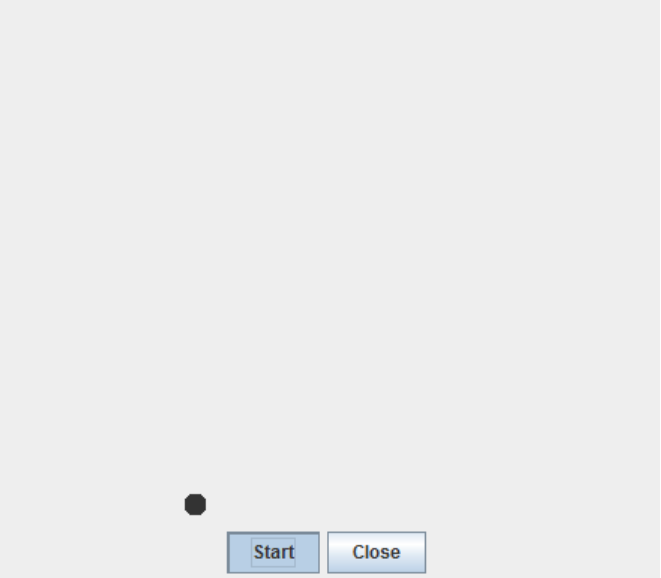
实验输出结果截图为:
bounceThread
package bounceThread;

import java.awt.geom.*;

/**

   A ball that moves and bounces off the edges of a

   rectangle

 * @version 1.33 2007-05-17

 * @author Cay Horstmann

*/

public class Ball

{

   private static final int XSIZE = 15;

   private static final int YSIZE = 15;

   private double x = 0;

   private double y = 0;

   private double dx = 1;

   private double dy = 1;

   /**

      Moves the ball to the next position, reversing direction

      if it hits one of the edges

   */

   public void move(Rectangle2D bounds)

   {

      x += dx;

      y += dy;

      if (x < bounds.getMinX())

      {

         x = bounds.getMinX();

         dx = -dx;

      }

      if (x + XSIZE >= bounds.getMaxX())

      {

         x = bounds.getMaxX() - XSIZE;

         dx = -dx;

      }

      if (y < bounds.getMinY())

      {

         y = bounds.getMinY();

         dy = -dy;

      }

      if (y + YSIZE >= bounds.getMaxY())

      {

         y = bounds.getMaxY() - YSIZE;

         dy = -dy;

      }

   }

   /**

      Gets the shape of the ball at its current position.

   */

   public Ellipse2D getShape()

   {

      return new Ellipse2D.Double(x, y, XSIZE, YSIZE);

   }

}
package bounceThread;

import java.awt.*;

import java.util.*;

import javax.swing.*;

/**

 * The component that draws the balls.

 * @version 1.34 2012-01-26

 * @author Cay Horstmann

 */

public class BallComponent extends JComponent

{

   private static final int DEFAULT_WIDTH = 450;

   private static final int DEFAULT_HEIGHT = 350;

   private java.util.List<Ball> balls = new ArrayList<>();

   /**

    * Add a ball to the panel.

    * @param b the ball to add

    */

   public void add(Ball b)

   {

      balls.add(b);

   }

   public void paintComponent(Graphics g)

   {

      Graphics2D g2 = (Graphics2D) g;

      for (Ball b : balls)

      {

         g2.fill(b.getShape());

      }

   }

   public Dimension getPreferredSize() { return new Dimension(DEFAULT_WIDTH, DEFAULT_HEIGHT); }

}
package bounceThread;

import java.awt.*;

import java.awt.event.*;

import javax.swing.*;

/**

 * Shows animated bouncing balls.

 * @version 1.34 2015-06-21

 * @author Cay Horstmann

 */

public class BounceThread

{

   public static void main(String[] args)

   {

      EventQueue.invokeLater(() -> {

         JFrame frame = new BounceFrame();

         frame.setTitle("BounceThread");

         frame.setDefaultCloseOperation(JFrame.EXIT_ON_CLOSE);

         frame.setVisible(true);

      });

   }

}

/**

 * The frame with panel and buttons.

 */

class BounceFrame extends JFrame

{

   private BallComponent comp;

   public static final int STEPS = 1000;

   public static final int DELAY = 5;

   /**

    * Constructs the frame with the component for showing the bouncing ball and

    * Start and Close buttons

    */

   public BounceFrame()

   {

      comp = new BallComponent();

      add(comp, BorderLayout.CENTER);

      JPanel buttonPanel = new JPanel();

      addButton(buttonPanel, "Start", event -> addBall());

      addButton(buttonPanel, "Close", event -> System.exit(0));

      add(buttonPanel, BorderLayout.SOUTH);

      pack();

   }

   /**

    * Adds a button to a container.

    * @param c the container

    * @param title the button title

    * @param listener the action listener for the button

    */

   public void addButton(Container c, String title, ActionListener listener)

   {

      JButton button = new JButton(title);

      c.add(button);

      button.addActionListener(listener);

   }

   /**

    * Adds a bouncing ball to the canvas and starts a thread to make it bounce

    */

   public void addBall()

   {

      Ball ball = new Ball();

      comp.add(ball);

      Runnable r = () -> {

         try

         {

            for (int i = 1; i <= STEPS; i++)

            {

               ball.move(comp.getBounds());

               comp.repaint();

               Thread.sleep(DELAY);

            }

         }

         catch (InterruptedException e)

         {

         }

      };

      Thread t = new Thread(r);

      t.start();

   }

}
实验输出结果截图为:

201871010117--石欣钰--《面向对象程序设计(java)》第十六周学习总结的更多相关文章
- 201571030332 扎西平措 《面向对象程序设计Java》第八周学习总结
<面向对象程序设计Java>第八周学习总结 项目 内容 这个作业属于哪个课程 https://www.cnblogs.com/nwnu-daizh/ 这个作业的要求在哪里 https: ...
- 201771010118马昕璐《面向对象程序设计java》第八周学习总结
第一部分:理论知识学习部分 1.接口 在Java程序设计语言中,接口不是类,而是对类的一组需求描述,由常量和一组抽象方法组成.Java为了克服单继承的缺点,Java使用了接口,一个类可以实现一个或多个 ...
- 201771010134杨其菊《面向对象程序设计java》第八周学习总结
第八周学习总结 第一部分:理论知识 一.接口.lambda和内部类: Comparator与comparable接口: 1.comparable接口的方法是compareTo,只有一个参数:comp ...
- 201771010134杨其菊《面向对象程序设计java》第七周学习总结
第七周学习总结 第一部分:理论知识 1.继承是面向对象程序设计(Object Oriented Programming-OOP)中软件重用的关键技术.继承机制使用已经定义的类作为基础建立新的类定义,新 ...
- 201771010128 王玉兰《面象对象程序设计 (Java) 》第六周学习总结
---恢复内容开始--- 第一部分:基础知识总结: 1.继承 A:用已有类来构建新类的一种机制,当定义了一个新类继承一个类时,这个新类就继承了这个类的方法和域以适应新的情况: B:特点:具有层次结构. ...
- 201871010126 王亚涛《面向对象程序设计 JAVA》 第十三周学习总结
内容 这个作业属于哪个课程 https://www.cnblogs.com/nwnu-daizh/ 这个作业的要求在哪里 https://www.cnblogs.com/nwnu-daizh/p/ ...
- 马凯军201771010116《面向对象程序设计Java》第八周学习总结
一,理论知识学习部分 6.1.1 接口概念 两种含义:一,Java接口,Java语言中存在的结构,有特定的语法和结构:二,一个类所具有的方法的特征集合,是一种逻辑上的抽象.前者叫做“Java接口”,后 ...
- 周强201771010141《面向对象程序设计Java》第八周学习总结
一.理论知识学习部分 Java为了克服单继承的缺点,Java使用了接口,一个类可以实现一个或多个接口. 接口体中包含常量定义和方法定义,接口中只进行方法的声明,不提供方法的实现. 类似建立类的继承关系 ...
- 201777010217-金云馨《面向对象程序设计Java》第八周学习总结
项目 内容 这个作业属于哪个课程 https://www.cnblogs.com/nwnu-daizh/ 这个作业的要求在哪里 https://www.cnblogs.com/nwnu-daizh/p ...
- 201871010126 王亚涛 《面向对象程序设计 (Java)》第十七周学习总结
内容 这个作业属于哪个课程 https://www.cnblogs.com/nwnu-daizh/ 这个作业的要求在哪里 https://www.cnblogs.com/nwnu-daizh/p/12 ...
随机推荐
- C++ string push_back()
函数功能: 在后面添加一项 vector头文件的push_back函数,在vector类中作用为在vector尾部加入一个数据.string中的push_back函数,作用是字符串之后插入一个字符. ...
- MySQL实战45讲学习笔记:第四十五讲
一.本节概述 MySQL 里有很多自增的 id,每个自增 id 都是定义了初始值,然后不停地往上加步长.虽然自然数是没有上限的,但是在计算机里,只要定义了表示这个数的字节长度,那它就有上限.比如,无符 ...
- linux的命令操作
linux的命令操作 1.日常操作命令 **查看当前所在的工作目录pwd **查看当前系统的时间 date **查看有谁在线(哪些人登陆到了服务器)who 查看当前在线last 查看最近的登陆历史记录 ...
- MMM的又一周计划[2019 7.1→2019.7.7]
发现今天是7.1然后又是星期一 来一发吧 本周目标: 1.二分图最佳匹配 2.网络流 3.HH的项链 4.洛谷rk前1000(目前1.1k) (upd:469) 5.AC260(35题,上周A了34, ...
- 如果对象的引用被置为null,;垃圾回收器是否会立即释放对象占用的内存?
不会,在下一个垃圾回调周期中,这个对象将是被可回收的. 也就是说并不会立即被垃圾收集器立刻回收,而是在下一次垃圾回收时才会释放其占用的内存.
- 谈谈vue.js中methods watch和compute的区别和联系
methods,watch和computed都是以函数为基础的,但各自却都不同: 1.watch和computed都是以Vue的依赖追踪机制为基础的,它们都试图处理这样一件事情:当某一个数据(称它为依 ...
- find命令常用场景
1.查找/var目录下属主为root并且属组为mail的所有文件: find /var -user root -group mail 2.查找/usr目录下不属于root,bin,或student的文 ...
- python 使用队列实现线程同步
#通过queue的方式进行线程间同步,Queue在底层通过实现了dqueue(双生队列,在字节码时实现了线程安全)实现了线程安全 from queue import Queue import time ...
- Kafka学习笔记之Kafka Consumer设计解析
0x00 摘要 本文主要介绍了Kafka High Level Consumer,Consumer Group,Consumer Rebalance,Low Level Consumer实现的语义,以 ...
- SAP MM模块相关透明表收集
物料表 MCHA 批次表(批次.评估类型 工厂物料) MARA 查看物料数据(发票名称.创建时间.人员) MARC 物料数据查询(利润中心.状态.在途) MAKT 查看物料描述 MKPF 物料抬头 M ...