
flask框架(六)——闪现(get_flashed_message)、请求扩展、中间件(了解)
message
-设置:flash('aaa')

-取值:get_flashed_message()

-假设在a页面操作出错,跳转到b页面,在b页面显示a页面的错误信息
1 如果要用flash就必须设置app.secret_key = 'asdfasdf'

2 特点:存了,你可以在任意一次请求中获取,但是一旦取了一次,就没有了。这里的一次指的是在同一个路径下请求一次

3 我们可以使用  flash('普通信息',category="info"),通过category对信息做分类

4get_flashed_messages(with_categories=True,category_filter=("error",)),设置with_categories以键值对的形式获取

设置category_filter=("error",)进行分类信息的过滤
代码示例
from flask import Flask,flash,get_flashed_messages

app = Flask(__name__)

app.secret_key = 'asdfasdf'

@app.route('/index1')

def index():

    #(category="message", message))

    flash('超时错误',category="error")  #设置信息,分类为error

    flash('普通信息',category="info")  #设置信息,分类为info

    return "ssdsdsdfsd"

@app.route('/error')

def error():

    data = get_flashed_messages(with_categories=True,category_filter=("error","info"))

    data1 = get_flashed_messages(with_categories=True, category_filter=("error", "info"))

    print("data1",data1)

    print("data",data)

    return "错误信息"

if __name__ == '__main__':

    app.run()
操作流程
请求index1路由,执行flash,设置信息,并且分类
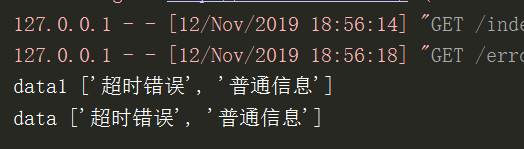
请求error路由,执行get_flash_message。with_categories参数可写可不写,写了参数就是(类型,设置信息)格式。category_filter是设置显示的哪个分类信息
设置with_categories=True,结果打印格式

不设置with_categories=True,结果打印格式
请求扩展
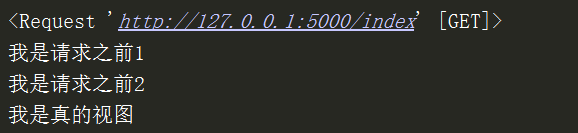
1.before_request 在访问正式的视图函数之前做一些事情(比如可以基于它做用户登录)
注意:如果你在一个before中加入return返回值,就会终止代码运行,不会往下走了。
from flask import Flask,request,render_template

app = Flask(__name__)

@app.before_request

def befor1():

    print(request)

    print("我是请求之前1")

@app.before_request

def befor2():

    print("我是请求之前2")

@app.route('/index')

def index():

    print("我是真的视图")

    return render_template("index.html")

if __name__ == '__main__':

    app.run()
结果是从上往下运行
2.after_request (在每个请求之后绑定一个函数,类似于django中间件中的process_response)
from flask import Flask,request,render_template

app = Flask(__name__)

@app.after_request

def after1(response):

    print("我是请求之后1")

    return response

@app.after_request

def after2(response):

    print("我是请求之后2")

    return response

@app.route('/index')

def index():

    print("我是真的视图")

    return render_template("index.html")

if __name__ == '__main__':

    app.run()
结果是从下往上运行
3.before_first_request (在请求之前运行,如果不重启,只会运行第一次)
from flask import Flask,render_template

app = Flask(__name__)

@app.before_first_request

def before_first():

    print("")

@app.route('/index')

def index():

    print("我是真的视图")

    return render_template("index.html")

if __name__ == '__main__':

    # app.__call__

    app.run()
4.teardown_request (在正式请求之后绑定一个函数,无论有没有异常都会执行,如果没有异常这个参数e就返回None,有就记录这个异常)
from flask import Flask,render_template

app = Flask(__name__)

@app.teardown_request

def tear(e):

    print('teardown_request')

    print(e)   #返回异常信息

@app.route('/index')

def index():

    print("我是真的视图")

    return render_template("index.html")

if __name__ == '__main__':

    # app.__call__

    app.run()
5.errorhandler (路径不存在时404,服务器内部错误500)
@app.errorhandler(404)

def error_404(arg):

    print(arg)   #返回路径错误信息

    return "404错误了"

@app.errorhandler(500)

def error(arg):

    print(arg)   #返回服务器错误信息

    return "500错误了"
6.template_global (标签)
@app.template_global()

def sb(a1, a2):

    return a1 + a2

@app.route('/index')

def index():

    print("我是真的视图")

    return render_template("index.html")
html
{{sb(1,2)}}
7.template_filter (过滤器)
@app.template_filter()

def db(a1, a2, a3):

    return a1 + a2 + a3

html

#{{ 1|db(2,3)}}
总结:
1 重点掌握before_request和after_request,
2 注意有多个的情况,执行顺序
3 before_request请求拦截后(也就是有return值),response所有都执行
中间件(了解)
from flask import Flask

app = Flask(__name__)

@app.route('/')

def index():

    return 'Hello World!'

# 模拟中间件

class Md(object):

    def __init__(self,old_wsgi_app):

        self.old_wsgi_app = old_wsgi_app

    def __call__(self,  environ, start_response):

        print('开始之前')

        ret = self.old_wsgi_app(environ, start_response)

        print('结束之后')

        return ret

if __name__ == '__main__':

    #1我们发现当执行app.run方法的时候,最终执行run_simple,最后执行app(),也就是在执行app.__call__方法

    #2 在__call__里面,执行的是self.wsgi_app().那我们希望在执行他本身的wsgi之前做点事情。

    #3 所以我们先用Md类中__init__,保存之前的wsgi,然后我们用将app.wsgi转化成Md的对象。

    #4 那执行新的的app.wsgi_app,就是执行Md的__call__方法。

    #把原来的wsgi_app替换为自定义的,

    app.wsgi_app = Md(app.wsgi_app)

    app.run()
请求所有的流程
ctx = self.request_context(environ)

        error = None

        try:

            try:

                ctx.push()

                #根据路径去执行视图函数,视图类

                response = self.full_dispatch_request()

            except Exception as e:

                error = e

                response = self.handle_exception(e)

            except:  # noqa: B001

                error = sys.exc_info()[1]

                raise

            return response(environ, start_response)

        finally:

            #不管出不出异常,都会走这里

            if self.should_ignore_error(error):

                error = None

            ctx.auto_pop(error)
flask框架(六)——闪现(get_flashed_message)、请求扩展、中间件(了解)的更多相关文章
- Flask框架(三)—— 请求扩展、中间件、蓝图、session源码分析
Flask框架(三)—— 请求扩展.中间件.蓝图.session源码分析 目录 请求扩展.中间件.蓝图.session源码分析 一.请求扩展 1.before_request 2.after_requ ...
- Flask的闪现(message) 请求扩展 中间件 蓝图
补充:一个编程思路 需求:做一些邮件短信微信的消息通知,比如账单告警之类的:比如数据库操作,数据库种类繁多:缓存的选择比如redis/memcache,诸如此类需要进行选择配置,如果我们单纯的用函数去 ...
- Flask框架 (四)—— 请求上下文源码分析、g对象、第三方插件(flask_session、flask_script、wtforms)、信号
Flask框架 (四)—— 请求上下文源码分析.g对象.第三方插件(flask_session.flask_script.wtforms).信号 目录 请求上下文源码分析.g对象.第三方插件(flas ...
- Flask - 请求响应 | session | 闪现 | 请求扩展 | 中间件
请求响应 flask的请求信息都在request里 flask的响应方式有四剑客,也可以自定义响应 请求相关信息 # request.method 提交的方法 # request.args get请求 ...
- session、闪现、请求扩展
session 除请求对象之外,还有一个session对象.它允许你在不同请求储存特定用户的信息.它是在Cookies的基础上实现的,并且对,Cookies进行密钥签名要使用会话,你需要设置一个密钥. ...
- Flask框架 之上下文、请求钩子与Flask_Script
一.上下文 请求上下文:request与session 应用上下文:current_app与g:一次请求多个函数可以用它传参 @app.route("/") def index() ...
- flask 框架 前端和后端请求超时问题
部署模式 flask + Gunicorn + nginx 为什么要用Gunicorn + nginx ? 请看知乎大神们的回答:https://www.zhihu.com/question/3852 ...
- flask之请求与响应、闪现(阅后即焚)、请求扩展(before,after)、中间件、LOCAL对象、偏函数、
目录 1.flask请求与响应 2.闪现 3.请求扩展 4.中间件 5.LOCAL对象 6.偏函数 templates 1.flask请求与响应 from flask import Flask,req ...
- python flask框架详解
Flask是一个Python编写的Web 微框架,让我们可以使用Python语言快速实现一个网站或Web服务.本文参考自Flask官方文档, 英文不好的同学也可以参考中文文档 1.安装flask pi ...
- Flask基础(01)-->Flask框架介绍
什么是Flask? 说白了,Flask就是一种web框架 在python中常用的框架有 flask django tornado 什么又是web框架呢? 为什么要使用web框架呢? 增强扩展性和稳定 ...
随机推荐
- 杂乱的Solidity - 2019-7-13
要清楚在区块链上开发DApp的架构[x][][][][][] DApp是去中心化的应用 基于智能合约 去中心化的游戏规则 代币激励
- 2016级移动应用开发在线测试12-service
有趣有内涵的文章第一时间送达! 喝酒I创作I分享 生活中总有些东西值得分享 @醉翁猫咪 1. Service是Android系统中的四大组件之一(Acitivty.Service.ContentPr ...
- Time of Trial
Time of Trial(思维) 题目大意:一个人想逃,一个人要阻止那个人逃跑 ,阻止者念每一个符咒的时间为b[i],逃跑者念每一个符咒的时间为a[i],逃跑者如果念完了第i个符咒,阻止者还没有念完 ...
- xmind 破解
邮箱:x@iroader 序列号: XAka34A2rVRYJ4XBIU35UZMUEEF64CMMIYZCK2FZZUQNODEKUHGJLFMSLIQMQUCUBXRENLK6NZL37JXP4P ...
- [HAOI2018]染色(NTT)
前置芝士 可重集排列 NTT 前置定义 \[\begin{aligned}\\ f_i=C_m^i\cdot \frac{n!}{(S!)^i(n-iS)!}\cdot (m-i)^{n-iS}\\ ...
- nRF51822 Beacon 扫描请求包的设置
Nordic 公司自己做有 iBeacon的板子和 SDK,很少有人拥有这个SDK,我最近在朋友那也拿到了一个,但是还没有时间看. 现在我们用普通的SDK自带的 Beacon 例程来做开发,开发的时相 ...
- clion ctrl+鼠标左键不能调到函数实现
问题:ctrl+鼠标左键只能在函数定义和申明之间跳转,不能跳转到implement,如果按ctrl+shift+B会报“no implement”. 解决:更改CMakeList文件,更改版本号. c ...
- hosts 屏蔽定位域名
通过修改hosts屏蔽定位服务的域名 #屏蔽百度地图 1.0.0.1 api.map.baidu.com 1.0.0.1 ps.map.baidu.com 1.0.0.1 sv.map.baidu.c ...
- Kafka(四) —— KafkaProducer源码阅读
一.doSend()方法 Kafka中的每一条消息都对应一个ProducerRecord对象. public class ProducerRecord<K, V> { private fi ...
- 第09组 Alpha冲刺(4/4)
队名:软工9组 组长博客:https://www.cnblogs.com/cmlei/ 作业博客:https://edu.cnblogs.com/campus/fzu/SoftwareEngineer ...