
UE4 window打包ios备忘
1、生成SHH key

2、安装证书 *.cer,*.p12
以下转自:http://wangjie.rocks/2017/11/30/ue4-ios-build-on-windows/
问题一
1 |
ssh_exchange_identification: Connection closed by remote host |
解决方法
首先保证远程机器 OSX 上的 ssh 并发数配置足够,使用命令查看
1 |
grep MaxStartups /etc/ssh/sshd_config |
一般输出如下格式 10/20/30 意思是连接达到10之后以20%的概率拒绝新连接直到30为止,可以根据需求调大第一个值并重启
其次保证 RemoteToolChainPrivate.key 文件存在于 C:\Users\用户名\AppData\Roaming\Unreal Engine\UnrealBuildTool\SSHKeys\远程机器地址\mac 文件夹下,没有的话需要在 Edit -> Project Settings... -> Platforms -> iOS -> Build 中进行配置,配置好远程 OSX 机器的地址,用户名,然后点击 Generate SSH Key 生成
问题二
编译失败,出现如下错误
1 |
clang: error: argument unused during compilation: '-fno-objc-exceptions' [-Werror,-Wunused-command-line-argument] |
解决方法
修改 Engine\Source\Programs\UnrealBuildTool\Platform\IOS\IOSToolChain.cs 文件,在 GetCompileArguments_Global 函数中增加 Result += " -Wno-unused-command-line-argument"; 禁用这个错误警告
问题三
出 Shipping 包出现链接错误,如下
1 |
ld: bitcode bundle could not be generated because '/Users/mac/UE4/Builds/xxx/Engine/Source/ThirdParty/PLCrashReporter/plcrashreporter-master-5ae3b0a/IOS/Release/libCrashReporter-iphoneos.a(libCrashReporter-iphoneos.a-arm64-master.o)' was built without full bitcode. All object files and libraries for bitcode must be generated from Xcode Archive or Install build for architecture arm64 clang: error: linker command failed with exit code 1 (use -v to see invocation) |
解决方法
目前的解决方法是在 Edit -> Project Settings... -> Platforms -> iOS -> Build 中取消 Support bitcode in Shipping
问题四
IPA 打包失败,错误如下
1 |
IPP ERROR: Application exception: System.Security.Cryptography.CryptographicException ... |
解决方法
Edit -> Project Settings... -> Platforms -> iOS -> Mobile Provision 中添加描述文件和证书,或者直接打开 Engine\Binaries\DotNET\IOS\IPhonePackager.exe 进行添加
描述文件和证书生成见官方文档
问题五
以下转自:https://www.cnblogs.com/kittywei/articles/7059993.html
System.Security.Cryptography.CryptographicException:该项不适于在指定状态下使用
当 RSACryptoProvider 创建了密钥文件但由于权限不足而无法删除该密钥文件时,会导致此错误;
解决方法
方法1、若要更正此错误,请确认代理服务帐户对“Documents and Settings”文件夹中 RSA 计算机密钥文件夹(例如,C:\Documents and Settings\%userName%\AppData\Roaming\Microsoft\Crypto\RSA)的“完全控制”权限设置为“允许”。
方法2、C:\Documents and Settings\%userName%\AppData\Roaming\Microsoft\的Crypto目录给删掉,重新生成key
Windows 远程编译iOS若干问题
原文
http://wangjie.rocks/2017/11/30/ue4-ios-build-on-windows/
问题一
ssh_exchange_identification: Connection closed by remote hostrsync: connection unexpectedly closed (0 bytes received so far) [sender]rsync error: error in rsync protocol data stream (code 12) at /home/lapo/packaging/rsync-3.0.4-1/src/rsync-3.0.4/io.c(632) [sender=3.0.4]
解决方法
首先保证远程机器 OSX 上的 ssh 并发数配置足够,使用命令查看
grep MaxStartups /etc/ssh/sshd_config
一般输出如下格式 10/20/30 意思是连接达到10之后以20%的概率拒绝新连接直到30为止,可以根据需求调大第一个值并重启
其次保证 RemoteToolChainPrivate.key 文件存在于 C:\Users\用户名\AppData\Roaming\Unreal Engine\UnrealBuildTool\SSHKeys\远程机器地址\mac 文件夹下,没有的话需要在 Edit -> Project Settings… -> Platforms -> iOS -> Build 中进行配置,配置好远程 OSX 机器的地址,用户名,然后点击 Generate SSH Key 生成
问题二
编译失败,出现如下错误
clang: error: argument unused during compilation: '-fno-objc-exceptions' [-Werror,-Wunused-command-line-argument]
解决方法
修改 Engine\Source\Programs\UnrealBuildTool\Platform\IOS\IOSToolChain.cs 文件,在 GetCompileArguments_Global 函数中增加 Result += “ -Wno-unused-command-line-argument”; 禁用这个错误警告
问题三
出 Shipping 包出现链接错误,如下
ld: bitcode bundle could not be generated because '/Users/mac/UE4/Builds/xxx/Engine/Source/ThirdParty/PLCrashReporter/plcrashreporter-master-5ae3b0a/IOS/Release/libCrashReporter-iphoneos.a(libCrashReporter-iphoneos.a-arm64-master.o)' was built without full bitcode. All object files and libraries for bitcode must be generated from Xcode Archive or Install build for architecture arm64clang: error: linker command failed with exit code 1 (use -v to see invocation)
解决方法
目前的解决方法是在 Edit -> Project Settings… -> Platforms -> iOS -> Build 中取消 Support bitcode in Shipping
问题四
IPA 打包失败,错误如下
IPP ERROR: Application exception: System.Security.Cryptography.CryptographicException ...
解决方法
Edit -> Project Settings… -> Platforms -> iOS -> Mobile Provision 中添加描述文件和证书,或者直接打开 Engine\Binaries\DotNET\IOS\IPhonePackager.exe 进行添加
描述文件和证书生成见官方文档
问题五
IPA打包失败,错误提示:
doesn't match the entitlements file's value for the get-task-allow entitlement.
解决办法
TARGETS -> Capabilities 的开关全部关掉,然后重新build。如果需要开启这些Capabilities,先构建成功一次后再开启。
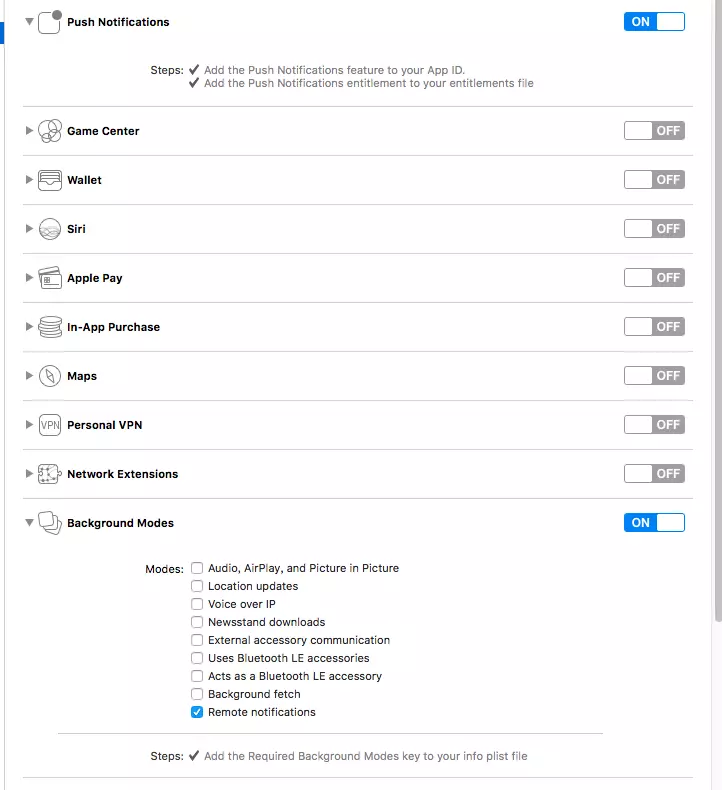
参考:
doesn’t match the entitlements file’s value for the get-task-allow entitlement.
https://www.jianshu.com/p/011670421594
iOS .entitlements文件
https://www.jianshu.com/p/24e55f608004
UE4 window打包ios备忘的更多相关文章
- spice server dpkg-buildpackage 打包编译备忘
一般我们会通过configure,make 编译.但是为了替换版本的方便需要把他编译成deb的包,而且还需要自定义下包名.下面就记录下我的修改过程. 注:前面关于spice server的编译过程掠过 ...
- 【C#】无损转换Image为Icon 【C#】组件发布:MessageTip,轻快型消息提示窗 【C#】给无窗口的进程发送消息 【手记】WebBrowser响应页面中的blank开新窗口及window.close关闭本窗体 【手记】调用Process.EnterDebugMode引发异常:并非所有引用的特权或组都分配给呼叫方 【C#】DataRowState演变备忘
[C#]无损转换Image为Icon 如题,市面上常见的方法是: var handle = bmp.GetHicon(); //得到图标句柄 return Icon.FromHandle(handle ...
- ExtJs4常用配置方法备忘
viewport布局常用属性 new Ext.Viewport({ layout: "border", renderTo: Ext.getBody(), defaults: { b ...
- ECMAScript 5(ES5)中bind方法简介备忘
一直以来对和this有关的东西模糊不清,譬如call.apply等等.这次看到一个和bind有关的笔试题,故记此文以备忘. bind和call以及apply一样,都是可以改变上下文的this指向的.不 ...
- Nmap备忘单:从探索到漏洞利用(Part 5)
这是备忘单的最后一部分,在这里主要讲述漏洞评估和渗透测试. 数据库审计 列出数据库名称 nmap -sV --script=mysql-databases 192.168.195.130 上图并没有显 ...
- JavaScript 教程学习进度备忘(二)
备忘:之前,只将“JS 教程”学习完毕,这篇记录:“JS HTML DOM ”.“JS 对象”.“JS Window”.“JS 库” 书签:跳过:另外跳过的内容有待跟进 _______________ ...
- HTML5终极备忘大全
二.文字备忘之标签 HTML5中新增的标签 <article> 定义文章 <aside> 定义页面内容旁边的内容 <audio> 定义声音内容 <canvas ...
- [转] HTML5终极备忘大全(图片版+文字版)---张鑫旭
by zhangxinxu from http://www.zhangxinxu.com本文地址:http://www.zhangxinxu.com/wordpress/?p=1544 一.前言兼图片 ...
- SSO之CAS备忘
http://blog.chinaunix.net/uid-28380443-id-4740103.html 自己负责的公司基于CAS单点登录平台架构已经上线运行,很多细节的东西是时候备忘一下了,开源 ...
随机推荐
- keras神经网络开发知识笔记
mnist数据集获取60000个训练样本和10000个测试样本,样本为0-9十个数字,用全连接神经网络进行训练,并测试结果. 例程采用60000个数据样本进行训练,对于一般的电脑来说,这样训练会比较费 ...
- postgres —— 分组集与部分聚集
创建表 create table t_oil ( region text, country text, year text, production int, comsumption int ) 导入数 ...
- 实用的Python库
一.Django 1.自动实现图片压缩: pip install easy-thumbnails / https://pypi.org/project/easy-thumbnails/2.实现定时任务 ...
- Dubbo源码分析:Serialization
背景 顺序化逻缉处理! 类图 获取Serialization对象时序图 序列化
- LightOJ - 1326 - Race(DP)
链接: https://vjudge.net/problem/LightOJ-1326 题意: Disky and Sooma, two of the biggest mega minds of Ba ...
- Sliding Window Matrix Maximum
Description Given an array of n * m matrix, and a moving matrix window (size k * k), move the window ...
- Python爬虫 | 多线程、多进程、协程
对于操作系统来说,一个任务就是一个进程(Process),比如打开一个浏览器就是启动一个浏览器进程,打开一个记事本就启动了一个记事本进程,打开两个记事本就启动了两个记事本进程,打开一个Word就启动了 ...
- SQL基础-子查询&EXISTS&UNION
一.子查询 1.使用子查询作为计算字段 子查询:嵌套在其他查询中的查询 现在有两个表,student表和teacher表 创建teacher表,并插入数据: CREATE TABLE `teacher ...
- python中的函数---函数应用
每种编程语言中,都需要函数的参与,python同样也不例外.函数是集成的子程序,是算法实现的最小方法单位,是完成基本操作的手段的集合.编程中能够灵活应用函数,提高程序设计的简单化:实现代码应用的复用化 ...
- D3.js的v5版本入门教程(第五章)—— 选择、插入、删除元素
D3.js的v5版本入门教程(第五章) 1.选择元素 现在我们已经知道,d3.js中选择元素的函数有select()和selectAll(),下面来详细讲解一下 假设我们的<body>中有 ...