
转 oracle 正则表达式和查询最大文件号 SQL
###sample 1
https://www.cnblogs.com/lxl57610/p/8227599.html
Oracle使用正则表达式离不开这4个函数:
1。regexp_like
2。regexp_substr
3。regexp_instr
4。regexp_replace
看函数名称大概就能猜到有什么用了。
regexp_like 只能用于条件表达式,和 like 类似,但是使用的正则表达式进行匹配,语法很简单:

regexp_substr 函数,和 substr 类似,用于拾取合符正则表达式描述的字符子串,语法如下:
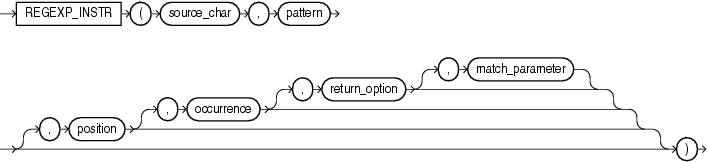
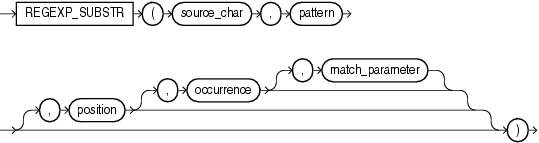 regexp_instr 函数,和 instr 类似,用于标定符合正则表达式的字符子串的开始位置,语法如下:
regexp_replace 函数,和 replace 类似,用于替换符合正则表达式的字符串,语法如下:
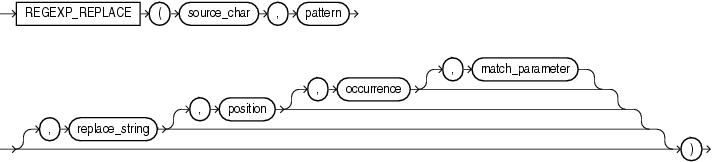
这里解析一下几个参数的含义:
1。source_char,输入的字符串,可以是列名或者字符串常量、变量。搜索字符串。可以是任意的数据类型char,VARCHAR2,nchar,CLOB,NCLOB类型
2。pattern,正则表达式。
3。match_parameter,匹配选项。
取值范围: i:大小写不敏感; c:大小写敏感;n:点号 . 不匹配换行符号;m:多行模式;x:扩展模式,忽略正则表达式中的空白字符。
4。position,标识从第几个字符开始正则表达式匹配。可选。搜索在字符串中的开始位置。如果省略,默认为1,这是第一个位置的字符串。
5。occurrence,标识第几个匹配组。可选。它是模式字符串中的第n个匹配位置。如果省略,默认为1。
6。replace_string,替换的字符串。
| 值 | 描述 |
| ^ | 匹配一个字符串的开始。如果与“m” 的match_parameter一起使用,则匹配表达式中任何位置的行的开头。 |
| $ | 匹配字符串的结尾。如果与“m” 的match_parameter一起使用,则匹配表达式中任何位置的行的末尾。 |
| * | 匹配零个或多个。 |
| + | 匹配一个或多个出现。 |
| ? | 匹配零次或一次出现。 |
| 。 | 匹配任何字符,除了空。 |
| | | 用“OR”来指定多个选项。 |
| [] | 用于指定一个匹配列表,您尝试匹配列表中的任何一个字符。 |
| [^] | 用于指定一个不匹配的列表,您尝试匹配除列表中的字符以外的任何字符。 |
| () | 用于将表达式分组为一个子表达式。 |
| {M} | 匹配m次。 |
| {M,} | 至少匹配m次。 |
| {M,N} | 至少匹配m次,但不多于n次。 |
| \ n | n是1到9之间的数字。在遇到\ n之前匹配在()内找到的第n个子表达式。 |
| [..] | 匹配一个可以多于一个字符的整理元素。 |
| [:] | 匹配字符类。 |
| [==] | 匹配等价类。 |
| \ d | 匹配一个数字字符。 |
| \ D | 匹配一个非数字字符。 |
| \ w | 匹配包括下划线的任何单词字符。 |
| \ W | 匹配任何非单词字符。 |
| \ s | 匹配任何空白字符,包括空格,制表符,换页符等等。 |
| \ S | 匹配任何非空白字符。 |
| \A | 在换行符之前匹配字符串的开头或匹配字符串的末尾。 |
| \Z | 匹配字符串的末尾。 |
| *? | 匹配前面的模式零次或多次发生。 |
| +? | 匹配前面的模式一个或多个事件。 |
| ?? | 匹配前面的模式零次或一次出现。 |
| {N}? | 匹配前面的模式n次。 |
| {N,}? | 匹配前面的模式至少n次。 |
| {N,M}? | 匹配前面的模式至少n次,但不超过m次。 |
说了一堆文绉绉的,现在开始实例演练了,在此之前先建好一个表。

create table tmp as

with data as (

  select 'like' as id ,'a9999' as str from dual union all

  select 'like'       ,'a9c'          from dual union all

  select 'like'       ,'A7007'        from dual union all

  select 'like'       ,'123a34cc'     from dual union all

  select 'substr'     ,'123,234,345'  from dual union all

  select 'substr'     ,'12,34.56:78'  from dual union all

  select 'substr'     ,'123456789'    from dual union all

  select 'instr'      ,'192.168.0.1'  from dual union all

  select 'replace'    ,'(020)12345678' from dual union all

  select 'replace'    ,'001517729C28' from dual

)

select * from data ;

select * from tmp ;

ID      STR

------- -------------

like    a9999

like    a9c

like    A7007

like    123a34cc

substr  123,234,345

substr  12,34.56:78

substr  123456789

instr   192.168.0.1

replace (020)12345678

replace 001517729C28
regexp_like 例子:
select str from tmp where id='like' and regexp_like(str,'A\d+','i'); -- 'i' 忽略大小写

STR

-------------

a9999

a9c

A7007

123a34cc

select str from tmp where id='like' and regexp_like(str, 'a\d+');

STR

-------------

a9999

a9c

123a34cc

select str from tmp where id='like' and regexp_like(str,'^a\d+');

STR

-------------

a9999

a9c

select str from tmp where id='like' and regexp_like(str,'^a\d+$');

STR

-------------

a9999
##sample 说明:第一列来源,第二列 匹配模式 ,第三列 哪个位置 ,第四类 第几个匹配组
regexp_substr 例子:
col str format a15;

select

  str,

  regexp_substr(str,'[^,]+')     str,

  regexp_substr(str,'[^,]+',1,1) str,

  regexp_substr(str,'[^,]+',1,2) str,  -- occurrence 第几个匹配组

  regexp_substr(str,'[^,]+',2,1) str   -- position 从第几个字符开始匹配

from tmp

where id='substr';

STR             STR             STR             STR             STR

--------------- --------------- --------------- --------------- ---------------

123,234,345     123             123             234             23

12,34.56:78     12              12              34.56:78        2

123456789       123456789       123456789                       23456789

select

  str,

  regexp_substr(str,'\d')        str,

  regexp_substr(str,'\d+'  ,1,1) str,

  regexp_substr(str,'\d{2}',1,2) str,

  regexp_substr(str,'\d{3}',2,1) str

from tmp

where id='substr';

STR             STR             STR             STR             STR

--------------- --------------- --------------- --------------- ---------------

123,234,345     1               123             23              234

12,34.56:78     1               12              34

123456789       1               123456789       34              234

select regexp_substr('123456789','\d',1,level) str  --取出每位数字,有时这也是行转列的方式

from dual

connect by level<=9

STR

---------------

1

2

3

4

5

6

7

8

9
regex_instr 例子:
col ind format 9999;

select

  str,

  regexp_instr(str,'\.'    ) ind ,

  regexp_instr(str,'\.',1,2) ind ,

  regexp_instr(str,'\.',5,2) ind

from tmp where id='instr';

STR               IND   IND   IND

--------------- ----- ----- -----

192.168.0.1         4     8    10

select

  regexp_instr('192.168.0.1','\.',1,level) ind ,  -- 点号. 所在的位置

  regexp_instr('192.168.0.1','\d',1,level) ind    -- 每个数字的位置

from dual

connect by level <=  9

  IND   IND

----- -----

    4     1

    8     2

   10     3

    0     5

    0     6

    0     7

    0     9

    0    11

    0     0
regex_replace 例子:
select

  str,

  regexp_replace(str,'020','GZ') str,

  regexp_replace(str,'(\d{3})(\d{3})','<\2\1>') str -- 将第一、第二捕获组交换位置,用尖括号标识出来

from tmp

where id='replace';

STR             STR             STR

--------------- --------------- ---------------

(020)12345678   (GZ)12345678    (020)<456123>78

001517729C28    001517729C28    <517001>729C28
综合应用的例子:
col row_line format a30;

with sudoku as (

  select '020000080568179234090000010030040050040205090070080040050000060289634175010000020' as line

  from dual

),

tmp as (

  select regexp_substr(line,'\d{9}',1,level) row_line,

  level col

  from sudoku

  connect by level<=9

)

select regexp_replace( row_line ,'(\d)(\d)(\d)(\d)(\d)(\d)(\d)(\d)(\d)','\1 \2 \3 \4 \5 \6 \7 \8 \9') row_line

from tmp

ROW_LINE

------------------------------

0 2 0 0 0 0 0 8 0

5 6 8 1 7 9 2 3 4

0 9 0 0 0 0 0 1 0

0 3 0 0 4 0 0 5 0

0 4 0 2 0 5 0 9 0

0 7 0 0 8 0 0 4 0

0 5 0 0 0 0 0 6 0

2 8 9 6 3 4 1 7 5

0 1 0 0 0 0 0 2 0
##sample 2
##sample 说明:第一列来源,第二列 匹配模式 ,第三列 哪个位置 ,第四类 第几个匹配组
##meet the issue usera99.dbf> usera100.dbf, so change to sql from
select max(FILE_NAME) "max",TABLESPACE_NAME from dba_data_files group by TABLESPACE_NAME;
##to new sql
select b.file_name max,b.tablespace_name
from (select max(to_number(regexp_substr(FILE_NAME, '\d+', 1, 1))) num,
tablespace_name
from dba_data_files
group by tablespace_name) a,
dba_data_files b
where a.tablespace_name = b.tablespace_name
and b.file_name like '%'||a.num||'%';
or
select b.file_name max,b.tablespace_name,a.num
from (select max(to_number(replace(regexp_substr(file_name,'\d+[.]',1,1),'.','') )) num,
tablespace_name
from dba_data_files
group by tablespace_name) a,
dba_data_files b
where a.tablespace_name = b.tablespace_name
and b.tablespace_name='B1'
and b.file_name like '%'||a.num||'%';
转 oracle 正则表达式和查询最大文件号 SQL的更多相关文章
- Oracle EBS-SQL (OM-1):查询订单发货明细.sql
select mtrh.request_number 发货单号, mmt.transaction_date 发货时间, ...
- Oracle EBS中查询Profile的各种SQL【转载】
1.List E-Business Suite Profile Option Values For All Levels SELECT p.profile_option_name SHORT_NAME ...
- 【转】Oracle EBS中查询Profile的各种SQL
参考 http://blog.csdn.net/pan_tian/article/details/7652968#t0 Using API FND_PROFILE.save to update pro ...
- oracle的分页查询,mabatis的sql配置
<select id="getCardcaseByPage" resultType="Cardcase" > select * from ( sel ...
- 【oracle查询】oracle查询字段显示#号 (井号)
客户反映字段查询为井号,我自己没有遇到这种情况,于是上网百度了一下. 下面的答案很好地解决了问题,哈哈哈.
- oracle系统表查询
oracle查询用户下的所有表 select * from all_tab_comments -- 查询所有用户的表,视图等select * from user_tab_comments -- 查询本 ...
- Oracle正则表达式函数:regexp_like、regexp_substr、regexp_instr、regexp_replace
Oracle正则表达式函数:regexp_like.regexp_substr.regexp_instr.regexp_replace --去掉所有特殊字符,只剩字母 SELECT REGEXP ...
- 数据字典 dba_free_space及相对文件号RELATIVE_FNO 小结
1.1 dba_free_space 1.1.1 概述 SQL> desc dba_free_space; Name Type Nullable Default Comments ------- ...
- Oracle 特殊字符模糊查询的方法
最近在写DAO层的时候,遇到一个问题,就是使用like进行模糊查询时,输入下划线,无法精确查到数据,而是返回所有的数据. 这让我很好奇,百度之后才发现,原来是因为有些特殊字符需要进行转义才可以进行查询 ...
随机推荐
- zabbix--基本操作
zabbix 快速上手 示例一些zabbix的最基本的配置: 添加主机群组:添加主机:创建监控项:创建触发器 添加主机群组 参考官档:https://www.zabbix.com/documentat ...
- Codeforces K. Ice Skating(求强连通分量)
题目描述: Ice Skating time limit per test 2 seconds memory limit per test 256 megabytes input standard i ...
- Tensorflow简单实践系列(二):张量
在上一节中,我们安装 TensorFlow 并运行了最简单的应用,这节我们熟悉 TensorFlow 中的张量. 张量是 TensorFlow 的核心数据类型.数学里面也有张量的概念,但是 Tenso ...
- jmeter使用正则表达式从上一个http响应数据里提取关键字传递给下一个http请求(二)
通过jmeter从表格批量读取数据(一)(http://www.cnblogs.com/lelexiong/p/8728993.html)介绍了从表格批量读取数据,读取数据之后,如果要提取响应数据里面 ...
- 项目Beta冲刺(团队)——用户试用调查报告
项目Beta冲刺(团队)--用户试用调查报告 格式描述 课程名称:软件工程1916|W(福州大学) 作业要求:项目Beta冲刺(团队) 团队名称:为了交项目干杯 作业目标:针对相应版本展开用户试用,完 ...
- wordpress角色权限汇总
我们在用wordpress开发的时候有时候需要设置不同的用户组及权限,具体有哪些角色权限呢?随ytkah一起来看看吧.WordPress使用了角色的概念,旨在让站点所有者能够控制用户在站点中可以做什么 ...
- oc语言的特征
类型结构+运行时 内存管理:引用计数与析构 并发:gcd 函数式:block
- idea 将java导出为可执行jar及导入jar依赖
使用maven可以很好的帮助我们进行依赖的管理,也可以使用maven的jar包打包插件构建出可运行的jar.那针对不是用maven进行管理的普通java项目,可以通过以下方式导出可执行的jar包以及导 ...
- OpenCV 学习笔记(11)像素级别指针操作
//优化两图的连接处,使得拼接自然 void OptimizeSeam(Mat& img1, Mat& trans, Mat& dst) { int start = MIN(c ...
- singer tap-minio-csv 使用
使用tap-minio-csv 我们可以将s3 中csv 的文件,通过singer 的target 写到不用的系统中,可以兼容 s3 的存储类型,以下是一个集成minio 的测试,将minio 中的c ...