
入手Arduino Yun,配合Blynk搞一波事情
前言
原创文章,转载引用务必注明链接。
最近在闲鱼上与别人用RPi2尸体+好的BBB换了个Arduino Yun,等了几天赶在节前收到了。出奇的轻巧,产地台湾,官方正品做工就是精细~采用5v MicroUSB接口供电。开机上电参考葉難大大写的文章就行啦。
本文使用Markdown写成,为获得更好的阅读体验和正常的图片、链接,请访问我的博客:
http://www.cnblogs.com/sjqlwy/p/arduino_blynk.html
Arduino Yun

优点
- 有Wifi
- 可以与Linux通信
- 完整兼容Arduino,比如DHT22这种传感器可以直接使用
缺点
- 没蓝牙
- 超低配版Intel Edison,价格不低
- 由于LAN和USB接口的存在,盾板(Shield)不能完全插上去,害怕短路。。。
Blynk
在我之前的项目里面有介绍,Virtual Pin很棒,不赘述啦。非常好用,就是点数要购买。本项目算是上手Arduino Yun的,分为三部分组合而成:
一、LED Blynk
安装Blynk库之后,选择Boards_Wifi——Arduino_Yun即可。手机安装Blynk程序并注册。添加按钮,设置LED所在的数字引脚
二、读取温度传感器数值
使用grove官方例程,传送到虚拟引脚V5,手机APP 标签控件可以接收到。但是历史记录曲线图控件工作不正常,是不是Virtual Pin的值无法复用,不能够啊?使用push方法由Arduino主动推送而不是Blynk程序去请求,参考blynk官方示例使用SimpleTimer库。
三、将温度传感器值在LCD上显示出来
也是官方示例,具体可以看看grove lcd的库文件和示例。
完整代码
#include <Bridge.h>

#include <BlynkSimpleYun.h>

#include <math.h>

#include <Wire.h>

#include "rgb_lcd.h"

#include <SimpleTimer.h> // here is the SimpleTimer library

char auth[] = "APP里面的token"; // Put your token here

rgb_lcd lcd;

const int B=4275;                 // B value of the thermistor

const int R0 = 100000;            // R0 = 100k

const int pinTempSensor = A1;     // Grove - Temperature Sensor connect to A1

SimpleTimer timer; // Create a Timer object called "timer"!

void setup()

{

  // Serial.begin(9600);

  Blynk.begin(auth);

  // set up the LCD's number of columns and rows:

  lcd.begin(16, 2);

  // turn off backlight:

  // lcd.setRGB(0, 0, 0);

  lcd.print("Currnet TEMP is");

  lcd.setCursor(5,1);

  // or use CustomCHaracter to display ℃

  lcd.print(" C");

  timer.setInterval(1000L, sendUptime); //  Here you set interval (1sec) and which function to call

}

void sendUptime()

{

  // This function sends Arduino up time every 1 second to Virtual Pin (V1)

  // In the app, Widget's reading frequency should be set to PUSH

  // You can send anything with any interval using this construction

  // Don't send more that 10 values per second

  float temperature = getTemperature();

  lcd.setCursor(0,1);

  lcd.print(temperature);

  Blynk.virtualWrite(V5, temperature);

}

void loop()

{

  Blynk.run(); // all the Blynk magic happens here

  timer.run(); // SimpleTimer is working

}

float getTemperature()

{

    int a = analogRead(pinTempSensor);

    float R = 1023.0/((float)a)-1.0;

    R = 100000.0*R;

    float temperature=1.0/(log(R/100000.0)/B+1/298.15)-273.15;//convert to temperature via datasheet ;

    return temperature;

    // Serial.print("temperature = ");

    // Serial.println(temperature);

}
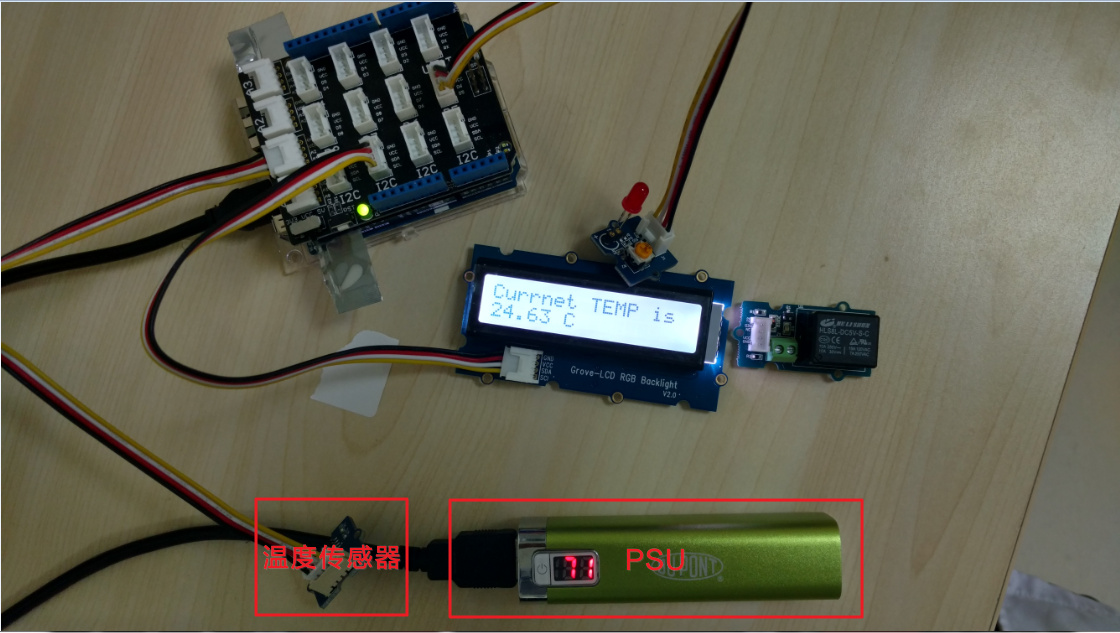
每秒钟更新温度值。开了背光之后还是很耗电的。另外Arduino Yun空载170mA左右,远高于Intel Edison的70mA,以及Arduino UNO R3 的20mA。

2018年2月20日更新
采用自建Blynk服务器可以获得大量点数,目前用docker建了一个,还阔以,有需要的PM我
入手Arduino Yun,配合Blynk搞一波事情的更多相关文章
- 指示灯组与3个复位按钮的介绍Arduino Yun快速入门教程
指示灯组与3个复位按钮的介绍Arduino Yun快速入门教程 1.4.2 指示灯组 指示灯组的放大图如图1.5所示. 图1.5 指示灯组 各个指示灯对应的功能如下: q RX:对应于0号端口, ...
- Use Node.js DDP Client on Arduino Yun to Access Meteor Server
Use Node.js DDP Client on Arduino Yun to Access Meteor Server 概述 在Arduino Yun上安装 Node.js, 并測试与 Meteo ...
- ArduinoYun教程之配置Arduino Yun环境
ArduinoYun教程之配置Arduino Yun环境 配置Arduino Yun 不管你使用前面介绍的哪种方式连接Arduino Yun.如今都能够配置你的Arduino Yun了.首先须要的是使 ...
- ArduinoYun教程之OpenWrt-Yun与CLI配置Arduino Yun
ArduinoYun教程之OpenWrt-Yun与CLI配置Arduino Yun OpenWrt-Yun OpenWrt-Yun是基于OpenWrt的一个Linux发行版.有所耳闻的读者应该听说他是 ...
- ArduinoYun教程之通过网络为Arduino Yun编程
ArduinoYun教程之通过网络为Arduino Yun编程 Arduino Yun的软件部分 通过第一章的介绍后读者就明白了Arduino Yun除了是一个类似其他Arduino的单片机之外,它的 ...
- Arduino Yun高速新手教程(大学霸内部资料)
Arduino Yun高速新手教程(大学霸内部资料) 本资料为国内第一本Arduino Yun教程.具体解说Arduino Yun的基本结构.开发环境.系统配置.并着力解说关键功能--Bridge.最 ...
- bootstrap,bootstrap-table,bootstrapValidator,animate,layer配合起来搞事情
资源准备(just download) bootstrap: http://www.bootcss.com/ bootstrap-table: http://bootstrap-table.wenzh ...
- yml文件搞一波
引用https://www.cnblogs.com/zslli/p/8717483.html https://www.cnblogs.com/baoyi/p/SpringBoot_YML.html 划 ...
- 第一篇随笔:用VB.NET搞点简单事情(1)
网络上能搜索到的爬虫文章大多是用python做的,也有少部分是C#做的(小声:所以用VB.NET也可以做爬虫.本文写的是第一步:获取网页) 使用代码前先imports以下内容 Imports Syst ...
随机推荐
- numpy模块(对矩阵的处理,ndarray对象)
6.12自我总结 一.numpy模块 import numpy as np约定俗称要把他变成np 1.模块官方文档地址 https://docs.scipy.org/doc/numpy/referen ...
- day23 03 组合的例子
day23 03 组合的例子 一.用到组合的方式,编写一个圆环,并能够计算出它的周长和面积 from math import pi # 从内置函数里面导入pi # 先定义一个圆类 class Circ ...
- 关于Python解释器
由于Python语言从规范到解释器都是开源的,所以理论上任何人都可以编写Python解释器来执行Python代码 目前存在以下几种主流的Python解释器 CPython CPython是官方版本的解 ...
- django第13天(auth组件,forms组件,中间件,csrf)
django第13天(auth组件,forms组件) auth组件 -auth组件 -auth是什么? -django内置的用户认证系统,可以快速的实现,登录,注销,修改密码.... -怎么用? -( ...
- LeetCode(116) Populating Next Right Pointers in Each Node
题目 Given a binary tree struct TreeLinkNode { TreeLinkNode *left; TreeLinkNode *right; TreeLinkNode * ...
- c++ heap学习
heap并不属于STL容器组件,它分为 max heap 和min heap,在缺省情况下,max-heap是优先队列(priority queue)的底层实现机制. 而这个实现机制中的max-hea ...
- ORACLE常用修改字段脚本
describe employees; = select column_name,data_type,nullable,data_length,data_ precision,data_scale f ...
- bean容器能力
bean容器能力 对bean容器的最简单的述求 能生产bean 能注入组装bean: 字段,构造函数 spring bean容器(3.0版本)的能力列表 能生产bean 能注入组装bean:字段,构造 ...
- 对于一棵二叉树,请设计一个算法,创建含有某一深度上所有结点的链表。 给定二叉树的根结点指针TreeNode* root,以及链表上结点的深度,请返回一个链表ListNode,代表该深度上所有结点的值,请按树上从左往右的顺序链接,保证深度不超过树的高度,树上结点的值为非负整数且不超过100000。
/* struct TreeNode { int val; struct TreeNode *left; struct TreeNode *right; TreeNode(int x) : val(x ...
- ubuntu系统下如何禁用笔记本触摸板
命令行方式,得每次用终端输入命令行设置,不方便. sudo rmmod psmouse # 用来禁用触摸板 sudo modprobe psmouse # 用来启用触摸板 想 ...