
iOS Programming Camera 2
iOS Programming Camera 2
1.1 Creating BNRImageStore
The image store will fetch and cache the images as they are needed. It will also be able to flush the cache if the device runs low on memory.
Create a new NSObject subclass called BNRImageStore. Open BNRImageStore.h and create its interface:
#import <Foundation/Foundation.h> @interface BNRImageStore : NSObject + (instancetype)sharedStore;
- (void)setImage:(UIImage *)image forKey:(NSString *)key; - (UIImage *)imageForKey:(NSString *)key;
- (void)deleteImageForKey:(NSString *)key;
@end
In BNRImageStore.m, add a class extension to declare a property to hang onto the images. @interface BNRImageStore ()
@property (nonatomic, strong) NSMutableDictionary *dictionary; @end
@implementation BNRImageStore
Like the BNRItemStore, the BNRImageStore needs to be a singleton. In BNRImageStore.m, write the following code to ensure BNRImageStore's singleton status.
@implementation BNRImageStore
+ (instancetype)sharedStore
{
static BNRImageStore *sharedStore = nil;
if (!sharedStore) {
sharedStore = [[self alloc] initPrivate]; }
return sharedStore; }
// No one should call init - (instancetype)init
{
@throw [NSException exceptionWithName:@"Singleton"
return nil; }
reason:@"Use +[BNRImageStore sharedStore]" userInfo:nil];
// Secret designated initializer - (instancetype)initPrivate
{
self = [super init];
if (self) {
_dictionary = [[NSMutableDictionary alloc] init]; }
return self; }
- (void)setImage:(UIImage *)image forKey:(NSString *)key
{
[self.dictionary setObject:image forKey:key];
}
- (UIImage *)imageForKey:(NSString *)key
{
return [self.dictionary objectForKey:key];
}
- (void)deleteImageForKey:(NSString *)key
{
if (!key) {
return; }
[self.dictionary removeObjectForKey:key]; }
1.2 Creating and Using Keys
When an image is added to the store, it will be put into a dictionary under a unique key, and the associated BNRItem object will be given that key. When the BNRDetailViewController wants an image from the store, it will ask its item for the key and search the dictionary for the image. Add a property to BNRItem.h to store the key.
@property (nonatomic, copy) NSString *itemKey;
The image keys need to be unique in order for your dictionary to work.
为了让你的dictionary 工作,你必须让image key 是独特的。
While there are many ways to hack together a unique string, you are going to use the Cocoa Touch mechanism for creating universally unique identifiers (UUIDs), also known as globally unique identifiers (GUIDs).
有许多方式组成一个独特的string,你可以使用cocoa touch mechanism 来创建universally unique identifiers(UUIDs),也就是globally unique identifiers (GUIDs).
Objects of type NSUUID represent a UUID and are generated using the time, a counter, and a hardware identifier, which is usually the MAC address of the WiFi card.
类型为NSUUID 的对象代表了一个UUID 。它由time,counter,a hardware identifier ,which is usually the mac address of the wifi card .
When represented as a string, UUIDs look something like this:
4A73B5D2-A6F4-4B40-9F82-EA1E34C1DC04
#import "BNRImageStore.h"
// Create an NSUUID object - and get its string representation NSUUID *uuid = [[NSUUID alloc] init];
NSString *key = [uuid UUIDString];
_itemKey = key;
// Store the image in the BNRImageStore for this key [[BNRImageStore sharedStore] setImage:image
forKey:self.item.itemKey];
Therefore, the key is a persistent way of referring to an image.
一个key 是指向一个image 的持久化方式。
1.3 Wrapping up BNRImageStore
you need to teach BNRDetailViewController how to grab the image for the selected BNRItem and place it in its imageView.
你应该告诉BNRDetailViewController怎样获取image 对于选定的BNRItem,并把它放到它的imageView上。

The BNRDetailViewController's view will appear at two times: when the user taps a row in BNRItemsViewController and when the UIImagePickerController is dismissed. In both of these situations, the imageView should be populated with the image of the BNRItem being displayed.
NSString *imageKey = self.item.imageKey;
// Get the image for its image key from the image store
UIImage *imageToDisplay = [[BNRImageStore sharedStore] imageForKey:imageKey];
// Use that image to put on the screen in the imageView
self.imageView.image = imageToDisplay;
If there is no image associated with the item, then imageForKey: will return nil. When the image is nil, the UIImageView will not display an image.
如果没有与该项连接的image,那么imageForKey 将会返回nil。当image 是nil时,UIImageView将不展示一个image。
1.4 Dismissing the Keyboard
When the keyboard appears on the screen in the item detail view, it obscures BNRDetailViewController's imageView. This is annoying when you are trying to see an image, so you are going to implement the delegate method textFieldShouldReturn: to have the text field resign its first responder status to dismiss the keyboard when the return key is tapped.
所以你将要实现委托 方法textFieldShouldReturn 来让text field resign 它的first responder status 来取消keyboard 当return 建按下时候。
- (BOOL)textFieldShouldReturn:(UITextField *)textField
{
[textField resignFirstResponder];
return YES; }
It would be stylish to also dismiss the keyboard if the user taps anywhere else on BNRDetailViewController's view. You can dismiss the keyboard by sending the view the message endEditing:, which will cause the text field (as a subview of the view) to resign as first responder.
你可以通过给view发 信息endEditing来解除keyboard,这将会导致text field resign as first responder .
You have seen how classes like UIButton can send an action message to a target when tapped. Buttons inherit this target-action behavior from their superclass, UIControl.
Buttons 继承这个tareget action 行自 UIControl。
You are going to change the view of BNRDetailViewController from an instance of UIView to an instance of UIControl so that it can handle touch events.
In BNRDetailViewController.xib, select the main View object. Open the identity inspector and change the view's class to UIControl
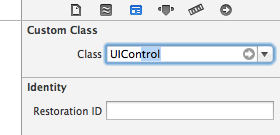

- (IBAction)backgroundTapped:(id)sender
{
[self.view endEditing:YES];
}
iOS Programming Camera 2的更多相关文章
- iOS Programming Camera 1
iOS Programming Camera 1 1 Displaying Images and UIImageView 1.1 put an instance of UIImageView o ...
- iOS Programming Autorotation, Popover Controllers, and Modal View Controllers
iOS Programming Autorotation, Popover Controllers, and Modal View Controllers 自动旋转,Popover 控制器,Moda ...
- iOS Programming State Restoration 状态存储
iOS Programming State Restoration 状态存储 If iOS ever needs more memory and your application is in the ...
- Head First iOS Programming
内部分享: Head First iOS Programming http://www.slideshare.net/tedzhaoxa/head-first-ios-programming-4606 ...
- iOS Programming Recipe 6: Creating a custom UIView using a Nib
iOS Programming Recipe 6: Creating a custom UIView using a Nib JANUARY 7, 2013 BY MIKETT 12 COMMENTS ...
- iOS Programming Controlling Animations 动画
iOS Programming Controlling Animations 动画 The word "animation" is derived from a Latin wor ...
- iOS Programming UIStoryboard 故事板
iOS Programming UIStoryboard In this chapter, you will use a storyboard instead. Storyboards are a f ...
- iOS Programming NSUserDefaults
iOS Programming NSUserDefaults When you start an app for the first time, it uses its factory settin ...
- iOS Programming Localization 本地化
iOS Programming Localization 本地化 Internationalization is making sure your native cultural informatio ...
随机推荐
- 多媒体开发之---h.264 rtsp网络流测试流
rtsp://218.204.223.237:554/live/1/66251FC11353191F/e7ooqwcfbqjoo80j.sdp 珠海拱北
- /tmp/crontab.tDoyrp: 设备上没有空间 查看文件夹所在分区 磁盘剩余空间 15g的root-mail大文件
问题诊断: 文件夹所在磁盘已满 问题确认: 查看文件夹所在磁盘剩余空间,找出空间被消耗的文件(集) 查看文件夹所在磁盘空间的所属文件(暂未解决) [root@hadoop1 /]# df -Bg /t ...
- 使用cloudflare加速你的网站隐藏你的网站IP
前言 cloudflare 是一家国外的 CDN 加速服务商,还是很有名气的.提供免费和付费的加速和网站保护服务.以前推荐过的百度云加速的国外节点就是和 cloudflare 合作使用的 cloudf ...
- 如何正确使用log4j
如何正确使用log4j? 关键字: 如何正确使用log4j? Java Web开发的过程中,通过会采用输出log的方式来进行调试,产品上线之后,也通常使用log来记录系统的运行状态.最简单的输出l ...
- I.MX6 查找占用UART进程
/**************************************************************************** * I.MX6 查找占用UART进程 * 说 ...
- Educational Codeforces Round 22 补题 CF 813 A-F
A The Contest 直接粗暴贪心 略过 #include<bits/stdc++.h> using namespace std; int main() {//freopen(&qu ...
- Nginx反向代理服务器、负载均衡和正向代理
Nginx("engine x")是一个高性能的 HTTP 和反向代理服务器,第一个公开版本 0.1.0 发布于 2004 年 10 月 4 日.官方测试 nginx 能够支撑5万 ...
- choice() 函数
描述 choice() 方法返回一个列表,元组或字符串的随机项. 语法 以下是 choice() 方法的语法: import random random.choice( seq ) 注意:choice ...
- win7下IIS7.0虚拟目录不存在的问题
问题:在IIS7.0下选中虚拟目录,右边浏览应用程序下,自动打开浏览器找开虚拟目录下的网站,但过一会什么都没有改变,再一次右边浏览应用程序,就提示 “虚拟目录不存在”. 解决方法:右键网站或下面的虚拟 ...
- VMware 12PRO安装Mac OS X 10.10.5
插件安装 步骤一完成后,打开任务管理器,找到服务项,选择按名称排序,将框中四项全部停止运行. 然后打开下载的插件,解压unlocker206.zip文件,找到 unlocker206\win-in ...