
Python:webshell 跳板机审计服务器
1.修改paramiko源码包实现
https://github.com/paramiko/paramiko/tree/1.10.1 下载源码包
unzip paramiko-1.10.1.zip
paramiko-1.10.1/demos/demo.py 模拟用户登录,在demo.py中会调用interactive.py
paramiko-1.10.1/demos/interactive.py 会把用户执行的命令以及服务器返回的结果打印出来
修改interactive.py,可以把用户名、执行的命令、时间、主机ip记录到日志中
demo.py
import base64
from binascii import hexlify
import getpass
import os
import select
import socket
import sys
import threading
import time
import traceback import paramiko
import interactive #define host
print("\033[34;1mWelcome zhengshun's Fort Machine\nThere have those machines:\033[0m")
dictroy = {
"vc-app01":"192.168.101.131",
"vc-app02":"192.168.101.130",
"vc-app03":"192.168.101.132"
}
while 1:
try:
print('')
for k,v in dictroy.items():
print k,v
print('')
hostname = raw_input('please input IP:')
if hostname == '':continue
elif hostname == 'exit':break
elif hostname == 'quit':break def agent_auth(transport, username):
"""
Attempt to authenticate to the given transport using any of the private
keys available from an SSH agent.
""" agent = paramiko.Agent()
agent_keys = agent.get_keys()
if len(agent_keys) == 0:
return for key in agent_keys:
print 'Trying ssh-agent key %s' % hexlify(key.get_fingerprint()),
try:
transport.auth_publickey(username, key)
print '... success!'
return
except paramiko.SSHException:
print '... nope.' def manual_auth(username, hostname):
default_auth = 'p'
auth = 'p'
if len(auth) == 0:
auth = default_auth if auth == 'r':
default_path = os.path.join(os.environ['HOME'], '.ssh', 'id_rsa')
path = raw_input('RSA key [%s]: ' % default_path)
if len(path) == 0:
path = default_path
try:
key = paramiko.RSAKey.from_private_key_file(path)
except paramiko.PasswordRequiredException:
password = getpass.getpass('RSA key password: ')
key = paramiko.RSAKey.from_private_key_file(path, password)
t.auth_publickey(username, key)
elif auth == 'd':
default_path = os.path.join(os.environ['HOME'], '.ssh', 'id_dsa')
path = raw_input('DSS key [%s]: ' % default_path)
if len(path) == 0:
path = default_path
try:
key = paramiko.DSSKey.from_private_key_file(path)
except paramiko.PasswordRequiredException:
password = getpass.getpass('DSS key password: ')
key = paramiko.DSSKey.from_private_key_file(path, password)
t.auth_publickey(username, key)
else:
pw = '123456'
t.auth_password(username, pw) # setup logging
paramiko.util.log_to_file('demo.log') username = 'root'
if len(hostname) == 0:
print '*** Hostname required.'
sys.exit(1)
port = 22
if hostname.find(':') >= 0:
hostname, portstr = hostname.split(':')
port = int(portstr) # now connect
try:
sock = socket.socket(socket.AF_INET, socket.SOCK_STREAM)
sock.connect((hostname, port))
except:
print('\033[31;1minvalid value\033[0m')
continue
#except Exception, e:
# print '*** Connect failed: ' + str(e)
# traceback.print_exc()
# sys.exit(1) try:
t = paramiko.Transport(sock)
try:
t.start_client()
except paramiko.SSHException:
print '*** SSH negotiation failed.'
sys.exit(1) try:
keys = paramiko.util.load_host_keys(os.path.expanduser('~/.ssh/known_hosts'))
except IOError:
try:
keys = paramiko.util.load_host_keys(os.path.expanduser('~/ssh/known_hosts'))
except IOError:
print '*** Unable to open host keys file'
keys = {} # check server's host key -- this is important.
key = t.get_remote_server_key()
if not keys.has_key(hostname):
print '*** WARNING: Unknown host key!'
elif not keys[hostname].has_key(key.get_name()):
print '*** WARNING: Unknown host key!'
elif keys[hostname][key.get_name()] != key:
print '*** WARNING: Host key has changed!!!'
sys.exit(1)
else:
print '*** Host key OK.' # get username
if username == '':
default_username = getpass.getuser()
username = raw_input('Username [%s]: ' % default_username)
if len(username) == 0:
username = default_username agent_auth(t, username)
if not t.is_authenticated():
manual_auth(username, hostname)
if not t.is_authenticated():
print '*** Authentication failed. :('
t.close()
sys.exit(1) chan = t.open_session()
chan.get_pty()
chan.invoke_shell()
print '*** Here we go!'
interactive.interactive_shell(chan)
chan.close()
t.close() except Exception, e:
print '*** Caught exception: ' + str(e.__class__) + ': ' + str(e)
traceback.print_exc()
try:
t.close()
except:
pass
sys.exit(1)
except:
continue
2.创建跳板机用户,并设置用户登陆的环境变量
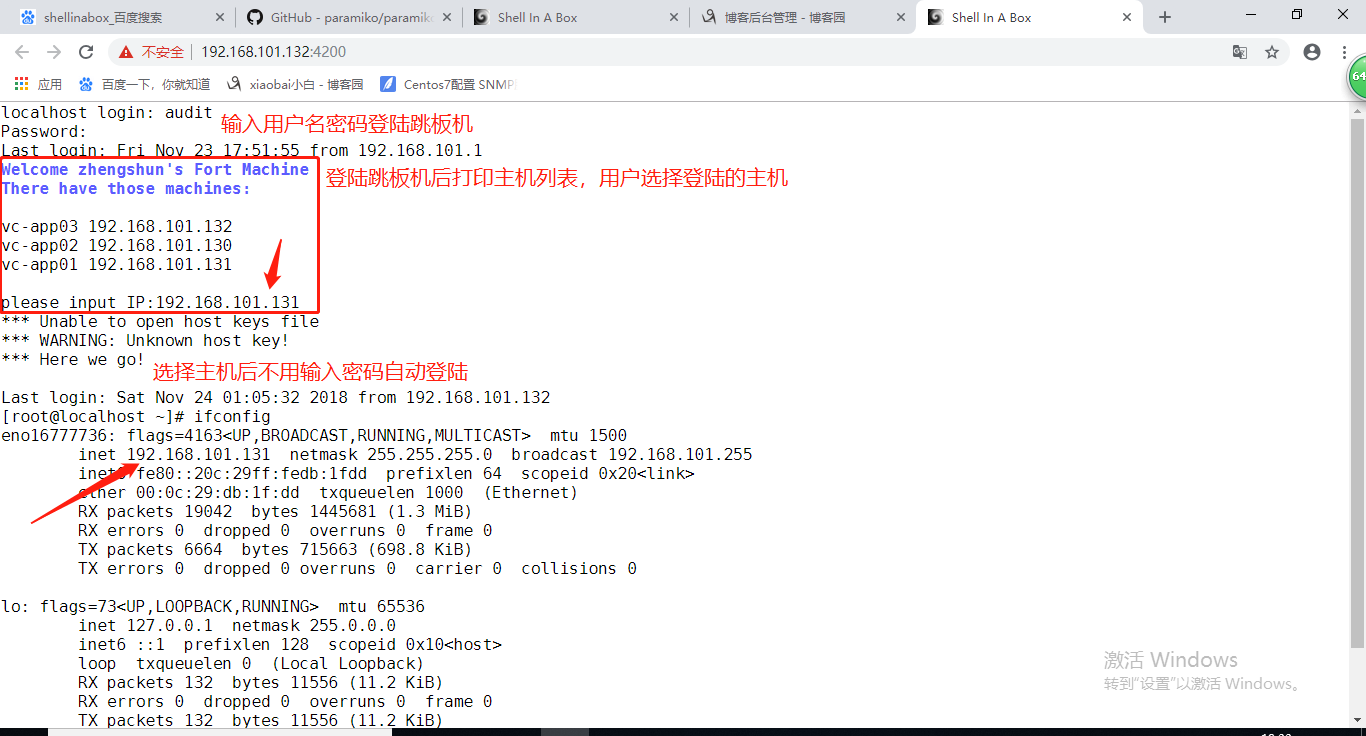
注意事项:用户登录跳板机后不能跳过demo.py程序,如果退出demo.py程序则注销跳板机的登陆,只能选择要登陆的主机ip,选择后直接登陆,如果用户在输入错误时,要循环从头开始
adduser audit
vim /home/audit/.bash_profile 在环境变量中加入执行python demo.py文件,执行后logout
3.使用shellinabox实现webssh
https://code.google.com/archive/p/shellinabox/downloads 下载shellinabox-2.14.tar.gz
tar zxf shellinabox-2.14.tar.gz
cd shellinabox-2.14
./configure --prefix=/usr/local/webshell && make && make install
bash /usr/local/webshell/bin/shellinaboxd & 后台运行,shellinabox默认端口是4200
访问https://ip:4200就可以登陆跳板机
展示:
Python:webshell 跳板机审计服务器的更多相关文章
- python实现跳板机
公司有1000多台服务器,线上机器都是禁止root登录的,所以平时是用普通用户登录,然后在su到root,密码都是在excel表中存的,这样登录一台机器,输两次命令,搜两次密码,实在很麻烦,有一天备份 ...
- winScp 跳板机到服务器
http://jingyan.baidu.com/article/454316ab6ffe1af7a7c03a31.html?qq-pf-to=pcqq.group
- Python通过跳板机链接MySQL的一种方法
- 运维堡垒机(跳板机)系统 python
相信各位对堡垒机(跳板机)不陌生,为了保证服务器安全,前面加个堡垒机,所有ssh连接都通过堡垒机来完成,堡垒机也需要有 身份认证,授权,访问控制,审计等功能,笔者用Python基本实现了上述功能. A ...
- 不输入用户名密码通过跳板机登录到线上linux机器
问题: 一般情况下,公司所有的服务器都在内网,公网访问.管理服务器都要先通过登录一台跳板机,然后再由跳板机登录到相应的服务器进行操作,跳板机与服务器的连接都是内网地址.我们经常看到的现象就是下图这样, ...
- 【python】-- paramiko、跳板机(堡垒机)
paramiko Python的paramiko模块,该模块用于连接远程服务器并执行相关命令,常用于作批量管理使用 一.下载: pip3 install paramiko 源码:查看 二.parami ...
- 使用pycharm、跳板机连接内网服务器
使用pycharm.跳板机连接内网服务器 接手实验室服务器后,大部分同学在GPU集群上跑程序都是直接在ssh界面上跑,这里想着通过pycharm通过跳板机来连接服务器. 总体就是实验室服务器仅限内网访 ...
- 在有跳板机的情况下,SecureCRT自动连接到目标服务器
为了服务器的安全,运维人员经常会要求我们先登录到跳板机,然后再SSH连接到目标服务器.但是这样是很繁琐的,每次在SecureCRT创建一个连接,都需要输入SSH命令,然后输入密码. 下面的方法可以实现 ...
- jmeter连接配置带跳板机(SSH)的mysql服务器
jmeter连接配置mysql服务器时,如果数据库服务器没有通过ssh连接,则只需要配置相应的jdbc参数就可以了,即请求域名或ip地址:3306,如果数据库服务器是通过SSH连接的,那需要通过中间远 ...
随机推荐
- thinkphp数据库查重方法
$test_data = M('hot'); //实例化数据表 $data = $test_data->Distinct(true)->field('descriprion')->o ...
- input type="file"文件上传到后台读取
html页面(表单采用bootStrap) js部分: //更换头像时把上传的图片post方式到控制器 <script type="text/javascript"> ...
- SpringBoot使用MongoDB
一.什么是MongoDB MongoDB是一个基于分布式文件存储的数据库,由C++语言编写.旨在为WEB应用提供可扩展的高性能数据存储解决方案. MongoDB是一个介于关系数据库和非关系数据库之间的 ...
- Manven下载
1.下载地址:http://maven.apache.org/download.cgi 2.点击下载链接 3.解压zip到安装路径 我的:C:\Progr ...
- LoadRunner12学习之路(6-8)
六.创建负载测试场景 如何启动控制器? 要开始开发场景,请打开LoadRunner Controller. 打开HPE LoadRunner Controller. 在LoadRunner机器上,单击 ...
- 3、InputStream
package com.io.file; import java.io.File; import java.io.FileInputStream; import java.io.FileNotFoun ...
- jQuery 常见面试题
一 :Q: What is the difference between .get(), [], and .eq()? A: eq返回原生jQuery对象,截取某些el元素生成Jquery新对象 ge ...
- shell 2 解析
---- shell 3 /home/oracle/utility/macro/call_autopurge_arch.sh Description: Call purge archive log f ...
- suricata.yaml (一款高性能的网络IDS、IPS和网络安全监控引擎)默认配置文件(图文详解)
不多说,直接上干货! 前期博客 基于CentOS6.5下Suricata(一款高性能的网络IDS.IPS和网络安全监控引擎)的搭建(图文详解)(博主推荐) 或者 基于Ubuntu14.04下Suric ...
- Kali linux 2016.2(Rolling)里的应用更新和配置额外安全工具
写在前面的话 你去打人家 ,你不伪装一下,化化妆 ,穿上盔甲,难道你傻逼一样的 拿着棍子就去打人家,人家 一眼不认出你是谁了.做坏事要伪装好自己 ,要把自己藏起来 ,让别人找不到你,你以为网络公 ...