
Handling unhandled exceptions and signals
there are two ways to catch otherwise uncaught conditions that will lead to a crash:
- Use the function
NSUncaughtExceptionHandlerto install a handler for uncaught Objective-C exceptions. - Use the
signalfunction to install handlers for BSD signals.
When an application crashes on the iPhone, it disappears without telling the user what happened. However, it is possible to add exception and signal handling to your applications so that an error message can be displayed to the user or you can save changes. It is even possible to try to recover from this situation without crashing at all.
Debug-only hack warning
Warning: The code in this post is for quick and dirty information gathering after a crash bug. The purpose is not to make your shipping code crash-proof, it is to allow better debugging of your application when a crash or exception occurs during user testing.
The code in this post performs signal handling in non re-entrant way — this is not a reliable thing to do and is only done because proper re-entrant coding is brutally difficult and the assumption is that your program has already fatally crashed so we're not too worried. If multiple signals are caught, this code probably won't help at all.
Introduction
This post will present a sample application that deliberately raises Objective-C exceptions, EXC_BAD_ACCESS exceptions and related BSD signals. All exceptions and signals are caught, presenting debug information and allowing the application to continue after these events.
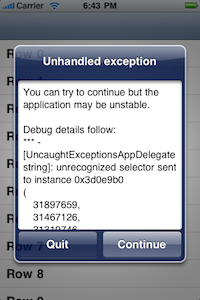
You can download the sample project: UncaughtExceptions.zip (25kB)
This application will deliberately trigger an unhandled message exception after 4 seconds and then will deliberately trigger an EXC_BAD_ACCESS/SIGBUS signal at the 10 second mark.
Why do applications crash on the iPhone?
A crash (or more accurately: an unexpected termination) is the result of an unhandled signal sent to your application.
An unhandled signal can come from three places: the kernel, other processes or the application itself. The two most common signals that cause crashes are:
EXC_BAD_ACCESSis a Mach exception sent by the kernel to your application when you try to access memory that is not mapped for your application. If not handled at the Mach level, it will be translated into aSIGBUSorSIGSEGVBSD signal.SIGABRTis a BSD signal sent by an application to itself when anNSExceptionorobj_exception_throwis not caught.
In the case of Objective-C exceptions, the most common reason why unexpected exceptions are thrown in Objective-C is sending an unimplemented selector to an object (due to typo, object mixup or sending to an already released object that's been replaced by something else).
Mac application note:
NSApplicationon the Mac always catches all Objective-C exceptions in the main run loop — so an exception on the main thread of a Mac application will not immediately crash the program, it will simply log the error. However, an unexpected exception can still leave the application in such a bad state that a crash will subsequently occur.
Catching uncaught exceptions
The correct way to handle an uncaught exception is to fix the cause in your code. If your program is working perfectly, then the approaches shown here should not be necessary.
Of course, programs do sometimes get released with bugs that may lead to a crash. In addition, you may simply want more information back from your testers when you know that there are bugs in your program.
In these cases, there are two ways to catch otherwise uncaught conditions that will lead to a crash:
- Use the function
NSUncaughtExceptionHandlerto install a handler for uncaught Objective-C exceptions. - Use the
signalfunction to install handlers for BSD signals.
For example, installing an Objective-C exception handler and handlers for common signals might look like this:
void InstallUncaughtExceptionHandler()

{

    NSSetUncaughtExceptionHandler(&HandleException);

    signal(SIGABRT, SignalHandler);

    signal(SIGILL, SignalHandler);

    signal(SIGSEGV, SignalHandler);

    signal(SIGFPE, SignalHandler);

    signal(SIGBUS, SignalHandler);

    signal(SIGPIPE, SignalHandler);

}
Responding to the exceptions and signals can then happen in the implementation of the HandleException and SignalHandler. In the sample application, these both call through to the same internal implementation so that the same work can be done in either case.
Save your data: The very first task to perform in your uncaught exception handler should be to save data that might need saving or otherwise clean up your application. However: if the exception may have left the data in an invalid state, you may need to save to a separate location (like a "Recovered Documents" folder) so you don't overwrite good data with potentially corrupt data.
While these cover the most common signals, there are many more signals that may be sent that you can add if required.
There are two signals which cannot be caught: SIGKILL and SIGSTOP. These are sent to your application to end it or suspend it without notice (a SIGKILL is what is sent by the command-line function kill -9 if you're familiar with that and a SIGSTOP is sent by typing Control-Z in a terminal).
Requirements of the exception handler
An unhandled exception handler may never return
The types of situations which would cause an unhandled exception or signal handler to be invoked are the types of situations that are generally considered unrecoverable in an application.
However, sometimes it is simply the stack frame or current function which is unrecoverable. If you can prevent the current stack frame from continuing, then sometimes the rest of the program can continue.
If you wish to attempt this, then your unhandled exception handler must never return control to the calling function — the code which raised the exception or triggered the signal should not be used again.
In order to continue the program without ever returning control to the calling function, we must return to the main thread (if we are not already there) and permanently block the old thread. On the main thread, we must start our own run loop and never return to the original run loop.
This will mean that the stack memory used by the thread that caused the exception will be permanently leaked. This is the price of this approach.
Attempt to recover
Since a run loop will be used to display the dialog, we can keep that run loop running indefinitely and it can serve as a possible replacement for the application's main run loop.
For this to work, the run loop must handle all the modes of the main run loop. Since the main run loop includes a few private modes (for GSEvent handling and scroll tracking), the default NSDefaultRunLoopMode is insufficent.
Fortunately, if the UIApplication has already created all the modes for the main loop, then we can get all of these modes by reading from the loop. Assuming it is run on the main thread after the main loop is created, the following code will run the loop in all UIApplication modes:
CFRunLoopRef runLoop = CFRunLoopGetCurrent();

CFArrayRef allModes = CFRunLoopCopyAllModes(runLoop);

while (!dismissed)

{

    for (NSString *mode in (NSArray *)allModes)

    {

        CFRunLoopRunInMode((CFStringRef)mode, 0.001, false);

    }

}

CFRelease(allModes);
As part of the debug information, we want the stack addresses
You can get the backtrace using the function backtrace and attempt to convert this to symbols using backtrace_symbols.
+ (NSArray *)backtrace

{

    void* callstack[128];

    int frames = backtrace(callstack, 128);

    char **strs = backtrace_symbols(callstack, frames);

    int i;

    NSMutableArray *backtrace = [NSMutableArray arrayWithCapacity:frames];

    for (

        i = UncaughtExceptionHandlerSkipAddressCount;

        i < UncaughtExceptionHandlerSkipAddressCount +

            UncaughtExceptionHandlerReportAddressCount;

        i++)

    {

        [backtrace addObject:[NSString stringWithUTF8String:strs[i]]];

    }

    free(strs);

    return backtrace;

}
Notice that we skip the first few addresses: this is because they will be the addresses of the signal or exception handling functions (not very interesting). Since we want to keep the data minimal (for display in a UIAlert dialog) I choose not to display the exception handling functions.
If the user selects "Quit" we want the crash to be logged
If the user selects "Quit" to abort the application instead of attempting to continue, it's a good idea to generate the crash log so that normal crash log handling can track the problem.
In this case, we need to remove all the exception handlers and re-raise the exception or resend the signal. This will cause the application to crash as normal (although the uncaught exception handler will appear at the top of the stack, lower frames will be the same).
Limitations
The signal handler is not re-entrant
Remember from the paragraph at the beginning:
The code in this post performs signal handling in non re-entrant way — this is not a reliable thing to do and is only done because proper re-entrant coding is brutally difficult and the assumption is that your program has already fatally crashed so we're not too worried. If multiple signals are caught, this code probably won't help at all.
If you want to learn how to write signal handlers for non-crash related signals or learn how to write proper re-entrant signal handling, I'm afraid you'll need to look elsewhere — there's not enough space here for me to show you and it's really hard. Ignoring this constraint here is okay for debug code only where we assume we're only going to get 1 signal.
This approach won't work if the application hasn't configured the main run loop
The exact way that UIApplication constructs windows and the main run loop is private. This means that if the main run loop and initial windows are not already constructed, the exception code I've given won't work — the code will run but the UIAlert dialog will never appear. For this reason, I install the exception handlers with a performSelector:withObject:afterDelay:0from the applicationDidFinishLaunching: method on the App Delegate to ensure that this exception handler is only installed after the main run loop is fully configured. Any exception that occurs prior to this point on startup will crash the application as normal.
Your application may be left in an unstable or invalid state
You cannot simply continue from all situations that trigger exceptions. If you're in the middle of a situation that must be completed in its entirety (a transaction on your document) then your application's document may now be invalid.
Alternately, the conditions which led to the exception or signal may have left your stack or heap in a state so corrupted that nothing is possible. In this type of situation, you're going to crash and there's little you can do.
The exception or signal could just happen again
The initial causes of the exception or signal will not be fixed by ignoring it. The application might simply raise the same exception immediately. In fact, you could become overwhelmed by exceptions in some cases — for this reason, I've limited the number of uncaught exceptions that may be handled to 10 in the sample application.
Resources used up to the time of the exception are leaked
Since the stack is blocked from returning, everything allocated on the stack or the autorelease pool between the main run loop and the exception will be leaked.
It might be bad behavior for the user
Depending on the style of your application, it might be better to simply let the crash happen — not all users care about debug information and your application might not have data that needs saving, so a very rare crash might not be too offensive.
gdb will interfere with signal handling
When you're debugging, the SIGBUS and SIGSEGV signals may not get called. This is because gdb inserts Mach exception handlers which picks them up at the EXC_BAD_ACCESS stage (and refuses to continue). Other signals type may also be handled by gdb, preventing the signals from reaching your handlers.
If you want to test signal handling properly, you'll need to run without gdb (Run with Breakpoints off).
Conclusion
You can download the sample project: UncaughtExceptions.zip (25kB)
It is possible to make your application continue running for a short period of time after a "crash" signal occurs by handling common exceptional signals and attempting to recover.
There are real risks though in terms of signal re-entrancy problems, leaked memory and potentially corrupted application data, so this type of approach should be viewed as either a debugging tool or a measure of last resort.
However, it is comforting to have a level of fallback in the situation where a hard to reproduce crash occurs during testing and you'd like more information on the application state when the crash happened.
Handling unhandled exceptions and signals的更多相关文章
- 2000条你应知的WPF小姿势 基础篇<34-39 Unhandled Exceptions和Resource>
在正文开始之前需要介绍一个人:Sean Sexton. 来自明尼苏达双城的软件工程师.最为出色的是他维护了两个博客:2,000Things You Should Know About C# 和 2,0 ...
- Thinking in Java,Fourth Edition(Java 编程思想,第四版)学习笔记(十二)之Error Handling with Exceptions
The ideal time to catch an error is at compile time, before you even try to run the program. However ...
- [转载]Eziriz .NET Reactor 4.7.0.0 官方原版+破解补丁(强大的代码保护和软件防盗版工具)
Eziriz .NET Reactor 是一个强大的代码保护和软件防盗版工具,完全由.NET框架编写..NET Reactor支持NET平台的软件许可系统,并支持NET程序集所有语言.当.Net编译器 ...
- 关于C#你应该知道的2000件事
原文 关于C#你应该知道的2000件事 下面列出了迄今为止你应该了解的关于C#博客的2000件事的所有帖子. 帖子总数= 1,219 大会 #11 -检查IL使用程序Ildasm.exe d #179 ...
- .NET:CLR via C# Exceptions and State Management
重点学习的个概念 unhandled exceptions constrained execution regions code contracts runtime wrapped exception ...
- Error handling in Swift does not involve stack unwinding. What does it mean?
Stack unwinding is just the process of navigating up the stack looking for the handler. Wikipedia su ...
- ASP.NET Error Handling
https://docs.microsoft.com/en-us/aspnet/web-forms/overview/getting-started/getting-started-with-aspn ...
- beam 的异常处理 Error Handling Elements in Apache Beam Pipelines
Error Handling Elements in Apache Beam Pipelines Vallery LanceyFollow Mar 15 I have noticed a defici ...
- Structured Exception Handling
https://docs.microsoft.com/en-us/windows/desktop/Debug/structured-exception-handling An exception is ...
随机推荐
- mongodb的备忘录
https://www.cnblogs.com/best/p/6212807.html
- OpenLayers 3+Geoserver+PostGIS实现点击查询
WebGIS开发中,点击查询是最经常使用的一种查询方式,在ArcGIS api 中.这样的查询叫IdentifyTask,主要作用是前台提交參数.交ArcServer查询分析返回. 本文从开源框架的角 ...
- Android 5.1 Settings源代码简要分析
转载请注明出处,谢谢~http://blog.csdn.net/u011974987/article/details/51004854. 概述: 先声明:本人工作快两年了,仍是菜鸟级别的.羞愧啊!曾经 ...
- 三分钟迁移Spring boot工程到Serverless
前言 Spring Boot已成为当今最流行的Java后端开发框架,典型的应用方式是在云上购买一台虚拟机,每天24小时在上面运行Java程序,在这种情况下,用户必须维护自己的虚拟机环境,而且按照包月包 ...
- storm与hadoop的对照
hadoop 是实现了 mapreduce 的思想,将数据切片计算来处理大量的离线数据. hadoop处理的数据必须是已经存放在 hdfs 上或者类似 hbase 的数据库中.所以 hadoop ...
- mysql group by 组内排序 group by 原理
mysql group by 组内排序 SELECT * FROM (SELECT MAX(id) AS t,wukong_uid, 1 AS tag FROM toutiao_uid_gath ...
- centos7 安装8188eu驱动小记
最小化安装把lsusb和lspci装上 使用lsusb 和lspci的命令, centos上的安装命令: yum -y install usbutils yum -y install pciutils ...
- C#中,JSON字符串转换成对象。
在前台提交(post)的数据中.除了强类型的数据外,还有一个额外的json数据提交 在这里我的办法是,在前台把json对象转换成字符串,然后提交. 测试demo 前台: @using(Html.Beg ...
- SQL Server: Difference between PARTITION BY and GROUP BY
https://stackoverflow.com/questions/2404565/sql-server-difference-between-partition-by-and-group-by ...
- flask装饰器route实现路由功能理解
利用装饰器的方式实现了路由函数,这是一个十分简单清晰的结构,而这个功能的实现,有着很大的学习意义 @appweb.route('index',methods=['GET','POST'] def st ...