
用Google Cloud Platform搭建***服务教程
之前FQ一直用的是***,天有不测风云,前几天发现ss服务挂了。更可怕的是ping都ping不通,多方打听,***中文社区已经炸开锅了,原因就是IP被封了。需要付费更换IP。然后到现在还是没有给我更换IP,于是就有了这篇随笔。记录自己用Google Cloud Platform搭建***服务教程的辛酸泪。
1.申请试用Google Cloud。登陆你的谷歌账户,必须使用信用卡,而且不能使用虚拟卡,招商银行、中信银行的全币种卡、浦发银行的 VISA 卡均可以通过验证。理论上 VISA 卡均可获得通过,成功后会于扣款1刀,验证卡片后会返还。GCD 现在免费赠送300刀期限是一年,也就是300刀和一年时间谁先用完就以谁为准,结束之后你不点继续使用时不会扣费的。地址:https://cloud.google.com
2.登录控制台。依次在菜单栏中点击【网络】【外部ip地址】【保留静态IP】点击右侧更改可以关联创建的实例VM对象。
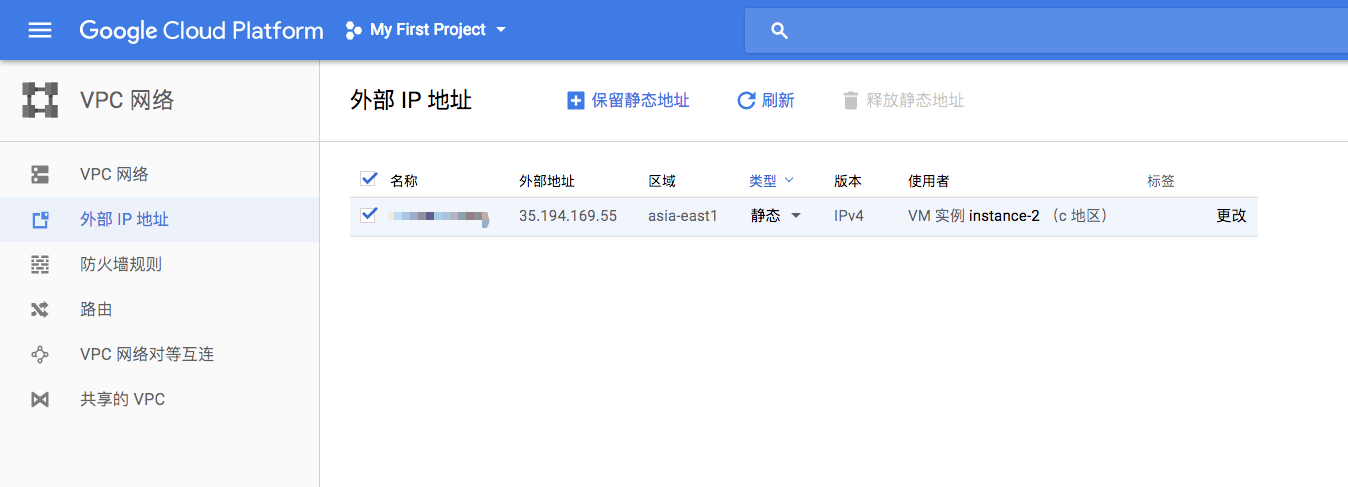
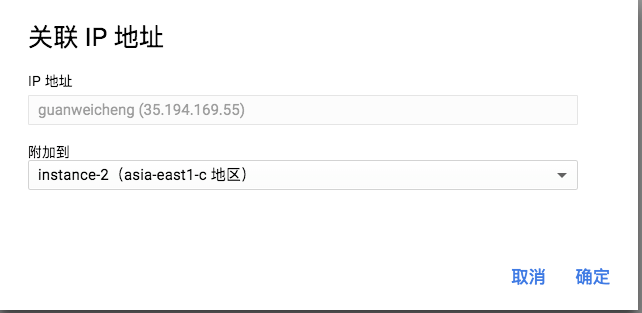
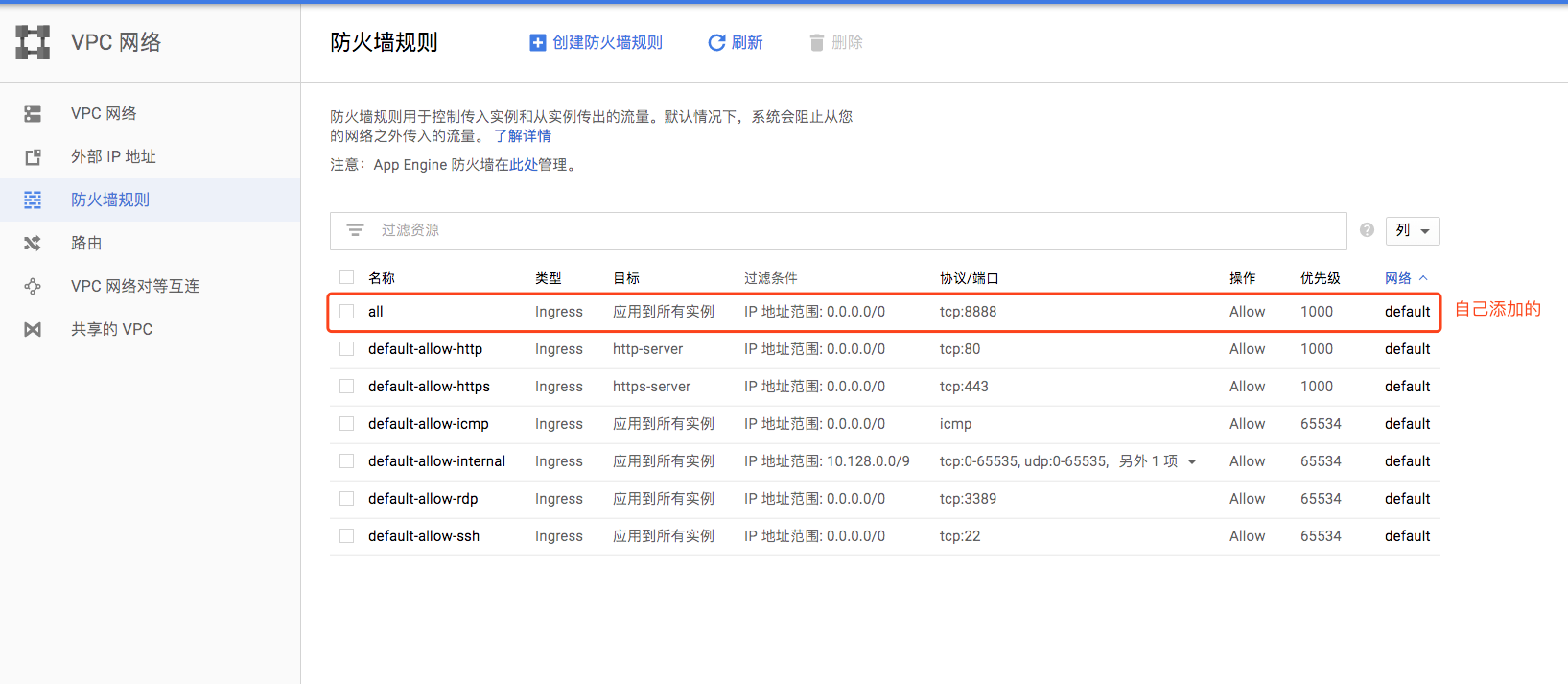
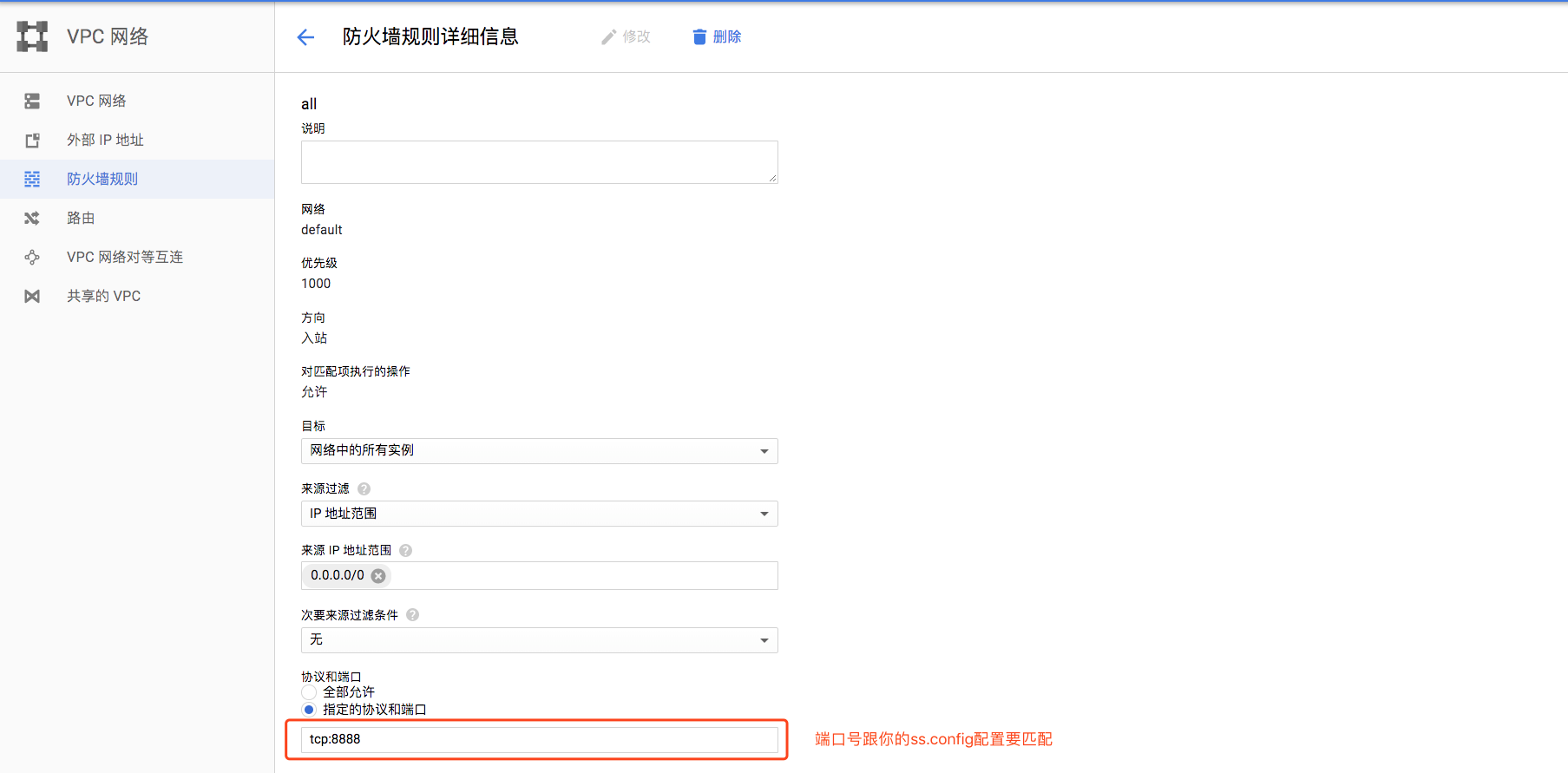
3.修改防火墙,依次点击【网络】【防火墙规则】【创建防火墙规则】
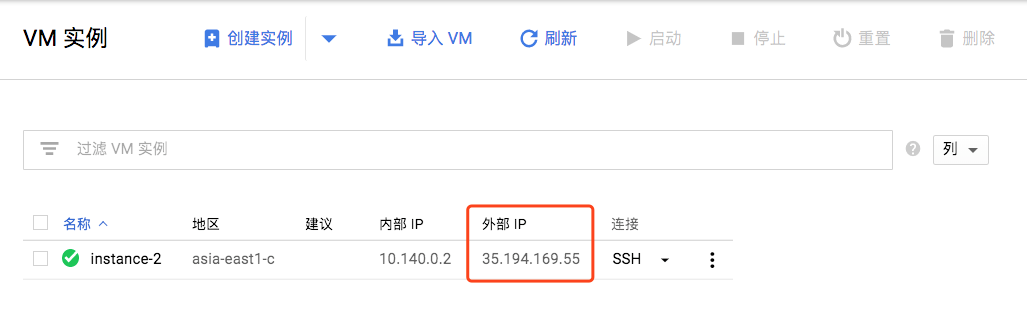
3.创建计算机引擎VM实例。配置如图下。
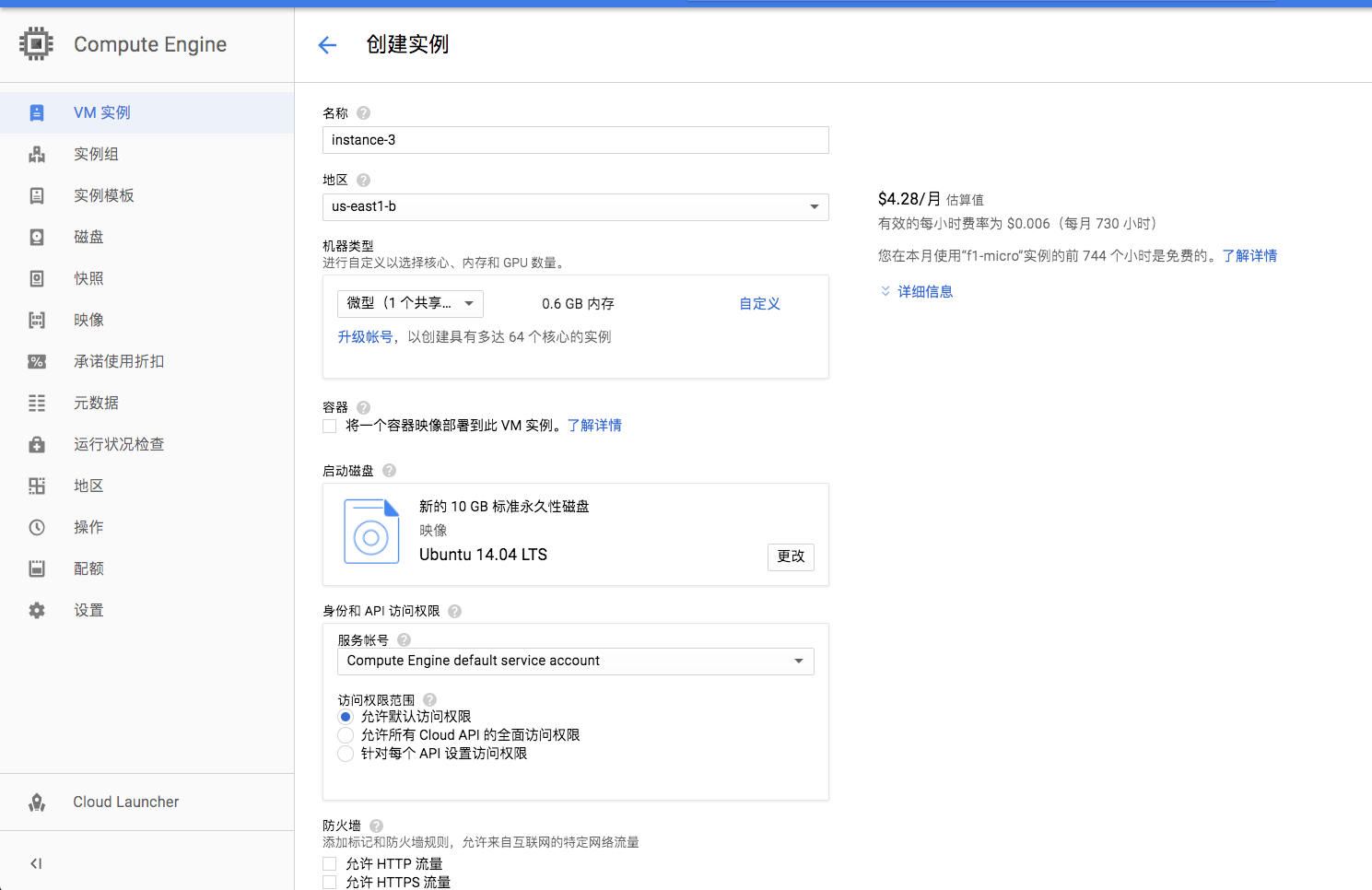
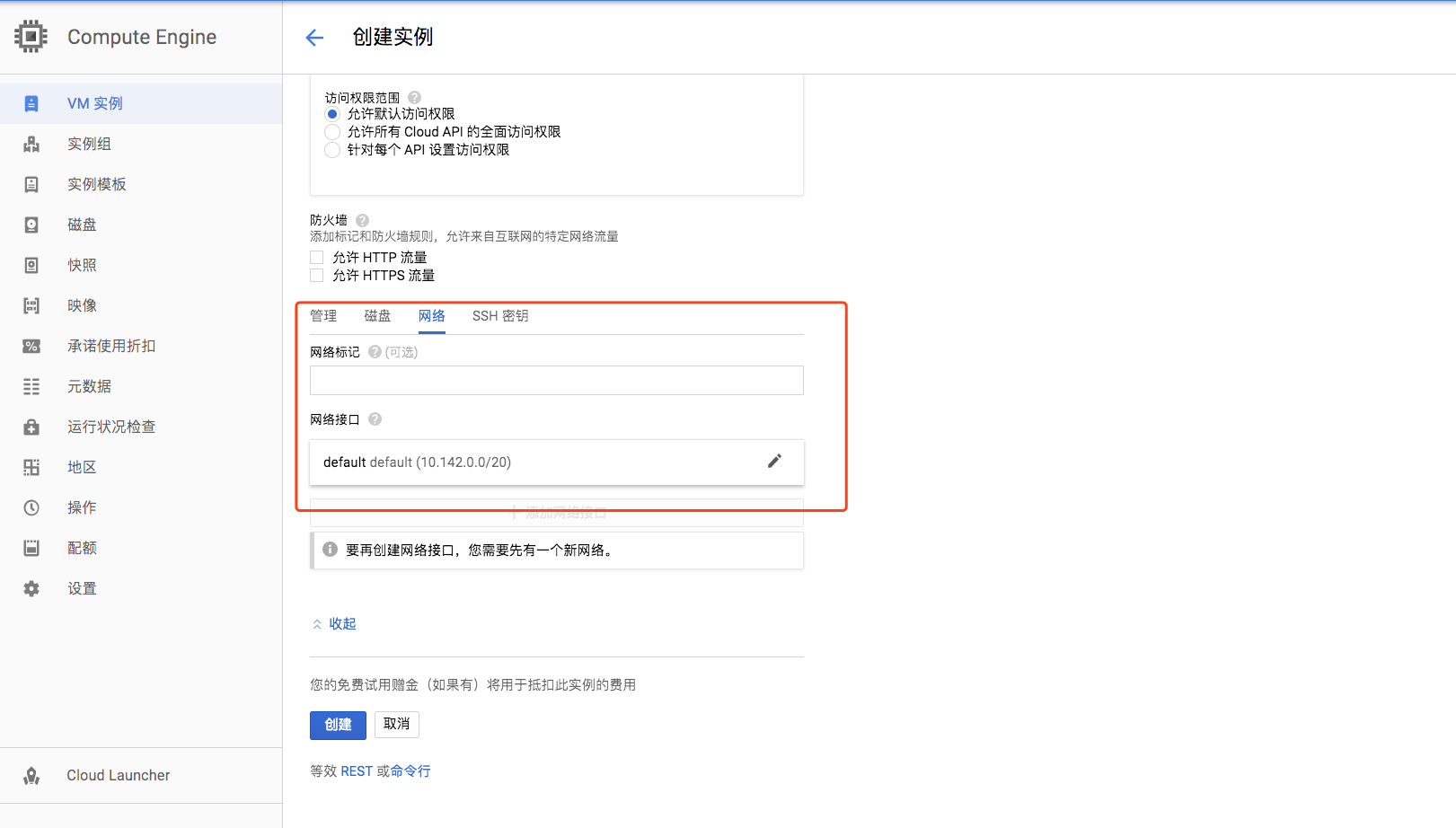
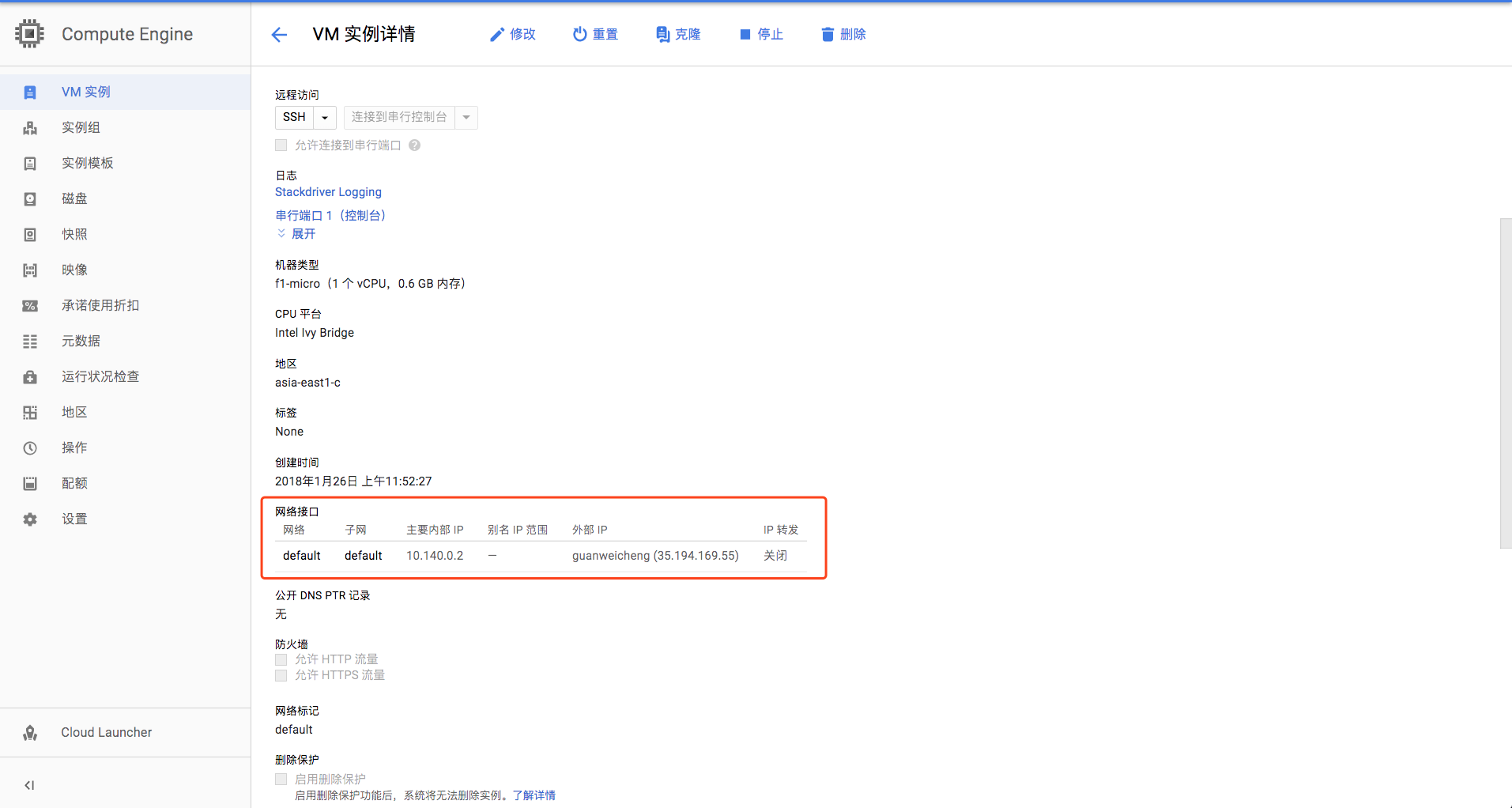
4.搭建shadowsocks server 及自启动。使用谷歌云自带的ssh工具。
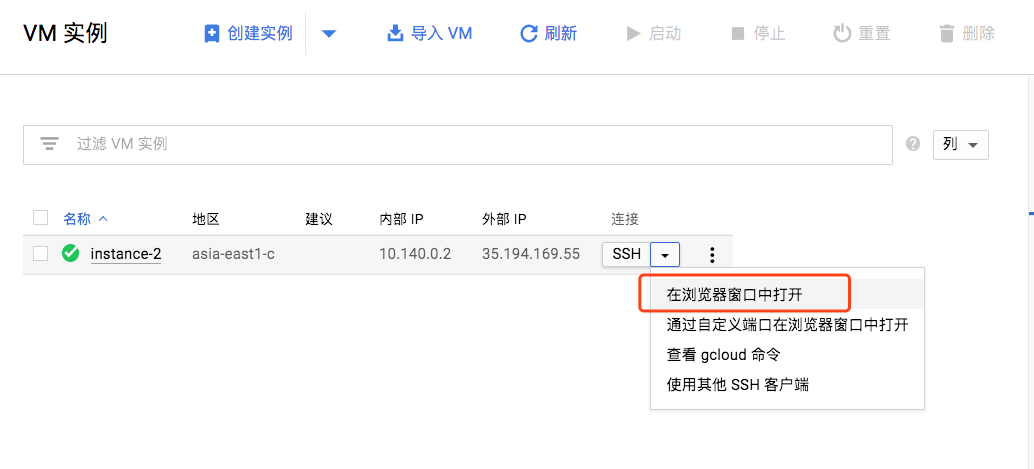
登录远端之后首先更新一下 apt-get 软件包
sudo apt-get update
然后通过 apt-get 安装 python-pip
sudo apt-get install python-pip
完成之后使用 pip 安装 shadowsocks 服务
sudo pip install shadowsocks

说明安装成功
然后我们需要创建一个 shadowsocks server 的配置文件,可以直接建在当前用户目录下
sudo vim /etc/ss-conf.json
回车之后会进入这个创建的文件,按键盘上的 insert键会进入编辑,然后把下面的内容输入进去。按ESC键会发现左下角的insert消失,shift+:这个组合键左下角出现:输入wq回车就保存退出文件。红色字体分边是端口和密码,设置成你想要的就行了
server_port 与防火墙中的端口保持一致。

{"server":"0.0.0.0","server_port":8888,"local_address":"127.0.0.1","local_port":1080,"password":"xxxxxx","timeout":600,"method":"aes-256-cfb"}
7.31日更新:上面的内容有网友反映直接复制会报错,请注意以下两点:1代码的全部内容必须为英文半角输入,2server_port与password后面的数字内容请自定义,也就是你之后在shadowsocks客户端上配置使用的端口和密码。
最后用这个配置文件启动 shadowsocks 服务
sudo ssserver -c /etc/ss-conf.json -d startss服务自启动实现
这一点让我尝试了很久,搜了很多教程说什么在系统的rc.local里面添加启动命令就行等等,试过很多次,各种折腾改路径都不行,最后还是参考别人步骤如下。
创建脚本 /etc/init.d/shadowsocks
sudo vim /etc/init.d/shadowsocks
进入文件后添加以下内容,方法与前面创建ss-conf.json这个文件一样,使用insert键、shif+:、wq回车保存等等
#!/bin/sh
start(){
ssserver -c /etc/shadowsocks.json -d start
}
stop(){
ssserver -c /etc/shadowsocks.json -d stop
}
case “$1” in
start)
start
;;
stop)
stop
;;
reload)
stop
start
;;
*)
echo “Usage: $0 {start|reload|stop}”
exit 1
;;
esac
然后增加这个文件的可执行权限
sudo chmod +x /etc/init.d/shadowsocks
创建文件 /etc/init/shadowsocks.conf
sudo vim /etc/init/shadowsocks.conf
内容直接复制如下
start on (runlevel [2345])stop on (runlevel [016])pre-start script
/etc/init.d/shadowsocks start
end scriptpost-stop script
/etc/init.d/shadowsocks stop
end script
执行
sudo update-rc.d shadowsocks defaults
然后就添加到开机启动中了
5.有了ss配置文件,就可以愉快的上google了。ps:ss配置文件的server填VM实例的外部IP而不是0.0.0.0。
用Google Cloud Platform搭建***服务教程的更多相关文章
- 使用Google Cloud Platform构建机器学习项目-宠物识别
宠物识别我们使用到了tensorflow object-detection API (https://github.com/tensorflow/models/tree/master/researc ...
- 使用Gardener在Google Cloud Platform上创建Kubernetes集群
Gardener是一个开源项目,github地址: https://github.com/gardener/gardener/ 使用Gardener,我们可以在几分钟之内在GCP, AWS, Azur ...
- 如何取消 Google Cloud Platform 试用 & 关闭 GCP 帐号 & 删除信用卡 & 取消订阅
如何取消 Google Cloud Platform 试用 & 关闭 GCP 帐号 & 删除信用卡 & 取消订阅 关闭您的 Google Cloud Platform 帐号 s ...
- Google Cloud Platform 续
Google Cloud Platform 创建新实例 地区:australia-southeast1-a 机器类型:1个vCPU n1-standard-1 系统:Ubuntu 16.04 LTS ...
- 对Google cloud platform 做了点研究
Google也推出了云计算基础服务, 加上微软Azure,亚马逊AWS, 都齐活了. 下面是研究了一下对其的一个初步了解. 计算: Compute Engine IaaS平台,提供VM,操作灵 ...
- Google Cloud Platform
一个离我们很遥远,很遥远的公司.作为全球三大公有云厂商之一,在国内根本听不到他的声音.其实吧,听到了也没用,因为在国内没法用!AWS还在纠结的落地过程中挣扎,GCP基本上就当不存在吧. 抛开这些乌烟瘴 ...
- Google Cloud服务免费申请试用以及使用教程
简介 Google Cloud Platform lets you build and host applications and websites, store data, and analyze ...
- google cloud storage products
https://cloud.google.com/products/storage/ BigTable Cloud Bigtable 是 Google 面向大数据领域的 NoSQL 数据库服务.它也是 ...
- 基于Spring Cloud的微服务入门教程
(本教程的原地址发布在本人的简书上:http://www.jianshu.com/p/947d57d042e7,若各位看官有什么问题或不同看法请在这里或简书留言,谢谢!) 本人也是前段时间才开始接触S ...
随机推荐
- Django:(7)auth用户认证组件 & 中间件
用户认证组件 用户认证组件: 功能:用session记录登陆验证状态 前提:用户表:django自带的auth_user 创建超级用户的命令: python manage.py createsuper ...
- DBA的40条军规
DBA操作规范 1.涉及业务上的修改/删除数据,在得到业务方.CTO的邮件批准后方可执行,执行前提前做好备份,必要时可逆. 2.所有上线需求必须走工单系统,口头通知视为无效. 3.在对大表做表结构变更 ...
- Binary Tree Preorder Traversal (非递归实现)
具体思路参见:二叉树的非递归遍历(转) 先序遍历(根左右). 即把每一个节点当做根节点来对待. /** * Definition for binary tree * struct TreeNode { ...
- Django学习系列之路由系统
一.基于App的路由 作用: 根据App对路由规则进行分类,在全局urls.py包含某个项目的urls.py 示例 定义全局urls.py(全局路由系统) #导入include from django ...
- 不同VLAN之间相互通信的两种方式
(单臂路由.三层交换) 试验环境:东郊二楼第三机房 试验设备:Catalyst 2950-24(SW3) Cisco 2611(R2) Catalyst 3750 SERIES (带两个SD接口,S8 ...
- HDU 4983 Goffi and GCD(数论)
HDU 4983 Goffi and GCD 思路:数论题.假设k为2和n为1.那么仅仅可能1种.其它的k > 2就是0种,那么事实上仅仅要考虑k = 1的情况了.k = 1的时候,枚举n的因子 ...
- Java编程中经常用到代码
http://www.toutiao.com/i6429293556086604289/
- Vijos 1451 圆环取数 【区间DP】
背景 小K攒足了路费来到了教主所在的宫殿门前,但是当小K要进去的时候,却发现了要与教主守护者进行一个特殊的游戏,只有取到了最大值才能进去Orz教主…… 描述 守护者拿出被划分为n个格子的一个圆环,每个 ...
- Spring 之AOP 面向切面编程
AOP相关术语: Joinpoint (连接点):所谓连接点是指那些被拦截到的点,在spring中,这些点指的是方法,因为spring 只支持方法类型的连接点. Pointcut(切入点):所谓切入点 ...
- AndroidCommon示例
效果图如下: 1) 自动滚动无限循环ViewPager.ViewPager嵌套自动滚动ViewPager (2) 网络缓存Demo (3) 图片缓存Demo,图片SD卡缓存D ...