
Activity跳转
本例中MainActivity为:FirstActivity.java
FirstActivity如下:
package com.wyl.intentmultiactivitytest;

import android.app.Activity;

import android.content.Intent;

import android.os.Bundle;

import android.view.View;

import android.view.View.OnClickListener;

import android.widget.Button;

import android.widget.EditText;

public class FirstActivity extends Activity {

	//

	Button btn01;

	Button btn02;

	EditText et;

	@Override

	protected void onCreate(Bundle savedInstanceState) {

		super.onCreate(savedInstanceState);

		setContentView(R.layout.firstctivity);// 绑定页面

		btn01 = (Button) findViewById(R.id.button1);

		btn02 = (Button) findViewById(R.id.button2);

		et = (EditText)findViewById(R.id.editText1);

		btn01.setOnClickListener(new OnClickListener() {

			@Override

			public void onClick(View v) {

				// TODO Auto-generated method stub

				// 1.上下文对象,Context

				// 2.目标文件

				Intent intent = new Intent(FirstActivity.this,

						SecondActivity.class);

				System.out.println("======kaishi :====");

				startActivity(intent);// 实现跳转到第二个页面

			}

		});

		btn02.setOnClickListener(new OnClickListener() {

			@Override

			public void onClick(View v) {

				// TODO Auto-generated method stub

				// 1.上下文对象,Context

				// 2.目标文件

				Intent intent = new Intent(FirstActivity.this,

						SecondActivity.class);

				System.out.println("======第一个页面的第二种跳转kaishi :====");

				startActivityForResult(intent, 1);;// 实现跳转到第二个页面

			}

		});

	}

	@Override

	protected void onActivityResult(int requestCode, int resultCode, Intent data) {

		// TODO Auto-generated method stub

		super.onActivityResult(requestCode, resultCode, data);

		if(requestCode==1&&resultCode==2){

			String plnr1 = data.getStringExtra("plnr");

			String plnr2 = data.getExtras().getString("plnr");

			System.out.println("==========:"+plnr1+",plnr2:"+plnr2);

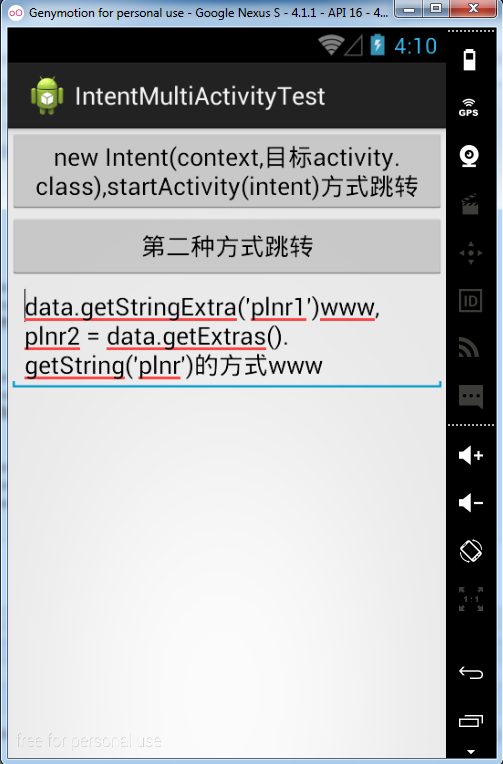
			et.setText("data.getStringExtra('plnr1')"+plnr1+",plnr2 = data.getExtras().getString('plnr')的方式"+plnr2);

		}

	}

}
SecondActivity:
package com.wyl.intentmultiactivitytest;

import android.app.Activity;

import android.content.Intent;

import android.os.Bundle;

import android.view.View;

import android.view.View.OnClickListener;

import android.widget.Button;

import android.widget.EditText;

import android.widget.Toast;

public class SecondActivity extends Activity {

	Button btn01;

	Button btn02;

	EditText et;

	@Override

	protected void onCreate(Bundle savedInstanceState) {

		// TODO Auto-generated method stub

		super.onCreate(savedInstanceState);

		setContentView(R.layout.second_activity);// 绑定页面

		System.out.println("=====wo shi the second yemian =====");

		btn01 = (Button) findViewById(R.id.button21);

		btn02 = (Button) findViewById(R.id.button22);

		et = (EditText)findViewById(R.id.editText01);

		btn01.setOnClickListener(new OnClickListener() {

			@Override

			public void onClick(View v) {

				// TODO Auto-generated method stub

				Intent intent = new Intent(SecondActivity.this, FirstActivity.class);

				System.out.println("==cong dier tiaodao diyiye==");

				startActivity(intent);

			}

		});

		btn02.setOnClickListener(new OnClickListener() {

			@Override

			public void onClick(View v) {

				// TODO Auto-generated method stub

				Intent intent = new Intent();

				String content = et.getText().toString();//获取评论的内容

				intent.putExtra("plnr", content);

				//2是状态码,随便自己设置,用来判断是哪个页面的返回值,自己不弄混了就行

				setResult(2, intent);	//这是最关键的一步,

				Toast.makeText(SecondActivity.this, intent.getExtras().getString("plnr"),1000);

				finish();//关闭该页面,就会自动返回到了第一页了。

			}

		});

	}

}
相关的layout文件:
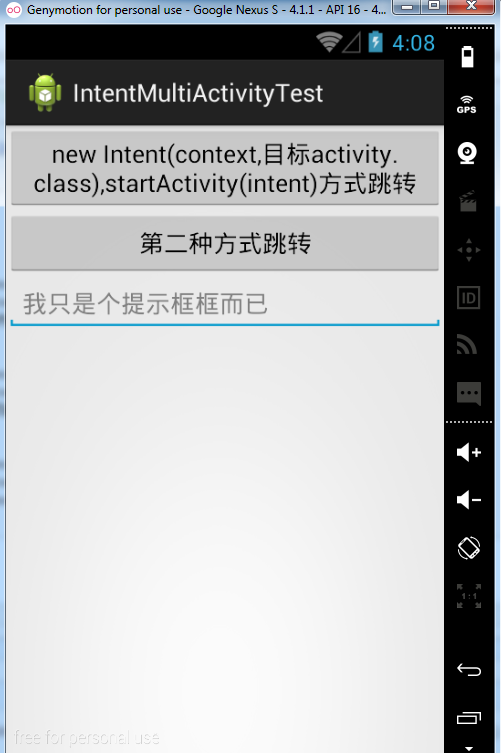
firstctivity.xml:
<?xml version="1.0" encoding="utf-8"?>

<LinearLayout xmlns:android="http://schemas.android.com/apk/res/android"

    android:layout_width="match_parent"

    android:layout_height="match_parent"

    android:orientation="vertical" >

    <Button

        android:id="@+id/button1"

        android:layout_width="match_parent"

        android:layout_height="wrap_content"

        android:text="new Intent(context,目标activity.class),startActivity(intent)方式跳转" />

    <Button

        android:id="@+id/button2"

        android:layout_width="match_parent"

        android:layout_height="wrap_content"

        android:text="第二种方式跳转" />

    <EditText

        android:id="@+id/editText1"

        android:layout_width="match_parent"

        android:layout_height="wrap_content"

        android:ems="10"

        android:hint="我只是个提示框框而已">

        <requestFocus />

    </EditText>

</LinearLayout>
second_activity.xml:
<?xml version="1.0" encoding="utf-8"?>

<LinearLayout xmlns:android="http://schemas.android.com/apk/res/android"

    android:layout_width="match_parent"

    android:layout_height="match_parent"

    android:orientation="vertical" >

    <EditText

        android:id="@+id/editText01"

        android:layout_width="match_parent"

        android:layout_height="wrap_content"

        android:hint="录入要返回到第一页的内容" />

    <Button

        android:id="@+id/button21"

        android:layout_width="match_parent"

        android:layout_height="wrap_content"

        android:text="我是第二个activity页面" />

	<Button

        android:id="@+id/button22"

        android:layout_width="match_parent"

        android:layout_height="wrap_content"

        android:text="startActivityForResult方式返回,并且回传数据" />

</LinearLayout>
效果图如下:

Activity跳转的更多相关文章
- 用Dart&Henson玩转Activity跳转
用Dart&Henson玩转Activity跳转 Extra是Android标准的组件之间(Activity/Fragment/Service等)传递数据的方式.本文介绍了开源项目Dart的使 ...
- Android之Activity跳转
简述 如果把每个activity看成一个页面的话,那么activity之间的跳转和页面的之间的跳转基本上是一样的.首先需要监听一个事件,当这个事件发生的时候,就进行跳转.html中有个<a sr ...
- android activity 跳转传值问题研究
intent = new Intent(); intent.setClass(LoginActivity.this, RegActivity.class); startActivity(intent) ...
- 【原创】Android 从一个Activity跳转到另外一个Activity
Android四大组件activity使用,实现两个activity之间的跳转 基本流程:创建两个activity-将其中一个activity中组件作为事件源-通过组件事件的处理借助intent对象实 ...
- tabhost中activity跳转动画不显示的解决办法
[1]如果是tabhost中的activity跳到其他的activity,用这篇blog的方法即可 http://blog.sina.com.cn/s/blog_8db8914301010t31.ht ...
- android 15 activity跳转
从一个屏幕跳到另一个屏幕,一个activity跳转到另一个activity,Intent类用于组件之间传递数据和跳转,组件包括不仅activity. package com.sxt.day04_01; ...
- Android Activity跳转动画,让你的APP瞬间绚丽起来
我们都知道绚丽的APP总会给用户耳目一新的感觉,为了抓住用户更大网络公司使出浑身解数让自己的产品更绚丽,而绚丽最简单的效果就是Activity跳转效果,不仅可以让用户看起来舒服,而且实现起来也特别简单 ...
- Activity跳转时传递Bitmap对象的实现
前言 相信大家可能都了解Activity跳转时我们是能够传递參数的,比方使用Intent传递或者Bundle来传递,把当前Activity的一些信息传递给将要跳转到的新的Activity.可是不知道大 ...
- Android的Activity跳转动画各种效果整理
Android的Activity跳转就是很生硬的切换界面.其实Android的Activity跳转可以设置各种动画,本文整理了一些,还有很多动画效果,就要靠我们发挥自己的想象力 大家使用Android ...
- android入门,activity跳转,并传递message
首先是布局文件,如下: activity_main.xml <?xml version="1.0" encoding="utf-8"?> <L ...
随机推荐
- Redis的入门Demo(java)
java代码部分参考了:http://www.runoob.com/redis/redis-java.html 在java中使用Redis,需要引入Redis驱动,就是jedis-2.1.0.jar, ...
- UIWebView的三种加载方式
一.使用UIWebView 将web content 嵌入到应用上. API提供了三种方法: - (void)loadRequest:(NSURLRequest *)request; - (void) ...
- 生产企业如何部署VMware虚拟化的解决方案
相信生产企业能够清楚的看到,随着生产规模和业务的快速发展,在IT基础设施的投入和使用也不断的增加,但同时也发现没有进行有效整理的硬件效率也就越来 越低,很大程度上浪费了IT资源.所以如何降低成本.提高 ...
- 26_Json_Example
JSON 很通用的处理数据的工具,各个语言都可以使用. 这个App就是把一个网上的用JSON格式保存的数据拿下来,然后保存到字典中,显示出来,用iOS自己的方法. 一定要记得写最后的那个 task.r ...
- Protel99Se使用方法详解
Protel99SE是应用于Windows9X/2000/NT操作系统下的EDA设计软件,采用设计库管理模式,可以进行联网设计,具有很强的数据交换能力和开放性及3D模拟功能,是一个32位的设计软件,可 ...
- poj 2593 Max Sequence(线性dp)
题目链接:http://poj.org/problem?id=2593 思路分析:该问题为求给定由N个整数组成的序列,要求确定序列A的2个不相交子段,使这m个子段的最大连续子段和的和最大. 该问题与p ...
- UITextField align left margin
如果我们想让我们的UITextField输入的字体偏移几个像素,我们常常用空格来代替,有时候我们不想用空格的话怎么办? #import <UIKit/UIKit.h> @interface ...
- CSDN Markdown简明教程3-表格和公式
0. 文件夹 文件夹 前言 表格 1 表格 2 表格对齐方式 公式 1 行内公式 2 陈列公式displayed formulas 3 MathJax语法 深入 声明 1. 前言 Markdown是一 ...
- 【SqlServer数据类型、C#数据类型、SqlDbType】对应关系及转换
// sql server数据类型(如:varchar)// 转换为SqlDbType类型public static SqlDbType SqlTypeString2SqlType(string sq ...
- JavaScript算法描述(一)
function swap(arr,index1,index2){ var temp=arr[index1]; arr[index1]=arr[index2]; arr[index2]=temp; } ...