
appsettings.json
appsettings.json
目录索引
简介
在我们之前的Asp.net mvc 开发中,一提到配置文件,我们不由的想到 web.config 和 app.config,在 core 中,我们看到了很多的变化,新的配置系统显得更加轻量级,具有更好的扩展性,并且支持多样化的数据源。
博客园对于这个的讲解很多,比如:Artche ,但是,没有点基础看老A的博客还是有些吃力的,对于老A介绍的配置,我也是看的一头雾水,在后面的文章中,我会用像我们这些菜鸟容易接受的方式,重新解释一下。
今天,我们以 appsettings.json 为例,读取一些简单的系统配置。
appsettings.json
在 第二章 中,我们在讲到EF上线文时,在 Startup.cs 添加 services.AddDbContext<ApplicationDbContext>(options => options.UseSqlServer(Configuration.GetConnectionString("SqlServerConnection"))); 已经使用到了 appsettings.json
我们添加一些简单的系统配置,来演示一下读取 appsettings.json:
{
"ApplicationInsights": {
"InstrumentationKey": ""
},
"ConnectionStrings": {
"SqlServerConnection": "Server=.;Database=db_wkmvc;User ID=sa_wkmvc;Password=123456;"
},
"Logging": {
"IncludeScopes": false,
"LogLevel": {
"Default": "Debug",
"System": "Information",
"Microsoft": "Information"
}
},
"ApplicationConfiguration": {
//文件上传路径
"FileUpPath": "/upload/",
//是否启用单用户登录
"IsSingleLogin": "True",
//允许上传的文件格式
"AttachExtension": "gif,jpg,jpeg,png,bmp,rar,zip,doc,docx,xls,xlsx,ppt,pptx,txt,flv,apk,mp4,mpg,ts,mpeg,mp3,bak,pdf",
//图片上传最大值KB
"AttachImagesize": 12400
}
}
我们添加一个配置类 ApplicationConfiguration

 1 public class ApplicationConfiguration

 2     {

 3         #region 属性成员

 4

 5         /// <summary>

 6         /// 文件上传路径

 7         /// </summary>

 8         public string FileUpPath { get; set; }

 9         /// <summary>

10         /// 是否启用单用户登录

11         /// </summary>

12         public bool IsSingleLogin { get; set; }

13         /// <summary>

14         /// 允许上传的文件格式

15         /// </summary>

16         public string AttachExtension { get; set; }

17         /// <summary>

18         /// 图片上传最大值KB

19         /// </summary>

20         public int AttachImagesize { get; set; }

21         #endregion

22     }
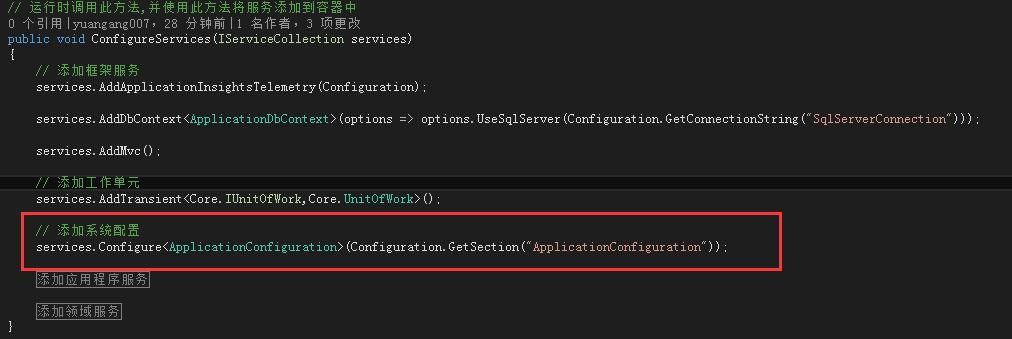
在 Startup.cs 的 ConfigureServices 添加
services.Configure<ApplicationConfiguration>(Configuration.GetSection("ApplicationConfiguration"));
添加一个领域层 AppConfigurtaionServices
public class AppConfigurtaionServices
{
private readonly IOptions<ApplicationConfiguration> _appConfiguration;
public AppConfigurtaionServices(IOptions<ApplicationConfiguration> appConfiguration)
{
_appConfiguration = appConfiguration;
}
public ApplicationConfiguration AppConfigurations
{
get
{
return _appConfiguration.Value;
}
}
}
添加引用 using Microsoft.Extensions.Options;
我们来测试一下:

测试结果:

希望跟大家一起学习Asp.net Core
appsettings.json的更多相关文章
- 【无私分享:ASP.NET CORE 项目实战(第六章)】读取配置文件(一) appsettings.json
目录索引 [无私分享:ASP.NET CORE 项目实战]目录索引 简介 在我们之前的Asp.net mvc 开发中,一提到配置文件,我们不由的想到 web.config 和 app.config,在 ...
- .Net Core 读取appsettings.json的配置
在.net core中是没有*.config 文件的 配置文件都是*.json 1.在project.json里下面这行代码 "Microsoft.Extensions.Options.Co ...
- Talking appsettings.json in Asp.Net Core
在ASP.NET Core中,默认提供了三个运行时环境变量,通过查看Hosting源代码我们可以看到,分别是Development.Staging.Production public static c ...
- 每天记录一点:NetCore获得配置文件 appsettings.json
用NetCore做项目如果用EF ORM在网上有很多的配置连接字符串,读取以及使用方法 由于很多朋友用的其他ORM如SqlSugar,NH,Dapper等,在读取连接字符串的时候,往往把信息保存到一 ...
- Asp .Net Core 读取appsettings.json配置文件
Asp .Net Core 如何读取appsettings.json配置文件?最近也有学习到如何读取配置文件的,主要是通过 IConfiguration,以及在Program中初始化完成的. ...
- DotNetCore跨平台~在appsettings.json里自定义配置项
回到目录 DotNetCore里一切都是依赖注入的,对于appsettings这个可扩展的配置对象也不例外,它位于项目根目录,一般在startup里去注册它,在类中通过构造方法注入来获取当前的对象,以 ...
- DotNetCore跨平台~关于appsettings.json里各种配置项的读取
回到目录 对于dotnet Core来说,依赖注入的集成无疑是最大的亮点,它主要用在服务注册与注入和配置文件注册与注入上面,我们一般会在程序入口先注册服务或者文件,然后在需要的地方使用注入即可,下面主 ...
- .Net Core 实践 - 如何在控制台应用(.Net Core)使用appsettings.json配置
新建控制台应用(.Net Core)程序 添加json文件,命名为appsettings.json,设置文件属性 如果较新则复制.添加内容如下 { "MyWords" : &quo ...
- Adding appsettings.json to a .NET Core console app
This is something that strangely doesn’t seem to be that well documented and took me a while to figu ...
随机推荐
- Netbeans7.4下搭建struts2.3.16
一:所需要的jar包如下: 在WEB-INF目录下新建一个lib文件夹将jar包复制到里面: 在这里要注意将jar包导入lib目录里还不可以,在这里与MyEclipse不同.在项目上右键属性-> ...
- 关于PowerShell中的命令的别名
cmdlets的别名,有利于使用传统的cmd的方式 或者使用 bash的方式的人员,更加方便的使用使用频率较高的命令. 以下是从 别名中获取的内置的别名. PS C:\> Get-Alias * ...
- 【转】Android(4.2) Sensors 学习——G-sensor,Gyroscope驱动移植
原文网址:http://blog.csdn.net/nxh_love/article/details/11804841 本人对驱动可谓是一点不懂,鉴于公司目前高驱动的人手不够,所以我也只能两眼一抹黑硬 ...
- 【转】 ubuntu下fastboot找不到devices
原文网址:http://memory.blog.51cto.com/6054201/1202420 转载补充: 1.首先,手机必须先进入bootloader状态,fastboot devices才能有 ...
- tmux 配置
tmux配置文件名为.tmux.conf,位于用户根目录下. 常用的配置为: # vimsetw -g mode-keys vibind [ copy-modebind -t vi-copy v be ...
- Largest Rectangle in Histogram 解答
Question Given n non-negative integers representing the histogram's bar height where the width of ea ...
- DBA 经典面试题(4)
1.如果信息采集管理系统(ICM)崩溃了怎么办? 答案:所有其他的管理器都会继续工作.ICM只会处理队列控制请求,意思是开启和关闭其他并发的管理器. 2.你如何加速打补丁的过程? 答案: ...
- SVN版本分支合并
SVN,开发中常用的工具,也没什么可说的.这里只是记录一下,以免太久不用了想用的时候又忘了. 首先已经有两个目录,一个是分支目录SVNChild,一个是主干目录SVNMain.SVNChild是从SV ...
- hadoop执行hbase插入表操作,出错:Stack trace: ExitCodeException exitCode=1:(xjl456852原创)
在执行hbase和mapreduce融合时,将hdfs上的文本文件插入到hbase中,我没有使用"胖包"(胖包就是将项目依赖的jar包放入项目打包后的lib目录中),而是直接将hb ...
- Hibernate框架后续
持久化对象的唯一标识OID 1:我们都知道,在java中按照内存地址来区分同一个类的不同对象 而关系数据库按照主键来区分一条记录 在Hibernate中使用OID来建立内存中的对象和数据 ...