
Python 在Visual studio 中做单元测试进行TDD开发
Unit Tests
Pages 38
- Home
- Azure Remote Debugging
- AzureSDK
- Bottle and Azure Table Storage on Azure
- Bottle and MongoDB on Azure
- Browsing Code Using PTVS
- Build Instructions for PTVS
- Cloud Project
- Code Formatting
- Contributing to PTVS
- Cross Platform Remote Debugging
- Debugging
- Development WebFrameworks
- Django
- Django and MySQL on Azure
- Show 23 more pages…
Clone this wiki locally
Unit tests are short sections of code that test small pieces of functionality belonging to a larger program. By demonstrating that each piece of a program is correct, it is easier to infer that the entire program is correct.
Python uses unit tests extensively to validate scenarios while designing a program. Python Tools for Visual Studio includes support for discovering, executing and debugging unit tests. This allows you to author your tests and run them without having to switch to a command prompt.
Discovering Tests
PTVS will discover tests using the standard unittest package. To ensure your test can be found and run, follow these rules:
- Import unittest
- Derive a class from unittest.TestCase
- Define a method named "test"
- (Optional) Add a call to unittest.main()
- This will allow you to run your script directly to execute the tests
To add a module with a test class, select Project -> Add New Item (Ctrl+Shift+A) and choose "Python Unit Test".
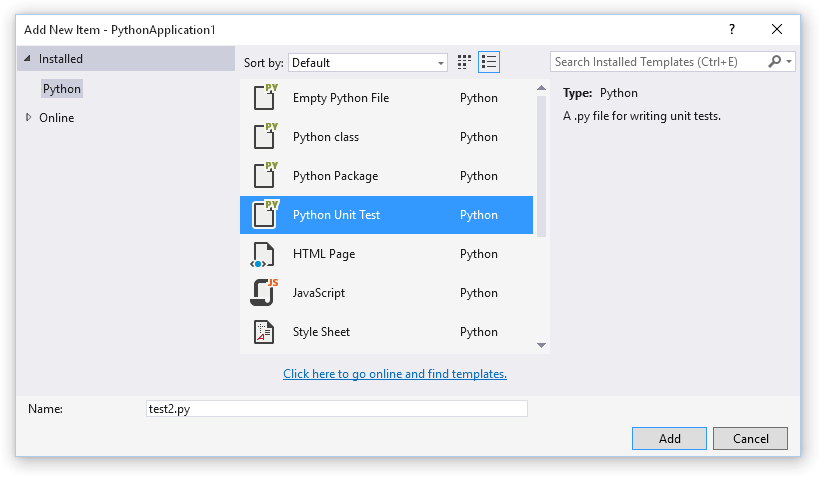
This will add a new file containing a basic unit test.
import unittest

class Test_test1(unittest.TestCase):

    def test_A(self):

        self.fail("Not implemented")

if __name__ == '__main__':

    unittest.main()
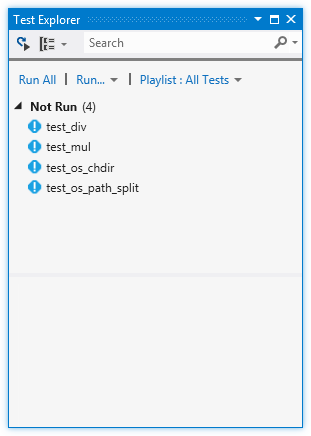
Hit Save All (Ctrl+Shift+S) to save the project file, and your test will be discovered and displayed in the Test Explorer. (If you do not see the Test Explorer window, click the Test menu, then Windows and Test Explorer.)
Important: If you do not see your test in the Test Explorer window, check our beta caveats for known issues and workarounds.
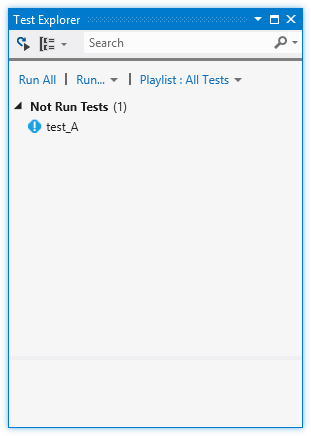
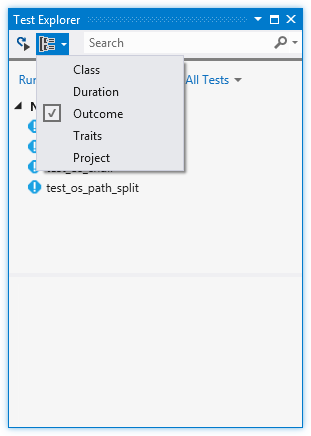
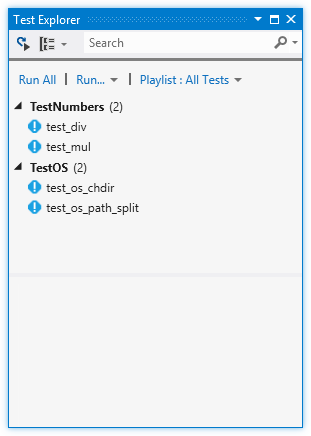
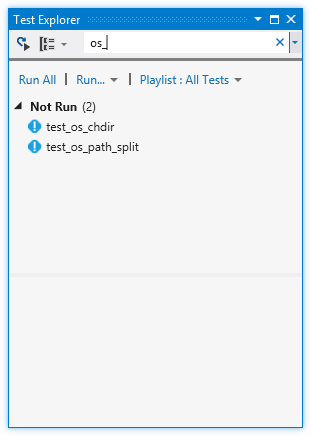
As you add more tests to your project, you may prefer to group or filter the tests that are displayed. The "Group By" menu on the toolbar will allow you to collect your tests into different groups, and the search toolbox will filter by matching names. Double-clicking a test will open the source file containing the test implementation.
Running Tests
Tests can be run by clicking "Run All" in the Test Explorer window, or by selecting one or more tests or groups, right-clicking and selecting "Run Selected Tests". Tests will be run in the background and the display will be updated to show the results.
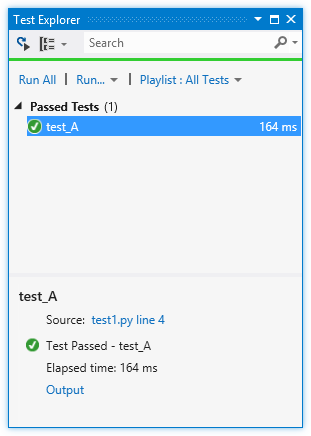
Tests that pass are shown with a green tick. The amount of time taken to run the test is also displayed.
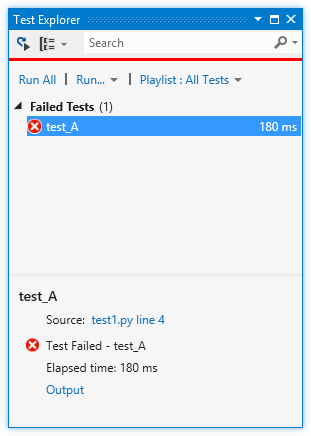
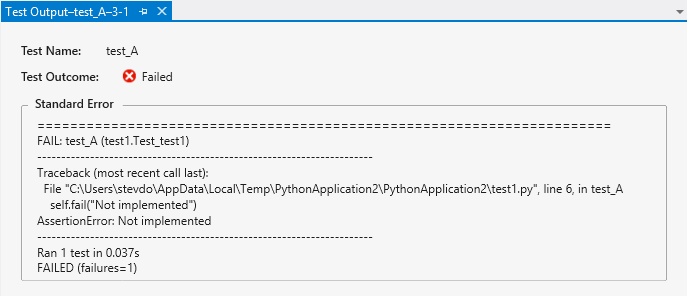
Tests that fail are shown with a red cross. The "Output" link can be clicked to display the text that was printed to the console during the test, including the standard unittest output.
Debugging Tests
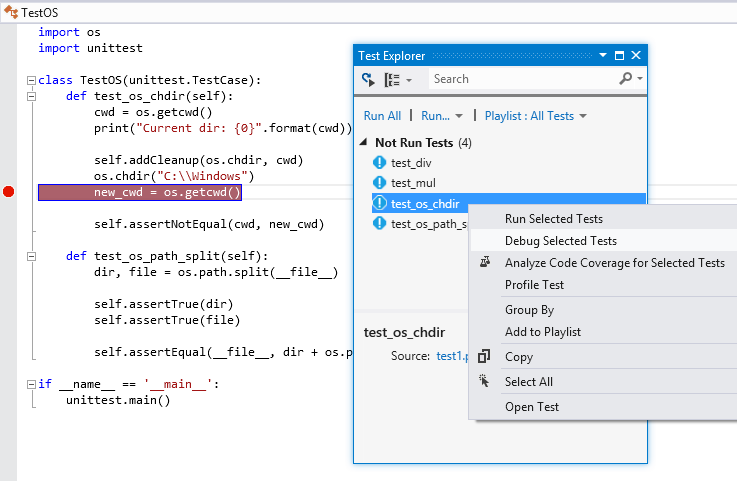
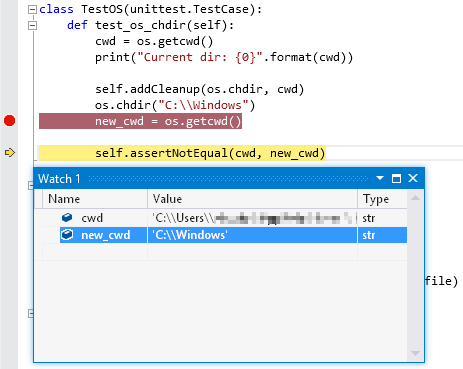
Tests can be debugged by right-clicking a test and selecting "Debug Selected Tests". (Note that "Analyze Code Coverage for Selected Tests" and "Profile Test" are not supported.) Ensure you have set a breakpoint in your test. When the breakpoint is hit, the normal debugging experience is available until the test completes.
Known Issues
- When starting debugging, VS will appear to start and stop debugging, before starting again. This is expected.
- When debugging multiple tests, each one is run independently, which will interrupt the debugging session.
- VS will intermittently fail to start a test when debugging. Normally, attempting to debug the test again will succeed.
- When debugging, it is possible to step out of a test into the
unittestimplementation. Normally, the next step will run to the end of the program and stop debugging.
Python 在Visual studio 中做单元测试进行TDD开发的更多相关文章
- Visual Studio 中的单元测试 UNIT TEST
原文:Visual Studio 中的单元测试 UNIT TEST 注:本文系作者原创,可随意转载,但请注明出处.如实在不愿注明可留空,强烈反对更改原创出处.TDD(Test-Driven Devel ...
- Visual Studio 中的 Office 和 SharePoint 开发
MSDN Library 开发工具和语言 Visual Studio 中的 Office 和 SharePoint 开发 https://msdn.microsoft.com/zh-cn/libra ...
- Visual Studio中UnitTesting单元测试模板代码生成
在软件研发过程中,单元测试的重要性直接影响软件质量.经验表明一个尽责的单元测试方法将会在软件开发的某个阶段发现很多的Bug,并且修改它们的成本也很低.在软件开发的后期阶段,Bug的发 ...
- visual studio中创建单元测试
1 打开 工具--自定义 2 选择 上下文菜单--编辑器上下文菜单|代码窗口 3 在这里我们可以看到“创建单元测试”这个菜单了,将它移到运行测试菜单下面 4 关闭VS并重启 重启后再对着类名,点击右 ...
- [No0000AE]在 Visual Studio 中调试 XAML 设计时异常
在 Visual Studio 中进行 WPF, UWP, Silverlight 开发时,经常会遇到 XAML 设计器由于遭遇异常而无法正常显示设计器视图的情况.很多时候由于最终生成的项目在运行时并 ...
- 在 Visual Studio 中调试 XAML 设计时异常
在 Visual Studio 中进行 WPF, UWP, Silverlight 开发时,经常会遇到 XAML 设计器由于遭遇异常而无法正常显示设计器视图的情况.很多时候由于最终生成的项目在运行时并 ...
- Python Tool Visual Studio简单使用
由于一直在做.NET的开发,一直用的IDE是VS系列的,所以想用VS也能开发Python,刚好微软提供一个插件PTVS(Python Tool Visual Studio)专门应用于Python开发的 ...
- Visual Studio 2013进行单元测试
使用Visual Studio 2013进行单元测试--初级篇 1.打开VS2013 --> 新建一个项目.这里我们默认创建一个控制台项目.取名为UnitTestDemo 2.在解决方案里面 ...
- 教程:在 Visual Studio 中开始使用 Flask Web 框架
教程:在 Visual Studio 中开始使用 Flask Web 框架 Flask 是一种轻量级 Web 应用程序 Python 框架,为 URL 路由和页面呈现提供基础知识. Flask 被称为 ...
随机推荐
- Delphi EurekaLog 调试内存泄露方法
要使用EurekaLog进行内存泄露检测,需要手动开启"EurekaLog Options..."下的"Advanced Options"旁的"Mem ...
- Android中Intent的使用
1./以下是常用到的Intent的URI及其示例,包含了大部分应用中用到的共用Intent. //一.打开一个网页,类别是Intent.ACTION_VIEW Uri uri = Uri.parse( ...
- HBase的rowkey的设计原则
HBase是三维有序存储的,通过rowkey(行键),column key(column family和qualifier)和TimeStamp(时间戳)这个三个维度可以对HBase中的数据进行快速定 ...
- Linux下的bc计算器
bc = basic calculator scale:设置精度,默认为0 obase:设置输出进制,默认为10 ibase:设置输入进制,默认为10 原文:http://www.linuxidc.c ...
- MySQL添加外键的方法
为book表添加外键: <1>明确指定外键的名称: 语法:alter table 表名 add constraint 外键的名称 foreign key(你的外键字段名) REFERENC ...
- (3)选择元素——(9)为交替的列加样式(Styling alternate rows)
Two very useful custom selectors in the jQuery library are :oddand :even. Let's take a look at how w ...
- web开发小白之路
今天就来谈谈本人从事web开发的一系列白只又白的经历,本人刚开始是从事ios开发的,由于一系列的变故现在变为了web前端开发,不过说来也奇怪,刚开始接触前端时间可以说是彻底蒙圈,各种选择器,各种适配搞 ...
- ADO.NET之使用DataGridView控件显示从服务器上获取的数据
今天回顾下ADO.NET中关于使用DataGridiew控件显示数据的相关知识 理论整理: 使用 DataGridView 控件,可以显示和编辑来自多种不同类型的数据源的表格数据. SqlDataAd ...
- ViewPager欢迎页
布局 <RelativeLayout xmlns:android="http://schemas.android.com/apk/res/android" xmlns:to ...
- Lambda表达式 - 浅谈
概述: 只要有委托参数类型的地方,就可以使用 Lambda表达式.在讲述Lambda表达式之前,有必要先简要说明一下 委托中的"匿名方法": using System; using ...