
安卓android的联系人的contacts, raw contacts, and data的区别
https://stackoverflow.com/questions/5151885/android-new-data-record-is-added-to-the-wrong-contact/5158059#5158059
https://developer.android.com/guide/topics/providers/contacts-provider.html
https://stackoverflow.com/questions/35448250/how-to-get-whatsapp-contacts-from-android/35453979#35453979
https://developer.android.com/reference/android/provider/ContactsContract.RawContactsEntity.html
https://developer.android.com/reference/android/provider/ContactsContract.Data.html
Couple of Key pointers:
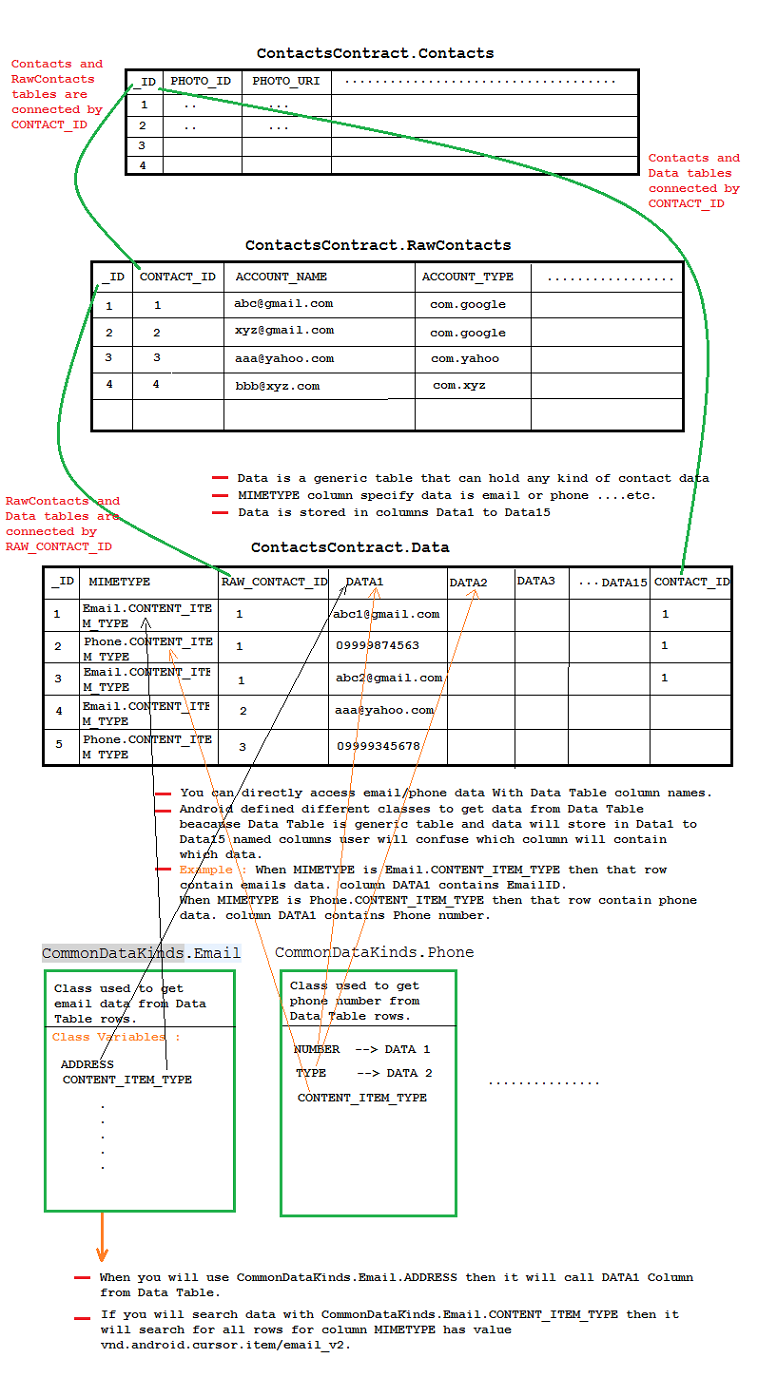
- Contacts._ID = Data.CONTACT_ID
- RawContacts._ID = Data.RAW_CONTACT_ID
- RawContacts.CONTACT_ID = Contacts._ID
- RawContactsEntity._ID = RawContacts._ID
Sounds confusing?? Let me try...
- The Contacts database is divided into 3 tables contacts, raw contacts, and data.
- Each table contains column (_ID) which is an auto incremented primary key.
- data table contains all the contact info like phone number, mail id, address etc.
- The raw contacts points to the actual contact created. Hence we use the raw contacts while adding a contact.
- The user cannot add any data in the contacts table. The data in this table is populated internally due to aggregation of contacts.
- The reason your logic worked for some of the contacts is: _ID for contacts, raw contactsremains same until there is any contact aggregation taking place. Lets say you add two contacts with same name abc. Here the _ID for raw contacts increments twice while _ID forcontacts increments only once as these two contacts gets merged due to the aggregation of contacts
Refer this for more details.
The best approach to fetch the info in your case is by using ContactsContract.RawContactsEntity ( an outer join of the raw_contacts table with the data table)
Reference:http://developer.android.com/reference/android/provider/ContactsContract.RawContactsEntity.html
here is the show Android Contact Data Store Diagram
安卓android的联系人的contacts, raw contacts, and data的区别的更多相关文章
- Android根据联系人姓名首字符顺序读取通讯录
Android根据联系人姓名首字符顺序读取通讯录 版权声明:本文为Zhang Phil原创文章,欢迎转载!转载请注明出处:http://blog.csdn.net/zhangphil 本文给出了A ...
- android管理联系人操作
ContentProvider扩展之管理系统联系人 我们都知道ContentProvider是用来共享数据的,然而android本身就提供了大量的ContentProvider,例如联系人信息,系统的 ...
- Android系统联系人全特效实现(下),字母表快速滚动
在上一篇文章中,我和大家一起实现了类似于Android系统联系人的分组导航和挤压动画功能,不过既然文章名叫做<Android系统联系人全特效实现>,那么没有快速滚动功能显然是称不上&quo ...
- Android系统联系人全特效实现(上),分组导航和挤压动画
记得在我刚接触Android的时候对系统联系人中的特效很感兴趣,它会根据手机中联系人姓氏的首字母进行分组,并在界面的最顶端始终显示一个当前的分组.如下图所示: 最让我感兴趣的是,当后一个分组和前一个分 ...
- 安卓Android面试题大全
56个问题都是经常用到的,可以深入研究下,也是必须掌握的开发必备知识. 安卓Android面试题汇总 搜集了一些Android面试题目,供将要面试或者正在面试的朋友参考. 1, 谈谈你对Activit ...
- Win7的64位系统如何搭建安卓Android开发环境
在搭建安卓Android开发环境,那么现在比较主流的Win7的64位操作系统如何搭建呢?其实很简单,不需要设置任何环境变量,只需要下载两个程序包(ADT和JDK),下载的时候注意选择相应的64位程序包 ...
- Python 开发安卓Android及IOS应用库Kivy安装尝试
Python 开发安卓Android及IOS应用库Kivy安装尝试: 先来看看这货可以用来制作什么应用: Create a package for Windows Create a package f ...
- android开发如何获取res/raw和assets文件夹的路径
---恢复内容开始--- android开发如何获取res/raw和assets文件夹的路径,主要分为两种情况: 1.如果你只是拷贝动作,那么你只需要得到res/raw和assets文件输入流就可以, ...
- VS2015配置安卓Android和iOS开发环境
http://www.cjjjs.cn/paper/gzsh/627201502818357.aspx [摘要] 本文按照步骤一步步的介绍要下载安装的东西,都提供了下载地址.最后将所有需要的程序都打包 ...
随机推荐
- js 刷新后不提示并保留控件状态
保存后,想提示一下并保留查询条件的状态,发现可以用document.forms[0].submit();继续提交达到刷新的目的 代码如下: ScriptManager.RegisterStartupS ...
- nginx的root alias 指令
location /img/ { alias /var/www/image/; } #若按照上述配置的话,则访问/img/目录里面的文件时,ningx会自动去/var/www/image/目录找文件 ...
- 一种基于匹配回朔的 css3 选择器引擎实现
介绍 CSS 选择器是一种应用于 DOM 节点查找场景的特定微型语法, 本质上和正则表达式一样都是一种模式匹配语言,灵活使用可以方便得获取指定位置的节点集合. 目前 W3C 推荐标准为 Selecto ...
- java---堆、栈、常量池的存储数据
说到Java中堆.栈和常量池,首先还是看看他们各自存放的数据类型吧! 栈: Java的JVM的内存可分为3个区:堆(heap).栈(stack)和方法区(method)也叫静态存储区. 堆区:(存放所 ...
- 【UVa】Partitioning by Palindromes(dp)
http://uva.onlinejudge.org/index.php?option=com_onlinejudge&Itemid=8&category=27&page=sh ...
- jQuery秒表、闹钟、计时器和报警插件
jQuery秒表.闹钟.计时器和报警插件 http://www.sucaihuo.com/jquery/8/896/demo/
- WPF - 绑定及惯用法(一)
写在前面:这仍然是一些没有经过严格审阅的文字.虽然我的确执行了初稿.复稿以及审阅等一系列用以保证文章质量的方法,但是仍然担心其中是否有错误.希望您能帮助指出,以在下一次我在版本更新时进行修正.所有的错 ...
- ItcastOA_设计BaseDao_设计DAO接口和实现类_写DAO实现类中的方法内容
3. 基础功能 3.1. 设计BaseDao接口与BaseDaoImpl类 每个实体都应有一个对应的Dao,他封装了对这个实体的数据库操作.例 实体Dao接口实现类 ================= ...
- Linux命令之乐--curl
参数: -I 获取头部信息 -s/--silent Silent mode. Don't output anything 沉默模式 --connect-timeout <secon ...
- 第十四篇:Apriori 关联分析算法原理分析与代码实现
前言 想必大家都听过数据挖掘领域那个经典的故事 - "啤酒与尿布" 的故事. 那么,具体是怎么从海量销售信息中挖掘出啤酒和尿布之间的关系呢? 这就是关联分析所要完成的任务了. 本文 ...