
nginx结合fastcgi
1、首先安装nginx,这里采用编译安装
location ~ \.php$ {
root html;
fastcgi_pass 127.0.0.1:9000;
fastcgi_index index.php;
fastcgi_param SCRIPT_FILENAME html$fastcgi_script_name;第二步修改
include fastcgi_params;
}
[root@wadeson nginx]# cat conf/fastcgi_params
fastcgi_param QUERY_STRING $query_string;
fastcgi_param REQUEST_METHOD $request_method;
fastcgi_param CONTENT_TYPE $content_type;
fastcgi_param CONTENT_LENGTH $content_length;
fastcgi_param SCRIPT_NAME $fastcgi_script_name;
fastcgi_param SCRIPT_FILENAME $document_root$fastcgi_script_name;这里是新增的一行
fastcgi_param REQUEST_URI $request_uri;
fastcgi_param DOCUMENT_URI $document_uri;
fastcgi_param DOCUMENT_ROOT $document_root;
fastcgi_param SERVER_PROTOCOL $server_protocol;
fastcgi_param HTTPS $https if_not_empty;
fastcgi_param GATEWAY_INTERFACE CGI/1.1;
fastcgi_param SERVER_SOFTWARE nginx/$nginx_version;
fastcgi_param REMOTE_ADDR $remote_addr;
fastcgi_param REMOTE_PORT $remote_port;
fastcgi_param SERVER_ADDR $server_addr;
fastcgi_param SERVER_PORT $server_port;
fastcgi_param SERVER_NAME $server_name;
# PHP only, required if PHP was built with --enable-force-cgi-redirect
fastcgi_param REDIRECT_STATUS 200;
执行完上面三步之后,编写php文件确认是否成功:
[root@wadeson nginx]# cat html/index.php
<?php
phpinfo();
?>
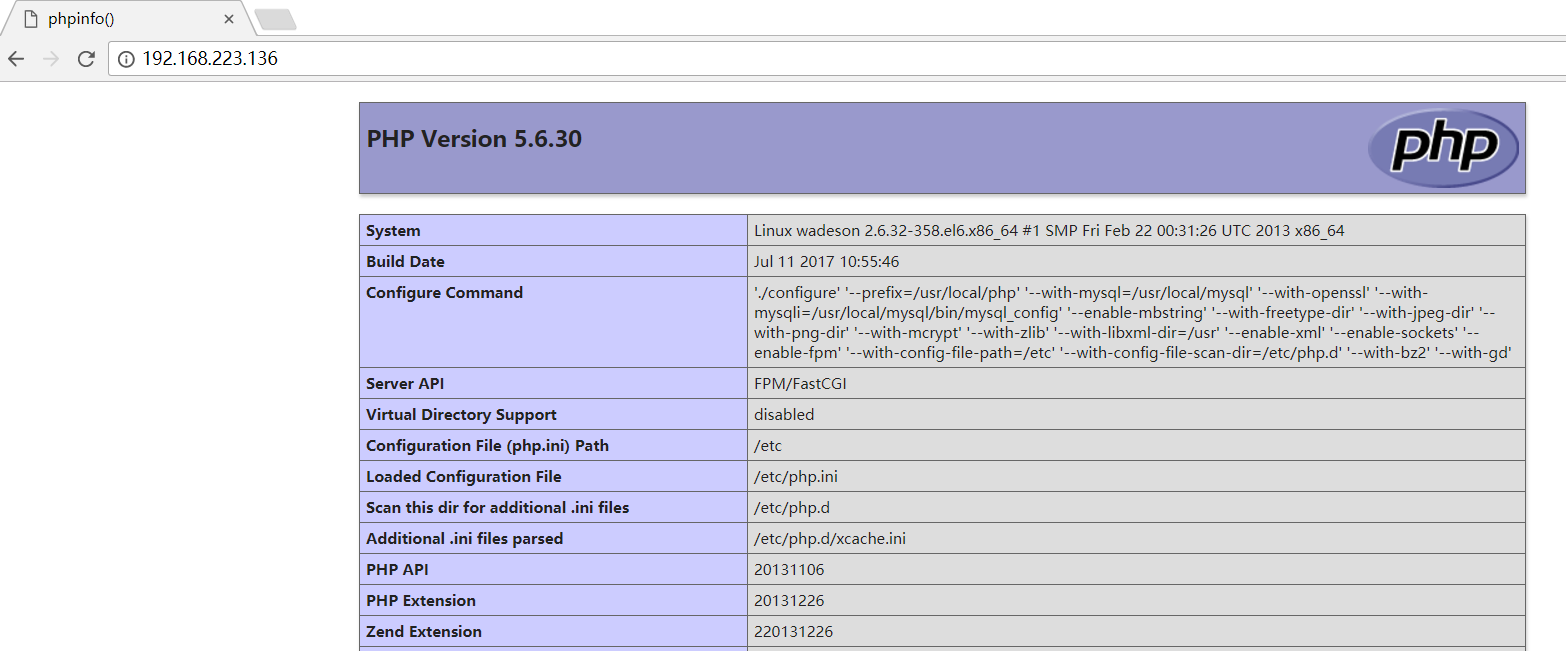
访问浏览器查看效果:
note:如果需要在现有的基础上编译一个新的模块,那么重新执行configure,后面加上参数
nginx结合fastcgi的更多相关文章
- Nginx中FastCGI配置优化
FastCGI: FastCGI是从CGI发展改进而来的.传统CGI接口方式的主要缺点是性能很差,因为每次HTTP服务器遇到动态程序时都需要重新启动脚本解析器来执行解析,然后结果被返回给HTTP服务器 ...
- nginx、fastCGI、php-fpm关系梳理(转)
前言: Linux下搭建nginx+php+memached(LPMN)的时候,nginx.conf中配需要配置fastCGI,php需要安装php-fpm扩展并启动php-fpm守护进程,nginx ...
- Nginx + CGI/FastCGI + C/Cpp
接着上篇<Nginx安装与使用>,本篇介绍CGI/FASTCGI的原理.及如何使用C/C++编写简单的CGI/FastCGI,最后将CGI/FASTCGI部署到nginx.内容大纲如下: ...
- nginx、fastCGI、php-fpm关系梳理(转载 http://blog.sina.com.cn/s/blog_6df9fbe30102v57y.html)
前言: Linux下搭建nginx+php+memached(LPMN)的时候,nginx.conf中配需要配置fastCGI,php需要安装 php-fpm扩展并启动php-fpm守护进程, ...
- 利用Nginx+Mono+Fastcgi代替IIS对Asp.Net进行反向代理
Nginx的好处相信我不必多说了,它作为一个相当轻量级的开源Web 服务器以及反向代理服务器而深受欢迎.越来越多的公司已经对它产生兴趣,包括我们公司的许多部门,利用它进行负载均衡和资源管理,之前写过一 ...
- etrace跟踪Nginx代码+ FASTCGI
http://blog.csdn.net/jianqiangchen/article/details/29175285 http://blog.csdn.net/jianqiangchen/artic ...
- nginx、fastCGI、php-fpm关系梳理(转载参考)
nginx.fastCGI.php-fpm关系梳理 还可以参考:http://www.cnblogs.com/skynet/p/4173450.html 前言: Linux下搭建nginx+php ...
- Linux上配置Nginx+PHP5(FastCGI)
原为地址:http://www.laruence.com/2009/07/28/1030.html Nginx是俄罗斯人编写的十分轻量级的HTTP服务器,以事件驱动的方式编写,所以有非常好的性能,同时 ...
- nginx、fastCGI、php-fpm关系梳理
前言: Linux下搭建nginx+php+memached(LPMN)的时候,nginx.conf中配需要配置fastCGI,php需要安装php-fpm扩展并启动php-fpm守护进程,nginx ...
- Nginx 中 FastCGI 配置示例
nginx 中 FastCGI 参数:主要是在 http 层 :保证PHP环境的高校运行 主要对PHP用来解析 fastcgi_cache_path /tmp/fastcgi_cache levels ...
随机推荐
- [SharePoint 2010]Sandboxed Solution (沙箱解決方案)
現有的SharePoint 2007系統中,我們如果要安裝客製化的程式碼到系統中,我們必須製作一個解決方案包裝檔(Solution Package),然後在系統的中央管理後台中,真對整個伺服器農場Fa ...
- mysql数据的导入与导出
参考:http://blog.sina.com.cn/s/blog_81b2b2a1010188q0.html http://blog.csdn.net/xin_yu_xin/article/det ...
- PHP array_merge() 函数
<?php $a1=array("a"=>"red","b"=>"green"); $a2=array ...
- Groovy中的脚本与类
包名 当你在groovy中定义类的时候需要指定包名,这和java中类似不多介绍. 导入 groovy中的导入也跟java类似,有一下五种: 默认导入 groovy默认导入了一下几个包和类: impor ...
- sssssss
1dispatcherServlet—拦截到spring mvc的请求 2dispatchServlet调用HandlerMapping( DefaultAnnoationHandlerMapping ...
- ICO成本价
[当前ICO成本价]仅供参考:ICOcoin 成本价1元SNT 成本价0.26元UGT 成本价2.7元PAY 成本价6元OMG 成本价2.6元YOYO 成本价 0.17元BNT 成本价26元BAT 成 ...
- Ubuntu 分区以及各个挂载目录的基本含义
我磁盘大概还有70多G的空间吧,我全部拿来使用的.真实的双系统哦. 一般来讲,linux系统分区最少要包括/和/swap两个.这样据说会影响性能,没有这样安装过,就无从考证啦.其实就是重装系统的时候, ...
- 解决Xshell中使用hbase shell backspace无法删除
进入到XShell 文件 –> 属性 –> 终端 –> 键盘 在 DELETE键序列 和 BACKSPACE键序列 中都选择 ASCII 127 最后进入 Hbase 命令行测试,可 ...
- CF#301 C:Ice Cave(简单BFS)
C:Ice Cave 有一个m*n的地图,里面包含'.'表示完整的冰块,'X'表示有裂痕的冰块,当游戏者到达完整的冰块时,这个位置的冰块会变成有裂痕的冰块,如果到达有裂痕的冰块时,游戏者会进入下一关 ...
- Win10新建文件不自动刷新
Win10 桌面创建文件/文件夹需要F5刷新才出来,资源管理器中创建也是一样的问题. 网上搜索的结果都以修改注册表,禁用音频面板检测,上述方案可能能解决部分情况. 实际上是桌面图标缓存出问题,以下是一 ...