
04-maven学习-pom.xml解析
pom.xml里面各个配置的含义如下:
<!-- 主项目标识,表示当前maven属于哪个实际项目,与包是一样的 -->

     <groupId>反写的公司网址+项目名</groupId>

     <!-- 模块标识-->

     <artifactId>项目名+模块名</artifactId>

     <!--

        版本号,一般由三个数字组成

        第一个0,表示大版本号,

        第二个0表示分支版本号,

        第三个0表示小版本号,

        snapshot 快照

        beta 公测

        alpha 内测

        Release 稳定

        GA正式发布

      -->

     <version></version>

     <!-- 打包的方式,默认为jar,还可以打包成war,zip,pom -->

     <packaging></packaging>

     <!-- 项目描述名 -->

     <name></name>

     <!-- 项目的地址 -->

     <url></url>

     <!-- 项目的描述 -->

     <description></description>

     <!-- 开发人员信息 -->

     <developers></developers>

     <!-- 许可证信息 -->

     <licenses></licenses>

     <!-- 组织信息 -->

     <organization></organization>

    <!--  依赖列表-->

    <dependencies>

        <!-- 依赖项 -->

        <dependency>

            <groupId></groupId>

            <artifactId></artifactId>

            <version></version>

            <type></type>

            <!-- 依赖的范围 -->

            <scope></scope>

            <!-- 设置依赖是否可选,默认false。 -->

            <optional></optional>

            <!-- 排除依赖传递列表 -->

            <exclusions>

                <exclusion>

                </exclusion>

            </exclusions>

        </dependency>

    </dependencies>

    <!-- 依赖的管理 -->

    <dependencyManagement>

         <dependencies>

             <dependency></dependency>

         </dependencies>

    </dependencyManagement>

    <build>

        <!-- 插件列表 -->

        <plugins>

            <plugin>

              <groupId></groupId>

              <artifactId></artifactId>

              <version></version>

            </plugin>

        </plugins>

    </build>

    <!-- 用于子模块对父模块pom的继承 -->

    <parent></parent>

    <!-- 用来聚合多个maven项 -->

    <modules>

        <module></module>

    </modules>
例如上一节创建的如下:
  <groupId>org.maven.mavenDemo</groupId>

  <artifactId>mavenDemo01</artifactId>

  <version>0.0.1-SNAPSHOT</version>

  <packaging>jar</packaging>

  <name>mavenDemo01</name>

  <url>http://maven.apache.org</url>

  <properties>

    <project.build.sourceEncoding>UTF-8</project.build.sourceEncoding>

  </properties>

  <dependencies>

    <dependency>

      <groupId>junit</groupId>

      <artifactId>junit</artifactId>

      <version>3.8.1</version>

      <scope>test</scope>

    </dependency>

  </dependencies>
依赖范围:<scop>
三种classpath:
- 编译
- 测试
- 运行
scop选项:
- compile:默认的范围,编译测试运行都有效
- provided:在编译和测试时候有效
- runtime:在测试和运行时有效
- test:只在测试范围有效
- system:与本机系统相关联,可移植性差。
- import:导入的范围,只使用在dependenceManagement中。表示从其他的pom中导入dependecy的配置
依赖传递
这里建立三个maven项目演示
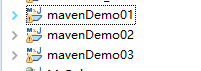
demo02要依赖demo01,要想依赖,必须在本地仓库安装demo01的项目,
首先对demo01进行如下操作:
1,右键demo01,使用maven方式运行,将其打包:
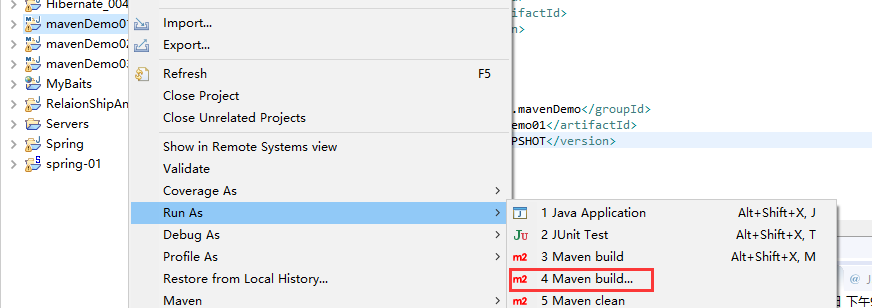
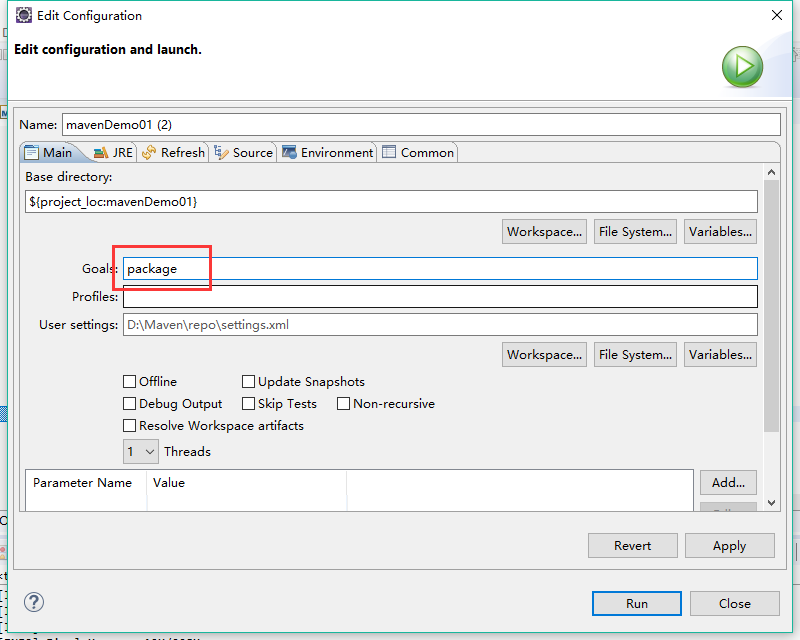
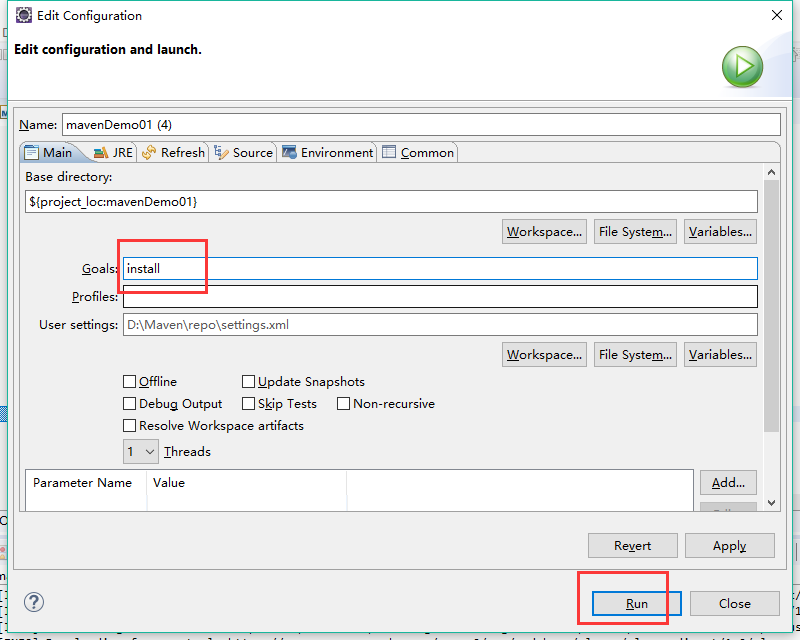
2,将mavendemo01安装到本地仓库中,同样执行maven方式运行,执行install命令。
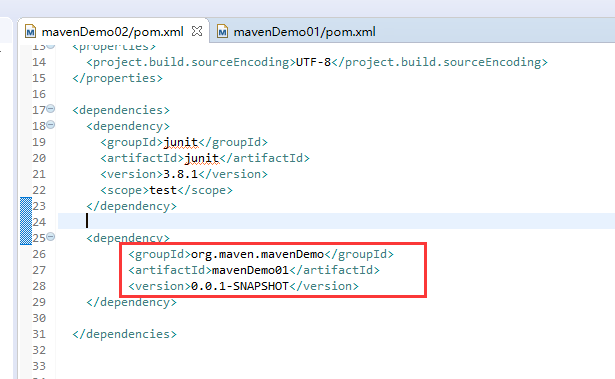
在demo02中加入demo01的依赖:
  <dependencies>

    <dependency>

      <groupId>junit</groupId>

      <artifactId>junit</artifactId>

      <version>3.8.1</version>

      <scope>test</scope>

    </dependency>

    <dependency>

            <groupId>org.maven.mavenDemo</groupId>

          <artifactId>mavenDemo01</artifactId>

          <version>0.0.1-SNAPSHOT</version>

    </dependency>

  </dependencies>
如下:
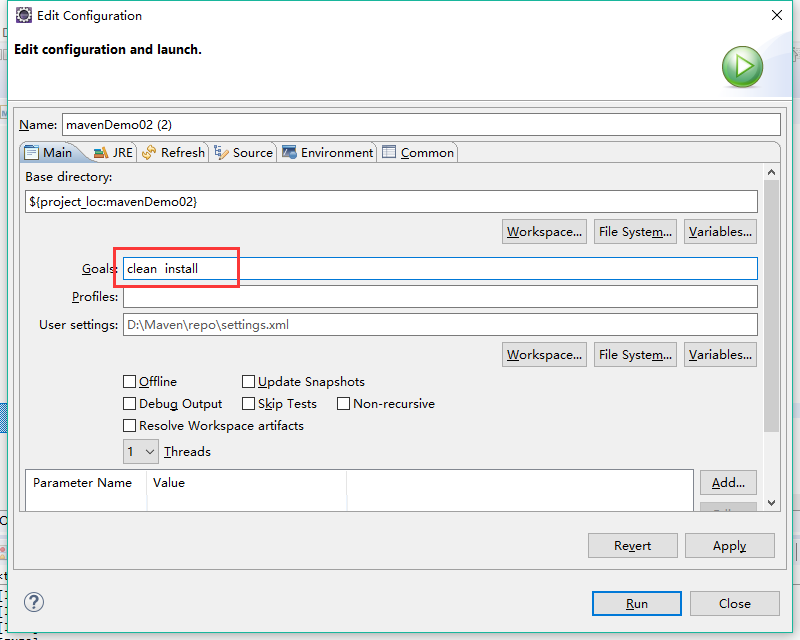
同样方式将demo02安装,为了省去操作,同时执行两个命令:clean install
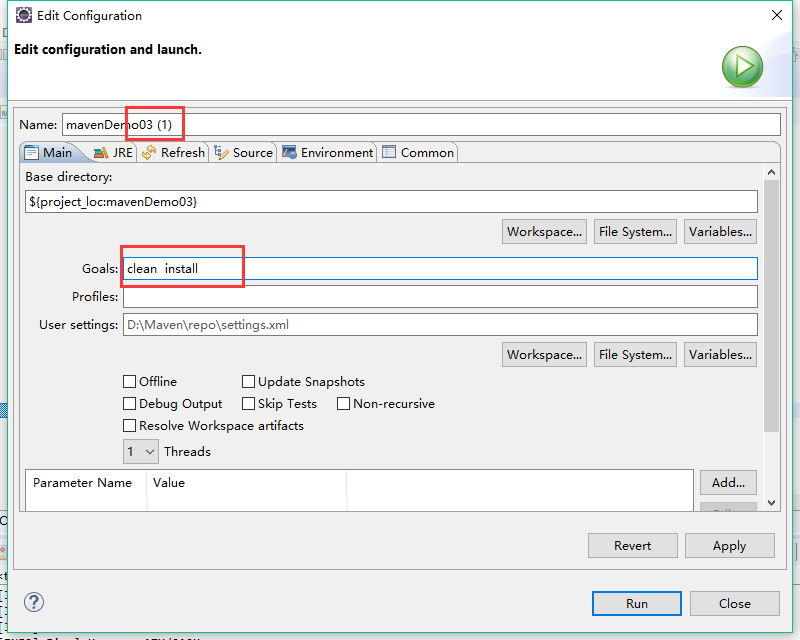
在demo03中依赖demo02项目。
  <dependencies>

    <dependency>

      <groupId>junit</groupId>

      <artifactId>junit</artifactId>

      <version>3.8.1</version>

      <scope>test</scope>

    </dependency>

    <dependency>

          <groupId>org.maven.mavenDemo</groupId>

          <artifactId>mavenDemo02</artifactId>

          <version>0.0.1-SNAPSHOT</version>

    </dependency>

  </dependencies>
同样对demo03安装到本地仓库。
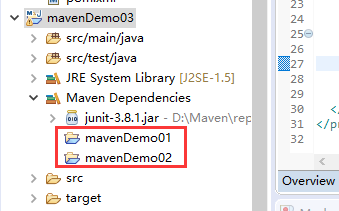
观察mavenDemo03的依赖包发现,demo03本来只想依赖demo02,但是连demo01也依赖了,
这表明依赖具有传递性。
要想不依赖demo01,使用exclusions,可以排除demo01的依赖。
  <dependencies>

    <dependency>

      <groupId>junit</groupId>

      <artifactId>junit</artifactId>

      <version>3.8.1</version>

      <scope>test</scope>

    </dependency>

    <dependency>

          <groupId>org.maven.mavenDemo</groupId>

          <artifactId>mavenDemo02</artifactId>

          <version>0.0.1-SNAPSHOT</version>

          <exclusions>

              <exclusion><!--下面填入mavenDemo01的坐标-->

                  <groupId>org.maven.mavenDemo</groupId>

                  <artifactId>mavenDemo01</artifactId>

              </exclusion>

          </exclusions>

    </dependency>

  </dependencies>
保存后发现只剩demo02的依赖了。
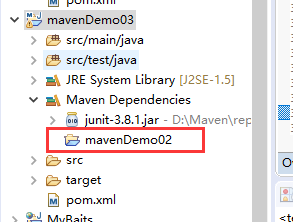
依赖冲突
解决依赖冲突的两条原则:
1,短路优先:A->B-C->X(jar)
A->D->X(jar)
由于第二条路比较短,会依赖第二条的方式。
2,先声明先优先:
如果路径长度相同,则谁先声明,先解析谁。
聚合和继承
聚合
如果想要将多个项目进行install,安装到本地仓库中,必须对其依次进行install命令。
而聚合可以将多个项目放到一起运行,同时安装。
例如:将前面的三个项目聚合,一起安装。
新建一个mavenDemo04,在pom.xml里面配置如下:
首先把packaging改成pom
  <groupId>org.maven.mavenDemo</groupId>

  <artifactId>mavenDemo04</artifactId>

  <version>0.0.1-SNAPSHOT</version>

  <packaging>pom</packaging>
然后添加聚合标签:分别加入要安装的三个项目
    <modules>

        <module>

            ../mavenDemo01

        </module>

        <module>

            ../mavenDemo02

        </module>

        <module>

            ../mavenDemo03

        </module>

    </modules>
而这里的dependency无所谓了,可以删除。
然后运行maven命令,执行 clean install命令。
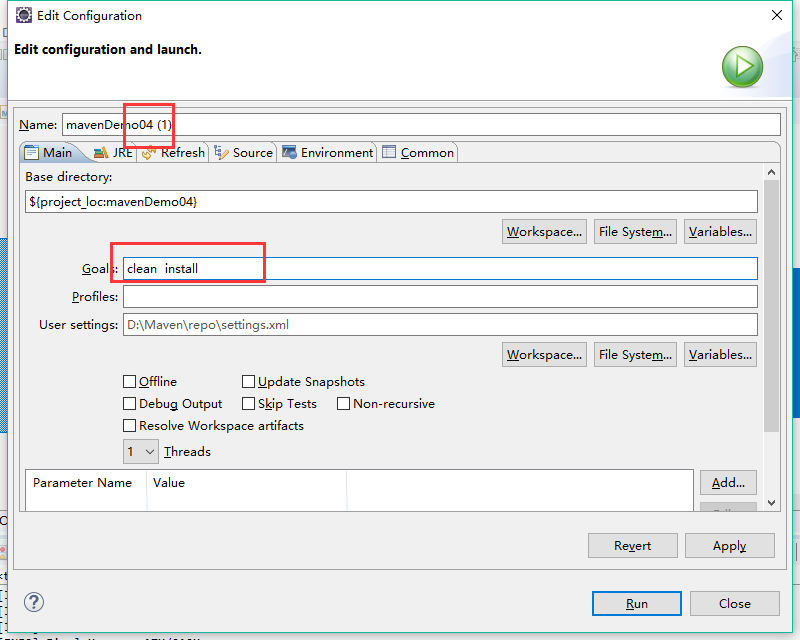
此时就同时安装了三个项目到本地仓库。
继承
例如对于之前的三个项目中,每个项目都依赖了一个junit,其实这样重复了很多,可以使用继承方式代替这种。
1,新建一个demo5,demo5中定义如下:
  <groupId>org.maven.mavenDemo</groupId>

  <artifactId>mavenDemo05</artifactId>

  <version>0.0.1-SNAPSHOT</version>

  <packaging>pom</packaging>

  <name>mavenDemo05</name>

  <url>http://maven.apache.org</url>

  <properties>

    <project.build.sourceEncoding>UTF-8</project.build.sourceEncoding>

      <junit.version>3.8.1</junit.version>

  </properties>

    <dependencyManagement>

          <dependencies>

            <dependency>

              <groupId>junit</groupId>

              <artifactId>junit</artifactId>

              <version>${junit.version}</version>

              <scope>test</scope>

            </dependency>

          </dependencies>

    </dependencyManagement>
一共关注三点:
1,将packaging改为pom
2,在properties中新增一共junit.version属性。然后可以在version标签中通过${属性名}的方式使用。
3,新增一个dependencyManagement标签,将dependencyies标签放进去。
假如在demo3中继承这里。
demo3中junit依赖定义如下:
  <dependencies>

    <dependency>

      <groupId>junit</groupId>

      <artifactId>junit</artifactId>

      <version>3.8.1</version>

      <scope>test</scope>

    </dependency>
</dependencies>
修改,需要将上面的红色部分删除,然后添加一个parent标签。parent标签引入demo05的坐标。
    <parent>

          <groupId>org.maven.mavenDemo</groupId>

          <artifactId>mavenDemo05</artifactId>

          <version>0.0.1-SNAPSHOT</version>

    </parent>

  <dependencies>

    <dependency>

      <groupId>junit</groupId>

      <artifactId>junit</artifactId>

    </dependency>

    <dependency>

          <groupId>org.maven.mavenDemo</groupId>

          <artifactId>mavenDemo02</artifactId>

          <version>0.0.1-SNAPSHOT</version>

          <exclusions>

              <exclusion>

                  <groupId>org.maven.mavenDemo</groupId>

                  <artifactId>mavenDemo01</artifactId>

              </exclusion>

          </exclusions>

    </dependency>

  </dependencies>
04-maven学习-pom.xml解析的更多相关文章
- maven项目pom.xml解析
- Maven项目pom.xml文件简单解析
Maven项目pom.xml简单解析 <project xmlns="http://maven.apache.org/POM/4.0.0" xmlns:xsi="h ...
- 史上最全的maven的pom.xml文件详解(转载)
此文出处:史上最全的maven的pom.xml文件详解——阿豪聊干货 <project xmlns="http://maven.apache.org/POM/4.0.0" x ...
- (六)Maven之pom.xml文件简单说明
通过前面几部分知识,我们对maven已经有了初步的印象,就像Make的Makefile.Ant的build.xml一样,Maven项目的核心是pom.xml.POM(Project Object Mo ...
- SSH项目搭建(四)——Maven的pom.xml配置
史上最全的maven的pom.xml文件详解: https://www.cnblogs.com/qq765065332/p/9238135.html 下面的节点有不理解是啥意思的可以到上面链接的文章里 ...
- maven(4)------maven核心pom.xml文件常用元素分析
在maven项目中,pom文件是核心文件 pom.xml: <?xml version="1.0" encoding="UTF-8"?> <p ...
- Maven项目pom.xml配置详解
maven项目pom.xml文件配置详解,需要时可以用作参考: <project xmlns="http://maven.apache.org/POM/4.0.0" xmln ...
- Maven 教程(6)— Maven之pom.xml文件简单说明
原文地址:https://blog.csdn.net/liupeifeng3514/article/details/79543963 通过前面几部分知识,我们对maven已经有了初步的印象,就像Mak ...
- [转]Maven的pom.xml文件详解
Maven的pom.xml文件详解------Build Settings 2013年10月30日 13:04:01 阅读数:44678 根据POM 4.0.0 XSD,build元素概念性的划分为两 ...
随机推荐
- IndiaHacks 2016 - Online Edition (Div. 1 + Div. 2) C. Bear and Up-Down 暴力
C. Bear and Up-Down 题目连接: http://www.codeforces.com/contest/653/problem/C Description The life goes ...
- PAT甲级1107. Social Clusters
PAT甲级1107. Social Clusters 题意: 当在社交网络上注册时,您总是被要求指定您的爱好,以便找到一些具有相同兴趣的潜在朋友.一个"社会群体"是一群拥有一些共同 ...
- mongoDB系列之(一):10分钟玩转mongoDB
1. mongoDB是什麽 mongodb是时下流行的NoSql数据库,它的存储方式是文档式存储,并不是Key-Value形式. 存储在集合中的文档,被存储为键-值对的形式.键用于唯一标识一个文档,为 ...
- 通过手机音频口,实现与单片机通讯,做电子签名成功n
手机端的Ukey便携产品, 可以管理证书.加密解密.电子签名 : 1.通讯稳定,生成签名成功率100% 2.证书固化,私钥安全 3.走手机音频接口,通用.跨平台 4.耗电少,自带电池可长期供电,且可充 ...
- Ext如何动态添加一行组件
用的column布局,点击一个按钮能添加一行组件,如文本框,有下拉框等. 如: 效果: 实现方法如下: 1 2 3 4 5 6 7 8 9 10 11 12 13 14 15 16 17 18 19 ...
- js实现大转盘抽奖游戏实例
<!DOCTYPE html PUBLIC "-//W3C//DTD XHTML 1.0 Transitional//EN" "http://www.w3.org/ ...
- 使用CefSharp在.Net程序中嵌入Chrome浏览器(二)——参数设置
在实现了.Net程序中嵌入Chrome浏览器后,下一步的个性化操作就是加入一些设置了,在前面的文章中,我们可以看到在使用Chrome控件前,有如下一个操作: var setting = new Cef ...
- libgdx与Robovm绑定的坑
https://github.com/BlueRiverInteractive/robovm-ios-bindings
- 前端必备工具-Sublime Text 2
一个好的编辑器,能够大大地提高工作效率,editplus.notepad++都是不错的工具,体积小,启动速度快,想比之下Dreamweaver就太臃肿了,今天初使用Sublime Text 这个软件, ...
- 周赛 POJ 3934 Queue
Description Linda is a teacher in ACM kindergarten. She is in charge of n kids. Because the dinning ...