
miniui表单验证守则总结
1,页面效果图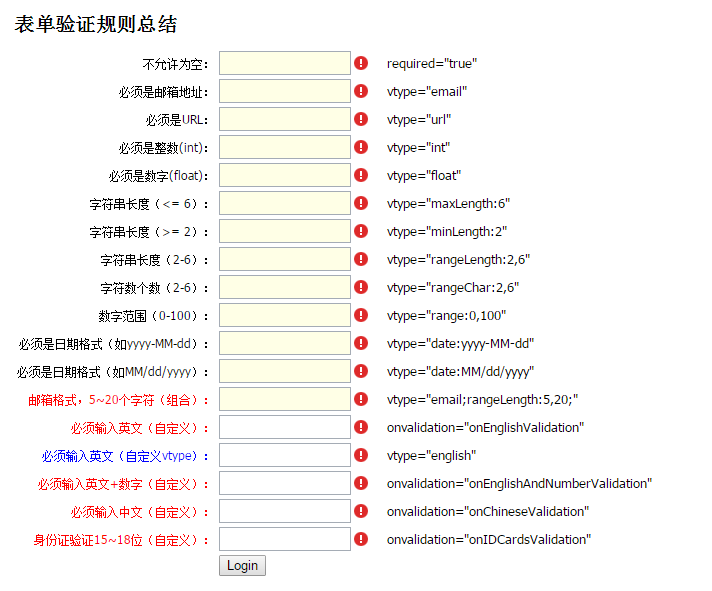
2,代码实现
| <!DOCTYPE html PUBLIC "-//W3C//DTD XHTML 1.0 Transitional//EN" "http://www.w3.org/TR/xhtml1/DTD/xhtml1-transitional.dtd"> | |
| <html xmlns="http://www.w3.org/1999/xhtml"> | |
| <head> | |
| <title>表单验证规则总结</title> | |
| <meta http-equiv="content-type" content="text/html; charset=UTF-8" /><link href="../demo.css" rel="stylesheet" type="text/css" /> | |
| <script src="../../scripts/boot.js" type="text/javascript"></script> | |
| <style type="text/css"> | |
| .td1 | |
| { | |
| text-align:right; | |
| } | |
| .td2 | |
| { | |
| padding-left:15px; | |
| font-size:13px; | |
| font-family:Tahoma; | |
| } | |
| </style> | |
| </head> | |
| <body> | |
| <h1>表单验证规则总结</h1> | |
| <div id="form1" > | |
| <table> | |
| <tr> | |
| <td class="td1">不允许为空:</td> | |
| <td> | |
| <input class="mini-textbox" required="true" /> | |
| </td> | |
| <td class="td2">required="true"</td> | |
| </tr> | |
| <tr> | |
| <td class="td1">必须是邮箱地址:</td> | |
| <td> | |
| <input class="mini-textbox" vtype="email" required="true"/> | |
| </td> | |
| <td class="td2">vtype="email"</td> | |
| </tr> | |
| <tr> | |
| <td class="td1">必须是URL:</td> | |
| <td> | |
| <input class="mini-textbox" vtype="url" required="true"/> | |
| </td> | |
| <td class="td2">vtype="url"</td> | |
| </tr> | |
| <tr> | |
| <td class="td1">必须是整数(int):</td> | |
| <td> | |
| <input class="mini-textbox" vtype="int" required="true"/> | |
| </td> | |
| <td class="td2">vtype="int"</td> | |
| </tr> | |
| <tr> | |
| <td class="td1">必须是数字(float):</td> | |
| <td> | |
| <input class="mini-textbox" vtype="float" required="true"/> | |
| </td> | |
| <td class="td2">vtype="float"</td> | |
| </tr> | |
| <tr> | |
| <td class="td1">字符串长度(<= 6):</td> | |
| <td> | |
| <input class="mini-textbox" vtype="maxLength:6" required="true"/> | |
| </td> | |
| <td class="td2">vtype="maxLength:6"</td> | |
| </tr> | |
| <tr> | |
| <td class="td1">字符串长度(>= 2):</td> | |
| <td> | |
| <input class="mini-textbox" vtype="minLength:2" required="true"/> | |
| </td> | |
| <td class="td2">vtype="minLength:2"</td> | |
| </tr> | |
| <tr> | |
| <td class="td1">字符串长度(2-6):</td> | |
| <td> | |
| <input class="mini-textbox" vtype="rangeLength:2,6" required="true"/> | |
| </td> | |
| <td class="td2">vtype="rangeLength:2,6"</td> | |
| </tr> | |
| <tr> | |
| <td class="td1">字符数个数(2-6):</td> | |
| <td> | |
| <input class="mini-textbox" vtype="rangeChar:2,6" required="true"/> | |
| </td> | |
| <td class="td2">vtype="rangeChar:2,6"</td> | |
| </tr> | |
| <tr> | |
| <td class="td1">数字范围(0-100):</td> | |
| <td> | |
| <input class="mini-textbox" vtype="range:0,100" required="true"/> | |
| </td> | |
| <td class="td2">vtype="range:0,100"</td> | |
| </tr> | |
| <tr> | |
| <td class="td1">必须是日期格式(如yyyy-MM-dd):</td> | |
| <td> | |
| <input class="mini-textbox" vtype="date:yyyy-MM-dd" required="true"/> | |
| </td> | |
| <td class="td2">vtype="date:yyyy-MM-dd"</td> | |
| </tr> | |
| <tr> | |
| <td class="td1">必须是日期格式(如MM/dd/yyyy):</td> | |
| <td> | |
| <input class="mini-textbox" vtype="date:MM/dd/yyyy" required="true"/> | |
| </td> | |
| <td class="td2">vtype="date:MM/dd/yyyy"</td> | |
| </tr> | |
| <tr> | |
| <td class="td1" style="color:Red;">邮箱格式,5~20个字符(组合):</td> | |
| <td> | |
| <input class="mini-textbox" vtype="email;rangeLength:5,20;" required="true"/> | |
| </td> | |
| <td class="td2">vtype="email;rangeLength:5,20;"</td> | |
| </tr> | |
| <tr> | |
| <td class="td1" style="color:Red;">必须输入英文(自定义):</td> | |
| <td> | |
| <input class="mini-textbox" onvalidation="onEnglishValidation" /> | |
| </td> | |
| <td class="td2">onvalidation="onEnglishValidation"</td> | |
| </tr> | |
| <tr> | |
| <td class="td1" style="color:blue;">必须输入英文(自定义vtype):</td> | |
| <td> | |
| <input class="mini-textbox" vtype="english"/> | |
| </td> | |
| <td class="td2">vtype="english"</td> | |
| </tr> | |
| <tr> | |
| <td class="td1" style="color:Red;">必须输入英文+数字(自定义):</td> | |
| <td> | |
| <input class="mini-textbox" onvalidation="onEnglishAndNumberValidation" /> | |
| </td> | |
| <td class="td2">onvalidation="onEnglishAndNumberValidation"</td> | |
| </tr> | |
| <tr> | |
| <td class="td1" style="color:Red;">必须输入中文(自定义):</td> | |
| <td> | |
| <input class="mini-textbox" onvalidation="onChineseValidation" /> | |
| </td> | |
| <td class="td2">onvalidation="onChineseValidation"</td> | |
| </tr> | |
| <tr> | |
| <td class="td1" style="color:Red;">身份证验证15~18位(自定义):</td> | |
| <td> | |
| <input class="mini-textbox" onvalidation="onIDCardsValidation" /> | |
| </td> | |
| <td class="td2">onvalidation="onIDCardsValidation"</td> | |
| </tr> | |
| <tr> | |
| <td></td> | |
| <td> | |
| <input value="Login" type="button" onclick="submitForm()" /> | |
| </td> | |
| </tr> | |
| </table> | |
| </div> | |
| <script type="text/javascript"> | |
| mini.parse(); | |
| function submitForm() { | |
| var form = new mini.Form("#form1"); | |
| form.validate(); | |
| if (form.isValid() == false) return; | |
| //提交数据 | |
| var data = form.getData(); | |
| var json = mini.encode(data); | |
| $.ajax({ | |
| url: "../data/FormService.aspx?method=SaveData", | |
| type: "post", | |
| data: { submitData: json }, | |
| success: function (text) { | |
| alert("提交成功,返回结果:" + text); | |
| } | |
| }); | |
| } | |
| //////////////////////////////////////// | |
| function onEnglishValidation(e) { | |
| if (e.isValid) { | |
| if (isEnglish(e.value) == false) { | |
| e.errorText = "必须输入英文"; | |
| e.isValid = false; | |
| } | |
| } | |
| } | |
| function onEnglishAndNumberValidation(e) { | |
| if (e.isValid) { | |
| if (isEnglishAndNumber(e.value) == false) { | |
| e.errorText = "必须输入英文+数字"; | |
| e.isValid = false; | |
| } | |
| } | |
| } | |
| function onChineseValidation(e) { | |
| if (e.isValid) { | |
| if (isChinese(e.value) == false) { | |
| e.errorText = "必须输入中文"; | |
| e.isValid = false; | |
| } | |
| } | |
| } | |
| function onIDCardsValidation(e) { | |
| if (e.isValid) { | |
| var pattern = /\d*/; | |
| if (e.value.length < 15 || e.value.length > 18 || pattern.test(e.value) == false) { | |
| e.errorText = "必须输入15~18位数字"; | |
| e.isValid = false; | |
| } | |
| } | |
| } | |
| //////////////////////////////////// | |
| /* 是否英文 */ | |
| function isEnglish(v) { | |
| var re = new RegExp("^[a-zA-Z\_]+$"); | |
| if (re.test(v)) return true; | |
| return false; | |
| } | |
| /* 是否英文+数字 */ | |
| function isEnglishAndNumber(v) { | |
| var re = new RegExp("^[0-9a-zA-Z\_]+$"); | |
| if (re.test(v)) return true; | |
| return false; | |
| } | |
| /* 是否汉字 */ | |
| function isChinese(v) { | |
| var re = new RegExp("^[\u4e00-\u9fa5]+$"); | |
| if (re.test(v)) return true; | |
| return false; | |
| } | |
| /*自定义vtype*/ | |
| mini.VTypes["englishErrorText"] = "请输入英文"; | |
| mini.VTypes["english"] = function (v) { | |
| var re = new RegExp("^[a-zA-Z\_]+$"); | |
| if (re.test(v)) return true; | |
| return false; | |
| } | |
| </script> | |
| <div class="description"> | |
| <h3>Description</h3> | |
| <p> | |
| </p> | |
| </div> | |
| </body> | |
| </html> |
miniui表单验证守则总结的更多相关文章
- MiniUI表单验证总结
原文地址:https://www.cnblogs.com/wllcs/p/5607890.html 1,页面效果图 2,代码实现 <!DOCTYPE html PUBLIC "-/ ...
- Miniui 表单验证
自定义表单验证: input输入框的表单验证可通过vtype和onvalidation事件两种方式实现 可编辑列表(例如div)的表单验证只能通过vtye来实现表单验证 (1)vtype方式: jsp ...
- MiniUI表单验证实践
学习实践: <form id="form2"> <div id="update_pas" style="width:380px&qu ...
- MiniUI官方表单验证示例
原文地址:http://www.miniui.com/docs/tutorial/validator.html 表单验证 参考示例: 验证规则 表单验证 表单验证:文本提示 表 ...
- miniui中表单验证规则总结
页面链接: http://www.miniui.com/demo/#src=form/rules.html 页面效果图: 页面代码: <!DOCTYPE html PUBLIC "-/ ...
- jQuery学习之路(8)- 表单验证插件-Validation
▓▓▓▓▓▓ 大致介绍 jQuery Validate 插件为表单提供了强大的验证功能,让客户端表单验证变得更简单,同时提供了大量的定制选项,满足应用程序各种需求.该插件捆绑了一套有用的验证方法,包括 ...
- 玩转spring boot——AOP与表单验证
AOP在大多数的情况下的应用场景是:日志和验证.至于AOP的理论知识我就不做赘述.而AOP的通知类型有好几种,今天的例子我只选一个有代表意义的“环绕通知”来演示. 一.AOP入门 修改“pom.xml ...
- form表单验证-Javascript
Form表单验证: js基础考试内容,form表单验证,正则表达式,blur事件,自动获取数组,以及css布局样式,动态清除等.完整代码如下: <!DOCTYPE html PUBLIC &qu ...
- ASP.NET MVC5+EF6+EasyUI 后台管理系统(33)-MVC 表单验证
系列目录 注:本节阅读需要有MVC 自定义验证的基础,否则比较吃力 一直以来表单的验证都是不可或缺的,微软的东西还是做得比较人性化的,从webform到MVC,都做到了双向验证 单单的用js实现的前端 ...
随机推荐
- mybatis+oracle如何批量执行多条update
接口 public void setStatus(List<Columns> columnsList); mapping xmlmapping 中使用foreach,关于标签的使用,资料非 ...
- 《Android Studio实用指南》4.27 使用演示模式
本文节选自<Android Studio实用指南> 第4章第27节 作者: 毕小朋 目前本书已上传到百度阅读, 在百度中搜索[Anroid Studio实用指南]便可以找到本书. 什么是演 ...
- Openssl base64命令
一.简介 对文件件进行base64的编码与解码 二.语法 openssl base64 [-in filename] [-out filename] 三.实例 1.二进制文件与base64编码互转 o ...
- Android中的Handler介绍
一.Handler的定义: 主要接受子线程发送的数据, 并用此数据配合主线程更新UI. 解释: 当应用程序启动时,Android首先会开启一个主线程 (也就是UI线程) , 主线程为管理界面中的UI控 ...
- turntable
1.业务流程 2.80001代码逻辑 3.80002代码逻辑 4抽奖概率计算
- centos踩坑指南之安装composer
composer是php的一个依赖管理器,那么安装composer可以快速编译php 但是在centos7以上 安装composer的有一个步骤有个小问题 对于centos6来说是 sudo mv c ...
- 视觉SLAM漫淡(二):图优化理论与g2o的使用
视觉SLAM漫谈(二):图优化理论与g2o的使用 1 前言以及回顾 各位朋友,自从上一篇<视觉SLAM漫谈>写成以来已经有一段时间了.我收到几位热心读者的邮件.有的希望我介绍一下当前 ...
- es-多文档简单查询(_mget)
1.多文档查询 (1)url:POST http://localhost:9200/_mget?pretty/ 参数: { "docs": [{ "_index" ...
- JSTL 引入
首先要明白jstl有如下版本: jstl1.0的引入方式为: <taglib uri="http://java.sun.com/jstl/core" prefix=&quo ...
- Web大文件上传(断点续传)控件-Xproer.HttpUploader6-安装教程
安装教程: IE8控件安装教程 IE9控件安装教程 Firefox控件安装教程 Chrome控件安装教程 Chrome 45+控件安装教程 相关问题: 提示Runtime Error错误 360拦 ...