
用lambda表达式树替代反射
本节重点不讲反射机制,而是讲lambda表达式树来替代反射中常用的获取属性和方法,来达到相同的效果但却比反射高效。
每个人都知道,用反射调用一个方法或者对属性执行SetValue和GetValue操作的时候都会比直接调用慢很多,这其中设计到CLR中内部的处理,不做深究。然而,我们在某些情况下又无法不使用反射,比如:在一个ORM框架中,你要将一个DataRow转化为一个对象,但你又不清楚该对象有什么属性,这时候你就需要写一个通用的泛型方法来处理,以下代码写得有点恶心,但不妨碍理解意思:
     //将DataReader转化为一个对象
     private static T GetObj<T>(SqliteDataReader reader) where T : class

        {

            T obj = new T();

            PropertyInfo[] pros = obj.GetType().GetProperties();

            foreach (PropertyInfo item in pros)

            {

                try

                {

                    Int32 Index = reader.GetOrdinal(item.Name);

                    String result = reader.GetString(Index);

                    if (typeof(String) == item.PropertyType)

                    {

                        item.SetValue(obj, result);

                        continue;

                    }

                    if (typeof(DateTime) == item.PropertyType)

                    {

                        item.SetValue(obj, Convert.ToDateTime(result));

                        continue;

                    }

                    if (typeof(Boolean) == item.PropertyType)

                    {

                        item.SetValue(obj, Convert.ToBoolean(result));

                        continue;

                    }

                    if (typeof(Int32) == item.PropertyType)

                    {

                        item.SetValue(obj, Convert.ToInt32(result));

                        continue;

                    }

                    if (typeof(Single) == item.PropertyType)

                    {

                        item.SetValue(obj, Convert.ToSingle(result));

                        continue;

                    }

                    if (typeof(Single) == item.PropertyType)

                    {

                        item.SetValue(obj, Convert.ToSingle(result));

                        continue;

                    }

                    if (typeof(Double) == item.PropertyType)

                    {

                        item.SetValue(obj, Convert.ToDouble(result));

                        continue;

                    }

                    if (typeof(Decimal) == item.PropertyType)

                    {

                        item.SetValue(obj, Convert.ToDecimal(result));

                        continue;

                    }

                    if (typeof(Byte) == item.PropertyType)

                    {

                        item.SetValue(obj, Convert.ToByte(result));

                        continue;

                    }

                }

                catch (ArgumentOutOfRangeException ex)

                {

                    continue;

                }

            }

            return obj;

        }
对于这种情况,其执行效率是特别低下的,具体多慢在下面例子会在.Net Core平台上和.Net Framework4.0运行测试案例.对于以上我举例的情况,效率上我们还可以得到提升。但对于想在运行时修改一下属性的名称或其他操作,反射还是一项特别的神器,因此在某些情况下反射还是无法避免的。
但是对于只是简单的SetValue或者GetValue,包括用反射构造函数,我们可以想一个中继的方法,那就是使用表达式树。对于不理解表达式树的,可以到微软文档查看,点击我。表达式树很容易通过对象模型表示表达式,因此强烈建议学习。查看以下代码:
        static void Main()

        {

            Dog dog = new Dog();

            PropertyInfo propertyInfo = dog.GetType().GetProperty(nameof(dog.Name));  //获取对象Dog的属性

            MethodInfo SetterMethodInfo = propertyInfo.GetSetMethod();  //获取属性Name的set方法

            ParameterExpression param = Expression.Parameter(typeof(Dog), "param");

            Expression GetPropertyValueExp = Expression.Lambda(Expression.Property(param, nameof(dog.Name)), param);

            Expression<Func<Dog, String>> GetPropertyValueLambda = (Expression<Func<Dog, String>>)GetPropertyValueExp;

            ParameterExpression paramo = Expression.Parameter(typeof(Dog), "param");

            ParameterExpression parami = Expression.Parameter(typeof(String), "newvalue");

            MethodCallExpression MethodCallSetterOfProperty = Expression.Call(paramo, SetterMethodInfo, parami);

            Expression SetPropertyValueExp = Expression.Lambda(MethodCallSetterOfProperty, paramo, parami);

            Expression<Action<Dog, String>> SetPropertyValueLambda = (Expression<Action<Dog, String>>)SetPropertyValueExp;

            //创建了属性Name的Get方法表达式和Set方法表达式,当然只是最简单的

            Func<Dog, String> Getter = GetPropertyValueLambda.Compile();

            Action<Dog, String> Setter = SetPropertyValueLambda.Compile();

            Setter?.Invoke(dog, "WLJ");  //我们现在对dog这个对象的Name属性赋值

            String dogName = Getter?.Invoke(dog);  //获取属性Name的值

            Console.WriteLine(dogName);

            Console.ReadKey();

        }

        public class Dog

        {

            public String Name { get; set; }

        }
以上代码可能很难看得懂,但只要知道我们创建了属性的Get、Set这两个方法就行,其结果最后也能输出狗的名字 WLJ,拥有ExpressionTree的好处是他有一个名为Compile()的方法,它创建一个代表表达式的代码块。现在是最有趣的部分,假设你在编译时不知道类型(在这篇文章中包含的代码我在不同的程序集上创建了一个类型)你仍然可以应用这种技术,我将对于常用的属性的set,get操作进行分装。
         /// <summary>

      /// 属性类,仿造反射中的PropertyInfo

    /// </summary>

      public class Property

    {

        private readonly PropertyGetter getter;

        private readonly PropertySetter setter;

        public String Name { get; private set; }

        public PropertyInfo Info { get; private set; }

        public Property(PropertyInfo propertyInfo)

        {

            if (propertyInfo == null)

                throw new NullReferenceException("属性不能为空");

            this.Name = propertyInfo.Name;

            this.Info = propertyInfo;

            if (this.Info.CanRead)

            {

                this.getter = new PropertyGetter(propertyInfo);

            }

            if (this.Info.CanWrite)

            {

                this.setter = new PropertySetter(propertyInfo);

            }

        }

        /// <summary>

           /// 获取对象的值

        /// </summary>

          /// <param name="instance"></param>

          /// <returns></returns>

           public Object GetValue(Object instance)

        {

            return getter?.Invoke(instance);

        }

        /// <summary>

           /// 赋值操作

        /// </summary>

          /// <param name="instance"></param>

          /// <param name="value"></param>

           public void SetValue(Object instance, Object value)

        {

            this.setter?.Invoke(instance, value);

        }

        private static readonly ConcurrentDictionary<Type, Core.Reflection.Property[]> securityCache = new ConcurrentDictionary<Type, Property[]>();

        public static Core.Reflection.Property[] GetProperties(Type type)

        {

            return securityCache.GetOrAdd(type, t => t.GetProperties().Select(p => new Property(p)).ToArray());

        }

    }

     /// <summary>

      /// 属性Get操作类

     /// </summary>

      public class PropertyGetter

     {

        private readonly Func<Object, Object> funcGet;

        public PropertyGetter(PropertyInfo propertyInfo) : this(propertyInfo?.DeclaringType, propertyInfo.Name)

        {

        }

        public PropertyGetter(Type declareType, String propertyName)

        {

            if (declareType == null)

            {

                throw new ArgumentNullException(nameof(declareType));

            }

            if (propertyName == null)

            {

                throw new ArgumentNullException(nameof(propertyName));

            }

            this.funcGet = CreateGetValueDeleagte(declareType, propertyName);

        }

        //代码核心部分

            private static Func<Object, Object> CreateGetValueDeleagte(Type declareType, String propertyName)

        {

            // (object instance) => (object)((declaringType)instance).propertyName

                var param_instance = Expression.Parameter(typeof(Object));

            var body_objToType = Expression.Convert(param_instance, declareType);

            var body_getTypeProperty = Expression.Property(body_objToType, propertyName);

            var body_return = Expression.Convert(body_getTypeProperty, typeof(Object));

            return Expression.Lambda<Func<Object, Object>>(body_return, param_instance).Compile();

        }

        public  Object Invoke(Object instance)

        {

            return this.funcGet?.Invoke(instance);

        }

    }


   public class PropertySetter

    {

        private readonly Action<Object, Object> setFunc;

        public PropertySetter(PropertyInfo property)

        {

            if (property == null)

            {

                throw new ArgumentNullException(nameof(property));

            }

            this.setFunc = CreateSetValueDelagate(property);

        }

        private static Action<Object, Object> CreateSetValueDelagate(PropertyInfo property)

        {

            // (object instance, object value) =>

            //     ((instanceType)instance).Set_XXX((propertyType)value)

            //声明方法需要的参数

            var param_instance = Expression.Parameter(typeof(Object));

            var param_value = Expression.Parameter(typeof(Object));

            var body_instance = Expression.Convert(param_instance, property.DeclaringType);

            var body_value = Expression.Convert(param_value, property.PropertyType);

            var body_call = Expression.Call(body_instance, property.GetSetMethod(), body_value);

            return Expression.Lambda<Action<Object, Object>>(body_call, param_instance, param_value).Compile();

        }

        public void Invoke(Object instance, Object value)

        {

            this.setFunc?.Invoke(instance, value);

        }

    }
在将代码应用到实例:
            Dog dog = new Dog();

            PropertyInfo propertyInfo = dog.GetType().GetProperty(nameof(dog.Name));

            //反射操作

            propertyInfo.SetValue(dog, "WLJ");

            String result = propertyInfo.GetValue(dog) as String;

            Console.WriteLine(result);

            //表达式树的操作

            Property property = new Property(propertyInfo);

            property.SetValue(dog, "WLJ2");

            String result2 = property.GetValue(dog) as String;

            Console.WriteLine(result2);
发现其实现的目的与反射一致,但效率却有明显的提高。
以下测试以下他们两之间的效率。测试代码如下:
       Student student = new Student();

            PropertyInfo propertyInfo = student.GetType().GetProperty(nameof(student.Name));

            Property ExpProperty = new Property(propertyInfo);

            Int32 loopCount = ;

            CodeTimer.Initialize();  //测试环境初始化

            //下面该方法个执行1000000次

            CodeTimer.Time("基础反射", loopCount, () => {

                propertyInfo.SetValue(student, "Fode",null);

            });

            CodeTimer.Time("lambda表达式树", loopCount, () => {

                ExpProperty.SetValue(student, "Fode");

            });

            CodeTimer.Time("直接赋值", loopCount, () => {

                student.Name = "Fode";

            });

            Console.ReadKey();
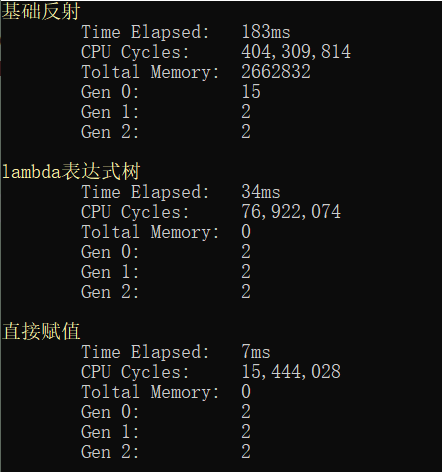
其.Net4.0环境下运行结果如下:
.Net Core环境下运行结果:
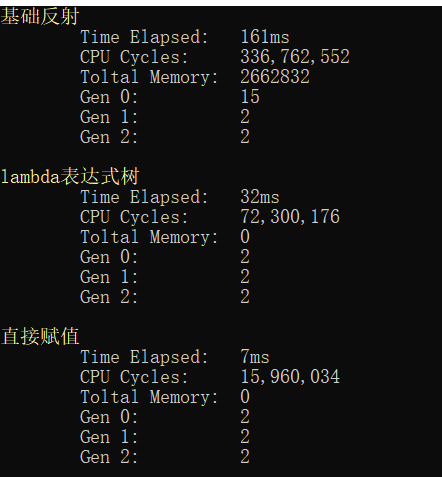
从以上结果可以知道,迭代同样的次数反射需要183ms,而用表达式只要34ms,直接赋值需要7ms,在效率上,使用表达式这种方法有显著的提高,您可以看到使用此技术可以完全避免使用反射时的性能损失。反射之所以效率有点低主要取决于其加载的时候时在运行期下,而表达式则在编译期,下篇有空将会介绍用Emit技术优化反射,会比表达式略快一点。
注:对于常用对象的属性,最好将其缓存起来,这样效率会更高。。
用lambda表达式树替代反射的更多相关文章
- 程序猿修仙之路--数据结构之你是否真的懂数组? c#socket TCP同步网络通信 用lambda表达式树替代反射 ASP.NET MVC如何做一个简单的非法登录拦截
程序猿修仙之路--数据结构之你是否真的懂数组? 数据结构 但凡IT江湖侠士,算法与数据结构为必修之课.早有前辈已经明确指出:程序=算法+数据结构 .要想在之后的江湖历练中通关,数据结构必不可少. ...
- C#中分别对委托、匿名方法、Lambda表达式、Lambda表达式树以及反射执行同一方法的过程进行比较。
using System; using System.Collections.Generic; using System.Linq; using System.Text; using System.T ...
- C# Lambda表达式详解,及Lambda表达式树的创建
最近由于项目需要,刚刚学完了Action委托和Func<T>委托,发现学完了委托就必须学习lambda表达式,委托和Lambda表达式联合起来,才能充分的体现委托的便利.才能使代码更加简介 ...
- 定义通用的可通过lambda表达式树来获取属性信息
我们一般获取某个类型或对象的属性信息均采用以下几种方法: 一.通过类型来获取属性信息 var p= typeof(People).GetProperty("Age");//获取指定 ...
- EntityFramework动态多条件查询与Lambda表达式树
在常规的信息系统中, 我们有需要动态多条件查询的情况, 例如UI上有多个选择项可供用户选择多条件查询数据. 那么在.net平台Entity Framework下, 我们用Lambd ...
- 动态拼接lambda表达式树
前言 最近在优化同事写的代码(我们的框架用的是dapperLambda),其中有一个这样很普通的场景——界面上提供了一些查询条件框供用户来进行过滤数据.由于dapperLambda按条件查询时是传入表 ...
- 将简单的lambda表达式树转为对应的sqlwhere条件
1.Lambda的介绍 园中已经有很多关于lambda的介绍了.简单来讲就是vs编译器给我带来的语法糖,本质来讲还是匿名函数.在开发中,lambda给我们带来了很多的简便.关于lambda的演变过程可 ...
- Lambda表达式树解析(下)
概述 前面章节,总结了Lambda树的构建,那么怎么解析Lambda表达式树那?Lambda表达式是一种委托构造而成,如果能够清晰的解析Lambda表达式树,那么就能够理解Lambda表达式要传递的正 ...
- Lambda表达式树构建(上)
概述 Lambda是C#常用的语句,采用委托等方式,来封装真实的代码块.Lambda其实就是语法糖,是一个匿名函数,是一种高效的类似于函数式编程的表达式,Lambda简化了开发中需要编写的代码量.它可 ...
随机推荐
- Git使用教程(转载)
Git使用教程 一:Git是什么? Git是目前世界上最先进的分布式版本控制系统. 二:SVN与Git的最主要的区别? SVN是集中式版本控制系统,版本库是集中放在中央服务器的,而干活的时候,用的都是 ...
- Apache+Tomcat负载均衡问题集锦
之前在windows 环境下搭建了下apache+tomcat负载均衡(不会的能够參考之前的文档,文档对于linux和windows都适用),一帆风顺.没有出现不论什么问题.今天尝试着在linux下搭 ...
- kafka生产者、消费者java示例
1. 生产者 import java.util.Properties; import kafka.javaapi.producer.Producer; import kafka.producer.Ke ...
- 在CMD下如何搜索某个名字的文件?
命令如下: dir FileYouWantToFind.txt /a /s 效果如图: 偷看Kun总操作学来的 ^_^
- 解决Vue用Nginx做web服务器报错favicon.ico 404 (Not Found)的问题
有多种解决方案 1.vue静态资源 vue中为网页增加favicon的最便捷的方式为使用link标签 <link rel="shortcut icon" type=" ...
- http://jingyan.baidu.com/article/7f41ecec1b7a2e593d095ce6.html
http://jingyan.baidu.com/article/7f41ecec1b7a2e593d095ce6.html http://www.linuxeden.com/html/softuse ...
- java中 HashMap和Hashtable,list、set和map 的区别
摘自: http://blog.chinaunix.net/uid-7374279-id-2057584.html HashMap是Hashtable的轻量级实现(非线程安全的实现),他们都完成了Ma ...
- PlSQL Oracle 中的 对应 SQL server 中的 IsNull(Expr1,Expr2)
NVL(Expr1,Expr2)如果Expr1为NULL,返回Expr2的值,否则返回Expr1的值NVL2(Expr1,Expr2,Expr3)如果Expr1为NULL,返回Expr2的值,否则返回 ...
- 【云计算】Docker容器不能修改hosts文件怎么解决?
参考资料: http://bbs.csdn.net/topics/390871429 http://tieba.baidu.com/p/4295556808 http://stackoverflow. ...
- Thinkphp错误-phpMyAdmin 尝试连接到 MySQL 服务器,但服务器拒绝连
phpMyAdmin 尝试连接到 MySQL 服务器,但服务器拒绝连接.您应该检查配置文件中的主机.用户名和密码,并确认这些信息与 MySQL 服务器管理员所给出的信息一致. 原因有可能是因为修改了m ...