
/etc/profile、~/.bash_profile等几个文件的执行过程
分类: LINUX
2012-04-26 17:44:55

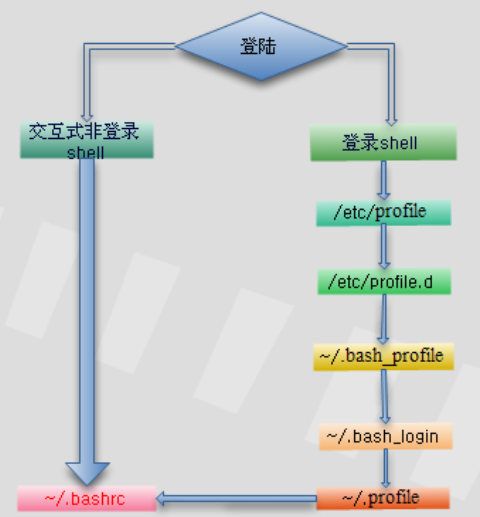
关于登录linux时,/etc/profile、~/.bash_profile等几个文件的执行过程。
在登录Linux时要执行文件的过程如下:
在 刚登录Linux时,首先启动 /etc/profile 文件,然后再启动用户目录下的 ~/.bash_profile、 ~/.bash_login或 ~/.profile文件中的其中一个,执行的顺序为:~/.bash_profile、 ~/.bash_login、 ~/.profile。如果 ~/.bash_profile文件存在的话,一般还会执行 ~/.bashrc文件。因为在 ~/.bash_profile文件中一般会有下面的代码:
if [ -f ~/.bashrc ] ; then
. ./bashrc
fi
~/.bashrc中,一般还会有以下代码:
if [ -f /etc/bashrc ] ; then
. /etc/bashrc
fi
所以,~/.bashrc会调用 /etc/bashrc文件。最后,在退出shell时,还会执行 ~/.bash_logout文件。
执 行顺序为:/etc/profile -> (~/.bash_profile | ~/.bash_login | ~/.profile) -> ~/.bashrc ->/etc/bashrc -> ~/.bash_logout
关于各个文件的作用域,在网上找到了以下说明:
(1)/etc/profile: 此文件为系统的每个用户设置环境信息,当用户第一次登录时,该文件被执行. 并从/etc/profile.d目录的配置文件中搜集shell的设置。
(2)/etc/bashrc: 为每一个运行bash shell的用户执行此文件.当bash shell被打开时,该文件被读取。
(3)~/.bash_profile: 每个用户都可使用该文件输入专用于自己使用的shell信息,当用户登录时,该文件仅仅执行一次!默认情况下,他设置一些环境变量,执行用户的.bashrc文件。
(4)~/.bashrc: 该文件包含专用于你的bash shell的bash信息,当登录时以及每次打开新的shell时,该该文件被读取。
(5)~/.bash_logout: 当每次退出系统(退出bash shell)时,执行该文件. 另外,/etc/profile中设定的变量(全局)的可以作用于任何用户,而~/.bashrc等中设定的变量(局部)只能继承/etc /profile中的变量,他们是"父子"关系。
(6)~/.bash_profile 是交互式、login 方式进入 bash 运行的~/.bashrc 是交互式 non-login 方式进入 bash 运行的通常二者设置大致相同,所以通常前者会调用后者。
我 做了个实验,在/etc/profile,/etc/bashrc,~/.bashrc和~/.bash_profile文件的最后追加同一个变量分别赋 予不同的值,实验结果表明变量最后的值为~/.bash_profile里的值。(4个文件都没有修改其他设置,都是安装系统后的默认值。)
再有就是4个文件都追加一个值到同一个文件,开机后查看该文件内容的顺序为:
/etc/profile
~/.bash_profile
~/.bashrc
/etc/bashrc
----------------------
其他文章:
redhat bash 初始化设置
先说明三个概念
登录shell
正常登录程序启动的shell.既登录成功后紧接着给登录用户启动的shell.
非登录交互式shell
这个shell的工作方式是交互式的,等用户输入,然后执行,再等用户输入。显然登录shell就是一个交互式shell。
如下,我们可获得一个交互式非登录shell:
[root@localhost ~]# bash
[root@localhost ~]# pwd
/root
非交互式shell
为运行一个shell脚本启动的shell.
以FC5的bash为例,跟shell环境配置相关的文件以下几个,
/etc/profile
/etc/profile.d/*.sh
/etc/bashrc
~/.bash_profile
~/.bashrc
有时你会发现定义一个别名,有时好像在任意一个文件里定义都可以起作用,有时好像又不起作用,那是为什么呢?这些配置文件各自互责了什么工作?相互的关系是怎么样的?跟前面介绍的不同种类的shell的关系是如何的呢?下面对每个文件单独进行说明。
/etc/profile
Linux规定,当启动一个登录shell会执行这个脚本. 测试过程如下:
把LIST的定义加到/etc/profile文件的未尾并保存. 如下:
alias LIST='ls -l'
把所有其它shell配置文件或目录改名,这样系统就找不到那些shell脚本了,不会执行,重而避免其它配置文件的干扰。如下:
[root@localhost ~]# mkdir /etc/profile.bak
[root@localhost ~]# mv /etc/profile.d/* -t /etc/profile.bak/
[root@localhost ~]# mv /etc/bashrc /etc/bashrc.bak
[root@localhost ~]# mv ~/.bash_profile ~/.bash_profile.bak
[root@localhost ~]# mv ~/.bashrc ~/.bashrc.bak
交互式shell,并测试过程如下:
[root@localhost ~]# bash
bash-3.1# LIST
bash: LIST: command not found
bash-3.1# exit
exit
[root@localhost ~]#
显然启动一个普通交互式shell的时候, shell配置文件/etc/profile不起作用
非交互式shell, 测试过程如下:
为了验证先写一个测试脚本,如下:
#!/bin/bash
LIST
把这个脚本保存为t.sh并加下可执行权限:
[root@localhost ~]# chmod a x t.sh
[root@localhost ~]# ./t.sh
./t.sh: line 2: LIST: command not found
[root@localhost ~]#
显然启动一个非交互式shell时,shell配置文件/etc/profile不起作用
登录shell,并测试过程如下:
Last login: Wed Nov 19 10:22:23 2008 from 192.168.0.97
-bash-3.1# LIST
total 160
drwxr-xr-x 2 root root 4096 Aug 14 12:24 Desktop
-rw-r--r-- 1 root root 3211 Nov 6 10:15 Session.vim
drwxr-xr-x 2 root root 4096 Nov 10 10:58 a
-rw-r--r-- 1 root root 126 Nov 12 12:42 a.txt
-rw-r--r-- 1 root root 261 Nov 6 15:23 a.zip
-rw-r--r-- 1 root root 157 Nov 6 15:23 aa.zip
-rw------- 1 root root 1054 Aug 14 11:59 anaconda-ks.cfg
-rw-r--r-- 1 root root 691 Nov 18 10:09 b.txt
-rw-r--r-- 1 root root 31671 Aug 14 11:58 install.log
-rw-r--r-- 1 root root 4155 Aug 14 11:50 install.log.syslog
-rw------- 1 root root 20310 Nov 17 13:51 mbox
drwxr-xr-x 2 root root 4096 Nov 17 17:22 shell
-rwxrwxrwx 1 root root 65 Nov 19 10:11 t.sh
drwxr-xr-x 14 root root 4096 Nov 5 15:34 test
-bash-3.1#
显然启动一个登录shell时,shell配置文件/etc/profile会起作用
~/.bash_profile
这个文件跟/etc/profile起作用的时机是一样的,都是只在启动一个登录shell的时候才会被source,跟/etc/profile不同的是,这里的配置只影响单个用户,不对其它用户产生影响。
/etc/bashrc与~/.bashrc
从字面上我们可以理解这两个文件应该跟根bash相关,即 只要你启动了一个bash类型的shell这两文件的配置就将发生作用。如果你的shell是sh、csh或是ksh这两个文件将不起作用。按前面的介 绍,可能很会猜测/etc/bashrc与~/.bashrc的关系跟/etc/profile与~/.bash_profile的关系一样,一个是全局 的,一个是针对单个用户的。从结果上看确实是这样的,但实现过程却是不一样的。启动一个bash时直接source ~/.bashrc, 而这~/.bashrc里面会source /etc/bashrc。
/etc/profile.d/*.sh
在fc5下这里的脚本会在/etc/profile里或是~/.bashrc里同时source, 所以这里的设置都是一些不同分类的全局环境设置。
总结在FC5下一个登录bash的环境初始全过程是:
/etc/profile
|
--/etc/profile.d/*
~/.bash_profile
|
--~/.bashrc
|
--/etc/bashrc
|
--/etc/profile.d/*
一个普通交互式bash的初始全过程是:
~/.bashrc
|
--/etc/bashrc
|
--/etc/profile.d/*
对于非交互式bash的初始全过程是:
不重新source 任何新的shell脚本,只继承当前shell的设置.
/etc/profile、~/.bash_profile等几个文件的执行过程的更多相关文章
- linux下系统启动时,几个配置文件 /etc/profile、~/.bash_profile 等几个文件的执行过程,先后顺序
1. 在登录Linux时要执行文件的过程如下: 在刚登录Linux时, 首先启动 /etc/profile 文件, 然后再启动用户目录下的 ~/.bash_profile. ~/.bash_login ...
- 【转】Linux 之 /etc/profile、~/.bash_profile 等几个文件的执行过程
原文网址:http://blog.csdn.net/ithomer/article/details/6322892 在登录Linux时要执行文件的过程如下:在刚登录Linux时,首先启动 /etc/p ...
- linux环境变量设置 以及 source命令 Linux 之 /etc/profile、~/.bash_profile 等几个文件的执行过程 Linux 设置环境变量
定制环境变量 环境变量是和Shell紧密相关的,用户登录系统后就启动了一个Shell.对于Linux来说一般是bash,但也可以重新设定或切换到其它的Shell.环境变量文件:/etc/profil ...
- /etc/profile ~/.bash_profile ~/.bashrc 等文件的执行过程 和 区别
/etc/profile :系统的所有用户共享 ~/.bash_profile:仅针对当前用户有效 我的电脑只用于开发,因此全部配置/etc/profile 参考链接: https://blog.cs ...
- 一个 java 文件的执行过程详解
平时我们都使用 idea.eclipse 等软件来编写代码,在编写完之后直接点击运行就可以启动程序了,那么这个过程是怎么样的? 总体过程 我们编写的 java 文件在由编译器编译后会生成对应的 cla ...
- linux下 /etc/profile、~/.bash_profile ~/.profile的执行过程
关于登录linux时,/etc/profile.~/.bash_profile等几个文件的执行过程. 在登录Linux时要执行文件的过程如下: 在刚登录Linux时,首先启动 /etc/profile ...
- [转] linux下 /etc/profile、~/.bash_profile ~/.profile的执行过程
分类: linux 2015-03-13 16:24 1572人阅读 评论(0) 收藏 举报linuxprofile关于登录linux时,/etc/profile.~/.bash_profile等几个 ...
- 【总结】/etc/rc.d/rc.local 与 /etc/profile .bash_profile .bashrc 文件执行顺序
登陆shell与交互式非登陆shell的区别 登录shell 所谓登录shell,指的是当用户登录系统时所取的那个 shell.登录shell属于交互式shell. 登录shell将查找4个不同的启动 ...
- Linux系统profile、bashrc、bash_profile等环境设置文件的使用
一.前言 关于bash的环境设置文件,分为系统设置和个人设置,一般来说建议用户直接修改个人的设置. 本文测试环境为:centos6.5. 二.系统设置值 1. /etc/sysconfig/i18n ...
随机推荐
- Java基础--NIO
NIO库在JDK1.4中引入,它以标准Java代码提供了高速的,面向块的IO,弥补了之前同步IO的不足. 缓冲区Buffer Buffers是一个对象,包含了一些要写入或读出的数据.在面向流的IO模型 ...
- RTMP(实时信息传输协议)详解
RTMP协议是Real Time Message Protocol(实时信息传输协议)的缩写,它是由Adobe公司提出的一种应用层的协议,用来解决多媒体数据传输流的多路复用(Multiplexing) ...
- 老师金角大王的BLOG
首页: http://www.cnblogs.com/alex3714/ python3专题: http://www.cnblogs.com/alex3714/category/770733.html
- 缺乏libaio包导致报The server quit without updating PID file
背景: 直接解压安装mysql5.7.18,解压mysql-5.7.18-linux-glibc2.5-x86_64.tar.gz,直接拷贝另外一台数据库的数据目录,启动mysql过程无日志输出,报E ...
- FBString
folly/FBString.h fbstring is a drop-in replacement for std::string. The main benefit of fbstring is ...
- 脱壳系列(一) - CrypKeySDK 壳
程序: 运行 用 PEiD 载入程序 PEid 显示找不到相关的壳 脱壳: 用 OD 载入程序 这个是壳的入口地址 因为代码段的入口地址为 00401000 这三个是壳增加的区段 按 F8 往下走程序 ...
- URL传参时中文参数乱码的解决方法
URL传参时,中文参数乱码的解决: 今天在工作中遇到了这样的一个问题,在页面之间跳转时,我将中文的参数放入到url中,使用location进行跳转传参,但是发现接收到的参数值是乱码.我的代码是这样写的 ...
- Tkinter Entry
Python - Tkinter输入(Entry): 用于接受用户Entry小窗口部件单行文本字符串. 用于接受用户Entry小窗口部件单行文本字符串. 如果你想显示多行文本可以编辑,那么你应该使 ...
- 爬虫之 图片懒加载, selenium , phantomJs, 谷歌无头浏览器
一.图片懒加载 懒加载 : JS 代码 是页面自然滚动 window.scrollTo(0,document.body.scrollHeight) (重点) bro.execute_ ...
- 正则表达式RE与扩展正则表达式ERE——grep与egrep
grep 正则表达式规则: ^ 行首定位符,表示从行首开始进行模式匹配 . 一个非换行符的字符 [ ] 匹配属于此集合的任意一个字符 [^ ] 匹配不属于此集合的任意一个字符 [a-z] (其指定的集 ...