
新手教程之使用Xib自定义UITableViewCell
新手教程之使用Xib自定义UITableViewCell
前言
首先:什么是UITableView?看图
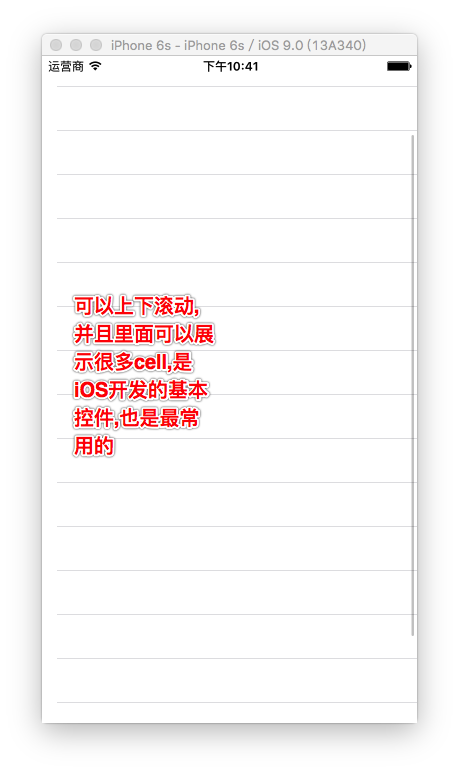
其次:什么是cell?

然后:为什么要自定cell,UITableView不是自带的有cell么?
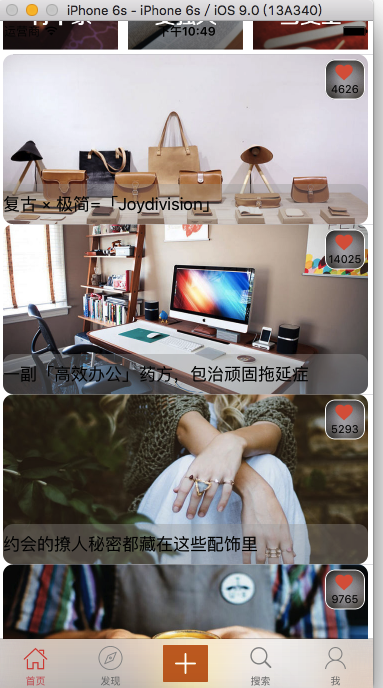
因为在日常开发中,系统自带的cell满足不了客户和开发人员的需求(并且每个cell中的内容\大小\样式相同),我们就需要自定义cell来实现更加优化的功能.比如下面这种
最后:怎么自定义cell?
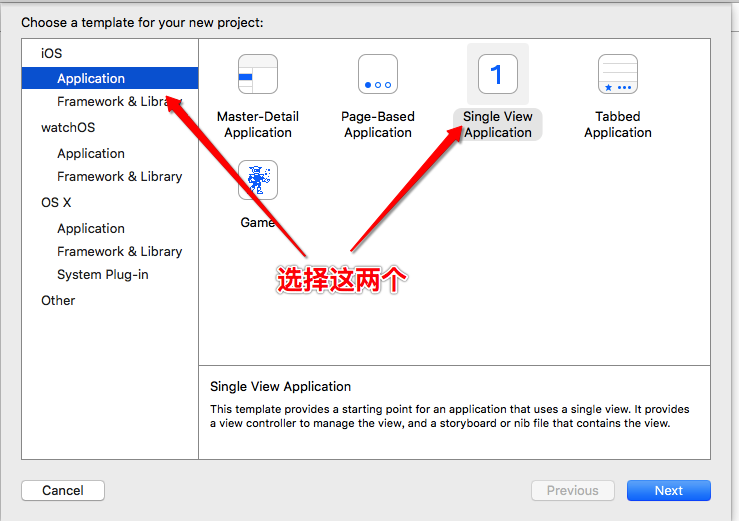
1.创建一个新的项目,在storyboard中拖入两个imageView,两个label
2.在ViewController里面创建UITableView
 //

 //  ViewController.m

 //  Xib自定义UITableViewCell

 //

 //  Created by admin on 16/5/16.

 //  Copyright © 2016年 KXZDJ. All rights reserved.

 //

 #import "ViewController.h"

 @interface ViewController ()<UITableViewDelegate,UITableViewDataSource>

 @property (nonatomic, strong) UITableView *tableView;

 @end

 @implementation ViewController

 - (void)viewDidLoad {

     [super viewDidLoad];

     // Do any additional setup after loading the view, typically from a nib.

     [self config];

 }

 - (void)didReceiveMemoryWarning {

     [super didReceiveMemoryWarning];

     // Dispose of any resources that can be recreated.

 }

 -(void)config {

     //初始化tableView,并给tableView设置frame以及样式

     self.tableView = [[UITableView alloc] initWithFrame:[UIScreen mainScreen].bounds style:UITableViewStylePlain];

     //遵守代理和数据源(因为要用到代理和数据源方法)

     self.tableView.delegate = self;

     self.tableView.dataSource = self;

     //添加到ViewController的视图中

     [self.view addSubview:self.tableView];

 }

 /**

  *  返回多少个组(默认是1组,如果只有一组可以不实现这个方法)

  *

  *  @param tableView 当前tableView

  *

  *  @return 组的个数

  */

 -(NSInteger)numberOfSectionsInTableView:(UITableView *)tableView {

     return ;

 }

 /**

  *  每一组返回多少行

  *

  *  @param tableView 当前tableView

  *  @param section   当前组

  *

  *  @return 行的个数

  */

 -(NSInteger)tableView:(UITableView *)tableView numberOfRowsInSection:(NSInteger)section {

     return ;

 }

 -(UITableViewCell *)tableView:(UITableView *)tableView cellForRowAtIndexPath:(NSIndexPath *)indexPath {

     //指定cell的重用标识符

     static NSString *reuseIdentifier = @"CELL";

     //去缓存池找名叫reuseIdentifier的cell

     UITableViewCell *cell = [tableView dequeueReusableCellWithIdentifier:reuseIdentifier];

     //如果缓存池中没有,那么创建一个新的cell

     if (!cell) {

         cell = [[UITableViewCell alloc] initWithStyle:UITableViewCellStyleDefault reuseIdentifier:reuseIdentifier];

     }

     //返回当前cell

     return cell;

 }
系统自带的UITableView
运行效果
4.Xib自定义cell
首先我们要创建一个xib文件,有两种创建方式:
直接上图
第一种:

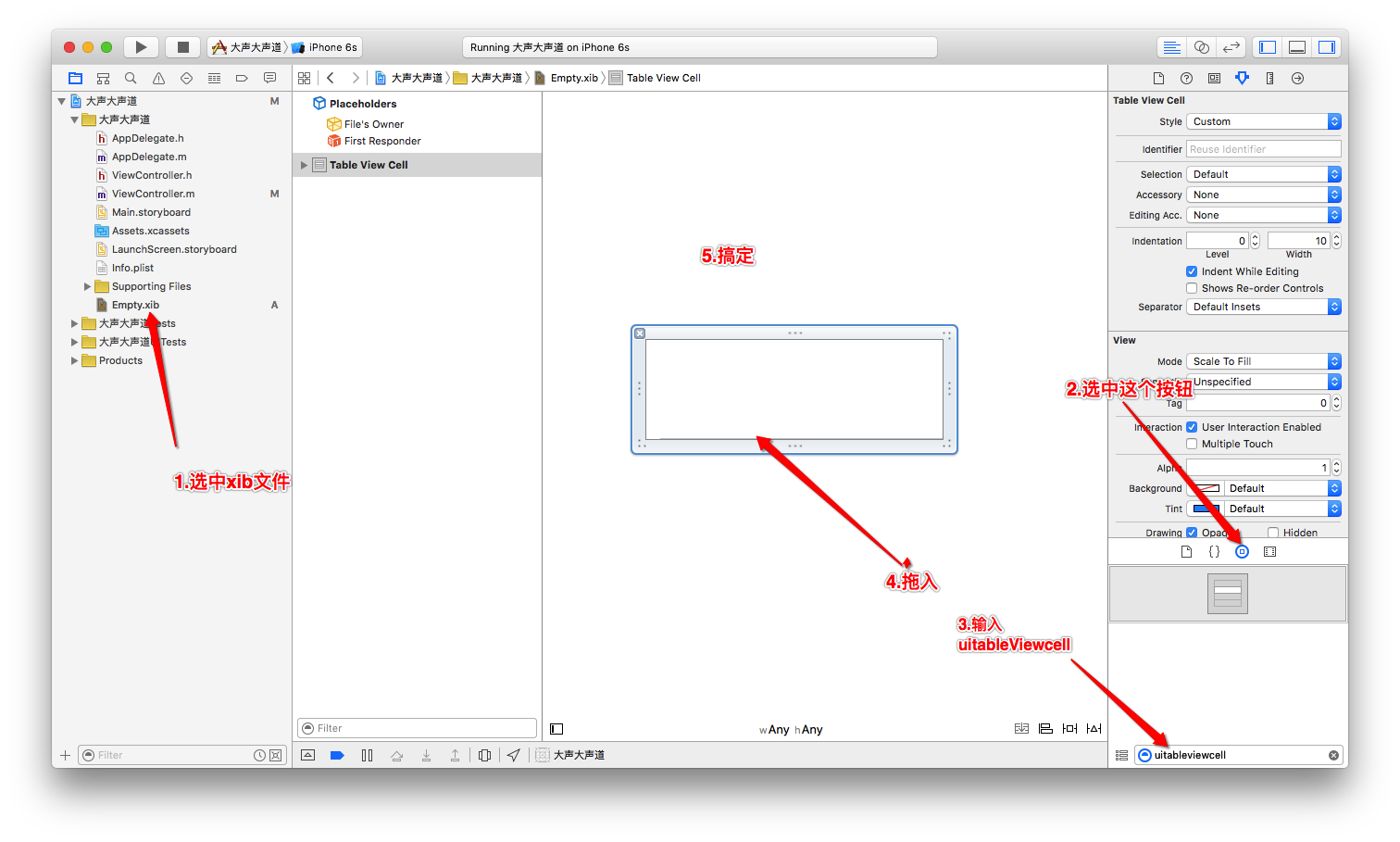
第二种:
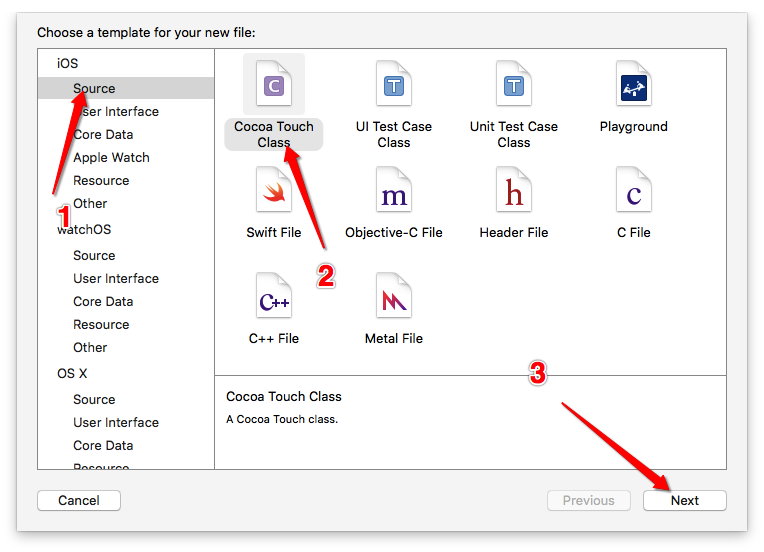
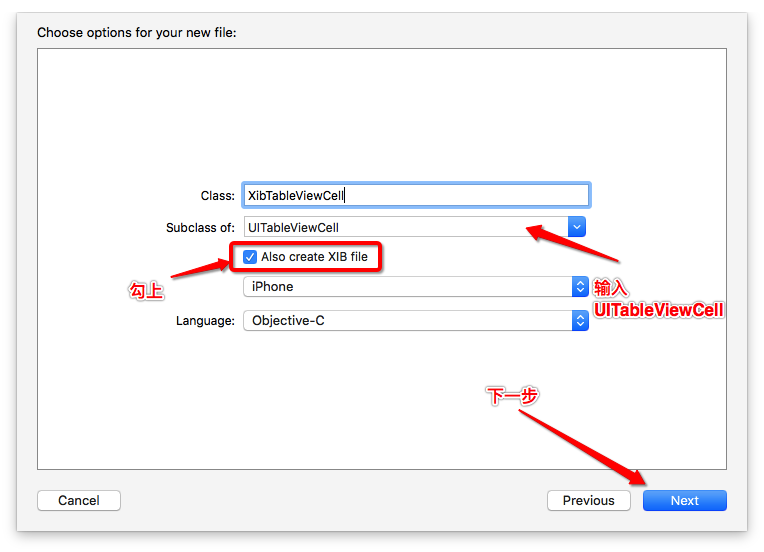
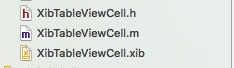
第二种在创建类的时候也同时创建了xib,比较方便,要是用第一种方式创建,还得关联类

下面就要拖控件到Xib的cell中并给控件设置布局(约束)了
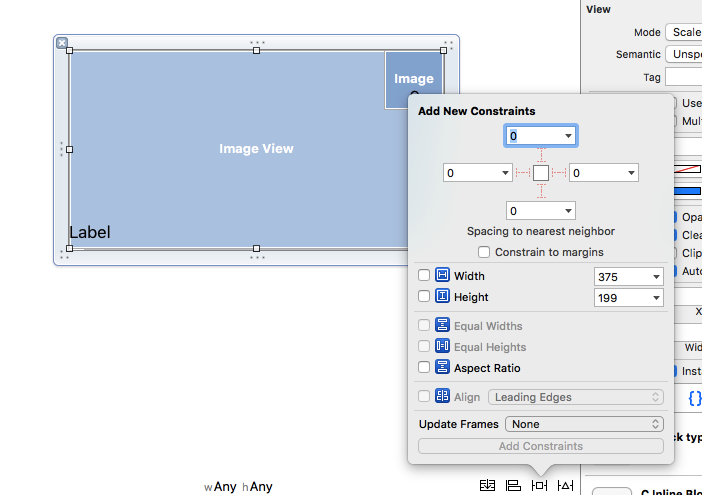
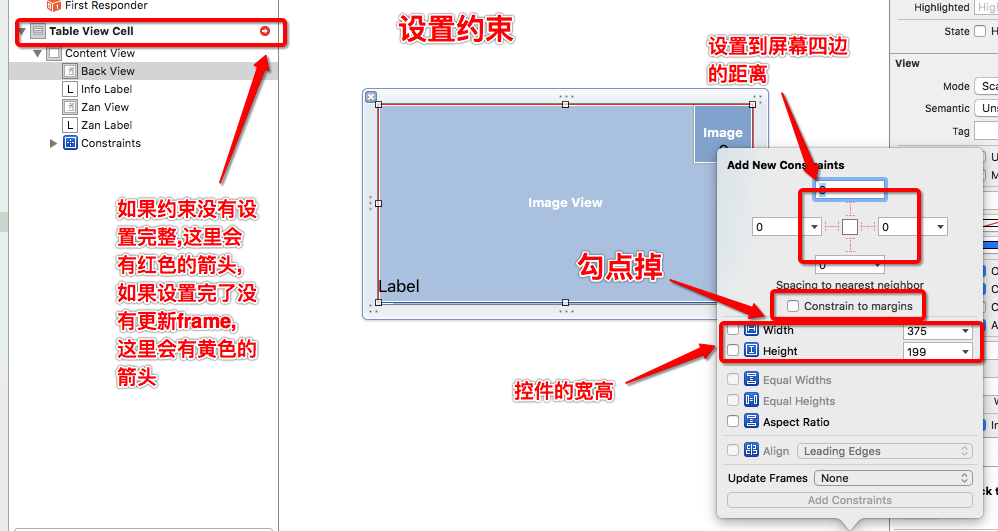
下面进入代码阶段
5.获取Xib自定义的cell
代码:(XibTableViewCell.h)
 //

 //  XibTableViewCell.h

 //  Xib自定义UITableViewCell

 //

 //  Created by admin on 16/5/16.

 //  Copyright © 2016年 KXZDJ. All rights reserved.

 //

 #import <UIKit/UIKit.h>

 @interface XibTableViewCell : UITableViewCell

 //加载xib的方法(自己写的,不是系统自带)

 +(instancetype)xibTableViewCell;

 @end
(XibTableViewCell.m)
 //

 //  XibTableViewCell.m

 //  Xib自定义UITableViewCell

 //

 //  Created by admin on 16/5/16.

 //  Copyright © 2016年 KXZDJ. All rights reserved.

 //

 #import "XibTableViewCell.h"

 @implementation XibTableViewCell

 //实现类方法

 +(instancetype)xibTableViewCell {

     //在类方法中加载xib文件,注意:loadNibNamed:owner:options:这个方法返回的是NSArray,所以在后面加上firstObject或者lastObject或者[0]都可以;因为我们的Xib文件中,只有一个cell

     return [[[NSBundle mainBundle] loadNibNamed:@"XibTableViewCell" owner:nil options:nil] lastObject];

 }

 - (void)awakeFromNib {

     // Initialization code

 }

 - (void)setSelected:(BOOL)selected animated:(BOOL)animated {

     [super setSelected:selected animated:animated];

     // Configure the view for the selected state

 }

 @end
6.把xib文件加载到系统的UITableView中替换系统自带的cell
这一步必须在
-(UITableViewCell *)tableView:(UITableView *)tableView cellForRowAtIndexPath:(NSIndexPath *)indexPath方法中进行,或者是封装在自己定义的类中,不过就算封装了,也要在这个方法中调用.
6.1给控件拖线关联到类中,方便调用控件

6.2代码:
 //

 //  ViewController.m

 //  Xib自定义UITableViewCell

 //

 //  Created by admin on 16/5/16.

 //  Copyright © 2016年 KXZDJ. All rights reserved.

 //

 #import "ViewController.h"

 //导入头文件

 #import "XibTableViewCell.h"

 @interface ViewController ()<UITableViewDelegate,UITableViewDataSource>

 @property (nonatomic, strong) UITableView *tableView;

 @end

 @implementation ViewController

 - (void)viewDidLoad {

     [super viewDidLoad];

     // Do any additional setup after loading the view, typically from a nib.

     [self config];

 }

 - (void)didReceiveMemoryWarning {

     [super didReceiveMemoryWarning];

     // Dispose of any resources that can be recreated.

 }

 -(void)config {

     //初始化tableView,并给tableView设置frame以及样式

     self.tableView = [[UITableView alloc] initWithFrame:[UIScreen mainScreen].bounds style:UITableViewStylePlain];

     //遵守代理和数据源(因为要用到代理和数据源方法)

     self.tableView.delegate = self;

     self.tableView.dataSource = self;

     //添加到ViewController的视图中

     [self.view addSubview:self.tableView];

 }

 /**

  *  返回多少个组(默认是1组,如果只有一组可以不实现这个方法)

  *

  *  @param tableView 当前tableView

  *

  *  @return 组的个数

  */

 -(NSInteger)numberOfSectionsInTableView:(UITableView *)tableView {

     return ;

 }

 /**

  *  每一组返回多少行

  *

  *  @param tableView 当前tableView

  *  @param section   当前组

  *

  *  @return 行的个数

  */

 -(NSInteger)tableView:(UITableView *)tableView numberOfRowsInSection:(NSInteger)section {

     return ;

 }

 -(UITableViewCell *)tableView:(UITableView *)tableView cellForRowAtIndexPath:(NSIndexPath *)indexPath {

     //指定cell的重用标识符

     static NSString *reuseIdentifier = @"CELL";

     //去缓存池找名叫reuseIdentifier的cell

     //这里换成自己定义的cell

     XibTableViewCell *cell = [tableView dequeueReusableCellWithIdentifier:reuseIdentifier];

     //如果缓存池中没有,那么创建一个新的cell

     if (!cell) {

         //这里换成自己定义的cell,并调用类方法加载xib文件

         cell = [XibTableViewCell xibTableViewCell];

     }

     //给cell赋值

     cell.backView.image = [UIImage imageNamed:@"223733vuf3mhajhd04hdh5"];

     cell.infoLabel.text = @"金三胖真帅";

     cell.infoLabel.textColor = [UIColor redColor];

     cell.zanView.image = [UIImage imageNamed:@"103112778vn00czp59p6w7"];

     cell.zanLabel.text = @"";

     cell.zanLabel.textColor = [UIColor redColor];

     //返回当前cell

     return cell;

 }

 /**

  *  返回cell的行高

  *

  *  @param tableView 当前tableView

  *  @param indexPath

  *

  *  @return cell的行高

  */

 -(CGFloat)tableView:(UITableView *)tableView heightForRowAtIndexPath:(NSIndexPath *)indexPath {

     return ;

 }

 @end
运行效果

总结:到此Xib自定义UITableViewCell就告一段落,如有错误,烦请各位指正,希望能帮到大家,不是故意黑金三胖.
新手教程之使用Xib自定义UITableViewCell的更多相关文章
- iOS开发UI篇—使用xib自定义UItableviewcell实现一个简单的团购应用界面布局
iOS开发UI篇—使用xib自定义UItableviewcell实现一个简单的团购应用界面布局 一.项目文件结构和plist文件 二.实现效果 三.代码示例 1.没有使用配套的类,而是直接使用xib文 ...
- 【转】iOS 通过xib自定义UITableViewCell【原创】
原文网址:http://blog.it985.com/9683.html 在使用tableView的时候,如果cell的布局过于复杂,通过代码搭建的话不够直观.并且要不停的调整位置,字体什么的.这时, ...
- 通过xib自定义UITableViewCell
通过xib自定义UITableViewCell 一.新建iOS Application工程,选择Single View Application,不要选中Use Storyboard.假设指定的是pro ...
- 用xib自定义UITableViewCell的注意事项——重用
问题的提出: 有时候我们经常需要自定义tableView的cell,当cell里面的布局较为复杂时往往舍弃纯代码的方式而改用xib的方式进行自定义.当我们用纯代码的方式布局cell时,往往会在cell ...
- 【swift学习笔记】三.使用xib自定义UITableViewCell
使用xib自定义tableviewCell看一下效果图 1.自定义列 新建一个xib文件 carTblCell,拖放一个UITableViewCell,再拖放一个图片和一个文本框到tableviewc ...
- 用xib自定义UITableViewCell
1.文件结构: 2. 先创建一个xib文件,删除原有的view,添加一个TableViewCell控件. 3.ModelTableViewController.m文件 #import "Mo ...
- IOS学习之路七(通过xib自定义UITableViewCell)
一.新建iOS Application工程,选择Single View Application,不要选中Use Storyboard.假设指定的是product name是:UITableViewCe ...
- 【转】自定义UITableViewCell(registerNib: 与 registerClass: 的区别)
自定义UITableViewCell大致有两类方法: 使用nib 1.xib中指定cell的Class为自定义cell类型(注意不是设置File's Owner的class) 2.调用 tableVi ...
- ios开发UI篇—使用纯代码自定义UItableviewcell实现一个简单的微博界面布局
本文转自 :http://www.cnblogs.com/wendingding/p/3761730.html ios开发UI篇—使用纯代码自定义UItableviewcell实现一个简单的微博界面布 ...
随机推荐
- UVaLive 6697 Homework Evaluation (DP)
题意:给出一个长字符串,再给一个短字符串,进行匹配,如果第i个恰好匹配,则 +8,:如果不匹配,可以给长或短字符串添加-,先后匹配,这样-3, 连续的长字符串添加-,需要减去一个4:也可不给添加-,则 ...
- C# JackLib系列之如何获取地球上两经纬度坐标点间的距离
获取地球上两经纬度坐标点间的距离,利用[大圆距离公式] A diagram illustrating great-circle distance (drawn in red) between tw ...
- ecshop读写分离
1.配置文件设置 $db_name = "ecshop"; $prefix = "ecs_"; $timezone = "Europe/Berlin& ...
- CSS Hack技术(一)
这世间坑爹的东西不少,浏览器可以算做一件,尤其的IE浏览器.关于浏览器的吐槽已经有不少了,我也就不在这添油加醋了.不过吐槽终究只是泄一时之愤,解决问题才是关键,今天我们就来讲一讲浏览器(样式)兼容的技 ...
- C#中的Collection 3
IList<T> 和 ICollection<T> 最重要的一些类型 List<T>: Encapsulates[T], like array, but also ...
- OC三种方法实现定时器
在软件开发过程中,我们常常需要在某个时间后执行某个方法,或者是按照某个周期一直执行某个方法.在这个时候,我们就需要用到定时器. 在iOS中有很多方法完成定时器的任务,例如 NSTimer.CADisp ...
- OC键值观察KVO
什么是KVO? 什么是KVO?KVO是Key-Value Observing的简称,翻译成中文就是键值观察.这是iOS支持的一种机制,用来做什么呢?我们在开发应用时经常需要进行通信,比如一个model ...
- C#方法封装与重构
C#作为一个完全面向对象的语言,有个特性很重要但是往往会不重视,而不重视的结果就会造成代码杂乱难以解读.维护.这个特性就是封装. 这里不是大谈C#的封装,我只讲一个,关于方法封装的一些问题. ...
- 内存不足(OutOfMemory)的调试分析
32位操作系统的寻址空间是4G,其中有2G被操作系统占用,也就是说留给用户进程的内存只有2G(其中还要扣除程序加载时映像占用的部分空间,一般只有1.6G~1.8G左右可以使用). 如果进程运行中需要申 ...
- Java面试葵花宝典
面向对象的特征有哪些方面 1. 抽象:抽象就是忽略一个主题中与当前目标2. 无关的那些方面,3. 以便更充分地注意与当前目标4. 有关的方面.抽象并不5. 打算了解全部问题,而6. 只是选择其中的一 ...