
How to Send Information (String, Image, Record) Between Two Applications
http://delphi.about.com/od/windowsshellapi/a/wm_copydata.htm
here are many situation when you need to allow for two applications to communicate. If you do not want to mess with TCP and sockets communication (because both applications are running on the same machine), you can *simply* send (and properly receive) a special Windows message: WM_COPYDATA.
Since handling Windows messages in Delphi is simple, issuing a SendMessage API call along with the WM_CopyData filled with the data to be sent is quite straight forward.
WM_CopyData and TCopyDataStruct
The WM_COPYDATA message enables you to send data from one application to another. The receiving application receives the data in a TCopyDataStruct record .
The TCopyDataStruct is defined in the Windows.pas unit and wraps the COPYDATASTRUCT structure that contains the data to be passed.
Here's the declaration and the description of the TCopyDataStruct record:
type

  TCopyDataStruct = packed record

    dwData : DWORD;

    // up to  bits of data to be passed to the receiving application

    cbData : DWORD;

    // the size, in bytes, of the data pointed to by the lpData member

    lpData : Pointer;

    // Points to data to be passed to the receiving application. This member can be nil.

  end;
Send a String over WM_CopyData
For a "Sender" application to send data to "Receiver" the CopyDataStruct must be filled and passed using the SendMessage function. Here's how to send a string value over WM_CopyData:
procedure TSenderMainForm.SendString( );

var

  stringToSend : string;

  copyDataStruct : TCopyDataStruct;

begin

  stringToSend := 'About Delphi Programming';

  copyDataStruct.dwData := ; // use it to identify the message contents

  copyDataStruct.cbData :=  + Length( stringToSend );

  copyDataStruct.lpData := PChar( stringToSend );

  SendData( copyDataStruct );

end;
The SendData custom function locates the receiver using the FindWindow API call:
procedure TSenderMainForm.SendData( const copyDataStruct : TCopyDataStruct );

var

  receiverHandle : THandle;

  res : integer;

begin

  receiverHandle := FindWindow( PChar( 'TReceiverMainForm' ),

    PChar( 'ReceiverMainForm' ) );

  if receiverHandle =  then

  begin

    ShowMessage( 'CopyData Receiver NOT found!' );

    Exit;

  end;

  res := SendMessage( receiverHandle, WM_COPYDATA, integer( Handle ),

    integer( @copyDataStruct ) );

end;
In the code above, the "Receiver" application was found using the FindWindow API call by passing the class name of the main form ("TReceiverMainForm") and the caption of the window ("ReceiverMainForm").
Note: The SendMessage returns an integer value assigned by the code that handled the WM_CopyData message.
Handling WM_CopyData - Receiving a String
The "Receiver" application handles the WM_CopyData mesage as in:
type

  TReceiverMainForm = class( TForm )

  private

    procedure WMCopyData( var Msg : TWMCopyData ); message WM_COPYDATA;

  end;

type

  // The TWMCopyData record is declared as:

  TWMCopyData = packed record

    Msg : Cardinal;

    From : HWND; // Handle of the Window that passed the data

    CopyDataStruct : PCopyDataStruct; // data passed

    Result : Longint; // Use it to send a value back to the "Sender"

  end;

implementation

procedure TReceiverMainForm.WMCopyData( var Msg : TWMCopyData );

var

  s : string;

begin

  s := PChar( Msg.CopyDataStruct.lpData );

  // Send something back msg.Result := ;

end;
Sending String, Custom Record or an Image?
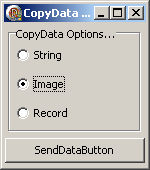
The accompanying source code demonstrates how to send a string, record (complex data type) and even graphics (bitmap) to another application.
If you cannot wait the download, here's how to send a TBitmap graphics:
procedure TSenderMainForm.SendImage( );

var

  ms : TMemoryStream;

  bmp : TBitmap;

  copyDataStruct : TCopyDataStruct;

begin

  ms := TMemoryStream.Create;

  try

    bmp := self.GetFormImage;

    try

      bmp.SaveToStream( ms );

    finally

      bmp.Free;

    end;

    copyDataStruct.dwData := Integer( cdtImage ); // identify the data

    copyDataStruct.cbData := ms.Size;

    copyDataStruct.lpData := ms.Memory;

    SendData( copyDataStruct );

  finally

    ms.Free;

  end;

end;

// And how to receive it:

procedure TReceiverMainForm.HandleCopyDataImage( copyDataStruct : PCopyDataStruct );

var

  ms : TMemoryStream;

begin

  ms := TMemoryStream.Create;

  try

    ms.Write( copyDataStruct.lpData^, copyDataStruct.cbData );

    ms.Position := ;

    receivedImage.Picture.Bitmap.LoadFromStream( ms );

  finally

    ms.Free;

  end;

end;
Downloadwm_copydata source code example.
How to Send Information (String, Image, Record) Between Two Applications的更多相关文章
- Java14版本特性【一文了解】
「MoreThanJava」 宣扬的是 「学习,不止 CODE」,本系列 Java 基础教程是自己在结合各方面的知识之后,对 Java 基础的一个总回顾,旨在 「帮助新朋友快速高质量的学习」. 当然 ...
- kafka客户端发布record(消息)
kafka客户端发布record(消息)到kafka集群. 新的生产者是线程安全的,在线程之间共享单个生产者实例,通常单例比多个实例要快. 一个简单的例子,使用producer发送一个有序的key/v ...
- Method and apparatus for encoding data to be self-describing by storing tag records describing said data terminated by a self-referential record
A computer-implemented method and apparatus in a computer system of processing data generated by a f ...
- 记录类型中String的释放
String能自动释放,在进行内存拷贝时需要进行手动释放.可以直接调用Finalize手工释放 如:TGraphicHideTab 记录中声明的Caption:string TGraphicHideT ...
- [LeetCode] Masking Personal Information 给个人信息打码
We are given a personal information string S, which may represent either an email address or a phone ...
- [Swift]LeetCode831. 隐藏个人信息 | Masking Personal Information
We are given a personal information string S, which may represent either an email address or a phone ...
- Masking Personal Information
Masking Personal Information We are given a personal information string S, which may represent eithe ...
- 【LeetCode】831. Masking Personal Information 解题报告(Python)
[LeetCode]831. Masking Personal Information 解题报告(Python) 标签(空格分隔): LeetCode 作者: 负雪明烛 id: fuxuemingzh ...
- Vertica 导出数据测试用例
需求:构建简单的测试用例,完成演示Vertica导出数据的功能. 测试用例:导出test业务用户t_jingyu表中的数据. 一.初始化测试环境 二.导出数据 2.1 vsql命令说明帮助 2.2 导 ...
随机推荐
- asp.net读取xml方法
这个适合刚学asp.net的同学,大神直接略过好了,asp.net经常会有很多用到XML的地方,比如全国省市的联动,以及一些菜单读取等等都有xml的影子,直接贴代码,以便我以后用到的时候忘了,注释我写 ...
- As3 计算两个日期之间的天数差
/*日期转YYYYMMDD*/ formDate.fullYear+""+(formDate.month<10?("0"+formDate.month): ...
- 开源堡垒机GateOne的安装、配置笔记
因为内部临时需要这么一套系统,所以搜搜查查,搞定了系统部署,使用pam认证的配置. 系统初始化是使用CentOS 6.5 Mini x64版本. 首先exports http_proxy和http ...
- 数往知来C#之接口 值类型与引用类型 静态非静态 异常处理 GC垃圾回收 值类型引用类型内存分配<四>
C# 基础接口篇 一.多态复习 使用个new来实现,使用virtual与override -->new隐藏父类方法 根据当前类型,电泳对应的方法(成员) -->override ...
- xshell 上传 下载文件
借助XShell,使用linux命令sz可以很方便的将服务器上的文件下载到本地,使用rz命令则是把本地文件上传到服务器. sz用法: 下载一个文件 sz filename 下载多个文件 sz file ...
- Coffee Script 笔记 1
安装node 虽然官网提供了单文件bin的版本 但是并不知道怎么安装npm 于是乎还是得安装msi (坑 当使用 coffee -w -c . 监视文件改变 即时编译的时候会 提示 Error: T ...
- mysql 的 GROUP_CONCAT
GROUP_CONCAT 通常跟 group by 一起用,但也可以不用.例:select GROUP_CONCAT(pct_id) as pct_ids from (select max(pct_i ...
- HttpClient 操作总结
1.HttpClient4.3和之前版本设置超时(set timeout)区别: 参考:http://my.oschina.net/u/577453/blog/173724 解析:如果不设置超时的话, ...
- jxse2.6在jdk8下,JxtaMulticastSocket存在的问题
JxtaMulticastSocket覆写了java.net.MulticastSocket的bind方法: @Override public void bind(SocketAddress addr ...
- <转>单播,广播,组播的缺点与优点
原文链接:http://apje.blog.163.com/blog/static/145345252007101175714761/ 当前的网络中有三种通讯模式:单播.广播.组播(多播),其中的组播 ...