
Java Concurrency - invokeAny & invokeAll
Running multiple tasks and processing the first result
A common problem in concurrent programming is when you have various concurrent tasks that solve a problem, and you are only interested in the first result of those tasks. For example, you want to sort an array. You have various sort algorithms. You can launch all of them and get the result of the first one that sorts these, that is, the fastest sorting algorithm for a given array.
In this case, you are going to implement an example where a user can be validated by two mechanisms. The user will be validated if one of those mechanisms validates it.
/**

 * This class implement a simulation of a user validation system. It suspend the Thread

 * a random period of time and then returns a random boolean value. We consider that it

 * returns the true value when the user is validated and the false value when it's not

 */

public class UserValidator {

    /**

     * The name of the validation system

     */

    private String name;

    public UserValidator(String name) {

        this.name=name;

    }

    /**

     * Method that validates a user

     * @param name Name of the user

     * @param password Password of the user

     * @return true if the user is validated and false if not

     */

    public boolean validate(String name, String password) {

        // Create a new Random objects generator

        Random random=new Random();

        // Sleep the thread during a random period of time

        try {

            Long duration=(long)(Math.random()*5);

            System.out.printf("Validator %s: Validating a user during %d seconds\n",this.name,duration);

            TimeUnit.SECONDS.sleep(duration);

        } catch (InterruptedException e) {

            return false;

        }

        // Return a random boolean value

        return random.nextBoolean();

    }

    /**

     * Return the name of the validation system

     * @return The name of the validation system

     */

    public String getName(){

        return name;

    }

}

/**

 * This class encapsulate a user validation system to be executed as a Callable object.

 * If the user is validated, it returns the name of the validation system. If not,

 * it throws an Exception

 */

public class TaskValidator implements Callable<String> {

    /**

     * The user validator used to validate the user.

     */

    private UserValidator validator;

    /**

     * The name of the user

     */

    private String user;

    /**

     * The password of the user

     */

    private String password;

    /**

     * Constructor of the class

     * @param validator The user validator system used to validate it

     * @param user The name of the user

     * @param password The password of the user

     */

    public TaskValidator(UserValidator validator, String user, String password){

        this.validator=validator;

        this.user=user;

        this.password=password;

    }

    /**

     * Core method of the Callable interface. Tries to validate the user using the user

     * validation system. If the user is validated, returns the name of the validation system.

     * If not, throws and Exception

     * @return The name of the user validation system.

     * @throws Exception An exception when the user is not validated

     */

    @Override

    public String call() throws Exception {

        if (!validator.validate(user, password)) {

            System.out.printf("%s: The user has not been found\n",validator.getName());

            throw new Exception("Error validating user");

        }

        System.out.printf("%s: The user has been found\n",validator.getName());

        return validator.getName();

    }

}

/**

 * This is the main class of the example. Creates two user validation systems and execute

 * them in an Executor using the invokeAny() method. If the user is validated by one of the

 * user validation systems, then it shows a message. If both system don't validate the user,

 * the application processes the ExecutionException thrown by the method

 */

public class Main {

    public static void main(String[] args) {

        // Initialize the parameters of the user

        String username = "test";

        String password = "test";

        // Create two user validation objects

        UserValidator ldapValidator = new UserValidator("LDAP");

        UserValidator dbValidator = new UserValidator("DataBase");

        // Create two tasks for the user validation objects

        TaskValidator ldapTask = new TaskValidator(ldapValidator, username, password);

        TaskValidator dbTask = new TaskValidator(dbValidator, username, password);

        // Add the two tasks to a list of tasks

        List<TaskValidator> taskList = new ArrayList<>();

        taskList.add(ldapTask);

        taskList.add(dbTask);

        // Create a new Executor

        ExecutorService executor = (ExecutorService) Executors.newCachedThreadPool();

        String result;

        try {

            // Send the list of tasks to the executor and waits for the result of the first task

            // that finish without throw any Exception. If all the tasks throw an Exception, the

            // method throws an ExecutionException.

            result = executor.invokeAny(taskList);

            System.out.printf("Main: Result: %s\n",result);

        } catch (InterruptedException e) {

            e.printStackTrace();

        } catch (ExecutionException e) {

            e.printStackTrace();

        }

        // Shutdown the Executor

        executor.shutdown();

        System.out.printf("Main: End of the Execution\n");

    }

}
The key of the example is in the Main class. The invokeAny() method of the ThreadPoolExecutor class receives a list of tasks, launches them, and returns the result of the first task that finishes without throwing an exception. This method returns the same data type that the call() method of the tasks you launch returns. In this case, it returns a String value.
The following screenshot shows the output of an execution of the example when one task validates the user:
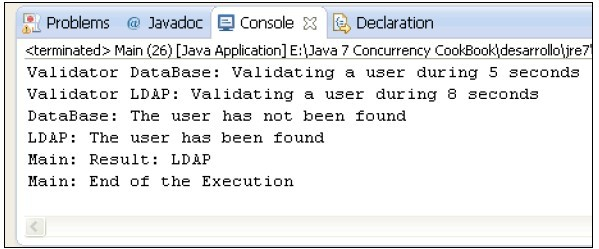
The example has two UserValidator objects that return a random boolean value. Each UserValidator object is used by a Callable object, implemented by the TaskValidator class. If the validate() method of the UserValidator class returns a false value, the TaskValidator class throws Exception. Otherwise, it returns the true value.
So, we have two tasks that can return the true value or throw an Exception exception. You can have the following four possibilities:
- Both tasks return the true value. The result of the invokeAny() method is the name of the task that finishes in the first place.
- The first task returns the true value and the second one throws Exception. The result of the invokeAny() method is the name of the first task.
- The first task throws Exception and the second one returns the true value. The result of the invokeAny() method is the name of the second task.
- Both tasks throw Exception. In that class, the invokeAny() method throws an ExecutionException exception.
If you run the examples several times, you get the four possible solutions you can get.
The following screenshot shows the output of the application when both tasks throw an exception:
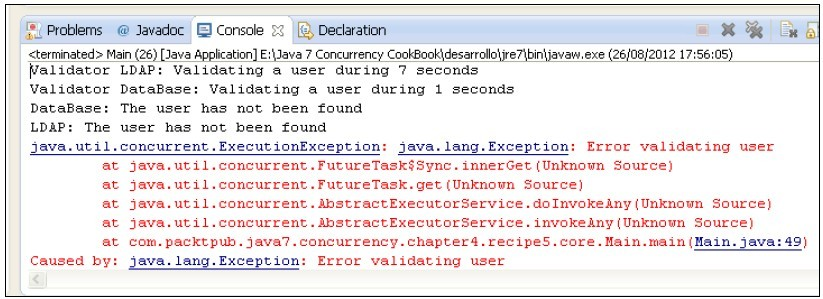
The ThreadPoolExecutor class provides another version of the invokeAny() method:
invokeAny(Collection<? extends Callable<T>> tasks, long timeout, TimeUnit unit): This method executes all the tasks and returns the result of the first one that finishes without throwing an exception, if it finishes before the given timeout passes. The TimeUnit class is an enumeration with the following constants: DAYS, HOURS, MICROSECONDS, MILLISECONDS, MINUTES, NANOSECONDS, and SECONDS.
Running multiple tasks and processing all the results
The Executor framework allows you to execute concurrent tasks without worrying about thread creation and execution. It provides you the Future class that you can use to control the status and get the results of any task executed in an executor.
When you want to wait for the finalization of a task, you can use the following two methods:
- The isDone() method of the Future interface returns true if the task has finished its execution.
- The awaitTermination() method of the ThreadPoolExecutor class puts the thread to sleep until all the tasks have finished their execution after a call to the shutdown() method.
These two methods have some drawbacks. With the first one, you can only control the completion of a task, and with the second one, you have to shutdown the executor to wait for a thread, otherwise the method's call returns immediately.
The ThreadPoolExecutor class provides a method that allows you to send to the executor a list of tasks and wait for the finalization of all the tasks in the list.
In this case, you will learn how to use this feature by implementing an example with three tasks executed and their results printed out when they finish.
/**

 * This class stores the result generated by one task

 *

 */

public class Result {

    private int num;

    private long factorial;

    public Result(int num, long factorial) {

        super();

        this.num = num;

        this.factorial = factorial;

    }

    public int getNum() {

        return num;

    }

    public long getFactorial() {

        return factorial;

    }

}

/**

 * This class calculates the factorial of a number.

 */

public class FactorialCalculator implements Callable<Result> {

    /**

     * Number to calculate the factorial

     */

    private int num;

    /**

     * Constructor of the class. Initializes the attributes

     * @param num Number to calculate the factorial

     */

    public FactorialCalculator(int num) {

        this.num = num;

    }

    /**

     * Method called by the executor to execute this task and calculate the factorial of a number

     */

    @Override

    public Result call() throws Exception {
        TimeUnit.SECONDS.sleep(new Random().nextInt(3));

        if (num < 0) {

            throw new IllegalArgumentException("The number must be less than zero.");

        }

        if (num <= 1) {

            return new Result(num, 1L);

        }

        long f = 1;

        for (int i = 2; i <= num; i++) {

            f *= num;

        }

        return new Result(num, f);

    }

}

/**

 * Main class of the example. Launch three tasks using the invokeAll() method

 * and then prints their results to the console

 */

public class Main {

    public static void main(String[] args) {

        // Create three tasks and stores them in a List

        List<Callable<Result>> taskList = new ArrayList<>();

        for (int i = 0; i < 3; i++) {

            Callable<Result> factorialTask = new FactorialCalculator(new Random().nextInt(10));

            taskList.add(factorialTask);

        }

        // Create an executor

        ExecutorService executor = (ExecutorService) Executors.newCachedThreadPool();

        // Call the invokeAll() method

        List<Future<Result>> resultList = new ArrayList<>();

        try {

            resultList = executor.invokeAll(taskList);

        } catch (InterruptedException e) {

            e.printStackTrace();

        }

        // Finish the executor

        executor.shutdown();

        // Writes the results to the console

        for (int i = 0; i < resultList.size(); i++) {

            try {

                Result result = resultList.get(i).get();

                System.out.printf("%d! = %d\n", result.getNum(), result.getFactorial());

            } catch (InterruptedException | ExecutionException e) {

                e.printStackTrace();

            }

        }

    }

}
In this case, you have learned how to send a list of tasks to an executor and wait for the finalization of all of them using the invokeAll() method. This method receives a list of the Callable objects and returns a list of the Future objects. This list will have a Future object per task in the list. The first object in the list of the Future objects will be the object that controls the first task in the list of the Callable objects, and so on.
The first point to take into consideration is that the type of data used for the parameterization of the Future interface in the declaration of the list that stores the result objects must be compatible with the one used to parameterized the Callable objects. In this case, you have used the same type of data: the Result class.
Another important point about the invokeAll() method is that you will use the Future objects only to get the results of the tasks. As the method finishes when all the tasks have finished, if you call the isDone() method of the Future objects that is returned, all the calls will return the true value.
The ExecutorService class provides another version of the invokeAll() method:
- invokeAll(Collection<? extends Callable<T>> tasks, long timeout, TimeUnit unit): This method executes all the tasks and returns the result of their execution when all of them have finished, if they finish before the given timeout passes. The TimeUnit class is an enumeration with the following constants: DAYS, HOURS, MICROSECONDS, MILLISECONDS, MINUTES, NANOSECONDS, and SECONDS.
Java Concurrency - invokeAny & invokeAll的更多相关文章
- Java Concurrency in Practice 读书笔记 第十章
粗略看完<Java Concurrency in Practice>这部书,确实是多线程/并发编程的一本好书.里面对各种并发的技术解释得比较透彻,虽然是面向Java的,但很多概念在其他语言 ...
- Java Concurrency - 浅析 CountDownLatch 的用法
The Java concurrency API provides a class that allows one or more threads to wait until a set of ope ...
- Java Concurrency - 浅析 CyclicBarrier 的用法
The Java concurrency API provides a synchronizing utility that allows the synchronization of two or ...
- Java Concurrency - 浅析 Phaser 的用法
One of the most complex and powerful functionalities offered by the Java concurrency API is the abil ...
- Java Concurrency - 线程执行器
Usually, when you develop a simple, concurrent-programming application in Java, you create some Runn ...
- Java Concurrency - Callable & Future
One of the advantages of the Executor framework is that you can run concurrent tasks that return a r ...
- 深入浅出 Java Concurrency (4): 原子操作 part 3 指令重排序与happens-before法则
转: http://www.blogjava.net/xylz/archive/2010/07/03/325168.html 在这个小结里面重点讨论原子操作的原理和设计思想. 由于在下一个章节中会谈到 ...
- 《Java Concurrency》读书笔记,使用JDK并发包构建程序
1. java.util.concurrent概述 JDK5.0以后的版本都引入了高级并发特性,大多数的特性在java.util.concurrent包中,是专门用于多线并发编程的,充分利用了现代多处 ...
- 深入浅出 Java Concurrency (15): 锁机制 part 10 锁的一些其它问题
主要谈谈锁的性能以及其它一些理论知识,内容主要的出处是<Java Concurrency in Practice>,结合自己的理解和实际应用对锁机制进行一个小小的总结. 首先需要强调的 ...
随机推荐
- hash_map vs unordered_map vs map vs unordered_set
hash_map vs unordered_map 这两个的内部结构都是采用哈希表来实现.unordered_map在C++11的时候被引入标准库了,而hash_map没有,所以建议还是使用unord ...
- Android子线程更新UI的方法总结
版权声明:本文为博主原创文章,转载请注明出处:https://i.cnblogs.com/EditPosts.aspx?postid=6121280 消息机制,对于Android开发者来说,应该是非常 ...
- Ioc容器Autofac系列(2)-- asp.net mvc中整合autofac
经过上篇蜻蜓点水的介绍后,本篇通过实例快速上手autofac,展示当asp.net mvc引入了autofac之后会带来什么. 创建Asp.net MVC并引入Autofac 首先,创建一个MVC站点 ...
- Volley使用指南第四回(来自developer.android)
Volley网络请求的第四篇,废话不多说,开始. 这一篇文章将会教你怎样在Volley支持的范围内定制一个请求. 第一步:写一个通用请求: 大多数请求都有已经写好的接口供你调用,如果你的请求是Stri ...
- 【不积跬步,无以致千里】vim复制
用vim这么久 了,始终也不知道怎么在vim中使用系统粘贴板,通常要在网上复制一段代码都是先gedit打开文件,中键粘贴后关闭,然后再用vim打开编辑,真的不 爽:上次论坛上有人问到了怎么在vim中使 ...
- MEF 编程指南(十二):批量组合
MEF 容器实例并非不可变的.如果目录支持改变(像监控目录变动)或者在运行时添加/移除部件都可能发生改变.以前,你不得不做出改动并且调用 CompositionContainer 上的 Compose ...
- 【转】Android 实现ListView的滑动删除效果
http://www.cnblogs.com/weixiao870428/p/3524055.html http://download.csdn.net/download/love_javc_you/ ...
- Android,iOS,浏览器打开手机QQ与指定用户聊天界面
在浏览器中可以通过JS代码打开QQ并弹出聊天界面,一般作为客服QQ使用.而在移动端腾讯貌似没有公布提供类似API,但是却可以使用schema模式来启动手机QQ. 以下为具体代码: 浏览器(包括手机浏览 ...
- 【M15】了解异常处理(exception handling)的成本
1.为了在运行期处理异常,程序必须做大量额外的工作.比如,即使抛出异常,也必须保证离开作用域的栈上对象执行析构方法.因此,必须记录try语句的进入点和离开点,记录catch语句能够处理的异常等.这就意 ...
- C#的WebBrowser操作frame如此简单
刚学c#不久,也不太懂什么IHTMLDocument.IHTMLDocument2.IWebBrowser2等等.自己琢磨了好久,终于知道了怎么用WebBrowser操作frame和iframe. 1 ...