
修改radio、checkbox、select默认样式的方法
现在前端页面效果日益丰富,默认的input组件样式显然已经不能满足需求。趁着这次开发的页面中有这方面的需求,在这里整理一下修改radio、checkbox、select的方法。
首先上效果图:
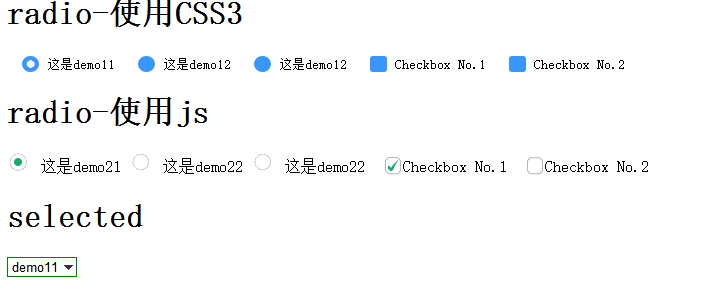
radio and checkbox
修改radio的默认样式有两种常用的方法
纯CSS
此方法需借助CSS3,关键CSS代码如下
.demo1 input[type='radio'],.demo1 input[type="checkbox"]{

    display:none;

}

.demo1 label:before{

    content: "";

    display: inline-block;

    width: 17px;

    height: 16px;

    margin-right: 10px;

    position: absolute;

    left: 0;

    bottom: 0;

    background-color: #3797fc;

}

.demo1 input[type='radio'] + label:before{

     border-radius: 8px;

}

.demo1 input[type='checkbox'] + label:before{

     border-radius: 3px;

}

.demo1 input[type='radio']:checked+label:before{

    content: "\2022";

    color: #fff;

    font-size: 30px;

    text-align: center;

    line-height: 19px;

}

.demo1 input[type='checkbox']:checked+label:before{

    content: "\2713";

    font-size: 15px;

    color: #f3f3f3;

    text-align: center;

    line-height: 17px;

}
优点:充分借助了CSS3的优势,无需使用js和图片,仅用纯CSS3就可搞定
缺点:兼容性较差,仅支持IE9+
js+图片
js代码:
$(function(){

    $(".demospan").bind("click",function(){

        $(this).addClass("on").siblings().removeClass("on");

    })

    $(".piaochecked").bind("click",function(){

        $(this).hasClass("on_check")?$(this).removeClass("on_check"):$(this).addClass("on_check");

        // $(this).toggleClass("on_check");

    })

})
css代码
.demospan{

    display: inline-block;

    width: 24px;

    height: 18px;

    /*float: left;*/

    padding-top: 3px;

    cursor: pointer;

    text-align: center;

    margin-right: 10px;

    background-image: url(http://sandbox.runjs.cn/uploads/rs/161/i5pmsg7s/inputradio.gif);

    background-repeat: no-repeat;

    background-position: -24px 0;

}

.demo21{

    opacity: 0;

    cursor: pointer;

    -ms-filter:"progid:DXImageTransform.Microsoft.Alpha(Opacity=0)";

    filter:alpha(opacity=0);

}

.on{

    background-position: 0 0;

}

.piaochecked{

    display: inline-block;

    width: 20px;

    height: 20px;

    cursor: pointer;

    margin-left: 10px;

    text-align: center;

    background-image:  url(http://sandbox.runjs.cn/uploads/rs/161/i5pmsg7s/checkbox_01.gif);

    background-repeat: no-repeat;

    background-position: 0 0;

}

.on_check{

    background-position: 0 -21px;

}

.cbdemo2{

    opacity: 0;

    cursor: pointer;

    -ms-filter:"progid:DXImageTransform.Microsoft.Alpha(opacity=0)";

    filter:alpha(opacity=0);

}
优点:兼容性高,支持IE6+
缺点:使用js+图片较为麻烦
select
/*select*/

 .select select{

    /*复写Chrome和Firefox里面的边框*/

    border:1px solid  green;

    /*清除默认样式*/

    appearance:none;

    -moz-appearance:none;

    -webkit-appearance:none;

/*在选择框的最右侧中间显示小箭头图片*/

    background: url("http://ourjs.github.io/static/2015/arrow.png") no-repeat scroll right center transparent;

    /*为下拉小箭头留出一点位置,避免被文字覆盖*/

  padding-right: 14px;

 }

 /*清除ie的默认选择框样式清除,隐藏下拉箭头*/

select::-ms-expand { display: none; }
该方法关键在于清除默认样式,使用css3的appearance属性,但是兼容性较差,仅支持IE9+。若要兼容低版本浏览器,可以使用Div进行模拟。
兼容更低版本浏览器的select样式修改
最后附上演示链接:修改radio、checkbox和select默认样式
修改radio、checkbox、select默认样式的方法的更多相关文章
- 修改 input[type="radio"] 和 input[type="checkbox"] 的默认样式
表单中,经常会使用到单选按钮和复选框,但是,input[type="radio"] 和 input[type="checkbox"] 的默认样式在不同的浏览器或 ...
- jSP的3种方式实现radio ,checkBox,select的默认选择值。
jSP的3种方式实现radio ,checkBox,select的默认选择值.以radiao 为例:第一种方式:在jsp中使用java 脚本,这个方法最直接,不过脚本太多,不容易维护<%Stri ...
- 修改 百度地图 infowindow 默认样式
1.百度 api 没有 提供可以修改 infowindow 默认样式的 方法. 如需修改,需要 自定义 替换 默认样式. demo.html <!DOCTYPE html> <htm ...
- 【TP3.2+onethink】radio+checkbox+select 空间 编辑页面选中,附录 js 返回上一页
1.TP3.2框架 如何实现 [radio+checkbox+select 空间 编辑页面选中],说实话,比较繁琐,不咋地!! 不废话,上代码:(其中 XX_arr 变量一维数组) <div ...
- 取消select默认样式
/*清除select默认样式*/select { border: solid 1px #CACDD0; appearance:none; -moz-appearance:none; -webkit-a ...
- Ionic4.x Theming(主题) 增加内置主题 颜色 修改内置组件默认样式 修改底部 Tabs 背景颜色以及按钮颜色
1.Ionic4.x Theming(主题) Ionic4.x 修改主题颜色的话需要在 src/theme/variables.scss 文件中修改. https://ionicframework.c ...
- 微信小程序修改radio和checkbox的默认样式和图标
wxml: <view class="body"> <view class="body-content"> 第1题:企业的价值观是 ? ...
- React 项目中修改 Ant Design 的默认样式(Input Checkbox 等等
修改样式更符合项目的需求特别是在 Input 和 Checkbox 等等一系列 试过很的方式都有问题, 比如直接在行内添加样式会无法传递到特定的层级 最好的办法是添加 id 可行 渲染部分代码 < ...
- Radio Checkbox Select 操作
一个小总结 <!DOCTYPE html> <html> <head> <meta name="description" content= ...
随机推荐
- 神奇的CSS3选择器
话说园子里也混迹多年了,但是基本没写过blog,写点基础的,那就从css3选择器开始吧. Css3选择器 先说下,为什么提倡使用选择器. 使用选择器可以将样式与元素直接绑定起来,在样式表中什么样式与什 ...
- struts2 jsp表单提交后保留表单中输入框中的值 下拉框select与input
原文地址:struts2 jsp表单提交后保留表单中输入框中的值 下拉框select与input jsp页面 1 function dosearch() {2 if ($(&q ...
- javascript深入理解闭包
一.变量的作用域 要理解闭包,首先必须理解Javascript特殊的变量作用域. 变量的作用域无非就是两种:全局变量和局部变量. Javascript语言的特殊之处,就在于函数内部可以直接读取全局变量 ...
- g++ 编译和链接(转)
传统意义上的编译程序分两步走 —— 编译和链接: 1.编译(compile):指用编译器(compiler)将源代码(source code)生成二进制目标文件(object file),在Windo ...
- React-Native的基本控件属性方法
对React-Native的学习,从熟悉基本控件开始. View 属性方法 序号 名称 属性Or方法 类型 说明 1 accessibilityLabel 属性 string 2 accessib ...
- 利用ExpandableListView和gridview 显示可展开折叠菜单导航
这篇随身笔带来的是结合聚合数据“菜谱大全”做的一个菜谱可折叠一级+二级列表. 先发来一些截图一睹为快吧. ExpandableListView 可用于折叠型菜单列表,其布局主要通过getGroupVi ...
- web工程中URL地址的写法
在开发中我们不可避免的要碰到许多需要写URL地址的情况,这常常让我们感到头疼.下面笔者推荐一种简单的做法.URL地址分为绝对路径和相对路径两种.相对路径又分为相对资源路径和相对根路径.显然绝对路径在开 ...
- NDIS IM 驱动那些事情
最近不知道为什么开始学习windows NDIS驱动开发,用的是寒江独钓的例子,其实他的改的代码也就一点点,说的有用的东西也就那么多,不过还是感谢他出了这么一本书,不然这真的就没有一本稍微好一点的书籍 ...
- 调整Windows8允许多用户登录
最近LP说要在继续教育平台上学习,好像是中级的需要进行继续教育吧,具体情况不管了.LP说网站登录后没办法听到声音看到视频,但是我的可以,系统环境是Win8,IE10,不过是在Chrome下使用IPA插 ...
- 第六十六篇、OC_Sqlite数据库操作
#import <Foundation/Foundation.h> #import <sqlite3.h> #define kFilename @"data.sqli ...