
H3C S10512虚拟化配置
软件版本:Version 7.1.070, Release 7585P05
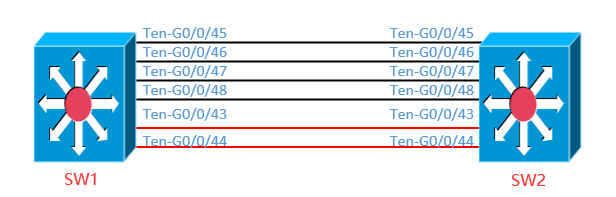
1、配置SW1
#设置SW1的成员编号为1,创建IRF端口2,并将它与物理接口Ten-G0/0/45、Ten-G0/0/46、Ten-G0/0/47、Ten-G0/0/48绑定。
<H3C>system-view
System View: return to User View with Ctrl+Z.
[H3C]sysname A
[A]irf member 1
[A]int range Ten-GigabitEthernet 0/0/45 to Ten-GigabitEthernet 0/0/48
[A-if-range]shutdown
[A-if-range]quit
[A]irf-port 2
[A-irf-port2]port group interface Ten-GigabitEthernet0/0/45
[A-irf-port2]port group interface Ten-GigabitEthernet0/0/46
[A-irf-port2]port group interface Ten-GigabitEthernet0/0/47
[A-irf-port2]port group interface Ten-GigabitEthernet0/0/48
[A-irf-port2]int range Ten-GigabitEthernet 0/0/45 to Ten-GigabitEthernet 0/0/48
[A-if-range]undo shutdown
# 将当前配置保存到下次启动配置文件。
<A>sa
The current configuration will be written to the device. Are you sure? [Y/N]:y
Please input the file name(*.cfg)[cfa0:/startup.cfg]
(To leave the existing filename unchanged, press the enter key):
Validating file. Please wait...
Configuration is saved to device successfully.
# 将设备的运行模式切换到IRF模式。
[A]chassis convert mode irf
The device will switch to IRF mode and reboot.
You are recommended to save the current running configuration and specify the configuration file for the next startup. Continue? [Y/N]:y
Do you want to convert the content of the next startup configuration file cfa0:/startup.cfg to make it available in IRF mode? [Y/N]:y
Now rebooting, please wait...
%Jun 19 16:39:42:065 2015 A DEV/5/SYSTEM_REBOOT: System is rebooting now.
设备重启后Device A组成了只有一台成员设备的IRF。
1、配置SW2
#设置SW2的成员编号为2,创建IRF端口1,并将它与物理接口Ten-G0/0/45、Ten-G0/0/46、Ten-G0/0/47、Ten-G0/0/48绑定。
<H3C>system-view
System View: return to User View with Ctrl+Z.
[H3C]sysname B
[B]irf member 2
[B]int range Ten-GigabitEthernet 0/0/45 to Ten-GigabitEthernet 0/0/48
[B-if-range]shutdown
[B-if-range]quit
[B]irf-port 1
[B-irf-port2]port group interface Ten-GigabitEthernet0/0/45
[B-irf-port2]port group interface Ten-GigabitEthernet0/0/46
[B-irf-port2]port group interface Ten-GigabitEthernet0/0/47
[B-irf-port2]port group interface Ten-GigabitEthernet0/0/48
[B-irf-port2]int range Ten-GigabitEthernet 0/0/45 to Ten-GigabitEthernet 0/0/48
[B-if-range]undo shutdown
# 将当前配置保存到下次启动配置文件。
<B>sa
The current configuration will be written to the device. Are you sure? [Y/N]:y
Please input the file name(*.cfg)[cfa0:/startup.cfg]
(To leave the existing filename unchanged, press the enter key):
Validating file. Please wait...
Configuration is saved to device successfully.
进行物理连线。
将设备的运行模式切换到IRF模式。
[B]chassis convert mode irf
The device will switch to IRF mode and reboot.
You are recommended to save the current running configuration and specify the configuration file for the next startup. Continue? [Y/N]:y
Do you want to convert the content of the next startup configuration file cfa0:/startup.cfg to make it available in IRF mode? [Y/N]:y
Now rebooting, please wait...
%Jun 19 16:41:29:433 2015 B DEV/5/SYSTEM_REBOOT: System is rebooting now.
设备B重启后与设备A形成IRF。
[B]dis irf
MemberID Slot Role Priority CPU-Mac Description
*1 6 Master 1 00e0-fc0f-8c07 ---
1 7 Standby 1 00e0-fc0f-8c08 ---
+2 6 Standby 1 00e0-fc0f-8c19 ---
2 7 Standby 1 00e0-fc0f-8c1a ---
--------------------------------------------------
* indicates the device is the master.
+ indicates the device through which the user logs in.
The bridge MAC of the IRF is: 0868-8d62-7200
Auto upgrade : yes
Mac persistent : always
Domain ID : 0
Auto merge : yes
IRF mode : normal
(3) 配置BFD MAD检测
[A]vlan 4090
[A-vlan4090]description mad-bfd
[A-vlan4090]port Ten-GigabitEthernet 1/0/0/43 Ten-GigabitEthernet 1/0/0/44 Ten
-GigabitEthernet 2/0/0/43 Ten-GigabitEthernet 2/0/0/44
[A-vlan4090]int vlan 4090
[A-Vlan-interface4090]mad bfd enable
[A-Vlan-interface4090]mad ip address 1.1.1.1 30 member 1
[A-Vlan-interface4090]mad ip address 1.1.1.2 30 member 2
[A]int Ten-GigabitEthernet 1/0/0/43
[A-Ten-GigabitEthernet1/0/0/43]undo stp enable
[A-Ten-GigabitEthernet1/0/0/43]int Ten-GigabitEthernet 1/0/0/44
[A-Ten-GigabitEthernet1/0/0/44]undo stp enable
[A-Ten-GigabitEthernet1/0/0/44]int Ten-GigabitEthernet 2/0/0/43
[A-Ten-GigabitEthernet2/0/0/43]undo stp enable
[A-Ten-GigabitEthernet2/0/0/44]int Ten-GigabitEthernet 2/0/0/43
[A-Ten-GigabitEthernet2/0/0/43]undo stp enable
[A]dis bfd session
Total Session Num: 1 Up Session Num: 0 Init Mode: Active
IPv4 session working in control packet mode:
LD/RD SourceAddr DestAddr State Holdtime Interface
4097/0 1.1.1.1 1.1.1.2 Down / Vlan4090
H3C S10512虚拟化配置的更多相关文章
- H3C S5120-52P-WiNet交换机配置
配置console口登录验证密码 <H3C>system-view [H3C]user-interface aux 0 [H3C-ui-aux0]authentication-mode p ...
- KVM虚拟化配置
KVM虚拟化 虚拟化概念 KVM虚拟化概念详讲 虚拟化配置 首先开启虚拟化的支持 并且增加一个50g的硬盘 free查看内存 grep -Ei 'vmx|svm' /proc/cpuinfo查看虚拟机 ...
- H3C远程登陆配置
1.配置本地用户(默认权限 level 1) [H3C]local-user admin [H3C-luser-admin]password cipher [H3C]super password le ...
- H3C S3100交换机配置VLAN和远程管理
一.基本设置 1. console线连接成功 2. 进入系统模式 <H3C>system-view //提示符由<H3C> 变为 [H3C] 3. 更改设备名称 [H3C]sy ...
- 飞鱼星、H3C企业路由器配置
飞鱼星企业路由器配置外网访问IIS 只配置端口映射就行,配置好了,如果不立即重启,需要等几分钟才能生效 H3C路由器配置虚拟服务器即可
- ESXi 嵌套KVM虚拟化 配置
VMware ESXi5.x默认不支持嵌套虚拟化,需要修改相关配置才能支持 1.ESXi5.1主机开通ssh,修改VMware ESXi配置文件使之嵌套虚拟化. 在配置文件后面加入如下配置:vhv ...
- 批量备份H3C交换机路由器配置
第一种(使用ftp下载配置文件): #!/bin/bash datetime=`date +%Y%m%d` BAKTIME=`date +%Y%m%d%H%M%S` user="admin& ...
- H3C交换机SNMP配置
1.启动/关闭SNMP Agent服务 在系统视图模式下: 启用:snmp-agent 关闭:undo snmp-agent 注:缺省情况下snmp agent是关闭的 2. 使能或禁止SNMP相应版 ...
- H3C/华为交换机配置NTP客户端
H3C clock timezone UTC add ntp-service unicast-server 1.1.1.1 //ntp服务器地址 clock protocol ntp ntp-serv ...
随机推荐
- Netty 异步模型
简介 Netty中的 I/O 操作是异步的, 包括 Bind.Write.Connect 等操作会简单的返回一个ChannelFuture. 调用者不能立刻获得结果, 而是通过Future-Liste ...
- NO3 cat-xargs-cp-mv-rm-find命令
·cat #查看文件内容 eg:cat oldboy.txt·xargs #从标准输入获取内容创建和执行命令 -n 加数字:分组 ·cp ...
- 微信浏览器 UA
mozilla/5.0 (linux; android 5.1.1; mi note pro build/lmy47v) applewebkit/537.36 (khtml, like gecko) ...
- scan port
$sudo apt-get install nmap $nmap 127.0.0.1 Starting Nmap 7.60 ( https://nmap.org ) at 2020-02-20 15: ...
- “~" 的用法
“~" 的用法 let arr = ['weixin','qq','weibo'] console.log(arr.indexOf('aa'),~arr.indexOf('aa'),'aa' ...
- ubuntu下pip的安装、升级和使用
系统虽然自带了不同版本的python,但都没有安装pip,pyhton2.7下使用的是pip2,python3.5下使用的是pip3.下面是各自安装命令. 安装 pip2: sudo apt-get ...
- JDBC面试知识点整理(温习用)
要面试,所以把之前的笔记整理一遍,嘻嘻,加油 JDBC编程 使用JDBC,java程序可以轻松地操作各种主流数据库,Oracle,MySQL,等,使用JDBC编写的程序不仅可以实现跨数据库,还具有跨平 ...
- webapi------宿主程序
业务场景: 公司的容器程序需要给前端暴露接口但是代码里面又不想写webapi项目工程就用到了宿主可以达到webapi的效果 1.owin实现 2.其他实现 测试实现如下 1.新建一个控制台程序 2.新 ...
- 实验吧-web-天下武功唯快不破(Python中byte和str的转换)
题目:看看响应头 打开网站,既然已经提示我们看响应头了,那我们就看看呗(习惯bp,也可直接F12查看) 可以看到,响应头部分有个FLAG,而且有提示:please post what you find ...
- bool之regexp正则注入(原理详解)
感谢原创博主的文章,在此致敬.本文转自:http://www.cnblogs.com/lcamry/articles/5717442.html 我们都已经知道,在MYSQL 5+中 informati ...