
(转载)(DescriptionResource Path Location Type The superclass "javax.servlet.http.HttpServlet" was not foun
eclipse环境下如何配置tomcat
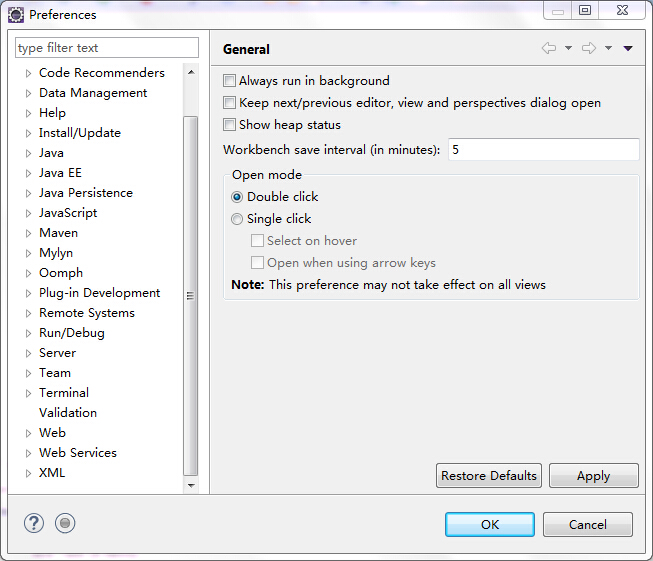
- 打开Eclipse,单击“Window”菜单,选择下方的“Preferences”。
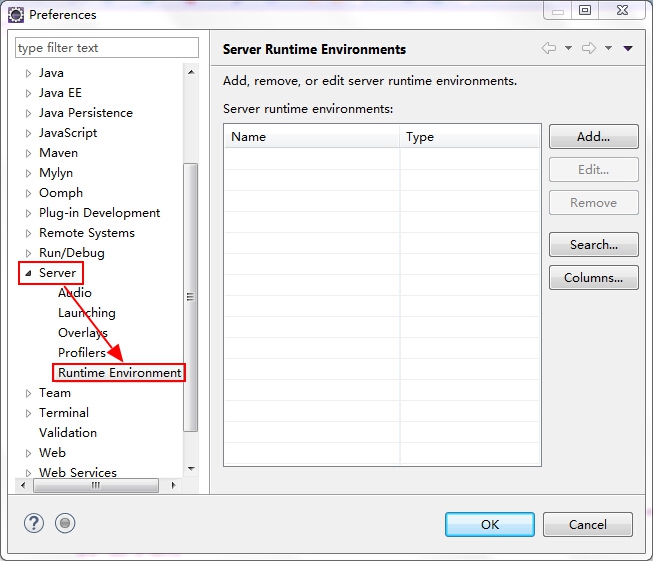
- 单击“Server”选项,选择下方的“Runtime Environments”。
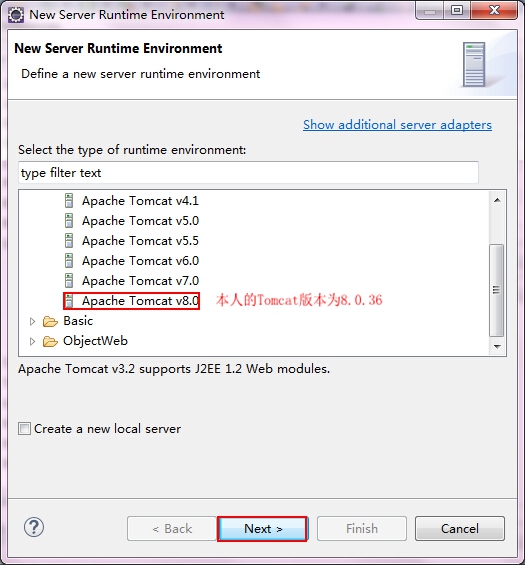
- 点击“Add”添加Tomcat。
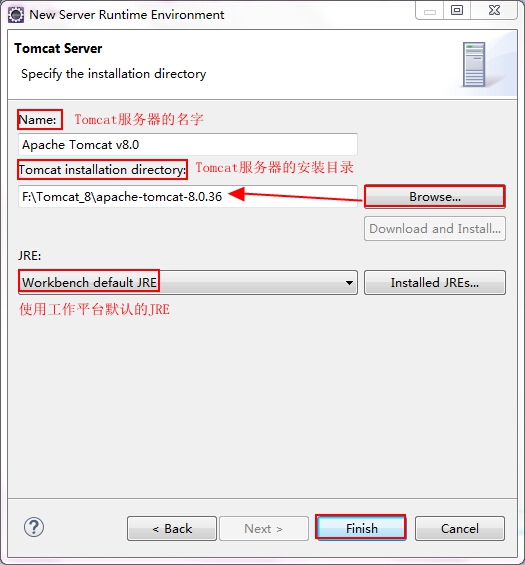
- 点击“Next”,选中自己安装的Tomcat路径。
- 点击“Finish”完成。

建立一个Web应用
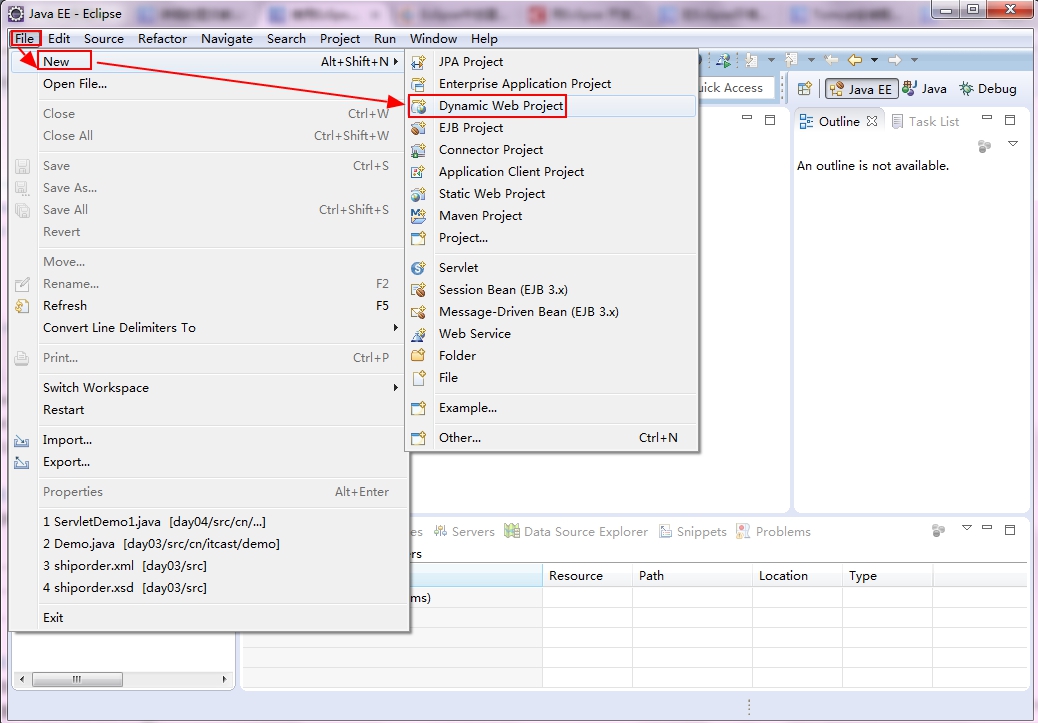
File→New→Dynamic Web Project
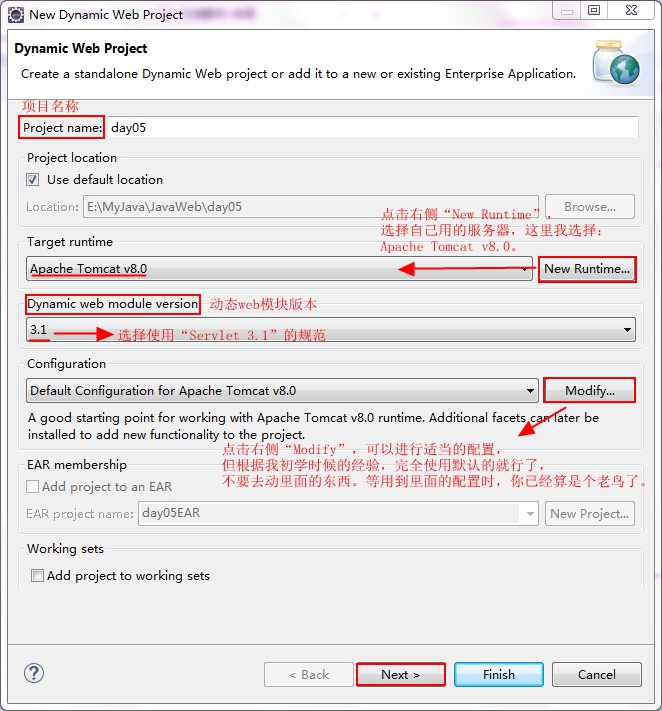
- 创建一个
Dynamic Web Project
- 点击“Next”下一步
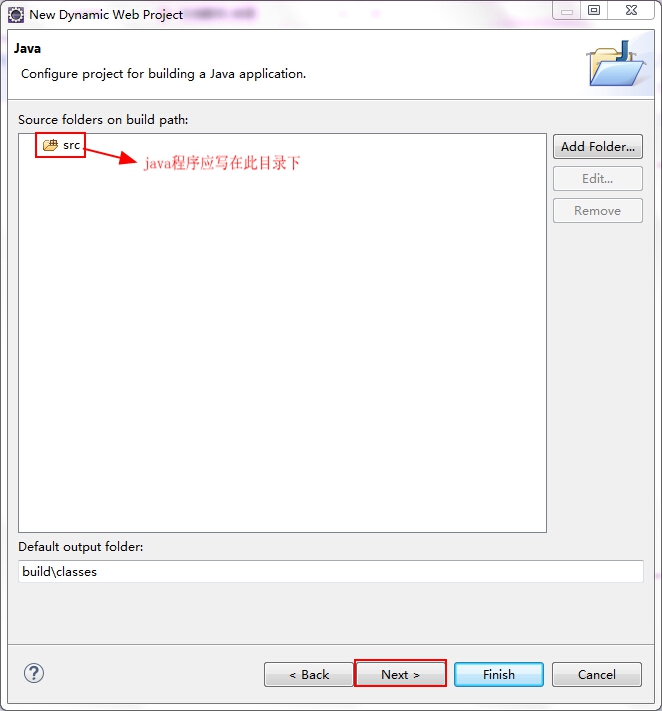
- 点击“Next”下一步
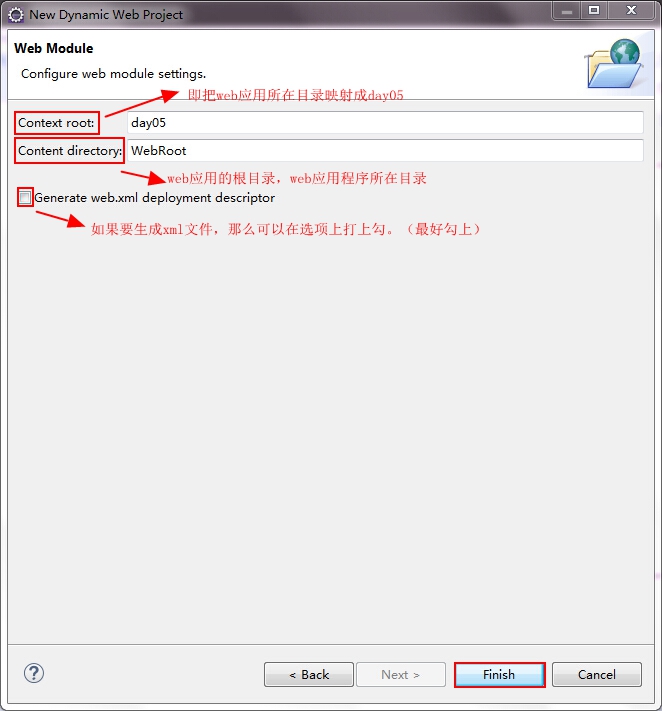
- 点击“Finish”完成
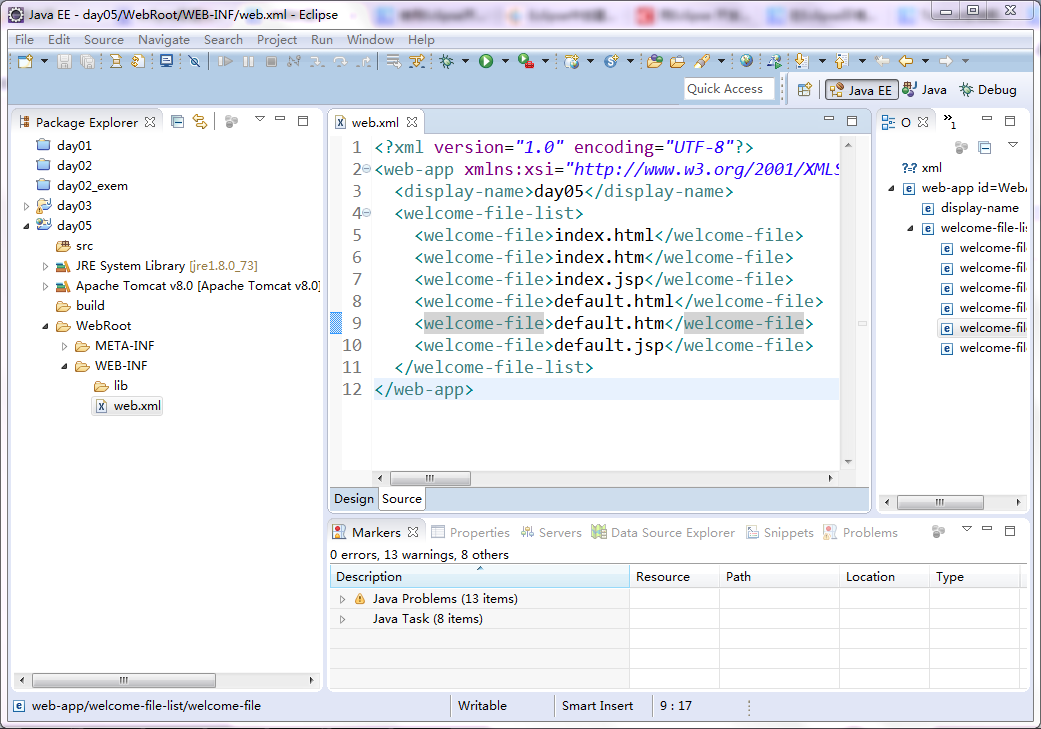
让Tomcat服务器显示在控制台上,将Web应用部署到Tomcat中
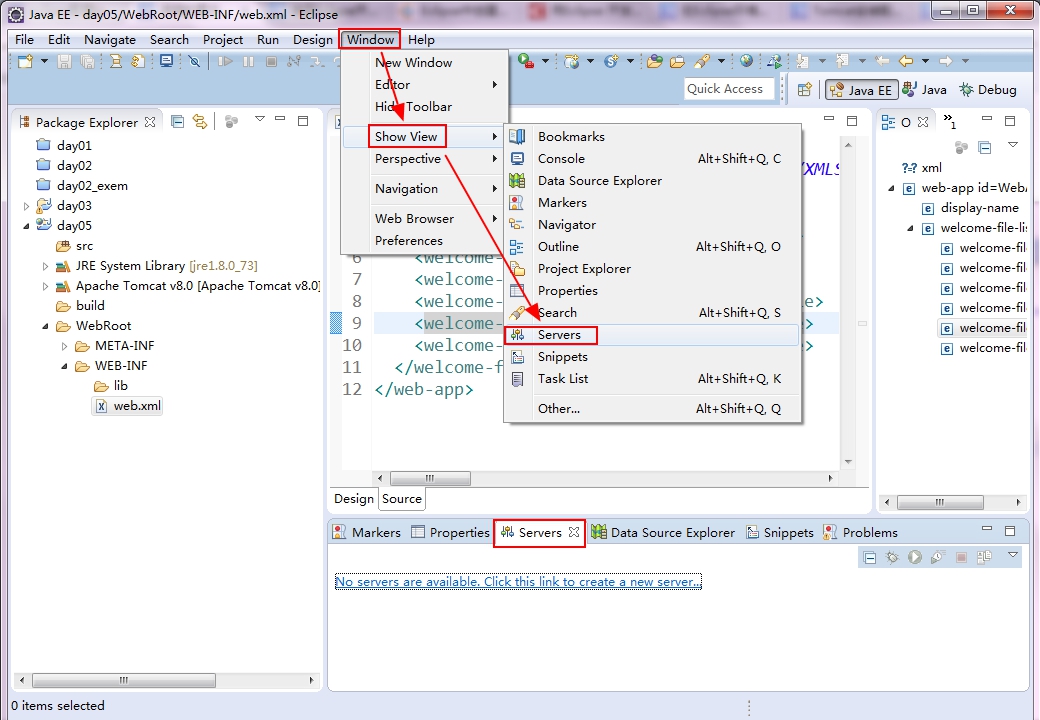
Window→Show View→Servers
- 点击链接
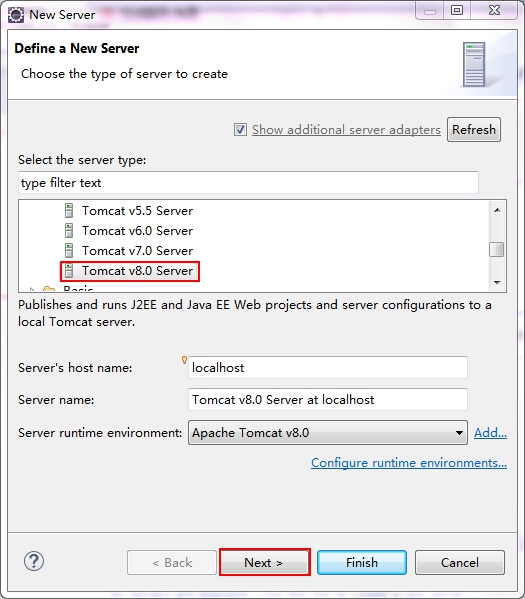
No servers are available. Click ths link to create a new server.,在弹出的对话框中选择Tomcat版本
- 点击“Next”,添加我们的项目
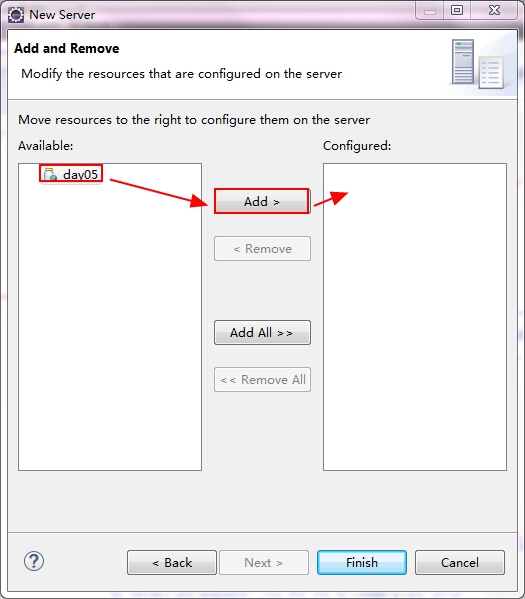
选中项目并点击Add,或是双击都可以添加到右边 点击“Finish”完成
返回下方的“Servers”面板,右键单击该面板中的“Tomcat v8.0 Server at localhost”节点,在弹出的快捷菜单中单击“Start”,即可启动指定的Web服务器。如果此时直接启动访问
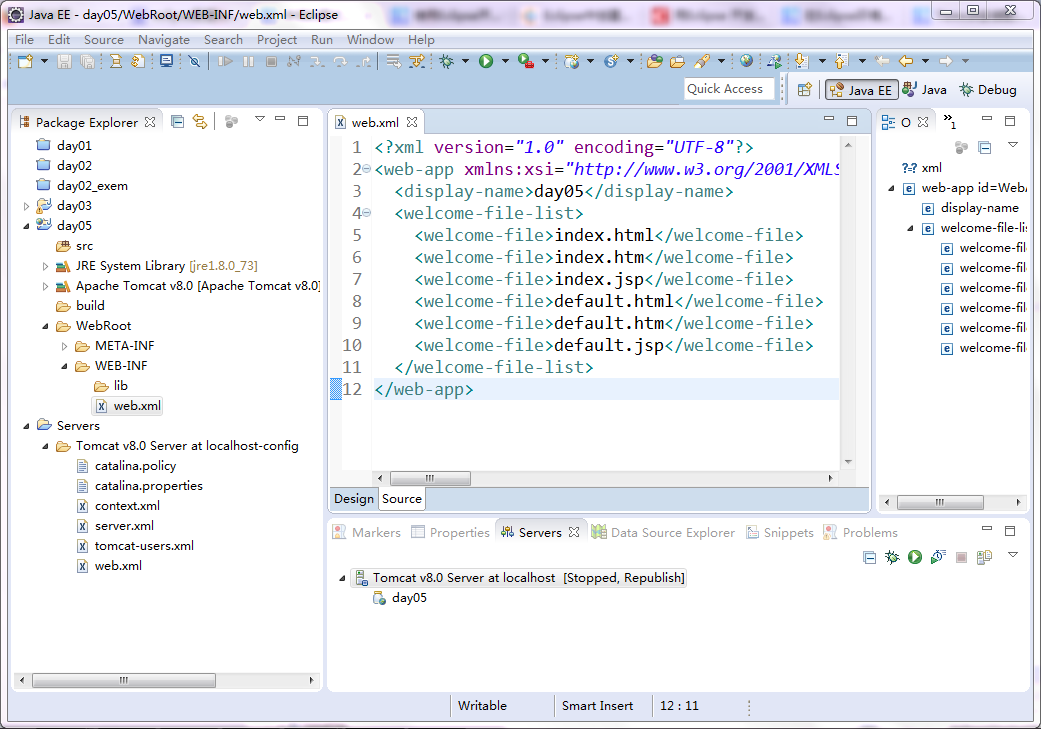
http://localhost:8080/TomcatTest,会发现会报404的错误。这是因为我们没有添加主页,下面添加主页(index.jsp)的内容:<%@ page language="java" contentType="text/html; charset=utf-8" pageEncoding="utf-8"%>
<!DOCTYPE html PUBLIC "-//W3C//DTD HTML 4.01 Transitional//EN" "http://www.w3.org/TR/html4/loose.dtd">
<html>
<head>
<meta http-equiv="Content-Type" content="text/html; charset=ISO-8859-1">
<title>欢迎页面</title>
</head>
<body>
欢迎使用eclipse部署Tomcat。
</body>
</html>- 1
- 2
- 3
- 4
- 5
- 6
- 7
- 8
- 9
- 10
- 11
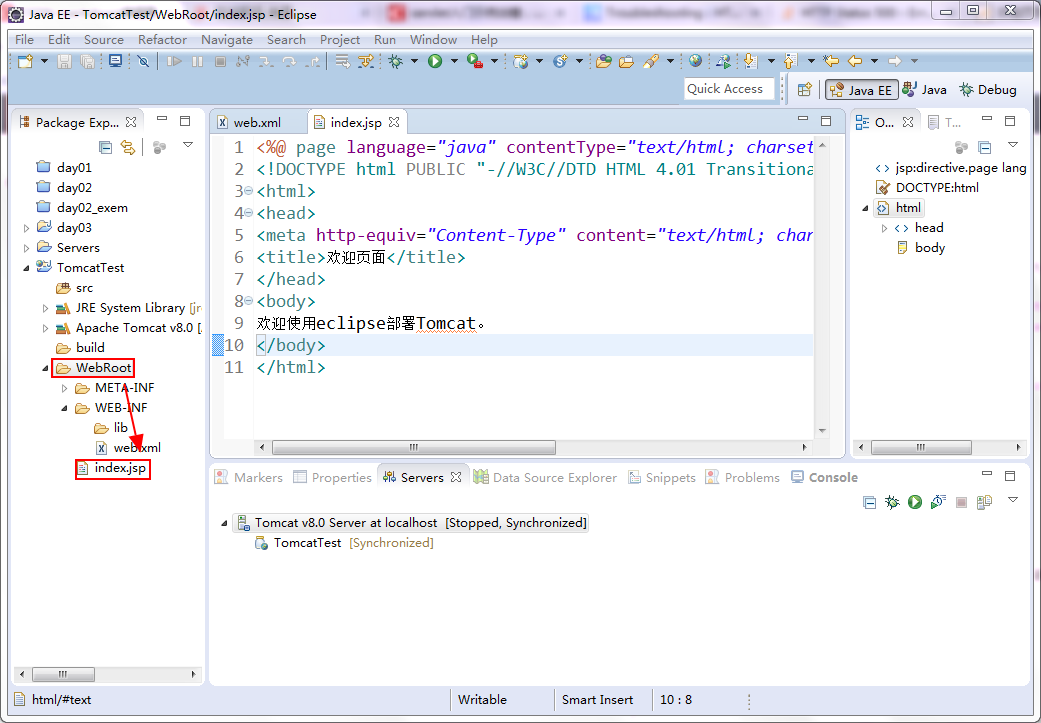
注意:web资源一定要在WebRoot目录下添加。如图:
此时,再一次来访问该链接:http://localhost:8080/TomcatTest,效果如下:

(转载)(DescriptionResource Path Location Type The superclass "javax.servlet.http.HttpServlet" was not foun的更多相关文章
- Description Resource Path Location Type The superclass "javax.servlet.http.HttpServlet" was not foun
一段时间没亲自建新项目玩乐,今天建立了一Maven project的时候发现了以下异常,Description Resource Path Location Type The superclass & ...
- HttpServletRequest cannot be resolved to a type The superclass "javax.servlet.http.HttpServlet" was not found on the Java Build Path
HttpServletRequest cannot be resolved to a type The superclass "javax.servlet.http.HttpServlet& ...
- [转]The superclass "javax.servlet.http.HttpServlet" was not found on the Java Build Path
完整错误信息: THIS SOFTWARE IS PROVIDED BY THE COPYRIGHT HOLDERS AND CONTRIBUTORS"AS IS" AND ANY ...
- 使用maven创建项目时报错The superclass "javax.servlet.http.HttpServlet" was not found on the Java Build Path
Description Resource Path Location Type The superclass "javax.servlet.http.HttpServlet" wa ...
- The superclass "javax.servlet.http.HttpServlet" was not found on the Java Build Path解决方案
0.环境: win7系统,Tomcat9配置无误. 1.错误: 项目中某一.jps页面忽然出现错误,鼠标点上去为:The superclass "javax.servlet.http.Htt ...
- eclipse:报错信息The superclass “javax.servlet.http.HttpServlet” was not found on the Java Build Path
JavaWeb: 报错信息The superclass "javax.servlet.http.HttpServlet" was not found on the Java Bui ...
- The superclass "javax.servlet.http.HttpServlet" was not found on the Java Build Path。问题
JSP页面顶端出现“红色”的报错信息:The superclass "javax.servlet.http.HttpServlet" was not found on the Ja ...
- 错误:The superclass "javax.servlet.http.HttpServlet" was not found on the Java Build Path
我们在利用Eclipse进行Java web开发时,可能会出现这样的错误:The superclass javax.servlet.http.HttpServlet was not found on ...
- ubuntu下eclipse遇到The superclass "javax.servlet.http.HttpServlet" was not found on the Java Build Path
JSP页面顶端出现“红色”的报错信息:The superclass "javax.servlet.http.HttpServlet" was not found on the Ja ...
随机推荐
- 解决fedora28桌面图标问题
正文 在fedora28中默认是没有桌面图标的,对于那些习惯使用桌面的图标的人来说使用有点不适应. 替代方法是: 下载nemo,在终端内输入sudo dnf install nemo 创建~/.con ...
- ArcoLinux美化教程
ArcoLinux美化教程 1. 前言 ArcoLinux已经足够美观,这里主要是讲解如何配置桌面特效 2. 安装compiz $ yay -S compiz 3. 用compiz替换xfwm4 编辑 ...
- cf221 D. Little Elephant and Array
题解真的是太神奇了2333 用离线和树状数组(为什么感觉和HH的项链是的,什么鬼),比较巧妙的是他把整个数列分成几段.用一个vector来记录每个数出现的位置.一共就是data[a[i]][sz]-- ...
- 四、JavaScript之<script>标签的使用
一.代码如下 二.运行效果如下 <!DOCTYPE html> <html> <meta http-equiv="Content-Type" cont ...
- 三十五、在SAP中定义选择屏幕,设置选择范围
一.代码如下,有2个地方需要注意,一个是SELECT-OPTIONS,还有一个是IN的使用 二.我们定义一下选择文本 三.我们运行程序 四.输出 五.当然,选择的时候,我们也可以用其他的方式,如下图
- 十三、SAP中定义变量时赋初始值
一.代码如下 二.输出如下
- ubuntu12.04安装JDK8
系统里已经有jdk1.6,下载并解压jdk后,按照网上的教程(bash.bashrc)没成功. sudo update-alternatives --install /usr/bin/java jav ...
- Flink on yarn以及实现jobManager 高可用(HA)
on yarn https://ci.apache.org/projects/flink/flink-docs-release-1.8/ops/deployment/yarn_setup.html f ...
- P3045 [USACO12FEB]牛券Cow Coupons
P3045 [USACO12FEB]牛券Cow Coupons 贪心题.先选中 \(c_i\) 最小的 \(k\) 头牛,如果这样就超过 \(m\) ,直接退出,输出答案.否则考虑把后面的牛依次加入, ...
- UVA - 11400 Lighting System Design(照明系统设计)(dp)
题意:共有n种(n<=1000)种灯泡,每种灯泡用4个数值表示.电压V(V<=132000),电源费用K(K<=1000),每个灯泡的费用C(C<=10)和所需灯泡的数量L(1 ...