
Centos7下源编译安装Postgresql 并设置开机自动启动postgresql.serivce 服务相关研究
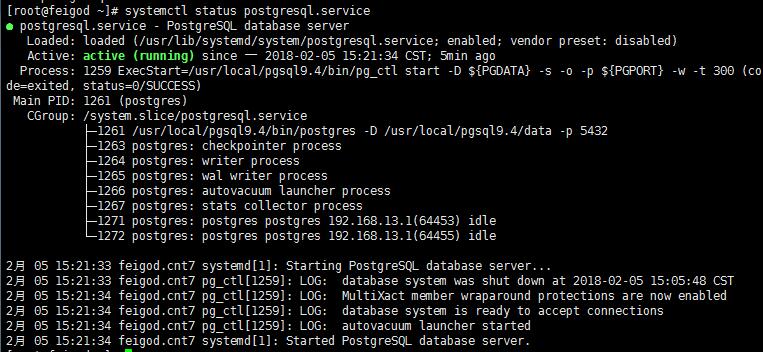
编写开机自动启动服务脚本:
# cat >> /usr/lib/systemd/system/postgresql.service >> EOF
[Unit]

Description=PostgreSQL database server

After=network.target

[Service]

Type=forking

User=postgres

Group=postgres

# Port number for server to listen on

Environment=PGPORT=5432

# Location of database directory

Environment=PGDATA=/usr/local/pgsql9.4/data

# Where to send early-startup messages from the server (before the logging

# options of postgresql.conf take effect)

# This is normally controlled by the global default set by systemd

# StandardOutput=syslog

# Disable OOM kill on the postmaster

OOMScoreAdjust=-1000

#ExecStartPre=/usr/local/pgsql9.4/bin/postgresql-check-db-dir ${PGDATA}

ExecStart=/usr/local/pgsql9.4/bin/pg_ctl start -D ${PGDATA} -s -o "-p ${PGPORT}" -w -t 300

ExecStop=/usr/local/pgsql9.4/bin/pg_ctl stop -D ${PGDATA} -s -m fast

ExecReload=/usr/local/pgsql9.4/bin/pg_ctl reload -D ${PGDATA} -s

# Give a reasonable amount of time for the server to start up/shut down

TimeoutSec=300

[Install]

WantedBy=multi-user.target
EOF
添加可执行权限:
chmod 754 /usr/lib/systemd/system/postgresql.service
设置为开机自启动:
systemctl enable postgresql.service
常用指令(以postgresql服务为例):
启动某服务:
systemctl start postgresql.service
停止某服务:
systemctl stop postgresql.service
重启某服务:
systemctl restart postgresql.service

service postgresql restart
使某服务自动启动(如tomcat服务):
systemctl enable postgresql.service
使某服务不自动启动:
systemctl disable postgresql.service
检查服务状态:
systemctl   status  postgresql.service (服务详细信息)

systemctl   is-active postgresql.service(仅显示是否Active)
显示所有已启动的服务:
systemctl list-units --type=service
Centos7下源编译安装Postgresql 并设置开机自动启动postgresql.serivce 服务相关研究的更多相关文章
- CentOS7 下源码安装 python3
CentOS 7 下源码安装 python3 在CentOS7下,默认安装的是python2.7:为满足项目要求,安装python3 的方法如下: 1. 首先安装python3.6可能使用的依 ...
- centos下安装memcached并设置开机自动启动-两种方法
方法一: 安装memcachedyum install memcached 启动服务并初始化service memcached start -p 11211 -l 127.0.0.1 -d 设置mem ...
- CentOS7下源码安装mysql5.6
目录 准备工作 运行环境 确认你的安装版本 下载mysql 安装mysql 准备安装环境 编译和安装 配置mysql 单实例配置 单实例配置方法 添加防火墙 ...
- 源码编译安装nginx及设置开机启动项
1.上传nginx文档:解压到/data目录下,并安装依赖包tar xf nginx-1.20.1.tar.gz -C /data/cd /data/nginx-1.20.1/ && ...
- centos7下源码安装mysql5.7.16
一.下载源码包下载mysql源码包 http://mirrors.sohu.com/mysql/MySQL-5.7/mysql-5.7.16.tar.gz 二.安装约定: 用户名:mysql 安装目录 ...
- CentOS7下源码安装5.6.23
清理CentOS7下的MariaDB. [root@localhost ~]#rpm -qa | gremp mariadb [root@localhost ~]# rpm -e --node ...
- centos7下源码安装多个nginx步骤完整版
1.下载:wget http://nginx.org/download/nginx-1.10.0.tar.gz 解压:tar -zxvf nginx-1.10.0.tar.gz 2. 执行下面 ...
- Windows 下安装redis 并且设置开机自动启动的过程.
1. 下载redis 的 windows下的安装文件 https://github.com/MicrosoftArchive/redis/releasesmsi文件下载地址https://github ...
- Linux下源码安装MySQL-5.6.25
从mysql-5.5起,mysql源码安装开始使用cmake了,因此我们得先安装cmake,配置安装目录./configure --perfix=/.....的时候和以前的会有些区别. 一.安装cma ...
随机推荐
- Docker的安装(Linux)
官网下载安装说明 1.卸载旧版本 sudo yum remove docker \ docker-client \ docker-client-latest \ docker-common \ doc ...
- java新学者(二)
一.构造方法的特点 创建新的对象 A a =new A (); 二.抽象类和抽象方法的特点是什么? .抽象类使用abstract修饰: .抽象类不能实例化,即不能使用new关键字来实例化对象: .含有 ...
- ORA-12519,TNS:no appropriate service handler found的问题 超过连接数
http://www.2cto.com/database/201205/133542.html ORA-12519,TNS:no appropriate service handler found的问 ...
- logger日志接口SLF4J
SLF4J只是一个接口,可以实现程序的解藕.SLF4J可以与log4j.logback.jdk等日志系统结合,以及在这些日志系统之间切换. 使用maven导入各个日志系统的jar包.需要注意的是要写相 ...
- 201771010128王玉兰实验一软件工程准备——<阅读《构建之法——现代软件工程》初步了解软件工程>
|||||||||||||| |:--|:--| |项目|内容| |软件工程|https://www.cnblogs.com/nwnu-daizh/| |作业要求在博客里|https://www.cn ...
- 基于java的雷电游戏
基于java的雷电游戏基本功能包括:敌方飞机随机飞行.我方飞机手动控制飞行,射击比拼,游戏闯关等.本系统结构如下: (1)雷电游戏状态调整功能: 在游戏启动时,游戏会自动进行初始化的验证. 若初始化成 ...
- 【python 】文件下载进度条(装逼利器)
基础版 import requests url = "http://mp.111ttt.cn/mp3free/81135985.mp3" rsp = requests.get(ur ...
- [Wireshark]_001_入门
Wireshark(前称Ethereal)是一个网络封包分析软件.网络封包分析软件的功能是撷取网络封包,并尽可能显示出最为详细的网络封包资料.Wireshark使用WinPCAP作为接口,直接与网卡进 ...
- centos7 在docker下安装mongodb
第一步:安装 1.1 查找(查看)mongo相应的版本 [root@localhost ~]# docker search mongo INDEX NAME DESCRIPTION STARS OFF ...
- 单片机提高ADC精度总结
在常用传感器中,模数转换器是其中至关重要的环节,模数转换器的精度以及系统的成本直接影响到系统的实用性.因此.如何提高模数转换器的精度和降低系统的成本是衡量系统是否具有实际应用价值的标准. 图 1 ...