
Centos7下源编译安装Postgresql 并设置开机自动启动postgresql.serivce 服务相关研究
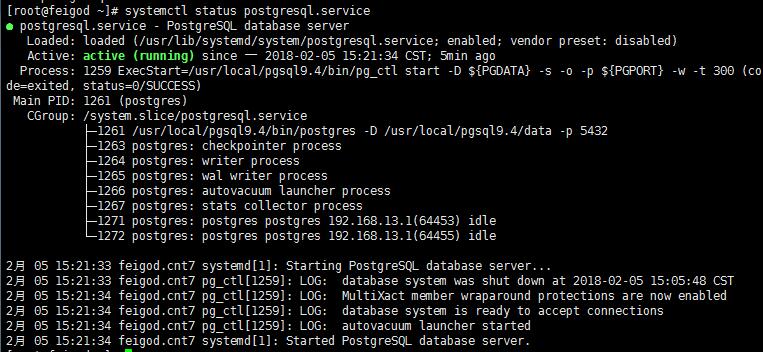
编写开机自动启动服务脚本:
# cat >> /usr/lib/systemd/system/postgresql.service >> EOF
[Unit]

Description=PostgreSQL database server

After=network.target

[Service]

Type=forking

User=postgres

Group=postgres

# Port number for server to listen on

Environment=PGPORT=5432

# Location of database directory

Environment=PGDATA=/usr/local/pgsql9.4/data

# Where to send early-startup messages from the server (before the logging

# options of postgresql.conf take effect)

# This is normally controlled by the global default set by systemd

# StandardOutput=syslog

# Disable OOM kill on the postmaster

OOMScoreAdjust=-1000

#ExecStartPre=/usr/local/pgsql9.4/bin/postgresql-check-db-dir ${PGDATA}

ExecStart=/usr/local/pgsql9.4/bin/pg_ctl start -D ${PGDATA} -s -o "-p ${PGPORT}" -w -t 300

ExecStop=/usr/local/pgsql9.4/bin/pg_ctl stop -D ${PGDATA} -s -m fast

ExecReload=/usr/local/pgsql9.4/bin/pg_ctl reload -D ${PGDATA} -s

# Give a reasonable amount of time for the server to start up/shut down

TimeoutSec=300

[Install]

WantedBy=multi-user.target
EOF
添加可执行权限:
chmod 754 /usr/lib/systemd/system/postgresql.service
设置为开机自启动:
systemctl enable postgresql.service
常用指令(以postgresql服务为例):
启动某服务:
systemctl start postgresql.service
停止某服务:
systemctl stop postgresql.service
重启某服务:
systemctl restart postgresql.service

service postgresql restart
使某服务自动启动(如tomcat服务):
systemctl enable postgresql.service
使某服务不自动启动:
systemctl disable postgresql.service
检查服务状态:
systemctl   status  postgresql.service (服务详细信息)

systemctl   is-active postgresql.service(仅显示是否Active)
显示所有已启动的服务:
systemctl list-units --type=service
Centos7下源编译安装Postgresql 并设置开机自动启动postgresql.serivce 服务相关研究的更多相关文章
- CentOS7 下源码安装 python3
CentOS 7 下源码安装 python3 在CentOS7下,默认安装的是python2.7:为满足项目要求,安装python3 的方法如下: 1. 首先安装python3.6可能使用的依 ...
- centos下安装memcached并设置开机自动启动-两种方法
方法一: 安装memcachedyum install memcached 启动服务并初始化service memcached start -p 11211 -l 127.0.0.1 -d 设置mem ...
- CentOS7下源码安装mysql5.6
目录 准备工作 运行环境 确认你的安装版本 下载mysql 安装mysql 准备安装环境 编译和安装 配置mysql 单实例配置 单实例配置方法 添加防火墙 ...
- 源码编译安装nginx及设置开机启动项
1.上传nginx文档:解压到/data目录下,并安装依赖包tar xf nginx-1.20.1.tar.gz -C /data/cd /data/nginx-1.20.1/ && ...
- centos7下源码安装mysql5.7.16
一.下载源码包下载mysql源码包 http://mirrors.sohu.com/mysql/MySQL-5.7/mysql-5.7.16.tar.gz 二.安装约定: 用户名:mysql 安装目录 ...
- CentOS7下源码安装5.6.23
清理CentOS7下的MariaDB. [root@localhost ~]#rpm -qa | gremp mariadb [root@localhost ~]# rpm -e --node ...
- centos7下源码安装多个nginx步骤完整版
1.下载:wget http://nginx.org/download/nginx-1.10.0.tar.gz 解压:tar -zxvf nginx-1.10.0.tar.gz 2. 执行下面 ...
- Windows 下安装redis 并且设置开机自动启动的过程.
1. 下载redis 的 windows下的安装文件 https://github.com/MicrosoftArchive/redis/releasesmsi文件下载地址https://github ...
- Linux下源码安装MySQL-5.6.25
从mysql-5.5起,mysql源码安装开始使用cmake了,因此我们得先安装cmake,配置安装目录./configure --perfix=/.....的时候和以前的会有些区别. 一.安装cma ...
随机推荐
- jQuery的面试题
1.$的原理 答案: 1)$("选择器")是先查找DOM元素,再将DOM元素放入jQuery对象中 其中自带优化: 如果选择器是#id,则自动调用getElementById 如果 ...
- Django模板之模板变量过滤器
在Django的模板语言中,通过使用 过滤器 来改变变量的显示:Django的模板语言中提供了大约六十个内置过滤器. 过滤器规则: · 过滤器的语法: {{ value|filter_ ...
- E. Physical Education Lessons 动态开辟线段树区间更新
E. Physical Education Lessons time limit per test 1 second memory limit per test 256 megabytes input ...
- 仙人掌图判定及求直径HDU3594 BZOJ1023
https://wenku.baidu.com/view/ce296043192e45361066f575.html //仙人掌图基础知识3个判定条件 http://blog.csdn.net/y ...
- .NET Core HttpClient+Consul实现服务发现
简介 随着.NET Core的不断发展与成熟,基于.NET Core实现微服务的解决方案也越来越多.这其中必然需要注册中心,Consul成为了.NET Core实现服务注册与发现的首选.类似的解决方案 ...
- ExtJS动态隐藏Panel中按钮
1.直接隐藏 在bbar的按钮中直接加属性:hidden : true 属性,可隐藏:disabled : true 属性,可禁用 在columns列中直接加属性:hidden : true 属性,可 ...
- 【NLP】常用优化方法
目录 梯度下降法 动量法 AdaGrad算法 RMSProP算法 AdaDelta算法 Adam算法 1.梯度下降法 梯度下降法可以分为三种,批量梯度下降法(BGD).小批量梯度下降(MBGD).随机 ...
- JMeter中BeanShell Sampler
https://blog.51cto.com/11009785/2385492?source=dra 1.jmeter报错 jmeter.protocol.java.sampler.BeanShell ...
- linux添加策略路由python脚本(待完善)
#! _*_ coding:utf-8 _*_ import os,sys,re,fileinput,socket device_list = [] ip_list = [] ip_end = [] ...
- python常见面试题讲解(十)数字颠倒
题目描述 描述: 输入一个整数,将这个整数以字符串的形式逆序输出 程序不考虑负数的情况,若数字含有0,则逆序形式也含有0,如输入为100,则输出为001 输入描述: 输入一个int整数 输出描述: 将 ...