
An attempt was made to call the method com.google.gson.GsonBuilder.setLenient()Lcom/google/gson/GsonBuilder; but it does not exist. Its class, com.google.gson.GsonBuilder, is available from the foll
 SLF4J: Class path contains multiple SLF4J bindings.

 SLF4J: Found binding in [jar:file:/G:/sharp/repo/ch/qos/logback/logback-classic/1.2.3/logback-classic-

 1.2.3.jar!/org/slf4j/impl/StaticLoggerBinder.class]

 SLF4J: Found binding in [jar:file:/G:/sharp/repo/org/slf4j/slf4j-log4j12/1.7.25/slf4j-log4j12-

 1.7.25.jar!/org/slf4j/impl/StaticLoggerBinder.class]

 SLF4J: See http://www.slf4j.org/codes.html#multiple_bindings for an explanation.

 SLF4J: Actual binding is of type [ch.qos.logback.classic.util.ContextSelectorStaticBinder]

   .   ____          _            __ _ _

  /\\ / ___'_ __ _ _(_)_ __  __ _ \ \ \ \

 ( ( )\___ | '_ | '_| | '_ \/ _` | \ \ \ \

  \\/  ___)| |_)| | | | | || (_| |  ) ) ) )

   '  |____| .__|_| |_|_| |_\__, | / / / /

  =========|_|==============|___/=/_/_/_/

  :: Spring Boot ::        (v2.1.0.RELEASE)

 2019-01-10 09:20:41.911 [main] INFO  com.sharp.forward.SharpServiceApplication - Starting SharpServiceApplication on

 hh-PC with PID 7440 (G:\worksheet\sharp-service\target\classes started by Administrator in G:\worksheet\sharp-service)

 2019-01-10 09:20:41.913 [main] INFO  com.sharp.forward.SharpServiceApplication - The following profiles are active:

 local

 log4j:WARN No appenders could be found for logger (com.alibaba.dubbo.common.logger.LoggerFactory).

 log4j:WARN Please initialize the log4j system properly.

 log4j:WARN See http://logging.apache.org/log4j/1.2/faq.html#noconfig for more info.

 2019-01-10 09:20:43.101 [main] INFO  org.springframework.data.repository.config.RepositoryConfigurationDelegate -

 Bootstrapping Spring Data repositories in DEFAULT mode.

 2019-01-10 09:20:43.126 [main] INFO  org.springframework.data.repository.config.RepositoryConfigurationDelegate -

 Finished Spring Data repository scanning in 15ms. Found 0 repository interfaces.

 2019-01-10 09:20:43.506 [main] INFO  org.springframework.context.support.PostProcessorRegistrationDelegate

 $BeanPostProcessorChecker - Bean 'org.springframework.transaction.annotation.ProxyTransactionManagementConfiguration' of

 type [org.springframework.transaction.annotation.ProxyTransactionManagementConfiguration$$EnhancerBySpringCGLIB$

 $d77381ec] is not eligible for getting processed by all BeanPostProcessors (for example: not eligible for auto-proxying)

 2019-01-10 09:20:43.915 [main] INFO  org.springframework.boot.web.embedded.tomcat.TomcatWebServer - Tomcat initialized

 with port(s): 8080 (http)

 2019-01-10 09:20:43.929 [main] INFO  org.apache.coyote.http11.Http11NioProtocol - Initializing ProtocolHandler ["http-

 nio-8080"]

 2019-01-10 09:20:43.935 [main] INFO  org.apache.catalina.core.StandardService - Starting service [Tomcat]

 2019-01-10 09:20:43.936 [main] INFO  org.apache.catalina.core.StandardEngine - Starting Servlet Engine: Apache

 Tomcat/9.0.12

 2019-01-10 09:20:43.944 [main] INFO  org.apache.catalina.core.AprLifecycleListener - The APR based Apache Tomcat Native

 library which allows optimal performance in production environments was not found on the java.library.path: [D:

 \xxxSoft\java\jre1.8\bin;C:\Windows\Sun\Java\bin;C:\Windows\system32;C:

 \Windows;D:/xxxSoft/java/jre1.8/bin/server;D:/xxxSoft/java/jre1.8/bin;D:/xxxSoft/java/jre1.8/lib/amd64;C:

 \Program Files (x86)\Common Files\Oracle\Java\javapath;C:\Windows\system32;C:\Windows;C:\Windows\System32\Wbem;C:

 \Windows\System32\WindowsPowerShell\v1.0\;C:\Program Files (x86)\Java\jre7;D:\xxxSoft\java\jdk1.8\bin;D:

 \xxxSoft\java\jdk1.8\jre\bin;D:\xxxSoft\git\Git\cmd;D:\xxxSoft\svn\bin;D:\xxxSoft\maven\apache-maven-

 3.3.9-bin\apache-maven-3.3.9\bin;C:\Program Files\bin;D:\xxxSoft\zookeeper/bin;D:\xxxSoft\zookeeper/conf;D:

 \project-x\;D:\xxxSoft\eclipse4.8\eclipse;;.]

 2019-01-10 09:20:44.063 [main] INFO  org.apache.catalina.core.ContainerBase.[Tomcat].[localhost].[/] - Initializing

 Spring embedded WebApplicationContext

 2019-01-10 09:20:44.063 [main] INFO  org.springframework.web.context.ContextLoader - Root WebApplicationContext:

 initialization completed in 2102 ms

 2019-01-10 09:20:44.091 [main] INFO  org.springframework.boot.web.servlet.ServletRegistrationBean - Servlet

 dispatcherServlet mapped to [/]

 2019-01-10 09:20:44.095 [main] INFO  org.springframework.boot.web.servlet.FilterRegistrationBean - Mapping filter:

 'characterEncodingFilter' to: [/*]

 2019-01-10 09:20:44.095 [main] INFO  org.springframework.boot.web.servlet.FilterRegistrationBean - Mapping filter:

 'hiddenHttpMethodFilter' to: [/*]

 2019-01-10 09:20:44.095 [main] INFO  org.springframework.boot.web.servlet.FilterRegistrationBean - Mapping filter:

 'formContentFilter' to: [/*]

 2019-01-10 09:20:44.095 [main] INFO  org.springframework.boot.web.servlet.FilterRegistrationBean - Mapping filter:

 'requestContextFilter' to: [/*]

 2019-01-10 09:20:44.222 [main] INFO  com.zaxxer.hikari.HikariDataSource - HikariPool-1 - Starting...

 Thu Jan 10 09:20:44 CST 2019 WARN: Establishing SSL connection without server's identity verification is not

 recommended. According to MySQL 5.5.45+, 5.6.26+ and 5.7.6+ requirements SSL connection must be established by default

 if explicit option isn't set. For compliance with existing applications not using SSL the verifyServerCertificate

 property is set to 'false'. You need either to explicitly disable SSL by setting useSSL=false, or set useSSL=true and

 provide truststore for server certificate verification.

 2019-01-10 09:20:44.653 [main] INFO  com.zaxxer.hikari.HikariDataSource - HikariPool-1 - Start completed.

 2019-01-10 09:20:44.708 [main] INFO  org.hibernate.jpa.internal.util.LogHelper - HHH000204: Processing

 PersistenceUnitInfo [

     name: default

     ...]

 Thu Jan 10 09:20:44 CST 2019 WARN: Establishing SSL connection without server's identity verification is not

 recommended. According to MySQL 5.5.45+, 5.6.26+ and 5.7.6+ requirements SSL connection must be established by default

 if explicit option isn't set. For compliance with existing applications not using SSL the verifyServerCertificate

 property is set to 'false'. You need either to explicitly disable SSL by setting useSSL=false, or set useSSL=true and

 provide truststore for server certificate verification.

 Thu Jan 10 09:20:44 CST 2019 WARN: Establishing SSL connection without server's identity verification is not

 recommended. According to MySQL 5.5.45+, 5.6.26+ and 5.7.6+ requirements SSL connection must be established by default

 if explicit option isn't set. For compliance with existing applications not using SSL the verifyServerCertificate

 property is set to 'false'. You need either to explicitly disable SSL by setting useSSL=false, or set useSSL=true and

 provide truststore for server certificate verification.

 2019-01-10 09:20:44.805 [main] INFO  org.hibernate.Version - HHH000412: Hibernate Core {5.3.7.Final}

 2019-01-10 09:20:44.806 [main] INFO  org.hibernate.cfg.Environment - HHH000206: hibernate.properties not found

 Thu Jan 10 09:20:44 CST 2019 WARN: Establishing SSL connection without server's identity verification is not

 recommended. According to MySQL 5.5.45+, 5.6.26+ and 5.7.6+ requirements SSL connection must be established by default

 if explicit option isn't set. For compliance with existing applications not using SSL the verifyServerCertificate

 property is set to 'false'. You need either to explicitly disable SSL by setting useSSL=false, or set useSSL=true and

 provide truststore for server certificate verification.

 Thu Jan 10 09:20:44 CST 2019 WARN: Establishing SSL connection without server's identity verification is not

 recommended. According to MySQL 5.5.45+, 5.6.26+ and 5.7.6+ requirements SSL connection must be established by default

 if explicit option isn't set. For compliance with existing applications not using SSL the verifyServerCertificate

 property is set to 'false'. You need either to explicitly disable SSL by setting useSSL=false, or set useSSL=true and

 provide truststore for server certificate verification.

 Thu Jan 10 09:20:44 CST 2019 WARN: Establishing SSL connection without server's identity verification is not

 recommended. According to MySQL 5.5.45+, 5.6.26+ and 5.7.6+ requirements SSL connection must be established by default

 if explicit option isn't set. For compliance with existing applications not using SSL the verifyServerCertificate

 property is set to 'false'. You need either to explicitly disable SSL by setting useSSL=false, or set useSSL=true and

 provide truststore for server certificate verification.

 Thu Jan 10 09:20:44 CST 2019 WARN: Establishing SSL connection without server's identity verification is not

 recommended. According to MySQL 5.5.45+, 5.6.26+ and 5.7.6+ requirements SSL connection must be established by default

 if explicit option isn't set. For compliance with existing applications not using SSL the verifyServerCertificate

 property is set to 'false'. You need either to explicitly disable SSL by setting useSSL=false, or set useSSL=true and

 provide truststore for server certificate verification.

 Thu Jan 10 09:20:44 CST 2019 WARN: Establishing SSL connection without server's identity verification is not

 recommended. According to MySQL 5.5.45+, 5.6.26+ and 5.7.6+ requirements SSL connection must be established by default

 if explicit option isn't set. For compliance with existing applications not using SSL the verifyServerCertificate

 property is set to 'false'. You need either to explicitly disable SSL by setting useSSL=false, or set useSSL=true and

 provide truststore for server certificate verification.

 Thu Jan 10 09:20:44 CST 2019 WARN: Establishing SSL connection without server's identity verification is not

 recommended. According to MySQL 5.5.45+, 5.6.26+ and 5.7.6+ requirements SSL connection must be established by default

 if explicit option isn't set. For compliance with existing applications not using SSL the verifyServerCertificate

 property is set to 'false'. You need either to explicitly disable SSL by setting useSSL=false, or set useSSL=true and

 provide truststore for server certificate verification.

 Thu Jan 10 09:20:44 CST 2019 WARN: Establishing SSL connection without server's identity verification is not

 recommended. According to MySQL 5.5.45+, 5.6.26+ and 5.7.6+ requirements SSL connection must be established by default

 if explicit option isn't set. For compliance with existing applications not using SSL the verifyServerCertificate

 property is set to 'false'. You need either to explicitly disable SSL by setting useSSL=false, or set useSSL=true and

 provide truststore for server certificate verification.

 2019-01-10 09:20:44.986 [main] INFO  org.hibernate.annotations.common.Version - HCANN000001: Hibernate Commons

 Annotations {5.0.4.Final}

 2019-01-10 09:20:45.140 [main] INFO  org.hibernate.dialect.Dialect - HHH000400: Using dialect:

 org.hibernate.dialect.MySQL5Dialect

 2019-01-10 09:20:45.365 [main] INFO  org.springframework.orm.jpa.LocalContainerEntityManagerFactoryBean - Initialized

 JPA EntityManagerFactory for persistence unit 'default'

 2019-01-10 09:20:45.888 [main] INFO  org.springframework.scheduling.concurrent.ThreadPoolTaskExecutor - Initializing

 ExecutorService 'applicationTaskExecutor'

 2019-01-10 09:20:45.929 [main] WARN  org.springframework.boot.autoconfigure.orm.jpa.JpaBaseConfiguration

 $JpaWebConfiguration$JpaWebMvcConfiguration - spring.jpa.open-in-view is enabled by default. Therefore, database queries

 may be performed during view rendering. Explicitly configure spring.jpa.open-in-view to disable this warning

 2019-01-10 09:20:46.057 [main] WARN

 org.springframework.boot.web.servlet.context.AnnotationConfigServletWebServerApplicationContext - Exception encountered

 during context initialization - cancelling refresh attempt: org.springframework.beans.factory.BeanCreationException:

 Error creating bean with name 'gsonBuilder' defined in class path resource

 [org/springframework/boot/autoconfigure/gson/GsonAutoConfiguration.class]: Bean instantiation via factory method failed;

 nested exception is org.springframework.beans.BeanInstantiationException: Failed to instantiate

 [com.google.gson.GsonBuilder]: Factory method 'gsonBuilder' threw exception; nested exception is

 java.lang.BootstrapMethodError: java.lang.NoSuchMethodError: com.google.gson.GsonBuilder.setLenient()

 Lcom/google/gson/GsonBuilder;

 2019-01-10 09:20:46.057 [main] INFO  org.springframework.scheduling.concurrent.ThreadPoolTaskExecutor - Shutting down

 ExecutorService 'applicationTaskExecutor'

 2019-01-10 09:20:46.058 [main] INFO  org.springframework.orm.jpa.LocalContainerEntityManagerFactoryBean - Closing JPA

 EntityManagerFactory for persistence unit 'default'

 2019-01-10 09:20:46.061 [main] INFO  com.zaxxer.hikari.HikariDataSource - HikariPool-1 - Shutdown initiated...

 2019-01-10 09:20:46.068 [main] INFO  com.zaxxer.hikari.HikariDataSource - HikariPool-1 - Shutdown completed.

 2019-01-10 09:20:46.070 [main] INFO  org.apache.catalina.core.StandardService - Stopping service [Tomcat]

 2019-01-10 09:20:46.083 [main] INFO

 org.springframework.boot.autoconfigure.logging.ConditionEvaluationReportLoggingListener -

 Error starting ApplicationContext. To display the conditions report re-run your application with 'debug' enabled.

 2019-01-10 09:20:46.085 [main] ERROR org.springframework.boot.diagnostics.LoggingFailureAnalysisReporter -

 ***************************

 APPLICATION FAILED TO START

 ***************************

 Description:

 An attempt was made to call the method com.google.gson.GsonBuilder.setLenient()Lcom/google/gson/GsonBuilder; but it does

 not exist. Its class, com.google.gson.GsonBuilder, is available from the following locations:

     jar:file:/G:/lib/gson-2.3.1.jar!/com/google/gson/GsonBuilder.class

 It was loaded from the following location:

     file:/G:/lib/gson-2.3.1.jar

 Action:

 Correct the classpath of your application so that it contains a single, compatible version of

 com.google.gson.GsonBuilder
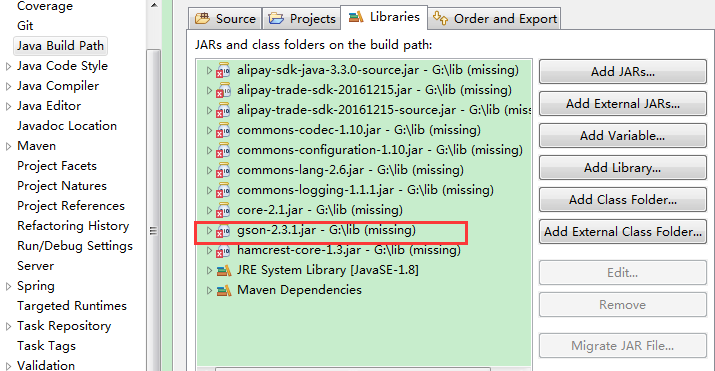
提升了版本2.7,2.8.2,但是均没有解决版本冲突的问题,最后发现,是我之前手动添加过gson.jar。删除即可。比较常规,但是由于用maven管理jar包,在pom.xml中找不到冲突的jar所以在这里记录一下,提个醒。下面是先删除本地jar之后的现象,再删除这些就可以了
An attempt was made to call the method com.google.gson.GsonBuilder.setLenient()Lcom/google/gson/GsonBuilder; but it does not exist. Its class, com.google.gson.GsonBuilder, is available from the foll的更多相关文章
- 【排错】springboot项目,启动报An attempt was made to call the method com.google.gson.GsonBuilder.setLenient()Lcom/google/gson/GsonBuilder; but it does not exist.
pom文件新引入: <dependency> <groupId>com.google.code.gson</groupId> ...
- 搭建SpringbootAdmin监控中心报错A attempt was made to call the method reactor.retry.Retry.retryMax(I)Lreactor/ret)
遇到了同样的错误,转载记录下: 转载自:https://blog.csdn.net/qq_41938882/article/details/85048953 很明显,还没有启动成功就报错了.报错原 ...
- 搭建Springboot监控中心报错A attempt was made to call the method reactor.retry.Retry.retryMax(I)Lreactor/ret)
服务器还没启动就报错,是因为jar包的版本没对上,看的视频是SpringBoot2.0 ,现在已经是2.1.7了 将spring-boot-admin-starter-server版本改为最新就ok了
- SpringBoot中pom引入gson异常
在pom中引入gson依赖,启动spring boot项目中报错 Description:An attempt was made to call the method com.google.gson. ...
- SpringBoot_异常_01_Caused by: java.lang.BootstrapMethodError: java.lang.NoSuchMethodError
一.异常信息 org.springframework.beans.factory.BeanCreationException: Error creating bean with name 'gsonB ...
- SpringBoot Cloud eureka 注册中心
SpringBoot Cloud是什么 Spring Cloud是一个分布式的整体解决方案. Spring Cloud 为开发者提供了在分布式系统(配置管理,服务发现,熔断,路由,微代理,控制总线,一 ...
- Method and Apparatus for Providing Highly-Scalable Network Storage for Well-Gridded Objects
An apparatus comprising a plurality of storage nodes comprising a plurality of corresponding storage ...
- 给访问私有变量添加access method
class TestAccessPrivateVar{ private int a = 1; class MyInner{ /* synthetic final TestAccessPrivateVa ...
- Volley
Volley 是 Google 推出的轻量级 Android 异步网络请求框架和图片加载框架.在 Google I/O 2013 大会上发布.其适用场景是数据量小,通信频繁的网络操作. 主要特点: ( ...
随机推荐
- 类似discuz密码的生成规则
/* 生成一个串,uniqid(rand()): uniqid(prefix,more_entropy) 函数基于以微秒计的当前时间,生成一个唯一的 ID. 如果 prefix 参数为空,则返回的字符 ...
- 1.ORM介绍,基本配置及通过ORM框架创建表
1.介绍 ORM全拼Object-Relation Mapping(对象-关系映射) 作用:主要实现模型对象到关系数据库数据的映射 通过ORM框架作为一个中间者或者是一个桥梁,开发者通过定义模型类,属 ...
- 2.9 logistic回归中的梯度下降法(非常重要,一定要重点理解)
怎么样计算偏导数来实现logistic回归的梯度下降法 它的核心关键点是其中的几个重要公式用来实现logistic回归的梯度下降法 接下来开始学习logistic回归的梯度下降法 logistic回归 ...
- 为spring boot 写的Controller中的rest接口配置swagger
1.pom.xml文件中加入下列依赖: <dependency> <groupId>io.springfox</groupId> <artifactId> ...
- 记录下 k8s (1.14.2)使用kubeadm方式搭建和rancher搭建需要的镜像清单
kubeadm方式 之前一直用的1.12.2版本的,最近想试一下新的版本1.14.2 当然相应的组件镜像版本也需要更新了.镜像版本如下(网络插件使用flannel) k8s.gcr.io/kube-p ...
- Spark教程——(11)Spark程序local模式执行、cluster模式执行以及Oozie/Hue执行的设置方式
本地执行Spark SQL程序: package com.fc //import common.util.{phoenixConnectMode, timeUtil} import org.apach ...
- iOS学习7:iOS沙盒(sandBox)机制(一)之获取沙盒路径及目录说明(转)
转:http://my.oschina.net/joanfen/blog/151145 一.iOS沙盒机制 iOS的应用只能访问为该应用创建的区域,不可访问其他区域,应用的其他非代码文件都存在此目录下 ...
- spm_hrf
a=spm_hrf(0.72); n1=MOTOR_taskdesign(1,:);cn1=conv(n1,a);plot(cn1); block design hrf
- 解题报告:luogu P2220
指挥使走后一脸懵逼,然后想起了一道水\(SB\)的省选题. 这是毒瘤乘法分配率的应用,似乎还有一篇,算是入门题. 对了,这题连接:P2220 [HAOI2012]容易题 然而蒟蒻还是先自闭了一会... ...
- linux#自启动脚本
编写脚本: /etc/init.d/myscriptname # chkconfig: # description: 描述信息,描述信息,上面的90表示在众多开机启动脚本的优先级,10表示在众多关机启 ...