
An attempt was made to call the method com.google.gson.GsonBuilder.setLenient()Lcom/google/gson/GsonBuilder; but it does not exist. Its class, com.google.gson.GsonBuilder, is available from the foll
 SLF4J: Class path contains multiple SLF4J bindings.

 SLF4J: Found binding in [jar:file:/G:/sharp/repo/ch/qos/logback/logback-classic/1.2.3/logback-classic-

 1.2.3.jar!/org/slf4j/impl/StaticLoggerBinder.class]

 SLF4J: Found binding in [jar:file:/G:/sharp/repo/org/slf4j/slf4j-log4j12/1.7.25/slf4j-log4j12-

 1.7.25.jar!/org/slf4j/impl/StaticLoggerBinder.class]

 SLF4J: See http://www.slf4j.org/codes.html#multiple_bindings for an explanation.

 SLF4J: Actual binding is of type [ch.qos.logback.classic.util.ContextSelectorStaticBinder]

   .   ____          _            __ _ _

  /\\ / ___'_ __ _ _(_)_ __  __ _ \ \ \ \

 ( ( )\___ | '_ | '_| | '_ \/ _` | \ \ \ \

  \\/  ___)| |_)| | | | | || (_| |  ) ) ) )

   '  |____| .__|_| |_|_| |_\__, | / / / /

  =========|_|==============|___/=/_/_/_/

  :: Spring Boot ::        (v2.1.0.RELEASE)

 2019-01-10 09:20:41.911 [main] INFO  com.sharp.forward.SharpServiceApplication - Starting SharpServiceApplication on

 hh-PC with PID 7440 (G:\worksheet\sharp-service\target\classes started by Administrator in G:\worksheet\sharp-service)

 2019-01-10 09:20:41.913 [main] INFO  com.sharp.forward.SharpServiceApplication - The following profiles are active:

 local

 log4j:WARN No appenders could be found for logger (com.alibaba.dubbo.common.logger.LoggerFactory).

 log4j:WARN Please initialize the log4j system properly.

 log4j:WARN See http://logging.apache.org/log4j/1.2/faq.html#noconfig for more info.

 2019-01-10 09:20:43.101 [main] INFO  org.springframework.data.repository.config.RepositoryConfigurationDelegate -

 Bootstrapping Spring Data repositories in DEFAULT mode.

 2019-01-10 09:20:43.126 [main] INFO  org.springframework.data.repository.config.RepositoryConfigurationDelegate -

 Finished Spring Data repository scanning in 15ms. Found 0 repository interfaces.

 2019-01-10 09:20:43.506 [main] INFO  org.springframework.context.support.PostProcessorRegistrationDelegate

 $BeanPostProcessorChecker - Bean 'org.springframework.transaction.annotation.ProxyTransactionManagementConfiguration' of

 type [org.springframework.transaction.annotation.ProxyTransactionManagementConfiguration$$EnhancerBySpringCGLIB$

 $d77381ec] is not eligible for getting processed by all BeanPostProcessors (for example: not eligible for auto-proxying)

 2019-01-10 09:20:43.915 [main] INFO  org.springframework.boot.web.embedded.tomcat.TomcatWebServer - Tomcat initialized

 with port(s): 8080 (http)

 2019-01-10 09:20:43.929 [main] INFO  org.apache.coyote.http11.Http11NioProtocol - Initializing ProtocolHandler ["http-

 nio-8080"]

 2019-01-10 09:20:43.935 [main] INFO  org.apache.catalina.core.StandardService - Starting service [Tomcat]

 2019-01-10 09:20:43.936 [main] INFO  org.apache.catalina.core.StandardEngine - Starting Servlet Engine: Apache

 Tomcat/9.0.12

 2019-01-10 09:20:43.944 [main] INFO  org.apache.catalina.core.AprLifecycleListener - The APR based Apache Tomcat Native

 library which allows optimal performance in production environments was not found on the java.library.path: [D:

 \xxxSoft\java\jre1.8\bin;C:\Windows\Sun\Java\bin;C:\Windows\system32;C:

 \Windows;D:/xxxSoft/java/jre1.8/bin/server;D:/xxxSoft/java/jre1.8/bin;D:/xxxSoft/java/jre1.8/lib/amd64;C:

 \Program Files (x86)\Common Files\Oracle\Java\javapath;C:\Windows\system32;C:\Windows;C:\Windows\System32\Wbem;C:

 \Windows\System32\WindowsPowerShell\v1.0\;C:\Program Files (x86)\Java\jre7;D:\xxxSoft\java\jdk1.8\bin;D:

 \xxxSoft\java\jdk1.8\jre\bin;D:\xxxSoft\git\Git\cmd;D:\xxxSoft\svn\bin;D:\xxxSoft\maven\apache-maven-

 3.3.9-bin\apache-maven-3.3.9\bin;C:\Program Files\bin;D:\xxxSoft\zookeeper/bin;D:\xxxSoft\zookeeper/conf;D:

 \project-x\;D:\xxxSoft\eclipse4.8\eclipse;;.]

 2019-01-10 09:20:44.063 [main] INFO  org.apache.catalina.core.ContainerBase.[Tomcat].[localhost].[/] - Initializing

 Spring embedded WebApplicationContext

 2019-01-10 09:20:44.063 [main] INFO  org.springframework.web.context.ContextLoader - Root WebApplicationContext:

 initialization completed in 2102 ms

 2019-01-10 09:20:44.091 [main] INFO  org.springframework.boot.web.servlet.ServletRegistrationBean - Servlet

 dispatcherServlet mapped to [/]

 2019-01-10 09:20:44.095 [main] INFO  org.springframework.boot.web.servlet.FilterRegistrationBean - Mapping filter:

 'characterEncodingFilter' to: [/*]

 2019-01-10 09:20:44.095 [main] INFO  org.springframework.boot.web.servlet.FilterRegistrationBean - Mapping filter:

 'hiddenHttpMethodFilter' to: [/*]

 2019-01-10 09:20:44.095 [main] INFO  org.springframework.boot.web.servlet.FilterRegistrationBean - Mapping filter:

 'formContentFilter' to: [/*]

 2019-01-10 09:20:44.095 [main] INFO  org.springframework.boot.web.servlet.FilterRegistrationBean - Mapping filter:

 'requestContextFilter' to: [/*]

 2019-01-10 09:20:44.222 [main] INFO  com.zaxxer.hikari.HikariDataSource - HikariPool-1 - Starting...

 Thu Jan 10 09:20:44 CST 2019 WARN: Establishing SSL connection without server's identity verification is not

 recommended. According to MySQL 5.5.45+, 5.6.26+ and 5.7.6+ requirements SSL connection must be established by default

 if explicit option isn't set. For compliance with existing applications not using SSL the verifyServerCertificate

 property is set to 'false'. You need either to explicitly disable SSL by setting useSSL=false, or set useSSL=true and

 provide truststore for server certificate verification.

 2019-01-10 09:20:44.653 [main] INFO  com.zaxxer.hikari.HikariDataSource - HikariPool-1 - Start completed.

 2019-01-10 09:20:44.708 [main] INFO  org.hibernate.jpa.internal.util.LogHelper - HHH000204: Processing

 PersistenceUnitInfo [

     name: default

     ...]

 Thu Jan 10 09:20:44 CST 2019 WARN: Establishing SSL connection without server's identity verification is not

 recommended. According to MySQL 5.5.45+, 5.6.26+ and 5.7.6+ requirements SSL connection must be established by default

 if explicit option isn't set. For compliance with existing applications not using SSL the verifyServerCertificate

 property is set to 'false'. You need either to explicitly disable SSL by setting useSSL=false, or set useSSL=true and

 provide truststore for server certificate verification.

 Thu Jan 10 09:20:44 CST 2019 WARN: Establishing SSL connection without server's identity verification is not

 recommended. According to MySQL 5.5.45+, 5.6.26+ and 5.7.6+ requirements SSL connection must be established by default

 if explicit option isn't set. For compliance with existing applications not using SSL the verifyServerCertificate

 property is set to 'false'. You need either to explicitly disable SSL by setting useSSL=false, or set useSSL=true and

 provide truststore for server certificate verification.

 2019-01-10 09:20:44.805 [main] INFO  org.hibernate.Version - HHH000412: Hibernate Core {5.3.7.Final}

 2019-01-10 09:20:44.806 [main] INFO  org.hibernate.cfg.Environment - HHH000206: hibernate.properties not found

 Thu Jan 10 09:20:44 CST 2019 WARN: Establishing SSL connection without server's identity verification is not

 recommended. According to MySQL 5.5.45+, 5.6.26+ and 5.7.6+ requirements SSL connection must be established by default

 if explicit option isn't set. For compliance with existing applications not using SSL the verifyServerCertificate

 property is set to 'false'. You need either to explicitly disable SSL by setting useSSL=false, or set useSSL=true and

 provide truststore for server certificate verification.

 Thu Jan 10 09:20:44 CST 2019 WARN: Establishing SSL connection without server's identity verification is not

 recommended. According to MySQL 5.5.45+, 5.6.26+ and 5.7.6+ requirements SSL connection must be established by default

 if explicit option isn't set. For compliance with existing applications not using SSL the verifyServerCertificate

 property is set to 'false'. You need either to explicitly disable SSL by setting useSSL=false, or set useSSL=true and

 provide truststore for server certificate verification.

 Thu Jan 10 09:20:44 CST 2019 WARN: Establishing SSL connection without server's identity verification is not

 recommended. According to MySQL 5.5.45+, 5.6.26+ and 5.7.6+ requirements SSL connection must be established by default

 if explicit option isn't set. For compliance with existing applications not using SSL the verifyServerCertificate

 property is set to 'false'. You need either to explicitly disable SSL by setting useSSL=false, or set useSSL=true and

 provide truststore for server certificate verification.

 Thu Jan 10 09:20:44 CST 2019 WARN: Establishing SSL connection without server's identity verification is not

 recommended. According to MySQL 5.5.45+, 5.6.26+ and 5.7.6+ requirements SSL connection must be established by default

 if explicit option isn't set. For compliance with existing applications not using SSL the verifyServerCertificate

 property is set to 'false'. You need either to explicitly disable SSL by setting useSSL=false, or set useSSL=true and

 provide truststore for server certificate verification.

 Thu Jan 10 09:20:44 CST 2019 WARN: Establishing SSL connection without server's identity verification is not

 recommended. According to MySQL 5.5.45+, 5.6.26+ and 5.7.6+ requirements SSL connection must be established by default

 if explicit option isn't set. For compliance with existing applications not using SSL the verifyServerCertificate

 property is set to 'false'. You need either to explicitly disable SSL by setting useSSL=false, or set useSSL=true and

 provide truststore for server certificate verification.

 Thu Jan 10 09:20:44 CST 2019 WARN: Establishing SSL connection without server's identity verification is not

 recommended. According to MySQL 5.5.45+, 5.6.26+ and 5.7.6+ requirements SSL connection must be established by default

 if explicit option isn't set. For compliance with existing applications not using SSL the verifyServerCertificate

 property is set to 'false'. You need either to explicitly disable SSL by setting useSSL=false, or set useSSL=true and

 provide truststore for server certificate verification.

 Thu Jan 10 09:20:44 CST 2019 WARN: Establishing SSL connection without server's identity verification is not

 recommended. According to MySQL 5.5.45+, 5.6.26+ and 5.7.6+ requirements SSL connection must be established by default

 if explicit option isn't set. For compliance with existing applications not using SSL the verifyServerCertificate

 property is set to 'false'. You need either to explicitly disable SSL by setting useSSL=false, or set useSSL=true and

 provide truststore for server certificate verification.

 2019-01-10 09:20:44.986 [main] INFO  org.hibernate.annotations.common.Version - HCANN000001: Hibernate Commons

 Annotations {5.0.4.Final}

 2019-01-10 09:20:45.140 [main] INFO  org.hibernate.dialect.Dialect - HHH000400: Using dialect:

 org.hibernate.dialect.MySQL5Dialect

 2019-01-10 09:20:45.365 [main] INFO  org.springframework.orm.jpa.LocalContainerEntityManagerFactoryBean - Initialized

 JPA EntityManagerFactory for persistence unit 'default'

 2019-01-10 09:20:45.888 [main] INFO  org.springframework.scheduling.concurrent.ThreadPoolTaskExecutor - Initializing

 ExecutorService 'applicationTaskExecutor'

 2019-01-10 09:20:45.929 [main] WARN  org.springframework.boot.autoconfigure.orm.jpa.JpaBaseConfiguration

 $JpaWebConfiguration$JpaWebMvcConfiguration - spring.jpa.open-in-view is enabled by default. Therefore, database queries

 may be performed during view rendering. Explicitly configure spring.jpa.open-in-view to disable this warning

 2019-01-10 09:20:46.057 [main] WARN

 org.springframework.boot.web.servlet.context.AnnotationConfigServletWebServerApplicationContext - Exception encountered

 during context initialization - cancelling refresh attempt: org.springframework.beans.factory.BeanCreationException:

 Error creating bean with name 'gsonBuilder' defined in class path resource

 [org/springframework/boot/autoconfigure/gson/GsonAutoConfiguration.class]: Bean instantiation via factory method failed;

 nested exception is org.springframework.beans.BeanInstantiationException: Failed to instantiate

 [com.google.gson.GsonBuilder]: Factory method 'gsonBuilder' threw exception; nested exception is

 java.lang.BootstrapMethodError: java.lang.NoSuchMethodError: com.google.gson.GsonBuilder.setLenient()

 Lcom/google/gson/GsonBuilder;

 2019-01-10 09:20:46.057 [main] INFO  org.springframework.scheduling.concurrent.ThreadPoolTaskExecutor - Shutting down

 ExecutorService 'applicationTaskExecutor'

 2019-01-10 09:20:46.058 [main] INFO  org.springframework.orm.jpa.LocalContainerEntityManagerFactoryBean - Closing JPA

 EntityManagerFactory for persistence unit 'default'

 2019-01-10 09:20:46.061 [main] INFO  com.zaxxer.hikari.HikariDataSource - HikariPool-1 - Shutdown initiated...

 2019-01-10 09:20:46.068 [main] INFO  com.zaxxer.hikari.HikariDataSource - HikariPool-1 - Shutdown completed.

 2019-01-10 09:20:46.070 [main] INFO  org.apache.catalina.core.StandardService - Stopping service [Tomcat]

 2019-01-10 09:20:46.083 [main] INFO

 org.springframework.boot.autoconfigure.logging.ConditionEvaluationReportLoggingListener -

 Error starting ApplicationContext. To display the conditions report re-run your application with 'debug' enabled.

 2019-01-10 09:20:46.085 [main] ERROR org.springframework.boot.diagnostics.LoggingFailureAnalysisReporter -

 ***************************

 APPLICATION FAILED TO START

 ***************************

 Description:

 An attempt was made to call the method com.google.gson.GsonBuilder.setLenient()Lcom/google/gson/GsonBuilder; but it does

 not exist. Its class, com.google.gson.GsonBuilder, is available from the following locations:

     jar:file:/G:/lib/gson-2.3.1.jar!/com/google/gson/GsonBuilder.class

 It was loaded from the following location:

     file:/G:/lib/gson-2.3.1.jar

 Action:

 Correct the classpath of your application so that it contains a single, compatible version of

 com.google.gson.GsonBuilder
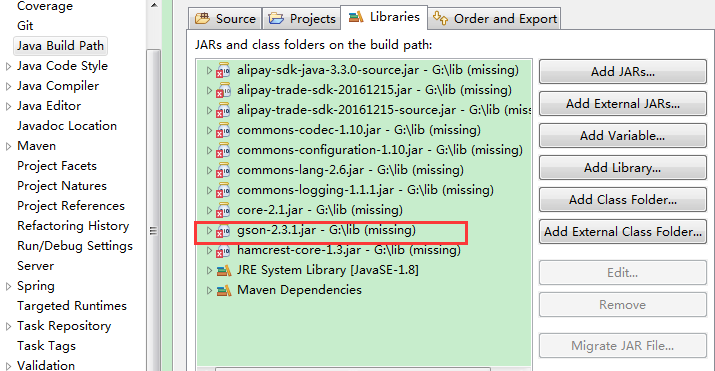
提升了版本2.7,2.8.2,但是均没有解决版本冲突的问题,最后发现,是我之前手动添加过gson.jar。删除即可。比较常规,但是由于用maven管理jar包,在pom.xml中找不到冲突的jar所以在这里记录一下,提个醒。下面是先删除本地jar之后的现象,再删除这些就可以了
An attempt was made to call the method com.google.gson.GsonBuilder.setLenient()Lcom/google/gson/GsonBuilder; but it does not exist. Its class, com.google.gson.GsonBuilder, is available from the foll的更多相关文章
- 【排错】springboot项目,启动报An attempt was made to call the method com.google.gson.GsonBuilder.setLenient()Lcom/google/gson/GsonBuilder; but it does not exist.
pom文件新引入: <dependency> <groupId>com.google.code.gson</groupId> ...
- 搭建SpringbootAdmin监控中心报错A attempt was made to call the method reactor.retry.Retry.retryMax(I)Lreactor/ret)
遇到了同样的错误,转载记录下: 转载自:https://blog.csdn.net/qq_41938882/article/details/85048953 很明显,还没有启动成功就报错了.报错原 ...
- 搭建Springboot监控中心报错A attempt was made to call the method reactor.retry.Retry.retryMax(I)Lreactor/ret)
服务器还没启动就报错,是因为jar包的版本没对上,看的视频是SpringBoot2.0 ,现在已经是2.1.7了 将spring-boot-admin-starter-server版本改为最新就ok了
- SpringBoot中pom引入gson异常
在pom中引入gson依赖,启动spring boot项目中报错 Description:An attempt was made to call the method com.google.gson. ...
- SpringBoot_异常_01_Caused by: java.lang.BootstrapMethodError: java.lang.NoSuchMethodError
一.异常信息 org.springframework.beans.factory.BeanCreationException: Error creating bean with name 'gsonB ...
- SpringBoot Cloud eureka 注册中心
SpringBoot Cloud是什么 Spring Cloud是一个分布式的整体解决方案. Spring Cloud 为开发者提供了在分布式系统(配置管理,服务发现,熔断,路由,微代理,控制总线,一 ...
- Method and Apparatus for Providing Highly-Scalable Network Storage for Well-Gridded Objects
An apparatus comprising a plurality of storage nodes comprising a plurality of corresponding storage ...
- 给访问私有变量添加access method
class TestAccessPrivateVar{ private int a = 1; class MyInner{ /* synthetic final TestAccessPrivateVa ...
- Volley
Volley 是 Google 推出的轻量级 Android 异步网络请求框架和图片加载框架.在 Google I/O 2013 大会上发布.其适用场景是数据量小,通信频繁的网络操作. 主要特点: ( ...
随机推荐
- redis在Windows上启动报错
The Windows version of Redis allocates a memory mapped heap for sharing with the forked process used ...
- mssql-osql
mssql导入单行字段值非常长,或者sql文件非常大,比如上百M或者更大,常规方法是导不进去的,所以推荐下面方式进行导入. osql -S . -U sa -P 123456 -d TS_TEST - ...
- js面试必考:this
this是前端面试中必考的基础知识点,也是新手小白在做项目中经常晕头转向的问题.但其实this不难理解. 判断this指向时,记住以下几点: 判断函数类型, 1.1 如果是箭头函数,则为第一个包裹箭头 ...
- c++ 读取、保存单张图片
转载:https://www.jb51.net/article/147896.htm 实际上就是以二进制形式打开文件,将数据保存到内存,在以二进制形式输出到指定文件.因此对于有图片的文件,也可以用这种 ...
- Codeforces Global Round 4E(字符串,思维)
#include<bits/stdc++.h>using namespace std;string s,a,b;int main(){ cin>>s; int n=s.size ...
- android原始sqlite中query的复杂用法
android直接执行sql是execSQL(String sql). 这个方法可以执行任意sql语句.但是改变这个不够灵活. query这个方法可以很好的解决这个问题. 执行query查询指定的数据 ...
- 块级元素、行内元素、display属性
块级元素 特点: 总是以一个块的形式表现出来,占领一整行.若干同级块元素会从上之下依次排列(使用float属性除外). 可以设置高度.宽度.各个方向的margin以及各个方向的padding. 当宽度 ...
- Windows密码安全性测试
一.本地管理员密码如何直接提取 1.1直接通过mimikatz读取管理员密码 (不能交互式,不能在webshell下用,图形化界面很好用) 第一条:privilege::debug ...
- python的沙盒环境--virtualenv
VirtualEnv用于在一台机器上创建多个独立的python运行环境,VirtualEnvWrapper为前者提供了一些便利的命令行上的封装. 使用 VirtualEnv 的理由: 隔离项目之间 ...
- MyBatis插入时获取自增长主键
在某些场景下,我们需要使用mybatis返回生成的主键值.Mybatis在insert和update标签中就提供了这种功能. 方法1: <insert id=”indetifyId” useGe ...