
System.PlatformNotSupportedException:“Operation is not supported on this platform.”
vs2019创建.net core3.1 的控制台应用程序
执行以下代码:
using System;

using System.Diagnostics;

using System.Threading;

namespace ConsoleApp3

{

    /// <summary>

    /// 委托必须和要调用的异步方法有相同的签名

    /// </summary>

    /// <param name="callDuration">sleep时间</param>

    /// <param name="threadId">当前线程id</param>

    /// <returns></returns>

    public delegate string AsyncMethodCaller(int callDuration, out int threadId);

    class Program

    {

        /// <summary>

        /// 主函数

        /// </summary>

        /// <param name="args"></param>

        static void Main(string[] args)

        {

            AsyncMethodCaller caller = new AsyncMethodCaller(TestMethodAsync);

            int threadid = ;

            //开启异步操作

            IAsyncResult result = caller.BeginInvoke(, out threadid, null, null);

            for (int i = ; i < ; i++)

            {

                Console.WriteLine("其它业务" + i.ToString());

            }

            //调用EndInvoke,等待异步执行完成

            Console.WriteLine("等待异步方法TestMethodAsync执行完成");

            string res = caller.EndInvoke(out threadid, result);

            Console.WriteLine("Completed!");

            Console.WriteLine(res);

            Console.Read();

        }

        /// <summary>

        /// 与委托对应的方法

        /// </summary>

        /// <param name="callDuration"></param>

        /// <param name="threadId"></param>

        /// <returns></returns>

        static string TestMethodAsync(int callDuration, out int threadId)

        {

            Stopwatch sw = new Stopwatch();

            sw.Start();

            Console.WriteLine("异步TestMethodAsync开始");

            for (int i = ; i < ; i++)

            {   // 模拟耗时操作

                Thread.Sleep(callDuration);

                Console.WriteLine("TestMethodAsync:" + i.ToString());

            }

            sw.Stop();

            threadId = Thread.CurrentThread.ManagedThreadId;

            return string.Format("耗时{0}ms.", sw.ElapsedMilliseconds.ToString());

        }

    }

}
IAsyncResult result = caller.BeginInvoke(3000, out threadid, null, null);
所在行提示错误
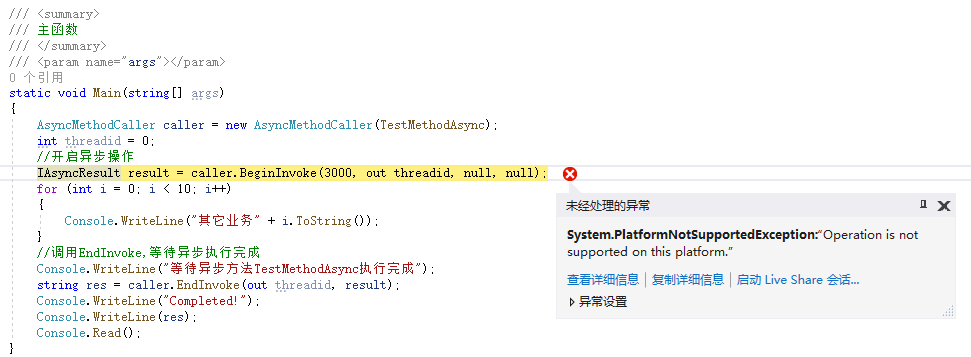
System.PlatformNotSupportedException

  HResult=0x80131539

  Message=Operation is not supported on this platform.

  Source=ConsoleApp3

  StackTrace:

   at ConsoleApp3.AsyncMethodCaller.BeginInvoke(Int32 callDuration, Int32& threadId, AsyncCallback callback, Object object)

   at ConsoleApp3.Program.Main(String[] args) in C:\Users\pxm\source\repos\ConsoleApp3\ConsoleApp3\Program.cs:line
原因
The Asynchronous Programming Model (APM) (using IAsyncResult and BeginInvoke) is no longer the preferred method of making asynchronous calls. The Task-based Asynchronous Pattern (TAP) is the recommended async model as of .NET Framework 4.5. Because of this, and because the implementation of async delegates depends on remoting features not present in .NET Core, BeginInvoke and EndInvoke delegate calls are not supported in .NET Core. This is discussed in GitHub issue dotnet/corefx #5940.
异步编程模型(APM)(使用IAsyncResult和BeginInvoke)不再是异步调用的优选方法。从.NET Framework 4.5开始,基于任务的异步模式(TAP)是推荐的异步模型。因此,而且由于异步委托的实现取决于远程处理但.NET Core不存在的功能,BeginInvoke和EndInvoke委托调用不.NET Core支持。GitHub问题 dotnet/corefx#5940 中对此进行了讨论
Async delegates are not in .NET Core for several reasons:
- Async delegates use deprecated IAsyncResult-based async pattern. This pattern is generally not supported throughout .NET Core base libraries, e.g. System.IO.Stream does not have IAsyncResult-based overloads for Read/Write methods in .NET Core.
- Async delegates depend on remoting (System.Runtime.Remoting) under the hood. Remoting is not in .NET Core - implementation of async delegates without remoting would be challenging.
解决办法
改为基于任务的异步模式Task.Run
using System;

using System.Diagnostics;

using System.Threading;

using System.Threading.Tasks;

namespace ConsoleApp3

{

    /// <summary>

    /// 委托必须和要调用的异步方法有相同的签名

    /// </summary>

    /// <param name="callDuration">sleep时间</param>

    /// <param name="threadId">当前线程id</param>

    /// <returns></returns>

    public delegate string AsyncMethodCaller(int callDuration, out int threadId);

    class Program

    {

        /// <summary>

        /// 主函数

        /// </summary>

        /// <param name="args"></param>

        static void Main(string[] args)

        {

            AsyncMethodCaller caller = new AsyncMethodCaller(TestMethodAsync);

            int threadid = ;

            //开启异步操作

            //IAsyncResult result = caller.BeginInvoke(3000, out threadid, null, null);

            var workTask = Task.Run(() => caller.Invoke(, out threadid));

            for (int i = ; i < ; i++)

            {

                Console.WriteLine("其它业务" + i.ToString());

            }

            //调用EndInvoke,等待异步执行完成

            Console.WriteLine("等待异步方法TestMethodAsync执行完成");

            //string res = caller.EndInvoke(out threadid, result);

            string res = workTask.Result;

            Console.WriteLine("Completed!");

            Console.WriteLine(res);

            Console.Read();

        }

        /// <summary>

        /// 与委托对应的方法

        /// </summary>

        /// <param name="callDuration"></param>

        /// <param name="threadId"></param>

        /// <returns></returns>

        static string TestMethodAsync(int callDuration, out int threadId)

        {

            Stopwatch sw = new Stopwatch();

            sw.Start();

            Console.WriteLine("异步TestMethodAsync开始");

            for (int i = ; i < ; i++)

            {   // 模拟耗时操作

                Thread.Sleep(callDuration);

                Console.WriteLine("TestMethodAsync:" + i.ToString());

            }

            sw.Stop();

            threadId = Thread.CurrentThread.ManagedThreadId;

            return string.Format("耗时{0}ms.", sw.ElapsedMilliseconds.ToString());

        }

    }

}
参考:
1.Migrating Delegate.BeginInvoke Calls for .NET Core
System.PlatformNotSupportedException:“Operation is not supported on this platform.”的更多相关文章
- 解决 cmake_symlink_library: System Error: Operation not supported
在编译uchardet时遇到这个错误: cmake_symlink_library: System Error: Operation not supported 创建链接不成功,要确认当前帐户下是否有 ...
- firefox同步ajax请求报错的问题 A parameter or an operation is not supported by the underlying object
今天在测试系统时,一个很正常的功能在firefox下报错,经过验证在ie和chrome浏览器中功能这个正常. 调试后发现: 请求比其他请求的特殊点在于同步请求. 经过firefox的控制台上测 ...
- Eclipse进度条出现“Remote System Explorer Operation”解决方法
Eclipse进度条出现“Remote System Explorer Operation”解决方法
- 【转载】Remote System Explorer Operation总是运行后台服务,卡死eclipse解决办法
原来是eclipse后台进程在远程操作,就是右下角显示的“Remote System Explorer Operation”.折腾了半天,在Stack Overflow找到答案(源地址).把解决方案翻 ...
- ORA-27300: OS system dependent operation:sendmsg failed with status: 105 ORA-27301: OS failure message: No buffer space available
早上查看数据库alert日志,发现如下ORA-报错: kgxpvfynet: mtype: 61 process 6460 failed because of a resource problem i ...
- Remote System Explorer Operation总是运行后台服务,卡死eclipse
阿里云 > 教程中心 > android教程 > Remote System Explorer Operation总是运行后台服务,卡死eclipse Remote System E ...
- Remote System Explorer Operation在eclipse后台一直跑 解决办法
在用eclipse开发时,经常遇到卡死的情况,其中一种就是右下角出现:“Remote System Explorer Operation”,解决方案如下: 第一步:Eclipse -> Pref ...
- Remote System Explorer Operation总是运行后台服务,卡死eclipse解决办法
当你右键编辑控件的id或者其他属性时都会卡很久,发现原来是eclipse后台进程在远程操作,就是右下角显示的“Remote System Explorer Operation”.折腾了半天,在Stac ...
- eclipse remote system explorer operation
Remote System Explorer Operation卡死Eclipse解决方案 - 披萨大叔的博客 - CSDN博客https://blog.csdn.net/qq_27258799/ar ...
随机推荐
- Java开发架构篇《初识领域驱动设计DDD落地》
作者:小傅哥 博客:https://bugstack.cn 沉淀.分享.成长,让自己和他人都能有所收获! 一.前言 DDD(Domain-Driven Design 领域驱动设计)是由Eric Eva ...
- 【雕爷学编程】MicroPython动手做(03)——零基础学MaixPy之开机测试
1.几个知识点(1)MicroPython 是 Python 3 语言的精简高效实现 ,包括Python标准库的一小部分,并针对嵌入式微控制器(单片机)和受限制的环境进行了优化,它是Python延伸出 ...
- SpringBoot注解分析
Spring boot 简介:是spring社区发布的一个开源项目,旨在帮助开发者更快更简单的构建项目,使用习惯优于配置,的理念让你的项目快速的跑起来,使用springboot可以不用,或者很少的配置 ...
- Django视图函数函数之视图装饰器
FBV模式装饰器: 普通函数的装饰器(语法糖@) views.py from django.shortcuts import render def wrapper(f): def inner(*arg ...
- 基于 abp vNext 和 .NET Core 开发博客项目 - 接入GitHub,用JWT保护你的API
上一篇文章(https://www.cnblogs.com/meowv/p/12924859.html)再次把Swagger的使用进行了讲解,完成了对Swagger的分组.描述和开启小绿锁以进行身份的 ...
- hdu3861他的子问题是poj2762二分匹配+Tarjan+有向图拆点 其实就是求DAG的最小覆盖点
The King’s Problem Time Limit: 2000/1000 MS (Java/Others) Memory Limit: 65536/32768 K (Java/Other ...
- 【网络安全】【02】Windows系统如何屏蔽自动更新
一.win键 + r ==> 输入 services.msc 二. win键 + r ==> 输入 gpedit.msc PS:我的电脑基本两年没有更新过了 -_-
- Java——读取和写入txt文件
package com.java.test.a; import java.io.BufferedReader; import java.io.BufferedWriter; import java.i ...
- SimpleAuthenticationInfo的参数
SimpleAuthenticationInfo的参数 仅供个人参考,以及学习记录.SimpleAuthenticationInfo authenticationInfo = new SimpleAu ...
- Linux 番茄时钟 定时 取消 快捷方式
shell 脚本 clock.sh #!/bin/bash if [ $1 == 0 ] then at -d `atq | awk -v ORS=" " '{a[NR]=$1} ...