
.linux基础命令三
一、 两台服务器免密登录:
1. 生成密钥
ssh-keygen的命令手册,通过”man ssh-keygen“命令查看指令:
通过命令”ssh-keygen -t rsa“创建一对密匙,包括公匙和私匙,生成之后会在用户的根目录生成一个 “.ssh”的文件夹
进入“.ssh”,查看生成的文件
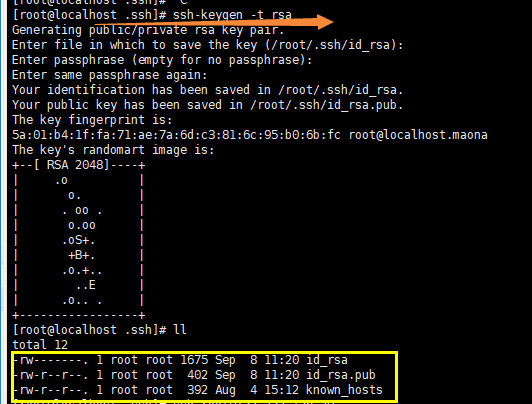
authorized_keys:存放远程免密登录的公钥,主要通过这个文件记录多台机器的公钥
id_rsa : 生成的私钥文件
id_rsa.pub : 生成的公钥文件
know_hosts : 已知的主机公钥清单
如果希望ssh公钥生效需满足至少下面两个条件:
1) .ssh目录的权限必须是700
2) .ssh/authorized_keys文件权限必须是600
常用以下几种方法:
2.1 通过ssh-copy-id的方式
命令: ssh-copy-id -i ~/.ssh/id_rsa.put <romte_ip>
举例:
[root@test .ssh]# ssh-copy-id -i ~/.ssh/id_rsa.pub 132.232.138.29
[root@test .ssh]# ssh root@ 132.232.138.29 直接连接另一台服务器就行了
2.2 通过scp将内容写到对方的文件中
命令:scp -p ~/.ssh/id_rsa.pub root@<remote_ip>:/root/.ssh/authorized_keys
scp: 即,ssh-copy-id
举例:
1. scp -p ~/.ssh/id_rsa.pub root@132.232.138.29 :/root/.ssh/authorized_keys
2. ssh root@192.168.91.135 直接连接另一台服务器就行了
原文参考地址:http://www.cnblogs.com/LuisYang/archive/2016/10/12/5952871.html
ntpdate ntp1.aliyun.com 根据阿里云服务器矫正时间
ntp:Network time Protocol,网络时间协议
# 测试sed命令
测试通过sed实现过滤匹配文本行之间的内容
匹配行后添加内容,并引用匹配模式。
##测试环境,文本内容如下:
```
[root@test sed_test]# cat test.txt1
this is a test1.
this is a test2.
this is a test3.
this is a test4.
this is a test5.
this is a test6.
[root@test sed_test]#
```
##测试p
###打印1行
```
[root@test sed_test]# sed '/test2/p' test.txt1
this is a test1.
this is a test2.
this is a test2.
this is a test3.
this is a test4.
this is a test5.
this is a test6.
[root@test sed_test]#
```
###打印多行
```
[root@test sed_test]# sed '2,3p' test.txt1
this is a test1.
this is a test2.
this is a test2.
this is a test3.
this is a test3.
this is a test4.
this is a test5.
this is a test6.
[root@test sed_test]#
```
##测试d删除
###删除单行
```
[root@test sed_test]# sed '/test2/d' test.txt1
this is a test1.
this is a test3.
this is a test4.
this is a test5.
this is a test6.
[root@test sed_test]#
```
###删除多行
```
[root@test sed_test]# sed '2,3d' test.txt1
this is a test1.
this is a test4.
this is a test5.
this is a test6.
[root@test sed_test]#
[root@test sed_test]# sed '2,4d' test.txt1
this is a test1.
this is a test5.
this is a test6.
[root@test sed_test]#
```
awk:
cat data|awk '{sum+=$1} END {print "Sum = ", sum}'
2、求平均值
cat data|awk '{sum+=$1} END {print "Average = ", sum/NR}'
3、求最大值
cat data|awk 'BEGIN {max = 0} {if ($1>max) max=$1 fi} END {print "Max=", max}'
4、求最小值(min的初始值设置一个超大数即可)
cat data | awk 'BEGIN {min = 1999999} {if ($1<min) min=$1 fi} END {print "Min=", min}'
haha 100
cost 100
[root@dplinux-node1 sed_awk]#
VMWare虚拟机IP为127.0.0.1的问题
dhclient -v
.linux基础命令三的更多相关文章
- Linux基础命令(三)
作业一:1) 将用户信息数据库文件和组信息数据库文件纵向合并为一个文件/1.txt(覆盖) cat /etc/passwd /etc/group >/1.txt 2) 将用户信息数据库文件和用户 ...
- 【Python之路】第一篇--Linux基础命令
pwd 命令 查看”当前工作目录“的完整路径 pwd -P # 显示出实际路径,而非使用连接(link)路径:pwd显示的是连接路径 . 表示当前目录 .. 表示上级目录 / 表示根目录 ls ...
- Linux基础命令-文件与目录
Linux基础命令-文件与目录 参考:<鸟哥linux私房菜>五-七章,17/12/5复习,18/01/15复习 文件权限 rwx421:用户,用户组,其他 umask查看默认权限:000 ...
- Linux基础命令和文件权限
Linux命令与文件权限 Linux基础命令 reboot 重启 cd 切换目录 cd .. 回到上一级目录 cd ~ 回到主目录 cd / ...
- Linux基础命令-查看基本硬件信息
Linux基础命令-查看基本硬件信息 作者:尹正杰 版权声明:原创作品,谢绝转载!否则将追究法律责任. 一.查看CPU信息 [root@node101.yinzhengjie.org.cn ~]# l ...
- Linux基础命令小结(超全!!)
Linux目录结构 1.bin 存放经常使用的指令比如ll,cp 2.sbin 系统管理员使用的系统管理指令 3.home 存放普通用户的住目录 4.root 系统管理员的用户主目录 5.boot 存 ...
- Linux 基础命令及基本目录
Linux 基础命令及基本目录 一.网卡 1.网卡配置文件路径 /etc/sysconfig/network-scripts/ifcfg-eth0 配置文件: TYPE=Ethernet # 以太 ...
- Linux——基础命令用法(上)
一.Linux基础命令 1.Linux命令行的格式 命令行的格式为:用户名+主机名+当前工作目录 输入内容的命令格式为:命令 [-短选项/--长选项] [参数] [root@localhost ~]# ...
- day04 Linux基础命令
day04 Linux基础命令 查看帮助信息命令 1.man命令:man命令的功能是查看指定命令的详细解释. 格式:man [具体需要被查看的命令] [root@localhost ~]# man r ...
随机推荐
- 【NOIP2013模拟】导弹防御塔
题目 Freda的城堡-- "Freda,城堡外发现了一些入侵者!" "喵...刚刚探究完了城堡建设的方案数,我要歇一会儿嘛lala~" "可是入侵者 ...
- JWT--无状态单点登录
序言 传统的 seesion 认证存在的问题: 1)用户信息存储在内存中,用户规模大之后增加服务器开销:2)由于登录信息存储在内存中,限制了登录机器,不利于分布式站点. JWT JWT无状态登录 常规 ...
- EF 查询时,返回其中一张表(省掉一个个写字段的麻烦)
1.使用partial将需要添加的字段进行扩展 public partial class T_OrderInfo { public string EntName { get; set; } } 2.使 ...
- Java中高级面试题(1)
List和Set比较,各自的子类比较 对比一:Arraylist与LinkedList的比较 1.ArrayList是实现了基于动态数组的数据结构,因为地址连续,一旦数据存储好了,查询操作效率会比较高 ...
- [POJ1637]Sightseeing tour:混合图欧拉回路
分析 混合图欧拉回路问题. 一个有向图有欧拉回路当且仅当图连通并且对于每个点,入度\(=\)出度. 入度和出度相等可以联想到(我也不知道是怎么联想到的)网络流除了源汇点均满足入流\(=\)出流.于是可 ...
- es之java操作插入文档
4方式: . 使用json字符串直接创建 . 使用Map集合 . 使用第三方库来序列化 createDocumentBySerialize . 使用内置的帮助器XContentFactory.json ...
- 高通camera基本代码架构【转】
本文转载自:http://blog.sina.com.cn/s/blog_c0de2be70102vyn1.html 1 camera基本代码架构 高通平台对于camera的代码组织,大体上还是遵循 ...
- 高通Camera驱动分析【转】
本文转载自:http://blog.csdn.net/liwei16611/article/details/53955711 1.Sensor slave配置 结构体msm_camera_sensor ...
- C#中查找或结束程序域中的主、子进程
有时候,我们的程序需要启动一些子进程,如嵌入的图形程序. 当启动一个进程后,获得这个进程信息Process,然后其内部在某个时刻启动了一个子进程,这个时候就涉及程序域和进程树的概念.当我们通过非正常操 ...
- 如何让ls按目录和文件 分开进行列表?
linux的思想是: 有很多 "小工具", 但是功能并不弱的 小工具, 组合起来完成一些复杂的工作, 通过 这些工具的组合可以完成各种各样的, 不同的任务. 如: ls, sort, hea ...