
python实现Restful服务 (基于flask)(1)
参考:https://www.jianshu.com/p/6ac1cab17929
参考:https://www.cnblogs.com/alexyuyu/p/6243362.html
参考:http://docs.jinkan.org/docs/flask/quickstart.html.
安装基于REST的Web客户端
1、helloworld的运行
from flask import Flask

# Flask初始化参数尽量使用你的包名,这个初始化方式是官方推荐的,官方解释:http://flask.pocoo.org/docs/0.12/api/#flask.Flask

app = Flask(__name__)

@app.route('/HelloWorld')

def hello_world():

    return "Hello World!"

app.run()
2、使用get 方法获取资源
# -*- coding: utf-8 -*-

from flask import Flask, jsonify, abort, make_response

app = Flask(__name__)

articles = [

    {

        'id': 1,

        'title': 'the way to python',

        'content': 'tuple, list, dict'

    },

    {

        'id': 2,

        'title': 'the way to REST',

        'content': 'GET, POST, PUT'

    }

]

@app.route('/blog/api/articles', methods=['GET'])

def get_articles():

    return jsonify({'articles': articles})

@app.route('/blog/api/articles/<int:article_id>', methods=['GET'])

def get_article(article_id):

    article = filter(lambda a: a['id'] == article_id, articles)

    if len(article) == 0:

        abort(404)

    return jsonify({'article': article[0]})

@app.errorhandler(404)

def not_found(error):

    return make_response(jsonify({'error': 'Not found'}), 404)

if __name__ == '__main__':

    app.run(host='127.0.0.1', port=5632)
在终端输入如下得到结果:
$ curl -i http://localhost:5632/blog/api/articles

HTTP/1.0 200 OK

Content-Type: application/json

Content-Length: 225

Server: Werkzeug/0.12.2 Python/3.6.3

Date: Thu, 22 Mar 2018 15:36:17 GMT

{

  "articles": [

    {

      "content": "tuple, list, dict",

      "id": 1,

      "title": "the way to python"

    },

    {

      "content": "GET, POST, PUT",

      "id": 2,

      "title": "the way to REST"

    }

  ]

}
3、使用flask的RESTful扩展库
from flask import Flask

from flask_restful import reqparse, abort, Api, Resource

app = Flask(__name__)

api = Api(app)

TODOS = {

    'todo1': {'task': 'build an API'},

    'todo2': {'task': '哈哈哈'},

    'todo3': {'task': 'profit!'},

}

def abort_if_todo_doesnt_exist(todo_id):

    if todo_id not in TODOS:

        abort(404, message="Todo {} doesn't exist".format(todo_id))

parser = reqparse.RequestParser()

parser.add_argument('task')

# Todo

# shows a single todo item and lets you delete a todo item

class Todo(Resource):

    def get(self, todo_id):

        abort_if_todo_doesnt_exist(todo_id)

        return TODOS[todo_id]

    def delete(self, todo_id):

        abort_if_todo_doesnt_exist(todo_id)

        del TODOS[todo_id]

        return '', 204

    def put(self, todo_id):

        args = parser.parse_args()

        task = {'task': args['task']}

        TODOS[todo_id] = task

        return task, 201

# TodoList

# shows a list of all todos, and lets you POST to add new tasks

class TodoList(Resource):

    def get(self):

        return TODOS

    def post(self):

        args = parser.parse_args()

        todo_id = int(max(TODOS.keys()).lstrip('todo')) + 1

        todo_id = 'todo%i' % todo_id

        TODOS[todo_id] = {'task': args['task']}

        return TODOS[todo_id], 201

##

## Actually setup the Api resource routing here

##

api.add_resource(TodoList, '/todos')

api.add_resource(Todo, '/todos/<todo_id>')

if __name__ == '__main__':

    app.run()
查询列表结果:

查询单任务:

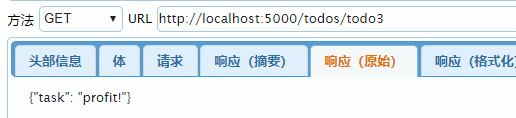
删除任务:

另一个例子:
from flask import Flask

from flask_restful import reqparse, abort, Api, Resource

app = Flask(__name__)

api = Api(app)

TODOS = {

    'todo1': {'task': 'build an API'},

    'todo2': {'task': '?????'},

    'todo3': {'task': 'profit!'},

}

def abort_if_todo_doesnt_exist(todo_id):

    if todo_id not in TODOS:

        abort(404, message="Todo {} doesn't exist".format(todo_id))

parser = reqparse.RequestParser()

parser.add_argument('task')

# Todo

# shows a single todo item and lets you delete a todo item

class Todo(Resource):

    def get(self, todo_id):

        abort_if_todo_doesnt_exist(todo_id)

        return TODOS[todo_id]

    def delete(self, todo_id):

        abort_if_todo_doesnt_exist(todo_id)

        del TODOS[todo_id]

        return '', 204

    def put(self, todo_id):

        args = parser.parse_args()

        task = {'task': args['task']}

        TODOS[todo_id] = task

        return task, 201

# TodoList

# shows a list of all todos, and lets you POST to add new tasks

class TodoList(Resource):

    def get(self):

        return TODOS

    def post(self):

        args = parser.parse_args()

        todo_id = int(max(TODOS.keys()).lstrip('todo')) + 1

        todo_id = 'todo%i' % todo_id

        TODOS[todo_id] = {'task': args['task']}

        return TODOS[todo_id], 201

##

## Actually setup the Api resource routing here

##

api.add_resource(TodoList, '/todos')

api.add_resource(Todo, '/todos/<todo_id>')

if __name__ == '__main__':

    app.run(debug=True)
通过终端进行如下相应任务:
获取列表:
$ curl http://localhost:5000/todos

{"todo1": {"task": "build an API"}, "todo2": {"task": "?????"}, "todo3": {"task": "profit!"}}
获取单个任务:
$ curl http://localhost:5000/todos/todo3

{"task": "profit!"}
删除一个任务:
curl http://localhost:5000/todos/todo2 -X DELETE -v
增加一个任务:
$ curl http://localhost:5000/todos -d "task=something new" -X POST -v
更新一个任务:
$ curl http://localhost:5000/todos/todo3 -d "task=something different" -X PUT -v
python实现Restful服务 (基于flask)(1)的更多相关文章
- [转]python实现RESTful服务(基于flask)
python实现RESTful服务(基于flask) 原文: https://www.jianshu.com/p/6ac1cab17929 前言 上一篇文章讲到如何用java实现RESTful服务, ...
- python实现RESTful服务(基于flask)
https://www.jianshu.com/p/6ac1cab17929 http://www.pythondoc.com/flask/quickstart.html 在java中调用python ...
- python实现Restful服务(基于flask)(2)
参考:https://blog.csdn.net/yelena_11/article/details/53404892 最简单的post例子: from flask import Flask, req ...
- python之restful api(flask)获取数据
需要用到谷歌浏览器的扩展程序 Advanced Rest Client进行模拟请求 1.直接上代码 from flask import Flask from flask import request ...
- 实战SpringCloud响应式微服务系列教程(第九章)使用Spring WebFlux构建响应式RESTful服务
本文为实战SpringCloud响应式微服务系列教程第九章,讲解使用Spring WebFlux构建响应式RESTful服务.建议没有之前基础的童鞋,先看之前的章节,章节目录放在文末. 从本节开始我们 ...
- Python flask 基于 Flask 提供 RESTful Web 服务
转载自 http://python.jobbole.com/87118/ 什么是 REST REST 全称是 Representational State Transfer,翻译成中文是『表现层状态转 ...
- XData -–无需开发、基于配置的数据库RESTful服务,可作为移动App和ExtJS、WPF/Silverlight、Ajax等应用的服务端
XData -–无需开发.基于配置的数据库RESTful服务,可作为移动App和ExtJS.WPF/Silverlight.Ajax等应用的服务端 源起一个App项目,Web服务器就一台,已经装了 ...
- 基于SpringBoot开发一个Restful服务,实现增删改查功能
前言 在去年的时候,在各种渠道中略微的了解了SpringBoot,在开发web项目的时候是如何的方便.快捷.但是当时并没有认真的去学习下,毕竟感觉自己在Struts和SpringMVC都用得不太熟练. ...
- 基于TypeScript装饰器定义Express RESTful 服务
前言 本文主要讲解如何使用TypeScript装饰器定义Express路由.文中出现的代码经过简化不能直接运行,完整代码的请戳:https://github.com/WinfredWang/expre ...
随机推荐
- 多线程实现socket编程
服务端: server.py import threading import socket server=socket.socket() ip_port=("127.0.0.1", ...
- iView 实战系列教程(21课时)_4.iView 实战教程之布局篇(二)
https://github.com/iview/iview 下载iview的代码 Layout布局大概的样子 Iview的源代码.Layout 组件比较简单,,里面一个slot Sider是最复杂的 ...
- mac 添加mysql的环境变量和删除mysql
添加环境变量 1.创建 .bash_profile,已创建过忽略这步 (1)启动终端 (2)进入当前用户的home目录(默认就是): cd ~ 或 cd /Users/YourMacU ...
- Angular5 错误: ngModel cannot be used to register form controls with a parent formGroup directive
在创建一个表单时,出现了这样的错误: 原因是,在最外层的form中使用了 formGroup 指令,但在下面的某个input 元素中,使用了ngModel 指令,但没有加入formControl 指令 ...
- Mybatis-学习笔记(2)Mybatis配置文件
3>typeAliases:类型别名.2种指定方式. 1>给某个类起个别名 <typeAliases> <typeAlias type="com.lfy.b ...
- Java-Lambda表达式第一篇认识Lambda表达式
1.Lambda表达式时Java 8新增的特性.Lambda表达式支持将代码块作为方法参数,Lambda表达式允许使用更简洁的代码创建只有一个抽象方法的接口(即函数式接口)的实例. 2.当使用Lamb ...
- CSS浏览器兼容性
答题技巧:因为这个问题主要是看你经验,一般有了开发经验的都会遇到这样的坑,你只要说出几个来大致就可以了. 1.对齐文本和文本输入框 问题: 当input元素在设置了高时,在IE7.IE8.IE9下会出 ...
- 《剑指offer》面试题19 二叉树的镜像 Java版
书中方法:这道题目可能拿到手没有思路,我们可以在纸上画出简单的二叉树来找到规律.最后我们发现,镜像的实质是对于二叉树的所有节点,交换其左右子节点.搞清楚获得镜像的方法,这道题实际上就变成了一道二叉树遍 ...
- [2019杭电多校第三场][hdu6608]Fansblog
题目链接:http://acm.hdu.edu.cn/showproblem.php?pid=6608 大致题意是比p小的最大素数q,求q!%p的值. 由威尔逊定理开始推: $(p-1)!\equiv ...
- linux驱动模型——platform(1)
一.驱动模型包含什么? 1.1. 类class 1.1.2. 它能够自动创建/dev下的设备节点,不需要mknod /dev/xxx c x x创建.当然class还有其另外的作用,且自动创建设备节点 ...