
Apicloud_(模板)登陆注册功能模板
项目已托管到Github上 传送门
不需要使用任何图片资源,需要用到SHA1.js库文件,
Apicloud_(接口验证)用户注册头部信息X-APICloud-AppKey生成 传送门
项目全代码放到博文最下方,注册和登陆功能在login_frame.html和register_frame.html中实现
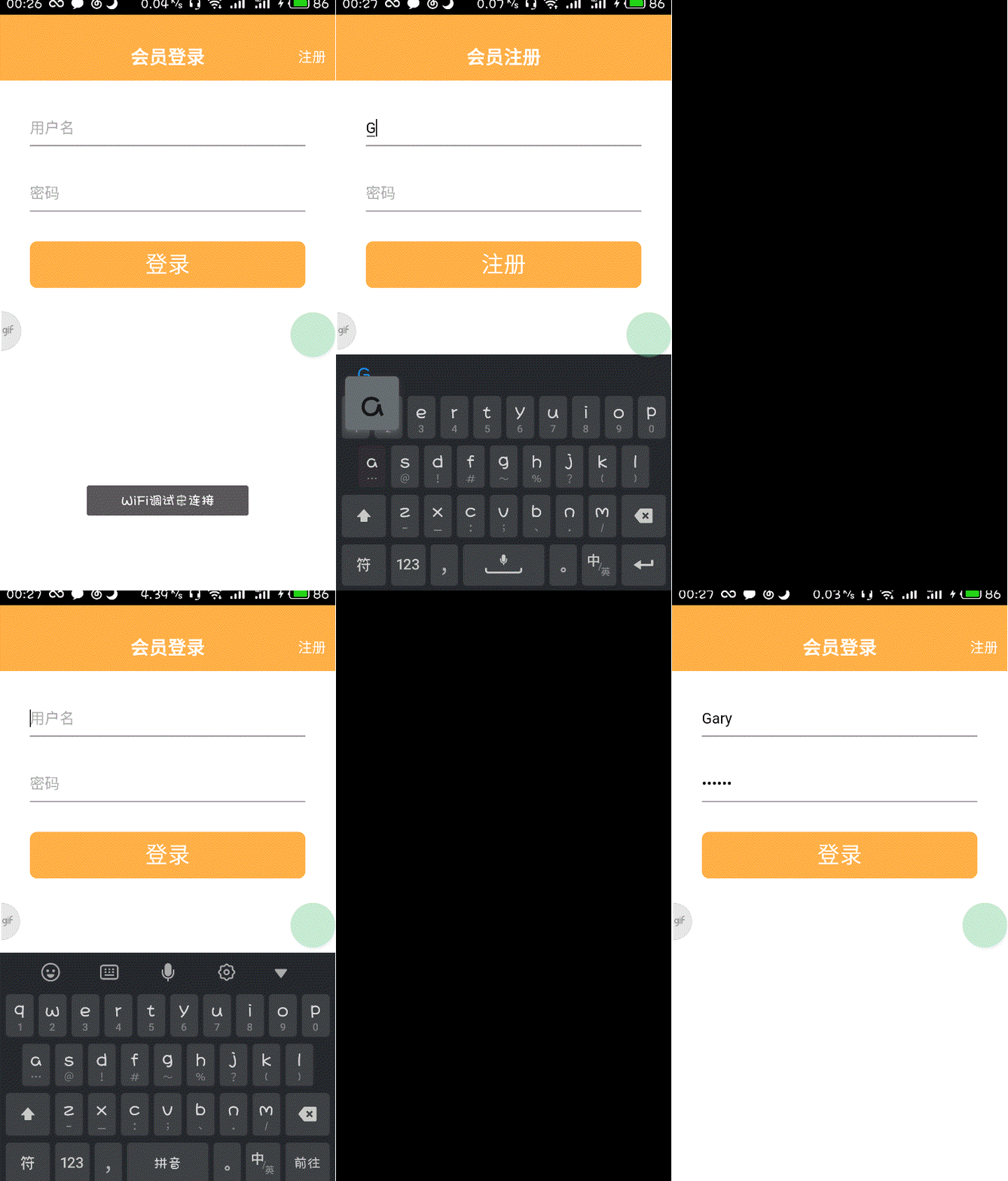
Apicloud通过api.ajax()方法去实现,ajax()方法在api.js中已经定义好
        api.ajax(json,

            function(ret,err){

                if (ret) {

                    fnSuc && fnSuc(ret);

                }

            }

        );
headers:链接自己应用程序的头部信息,由AppId和AppKey组成
data:传输到云端的数据
function (ret,err):回调函数(api.ajax()执行完后立即执行的函数),当链接到数据库成功时返回ret,否则返回err
实现过程
创建一个新项目
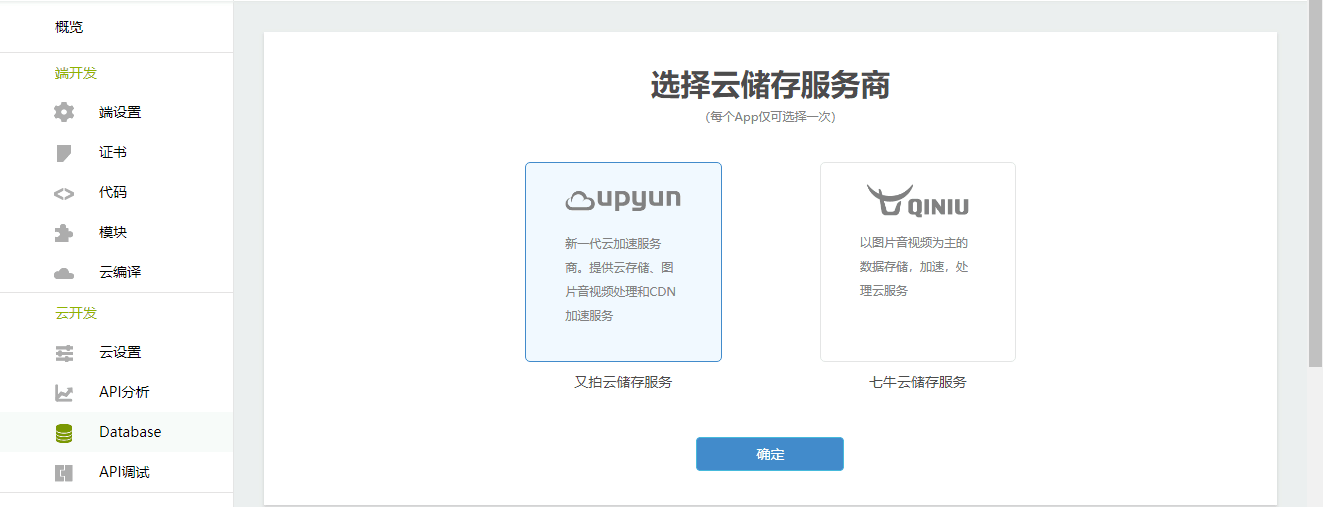
在控制台开启云服务Database数据库,随便选择一个云存储服务商
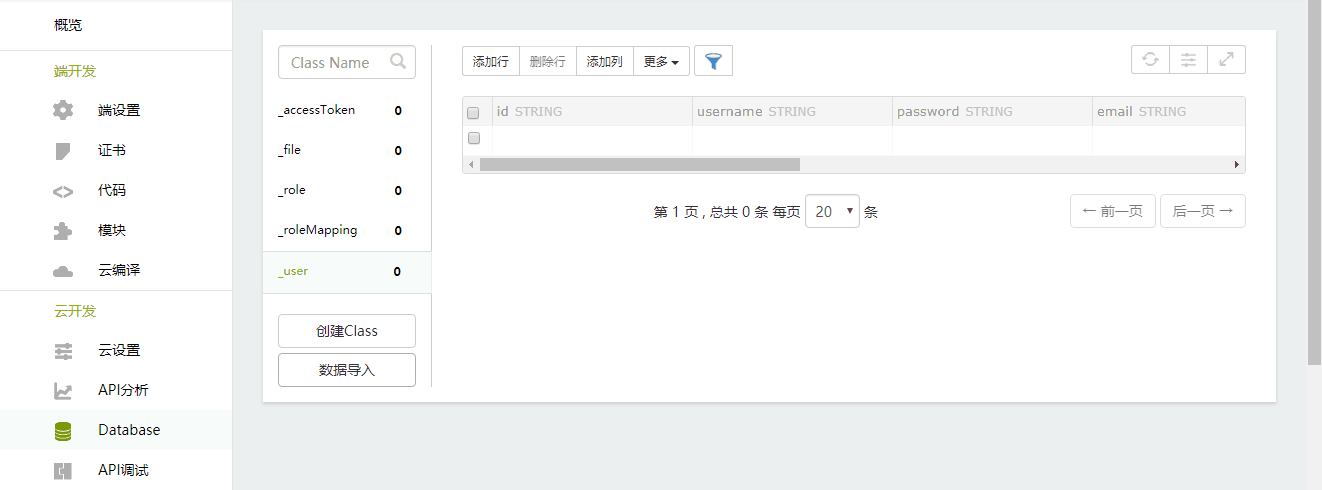
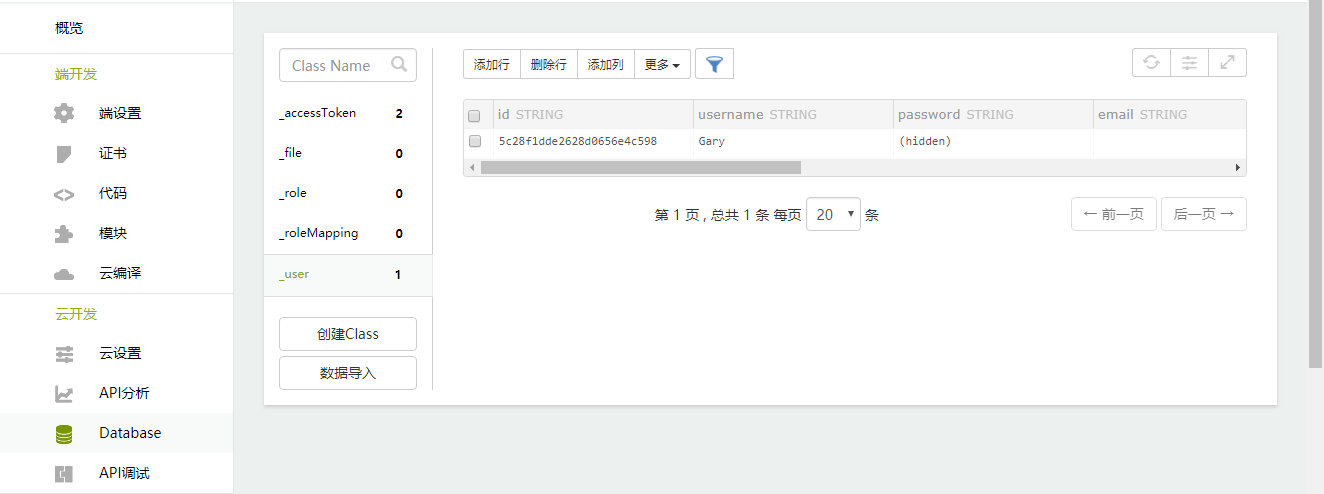
Apicloud默认内置user、file、role等基础数据结构,可以更具应用需求,拓展字段或自定义其它数据模型,这里我们可以看到user表目前是空的
在APICloud Studio中编写代码
修改index.html中的apiready()函数,加载程序时让它指向login.html页面
    apiready = function(){

        api.openWin({

          name:'main',

          url:'./html/login.html',

          slidBackEnabled:false

        });

    };
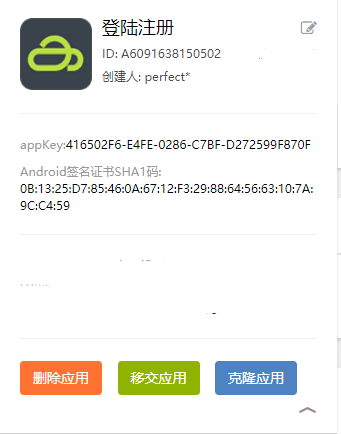
查看自己项目的ID和appKey
"X-APICloud-AppKey"生成规则是基于SHA1()算法生成的
AppKey= SHA1(你的应用ID + 'UZ' + 你的应用KEY +'UZ' +当前时间毫秒数).当前时间毫秒数
我的应用ID:A6091638150502
我的应用KEY:416502F6-E4FE-0286-C7BF-D272599F870F
注册
在register_frame中实现注册功能,把里边appkey生成修改一下
<body>

    <div class="row">

        <input id="username" class="input" type="text" placeholder="用户名">

    </div>

    <div class="row">

        <input id="password" class="input" type="password" placeholder="密码">

    </div>

    <div class="btn" tapmode="highlight" onclick="fnRegister();">注册</div>

</body>
编写fnRegister()注册函数
  function fnRegister() {

      var username = $api.byId("username");

      var password = $api.byId("password");

      var vusername = $api.val(username);

      var vpassword = $api.val(password);

      var now = Date.now();

      //A6091638150502修改为自己项目ID  416502F6-E4FE-0286-C7BF-D272599F870F修改为自己项目appKey

      var appKey = SHA1("A6091638150502"+"UZ"+"416502F6-E4FE-0286-C7BF-D272599F870F"+"UZ"+now)+"."+now

      api.ajax({

          url: 'https://d.apicloud.com/mcm/api/user',

          method: 'post',

          headers: {

              //A6091638150502修改为自己项目ID

              "X-APICloud-AppId": "A6091638150502",

              "X-APICloud-AppKey":appKey,

          },

          data: {

              values: {

                  username:vusername,

                  password:vpassword

              }

          }},

          function (ret,err){

            if(ret&&ret.id){

              alert("注册成功!");

            }else{

              alert("注册失败!");

            }

          }

      );

    }
<!DOCTYPE html>

<html>

<head>

    <meta charset="utf-8">

    <meta name="viewport" content="maximum-scale=1.0,minimum-scale=1.0,user-scalable=0,width=device-width,initial-scale=1.0" />

    <meta name="format-detection" content="telephone=no,email=no,date=no,address=no">

    <title>注册</title>

    <link rel="stylesheet" type="text/css" href="../css/api.css" />

    <style>

    header {

        width: 100%;

        height: 50px;

        background-color: #ffaf45

    }

    header .back {

        position: absolute;

        bottom: 0;

        left: 0;

        width: 80px;

        height: 50px;

        background: url(../image/back.png);

        background-position: 12px 16px;

        background-repeat: no-repeat;

        background-size: 11px 18px;

    }

    header h1 {

        width: 100%;

        height: 50px;

        line-height: 50px;

        text-align: center;

        color: #fff;

        font-size: 20px;

    }

    </style>

</head>

<body>

    <header id="header">

        <div class="back" tapmode onclick="api.closeWin();"></div>

        <h1>会员注册</h1>

    </header>

</body>

<script type="text/javascript" src="../script/api.js"></script>

<script type="text/javascript">

apiready = function() {

    var header = $api.byId('header');

    var headerH = $api.fixStatusBar(header);

    api.openFrame({

        name: 'register_frame',

        url: './register_frame.html',

        rect: {

            marginTop: headerH,

            w: 'auto',

            h: 'auto'

        },

        bounces: false,

        softInputBarEnabled: false //不显示键盘上方的工具条

    });

};

</script>

</html>
register.html
<!DOCTYPE html>

<html>

<head>

    <meta charset="utf-8">

    <meta name="viewport" content="maximum-scale=1.0,minimum-scale=1.0,user-scalable=0,width=device-width,initial-scale=1.0" />

    <meta name="format-detection" content="telephone=no,email=no,date=no,address=no">

    <title>注册Frame</title>

    <link rel="stylesheet" type="text/css" href="../css/api.css" />

    <style>

    .row {

        box-sizing: border-box;

        width: auto;

        height: 70px;

        margin-left: 32px;

        margin-right: 32px;

        padding-top: 40px;

        border-bottom: 1px solid #888;

    }

    .input {

        width: 100%;

        height: 20px;

        line-height: 20px;

        border: none;

        outline: none;

        font-size: 16px;

    }

    .btn {

        width: auto;

        height: 50px;

        margin-left: 32px;

        margin-right: 32px;

        margin-top: 32px;

        background-color: #ffaf45;

        color: #fff;

        font-size: 24px;

        line-height: 50px;

        text-align: center;

        border-radius: 8px;

    }

    .highlight {

        opacity: 0.7;

    }

    </style>

</head>

<body>

    <div class="row">

        <input id="username" class="input" type="text" placeholder="用户名">

    </div>

    <div class="row">

        <input id="password" class="input" type="password" placeholder="密码">

    </div>

    <div class="btn" tapmode="highlight" onclick="fnRegister();">注册</div>

</body>

<script type="text/javascript" src="../script/api.js"></script>

<script type="text/javascript" src="../script/SHA1.js"></script>

<script type="text/javascript">

apiready = function() {

};

  // 注册

  function fnRegister() {

      var username = $api.byId("username");

      var password = $api.byId("password");

      var vusername = $api.val(username);

      var vpassword = $api.val(password);

      var now = Date.now();

      //A6091638150502修改为自己项目ID  416502F6-E4FE-0286-C7BF-D272599F870F修改为自己项目appKey

      var appKey = SHA1("A6091638150502"+"UZ"+"416502F6-E4FE-0286-C7BF-D272599F870F"+"UZ"+now)+"."+now

      api.ajax({

          url: 'https://d.apicloud.com/mcm/api/user',

          method: 'post',

          headers: {

              //A6091638150502修改为自己项目ID

              "X-APICloud-AppId": "A6091638150502",

              "X-APICloud-AppKey":appKey,

          },

          data: {

              values: {

                  username:vusername,

                  password:vpassword

              }

          }},

          function (ret,err){

            if(ret&&ret.id){

              alert("注册成功!");

            }else{

              alert("注册失败!");

            }

          }

      );

    }

</script>

</html>
register_frame.html
登陆
在login_frame.html中实现登陆功能,把里边appkey生成修改一下
<body>

    <div class="row">

        <input id="username" class="input" type="text" placeholder="用户名">

    </div>

    <div class="row">

        <input id="password" class="input" type="password" placeholder="密码">

    </div>

    <div class="btn" tapmode="highlight" onclick="fnLogin();">登录</div>

</body>
编写fnLogin()函数
function fnLogin(){

      var username = $api.byId("username");

      var password = $api.byId("password");

      var vusername = $api.val(username);

      var vpassword = $api.val(password);

      var now = Date.now();

      //6091638150502修改为自己项目ID  416502F6-E4FE-0286-C7BF-D272599F870F修改为自己项目appKey

      var appKey = SHA1("A6091638150502"+"UZ"+"416502F6-E4FE-0286-C7BF-D272599F870F"+"UZ"+now)+"."+now

      api.ajax({

          url: 'https://d.apicloud.com/mcm/api/user/login',

          method: 'post',

          headers: {

              //6091638150502修改为自己项目ID

              "X-APICloud-AppId": "A6091638150502",

              "X-APICloud-AppKey":appKey,

          },

          data: {

              values: {

                  username:vusername,

                  password:vpassword

              }

          }},

          function (ret,err){

            if(ret&&ret.id){

              alert("登陆成功!");

            }else{

              alert("登陆失败!");

            }

          }

      );

    }
<!DOCTYPE html>

<html>

<head>

    <meta charset="utf-8">

    <meta name="viewport" content="maximum-scale=1.0,minimum-scale=1.0,user-scalable=0,width=device-width,initial-scale=1.0" />

    <meta name="format-detection" content="telephone=no,email=no,date=no,address=no">

    <title>登录</title>

    <link rel="stylesheet" type="text/css" href="../css/api.css" />

    <style>

    header {

        width: 100%;

        height: 50px;

        background-color: #ffaf45

    }

    header .back {

        position: absolute;

        bottom: 0;

        left: 0;

        width: 80px;

        height: 50px;

        background: url(../image/back.png);

        background-position: 12px 16px;

        background-size: 11px 18px;

        background-repeat: no-repeat;

    }

    header h1 {

        width: 100%;

        height: 50px;

        line-height: 50px;

        text-align: center;

        color: #fff;

        font-size: 20px;

    }

    header .right {

        position: absolute;

        bottom: 0;

        right: 0;

        width: 50px;

        height: 50px;

        line-height: 50px;

        color: #fff;

        font-size: 15px;

        text-align: center;

    }

    </style>

</head>

<body>

    <header id="header">

        <div class="back" tapmode onclick="api.closeWin();"></div>

        <h1>会员登录</h1>

        <div class="right" tapmode onclick="fnOpenRegisterWin();">注册</div>

    </header>

</body>

<script type="text/javascript" src="../script/api.js"></script>

<script type="text/javascript">

apiready = function() {

  var header = $api.byId('header');

  $api.fixStatusBar(header);

  var headerH = $api.offset(header).h;

  // 打开注册Frame

  api.openFrame({

      name: 'login_frame',

      url: './login_frame.html',

      rect: {

          marginTop: headerH,

          w: 'auto',

          h: 'auto'

      },

      bgColor:'rgba(0,0,0,0)',

    });

};

// 打开注册Window

function fnOpenRegisterWin () {

    api.openWin({

        name: 'register',

        url: './register.html'

    });

}

</script>

</html>
login.html
<!DOCTYPE html>

<html>

<head>

    <meta charset="utf-8">

    <meta name="viewport" content="maximum-scale=1.0,minimum-scale=1.0,user-scalable=0,width=device-width,initial-scale=1.0" />

    <meta name="format-detection" content="telephone=no,email=no,date=no,address=no">

    <title>登录Frame</title>

    <link rel="stylesheet" type="text/css" href="../css/api.css" />

    <style>

    body {

        text-align: center;

    }

    .row {

        width: auto;

        height: 70px;

        box-sizing: border-box;

        margin-left: 32px;

        margin-right: 32px;

        padding-top: 40px;

        border-bottom: 1px solid #888;

    }

    .input {

        width: 100%;

        height: 20px;

        border: none;

        outline: none;

        font-size: 16px;

        line-height: 20px;

    }

    .btn {

        width: auto;

        height: 50px;

        margin-left: 32px;

        margin-right: 32px;

        margin-top: 32px;

        background-color: #ffaf45;

        line-height: 50px;

        color: #fff;

        font-size: 24px;

        text-align: center;

        border-radius: 8px;

    }

    .highlight {

        opacity: 0.7;

    }

    </style>

</head>

<body>

    <div class="row">

        <input id="username" class="input" type="text" placeholder="用户名">

    </div>

    <div class="row">

        <input id="password" class="input" type="password" placeholder="密码">

    </div>

    <div class="btn" tapmode="highlight" onclick="fnLogin();">登录</div>

</body>

<script type="text/javascript" src="../script/api.js"></script>

<script type="text/javascript" src="../script/SHA1.js"></script>

<script type="text/javascript">

apiready = function() {

};

    function fnLogin(){

      var username = $api.byId("username");

      var password = $api.byId("password");

      var vusername = $api.val(username);

      var vpassword = $api.val(password);

      var now = Date.now();

      //6091638150502修改为自己项目ID  416502F6-E4FE-0286-C7BF-D272599F870F修改为自己项目appKey

      var appKey = SHA1("A6091638150502"+"UZ"+"416502F6-E4FE-0286-C7BF-D272599F870F"+"UZ"+now)+"."+now

      api.ajax({

          url: 'https://d.apicloud.com/mcm/api/user/login',

          method: 'post',

          headers: {

              //6091638150502修改为自己项目ID

              "X-APICloud-AppId": "A6091638150502",

              "X-APICloud-AppKey":appKey,

          },

          data: {

              values: {

                  username:vusername,

                  password:vpassword

              }

          }},

          function (ret,err){

            if(ret&&ret.id){

              alert("登陆成功!");

            }else{

              alert("登陆失败!");

            }

          }

      );

    }

</script>

</html>
login_frame.html
在移动端进行注册测试,数据库_user表中不存在相同ID时注册成功,重复注册时会提示注册失败
登陆时,匹配到数据库_user表中相同的username和password时注册成功

<!doctype html>

<html>

<head>

    <meta charset="utf-8">

    <meta name="viewport" content="maximum-scale=1.0,minimum-scale=1.0,user-scalable=0,width=device-width,initial-scale=1.0"/>

    <meta name="format-detection" content="telephone=no,email=no,date=no,address=no">

    <title>Hello APP</title>

    <link rel="stylesheet" type="text/css" href="./css/api.css" />

    <style type="text/css">

    </style>

</head>

<body>

</body>

<script type="text/javascript" src="./script/api.js"></script>

<script type="text/javascript">

    apiready = function(){

        api.openWin({

          name:'main',

          url:'./html/login.html',

          slidBackEnabled:false

        });

    };

</script>

</html>
index.html
<!DOCTYPE html>

<html>

<head>

    <meta charset="utf-8">

    <meta name="viewport" content="maximum-scale=1.0,minimum-scale=1.0,user-scalable=0,width=device-width,initial-scale=1.0" />

    <meta name="format-detection" content="telephone=no,email=no,date=no,address=no">

    <title>注册</title>

    <link rel="stylesheet" type="text/css" href="../css/api.css" />

    <style>

    header {

        width: 100%;

        height: 50px;

        background-color: #ffaf45

    }

    header .back {

        position: absolute;

        bottom: 0;

        left: 0;

        width: 80px;

        height: 50px;

        background: url(../image/back.png);

        background-position: 12px 16px;

        background-repeat: no-repeat;

        background-size: 11px 18px;

    }

    header h1 {

        width: 100%;

        height: 50px;

        line-height: 50px;

        text-align: center;

        color: #fff;

        font-size: 20px;

    }

    </style>

</head>

<body>

    <header id="header">

        <div class="back" tapmode onclick="api.closeWin();"></div>

        <h1>会员注册</h1>

    </header>

</body>

<script type="text/javascript" src="../script/api.js"></script>

<script type="text/javascript">

apiready = function() {

    var header = $api.byId('header');

    var headerH = $api.fixStatusBar(header);

    api.openFrame({

        name: 'register_frame',

        url: './register_frame.html',

        rect: {

            marginTop: headerH,

            w: 'auto',

            h: 'auto'

        },

        bounces: false,

        softInputBarEnabled: false //不显示键盘上方的工具条

    });

};

</script>

</html>
register.html
<!DOCTYPE html>

<html>

<head>

    <meta charset="utf-8">

    <meta name="viewport" content="maximum-scale=1.0,minimum-scale=1.0,user-scalable=0,width=device-width,initial-scale=1.0" />

    <meta name="format-detection" content="telephone=no,email=no,date=no,address=no">

    <title>注册Frame</title>

    <link rel="stylesheet" type="text/css" href="../css/api.css" />

    <style>

    .row {

        box-sizing: border-box;

        width: auto;

        height: 70px;

        margin-left: 32px;

        margin-right: 32px;

        padding-top: 40px;

        border-bottom: 1px solid #888;

    }

    .input {

        width: 100%;

        height: 20px;

        line-height: 20px;

        border: none;

        outline: none;

        font-size: 16px;

    }

    .btn {

        width: auto;

        height: 50px;

        margin-left: 32px;

        margin-right: 32px;

        margin-top: 32px;

        background-color: #ffaf45;

        color: #fff;

        font-size: 24px;

        line-height: 50px;

        text-align: center;

        border-radius: 8px;

    }

    .highlight {

        opacity: 0.7;

    }

    </style>

</head>

<body>

    <div class="row">

        <input id="username" class="input" type="text" placeholder="用户名">

    </div>

    <div class="row">

        <input id="password" class="input" type="password" placeholder="密码">

    </div>

    <div class="btn" tapmode="highlight" onclick="fnRegister();">注册</div>

</body>

<script type="text/javascript" src="../script/api.js"></script>

<script type="text/javascript" src="../script/SHA1.js"></script>

<script type="text/javascript">

apiready = function() {

};

  // 注册

  function fnRegister() {

      var username = $api.byId("username");

      var password = $api.byId("password");

      var vusername = $api.val(username);

      var vpassword = $api.val(password);

      var now = Date.now();

      //A6091638150502修改为自己项目ID  416502F6-E4FE-0286-C7BF-D272599F870F修改为自己项目appKey

      var appKey = SHA1("A6091638150502"+"UZ"+"416502F6-E4FE-0286-C7BF-D272599F870F"+"UZ"+now)+"."+now

      api.ajax({

          url: 'https://d.apicloud.com/mcm/api/user',

          method: 'post',

          headers: {

              //A6091638150502修改为自己项目ID

              "X-APICloud-AppId": "A6091638150502",

              "X-APICloud-AppKey":appKey,

          },

          data: {

              values: {

                  username:vusername,

                  password:vpassword

              }

          }},

          function (ret,err){

            if(ret&&ret.id){

              alert("注册成功!");

            }else{

              alert("注册失败!");

            }

          }

      );

    }

</script>

</html>
register_frame.html
<!DOCTYPE html>

<html>

<head>

    <meta charset="utf-8">

    <meta name="viewport" content="maximum-scale=1.0,minimum-scale=1.0,user-scalable=0,width=device-width,initial-scale=1.0" />

    <meta name="format-detection" content="telephone=no,email=no,date=no,address=no">

    <title>登录</title>

    <link rel="stylesheet" type="text/css" href="../css/api.css" />

    <style>

    header {

        width: 100%;

        height: 50px;

        background-color: #ffaf45

    }

    header .back {

        position: absolute;

        bottom: 0;

        left: 0;

        width: 80px;

        height: 50px;

        background: url(../image/back.png);

        background-position: 12px 16px;

        background-size: 11px 18px;

        background-repeat: no-repeat;

    }

    header h1 {

        width: 100%;

        height: 50px;

        line-height: 50px;

        text-align: center;

        color: #fff;

        font-size: 20px;

    }

    header .right {

        position: absolute;

        bottom: 0;

        right: 0;

        width: 50px;

        height: 50px;

        line-height: 50px;

        color: #fff;

        font-size: 15px;

        text-align: center;

    }

    </style>

</head>

<body>

    <header id="header">

        <div class="back" tapmode onclick="api.closeWin();"></div>

        <h1>会员登录</h1>

        <div class="right" tapmode onclick="fnOpenRegisterWin();">注册</div>

    </header>

</body>

<script type="text/javascript" src="../script/api.js"></script>

<script type="text/javascript">

apiready = function() {

  var header = $api.byId('header');

  $api.fixStatusBar(header);

  var headerH = $api.offset(header).h;

  // 打开注册Frame

  api.openFrame({

      name: 'login_frame',

      url: './login_frame.html',

      rect: {

          marginTop: headerH,

          w: 'auto',

          h: 'auto'

      },

      bgColor:'rgba(0,0,0,0)',

    });

};

// 打开注册Window

function fnOpenRegisterWin () {

    api.openWin({

        name: 'register',

        url: './register.html'

    });

}

</script>

</html>
login.html
<!DOCTYPE html>

<html>

<head>

    <meta charset="utf-8">

    <meta name="viewport" content="maximum-scale=1.0,minimum-scale=1.0,user-scalable=0,width=device-width,initial-scale=1.0" />

    <meta name="format-detection" content="telephone=no,email=no,date=no,address=no">

    <title>登录Frame</title>

    <link rel="stylesheet" type="text/css" href="../css/api.css" />

    <style>

    body {

        text-align: center;

    }

    .row {

        width: auto;

        height: 70px;

        box-sizing: border-box;

        margin-left: 32px;

        margin-right: 32px;

        padding-top: 40px;

        border-bottom: 1px solid #888;

    }

    .input {

        width: 100%;

        height: 20px;

        border: none;

        outline: none;

        font-size: 16px;

        line-height: 20px;

    }

    .btn {

        width: auto;

        height: 50px;

        margin-left: 32px;

        margin-right: 32px;

        margin-top: 32px;

        background-color: #ffaf45;

        line-height: 50px;

        color: #fff;

        font-size: 24px;

        text-align: center;

        border-radius: 8px;

    }

    .highlight {

        opacity: 0.7;

    }

    </style>

</head>

<body>

    <div class="row">

        <input id="username" class="input" type="text" placeholder="用户名">

    </div>

    <div class="row">

        <input id="password" class="input" type="password" placeholder="密码">

    </div>

    <div class="btn" tapmode="highlight" onclick="fnLogin();">登录</div>

</body>

<script type="text/javascript" src="../script/api.js"></script>

<script type="text/javascript" src="../script/SHA1.js"></script>

<script type="text/javascript">

apiready = function() {

};

    function fnLogin(){

      var username = $api.byId("username");

      var password = $api.byId("password");

      var vusername = $api.val(username);

      var vpassword = $api.val(password);

      var now = Date.now();

      //6091638150502修改为自己项目ID  416502F6-E4FE-0286-C7BF-D272599F870F修改为自己项目appKey

      var appKey = SHA1("A6091638150502"+"UZ"+"416502F6-E4FE-0286-C7BF-D272599F870F"+"UZ"+now)+"."+now

      api.ajax({

          url: 'https://d.apicloud.com/mcm/api/user/login',

          method: 'post',

          headers: {

              //6091638150502修改为自己项目ID

              "X-APICloud-AppId": "A6091638150502",

              "X-APICloud-AppKey":appKey,

          },

          data: {

              values: {

                  username:vusername,

                  password:vpassword

              }

          }},

          function (ret,err){

            if(ret&&ret.id){

              alert("登陆成功!");

            }else{

              alert("登陆失败!");

            }

          }

      );

    }

</script>

</html>
login_frame.html
Apicloud_(模板)登陆注册功能模板的更多相关文章
- Android Studio实现登陆注册功能之手机号验证
我们平常写的登陆注册功能,就是很普通的注册一个账号,设置密码,然后登录.这次,想写一个与之前稍微不一样的登陆注册界面,于是想到了手机号验证的方式. 现在我们市面上出现的很多app,都是采用的手机号注册 ...
- C# 实现简单仿QQ登陆注册功能
闲来没事,想做一个仿QQ登陆注册的winform,于是利用工作之余,根据自己的掌握和查阅的资料,历时4天修改完成,新手水平,希望和大家共同学习进步,有不同见解希望提出! 废话不多说,进入正题: 先来看 ...
- web_01Java ee实现登陆注册功能
Web Web_01版本: 实现功能 用户注册 用户登录 设计内容 数据库:mysql 服务器: tomact7 配置 : xml 页面 : jsp+html/css *重点: 数据库相关: 数据库操 ...
- SpringBoot写一个登陆注册功能,和期间走的坑
文章目录 前言 1. 首先介绍项目的相关技术和工具: 2. 首先创建项目 3. 项目的结构 3.1实体类: 3.2 Mapper.xml 3.3 mapper.inteface 3.4 Service ...
- Python学习笔记_02:使用Tkinter连接MySQL数据库实现登陆注册功能
1 环境搭建 1.1 Python安装 1.2 MySQL环境搭建 1.3安装MySQLdb 2 具体实现 2.1 登陆界面 2.2 注册界面 2.3 具体实现部分代码 1 环境搭建 1.1 P ...
- vue全家桶+Koa2开发笔记(7)--登陆注册功能
1 文件结构:pages中放置页面代码:server 分为 dbs 和interface两个文件夹: dbs设置有关数据库的代码:interface设置接口信息: 2.2 先看dbs的,在dbs的配置 ...
- Android MVC,MVP,MVVM模式入门——重构登陆注册功能
一 MVC模式: M:model,业务逻辑 V:view,对应布局文件 C:Controllor,对应Activity 项目框架: 代码部分: layout文件(适用于MVC和MVP两个Demo): ...
- 一个低级shell简易学生信息管理系统-新增登陆注册功能
还有bug 不修改了 小声bb一下 这玩意真的要控制版本 随手保存 本来有个超完整的版本 一开心被我rm - f 了 后续还出现了 更多的bug 仔细仔细 源码如下: record=stu.db if ...
- Android通过Http连接MySQL 实现登陆/注册(数据库+服务器+客户端)
写在最前: 在实际开发中,相信每个项目都会有用户登陆注册功能,这个实现的方法很多,下面是我实现的方法,供大家交流. 新人发帖,万分紧张,怎么样才能装作一副经常发帖的样子不被别人看出来呢-,- ? 好了 ...
随机推荐
- [BZOJ 3117] [NOI1999]内存分配(STL)
[BZOJ 3117] [NOI1999]内存分配(STL) 题面 内存是计算机重要的资源之一,程序运行的过程中必须对内存进行分配. 经典的内存分配过程是这样进行的: 1.内存以内存单元为基本单位,每 ...
- 转载:JavaWeb 文件上传下载
转自:https://www.cnblogs.com/aaron911/p/7797877.html 1. 文件上传下载概述 1.1. 什么是文件上传下载 所谓文件上传下载就是将本地文件上传到服务器端 ...
- wannacry分析--20199319
病毒概况 WannaCry病毒利用前阵子泄漏的方程式工具包中的"永恒之蓝"漏洞工具,进行网络端口扫描攻击,目标机器被成功攻陷后会从攻击机下载WannaCry病毒进行感染,并作为攻击 ...
- python-迭代器与生成器1
python-迭代器与生成器1 迭代器与生成器列表的定义列表生成式:作用使代码更加简洁通过列表生成式,我们可以直接创建一个列表.但是,受到内存限制,列表容量肯定是有限的.而且,创建一个包含100万个元 ...
- Python测试开发必知必会-PEP
互联网发展了许多年,不仅颠覆了很多行业,还让很多职位有了更多的用武之地.产品发布迭代速度不断加快,让测试开发这个岗位简直火得不要不要的. Python语言,作为一种更接近人来自然语言的开发语言,以简洁 ...
- D-query SPOJ - DQUERY (莫队算法裸题)
Given a sequence of n numbers a1, a2, ..., an and a number of d-queries. A d-query is a pair (i, j) ...
- magento购物车添加减少数量 实时更新购物车
magento实时更新购物车商品数量 <td> <button onclick="addQtyone();" type="submit"> ...
- 【奇淫技巧】Lyndon 分治
目前只见过一道题需要用这玩意,故只放个学习链接 https://blog.csdn.net/hzk_cpp/article/details/86102813
- java将一数组乱序排列
JAVA的Collections类中shuffle方法模拟了“洗牌”动作可以对list列表进行随机排序.如果一定要自己写,算法也很简单:假设数组array长度为n.用标准随机函数rand(n)生成[0 ...
- 清北学堂提高组突破营考试T1
题目如下: (想要作弊的后几届神仙们我劝你们还是别黈了,这个题如果你们不会只能证明你们上错班了). 好,题目看完了,发现是一道大模拟(%你)题,于是我们按照题目说的做: #include<ios ...