
springboot + 注解 + 拦截器 + JWT 实现角色权限控制
1、关于JWT,参考:
(2)认识JWT
2、JWT的JAVA实现
Java中对JWT的支持可以考虑使用JJWT开源库;JJWT实现了JWT, JWS, JWE 和 JWA RFC规范;下面将简单举例说明其使用:
2.1、生成Token码
import javax.crypto.spec.SecretKeySpec;

import javax.xml.bind.DatatypeConverter;

import java.security.Key;

import io.jsonwebtoken.*;

import java.util.Date;

//Sample method to construct a JWT

private String createJWT(String id, String issuer, String subject, long ttlMillis) {

  //The JWT signature algorithm we will be using to sign the token

  SignatureAlgorithm signatureAlgorithm = SignatureAlgorithm.HS256;

  long nowMillis = System.currentTimeMillis();

  Date now = new Date(nowMillis);

  //We will sign our JWT with our ApiKey secret

  byte[] apiKeySecretBytes = DatatypeConverter.parseBase64Binary(apiKey.getSecret());

  Key signingKey = new SecretKeySpec(apiKeySecretBytes, signatureAlgorithm.getJcaName());

  //Let's set the JWT Claims

  JwtBuilder builder = Jwts.builder().setId(id)

                                .setIssuedAt(now)

                                .setSubject(subject)

                                .setIssuer(issuer)

                                .signWith(signatureAlgorithm, signingKey);

  //if it has been specified, let's add the expiration

  if (ttlMillis >= 0) {

      long expMillis = nowMillis + ttlMillis;

      Date exp = new Date(expMillis);

      builder.setExpiration(exp);

  }

  //Builds the JWT and serializes it to a compact, URL-safe string

  return builder.compact();

}
2.2、解码和验证Token码
import javax.xml.bind.DatatypeConverter;

import io.jsonwebtoken.Jwts;

import io.jsonwebtoken.Claims;

//Sample method to validate and read the JWT

private void parseJWT(String jwt) {

  //This line will throw an exception if it is not a signed JWS (as expected)

  Claims claims = Jwts.parser()

     .setSigningKey(DatatypeConverter.parseBase64Binary(apiKey.getSecret()))

     .parseClaimsJws(jwt).getBody();

  System.out.println("ID: " + claims.getId());

  System.out.println("Subject: " + claims.getSubject());

  System.out.println("Issuer: " + claims.getIssuer());

  System.out.println("Expiration: " + claims.getExpiration());

}
3、springboot + 注解 + 拦截器 + JWT 实现角色权限控制
demo涉及的技术:springboot 2.1.5.RELEASE + 注解 + 拦截器 + JWT。
demo功能:模拟角色权限控制。使用注解@Role标注的Controller方法,都需要进行token验证,判断token中role的值与@Role注解中role的值是否相同。
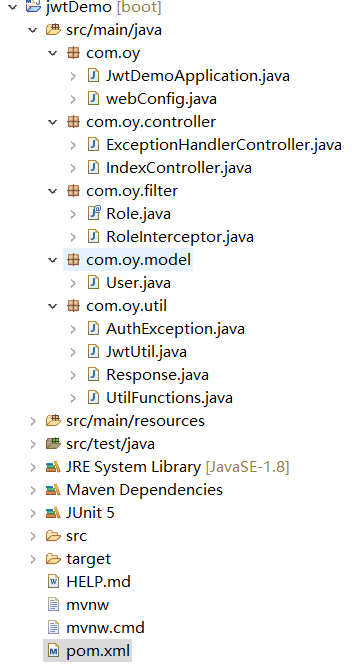
3.1、pom文件
<dependencies>

    <dependency>

        <groupId>org.springframework.boot</groupId>

        <artifactId>spring-boot-starter-web</artifactId>

    </dependency>

    <dependency>

        <groupId>io.jsonwebtoken</groupId>

        <artifactId>jjwt</artifactId>

        <version>0.7.0</version>

    </dependency>

    <dependency>

        <groupId>com.alibaba</groupId>

        <artifactId>fastjson</artifactId>

        <version>1.2.47</version>

    </dependency>

</dependencies>
3.2、token工具类JwtUtil
package com.oy.util;

import java.util.Date;

import java.util.HashMap;

import java.util.Map;

import java.util.Map.Entry;

import javax.servlet.http.HttpServletRequest;

import org.junit.jupiter.api.Test;

import com.oy.model.User;

import io.jsonwebtoken.Jwts;

import io.jsonwebtoken.SignatureAlgorithm;

public class JwtUtil {

    public static final long EXPIRATION_TIME = 3600_000; // 1 hour

    // public static final long EXPIRATION_TIME = 0; // for test

    public static final String SECRET = "secret007";

    public static final String TOKEN_PREFIX = "Bearer";

    public static final String HEADER_STRING = "Authorization";

    // 生成token

    public static String generateToken(User user) {

        //you can put any data into the map

        HashMap<String, Object> map = new HashMap<>();

        map.put("name", user.getUsername());

        map.put("role", user.getRole());

        String jwt = Jwts.builder()

                .setClaims(map) // 数据

                .setExpiration(new Date(System.currentTimeMillis() + EXPIRATION_TIME)) // 过期时间

                .signWith(SignatureAlgorithm.HS512, SECRET) // 算法,密钥

                .compact();

        return TOKEN_PREFIX + " " + jwt;

    }

    // 验证和解析token

    public static Map<String, Object> validateTokenAndGetClaims(HttpServletRequest request) {

        String token = request.getHeader(HEADER_STRING); // Authorization

        if (token == null)

            throw new TokenValidationException("Missing token");

        // Parse the token. Throw exception when token is invalid

        Map<String, Object> body = Jwts.parser()

                .setSigningKey(SECRET)

                .parseClaimsJws(token.replace(TOKEN_PREFIX, ""))

                .getBody();

        return body;

    }

    @SuppressWarnings("serial")

    public static class TokenValidationException extends RuntimeException {

        public TokenValidationException(String msg) {

            super(msg);

        }

    }

    // 测试生成jwt

    @Test

    public void test1() {

        UtilFunctions.log.info(generateToken(new User("admin", "", "admin")));

        // Bearer eyJhbGciOiJIUzUxMiJ9.eyJyb2xlIjoiYWRtaW4iLCJuYW1lIjoiYWRtaW4iLCJleHAiOjE1NjAwNzI1MTN9.YRG59eqP8nIoRNURPRYZWv3SAtss9YLOXjRsVmLmms7qMImq4MsERN0QuDbLGorgLCAbrIiSJjBY5_DaPJqP6Q

    }

    // 测试验证和解析token

    // 测试使用错误的密钥: io.jsonwebtoken.SignatureException: JWT signature does not match locally computed signature.

    // JWT validity cannot be asserted and should not be trusted.

    @Test

    public void test2() {

        String token = "eyJhbGciOiJIUzUxMiJ9.eyJyb2xlIjoiYWRtaW4iLCJuYW1lIjoiYWRtaW4iLCJleHAiOjE1NjAwNzI1MTN9.YRG59eqP8nIoRNURPRYZWv3SAtss9YLOXjRsVmLmms7qMImq4MsERN0QuDbLGorgLCAbrIiSJjBY5_DaPJqP6Q";

        Map<String, Object> body = Jwts.parser()

                //.setSigningKey(SECRET)

                .setSigningKey("secret") // 测试使用错误的密钥

                .parseClaimsJws(token.replace(TOKEN_PREFIX, ""))

                .getBody();

        for (Entry<String, Object> entry : body.entrySet()) {

            UtilFunctions.log.info("=== key:{}, value:{} ===", entry.getKey(), entry.getValue());

            // === key:role, value:admin ===

            // === key:name, value:admin ===

            // === key:exp, value:1560072513 ===

        }

    }

}
3.3、注解@Role的定义
package com.oy.filter;

import java.lang.annotation.ElementType;

import java.lang.annotation.Retention;

import java.lang.annotation.RetentionPolicy;

import java.lang.annotation.Target;

@Retention(RetentionPolicy.RUNTIME)

@Target(ElementType.METHOD)

public @interface Role {

    String role();

}
3.4、拦截器RoleInterceptor
package com.oy.filter;

import java.util.Map;

import javax.servlet.http.HttpServletRequest;

import javax.servlet.http.HttpServletResponse;

import org.springframework.web.method.HandlerMethod;

import org.springframework.web.servlet.handler.HandlerInterceptorAdapter;

import com.oy.util.AuthException;

import com.oy.util.JwtUtil;

import com.oy.util.UtilFunctions;

public class RoleInterceptor extends HandlerInterceptorAdapter {

    @Override

    public boolean preHandle(HttpServletRequest request, HttpServletResponse response, Object handler)

            throws Exception {

        UtilFunctions.log.info("RoleInterceptor work...");

        // target of request is method of controller

        if (handler instanceof HandlerMethod) {

            HandlerMethod handlerMethod = (HandlerMethod) handler;

            Role roleAnnotation = handlerMethod.getMethodAnnotation(Role.class);

            if (roleAnnotation == null) { // method without @Role annotation

                UtilFunctions.log.info("RoleInterceptor over...");

                return true; // 放行

            } else { // method with @Role annotation

                // 验证token

                String role = null;

                try {

                    Map<String, Object> claims = JwtUtil.validateTokenAndGetClaims(request);

                    UtilFunctions.log.info("claims:{}", claims);

                    role = String.valueOf(claims.get("role")); // 从token中取数据: role

                    // roleAnnotation.role(): 获取注解中指定role

                    UtilFunctions.log.info("=== role:{}, roleAnnotation.role:{} ===", role, roleAnnotation.role());

                    if (System.currentTimeMillis() / 1000L > (int) claims.get("exp")) {

                        throw new AuthException("token 过期了...");

                    }

                } catch (Exception e) {

//                    response.sendError(HttpServletResponse.SC_UNAUTHORIZED, e.getMessage());

//                    UtilFunctions.log.info(e.toString() + ". RoleInterceptor over...");

//                    return false; // 拦截

                    // token验证不通过,拦截

                    throw new AuthException(e.getMessage());

                }

                if (role == null || !role.equals(roleAnnotation.role())) {

//                    response.setStatus(401);

//                    UtilFunctions.log.info("RoleInterceptor over...");

//                    return false; // 拦截

                    throw new AuthException("a role of " + roleAnnotation.role() + " is needed, but you are " + role);

                }

            }

        }

        UtilFunctions.log.info("RoleInterceptor over...");

        return true; // // 放行

    }

}
在sprigboot中注册拦截器
package com.oy;

import org.springframework.context.annotation.Configuration;

import org.springframework.web.servlet.config.annotation.EnableWebMvc;

import org.springframework.web.servlet.config.annotation.InterceptorRegistry;

import org.springframework.web.servlet.config.annotation.WebMvcConfigurer;

import com.oy.filter.RoleInterceptor;

@EnableWebMvc

@Configuration

public class webConfig implements WebMvcConfigurer {

    @Override

    public void addInterceptors(InterceptorRegistry registry) {

        // 拦截除登陆外的所有请求

        registry.addInterceptor(new RoleInterceptor())

            .addPathPatterns("/**").excludePathPatterns("/login");

    }

}
3.5、IndexController
package com.oy.controller;

import java.util.HashMap;

import javax.servlet.http.HttpServletResponse;

import org.springframework.http.HttpStatus;

import org.springframework.http.ResponseEntity;

import org.springframework.web.bind.annotation.GetMapping;

import org.springframework.web.bind.annotation.PostMapping;

import org.springframework.web.bind.annotation.RequestParam;

import org.springframework.web.bind.annotation.RestController;

import com.alibaba.fastjson.JSONObject;

import com.oy.filter.Role;

import com.oy.model.User;

import com.oy.util.JwtUtil;

import com.oy.util.Response;

import com.oy.util.UtilFunctions;

@RestController

public class IndexController {

    @Role(role = "user")

    @GetMapping("/test1")

    public JSONObject test1() {

        return new Response("test role=user").toJson();

    }

    @Role(role = "admin")

    @GetMapping("/test2")

    public JSONObject test2() {

        return new Response("test role=admin").toJson();

    }

    // 登录方法不拦截

    @SuppressWarnings({ "serial", "rawtypes" })

    @PostMapping("/login")

    public Object login(HttpServletResponse response,

            @RequestParam(value = "username", required = true) String username,

            @RequestParam(value = "password", required = true) String password) throws Exception {

        UtilFunctions.log.info("login info, username:{}, password:{}", username, password);

        User user = isValidUsernameAndPassword(username, password);

        if (user != null) {

            String jwt = JwtUtil.generateToken(user);

            return new HashMap<String, String>() {

                {

                    put("token", jwt);

                }

            };

        } else {

            //

            return new ResponseEntity(HttpStatus.UNAUTHORIZED);

        }

    }

    private User isValidUsernameAndPassword(String username, String password) {

        if ("admin".equals(username) && "admin123".equals(password)

                || "user".equals(username) && "user123".equals(password)) {

            return new User("admin", "", "admin");

        }

        return null;

    }

}
3.6、全局异常处理ExceptionHandlerController
package com.oy.controller;

import org.springframework.http.HttpStatus;

import org.springframework.web.bind.annotation.ControllerAdvice;

import org.springframework.web.bind.annotation.ExceptionHandler;

import org.springframework.web.bind.annotation.ResponseBody;

import org.springframework.web.bind.annotation.ResponseStatus;

import com.alibaba.fastjson.JSONObject;

import com.oy.util.AuthException;

@ControllerAdvice

public class ExceptionHandlerController {

    @ExceptionHandler(RuntimeException.class)

    @ResponseStatus(HttpStatus.INTERNAL_SERVER_ERROR)

    @ResponseBody

    public JSONObject runtimeExceptionHandler(RuntimeException ex) {

        JSONObject response = new JSONObject();

        response.put("message", ex.getMessage());

        return response;

    }

    @ExceptionHandler(Exception.class)

    @ResponseStatus(HttpStatus.INTERNAL_SERVER_ERROR)

    @ResponseBody

    public JSONObject exceptionHandler(Exception ex) {

        JSONObject response = new JSONObject();

        response.put("message", ex.getMessage());

        return response;

    }

    @ExceptionHandler(AuthException.class)

    @ResponseStatus(HttpStatus.UNAUTHORIZED)

    @ResponseBody

    public JSONObject authExceptionHandler(Exception ex) {

        JSONObject response = new JSONObject();

        response.put("message", ex.getMessage());

        return response;

    }

}
3.7、其他model类或工具类
User类
package com.oy.model;

public class User {

    private String username;

    private String password;

    private String role;

    public User() {}

    public User(String username, String password, String role) {

        this.username = username;

        this.password = password;

        this.role = role;

    }

    // getter和setter方法省略

}
AuthException类
package com.oy.util;

@SuppressWarnings("serial")

public class AuthException extends RuntimeException {

    public AuthException() {}

    public AuthException(String message) {

        super(message);

    }

}
Response类
package com.oy.util;

import com.alibaba.fastjson.JSONObject;

public class Response {

    private int code = 0;

    private String msg = "";

    private String data = "";

    private JSONObject responseJson = new JSONObject(true);

    public Response(int code) {

        this.code = code;

    }

    public Response(int code, String msg) {

        this.code = code;

        this.msg = msg;

    }

    public Response(String data) {

        this.code = 0;

        this.data = data;

    }

    public String toString() {

        responseJson.put("code", this.code);

        if (!msg.isEmpty()) {

            responseJson.put("message", this.msg);

        }

        if (!data.isEmpty()) {

            responseJson.put("data", this.data);

        }

        return responseJson.toJSONString();

    }

    public JSONObject toJson() {

        responseJson.put("code", this.code);

        if (!msg.isEmpty()) {

            responseJson.put("message", this.msg);

        }

        if (!data.isEmpty()) {

            responseJson.put("data", this.data);

        }

        return responseJson;

    }

}
UtilFunctions类
package com.oy.util;

import org.slf4j.Logger;

import org.slf4j.LoggerFactory;

public class UtilFunctions {

    public static Logger log = LoggerFactory.getLogger("jwt");

}
3.8、测试
springboot + 注解 + 拦截器 + JWT 实现角色权限控制的更多相关文章
- struts2学习笔记--拦截器(Interceptor)和登录权限验证Demo
理解 Interceptor拦截器类似于我们学过的过滤器,是可以在action执行前后执行的代码.是我们做web开发是经常使用的技术,比如权限控制,日志.我们也可以把多个interceptor连在一起 ...
- springboot + redis + 注解 + 拦截器 实现接口幂等性校验
一.概念 幂等性, 通俗的说就是一个接口, 多次发起同一个请求, 必须保证操作只能执行一次 比如: 订单接口, 不能多次创建订单 支付接口, 重复支付同一笔订单只能扣一次钱 支付宝回调接口, 可能会多 ...
- Springboot + redis + 注解 + 拦截器来实现接口幂等性校验
Springboot + redis + 注解 + 拦截器来实现接口幂等性校验 1. SpringBoot 整合篇 2. 手写一套迷你版HTTP服务器 3. 记住:永远不要在MySQL中使用UTF ...
- Spring MVC 方法注解拦截器
应用场景,在方法级别对本次调用进行鉴权,如api接口中有个用户唯一标示accessToken,对于有accessToken的每次请求可以在方法加一个拦截器,获得本次请求的用户,存放到request或者 ...
- SpringBoot 注册拦截器方式及拦截器如何获取spring bean实例
SpringBoot 注册拦截器时,如果用New对象的方式的话,如下: private void addTokenForMallInterceptor(InterceptorRegistry regi ...
- SpringMVC拦截器与SpringBoot自定义拦截器
首先我们先回顾一下传统拦截器的写法: 第一步创建一个类实现HandlerInterceptor接口,重写接口的方法. 第二步在XML中进行如下配置,就可以实现自定义拦截器了 SpringBoot实现自 ...
- SpringMVC拦截器(资源和权限管理)
1.DispatcherServlet SpringMVC具有统一的入口DispatcherServlet,所有的请求都通过DispatcherServlet. DispatcherServle ...
- SpringBoot自定义拦截器实现IP白名单功能
SpringBoot自定义拦截器实现IP白名单功能 转载请注明源地址:http://www.cnblogs.com/funnyzpc/p/8993331.html 首先,相关功能已经上线了,且先让我先 ...
- 11. SpringMVC拦截器(资源和权限管理)
1.DispatcherServlet SpringMVC具有统一的入口DispatcherServlet,所有的请求都通过DispatcherServlet. DispatcherServl ...
随机推荐
- oracle ogg 单实例双向复制搭建(oracle-oracle)--Oracle GoldenGate
oracle ogg 单实例双向复制搭建(oracle-oracle)--Oracle GoldenGate --继昨天的测试,这一篇实施单实例双向复制(完全重新搭建) --环境不变 db1,db2( ...
- react-native start error Invalid regular expression:
详细错误: error Invalid regular expression: /(.*\\__fixtures__\\.*|node_modules[\\\]react[\\\]dist[\\\]. ...
- Golang基础(2):Go条件语句、switch和循环语句
一:Go条件语句 package main import "fmt" //========go条件判断语句=== func main() { { fmt.Println(" ...
- [ScreenOS] How to manually generate a new system self-signed certificate to replace the expired system self-signed certificate without resetting the firewall
SUMMARY: This article provides information on how to manually generate a new system self-signed cert ...
- 递归算法之排列组合-求一个集合S的m个元素的组合和所有可能的组合情况
求一个集合S的m个元素组合的所有情况,并打印出来,非常适合采用递归的思路进行求解.因为集合的公式,本身就是递归推导的: C(n,m) = C(n-1,m-1) + C(n-1,m). 根据该公式,每次 ...
- python pandas 自动生成批量测试数据插入数据库 mysql
1.python连接数据库游标 # coding:utf-8 from sqlalchemy import create_engine class connet_databases: def __in ...
- 第九周课程总结&实验报告七
实验任务详情: 完成火车站售票程序的模拟. 要求: (1)总票数1000张: (2)10个窗口同时开始卖票: (3)卖票过程延时1秒钟: (4)不能出现一票多卖或卖出负数号票的情况. package ...
- sql limit order by and where
1 sql limit limit size,返回前size行. limit offset , size,返回offset开始的size行,offset从0行开始. 2 sql limit with ...
- 首次全备及事务备份对数据库的影响,2014 SpexSql log评估版探索
参考:https://www.cnblogs.com/gered/p/9882367.html 关键词:解析事务日志 新建数据库test3,然后查看日志文件,382行记录 SELECT min([Be ...
- Mysql 5.7存储过程的学习
存储过程:对sql的封装和重用,经编译创建并保存在数据库中,通过指定存储过程的名字并给定参数(需要时)来调用执行. 优缺点: (1) 优点: 执行速度快------存储过程只在创建时进行编译,以后每次 ...