
centos7 安装php7+mysql5.7+nginx+redis
、1.先修改yum源 https://webtatic.com
rpm -Uvh https://dl.fedoraproject.org/pub/epel/epel-release-latest-7.noarch.rpm

rpm -Uvh https://mirror.webtatic.com/yum/el7/webtatic-release.rpm

rpm -Uvh  http://dev.mysql.com/get/mysql57-community-release-el7-9.noarch.rpm
2.安装nginx
yum install nginx
3.安装mysql5.7
yum -y install mysql-community-server
4.安装php
yum install php70w-devel php70w.x86_64 php70w-pecl-redis php70w-cli.x86_64 php70w-common.x86_64 php70w-gd.x86_64 php70w-ldap.x86_64 php70w-mbstring.x86_64 php70w-mcrypt.x86_64 php70w-pdo.x86_64 php70w-mysqlnd php70w-fpm php70w-opcache
5.开始简单的配置
添加运行目录
mkdir -p /var/run/mysqld/

chown mysql.mysql /var/run/mysqld/
mysql 配置
vim /etc/my.cnf
在[client] 下面添加
default-character-set=utf8
在 [mysqld] 下面添加
character_set_server=utf8
init_connect='SET NAMES utf8'
collation-server=utf8_general_ci
保存退出
获取初始密码
grep 'temporary password' /var/log/mysqld.log
得到

注意 里面包括开头的 ;号
然后登陆mysql 修改密码
alter user root@localhost identified by 'tyzZ001!'
如果密码太过于简单可能不然修改因为mysql默认设置了密码复杂度 至少8位 必须包含 大小写字母数字及符号
查看密码策略:
show variables like '%password%';
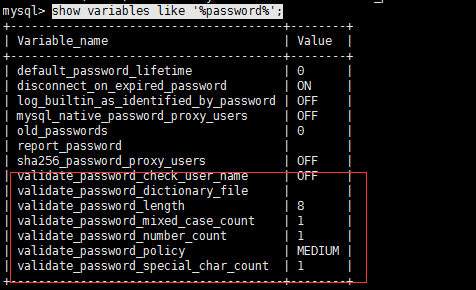
说明:
validate_password_dictionary_file:密码策略文件,策略为STRONG才需要
validate_password_length:密码最少长度
validate_password_mixed_case_count:大小写字符长度,至少1个
validate_password_number_count :数字至少1个
validate_password_special_char_count:特殊字符至少1个 上述参数是默认策略MEDIUM的密码检查规则。
validate_password_policy:密码策略,默认为MEDIUM策略 ,共有如下三种密码策略:
0 or LOW Length
1 or MEDIUM Length; numeric, lowercase/uppercase, and special characters
2 or STRONG Length; numeric, lowercase/uppercase, and special characters; dictionary file
可以通过 set GLOBAL validate_password_policy=0 来修改
或者修改/etc/my.cnf文件
validate_password_policy=0 #0(LOW),1(MEDIUM),2(STRONG)其中一种,注意2需要提供密码字典文件
如果不需要密码策略,添加my.cnf文件中添加如下配置禁用即可:
validate_password = off
添加一个可以在外部登陆的mysql用户
grant all privileges on *.* to 创建的用户名 @"%" identified by "密码";

flush privileges;
注意修改配置文件后需要重启mysql
配置nginx:
nginx可以的默认配置文件一般在:
/etc/nginx/nginx.conf
使用 cat 查看一下配置文件
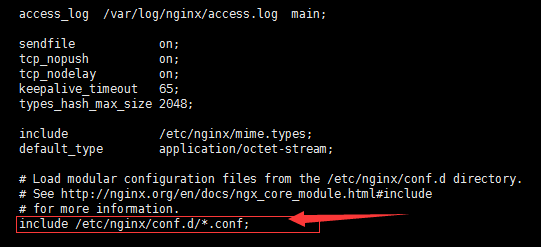
这行表示nginx会引用 conf.d 这个文件夹下面所有.conf后缀的文件
那么在conf.d下面我们来建立我们自己的配置文件
vim /etc/nginx/conf.d/user.conf
在里面写入:
server {

    listen       ;#端口

    server_name admin.com  www.admin.com; # 域名

    root /home/www/web/newomcat/admin; # 网站根目录

    index index.php index.html index.htm;#默认的index

    # 建议放内网

    # allow 192.168.0.0/;

    # deny all;

    location / {

if (!-e $request_filename) {

 rewrite ^/(.*)$ /index.php?$ last;#去除url中的index.php 不需要可以不写

}

    }

    location ~ \.php$ {

        try_files $uri = ;

        fastcgi_pass   127.0.0.1:;

        fastcgi_index  index.php;

        fastcgi_param  SCRIPT_FILENAME  $document_root$fastcgi_script_name;

        include        fastcgi_params;

    }

}
这样 简单的lnmp就安装好了
systemctl restart php-fpm   #启动php

systemctl restart nginx #启动nginx

systemctl restart  mysqld #启动mysql
6安装redis
下载源码包:
wget http://download.redis.io/releases/redis-3.2.5.tar.gz
或者使用yum安装也可以
yum install redis
解压下载好的远吗包:
tar -zxf redis-3.2..tar.gz
进入解压后的文件夹
cd redis-3.2.
make编译安装
make
安装完成后 在目录下会有一个 src目录里面放的是 redis的命令 当前目录下会有一个redis.conf 这个是 redis的配置文件 我们需要对他们进行处理一下放别以后的使用
建立两个目录
mkdir -p /usr/local/redis/bin  命令目录

mkdir -p /usr/local/redis/etc  配置文件目录
将配置文件移动到/usr/local/redis/ext 目录 将 src下的mkreleasehdr.sh redis-benchmark redis-check-aof redis-check-rdb redis-cli redis-sentinel redis-server redis-trib.rb 这个几个文件移动到/usr/local/redis/bin这个目录
mv ./redis.conf /usr/local/redis/etc/

mv   mkreleasehdr.sh   redis-benchmark   redis-check-aof  redis-check-rdb  redis-cli  redis-sentinel  redis-server redis-trib.rb  /usr/local/redis/bin/
打开 /usr/local/redis/etc/redis.conf 文件 修改配置 让redis在启动时在后台运行

找到这一项 改为 yes 原来为 no
最后将其注册为系统服务
在/etc/init.d/目录下建立redis 文件
vim /etc/init.d/redis
写入内容
###########################

#!/bin/sh

#chkconfig:

#description:auto_run

PATH=/usr/local/bin:/sbin:/usr/bin:/bin

REDISPORT=

EXEC=/usr/local/redis/bin/redis-server

REDIS_CLI=/usr/local/redis/bin/redis-cli

PIDFILE=/var/run/redis_${REDISPORT}.pid

CONF="/usr/local/redis/etc/redis.conf"

case "$1" in

    start)

        if [ -f $PIDFILE ]

        then

                echo "$PIDFILE exists, process is already running or crashed"

        else

                echo "Starting Redis server..."

                $EXEC $CONF

        fi

        if [ "$?"="" ]

        then

              echo "Redis is running..."

        fi

        ;;

    stop)

        if [ ! -f $PIDFILE ]

        then

                echo "$PIDFILE does not exist, process is not running"

        else

                PID=$(cat $PIDFILE)

                echo "Stopping ..."

                $REDIS_CLI -p $REDISPORT SHUTDOWN

                while [ -x ${PIDFILE} ]

               do

                    echo "Waiting for Redis to shutdown ..."

                    sleep

                done

                echo "Redis stopped"

        fi

        ;;

   restart|force-reload)

        ${} stop

        ${} start

        ;;

  *)

    echo "Usage: /etc/init.d/redis {start|stop|restart|force-reload}" >&

        exit

esac

###########################
保存退出
设置权限
chmod +x /etc/init.d/redis
设置自动启动:
chkconfig redis on
设置 mysql php nginx 自动启动
 systemctl enable redis

 systemctl enable php-fpm

 systemctl enable mysqld
systemctl enable nginx
转载请注明来源:http://www.cnblogs.com/phpshen/p/6222935.html
centos7 安装php7+mysql5.7+nginx+redis的更多相关文章
- centos7.6编译安装php7.2.11及redis/memcached/rabbitmq/openssl/curl等常见扩展
centos7.6编译安装php7..11及redis/memcached/rabbitmq/openssl/curl等常见扩展 获取Php的编译参数方法: [root@eus-api-cms-bac ...
- Centos7 安装PHP7版本及php-fpm,redis ,php-redis,hiredis,swoole 扩展安装
============================PHP7.1 ========================================= 1. 更换rpm 源,执行下面两个 rpm - ...
- centos7安装PHP7的redis扩展
前言: 在本篇博客中,我将给大家介绍如何在Centos7上安装PHP-Redis扩展,关于如何在Centos上安装redis的,可以参考另外一篇博客:Centos7安装redis 想要在php中操作r ...
- CentOS7 安装PHP7的swoole扩展:
一.绪 Swoole简介 PHP异步网络通信引擎 最终编译为so文件作为PHP的扩展 准备工作 Linux环境 PHP7 swoole2.1 redis 源码安装PHP7 源码安装swoole htt ...
- 在ubuntu16.04上安装php7 mysql5.7 nginx1.10并支持http2
安装nginx 首先更新软件包 并且安装nginx sudo apt-get update sudo apt-get install nginx 开放防火墙配置 sudo ufw allow 'Ngi ...
- CentOS7 安装 PHP7.2
点击查看原文 安装源 安装 EPEL 软件包: $ sudo yum install epel-release 安装 remi 源: $ sudo yum install http://rpms.re ...
- centos7安装php7.3
安装php7.3 CentOS/RHEL 7.x: yum install epel-release yum install http://rpms.remirepo.net/enterprise/r ...
- centos7 安装php7遇到的问题
环境中安装过php 5.4,觉得版本太低了,因此删除旧版本安装了新版本 1. 安装epel-release 通过命令: rpm -ivh http://dl.fedoraproject.org/pub ...
- CentOS7 安装PHP7的redis扩展:
phpredis-4.2.0.tar.gz:下载:wget https://github.com/phpredis/phpredis/archive/4.2.0.tar.gz $ tar -z ...
随机推荐
- java关键字之final
final表示不能修改. final修饰的方法不能被重写, final修饰的类不能被继承并且类里的所有方法都是final,成员变量可以是final或者不是final. final修饰的成员变量不可以改 ...
- Centos7下配置node.js环境
1.软件环境: Centos7.VMware 10.0.NodeJS v0.10.24 2.安装过程 1>安装过程中需要管理员权限,及root权限,可以敲入如下命令. [sharing@loca ...
- jsp页面传参大汇总-转帖收藏
http://blog.csdn.net/ssy_shandong/article/details/9328985/
- C#并行编程之数据并行
所谓的数据并行的条件是: 1.拥有大量的数据. 2.对数据的逻辑操作都是一致的. 3.数据之间没有顺序依赖. 运行并行编程可以充分的利用现在多核计算机的优势.记录代码如下: public class ...
- eclipse自动补全快捷键失效,sysout用不了!
好久没写Java代码了,使用新版Neon的Eclipse Java EE IDE开发时,自动补全各种失败,sysout也各种用不了, 开始还以为是电脑卡比呢,原来是版本的快捷键不同了,修改方法如下! ...
- SQLServer针对排名函数ROWNUMBER()、RANK()、DENSE_RANK()、NTILE的研究!~
相信大家在软件工程中经常会遇到对某些数据进行排名的问题,尤其是对于电子商务的HR来说“大手笔”是非常具有潜在价值的!~至于都有哪些价值这个超出本文的范畴不予进行说明,但是不得不说的是每一个精明的HR以 ...
- ubuntu command
uninstall software: sudo apt-get purge openjdk*
- 修改后的CopyFile类
这是修改后的CopyFile类,前面那个类有局限性,它不能复制大文件 这是我第一次写成一个能够实际应用的类,感谢博主们的无私奉献,感谢SeayXu老师的提点 但是这个类也并不是完美无缺,它复制文件没有 ...
- paper
1 IR 小目标检测 “Learning to detect small target A local kernel method” Xie K, Zhou T, Qiao Y, et al. Lea ...
- Foundation框架
1.框架是由许多类.方法.函数.文档按照一定的逻辑组织起来的集合,以便使研发程序变的更容易 清除缓存,删除这个文件夹下的所有文件/Users/fanyafang/Library/Developer/X ...