
Servlet开发技术,创建,以及Servlet的配置,web.xml的配置
直接上图,不废话!!!
第一:首先在Eclipse的包资源管理器中,单机鼠标右键,在弹出的快捷键菜单中选择“新建”/Servlet命令,在弹出的对话框中输入新建的Servlet所在的包和类名,然后单击下一步,

我选择默认,Next
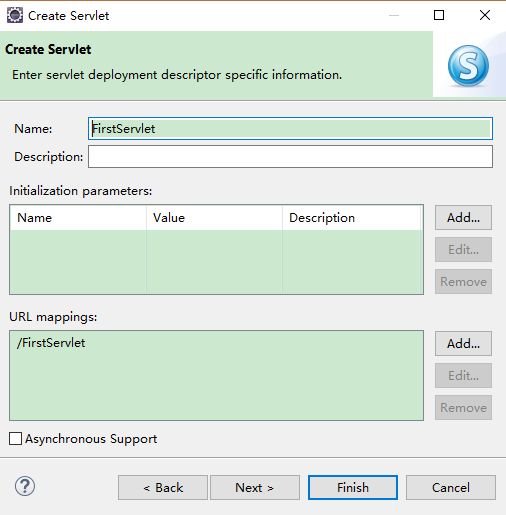
依旧默认,Next

注意事项,在创建web的工程的时候需要注意的是如下图,选择上web.xml这个按钮,因为Servlet需要配置一下web.xml这个文件,web.xml在web-inf这个文件下面


上图第二个箭头前面有个方括号,勾选上就可以自动创建好web.xml这个文件了。
 package com.ningmeng;

 import java.io.IOException;

 import java.io.PrintWriter;

 import javax.servlet.ServletException;

 import javax.servlet.annotation.WebServlet;

 import javax.servlet.http.HttpServlet;

 import javax.servlet.http.HttpServletRequest;

 import javax.servlet.http.HttpServletResponse;

 /**

  * Servlet implementation class FirstServlet

  */

 @WebServlet("/FirstServlet")

 public class FirstServlet extends HttpServlet {

     private static final long serialVersionUID = 1L;

     /**

      * @see HttpServlet#HttpServlet()

      */

     public FirstServlet() {

         super();

         // TODO Auto-generated constructor stub

     }

     /**

      * @see HttpServlet#doGet(HttpServletRequest request, HttpServletResponse response)

      */

     protected void doGet(HttpServletRequest request, HttpServletResponse response) throws ServletException, IOException {

         // TODO Auto-generated method stub

         response.setContentType("text/html");

         response.setCharacterEncoding("GBK");

         PrintWriter out=response.getWriter();

         out.print("<HTML>");

         out.println("<HEAD><TITLE>Servlet实例</TITLE></HEAD>");

         out.println("<BODY>");

         out.println("servlet实例");

         out.println(this.getClass());

         out.println("</BODY>");

         out.println("</HTML>");

         out.flush();

         out.close();

         response.getWriter().append("Served at: ").append(request.getContextPath());

     }

     /**

      * @see HttpServlet#doPost(HttpServletRequest request, HttpServletResponse response)

      */

     protected void doPost(HttpServletRequest request, HttpServletResponse response) throws ServletException, IOException {

         // TODO Auto-generated method stub

         doGet(request, response);

     }

 }
 <?xml version="1.0" encoding="UTF-8"?>

 <web-app xmlns:xsi="http://www.w3.org/2001/XMLSchema-instance" xmlns="http://java.sun.com/xml/ns/javaee" xsi:schemaLocation="http://java.sun.com/xml/ns/javaee http://java.sun.com/xml/ns/javaee/web-app_3_0.xsd" id="WebApp_ID" version="3.0">

   <display-name>web02</display-name>

   <welcome-file-list>

     <welcome-file>index.html</welcome-file>

     <welcome-file>index.htm</welcome-file>

     <welcome-file>index.jsp</welcome-file>

     <welcome-file>default.html</welcome-file>

     <welcome-file>default.htm</welcome-file>

     <welcome-file>default.jsp</welcome-file>

   </welcome-file-list>

   <servlet>

       <!-- 声明Servlet对象 -->

       <servlet-name>FirstServlet</servlet-name>

       <!-- 上面一句指定Servlet对象的名称 -->

       <servlet-class>com.ningmeng.FirstServlet</servlet-class>

       <!-- 上面一句指定Servlet对象的完整位置,包含包名和类名 -->

   </servlet>

   <servlet-mapping>

       <!-- 映射Servlet -->

       <servlet-name>FirstServlet</servlet-name>

       <!--<servlet-name>与上面<Servlet>标签的<servlet-name>元素相对应,不可以随便起名  -->

       <url-pattern>/FirsetServlet</url-pattern>

       <!-- 上面一句话用于映射访问URL -->

   </servlet-mapping>

 </web-app>
运行效果如下图所示

Servlet开发技术,创建,以及Servlet的配置,web.xml的配置的更多相关文章
- 在springBoot中配置web.xml中配置的servlet
第一种 web.xml (截取的需要转换的) 当拦截到 /socke t时执行该servlet <servlet> <servlet-name>websocket</se ...
- 转 一个web项目web.xml的配置中<context-param>配置作用
一个web项目web.xml的配置中<context-param>配置作用 <context-param>的作用:web.xml的配置中<context-param& ...
- 一个web项目web.xml的配置中<context-param>配置作用
<context-param>的作用: web.xml的配置中<context-param>配置作用 1. 启动一个WEB项目的时候,容器(如:Tomcat)会去读它的配置文件 ...
- Servlet中Web.xml的配置详解
1 定义头和根元素 部署描述符文件就像所有XML文件一样,必须以一个XML头开始.这个头声明可以使用的XML版本并给出文件的字符编码. DOCYTPE声明必须立即出现在此头之后.这个声明告诉服务器适用 ...
- Servlet——web.xml的配置
<servlet>: <servlet-name>: 名称 <servlet-class>: 类名 <init-param>: 初始化参数(只有本ser ...
- servlet为什么要配置web.xml
(1).为Servlet命名: <servlet> <servlet-name>servlet1</servlet-name> <- 这是用于,在serv ...
- web.xml中配置启动时加载的servlet,load-on-starup
web.xml中配置启动时加载的servlet,load-on-starup 使用servlet来初始化配置文件数据: 在servlet的配置当中,<load-on-startup>1&l ...
- springmvc 项目完整示例07 设置配置整合springmvc springmvc所需jar包springmvc web.xml文件配置
前面主要是后台代码,spring以及mybatis的整合 下面主要是springmvc用来处理请求转发,展现层的处理 之前所有做到的,完成了后台,业务层和持久层的开发完成了 接下来就是展现层了 有很多 ...
- SpringMVC(十四):SpringMVC 与表单提交(post/put/delete的用法);form属性设置encrypt='mutilpart/form-data'时,如何正确配置web.xml才能以put方式提交表单
SpringMVC 与表单提交(post/put/delete的用法) 为了迎合Restful风格,提供的接口可能会包含:put.delete提交方式.在springmvc中实现表单以put.dele ...
- JavaWeb工程中web.xml基本配置
一.理论准备 先说下我记得xml规则,必须有且只有一个根节点,大小写敏感,标签不嵌套,必须配对. web.xml是不是必须的呢?不是的,只要你不用到里面的配置信息就好了,不过在大型web工程下使用该文 ...
随机推荐
- ContentProvider要点复习
ContentProvider要点复习 ContentProvider作为四大组件之一,发挥着举足轻重的作用.与之相关联的另外两个类分别是ContentResolver和ContentObserver ...
- matlab资源
百度网盘 链接:http://pan.baidu.com/s/1c06ikEW 密码:9dpt包含matlab6.5,7,7.01,7.04,7.1,Matlab2006b(7.3),Matlab ...
- Python 4 —— 函数与模块
函数和模块的使用 一.函数 一个例子说明一切. def hello(): print "hello world" def increment(num): num += 1 retu ...
- GridView里的文本框改变事件
<asp:TemplateField HeaderText="实收数量"> <ItemTemplate> <asp:TextBox ID=" ...
- Python学习之路-Day4
1.函数 函数定义 def func(aa): def:表示函数的关键字 func:函数名,即函数的名称,可根据函数名调用函数 print('.....') prin ...
- iOS下控件坐标的转换方法
转换方法如下: - (CGPoint)convertPoint:(CGPoint)point fromView:(UIView *)view - (CGPoint)convertPoint:(CGPo ...
- CSS中继承,特殊性,层叠与重要性
继承 CSS的某些样式是具有继承性的,那么什么是继承呢?继承是一种规则,它允许样式不仅应用于某个特定html标签元素,而且应用于其后代.比如下面代码: <html><head> ...
- 查看Linux内存状况的命令及工具
1.cat /proc/meminfo cat /proc/<pid>/statm 和 cat /proc/<pid>/status 获取特定的进程的内存信息: 2. ...
- UITextField 的重写
在很多产品设计的时候,产品设计人员设计出来的输入框总会要求,文字的内容距离做边框多少像素,编辑区域的其实点,距离左边多少像素,很多人绝的难以适应!其实这些都不存在很大的技术难度,一下这些方式都可以达到 ...
- Inno Setup 下载安装
Inno Setup 是一个免费的 Windows 安装程序制作软件.第一次发表是在 1997 年,Inno Setup 今天在功能设置和稳定性上的竞争力可能已经超过一些商业的安装程序制作软件. 目前 ...