
SqlServer性能优化 提高并发性能二(九)
补充上一篇修改用非聚集索引:
update Employee set age=age+1 from Employee with(index=nc_Employee_Age) where age<30
执行计划:

并发访问控制隔离级别:
1.读提交:默认行为,读取时请求S锁
	set transaction isolation level read committed

	select * from Employee where age=34
2. 脏读:读取时不请求S锁,不会受到其他X锁限制
	set transaction isolation level read uncommitted

	select * from Employee
3. 已提交快照读:更新时将老的数据复制到 Tempdb:read_committed_snapshot
        alter database HRDB

	 set read_committed_snapshot on
设置成单用户模式:

设置事物:
	begin tran

	 update Employee set age=age+1 where age>=30
执行语句:
select * from Employee
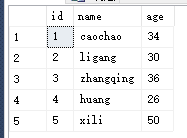
这条语句也可以执行:
select * from Employee where age>30
这条可以执行:
update Employee set age=age+1 from Employee with(index=nc_Employee_Age) where age<30
没有复制的还是从索引或基表中读取。所以可以读取出数据
这条不能执行:
update Employee set age=age+1 from Employee with(index=nc_Employee_Age) where age>30
打开数据库的读提交快照。 对记录进行操作时,会把排他锁的数据放到Tempdb数据库中,访问的时候直接读出Tempdb的数据。
4.可重复读:事物结束前,不释放获取的S锁,可能会形成死锁
create table Products(id int identity(1,1),name varchar(500),UnitPrice money)

 delete from Products where id=2

 insert Products values ('p1',13)

 insert Products values('p2',5)

 --业务逻辑:单价大于10的优惠10

  begin tran

  declare @UnitPrice money

  set @UnitPrice=(select @UnitPrice from Products where id=1)

  --执行等待的时间

  waitfor delay '00:00:20'

  if @UnitPrice>10

  update Products set UnitPrice=UnitPrice-10 where id=1

  commit tran
第二个人执行打六折的业务:
update Products set UnitPrice=UnitPrice*0.6
结果:

事务中尽量不要放查询语句:13*0.6=7.8 7.8-10=-2.2
实在要查询语句,如何解决呢?
删除上述表:drop table Products 重新创建
1. --在开启事务之前 设置事务的级别 可重复读
 --在开启事务之前  设置事务的级别  可重复读

 set transaction isolation level repeatable read

 --业务逻辑:单价大于10的优惠10

  begin tran

  declare @UnitPrice money

  set @UnitPrice=(select @UnitPrice from Products where id=1)

  --执行等待的时间

  waitfor delay '00:00:20'

  if @UnitPrice>10

  update Products set UnitPrice=UnitPrice-10 where id=1

  commit tran
2.打六折:
update Products set UnitPrice=UnitPrice*0.6
结果:

with(updlock) 可重复读的方式 可以保护线程。代码如下:
begin tran

  declare @UnitPrice money

  set @UnitPrice=(select @UnitPrice from Products with(updlock)  where id=1)

  --执行等待的时间

  waitfor delay '00:00:20'

  if @UnitPrice>10

  update Products set UnitPrice=UnitPrice-10  where id=1

  commit tran

update Products set UnitPrice=UnitPrice*0.6
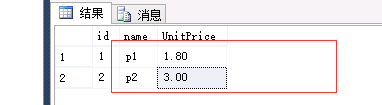
5. 串行化:访问的行和按顺序下一行放置范围锁,防止不必要操作与插入数据
业务背景:给分组为:‘group1’的员工发奖金,加入了新的员工
  create table Employees(id int identity(1,1),name varchar(500),groups varchar(500),salary money)

  insert Employees values('caojian','grouup1',3000)

    insert Employees values('ligang','grouup1',1000)

  insert Employees values('huang','grouup2',1500)

  insert Employees values('sunliyuan','grouup2',2000)
业务逻辑的事务语句:
  begin tran

  declare @count int

  set @count=(select COUNT(*) from Employees where groups='grouup1')

  declare @avgsalary money

  set @avgsalary=20000/@count

  waitfor delay '00:00:20'

  update Employees set salary=salary+@avgsalary where groups='grouup1'

  commit tran
第二个线程执行的语句:
insert Employees values ('newemployee','grouup1',0)
这种结果是不对的:

--设置串行化
  set transaction isolation level  serializable

  begin tran

  declare @count int

  set @count=(select COUNT(*) from Employees where groups='grouup1')

  declare @avgsalary money

  set @avgsalary=20000/@count

  waitfor delay '00:00:20'

  update Employees set salary=salary+@avgsalary where groups='grouup1'

  commit tran
进行添加:
insert Employees values ('newemployee','grouup1',0)
执行查询语句:

针对group创建索引:
 --针对group创建聚集索引

  create clustered index c_Employees_group on Employees  (groups)
执行事务:
 --设置串行化

  set transaction isolation level  serializable

  begin tran

  declare @count int

  set @count=(select COUNT(*) from Employees where groups='grouup1')

  declare @avgsalary money

  set @avgsalary=20000/@count

  waitfor delay '00:00:20'

  update Employees set salary=salary+@avgsalary where groups='grouup1'

  commit tran
执行以下三条语句:
insert Employees values ('newemployee','grouup1',0)

insert Employees values ('newemployee','grouup2',0)

insert Employees values ('newemployee','grouup3',0)
grouup1有影响,grouup2和grouup3无影响。

6. 快照:比已提交快照读取更严格,试图对修改数据应用X(排他锁),如果已发生改变,事物失败 allow_snapshot_isolation
创建表:
create table SnapShotTB(id int identity(1,1),name varchar(500),age int)

insert SnapShotTB values('caojian',33)
给数据库进行配置:
--打开配置数据库的一个选项

alter database  HRDB

--允许快照隔离

set allow_snapshot_isolation on
设置事物的隔离级别:
--设置事物的隔离级别为快照

set transaction isolation level snapshot

begin transaction

   declare @age int

   set @age=(select age from SnapShotTB where name='caojian')

   waitfor delay '00:00:20'

   update SnapShotTB set age =age+1 where name='caojian'

commit tran
第二个线程:
update SnapShotTB set age =age-1 where name='caojian'
报的错误:
减少阻塞与死锁的建议:
1.合适的索引
2.合适的分区
3.调整合适的隔离级别
4.查询条件的有限性
5.相同的顺序操作资源
6.短的事务
.NET 调用的案例:(EF CodeFirst)
1.连上数据库。
2.引入命名空间。

3.在领域层引入命名空间:
    using System.Transactions;

    using System.Data;

    using System.Linq;
4.代码:
/// <summary>

        /// 奖金处理的业务

        /// </summary>

        public void ProcessSalary()

        {

            TransactionOptions option = new TransactionOptions();

            //指定的隔离级别(串行化)

            option.IsolationLevel = System.Transactions.IsolationLevel.Serializable;

            using (TransactionScope scope=new TransactionScope(TransactionScopeOption.Required,option))

            {

                //连到数据访问的上下文

                HRUser dbcontext = new HRUser();

                var employees = dbcontext.Set<Employees>().Where(p => p.groups == "grouup1").ToList();

                //取得groupp1组的人数

                int count = employees.Count;

                //把奖金进行employees平分

                decimal salary = 20000 / count;

                //对每个人的值进行跟新

                foreach (var emoloyee in employees)

                {

                    dbcontext.Set<Employees>().Attach(emoloyee);

                    //状态是可修改的

                    dbcontext.Entry<Employees>(emoloyee).State = System.Data.Entity.EntityState.Modified;

                    emoloyee.salary = emoloyee.salary + salary;

                }

                dbcontext.SaveChanges();

                //事物的完成

                scope.Complete();

            }

        }
调用:
         protected void Button1_Click(object sender, EventArgs e)

        {

            Employees es = new Employees();

            es.ProcessSalary();

        }
点击button数据库更新成功。
7. 索引对隔离级别的影响、阻塞的监视
SqlServer性能优化 提高并发性能二(九)的更多相关文章
- SqlServer性能优化 提高并发性能(八)
并发访问: 当多个线程访问同一个资源,会产生并发性问题 并发控制与处理: 乐观并发控制:一种方式是"后来的更新者获胜" 这意味着先来的用户提交的值会在没有察觉的情况下丢失. 为 ...
- 性能优化——Web前端性能优化
核心知识点: 1.排查网站性能瓶颈的手法:分析各个环节的日志,找出异常部分 2.Web前端:网站业务逻辑之前的部分(浏览器.图片服务.CDN) 3.优化手段 1)浏览器优化 (1)减少http请求 a ...
- Android App性能优化笔记之一:性能优化是什么及为什么?
By Long Luo 周星驰的电影<功夫>里面借火云邪神之口说出了一句至理名言:“天下武功,唯快不破”. 在移动互联网时代,同样如此,留给一个公司的窗口往往只有很短的时间,如何把握住 ...
- 微擎开启性能优化里面的性能优化memcache内存优化及数据库读写分离
http://www.mitusky.com/forum.php?mod=viewthread&tid=3135 [微擎 安装使用] 微擎开启性能优化里面的性能优化memcache内存优化及数 ...
- nginx配置优化提高并发量
1 nginx配置优化提高并发量 worker_processes 2; 这个按照CPU的核数来决定 2 worker_connections 65535; 这个一般设置65535即可 每个进程允许的 ...
- web性能优化-网络传输性能优化
浏览器工作原理:https://www.cnblogs.com/thonrt/p/10008220.html 浏览器渲染原理: https://www.cnblogs.com/thonrt/p/100 ...
- Web前端性能优化——提高页面加载速度
前言: 在同样的网络环境下,两个同样能满足你的需求的网站,一个“Duang”的一下就加载出来了,一个纠结了半天才出来,你会选择哪个?研究表明:用户最满意的打开网页时间是2-5秒,如果等待超过10秒, ...
- JVM性能优化,提高Java的伸缩性
很多程序员在解决JVM性能问题的时候,花开了很多时间去调优应用程序级别的性能瓶颈,当你读完这本系列文章之后你会发现我可能更加系统地看待这类的问题.我说过JVM的自身技术限制了Java企业级应用的伸缩性 ...
- SQL Server查询性能优化——覆盖索引(二)
在SQL Server 查询性能优化——覆盖索引(一)中讲了覆盖索引的一些理论. 本文将具体讲一下使用不同索引对查询性能的影响. 下面通过实例,来查看不同的索引结构,如聚集索引.非聚集索引.组合索引等 ...
随机推荐
- Z表数据EXCEL导入
很多项目都有这种需求,虽然别人用的各有不同,不过闲来无事,还是自己搞了一个出来.基于EXCEL的导入. *&------------------------------------------ ...
- occ 中绘制二维矩形
在屏幕上绘制一个二级矩形 #include <Visual3d_Layer.hxx> #include <V3d_LayerMgr.hxx> #include <Visu ...
- django-pagination 分页栏长度控制
在分页页数很多时,分页样式会很长影响美观 我们可以用两个方式控制: 1.找到django-pagination里的pagination\pagination.html,在<ul class=&q ...
- Spring事务管理器的应对
Spring抽象的DAO体系兼容多种数据访问技术,它们各有特色,各有千秋.像Hibernate是非常优秀的ORM实现方案,但对底层SQL的控制不太方便:而iBatis则通过模板化技术让你方便地控制SQ ...
- 临界区 TRTLCriticalSection 和 TCriticalSection
临界区对象TCriticalSection(Delphi) 与 TRtlCriticalSection 的区别 TRtlCriticalSection 是一个结构体,在windows单元中定义: 是I ...
- 非Spring下的Quartz
转自:Nick Huang. http://www.cnblogs.com/nick-huang/ 阅读目录 > 参考的优秀资料 > 版本说明 > 简单的搭建 > 在We ...
- JavaScript 开发的45个经典技巧
JavaScript是一个绝冠全球的编程语言,可用于Web开发.移动应用开发(PhoneGap.Appcelerator).服务器端开发(Node.js和Wakanda)等等.JavaScript还是 ...
- (BFS)poj3669-Meteor Shower
题目地址 为判断某时刻能否走到某位置,建立shi数组,记录某位置最早t时刻就不能走.(初始化为-1)之后开始从(0,0)出发bfs,用bu数组记录走到某一位置时花费的步数,并且需要用vi数组记录是否走 ...
- Js 根据不同浏览器弹出窗口
/// <reference path="intellisense/jquery-1.2.6-vsdoc.js" /> var userAgent = navigato ...
- c++作业:Circle
Circle Github链接