
tomcat+nginx简单实现负载均衡
1.环境准备
在前面的博客中我已经安装好nginx和一台tomcat了。现在就在加一台tomcat
tomcat1: /apps/tomcat/tomcat1/apache-tomcat-7.0.69/
tomcat2: /apps/tomcat/tomcat2/apache-tomcat-7.0.69/
jdk:java7
nginx:nginx-1.4.2
给tomcat添加权限
chmod +775 -R /apps/tomcat/tomcat1
chmod +775 -R /apps/tomcat/tomcat2
tomcat下载地址: http://pan.baidu.com/s/1gf7gcVL
2.修改 server.xml 给tomcat配置不同的端口
cd /apps/tomcat/tomcat1/apache-tomcat-7.0.69/conf/
vi server.xml
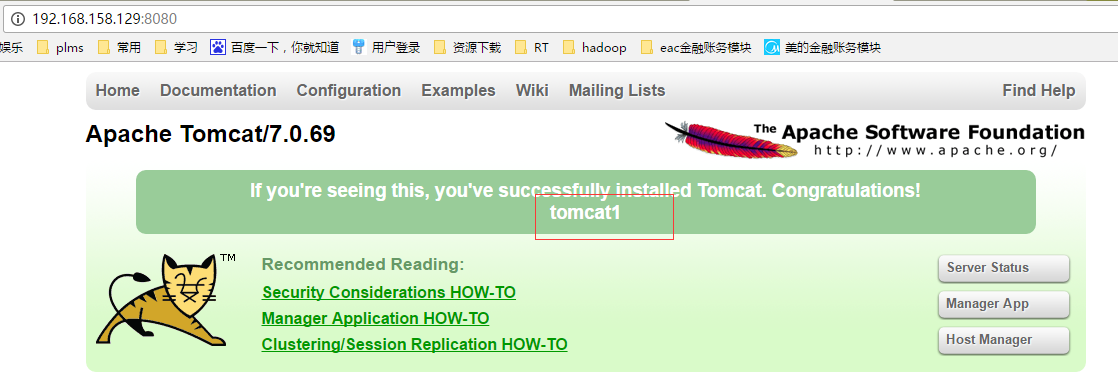
tomcat1 8080
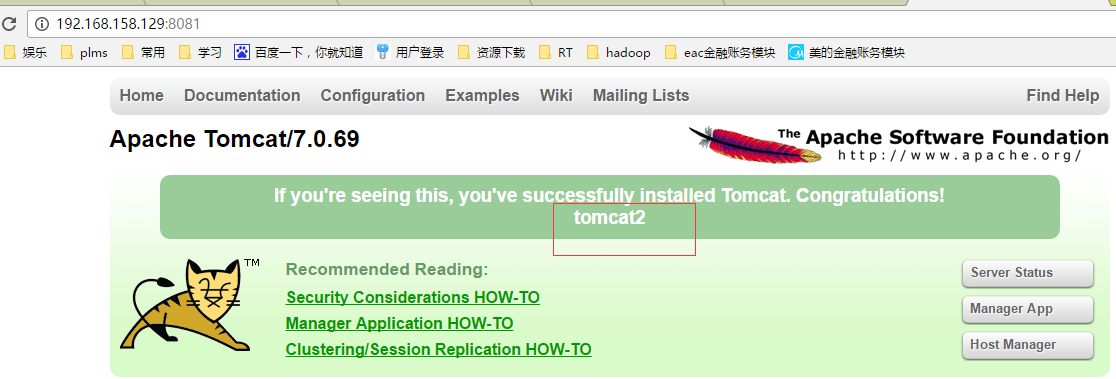
tomcat2 8081
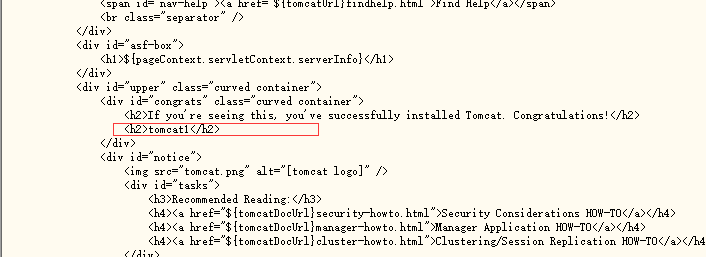
3.给tomcat编写不同的测试页,用来测试nginx是否能分发请求
vi /apps/tomcat/tomcat1/apache-tomcat-7.0.69/webapps/ROOT/index.jsp
vi /apps/tomcat/tomcat2/apache-tomcat-7.0.69/webapps/ROOT/index.jsp
4.配置nginx
进入安装目录
cd /apps/install/nginx/conf/
编辑配置文件
vi /apps/install/nginx/conf/nginx.conf
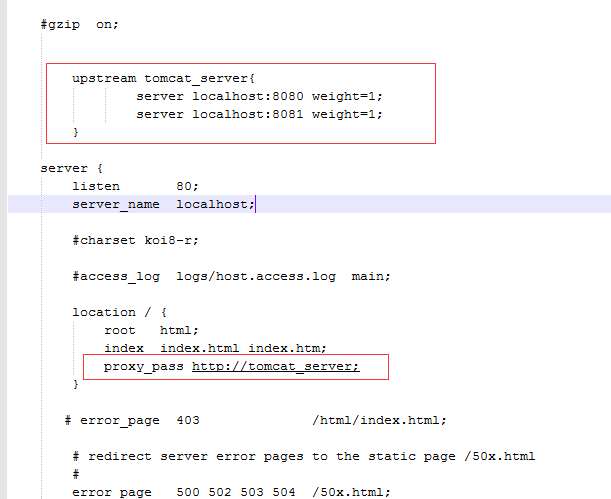
添加如下部分
upstream的负载均衡,weight是权重,可以根据机器配置定义权重。weigth参数表示权值,权值越高被分配到的几率越大。
user  root;

worker_processes  1;

#error_log  logs/error.log;

#error_log  logs/error.log  notice;

#error_log  logs/error.log  info;

#pid        logs/nginx.pid;

events {

    worker_connections  1024;

}

http {

    include       mime.types;

    default_type  application/octet-stream;

    #log_format  main  '$remote_addr - $remote_user [$time_local] "$request" '

    #                  '$status $body_bytes_sent "$http_referer" '

    #                  '"$http_user_agent" "$http_x_forwarded_for"';

    #access_log  logs/access.log  main;

    sendfile        on;

    #tcp_nopush     on;

    #keepalive_timeout  0;

    keepalive_timeout  65;

    #gzip  on;

        upstream tomcat_server{

                server localhost:8080 weight=1;

                server localhost:8081 weight=1;

        }

    server {

        listen       80;

        server_name  localhost;

        #charset koi8-r;

        #access_log  logs/host.access.log  main;

        location / {

            root   html;

            index  index.html index.htm;

            proxy_pass http://tomcat_server;

        }

       # error_page  403              /html/index.html;

        # redirect server error pages to the static page /50x.html

        #

        error_page   500 502 503 504  /50x.html;

        location = /50x.html {

            root   html;

        }

        # proxy the PHP scripts to Apache listening on 127.0.0.1:80

        #

        #location ~ \.php$ {

        #    proxy_pass   http://127.0.0.1;

        #}

        # pass the PHP scripts to FastCGI server listening on 127.0.0.1:9000

        #

        #location ~ \.php$ {

        #    root           html;

        #    fastcgi_pass   127.0.0.1:9000;

        #    fastcgi_index  index.php;

        #    fastcgi_param  SCRIPT_FILENAME  /scripts$fastcgi_script_name;

        #    include        fastcgi_params;

        #}

        # deny access to .htaccess files, if Apache's document root

        # concurs with nginx's one

        #

        #location ~ /\.ht {

        #    deny  all;

        #}

    }

    # another virtual host using mix of IP-, name-, and port-based configuration

    #

    #server {

    #    listen       8000;

    #    listen       somename:8080;

    #    server_name  somename  alias  another.alias;

    #    location / {

    #        root   html;

    #        index  index.html index.htm;

    #    }

    #}

    # HTTPS server

    #

    #server {

    #    listen       443 ssl;

    #    server_name  localhost;

    #    ssl_certificate      cert.pem;

    #    ssl_certificate_key  cert.key;

    #    ssl_session_cache    shared:SSL:1m;

    #    ssl_session_timeout  5m;

    #    ssl_ciphers  HIGH:!aNULL:!MD5;

    #    ssl_prefer_server_ciphers  on;

    #    location / {

    #        root   html;

    #        index  index.html index.htm;

    #    }

    #}

}
5.启动测试
tomcat1
tomcat2
启动nginx
/apps/install/nginx/sbin/nginx
访问nginx

再次访问
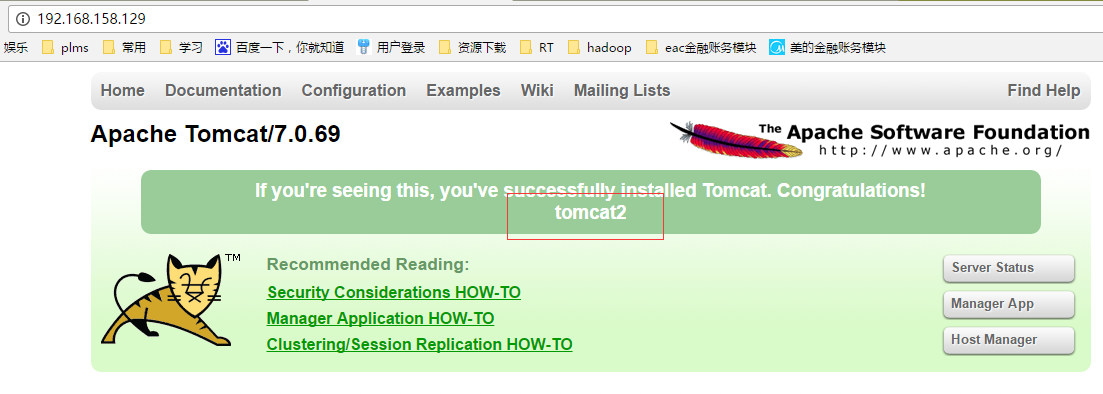
ok 成功路由到了2台tomcat
6.nginx 常用命令
cd /apps/install/nginx/
启动
./sbin/nginx
停止
./sbin/nginx -s stop
重载配置
./sbin/nginx -s reload
指定配置文件启动
./sbin/nginx -c /usr/local/nginx/conf/nginx.conf
查看 Nginx 版本
./sbin/nginx -v
检查配置文件是否正确
./sbin/nginx -t
显示帮助信息
./sbin/nginx -h
tomcat+nginx简单实现负载均衡的更多相关文章
- Nginx 简单的负载均衡配置示例(转载)
原文地址:Nginx 简单的负载均衡配置示例(转载) 作者:水中游于 www.s135.com 和 blog.s135.com 域名均指向 Nginx 所在的服务器IP. 用户访问http://www ...
- Windows下nginx+tomcat实现简单的负载均衡
Nginx是一款轻量级的Web 服务器/反向代理服务器及电子邮件(IMAP/POP3)代理服务器.反向代理(Reverse Proxy)方式是指以代理服务器来接受internet上的连接请求,然后将请 ...
- Nginx 简单的负载均衡配置示例
http://www.cnblogs.com/xiaogangqq123/archive/2011/03/02/1969006.html 在此记录下Nginx服务器nginx.conf的配置文件说明, ...
- Nginx 简单的负载均衡配置演示样例
近期在做开放查询应用的时候,因为数据两天特别多,两千多万条呢,用户訪问需求也比較大,所以就用nginx做了 负载均衡,以下是改动之后的相关内容. http://www.cnblogs.com/xiao ...
- 使用nginx简单实现负载均衡
只是简单使用nginx玩玩而已,知道能这么用,但是在实际项目中并没有实践过,在项目不大的时候用不到,但是对于理解负载均衡来说还是可以的. 利用虚拟机安装了三个centOS系统,然后顺便装了环境. 这里 ...
- Nginx简单的负载均衡(一)
Nginx是一个高性能的http和反向代理服务器,官方测试nginx能够支支撑5万并发链接,并且cpu.内存等资源消耗却非常低,运行非常稳定. 1.应用场景 1.http服务器.Nginx是一个htt ...
- nginx+tomcat实现简单的负载均衡
host1:10.0.0.10(部署nginx和tomcat) host2:10.0.0.11(部署tomcat) 平台环境(2主机一样) [root@smp ~]# uname -r3.10.0-8 ...
- Nginx简单的负载均衡入门
nginx是用来管理tomcat的,只管理tomcat,并没有管理具体tomcat里面的项目,这里实现了简单的nginx管理两个tomcat的配置,注意upstream节点应该配置到service节点 ...
- Nginx + Tomcat Windows下的负载均衡配置
Nginx + Tomcat Windows下的负载均衡配置 一.为什么需要对Tomcat服务器做负载均衡? Tomcat服务器作为一个Web服务器,其并发数在300-500之间,如果超过50 ...
随机推荐
- js获取当前日期时间格式为“yyyy-MM-dd HH:MM:SS”
废话不多说,直接上代码! <!DOCTYPE html><html><head> <meta charset="utf-8"> ...
- 【java基础】java的构造函数
java构造器用于创建类的实例,是创建对象的重要途径,因此,java类必须含有一个或一个以上的构造函数 当我们没有为类提供任何构造函数的时候,系统会自动为该类提供一个无参构造函数,当我们为类提供了 ...
- cmd命令行提示符
cd..用来返回上层到目录 cd download(某一具体文件夹)进入此文件夹中的一个文件夹 进入命令行时直接输入D: 进入D盘 dir 显示文件目录
- 转载:Maven项目mybatis Invalid bound statement (not found)解决方法
在mapper代理的开发中,程序员需要遵守一些规范,mybatis才能实现mapper接口的代理对象. 它的规范如下: mapper.xml的namespace要写所映射接口的全称类名. mapper ...
- 数据库DDL审计
一.为什么需要数据库DDL审计? DDL在生产系统中扮演非常重要的作用. 1)首先从业务角度来说,DDL可能意味着表结构变更,意味着新的版本即将发布,是个重要的时刻. 2)其次从运维角度来说,DDL尤 ...
- 谈谈javascript中的日期Date对象
一.日期对象 在javascript中并没有日期型的数据类型,但是提供了一个日期对象可以操作日期和时间. 日期对象的创建: new Date();二.将日期对象转换为字符串 将日期对象转换为字 ...
- 使用 Spring 进行单元测试
一.使用spring中对Junit框架的整合功能 除了junit4和spring的jar包,还需要spring-test.jar.引入如下依赖: <dependency> <grou ...
- Javascript学习笔记2.2 Javascript与DOM选项卡(滑动门)案例详解
学习了DOM的知识,今天开始做些练习,想到了一个网页滑动门的特效,见下图: 1.通过建立索引实现 <!doctype html> <html> <head> < ...
- 搭建apache http服务器
异步: http://blog.csdn.net/lzhlzz/article/details/39496285
- Flexbox,更优雅的布局
在设计的眼中,排版的操作是一件很简单的事情,靠左.置中.靠右,我只要点一下,所有元素,就会乖乖的到指定的位置. 但到了前端在排版的实现上,就不是这样了. 我们常常得用一堆其实本来不是这样用的属性来做 ...