
JQuery_元素样式操作
元素样式操作包括了直接设置CSS 样式、增加CSS 类别、类别切换、删除类别这几种操作方法。
而在整个jQuery 使用频率上来看,CSS 样式的操作也是极高的,所以需要重点掌握。
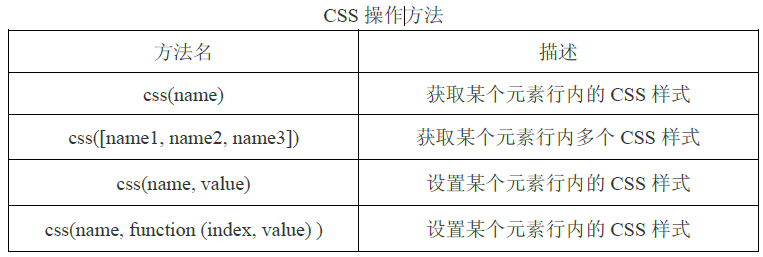
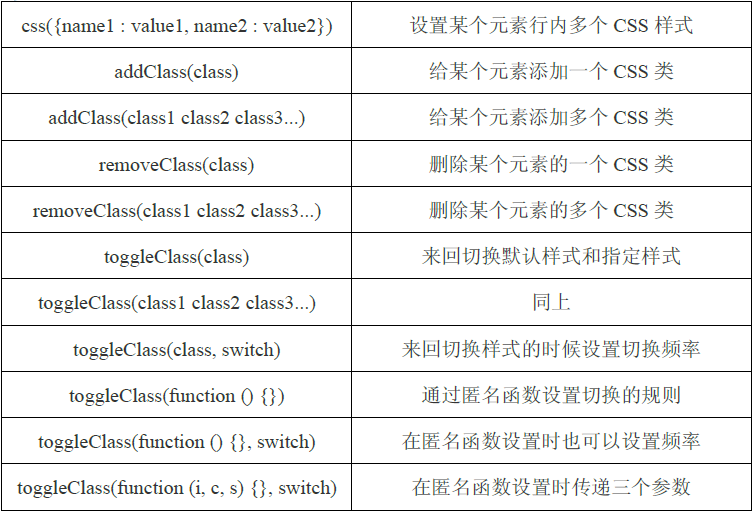
一、css()方法:
<script type="text/javascript" src="jquery-1.12.3.min.js"></script>
<script type="text/javascript">
   $(function(){
      //alert($("#box").css("color"));//获取某个元素的行内样式,不同浏览器结果不一样,有些返回rgb格式的颜色值
      $("#box").css("color","yellow");//设置某个元素的行内样式
   });
</script>
<style type="text/css">
    #box{color:red}
</style>
</head>
<body>
    <div id="box" title="我是域名">发生</div>
</body>
在CSS 获取上,我们也可以获取多个CSS 样式,而获取到的是一个对象数组,如果用传统方式进行解析需要使用for in 遍历。
<script type="text/javascript" src="jquery-1.12.3.min.js"></script>
<script type="text/javascript">
   $(function(){
          var box = $('div').css(['color', 'height', 'width']); //得到多个CSS 样式的数组对象
        for (var i in box) { //逐个遍历出来
            alert(i + ':' + box[i]);
        }
   });
</script>
<style type="text/css">
    #box{color:red}
</style>
</head>
<body>
    <div id="box" title="我是域名">发生</div>
</body>
jQuery 提供了一个遍历工具专门来处理这种对象数组,$.each()方法,这个方法可以轻松的遍历对象数组。
<script type="text/javascript" src="jquery-1.12.3.min.js"></script>
<script type="text/javascript">
   $(function(){
          var box = $('div').css(['color', 'height', 'width']); //得到多个CSS 样式的数组对象
        /*for (var i in box) { //逐个遍历出来
            alert(i + ':' + box[i]);
        }*/
        $.each(box, function (attr, value) { //遍历JavaScript 原生态的对象数组
            alert(attr + ':' + value);
        });
   });
</script>
<style type="text/css">
    #box{
        color:red;
        height:200px;
        width:300px;
    }
</style>
</head>
<body>
    <div id="box" title="我是域名">发生</div>
</body>
使用$.each()可以遍历原生的JavaScript 对象数组,如果是jQuery 对象的数组怎么使用.each()方法呢?
<script type="text/javascript" src="jquery-1.12.3.min.js"></script>
<script type="text/javascript">
   $(function(){
          var box = $('div').css(['color', 'height', 'width']); //得到多个CSS 样式的数组对象
        /*for (var i in box) { //逐个遍历出来
            alert(i + ':' + box[i]);
        }*/
        /*$.each(box, function (attr, value) { //遍历JavaScript 原生态的对象数组
            alert(attr + ':' + value);
        });*/
        $('div').each(function (index, element) { //index 为索引,element 为元素DOM
            alert(index + ':' + element);
        });
   });
</script>
<style type="text/css">
    #box{
        color:red;
        height:200px;
        width:300px;
    }
</style>
</head>
<body>
    <div id="box" title="我是域名">发生</div>
    <div id="" title="我是域名">发生</div>
    <div id="" title="我是域名">发生</div>
</body>
在需要设置多个样式的时候,我们可以传递多个CSS 样式的键值对即可。
<script type="text/javascript" src="jquery-1.12.3.min.js"></script>
<script type="text/javascript">
   $(function(){
          $('div').css({
            'background-color' : '#ccc',
            'color' : 'red',
            'font-size' : '20px'
        });
   });
</script>
<style type="text/css">
    #box{
        color:red;
        height:200px;
        width:300px;
    }
</style>
</head>
<body>
    <div id="box" title="我是域名">发生</div>
    <div id="" title="我是域名">发生</div>
    <div id="" title="我是域名">发生</div>
</body>
如果想设置某个元素的CSS 样式的值,但这个值需要计算我们可以传递一个匿名函数。
<script type="text/javascript" src="jquery-1.12.3.min.js"></script>
<script type="text/javascript">
   $(function(){
          $('#box').css('width', function (index, value) {
            return (parseInt(value) - 500) + 'px';    //value是之前的长度,这里将全局的操作包装成局部的操作
        });
   });
</script>
<style type="text/css">
    #box{
        color:red;
        height:200px;
        width:800px;
    }
</style>
</head>
<body>
    <div id="box" title="我是域名">发生</div>
    <div id="" title="我是域名">发生</div>
    <div id="" title="我是域名">发生</div>
</body>
二、addClass()方法/removeClass()方法
<script type="text/javascript" src="jquery-1.12.3.min.js"></script>
<script type="text/javascript">
   $(function(){
          $('div').addClass("box");//添加一个类
        $("div").addClass("box bg");//同事添加多个类
   });
</script>
<style type="text/css">
    .box{
        color:red;
        height:20px;
        width:800px;
    }
    .bg{
        background-color:yellow;
    }
</style>
</head>
<body>
    <div id="" title="我是域名">发生</div>
    <div id="" title="我是域名">发生</div>
    <div id="" title="我是域名">发生</div>
</body>
<script type="text/javascript" src="jquery-1.12.3.min.js"></script>
<script type="text/javascript">
   $(function(){
          $('div').removeClass("box");//删除一个类
        $("div").removeClass("box bg");//同时删除多个类
   });
</script>
<style type="text/css">
    .box{
        color:red;
        height:20px;
        width:800px;
    }
    .bg{
        background-color:yellow;
    }
</style>
</head>
<body>
    <div class="box" title="我是域名">发生</div>
    <div class="box bg" title="我是域名">发生</div>
    <div class="box" title="我是域名">发生</div>
</body>
三、toggleClass()方法
我们还可以结合事件来实现CSS 类的样式切换功能。
<script type="text/javascript" src="jquery-1.12.3.min.js"></script>
<script type="text/javascript">
      $(function(){
         $('div').click(function(){ //当点击后触发
            $(this).toggleClass('box bg');     //单个样式多个样式均可
        });
    });
</script>
<style type="text/css">
    .box{
        color:red;
        height:20px;
        width:800px;
    }
    .bg{
        background-color:yellow;
    }
</style>
</head>
<body>
    <div class="" title="我是域名">发生</div>
    <div class="" title="我是域名">发生</div>
    <div class="" title="我是域名">发生</div>
</body>
.toggleClass()方法的第二个参数可以传入一个布尔值,true 表示执行切换到class 类,false表示执行回默认class 类(默认的是空class),运用这个特性,我们可以设置切换的频率。
<script type="text/javascript" src="jquery-1.12.3.min.js"></script>
<script type="text/javascript">
      $(function(){
        var count = 0;
        $('div').click(function () { //每点击两次切换一次red
            $(this).toggleClass('box bg', count++ % 3 == 0);
        });
    });
</script>
<style type="text/css">
    .box{
        color:red;
        height:20px;
        width:800px;
    }
    .bg{
        background-color:yellow;
    }
</style>
</head>
<body>
    <div class="" title="我是域名">发生</div>
    <div class="" title="我是域名">发生</div>
    <div class="" title="我是域名">发生</div>
</body>
默认的CSS 类切换只能是无样式和指定样式之间的切换,如果想实现样式1 和样式2之间的切换还必须自己写一些逻辑。
<script type="text/javascript" src="jquery-1.12.3.min.js"></script>
<script type="text/javascript">
      $(function(){
        $('div').click(function () {
            $(this).toggleClass('blue'); //一开始切换到样式2
            if ($(this).hasClass('blue')) { //判断样式2 存在后
                $(this).removeClass('red'); //删除样式1
            } else {
                $(this).toggleClass('red'); //添加样式1,这里也可以addClass
            }
        });
    });
</script>
<style type="text/css">
    .red{
        color:red;
    }
    .blue{
        color:blue;
    }
</style>
</head>
<body>
    <div class="" title="我是域名">发生</div>
    <div class="" title="我是域名">发生</div>
    <div class="" title="我是域名">发生</div>
</body>
上面的方法较为繁琐,.toggleClass()方法提供了传递匿名函数的方式,来设置你所需要切换的规则。
<script type="text/javascript" src="jquery-1.12.3.min.js"></script>
<script type="text/javascript">
      $(function(){
        $('div').click(function () {
            $(this).toggleClass(function () { //传递匿名函数,返回要切换的样式
                return $(this).hasClass('red') ? 'blue' : 'red';
            });
        });
    });
</script>
<style type="text/css">
    .red{
        color:red;
    }
    .blue{
        color:blue;
    }
</style>
</head>
<body>
    <div class="" title="我是域名">发生</div>
    <div class="" title="我是域名">发生</div>
    <div class="" title="我是域名">发生</div>
</body>
注意:上面虽然一句话实现了这个功能,但还是有一些小缺陷,因为原来的class 类没有被删除,只不过被替代了而已。所以,需要改写一下。
<script type="text/javascript" src="jquery-1.12.3.min.js"></script>
<script type="text/javascript">
      $(function(){
        $('div').click(function () {
            $(this).toggleClass(function () {
                if ($(this).hasClass('red')) {
                    $(this).removeClass('red');
                    return 'blue';
                } else {
                    $(this).removeClass('blue');
                    return 'red';
                }
            });
        });
    });
</script>
<style type="text/css">
    .red{
        color:red;
    }
    .blue{
        color:blue;
    }
</style>
</head>
<body>
    <div class="" title="我是域名">发生</div>
    <div class="" title="我是域名">发生</div>
    <div class="" title="我是域名">发生</div>
</body>
JQuery_元素样式操作的更多相关文章
- JQuery_元素属性操作
除了对元素内容进行设置和获取,通过jQuery 也可以对元素本身的属性进行操作,包括获取属性的属性值.设置属性的属性值,并且可以删除掉属性. <script type="text/ja ...
- jQuery编程基础精华02(属性、表单过滤器,元素的each,表单选择器,子元素过滤器(*),追加方法,节点,样式操作)
属性.表单过滤器 属性过滤选择器: $("div[id]")选取有id属性的<div> $("div[title=test]")选取title属性为 ...
- jQuery学习之------元素样式的操作
jQuery学习之------元素样式的操作 一..addClass( className )方法----增加样式 1.addClass( className ) : 为每个匹配元素所要增加的一个或多 ...
- DOM访问元素样式和操作元素样式
在HTML中定义样式的方式有三种:通过<link/>元素包含外部样式表文件(外部样式表).使用<style/>元素定义嵌入式样式(嵌入式样式表).使用style特性定义针对特定 ...
- 解密jQuery内核 样式操作
基础回顾 jQuery里节点样式读取以及设置都是通过.css()这个方法来实现的,本章通一下分解探究下jquery里这部分代码的实现 那么jQuery要处理样式的哪些问题? 先简单回顾下样式操作会遇到 ...
- jQuery 2.0.3 源码分析 样式操作
根据API分类 CSS addClass() jQuery.cssHooks .hasClass() .removeClass() .toggleClass() .addClass() 对元素的样式操 ...
- 深入学习jQuery样式操作
× 目录 [1]设置样式 [2]增加样式 [3]删除样式[4]切换样式[5]判断样式[6]样式操作 前面的话 使用javascript脚本化CSS是一个系列,包括行间样式.计算样式.CSS类.样式表. ...
- 11月8日上午Jquery的基础语法、选取元素、操作元素、加事件、挂事件及移除事件
jquery基础知识 1.jquery文件的引入,所有的js代码要写在下面那段代码下面. <script src="../jquery-1.11.2.min.js">& ...
- JavaScipt 样式操作
我们知道HTML样式定义的三种方式: <link/>外部引入也就是定义 CSS 中的 <style/>嵌入式样式 style特性地定义 给一个HTML元素设置css属性,如: ...
随机推荐
- Notepad++自动刷新文本
现在的日志信息往往都是打印在硬盘上,而不是保存到线上,所以我们常常会使用notepad++来查看硬盘上的文本文件 这时往往会出现两个问题 (1)在notepad++长时间最小化后,再次打开会提示是否下 ...
- 通过jxl 读取excel 文件中的日期,并计算时间间隔
java读取excel里面的日期会出现相差8小时的问题. 比如excel里面有一个日期是:2012-7-2 17:14:03秒,用Cell cell=readSheet.getCell(colNo, ...
- [tmp] hu60@所有人插件
<div style="padding:3px;text-align:right;"> <a style="background:green;color ...
- html5,video元素
<video src="1.mp4" controls="" width="500" height="300" ...
- android下面使用SurfaceView+ mediaPlayer播放视频
final SurfaceView surfaceView = new SurfaceView(StartupActivity.this); StartupActivity.this.mediaPla ...
- C#获取EF实体对象或自定义属性类的字段名称和值
在年前上班的时候遇到了一个问题是这样描述的:我前台设计一个页面,是标签和文本框,当用户修改了哪个文本框的值,将该修改前的值.修改后的值,该值对应的字段,该值对应的行id获取到保存到数据库的某张表里.现 ...
- YbSoftwareFactory 代码生成插件【十三】:Web API 的安全性
ASP.NET Web API 可非常方便地创建基于 HTTP 的 Services,这些服务可以非常方便地被几乎任何形式的平台和客户端(如浏览器.Windows客户端.Android设备.IOS等) ...
- 实现一个自适应网页用到的css知识
1 div导致父级高度没有变化是应该子元素设置了float:left等 2 div元素居中 text-align:center; margin-left: auto;margin-right: 3 大 ...
- struts2 的正则表达式验证不起作用解决办法
在官网上提供的model为: <field-validator type="regex"> <param name="expression"& ...
- Java 枚举类
如果要定义一个枚举类: public enum Size { SAMLL, MEDIUM, LARGE, EXTRA, EXTRA_LARGE}; 实际上,这个声明定义的类型是一个类,它刚好有4个实例 ...