
.NET程序集强命名删除与再签名技术 源代码剖析
如果你想去除一个程序集的强签名(strong name),目前为止可以有两个途径
1 反编译为IL代码,删除签名部分,再编译为程序集
2 应用Re-Sign程序,直接对一个程序集再签名
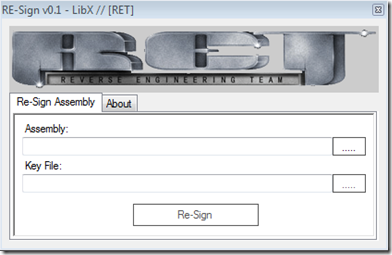
生成和读取强命名
先来看,如何生成.NET的签名文件,调用命令SN传入参数。
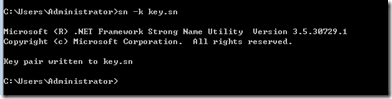
下面的代码读取该文件,
FileStream keyPairFile = File.OpenRead(“key.sn”);

this.byte_2 = new StrongNameKeyPair(keyPairFile).PublicKey;

keyPairFile.Close();
再深究一下,BCL中原来还有一个StrongNameKeyPair的类型,它的构造方法如下
[SecuritySafeCritical, SecurityPermission(SecurityAction.Demand, Flags=SecurityPermissionFlag.UnmanagedCode)]

public StrongNameKeyPair(FileStream keyPairFile)

{

    if (keyPairFile == null)

    {

        throw new ArgumentNullException("keyPairFile");

    }

    int length = (int) keyPairFile.Length;

    this._keyPairArray = new byte[length];

    keyPairFile.Read(this._keyPairArray, 0, length);

    this._keyPairExported = true;

}
这个类型中的方法,用调用BCL的内部帮助函数StrongNameHelpers
namespace Microsoft.Runtime.Hosting

{

    [ComImport, SecurityCritical, Guid("9FD93CCF-3280-4391-B3A9-96E1CDE77C8D"), ComConversionLoss, InterfaceType(ComInterfaceType.InterfaceIsIUnknown)]

    internal interface IClrStrongName

    [ComImport, Guid("9FD93CCF-3280-4391-B3A9-96E1CDE77C8D"), SecurityCritical, ComConversionLoss, InterfaceType(ComInterfaceType.InterfaceIsIUnknown)]

    internal interface IClrStrongNameUsingIntPtr

    internal static class StrongNameHelpers

}
.NET 框架对Strong Name的支持
关于strong name的创建,生成与验证,可以参考StrongNameHelpers的源代码。
为了完成这个任务,先参考几个不常见的BLC中的API
[DllImport("mscoree.dll", CharSet=CharSet.Auto)]

private static extern bool StrongNameKeyInstall([MarshalAs(UnmanagedType.LPWStr)] string wszKeyContainer, [MarshalAs(UnmanagedType.LPArray, SizeParamIndex=2)] byte[] pbKeyBlob, int int_1);
向容器中导入一个公钥/私钥对, 如果成功完成,则为 true;否则为 false。
[DllImport("mscoree.dll", CharSet=CharSet.Auto)]

private static extern bool StrongNameKeyDelete(string string_3);
.csharpcode, .csharpcode pre
{
font-size: small;
color: black;
font-family: consolas, "Courier New", courier, monospace;
background-color: #ffffff;
/*white-space: pre;*/
}
.csharpcode pre { margin: 0em; }
.csharpcode .rem { color: #008000; }
.csharpcode .kwrd { color: #0000ff; }
.csharpcode .str { color: #006080; }
.csharpcode .op { color: #0000c0; }
.csharpcode .preproc { color: #cc6633; }
.csharpcode .asp { background-color: #ffff00; }
.csharpcode .html { color: #800000; }
.csharpcode .attr { color: #ff0000; }
.csharpcode .alt
{
background-color: #f4f4f4;
width: 100%;
margin: 0em;
}
.csharpcode .lnum { color: #606060; }
.csharpcode, .csharpcode pre
{
font-size: small;
color: black;
font-family: consolas, "Courier New", courier, monospace;
background-color: #ffffff;
/*white-space: pre;*/
}
.csharpcode pre { margin: 0em; }
.csharpcode .rem { color: #008000; }
.csharpcode .kwrd { color: #0000ff; }
.csharpcode .str { color: #006080; }
.csharpcode .op { color: #0000c0; }
.csharpcode .preproc { color: #cc6633; }
.csharpcode .asp { background-color: #ffff00; }
.csharpcode .html { color: #800000; }
.csharpcode .attr { color: #ff0000; }
.csharpcode .alt
{
background-color: #f4f4f4;
width: 100%;
margin: 0em;
}
.csharpcode .lnum { color: #606060; }
.csharpcode, .csharpcode pre
{
font-size: small;
color: black;
font-family: consolas, "Courier New", courier, monospace;
background-color: #ffffff;
/*white-space: pre;*/
}
.csharpcode pre { margin: 0em; }
.csharpcode .rem { color: #008000; }
.csharpcode .kwrd { color: #0000ff; }
.csharpcode .str { color: #006080; }
.csharpcode .op { color: #0000c0; }
.csharpcode .preproc { color: #cc6633; }
.csharpcode .asp { background-color: #ffff00; }
.csharpcode .html { color: #800000; }
.csharpcode .attr { color: #ff0000; }
.csharpcode .alt
{
background-color: #f4f4f4;
width: 100%;
margin: 0em;
}
.csharpcode .lnum { color: #606060; }
.csharpcode, .csharpcode pre
{
font-size: small;
color: black;
font-family: consolas, "Courier New", courier, monospace;
background-color: #ffffff;
/*white-space: pre;*/
}
.csharpcode pre { margin: 0em; }
.csharpcode .rem { color: #008000; }
.csharpcode .kwrd { color: #0000ff; }
.csharpcode .str { color: #006080; }
.csharpcode .op { color: #0000c0; }
.csharpcode .preproc { color: #cc6633; }
.csharpcode .asp { background-color: #ffff00; }
.csharpcode .html { color: #800000; }
.csharpcode .attr { color: #ff0000; }
.csharpcode .alt
{
background-color: #f4f4f4;
width: 100%;
margin: 0em;
}
.csharpcode .lnum { color: #606060; }
删除指定的密钥容器。如果成功完成,则为 true;否则为 false。
[DllImport("mscoree.dll", CharSet=CharSet.Auto)]

private static extern bool StrongNameSignatureGeneration(string string_3, string string_4, int int_1, int int_2, int int_3, int int_4);
生成指定程序集的强名称签名。如果成功完成,则为 true;否则为 false。
[DllImport("mscoree.dll", CharSet=CharSet.Auto)]

private static extern bool StrongNameTokenFromAssemblyEx([MarshalAs(UnmanagedType.LPWStr)] string wszFilePath, ref IntPtr intptr_0, [MarshalAs(UnmanagedType.U4)] out int pcbStrongNameToken, ref IntPtr intptr_1, [MarshalAs(UnmanagedType.U4)] out int pcbPublicKeyBlob);
从指定的程序集文件创建强名称标记,并返回标记代表的公钥。强名称标记是公钥的缩写形式。该标记是依据用于对程序集进行签名的公钥创建的 64 位哈希。该标记是程序集的强名称的一部分,并且可以从程序集元数据中读取。
[DllImport("mscoree.dll", CharSet=CharSet.Auto)]

private static extern void StrongNameFreeBuffer(IntPtr intptr_0);
释放上一次调用强名称函数(如 StrongNameGetPublicKey、StrongNameTokenFromPublicKey 或 StrongNameSignatureGeneration)时分配的内存。
[DllImport("mscoree.dll", CharSet=CharSet.Auto)]

private static extern uint StrongNameErrorInfo();
获取由某个强名称函数引发的上一个错误代码。由某一个强名称函数设置的上一个 COM 错误代码。
大部分强名称方法返回简单的 true 或 false 以指示是否成功完成。使用 StrongNameErrorInfo 函数检索指定由强名称函数生成的上一个错误的 HRESULT。
程序中的代码流程分析
先用代码读取一个程序集的strong name
this.byte_1 = AssemblyName.GetAssemblyName("Test.dll").GetPublicKey();
.csharpcode, .csharpcode pre
{
font-size: small;
color: black;
font-family: consolas, "Courier New", courier, monospace;
background-color: #ffffff;
/*white-space: pre;*/
}
.csharpcode pre { margin: 0em; }
.csharpcode .rem { color: #008000; }
.csharpcode .kwrd { color: #0000ff; }
.csharpcode .str { color: #006080; }
.csharpcode .op { color: #0000c0; }
.csharpcode .preproc { color: #cc6633; }
.csharpcode .asp { background-color: #ffff00; }
.csharpcode .html { color: #800000; }
.csharpcode .attr { color: #ff0000; }
.csharpcode .alt
{
background-color: #f4f4f4;
width: 100%;
margin: 0em;
}
.csharpcode .lnum { color: #606060; }
再把整个程序集读取内存中
using (FileStream stream2 = File.OpenRead(“Test.dll"))

{

       this.byte_3 = new byte[stream2.Length];

       stream2.Read(this.byte_3, 0, (int) stream2.Length);

}
下面的代码获取已经签名的程序集的签名信息
int num;

int num2;

StrongNameTokenFromAssemblyEx(string_3, ref ptr2, out num2, ref zero, out num);

byte[] destination = new byte[num2];

Marshal.Copy(ptr2, destination, 0, num2);
.csharpcode, .csharpcode pre
{
font-size: small;
color: black;
font-family: consolas, "Courier New", courier, monospace;
background-color: #ffffff;
/*white-space: pre;*/
}
.csharpcode pre { margin: 0em; }
.csharpcode .rem { color: #008000; }
.csharpcode .kwrd { color: #0000ff; }
.csharpcode .str { color: #006080; }
.csharpcode .op { color: #0000c0; }
.csharpcode .preproc { color: #cc6633; }
.csharpcode .asp { background-color: #ffff00; }
.csharpcode .html { color: #800000; }
.csharpcode .attr { color: #ff0000; }
.csharpcode .alt
{
background-color: #f4f4f4;
width: 100%;
margin: 0em;
}
.csharpcode .lnum { color: #606060; }
读取签名文件的长度,它将是要写入到程序集中的签名
FileStream input = new FileStream(“sn.key”, FileMode.OpenOrCreate, FileAccess.Read);

BinaryReader reader = new BinaryReader(input);

byte[] buffer2 = new byte[(int) reader.BaseStream.Length];

reader.BaseStream.Seek(0L, SeekOrigin.Begin);

reader.Read(buffer2, 0, (int) reader.BaseStream.Length);

int length = (int) reader.BaseStream.Length;

reader.Close();

input.Close();
最后调用方法,添加和生成签名
StrongNameKeyInstall("Test.dll", buffer, length))

StrongNameSignatureGeneration("Test.dll", snKey, 0, 0, 0, 0))
因为这几个方法的调用不会抛出异常,所以要用Win32式的GetLastError函数一样,使用StrongNameErrorInfo()方法来截获错误,
整个过程几乎就是对BCL的API调用,全部代码在百行以内。我在想,Visual Studio内置的给程序集签名的方式,也应该与此有相似之处,毕竟核心的API都已经被
微软封装进BCL类库,只需要调用即可。
这个工具来源于一家专门研究逆向工程的研究小组,你可以通过下面的网址找到他们发布的研究成果。
http://www.reteam.org/index.html
.csharpcode, .csharpcode pre
{
font-size: small;
color: black;
font-family: consolas, "Courier New", courier, monospace;
background-color: #ffffff;
/*white-space: pre;*/
}
.csharpcode pre { margin: 0em; }
.csharpcode .rem { color: #008000; }
.csharpcode .kwrd { color: #0000ff; }
.csharpcode .str { color: #006080; }
.csharpcode .op { color: #0000c0; }
.csharpcode .preproc { color: #cc6633; }
.csharpcode .asp { background-color: #ffff00; }
.csharpcode .html { color: #800000; }
.csharpcode .attr { color: #ff0000; }
.csharpcode .alt
{
background-color: #f4f4f4;
width: 100%;
margin: 0em;
}
.csharpcode .lnum { color: #606060; }
.csharpcode, .csharpcode pre
{
font-size: small;
color: black;
font-family: consolas, "Courier New", courier, monospace;
background-color: #ffffff;
/*white-space: pre;*/
}
.csharpcode pre { margin: 0em; }
.csharpcode .rem { color: #008000; }
.csharpcode .kwrd { color: #0000ff; }
.csharpcode .str { color: #006080; }
.csharpcode .op { color: #0000c0; }
.csharpcode .preproc { color: #cc6633; }
.csharpcode .asp { background-color: #ffff00; }
.csharpcode .html { color: #800000; }
.csharpcode .attr { color: #ff0000; }
.csharpcode .alt
{
background-color: #f4f4f4;
width: 100%;
margin: 0em;
}
.csharpcode .lnum { color: #606060; }
.NET程序集强命名删除与再签名技术 源代码剖析的更多相关文章
- .net程序集强命名(签名)
要想得到强签名的dll有两种情况: 1.给项目添加强命名 在你的项目右键->属性->签名,勾选“为程序集签名”,新建 或 浏览已经新建过的.pfx文件,然后重新build项目,生成的dll ...
- .NET中查看一个强命名程序集(*****.dll)的PublicKeyToken的方法
使用命令行工具SDK Command Prompt,键入:SN -T C:\*****.dll (dll文件所在的路径) 就会显示出该dll具体的PublicKeyToken数值. 如果该程序集没有 ...
- C#程序集使用强名字(Strong Name)签名/强名称签名
强名称签名的方法: 强签名: 1. 可以将强签名的dll注册到GAC,不同的应用程序可以共享同一dll. 2. 强签名的库,或者应用程序只能引用强签名的dll,不能引用未强签名的dll,但是未强签名的 ...
- [.NET] - Enhanced Strong Naming (加强版的强签名程序集) – 如何迁移原有的强命名程序集
依据文档: https://msdn.microsoft.com/en-us/library/hh415055(v=vs.110).aspx 虽然文档上给出了看似完整的步骤,但是如果按照上面的步骤,结 ...
- CLR 关于强命名程序集 .
如何创建强命名程序集(Strong Name Assembly) 创建一个强命名程序集首先需要获得一个用强命名实用工具 (Strong Name Utility,即SN.exe,.NET ...
- C# 强命名程序集,防止dll被修改,混淆下发布
未能加载文件或程序集“Jonckers.Service.RedisCacheEngineExtend, Version=1.0.0.0, Culture=neutral, PublicKeyToken ...
- 第一部分 CLR基础:第3章 共享程序集和强命名程序集
第一部分 CLR基础:第3章 共享程序集和强命名程序集
- 只有ReflectionOnlyLoadFrom才可以拯救与GAC冲突的强命名程序集
先说结论,如果有两个拥有相同程序集名称的强命名程序集,一个在GAC里,一个不在.怎样动态加载那个不在GAC里的程序集?答案就是只有Assembly.ReflectionOnlyLoadFrom才可以加 ...
- membership DB生成 & dll 强命名 & 证书生成
UPD(Membership)数据库安装1.使用 Aspnet_regsql.exe 安装数据库 在 C:\WINDOWS\Microsoft.NET\Framework\\aspnet_regsql ...
随机推荐
- 黑马程序员-autorelease pool
Autorelease:可以延迟给对象发送release消息.发送一个autorelease消息给对象,证明该对象在一定时间内有效,一定时间后会对该对象进行释放,进行一次release. 一个auto ...
- devise 小项目(一)
Devise源于Warden,而warden是一个基于Rack的验证权限gem,不过,使用devise实际并不需要任何关于warden的知识. 如果你之前有一些其他类似的维护验证权限功能的gem的使用 ...
- Linux内核分析之理解进程调度时机跟踪分析进程调度与进程切换的过程
一.原理分析 1.调度时机 背景不同类型的进程有不同的调度需求第一种分类I/O-bond:频繁的进行I/O:通常会花费很多时间等待I/O操作的完成CPU-bound:计算密集型:需要大量的CPU时间进 ...
- 经典排序算法(PHP)
1.冒泡算法,排序算法,由于在排序过程中总是小数往前放,大数往后放,相当于气泡往上升,所以称作冒泡排序 function maopao_fun($array){ $count = count($arr ...
- oracle常用语句总结
一.用户管理类 1.创建用户: Create user username Identified by password Default tablespace tablespacename Tempor ...
- 对初学者的MPLS 常见问题
对初学者的MPLS 常见问题 2015年6月8日 16:04 阅读 186 问:什么是多协议标签交换 (MPLS)? 答:MPLS是一种数据包转发技术,该技术使用标签来做出数据转发决策. 利用MPLS ...
- Arcengine 中,创建色带
1,利用combobox创建色带,首先draw private void comboBox1_DrawItem(object sender, DrawItemEventArgs e) { ...
- LINQ LINQ Operators and Lambda Expression - Syntax & Examples
LINQ is a cool feature in C# 3.0. Most of the developers are struggling for the syntax and examples. ...
- Windows Server 2008 系统设置集合
1.禁用IPV6 netsh interface teredo set state disabled netsh interface 6to4 set state disabled netsh int ...
- libnode 0.4.0 发布,C++ 语言版的 Node.js
libnode 0.4.0 支持 Windows ,提升了性能,libuv 更新到 0.10.17 版本,libj 更新到 0.8.2 版本. libnode 是 C++ 语言版的 Node.js,和 ...