
测试驱动开发实践2————从testList开始
内容指引
1.测试之前
2.改造dto层代码
3.改造dao层代码
4.改造service.impl层的list方法
5.通过testList驱动domain领域类的修改
一、测试之前
在“云开发”平台上通过领域类自动生成的初始化代码是已经实现增删改查基本功能的代码,我们需要做的是对输入的数据进行更严格和符合实际业务需要的数据校验及业务逻辑代码编写。
在上一篇博客中,我已经对“云开发”平台的“团队”模块的相关领域类做了介绍,并提供了基于这些领域类生成的初始化代码,请有兴趣的同学自行到Github上获取该源码。
Github代码获取:https://github.com/MacManon/top_cloudev_team
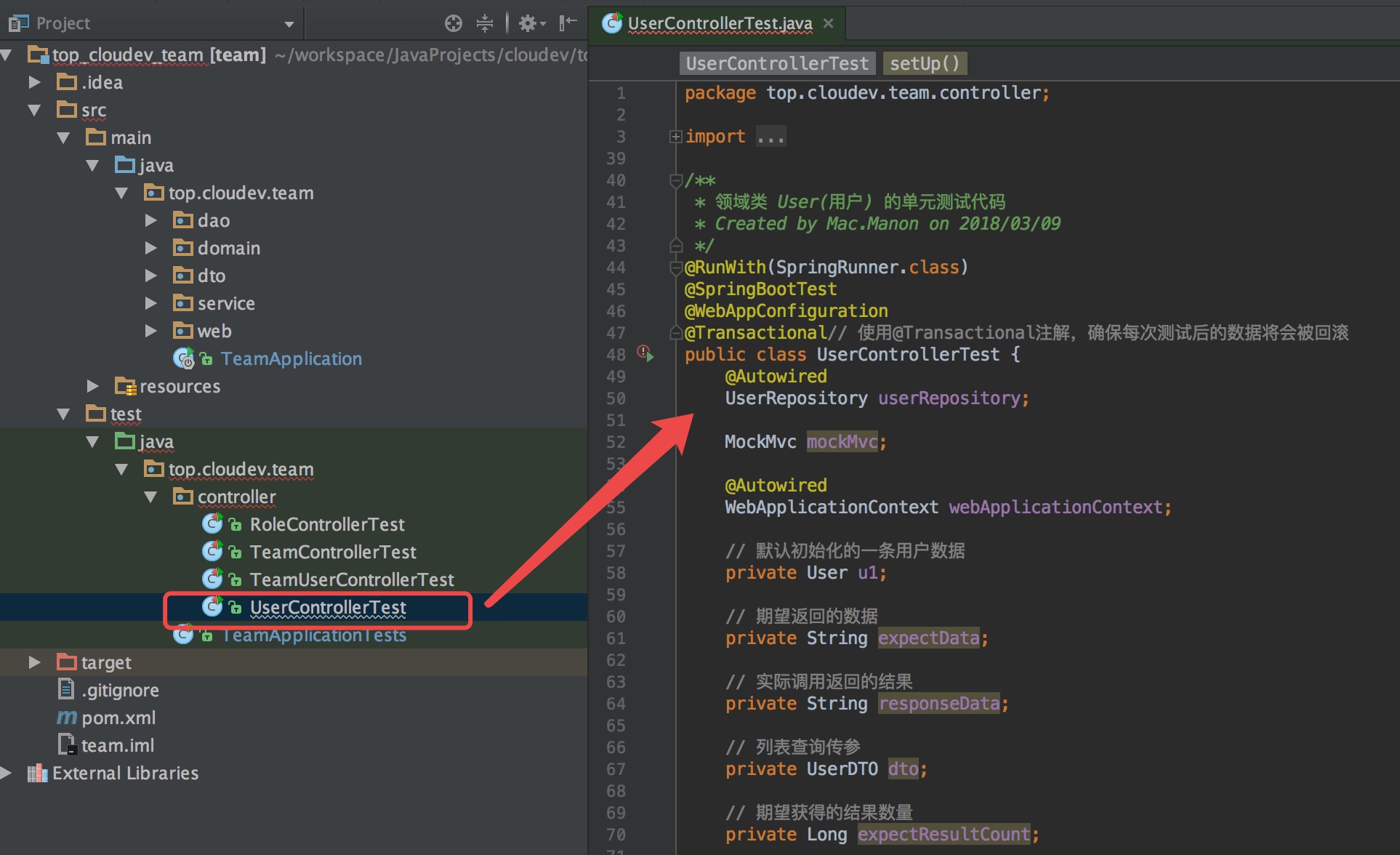
我们以用户(User)这个领域类为例,示范如何通过测试来驱动代码开发。首先我们可以打开User的单元测试初始化代码UserControllerTest.java:
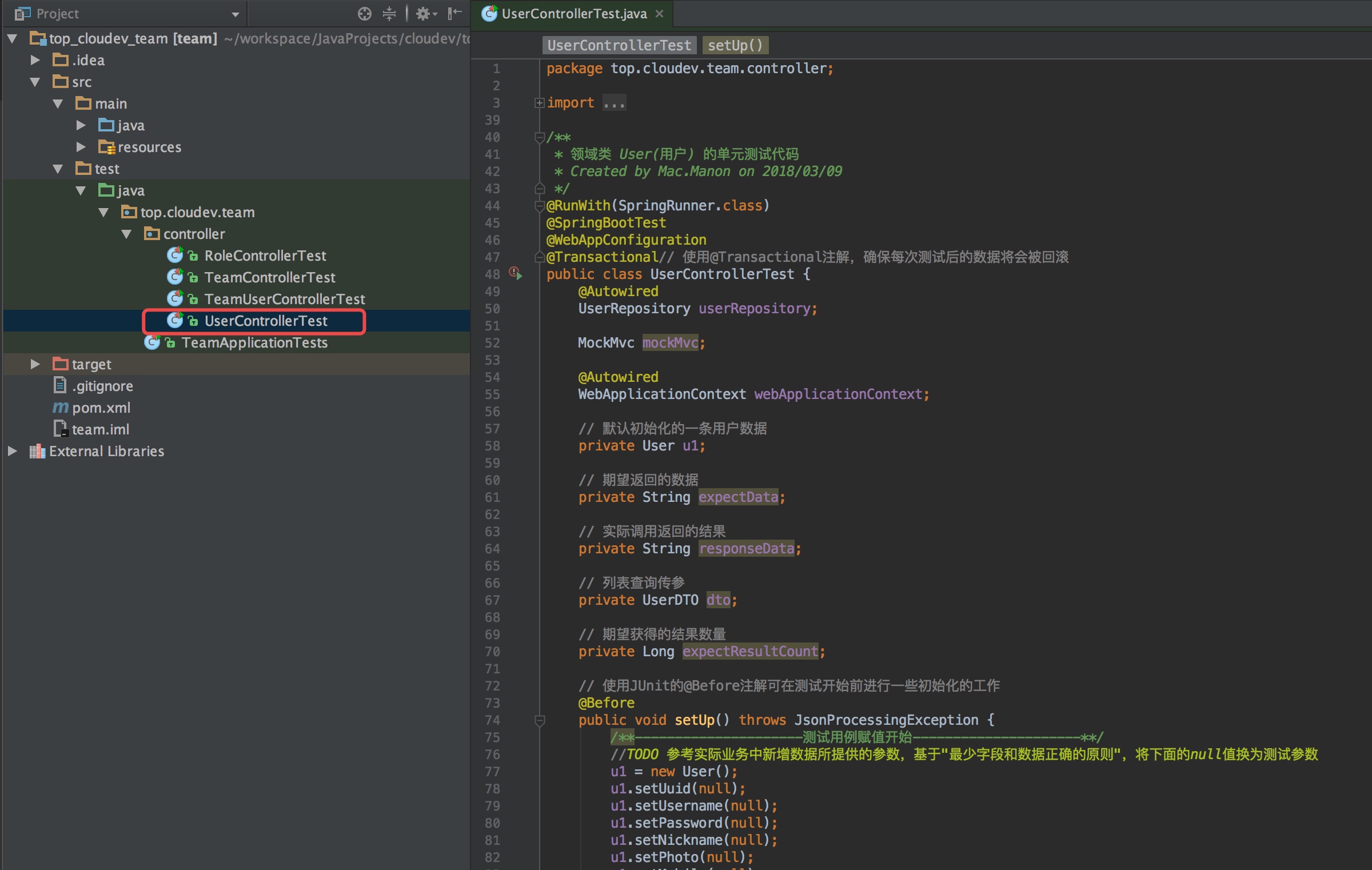 

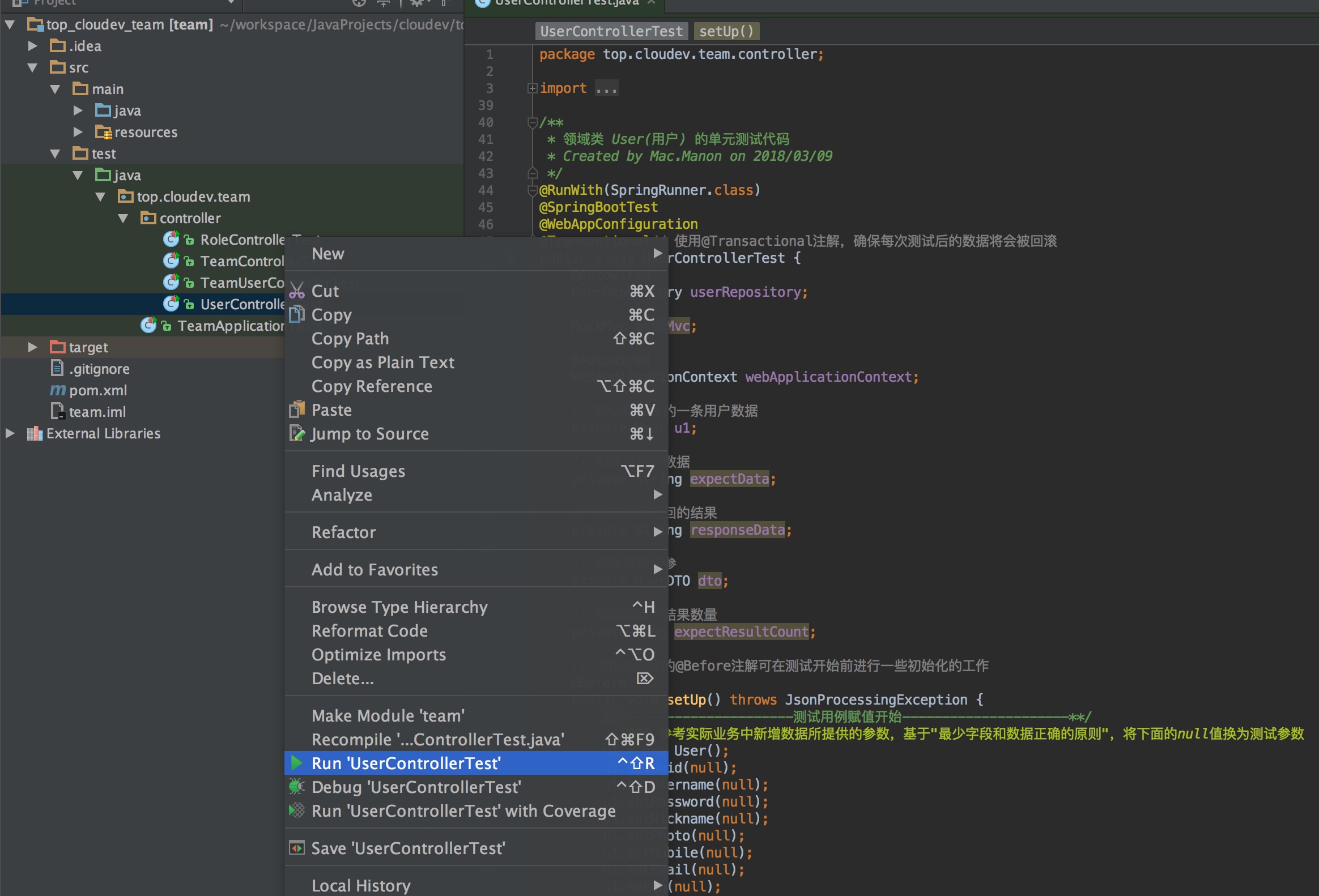
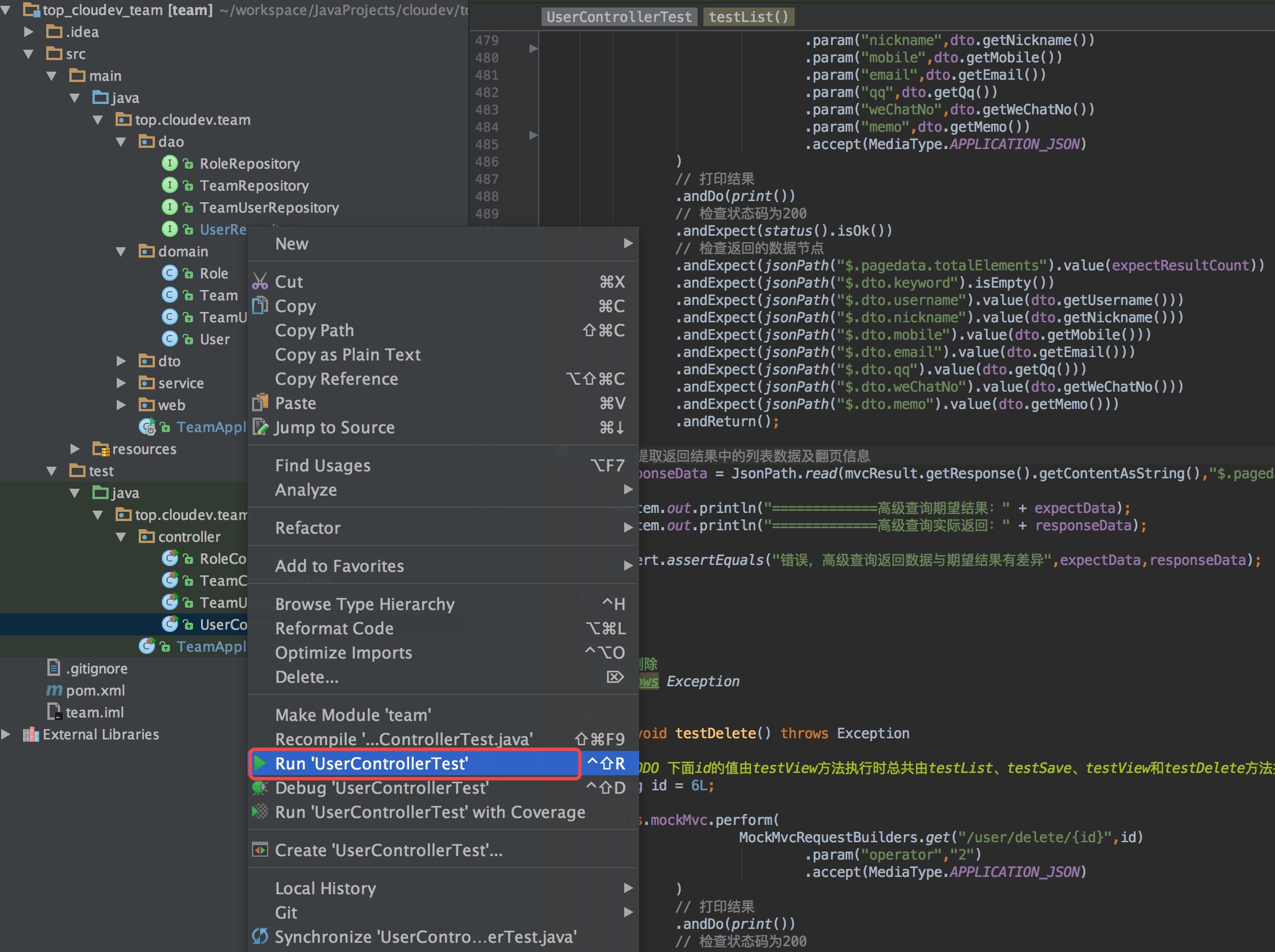
上面是通过“IntelliJ IDEA”打开项目的界面,首先我们在“UserControllerTest”上点鼠标右键,选择Run 'UserControllerTest'来运行User的单元测试类:

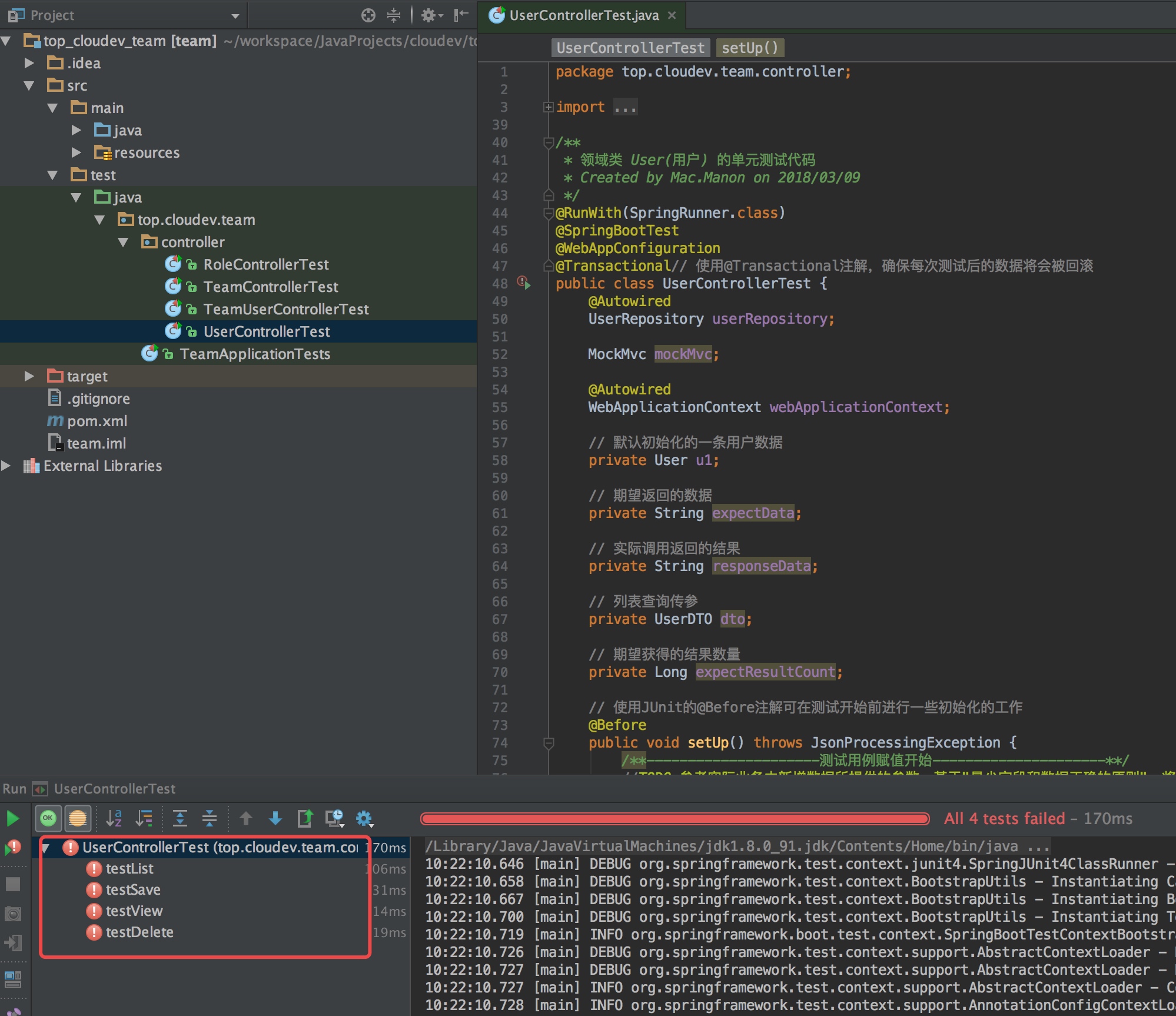 

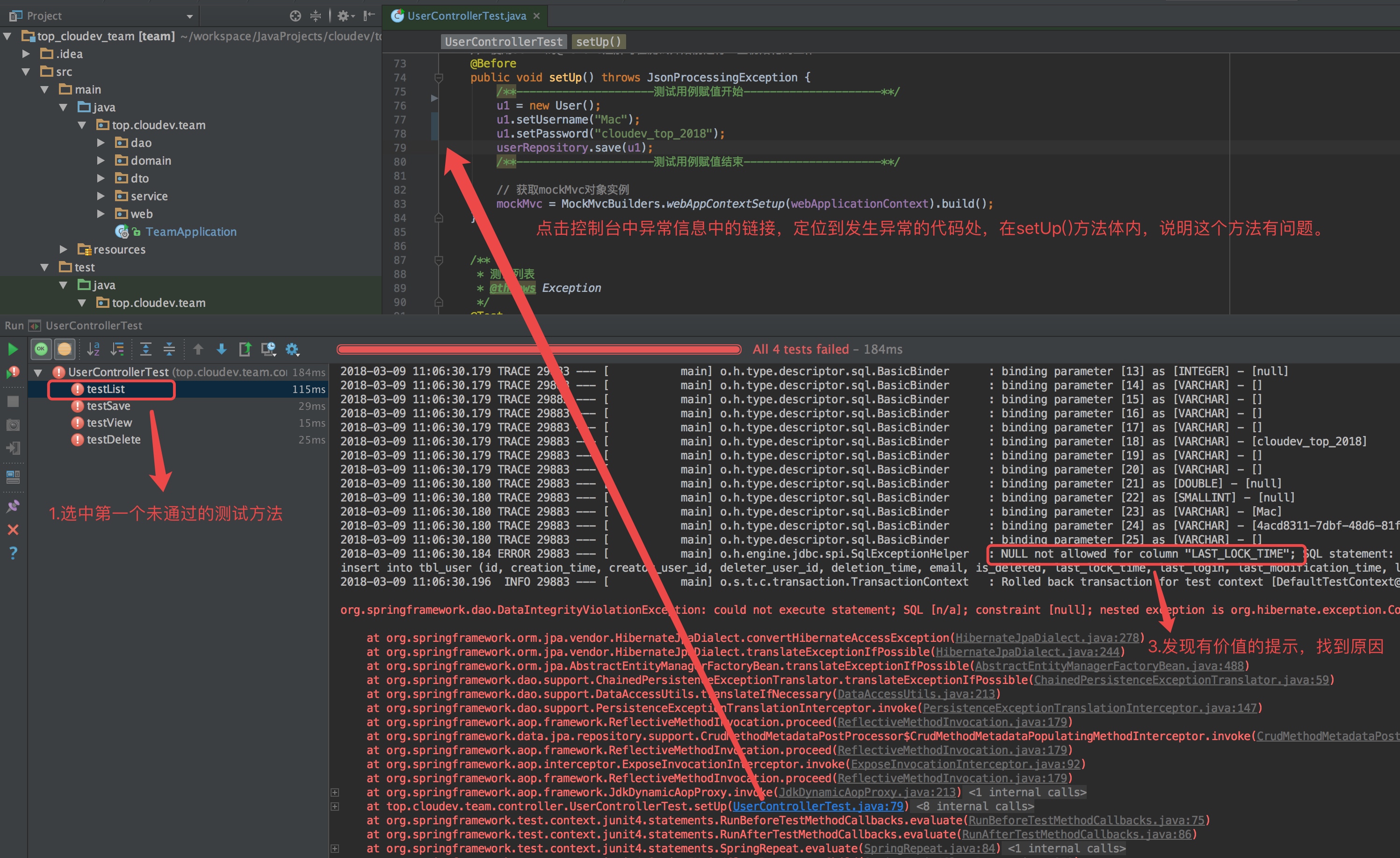
我们看到该单元测试类中的四个测试方法均未通过测试。第一个运行的测试方法是testList,所以,我们将首先从testList这个方法开始。
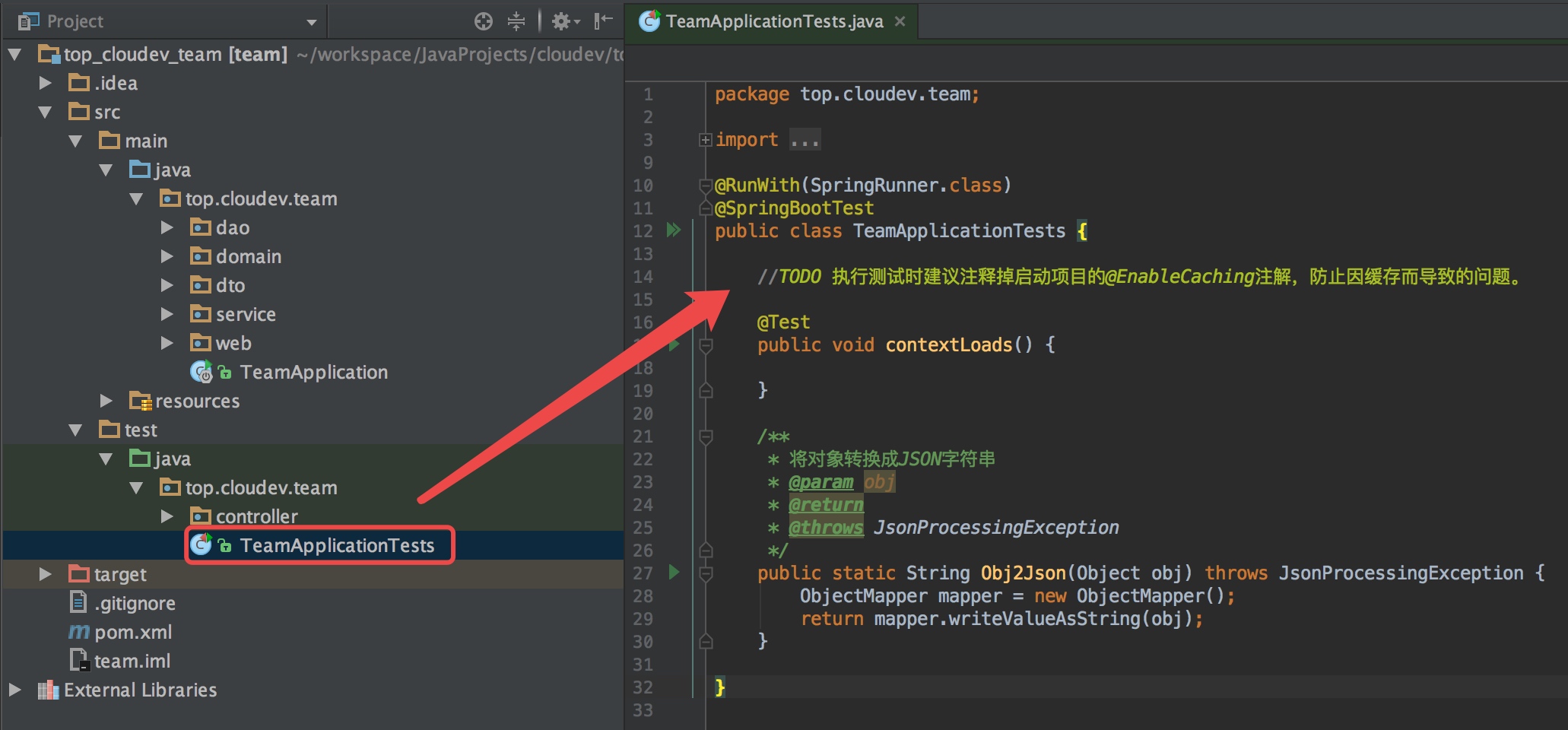
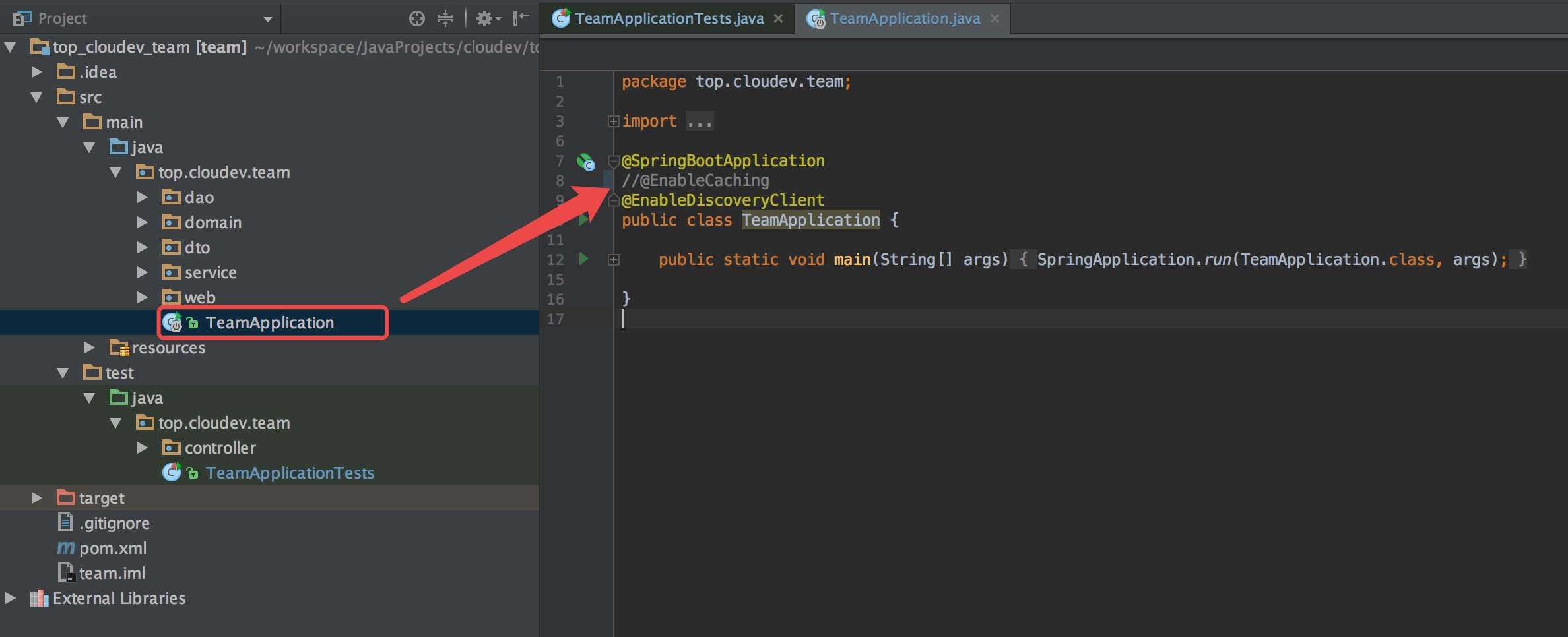
在正式进行测试驱动开发之前,我们需要关闭项目的缓存配置。由于从“云开发”平台生成的微服务初始化代码默认启用了Redis缓存(建议以Docker的方式安装及启动Redis),为避免因为缓存导致测试数据不准确,可以关闭缓存的注解:


二、改造dto层代码
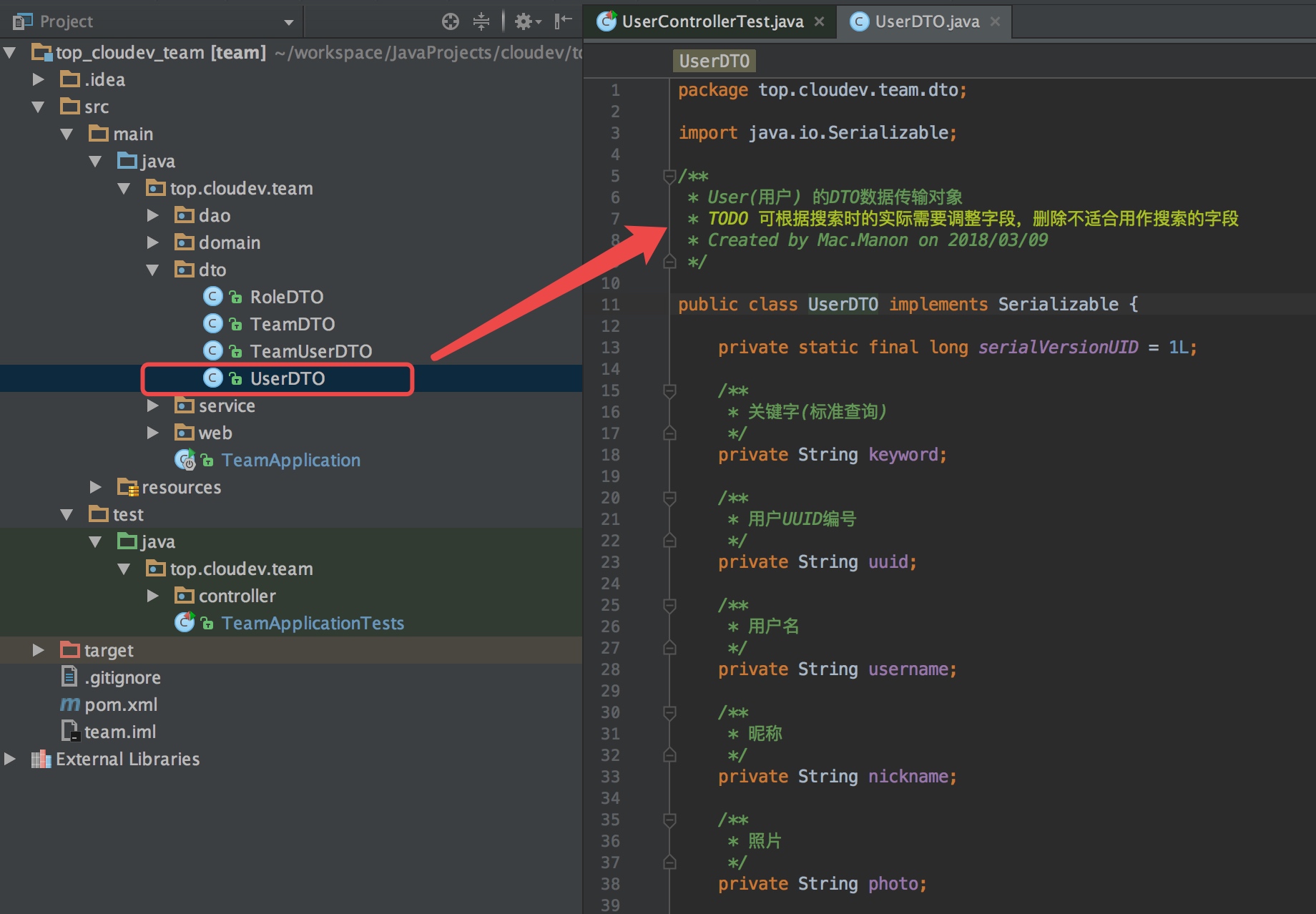
在查询用户(User)列表时,查询的参数通过“DTO数据传输对象”UserDTO传递。默认情况下,“云开发”平台初始化的DTO类代码中的字段来自于领域类中数据类型为String的字段,除此外,增加一个keyword字段。
keyword字段用于标准查询,其它字段用于高级查询。
标准查询
标准查询,就是客户端仅提供一个“查询关键字”,然后从User领域类对应的数据表"tbl_user"的多个String字段中匹配该关键字(忽略大小写),只要任何一个字段匹配成功,即成为查询结果之一。比如,关键字为“AA”,那么如果用户名(username)中含有“AA”,或者昵称(nickname)中含有“AA”....等都是符合条件的。
高级查询
高级查询,就是客户端提供多个关键字,然后从User领域类对应的数据表"tbl_user"的多个String字段中分别匹配这些关键字,只有所有字段的赋值均匹配成功,才能成为查询结果之一。比如,用户名关键字为“AA”,昵称关键字为“BB”,那么只有用户名(username)中含有“AA”,并且昵称(nickname)中含有“BB”的数据才是符合条件的。

1.keyword字段不可删除
keyword字段是约定用于标准查询的参数,不可删除!
2.UserDTO其它字段
根据实际查询需要,将不适合用于查询的字段删除掉,包含私有字段、构造函数、get和set属性。本例中删除如下字段:
用户UUID编号:uuid
照片:photo
最后一次登录IP:loginIP
3.为UserDTO增加字段
有时候,有些查询提供的参数来自其它领域类,目的是构造多表联合查询,这时,可以将这些字段增加到UserDTO中。本文暂不讨论联表查询的课题,这里不增加字段。
三、改造dao层代码
dao层采用JPA接口的方式实现数据查询,将上述删除的三个字段从接口方法名和参数中移除:
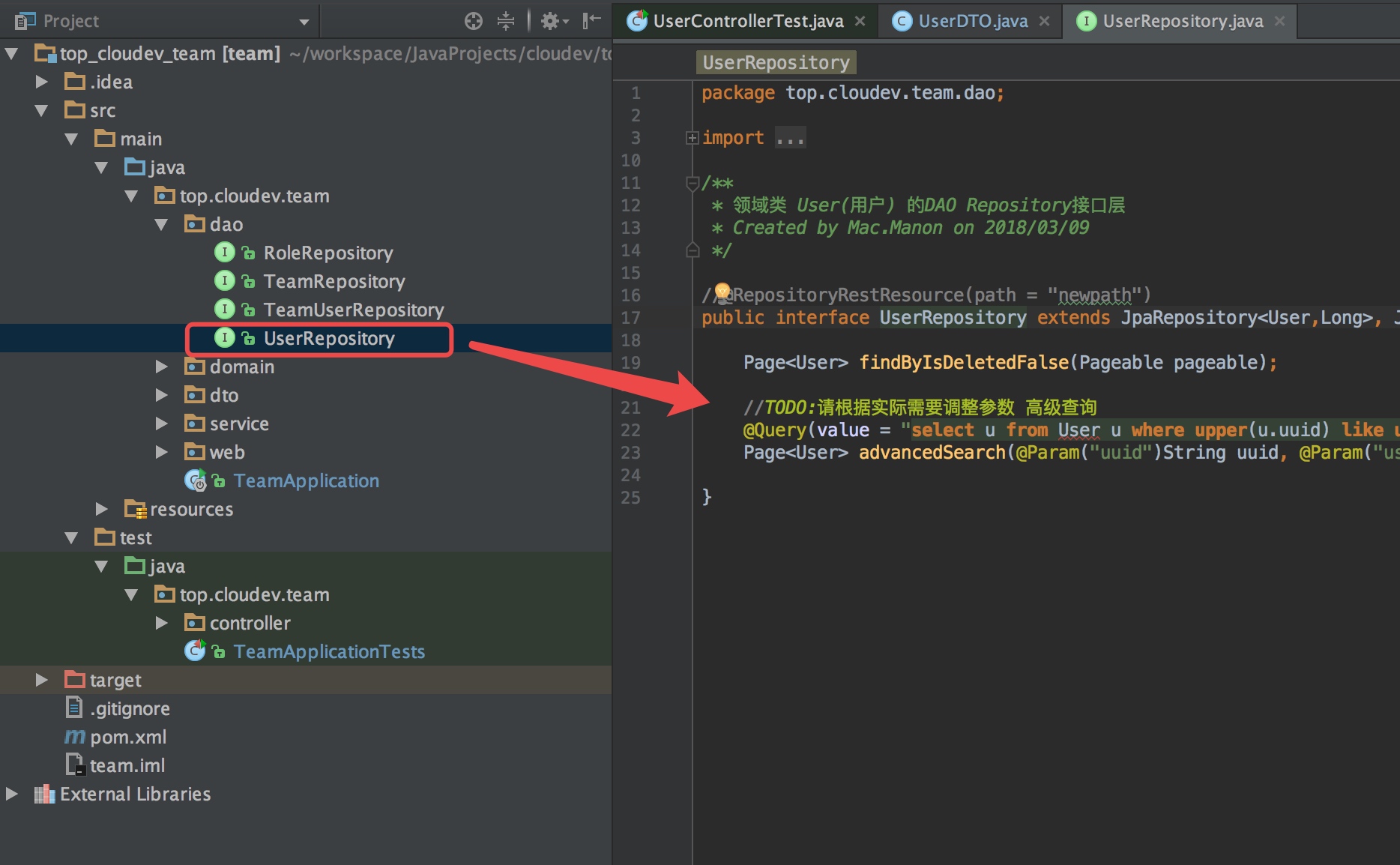 

修改前代码:
package top.cloudev.team.dao;

import top.cloudev.team.domain.User;
import org.springframework.data.domain.Page;
import org.springframework.data.domain.Pageable;
import org.springframework.data.jpa.repository.JpaRepository;
import org.springframework.data.jpa.repository.JpaSpecificationExecutor;
import org.springframework.data.jpa.repository.Query;
import org.springframework.data.repository.query.Param;

/**
 * 领域类 User(用户) 的DAO Repository接口层
 * Created by Mac.Manon on 2018/03/09
 */

//@RepositoryRestResource(path = "newpath")
public interface UserRepository extends JpaRepository<User,Long>, JpaSpecificationExecutor {

    Page<User> findByIsDeletedFalse(Pageable pageable);

    //TODO:请根据实际需要调整参数 高级查询
    @Query(value = "select u from User u where upper(u.uuid) like upper(CONCAT('%',:uuid,'%')) and upper(u.username) like upper(CONCAT('%',:username,'%')) and upper(u.nickname) like upper(CONCAT('%',:nickname,'%')) and upper(u.photo) like upper(CONCAT('%',:photo,'%')) and upper(u.mobile) like upper(CONCAT('%',:mobile,'%')) and upper(u.email) like upper(CONCAT('%',:email,'%')) and upper(u.qq) like upper(CONCAT('%',:qq,'%')) and upper(u.weChatNo) like upper(CONCAT('%',:weChatNo,'%')) and upper(u.memo) like upper(CONCAT('%',:memo,'%')) and upper(u.loginIP) like upper(CONCAT('%',:loginIP,'%')) and u.isDeleted = false")
    Page<User> advancedSearch(@Param("uuid")String uuid, @Param("username")String username, @Param("nickname")String nickname, @Param("photo")String photo, @Param("mobile")String mobile, @Param("email")String email, @Param("qq")String qq, @Param("weChatNo")String weChatNo, @Param("memo")String memo, @Param("loginIP")String loginIP, Pageable pageable);

}
修改后代码:
package top.cloudev.team.dao;

import top.cloudev.team.domain.User;
import org.springframework.data.domain.Page;
import org.springframework.data.domain.Pageable;
import org.springframework.data.jpa.repository.JpaRepository;
import org.springframework.data.jpa.repository.JpaSpecificationExecutor;
import org.springframework.data.jpa.repository.Query;
import org.springframework.data.repository.query.Param;

/**
 * 领域类 User(用户) 的DAO Repository接口层
 * Created by Mac.Manon on 2018/03/09
 */

//@RepositoryRestResource(path = "newpath")
public interface UserRepository extends JpaRepository<User,Long>, JpaSpecificationExecutor {

    Page<User> findByIsDeletedFalse(Pageable pageable);

    //TODO:请根据实际需要调整参数 高级查询
    @Query(value = "select u from User u where upper(u.username) like upper(CONCAT('%',:username,'%')) and upper(u.nickname) like upper(CONCAT('%',:nickname,'%')) and upper(u.mobile) like upper(CONCAT('%',:mobile,'%')) and upper(u.email) like upper(CONCAT('%',:email,'%')) and upper(u.qq) like upper(CONCAT('%',:qq,'%')) and upper(u.weChatNo) like upper(CONCAT('%',:weChatNo,'%')) and upper(u.memo) like upper(CONCAT('%',:memo,'%')) and u.isDeleted = false")
    Page<User> advancedSearch(@Param("username")String username, @Param("nickname")String nickname, @Param("mobile")String mobile, @Param("email")String email, @Param("qq")String qq, @Param("weChatNo")String weChatNo, @Param("memo")String memo, Pageable pageable);

}
其中uuid、photo和loginIp已被移除。
四、改造service.impl层的getPageData方法
由于dao层的查询接口已修改,相应调整服务实现层UserServiceImpl中getPageData方法调用的方法名及参数:
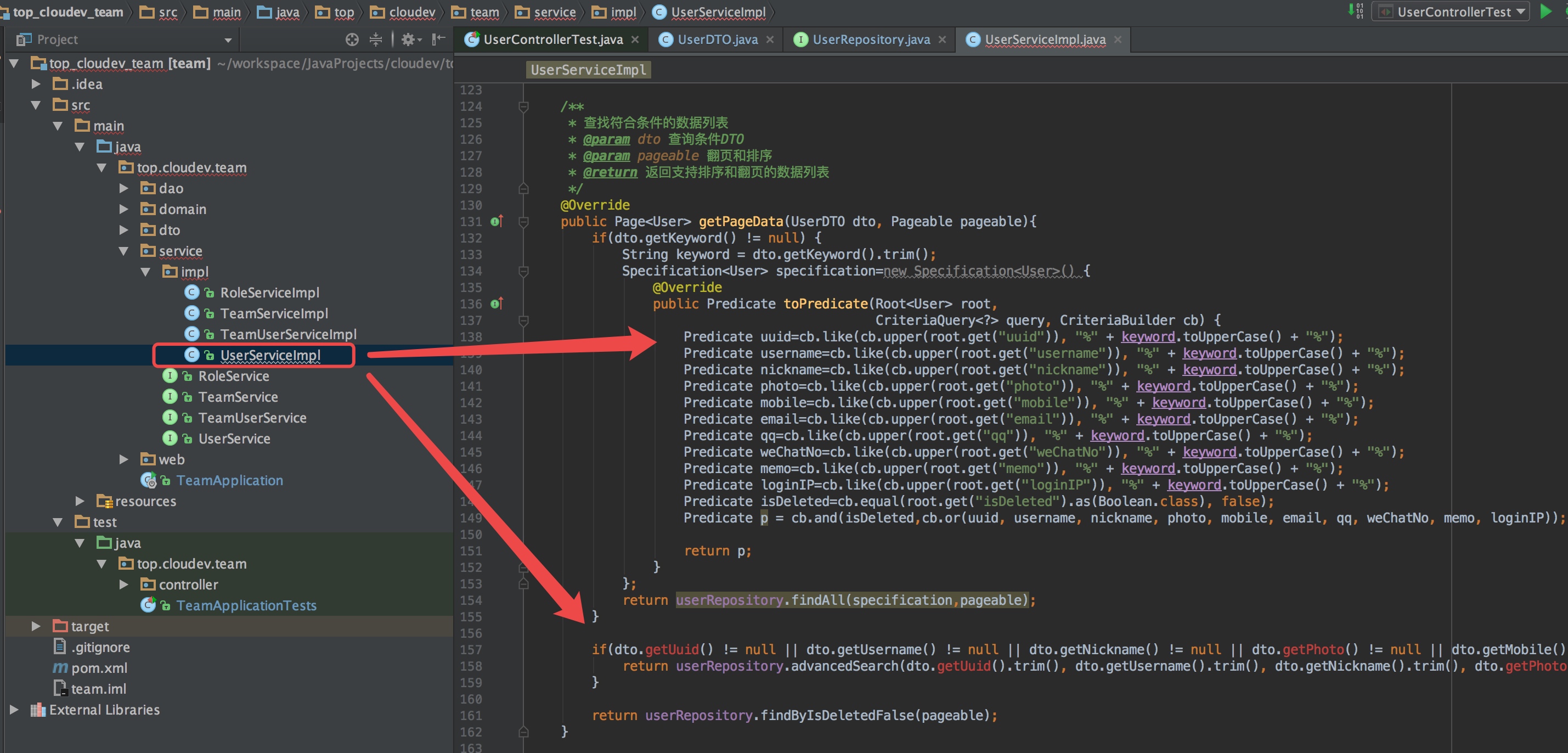 

调整前代码:
    /**
     * 查找符合条件的数据列表
     * @param dto 查询条件DTO
     * @param pageable 翻页和排序
     * @return 返回支持排序和翻页的数据列表
     */
    @Override
    public Page<User> getPageData(UserDTO dto, Pageable pageable){
        if(dto.getKeyword() != null) {
            String keyword = dto.getKeyword().trim();
            Specification<User> specification=new Specification<User>() {
                @Override
                public Predicate toPredicate(Root<User> root,
                                             CriteriaQuery<?> query, CriteriaBuilder cb) {
                    Predicate uuid=cb.like(cb.upper(root.get("uuid")), "%" + keyword.toUpperCase() + "%");
                    Predicate username=cb.like(cb.upper(root.get("username")), "%" + keyword.toUpperCase() + "%");
                    Predicate nickname=cb.like(cb.upper(root.get("nickname")), "%" + keyword.toUpperCase() + "%");
                    Predicate photo=cb.like(cb.upper(root.get("photo")), "%" + keyword.toUpperCase() + "%");
                    Predicate mobile=cb.like(cb.upper(root.get("mobile")), "%" + keyword.toUpperCase() + "%");
                    Predicate email=cb.like(cb.upper(root.get("email")), "%" + keyword.toUpperCase() + "%");
                    Predicate qq=cb.like(cb.upper(root.get("qq")), "%" + keyword.toUpperCase() + "%");
                    Predicate weChatNo=cb.like(cb.upper(root.get("weChatNo")), "%" + keyword.toUpperCase() + "%");
                    Predicate memo=cb.like(cb.upper(root.get("memo")), "%" + keyword.toUpperCase() + "%");
                    Predicate loginIP=cb.like(cb.upper(root.get("loginIP")), "%" + keyword.toUpperCase() + "%");
                    Predicate isDeleted=cb.equal(root.get("isDeleted").as(Boolean.class), false);
                    Predicate p = cb.and(isDeleted,cb.or(uuid, username, nickname, photo, mobile, email, qq, weChatNo, memo, loginIP));

                    return p;
                }
            };
            return userRepository.findAll(specification,pageable);
        }

        if(dto.getUuid() != null || dto.getUsername() != null || dto.getNickname() != null || dto.getPhoto() != null || dto.getMobile() != null || dto.getEmail() != null || dto.getQq() != null || dto.getWeChatNo() != null || dto.getMemo() != null || dto.getLoginIP() != null){
            return userRepository.advancedSearch(dto.getUuid().trim(), dto.getUsername().trim(), dto.getNickname().trim(), dto.getPhoto().trim(), dto.getMobile().trim(), dto.getEmail().trim(), dto.getQq().trim(), dto.getWeChatNo().trim(), dto.getMemo().trim(), dto.getLoginIP().trim(), pageable);
        }

        return userRepository.findByIsDeletedFalse(pageable);
    }
调整后代码:
    /**
     * 查找符合条件的数据列表
     * @param dto 查询条件DTO
     * @param pageable 翻页和排序
     * @return 返回支持排序和翻页的数据列表
     */
    @Override
    public Page<User> getPageData(UserDTO dto, Pageable pageable){
        if(dto.getKeyword() != null) {
            String keyword = dto.getKeyword().trim();
            Specification<User> specification=new Specification<User>() {
                @Override
                public Predicate toPredicate(Root<User> root,
                                             CriteriaQuery<?> query, CriteriaBuilder cb) {
                    Predicate username=cb.like(cb.upper(root.get("username")), "%" + keyword.toUpperCase() + "%");
                    Predicate nickname=cb.like(cb.upper(root.get("nickname")), "%" + keyword.toUpperCase() + "%");
                    Predicate mobile=cb.like(cb.upper(root.get("mobile")), "%" + keyword.toUpperCase() + "%");
                    Predicate email=cb.like(cb.upper(root.get("email")), "%" + keyword.toUpperCase() + "%");
                    Predicate qq=cb.like(cb.upper(root.get("qq")), "%" + keyword.toUpperCase() + "%");
                    Predicate weChatNo=cb.like(cb.upper(root.get("weChatNo")), "%" + keyword.toUpperCase() + "%");
                    Predicate memo=cb.like(cb.upper(root.get("memo")), "%" + keyword.toUpperCase() + "%");
                    Predicate isDeleted=cb.equal(root.get("isDeleted").as(Boolean.class), false);
                    Predicate p = cb.and(isDeleted,cb.or(username, nickname, mobile, email, qq, weChatNo, memo));

                    return p;
                }
            };
            return userRepository.findAll(specification,pageable);
        }

        if(dto.getUsername() != null || dto.getNickname() != null || dto.getMobile() != null || dto.getEmail() != null || dto.getQq() != null || dto.getWeChatNo() != null || dto.getMemo() != null){
            return userRepository.advancedSearch(dto.getUsername().trim(), dto.getNickname().trim(), dto.getMobile().trim(), dto.getEmail().trim(), dto.getQq().trim(), dto.getWeChatNo().trim(), dto.getMemo().trim(), pageable);
        }

        return userRepository.findByIsDeletedFalse(pageable);
    }
五、通过testList驱动domain领域类的修改
做好上面的调整后,现在正式进入测试类UserControllerTest:

1.调整标准查询和高级查询相关测试代码
因为前面修改过dao层标准查询和高级查询的JPA接口方法,所以首先找到testList方法代码,将测试无搜索列表、标准查询和高级查询部分的代码进行调整。
调整“测试无搜索列表”部分的代码
将测试断言中对uuid、photo和loginIp的断言去掉。
代码调整前:
         /**
         * 测试无搜索列表
         */

        /**---------------------测试用例赋值开始---------------------**/
        //TODO 将下面的null值换为测试参数
        Pageable pageable=new PageRequest(0,10, Sort.Direction.DESC,"userId");
        // 期望获得的结果数量(默认有两个测试用例,所以值应为"2L",如果新增了更多测试用例,请相应设定这个值)
        expectResultCount = null;
        /**---------------------测试用例赋值结束---------------------**/

        // 直接通过dao层接口方法获得期望的数据
        Page<User> pagedata = userRepository.findByIsDeletedFalse(pageable);
        expectData = JsonPath.read(Obj2Json(pagedata),"$").toString();

        MvcResult mvcResult = mockMvc
                .perform(
                        MockMvcRequestBuilders.get("/user/list")
                                .accept(MediaType.APPLICATION_JSON)
                )
                // 打印结果
                .andDo(print())
                // 检查状态码为200
                .andExpect(status().isOk())
                // 检查返回的数据节点
                .andExpect(jsonPath("$.pagedata.totalElements").value(expectResultCount))
                .andExpect(jsonPath("$.dto.keyword").isEmpty())
                .andExpect(jsonPath("$.dto.uuid").isEmpty())
                .andExpect(jsonPath("$.dto.username").isEmpty())
                .andExpect(jsonPath("$.dto.nickname").isEmpty())
                .andExpect(jsonPath("$.dto.photo").isEmpty())
                .andExpect(jsonPath("$.dto.mobile").isEmpty())
                .andExpect(jsonPath("$.dto.email").isEmpty())
                .andExpect(jsonPath("$.dto.qq").isEmpty())
                .andExpect(jsonPath("$.dto.weChatNo").isEmpty())
                .andExpect(jsonPath("$.dto.memo").isEmpty())
                .andExpect(jsonPath("$.dto.loginIP").isEmpty())
                .andReturn();

        // 提取返回结果中的列表数据及翻页信息
        responseData = JsonPath.read(mvcResult.getResponse().getContentAsString(),"$.pagedata").toString();

        System.out.println("=============无搜索列表期望结果:" + expectData);
        System.out.println("=============无搜索列表实际返回:" + responseData);

        Assert.assertEquals("错误,无搜索列表返回数据与期望结果有差异",expectData,responseData);
代码调整后:
        /**
         * 测试无搜索列表
         */

        /**---------------------测试用例赋值开始---------------------**/
        //TODO 将下面的null值换为测试参数
        Pageable pageable=new PageRequest(0,10, Sort.Direction.DESC,"userId");
        // 期望获得的结果数量(默认有两个测试用例,所以值应为"2L",如果新增了更多测试用例,请相应设定这个值)
        expectResultCount = null;
        /**---------------------测试用例赋值结束---------------------**/

        // 直接通过dao层接口方法获得期望的数据
        Page<User> pagedata = userRepository.findByIsDeletedFalse(pageable);
        expectData = JsonPath.read(Obj2Json(pagedata),"$").toString();

        MvcResult mvcResult = mockMvc
                .perform(
                        MockMvcRequestBuilders.get("/user/list")
                                .accept(MediaType.APPLICATION_JSON)
                )
                // 打印结果
                .andDo(print())
                // 检查状态码为200
                .andExpect(status().isOk())
                // 检查返回的数据节点
                .andExpect(jsonPath("$.pagedata.totalElements").value(expectResultCount))
                .andExpect(jsonPath("$.dto.keyword").isEmpty())
                .andExpect(jsonPath("$.dto.username").isEmpty())
                .andExpect(jsonPath("$.dto.nickname").isEmpty())
                .andExpect(jsonPath("$.dto.mobile").isEmpty())
                .andExpect(jsonPath("$.dto.email").isEmpty())
                .andExpect(jsonPath("$.dto.qq").isEmpty())
                .andExpect(jsonPath("$.dto.weChatNo").isEmpty())
                .andExpect(jsonPath("$.dto.memo").isEmpty())
                .andReturn();

        // 提取返回结果中的列表数据及翻页信息
        responseData = JsonPath.read(mvcResult.getResponse().getContentAsString(),"$.pagedata").toString();

        System.out.println("=============无搜索列表期望结果:" + expectData);
        System.out.println("=============无搜索列表实际返回:" + responseData);

        Assert.assertEquals("错误,无搜索列表返回数据与期望结果有差异",expectData,responseData);
调整“测试标准查询”部分的代码
代码调整前:
         /**
         * 测试标准查询
         */

        /**---------------------测试用例赋值开始---------------------**/
        //TODO 将下面的null值换为测试参数
        dto = new UserDTO();
        dto.setKeyword(null);

        pageable=new PageRequest(0,10, Sort.Direction.DESC,"userId");

        // 期望获得的结果数量
        expectResultCount = null;
        /**---------------------测试用例赋值结束---------------------**/

        String keyword = dto.getKeyword().trim();

        // 直接通过dao层接口方法获得期望的数据
        Specification<User> specification=new Specification<User>() {
            @Override
            public Predicate toPredicate(Root<User> root,
                                         CriteriaQuery<?> query, CriteriaBuilder cb) {
                Predicate uuid=cb.like(cb.upper(root.get("uuid")), "%" + keyword.toUpperCase() + "%");
                Predicate username=cb.like(cb.upper(root.get("username")), "%" + keyword.toUpperCase() + "%");
                Predicate nickname=cb.like(cb.upper(root.get("nickname")), "%" + keyword.toUpperCase() + "%");
                Predicate photo=cb.like(cb.upper(root.get("photo")), "%" + keyword.toUpperCase() + "%");
                Predicate mobile=cb.like(cb.upper(root.get("mobile")), "%" + keyword.toUpperCase() + "%");
                Predicate email=cb.like(cb.upper(root.get("email")), "%" + keyword.toUpperCase() + "%");
                Predicate qq=cb.like(cb.upper(root.get("qq")), "%" + keyword.toUpperCase() + "%");
                Predicate weChatNo=cb.like(cb.upper(root.get("weChatNo")), "%" + keyword.toUpperCase() + "%");
                Predicate memo=cb.like(cb.upper(root.get("memo")), "%" + keyword.toUpperCase() + "%");
                Predicate loginIP=cb.like(cb.upper(root.get("loginIP")), "%" + keyword.toUpperCase() + "%");
                Predicate isDeleted=cb.equal(root.get("isDeleted").as(Boolean.class), false);
                Predicate p = cb.and(isDeleted,cb.or(uuid, username, nickname, photo, mobile, email, qq, weChatNo, memo, loginIP));

                    return p;
                }
            };
        pagedata = userRepository.findAll(specification,pageable);
        expectData = JsonPath.read(Obj2Json(pagedata),"$").toString();

        mvcResult = mockMvc
                .perform(
                        MockMvcRequestBuilders.get("/user/list")
                                .param("keyword",dto.getKeyword())
                                .accept(MediaType.APPLICATION_JSON)
                )
                // 打印结果
                .andDo(print())
                // 检查状态码为200
                .andExpect(status().isOk())
                // 检查返回的数据节点
                .andExpect(jsonPath("$.pagedata.totalElements").value(expectResultCount))
                .andExpect(jsonPath("$.dto.keyword").value(dto.getKeyword()))
                .andExpect(jsonPath("$.dto.uuid").isEmpty())
                .andExpect(jsonPath("$.dto.username").isEmpty())
                .andExpect(jsonPath("$.dto.nickname").isEmpty())
                .andExpect(jsonPath("$.dto.photo").isEmpty())
                .andExpect(jsonPath("$.dto.mobile").isEmpty())
                .andExpect(jsonPath("$.dto.email").isEmpty())
                .andExpect(jsonPath("$.dto.qq").isEmpty())
                .andExpect(jsonPath("$.dto.weChatNo").isEmpty())
                .andExpect(jsonPath("$.dto.memo").isEmpty())
                .andExpect(jsonPath("$.dto.loginIP").isEmpty())
                .andReturn();

        // 提取返回结果中的列表数据及翻页信息
        responseData = JsonPath.read(mvcResult.getResponse().getContentAsString(),"$.pagedata").toString();

        System.out.println("=============标准查询期望结果:" + expectData);
        System.out.println("=============标准查询实际返回:" + responseData);

        Assert.assertEquals("错误,标准查询返回数据与期望结果有差异",expectData,responseData);
由于之前删除了uuid、photo和loginIp这三个参数,所以这里做相应修改:
        /**
         * 测试标准查询
         */

        /**---------------------测试用例赋值开始---------------------**/
        //TODO 将下面的null值换为测试参数
        dto = new UserDTO();
        dto.setKeyword(null);

        pageable=new PageRequest(0,10, Sort.Direction.DESC,"userId");

        // 期望获得的结果数量
        expectResultCount = null;
        /**---------------------测试用例赋值结束---------------------**/

        String keyword = dto.getKeyword().trim();

        // 直接通过dao层接口方法获得期望的数据
        Specification<User> specification=new Specification<User>() {
            @Override
            public Predicate toPredicate(Root<User> root,
                                         CriteriaQuery<?> query, CriteriaBuilder cb) {
                Predicate username=cb.like(cb.upper(root.get("username")), "%" + keyword.toUpperCase() + "%");
                Predicate nickname=cb.like(cb.upper(root.get("nickname")), "%" + keyword.toUpperCase() + "%");
                Predicate mobile=cb.like(cb.upper(root.get("mobile")), "%" + keyword.toUpperCase() + "%");
                Predicate email=cb.like(cb.upper(root.get("email")), "%" + keyword.toUpperCase() + "%");
                Predicate qq=cb.like(cb.upper(root.get("qq")), "%" + keyword.toUpperCase() + "%");
                Predicate weChatNo=cb.like(cb.upper(root.get("weChatNo")), "%" + keyword.toUpperCase() + "%");
                Predicate memo=cb.like(cb.upper(root.get("memo")), "%" + keyword.toUpperCase() + "%");
                Predicate isDeleted=cb.equal(root.get("isDeleted").as(Boolean.class), false);
                Predicate p = cb.and(isDeleted,cb.or(username, nickname, mobile, email, qq, weChatNo, memo));

                    return p;
                }
            };
        pagedata = userRepository.findAll(specification,pageable);
        expectData = JsonPath.read(Obj2Json(pagedata),"$").toString();

        mvcResult = mockMvc
                .perform(
                        MockMvcRequestBuilders.get("/user/list")
                                .param("keyword",dto.getKeyword())
                                .accept(MediaType.APPLICATION_JSON)
                )
                // 打印结果
                .andDo(print())
                // 检查状态码为200
                .andExpect(status().isOk())
                // 检查返回的数据节点
                .andExpect(jsonPath("$.pagedata.totalElements").value(expectResultCount))
                .andExpect(jsonPath("$.dto.keyword").value(dto.getKeyword()))
                .andExpect(jsonPath("$.dto.username").isEmpty())
                .andExpect(jsonPath("$.dto.nickname").isEmpty())
                .andExpect(jsonPath("$.dto.mobile").isEmpty())
                .andExpect(jsonPath("$.dto.email").isEmpty())
                .andExpect(jsonPath("$.dto.qq").isEmpty())
                .andExpect(jsonPath("$.dto.weChatNo").isEmpty())
                .andExpect(jsonPath("$.dto.memo").isEmpty())
                .andReturn();

        // 提取返回结果中的列表数据及翻页信息
        responseData = JsonPath.read(mvcResult.getResponse().getContentAsString(),"$.pagedata").toString();

        System.out.println("=============标准查询期望结果:" + expectData);
        System.out.println("=============标准查询实际返回:" + responseData);

        Assert.assertEquals("错误,标准查询返回数据与期望结果有差异",expectData,responseData);
调整“测试高级查询”部分的代码
代码调整前:
/**
* 测试高级查询
*/

    /**---------------------测试用例赋值开始---------------------**/
    //TODO 将下面的null值换为测试参数
    dto = new UserDTO();
    dto.setUuid(null);
    dto.setUsername(null);
    dto.setNickname(null);
    dto.setPhoto(null);
    dto.setMobile(null);
    dto.setEmail(null);
    dto.setQq(null);
    dto.setWeChatNo(null);
    dto.setMemo(null);
    dto.setLoginIP(null);

    pageable=new PageRequest(0,10, Sort.Direction.DESC,"userId");

    // 期望获得的结果数量
    expectResultCount = null;
    /**---------------------测试用例赋值结束---------------------**/

    // 直接通过dao层接口方法获得期望的数据
    pagedata = userRepository.advancedSearch(dto.getUuid().trim(), dto.getUsername().trim(), dto.getNickname().trim(), dto.getPhoto().trim(), dto.getMobile().trim(), dto.getEmail().trim(), dto.getQq().trim(), dto.getWeChatNo().trim(), dto.getMemo().trim(), dto.getLoginIP().trim(), pageable);
    expectData = JsonPath.read(Obj2Json(pagedata),"$").toString();
    mvcResult = mockMvc
            .perform(
                    MockMvcRequestBuilders.get("/user/list")
                            .param("uuid",dto.getUuid())
                            .param("username",dto.getUsername())
                            .param("nickname",dto.getNickname())
                            .param("photo",dto.getPhoto())
                            .param("mobile",dto.getMobile())
                            .param("email",dto.getEmail())
                            .param("qq",dto.getQq())
                            .param("weChatNo",dto.getWeChatNo())
                            .param("memo",dto.getMemo())
                            .param("loginIP",dto.getLoginIP())
                            .accept(MediaType.APPLICATION_JSON)
            )
            // 打印结果
            .andDo(print())
            // 检查状态码为200
            .andExpect(status().isOk())
            // 检查返回的数据节点
            .andExpect(jsonPath("$.pagedata.totalElements").value(expectResultCount))
            .andExpect(jsonPath("$.dto.keyword").isEmpty())
            .andExpect(jsonPath("$.dto.uuid").value(dto.getUuid()))
            .andExpect(jsonPath("$.dto.username").value(dto.getUsername()))
            .andExpect(jsonPath("$.dto.nickname").value(dto.getNickname()))
            .andExpect(jsonPath("$.dto.photo").value(dto.getPhoto()))
            .andExpect(jsonPath("$.dto.mobile").value(dto.getMobile()))
            .andExpect(jsonPath("$.dto.email").value(dto.getEmail()))
            .andExpect(jsonPath("$.dto.qq").value(dto.getQq()))
            .andExpect(jsonPath("$.dto.weChatNo").value(dto.getWeChatNo()))
            .andExpect(jsonPath("$.dto.memo").value(dto.getMemo()))
            .andExpect(jsonPath("$.dto.loginIP").value(dto.getLoginIP()))
            .andReturn();

    // 提取返回结果中的列表数据及翻页信息
    responseData = JsonPath.read(mvcResult.getResponse().getContentAsString(),"$.pagedata").toString();

    System.out.println("=============高级查询期望结果:" + expectData);
    System.out.println("=============高级查询实际返回:" + responseData);

    Assert.assertEquals("错误,高级查询返回数据与期望结果有差异",expectData,responseData);
调整后代码: /**
* 测试高级查询
*/
/**---------------------测试用例赋值开始---------------------**/
//TODO 将下面的null值换为测试参数
dto = new UserDTO();
dto.setUsername(null);
dto.setNickname(null);
dto.setMobile(null);
dto.setEmail(null);
dto.setQq(null);
dto.setWeChatNo(null);
dto.setMemo(null);
pageable=new PageRequest(0,10, Sort.Direction.DESC,"userId");
// 期望获得的结果数量
expectResultCount = null;
/**---------------------测试用例赋值结束---------------------**/
// 直接通过dao层接口方法获得期望的数据
pagedata = userRepository.advancedSearch(dto.getUsername().trim(), dto.getNickname().trim(), dto.getMobile().trim(), dto.getEmail().trim(), dto.getQq().trim(), dto.getWeChatNo().trim(), dto.getMemo().trim(), pageable);
expectData = JsonPath.read(Obj2Json(pagedata),"$").toString();
mvcResult = mockMvc
.perform(
MockMvcRequestBuilders.get("/user/list")
.param("username",dto.getUsername())
.param("nickname",dto.getNickname())
.param("mobile",dto.getMobile())
.param("email",dto.getEmail())
.param("qq",dto.getQq())
.param("weChatNo",dto.getWeChatNo())
.param("memo",dto.getMemo())
.accept(MediaType.APPLICATION_JSON)
)
// 打印结果
.andDo(print())
// 检查状态码为200
.andExpect(status().isOk())
// 检查返回的数据节点
.andExpect(jsonPath("$.pagedata.totalElements").value(expectResultCount))
.andExpect(jsonPath("$.dto.keyword").isEmpty())
.andExpect(jsonPath("$.dto.username").value(dto.getUsername()))
.andExpect(jsonPath("$.dto.nickname").value(dto.getNickname()))
.andExpect(jsonPath("$.dto.mobile").value(dto.getMobile()))
.andExpect(jsonPath("$.dto.email").value(dto.getEmail()))
.andExpect(jsonPath("$.dto.qq").value(dto.getQq()))
.andExpect(jsonPath("$.dto.weChatNo").value(dto.getWeChatNo()))
.andExpect(jsonPath("$.dto.memo").value(dto.getMemo()))
.andReturn();
// 提取返回结果中的列表数据及翻页信息
responseData = JsonPath.read(mvcResult.getResponse().getContentAsString(),"$.pagedata").toString();
System.out.println("=============高级查询期望结果:" + expectData);
System.out.println("=============高级查询实际返回:" + responseData);
Assert.assertEquals("错误,高级查询返回数据与期望结果有差异",expectData,responseData);
从现在开始,从UserControllerTest代码的第一行代码开始往下,根据“//TODO”的提示操作,完成testList的测试:
2.在运行测试方法testList前装配一条数据
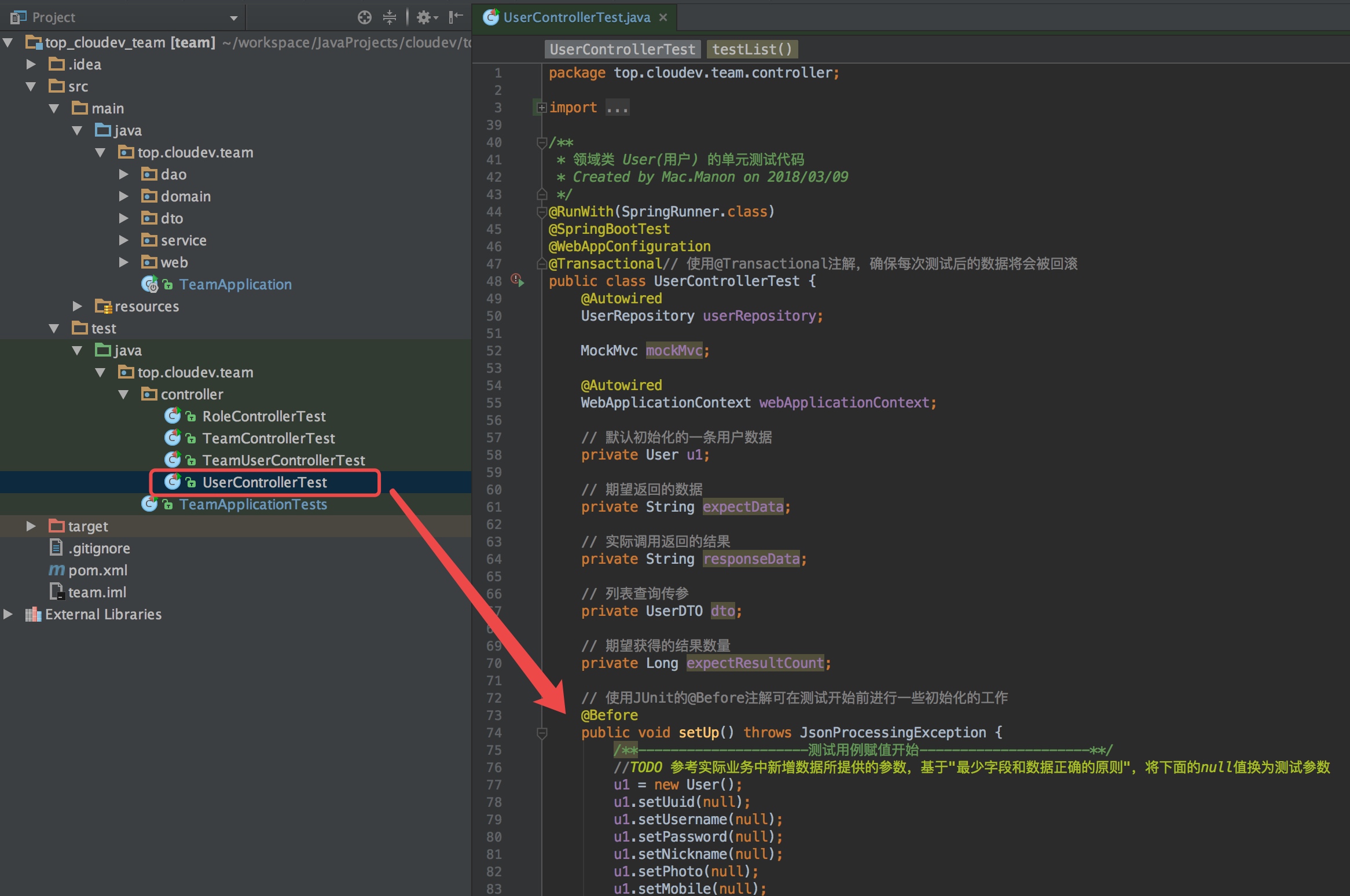 

在@Before注解的setUp()方法中,我们向数据库添加了一条数据。默认为领域类User中的所有字段赋值(如果含有审计字段,仅为创建者creatorUserId赋值)。代码如下:
    // 使用JUnit的@Before注解可在测试开始前进行一些初始化的工作
    @Before
    public void setUp() throws JsonProcessingException {
        /**---------------------测试用例赋值开始---------------------**/
        //TODO 参考实际业务中新增数据所提供的参数,基于"最少字段和数据正确的原则",将下面的null值换为测试参数
        u1 = new User();
        u1.setUuid(null);
        u1.setUsername(null);
        u1.setPassword(null);
        u1.setNickname(null);
        u1.setPhoto(null);
        u1.setMobile(null);
        u1.setEmail(null);
        u1.setQq(null);
        u1.setWeChatNo(null);
        u1.setSex(null);
        u1.setMemo(null);
        u1.setScore(null);
        u1.setLastLogin(null);
        u1.setLoginIP(null);
        u1.setLoginCount(null);
        u1.setLock(null);
        u1.setLastLockTime(null);
        u1.setLockTimes(null);
        u1.setCreatorUserId(1);
        userRepository.save(u1);
        /**---------------------测试用例赋值结束---------------------**/

        // 获取mockMvc对象实例
        mockMvc = MockMvcBuilders.webAppContextSetup(webApplicationContext).build();
    }
在这里建议不要给所有字段赋值,而是本着最少字段和数据正确的原则。
所谓最少字段赋值原则,是指,根据实际业务中添加数据时提供最少参数的情况。就本例而言,User用于记录用户的注册信息,“云开发”平台中新用户注册有三种方式:“用户名+密码”、“手机号+密码”、“Email+密码”。以“用户名+密码”方式为例,客户端只会传过来username和password这两个参数,所以仅需为这两个参数赋值。至于为创建者creatorUserId这个字段赋值,这里特别说明一下。通常,凡是启用了创建审计、修改审计和删除审计的数据,添加新数据时需要为这个这段赋值,本例比较特殊,恰好是用户注册,在用户注册前是无法提供自己的id的(注册成功后才产生id)。
所谓数据正确原则,是因为我们假设通过新增数据方法而插入数据库的数据都是合法数据,对于不合法数据的校验是新增数据方法的职责,而不是列表查询方法的职责。我们这里是通过JPA接口直接保存到数据库的,并未采用服务实现层的save方法。我们知道正确的用户名必须是由26个大小写字母和数字组成,必须是3位长度及以上,密码必须是6-16位之间长度的字母、数字及下划线组成。
修改后代码如下:
    // 使用JUnit的@Before注解可在测试开始前进行一些初始化的工作
    @Before
    public void setUp() throws JsonProcessingException {
        /**---------------------测试用例赋值开始---------------------**/
        u1 = new User();
        u1.setUsername("Mac");
        u1.setPassword("cloudev_top_2018");
        userRepository.save(u1);
        /**---------------------测试用例赋值结束---------------------**/

        // 获取mockMvc对象实例
        mockMvc = MockMvcBuilders.webAppContextSetup(webApplicationContext).build();
    }
现在再次运行测试,看testList的setUp方法是否报错:

测试未通过,根据下图发现,原因是lastLockTime不能为null。

解决办法,调整领域类User:
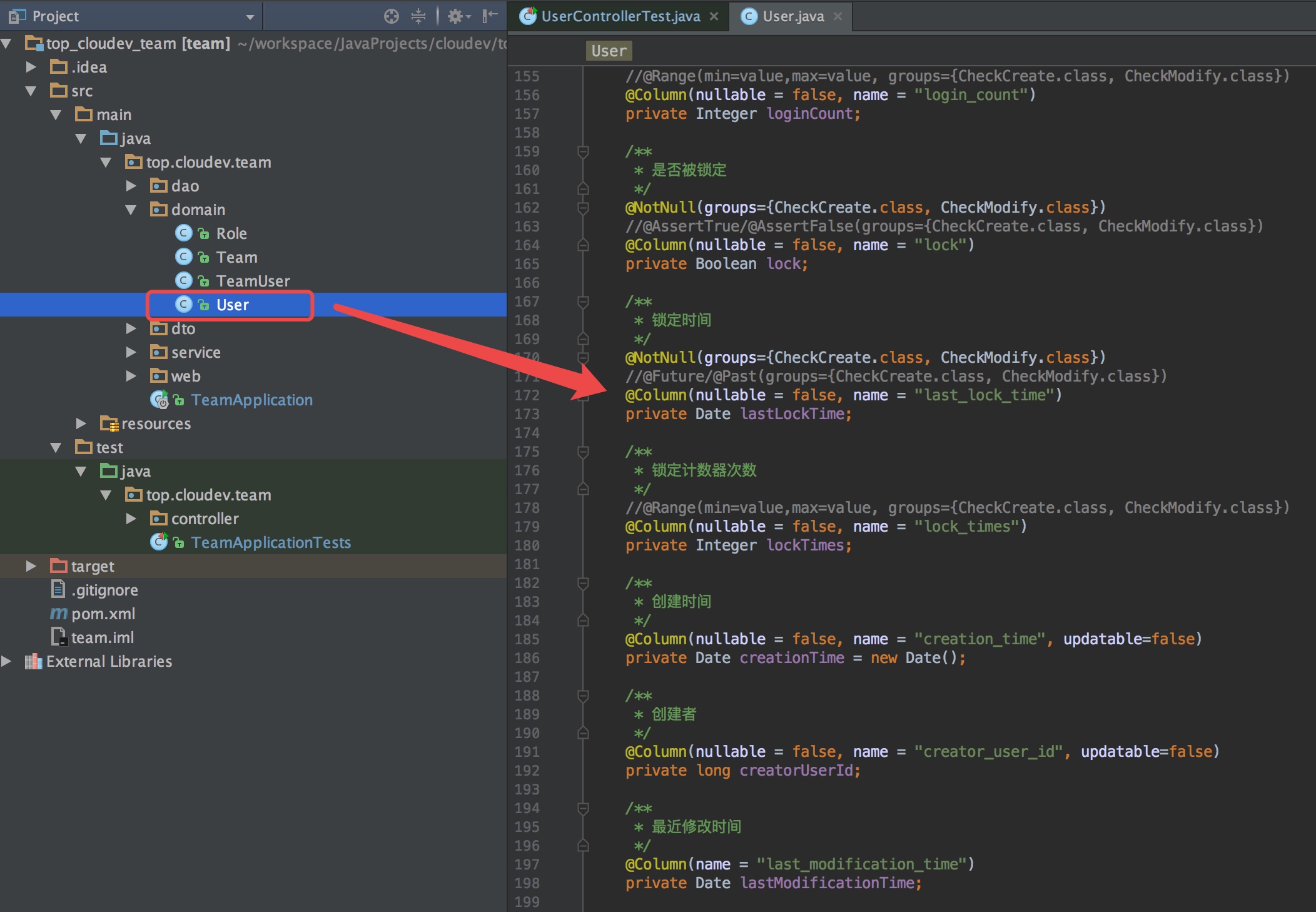 

我们看看lastLockTime这个字段在领域类的代码:
    /**
     * 锁定时间
     */
    @NotNull(groups={CheckCreate.class, CheckModify.class})
    //@Future/@Past(groups={CheckCreate.class, CheckModify.class})
    @Column(nullable = false, name = "last_lock_time")
    private Date lastLockTime;
其中“@NotNull”注解表示客户端传过来的值不可以是“null”,但是它后面有一个分组校验属性"(groups={CheckCreate.class, CheckModify.class})",其中CheckCreate是用于新增用户数据时校验该字段不可为“null”,CheckModify表示在修改用户数据时校验该字段不可为“null”。在setUp()方法构建第一条测试数据时是直接采用dao接口添加的,并没有启用分组校验属性,所以“@NotNull(groups={CheckCreate.class, CheckModify.class})”不会导致setUp()方法失败。
再看“@Column”注解:
@Column(nullable = false, name = "last_lock_time")
那么其中的“nullable = false”是否合适呢?这个决定于实际业务:
用户登陆时,账户或密码连续输入错误三次之后会被系统暂时锁定账户,锁定时会记录锁定时间,距该时间24小时后输入正确可以解锁。刚完成注册时不应该被锁定,也就不应有锁定时间。因此,默认情况下,锁定时间这个字段在数据库中是应该可以为null值的。修改后代码:
    /**
     * 锁定时间
     */
    @NotNull(groups={CheckCreate.class, CheckModify.class})
    @Column(name = "last_lock_time")
    private Date lastLockTime;
最佳实践
一般领域类中的字段,对于非必填值的字段的处理方法:
日期型:允许null值即可;
布尔型:输入一个默认值,true或false,根据字段含义确定;
数值型:输入一个默认值,整数型的输入0,非整数型的输入0.0,但如果业务规则有特殊定义的,输入特定默认数值;
字符型:输入空字符串为默认值,因为如果存入的是null值,无法被上面JPA接口中标准查询和高级查询方法查出来。
根据这个思路,我们User领域类中各字段赋默认值。调整后代码如下:
     //...........省略前面代码...........

    /**
     * 用户ID
     */
    @Id
    @GeneratedValue(strategy = GenerationType.AUTO)
    @Column(name = "id")
    private Long userId;

    /**
     * 用户UUID编号
     */
    @Column(nullable = false, name = "uuid", unique = true, length = 36)
    private String uuid = UUID.randomUUID().toString();

    /**
     * 用户名
     */
    @NotBlank(groups={CheckCreate.class, CheckModify.class})
    @Length(min = 3, max = 64, groups={CheckCreate.class, CheckModify.class})
    @Pattern(regexp = "^[A-Za-z0-9]+$", groups={CheckCreate.class, CheckModify.class})
    @Column(nullable = false, name = "username", length = 64)
    private String username = "";

    /**
     * 密码
     */
    @NotBlank(groups={CheckCreate.class, CheckModify.class})
    @Length(min = 6, max = 16, groups={CheckCreate.class, CheckModify.class})
    @Pattern(regexp = "^\\w+$", groups={CheckCreate.class, CheckModify.class})
    @Column(nullable = false, name = "password", length = 256)
    private String password;

    /**
     * 昵称
     */
    @NotBlank(groups={CheckCreate.class, CheckModify.class})
    @Length(min = 1, max = 50, groups={CheckCreate.class, CheckModify.class})
    //@Pattern(regexp = "", groups={CheckCreate.class, CheckModify.class})
    @Column(nullable = false, name = "nickname", length = 50)
    private String nickname = "";

    /**
     * 照片
     */
    @NotBlank(groups={CheckCreate.class, CheckModify.class})
    @Length(min = 1, max = 50, groups={CheckCreate.class, CheckModify.class})
    //@Pattern(regexp = "", groups={CheckCreate.class, CheckModify.class})
    @Column(nullable = false, name = "photo", length = 50)
    private String photo = "";

    /**
     * 手机
     */
    @NotBlank(groups={CheckCreate.class, CheckModify.class})
    @Pattern(regexp = "((\\d{11})|^((\\d{7,8})|(\\d{4}|\\d{3})-(\\d{7,8})|(\\d{4}|\\d{3})-(\\d{7,8})-(\\d{4}|\\d{3}|\\d{2}|\\d{1})|(\\d{7,8})-(\\d{4}|\\d{3}|\\d{2}|\\d{1}))$)", groups={CheckCreate.class, CheckModify.class})
    @Column(nullable = false, name = "mobile", length = 15)
    private String mobile = "";

    /**
     * 邮箱地址
     */
    @NotBlank(groups={CheckCreate.class, CheckModify.class})
    @Email(groups={CheckCreate.class, CheckModify.class})
    @Column(nullable = false, name = "email", length = 255)
    private String email = "";

    /**
     * QQ
     */
    @NotBlank(groups={CheckCreate.class, CheckModify.class})
    @Length(min = 1, max = 50, groups={CheckCreate.class, CheckModify.class})
    //@Pattern(regexp = "", groups={CheckCreate.class, CheckModify.class})
    @Column(nullable = false, name = "qq", length = 50)
    private String qq = "";

    /**
     * 微信号
     */
    @NotBlank(groups={CheckCreate.class, CheckModify.class})
    @Length(min = 1, max = 50, groups={CheckCreate.class, CheckModify.class})
    //@Pattern(regexp = "", groups={CheckCreate.class, CheckModify.class})
    @Column(nullable = false, name = "we_chat_no", length = 50)
    private String weChatNo = "";

    /**
     * 性别
     */
    //@Range(min=value,max=value, groups={CheckCreate.class, CheckModify.class})
    @Column(nullable = false, name = "sex")
    private Short sex = 0;

    /**
     * 描述
     */
    @NotBlank(groups={CheckCreate.class, CheckModify.class})
    @Length(min = 1, max = 50, groups={CheckCreate.class, CheckModify.class})
    //@Pattern(regexp = "", groups={CheckCreate.class, CheckModify.class})
    @Column(nullable = false, name = "memo", length = 50)
    private String memo = "";

    /**
     * 评分
     */
    //@Range(min=value,max=value, groups={CheckCreate.class, CheckModify.class})
    //@Digits(integer, fraction, groups={CheckCreate.class, CheckModify.class})
    @Column(nullable = false, name = "score")
    private Double score = 0.0;

    /**
     * 最后一次登录时间
     */
    @NotNull(groups={CheckCreate.class, CheckModify.class})
    //@Future/@Past(groups={CheckCreate.class, CheckModify.class})
    @Column(name = "last_login")
    private Date lastLogin;

    /**
     * 最后一次登录IP
     */
    @NotBlank(groups={CheckCreate.class, CheckModify.class})
    @Pattern(regexp = "^(25[0-5]|2[0-4][0-9]|[0-1]{1}[0-9]{2}|[1-9]{1}[0-9]{1}|[1-9])\\.(25[0-5]|2[0-4][0-9]|[0-1]{1}[0-9]{2}|[1-9]{1}[0-9]{1}|[1-9]|0)\\.(25[0-5]|2[0-4][0-9]|[0-1]{1}[0-9]{2}|[1-9]{1}[0-9]{1}|[1-9]|0)\\.(25[0-5]|2[0-4][0-9]|[0-1]{1}[0-9]{2}|[1-9]{1}[0-9]{1}|[0-9])$", groups={CheckCreate.class, CheckModify.class})
    @Column(nullable = false, name = "login_i_p", length = 23)
    private String loginIP = "";

    /**
     * 登录次数
     */
    //@Range(min=value,max=value, groups={CheckCreate.class, CheckModify.class})
    @Column(nullable = false, name = "login_count")
    private Integer loginCount = 0;

    /**
     * 是否被锁定
     */
    @NotNull(groups={CheckCreate.class, CheckModify.class})
    //@AssertTrue/@AssertFalse(groups={CheckCreate.class, CheckModify.class})
    @Column(nullable = false, name = "lock")
    private Boolean lock = false;

    /**
     * 锁定时间
     */
    @NotNull(groups={CheckCreate.class, CheckModify.class})
    @Column(name = "last_lock_time")
    private Date lastLockTime;

    /**
     * 锁定计数器次数
     */
    //@Range(min=value,max=value, groups={CheckCreate.class, CheckModify.class})
    @Column(nullable = false, name = "lock_times")
    private Integer lockTimes = 0;

    /**
     * 创建时间
     */
    @Column(nullable = false, name = "creation_time", updatable=false)
    private Date creationTime = new Date();

    /**
     * 创建者
     */
    @Column(nullable = false, name = "creator_user_id", updatable=false)
    private long creatorUserId;

    /**
     * 最近修改时间
     */
    @Column(name = "last_modification_time")
    private Date lastModificationTime;

    /**
     * 最近修改者
     */
    @Column(name = "last_modifier_user_id")
    private long lastModifierUserId;

    /**
     * 已删除
     */
    @Column(nullable = false, name = "is_deleted")
    private Boolean isDeleted = false;

    /**
     * 删除时间
     */
    @Column(name = "deletion_time")
    private Date deletionTime;

    /**
     * 删除者
     */
    @Column(name = "deleter_user_id")
    private long deleterUserId;

    //...........省略后面代码...........
再次运行测试,结果如下:
 

从提示中可以看到现在错误的原因在testList方法中。而setUp方法是运行在testList方法之前的,所以,当前setUp方法已正确的运行!
3.添加更多数据测试列表
将代码定位到testList方法:
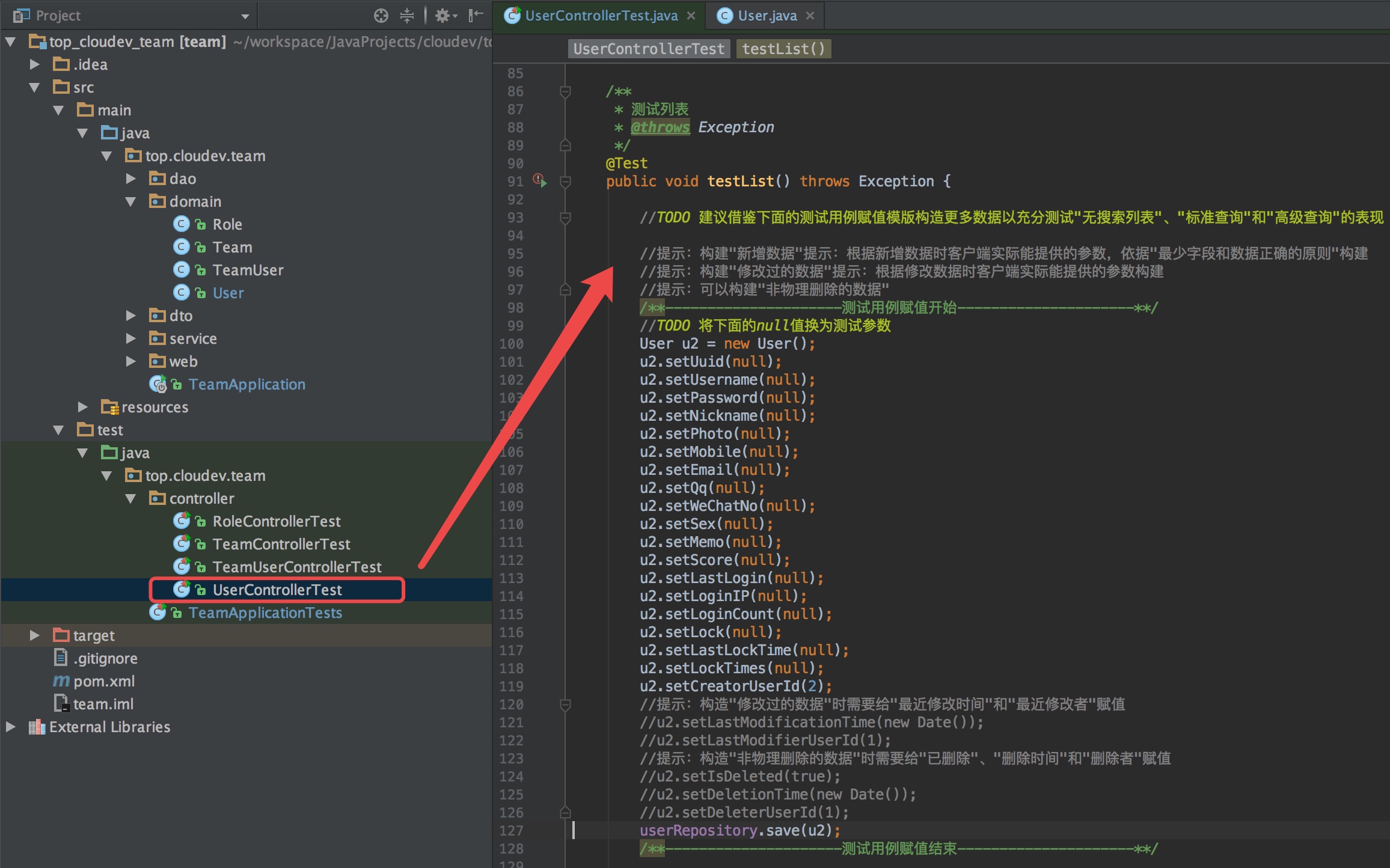 

在上图中给出了添加第二条数据的代码模版,可复制该段代码多份,依次改为u3、u4...以向数据库插入多条数据,充分测试无查询列表、标准查询和高级查询。
最佳实践
前面基于最少字段和数据正确的原则模拟实际业务中创建数据的参数构建了一条数据,一般而言,我们还需要模拟出“经过修改过的数据”(给更多字段赋值),对于启用删除审计的领域类,还应该模拟出非物理删除的数据。
在本例中,因为注册用户允许通过“用户名+密码”、“手机号+密码”或“Email+密码”来注册:
对于通过“用户名+密码”注册的用户,手机号和Email字段可以为空;
对于通过“手机号+密码”注册的用户,用户名和Email字段可以为空;
对于通过“Email+密码”注册的用户,用户名和手机号字段可以为空;
但是,用户名、手机号和Email不可同时为空,必须至少有其中一个值不为空,并且:
如果用户名字段有值,那么该字段必须由3-64位大小写字母和数字组成,且值不可与其它用户名重复;
如果手机号字段有值,那么该字段必须符合手机号格式,且值不可与其它手机号重复;
如果Email字段有值,那么该字段必须符合Email格式,且值不可与其它Email重复。
综上,我们可以再模拟四条数据:
通过“手机号+密码”新增的数据;
通过“Email+密码”新增的数据;
修改过的数据;
被非物理删除过的数据。
模拟数据前代码:
        //TODO 建议借鉴下面的测试用例赋值模版构造更多数据以充分测试"无搜索列表"、"标准查询"和"高级查询"的表现

        //提示:构建"新增数据"提示:根据新增数据时客户端实际能提供的参数,依据"最少字段和数据正确的原则"构建
        //提示:构建"修改过的数据"提示:根据修改数据时客户端实际能提供的参数构建
        //提示:可以构建"非物理删除的数据"
        /**---------------------测试用例赋值开始---------------------**/
        //TODO 将下面的null值换为测试参数
        User u2 = new User();
        u2.setUuid(null);
        u2.setUsername(null);
        u2.setPassword(null);
        u2.setNickname(null);
        u2.setPhoto(null);
        u2.setMobile(null);
        u2.setEmail(null);
        u2.setQq(null);
        u2.setWeChatNo(null);
        u2.setSex(null);
        u2.setMemo(null);
        u2.setScore(null);
        u2.setLastLogin(null);
        u2.setLoginIP(null);
        u2.setLoginCount(null);
        u2.setLock(null);
        u2.setLastLockTime(null);
        u2.setLockTimes(null);
        u2.setCreatorUserId(2);
        //提示:构造"修改过的数据"时需要给"最近修改时间"和"最近修改者"赋值
        //u2.setLastModificationTime(new Date());
        //u2.setLastModifierUserId(1);
        //提示:构造"非物理删除的数据"时需要给"已删除"、"删除时间"和"删除者"赋值
        //u2.setIsDeleted(true);
        //u2.setDeletionTime(new Date());
        //u2.setDeleterUserId(1);
        userRepository.save(u2);
        /**---------------------测试用例赋值结束---------------------**/
模拟数据后代码:
        //模拟通过"手机号+密码"注册的数据
        /**---------------------测试用例赋值开始---------------------**/
        User u2 = new User();
        u2.setPassword("123456");
        u2.setMobile("13999999999");
        userRepository.save(u2);
        /**---------------------测试用例赋值结束---------------------**/

        //模拟通过"Email+密码"注册的数据
        /**---------------------测试用例赋值开始---------------------**/
        User u3 = new User();
        u3.setPassword("12345678");
        u3.setEmail("Mac.Manon@cloudev.top");
        userRepository.save(u3);
        /**---------------------测试用例赋值结束---------------------**/

        //模拟经过修改的数据
        /**---------------------测试用例赋值开始---------------------**/
        User u4 = new User();
        u4.setUsername("Mac2");
        u4.setPassword("1234qwer");
        u4.setNickname("Mac.Manon");
        u4.setPhoto("/201803/a/cloudev.png");
        u4.setMobile("13888888888");
        u4.setEmail("888888@qq.com");
        u4.setQq("888888");
        u4.setWeChatNo("13888888888");
        u4.setSex((short) 1);
        u4.setMemo("Mac2是一个模拟修改过数据的测试用户。");
        u4.setScore(5.0);
        u4.setLastLogin(new Date());
        u4.setLoginIP("192.168.1.168");
        u4.setLoginCount(1);
        u4.setLock(false);
        u4.setLastLockTime(null);
        u4.setLockTimes(0);
        u4.setCreatorUserId(2);
        u4.setLastModificationTime(new Date());
        u4.setLastModifierUserId(1);
        userRepository.save(u4);
        /**---------------------测试用例赋值结束---------------------**/

        //模拟非物理删除的用户数据
        /**---------------------测试用例赋值开始---------------------**/
        User u5 = new User();
        u5.setUsername("Mac3");
        u5.setPassword("1234asdf");
        u5.setNickname("Mac.Manon");
        u5.setPhoto("/201803/a/testphoto.png");
        u5.setMobile("13666666666");
        u5.setEmail("666666@qq.com");
        u5.setQq("666666");
        u5.setWeChatNo("13666666666");
        u5.setSex((short) 0);
        u5.setMemo("Mac3是一个模拟非物理删除的测试用户。");
        u5.setScore(1.0);
        u5.setLastLogin(new Date());
        u5.setLoginIP("192.168.1.188");
        u5.setLoginCount(2);
        u5.setLock(true);
        u5.setLastLockTime(new Date());
        u5.setLockTimes(2);
        u5.setCreatorUserId(2);
        u5.setLastModificationTime(new Date());
        u5.setLastModifierUserId(1);
        u5.setIsDeleted(true);
        u5.setDeletionTime(new Date());
        u5.setDeleterUserId(1);
        userRepository.save(u5);
        /**---------------------测试用例赋值结束---------------------**/
现在再次运行“UserControllerTest”单元测试:
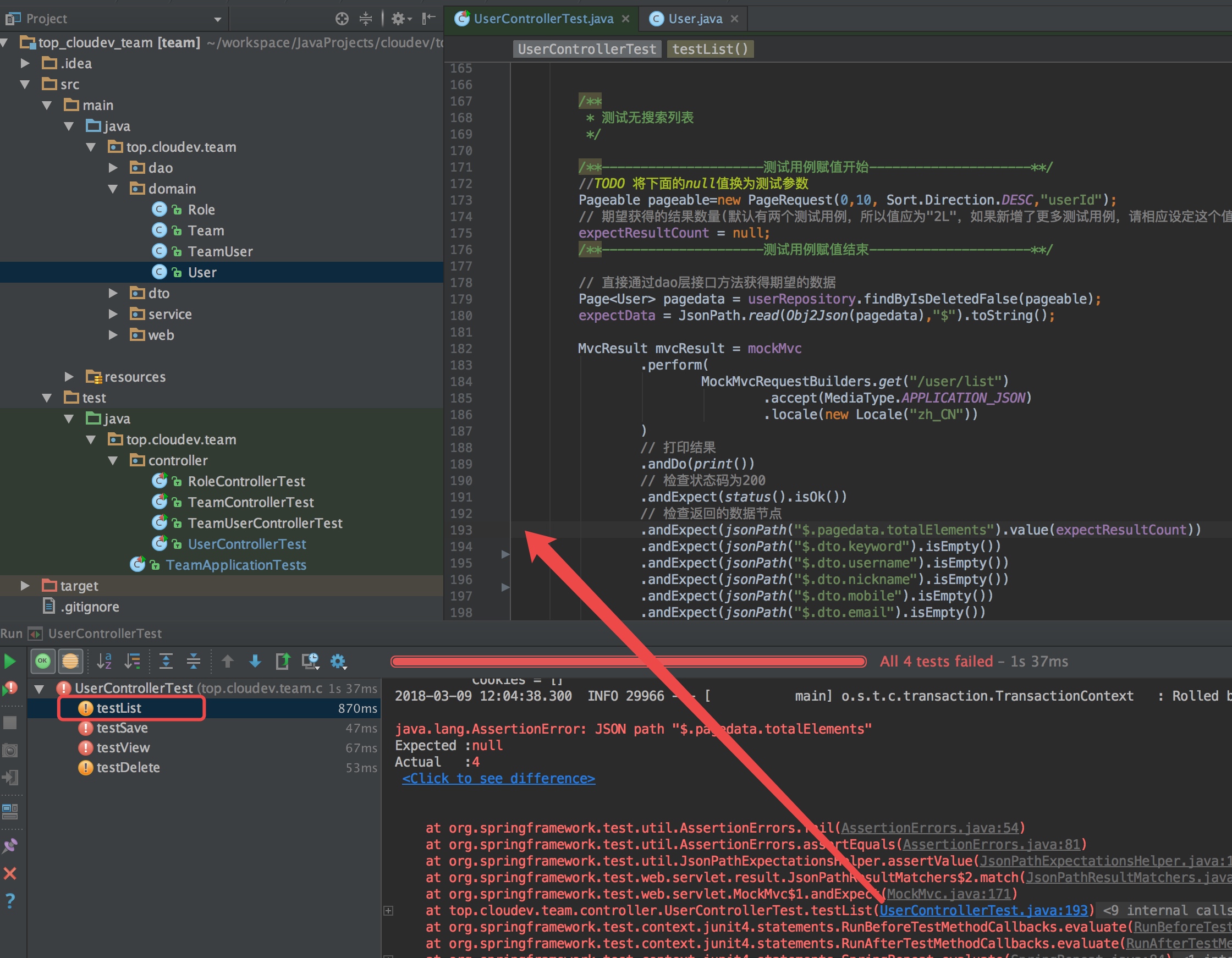 

我们看到现在异常定位到193行代码,在“测试无搜索列表”中,说明上面构造四条测试数据的代码已能通过。
此时,我们在setUp方法中构造了一条数据,在testList中构造了两条新增数据、一条修改过的数据和一条非物理删除的数据,共五条数据,排除已非物理删除的那条数据,我们加载列表时应返回4条未删除的数据,所以我们期望返回的数据数量应为4。
修改前代码:
        /**
         * 测试无搜索列表
         */

        /**---------------------测试用例赋值开始---------------------**/
        //TODO 将下面的null值换为测试参数
        Pageable pageable=new PageRequest(0,10, Sort.Direction.DESC,"userId");
        // 期望获得的结果数量(默认有两个测试用例,所以值应为"2L",如果新增了更多测试用例,请相应设定这个值)
        expectResultCount = null;
        /**---------------------测试用例赋值结束---------------------**/
根据提示,将“expectResultCount”赋值为4(因为是Long型,所以输入为"4L"),修改后:
        /**
         * 测试无搜索列表
         */

        /**---------------------测试用例赋值开始---------------------**/
        Pageable pageable=new PageRequest(0,10, Sort.Direction.DESC,"userId");
        // 期望获得的结果数量.我们在setUp方法中构造了一条数据,在testList中构造了两条新增数据、一条修改过的数据
        // 和一条非物理删除的数据,共五条数据,排除已非物理删除的那条数据,我们加载列表时应返回4条未删除的数据,所以我们期望返回的数据数量应为4
        expectResultCount = 4L;
        /**---------------------测试用例赋值结束---------------------**/
现在再次运行“UserControllerTest”单元测试:
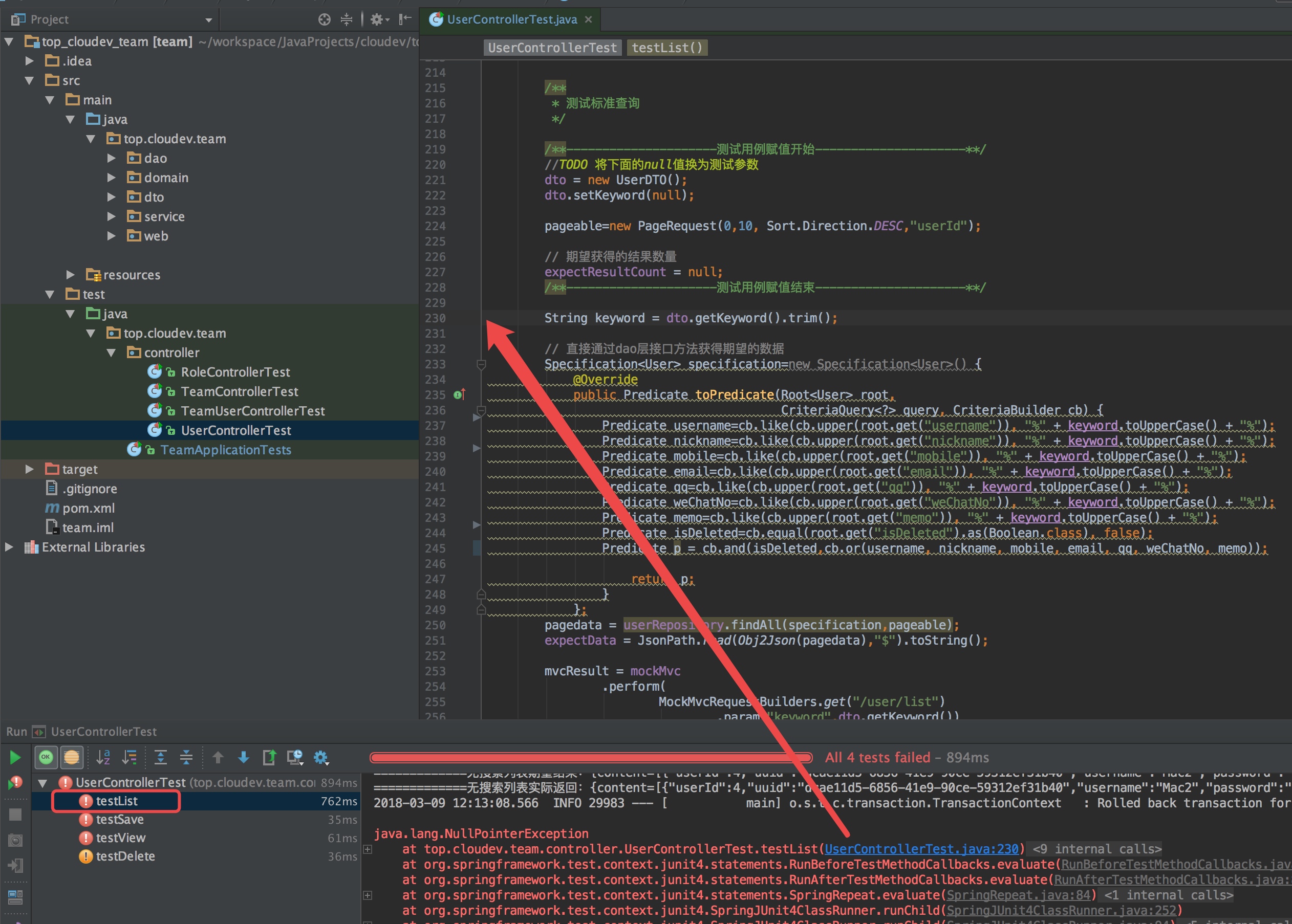 

异常代码定位到“测试标准查询”部分了,说明“无查询列表”部分的代码测试已通过了。我们先给“测试标准查询”部分代码的TODO部分代码赋值,赋值前代码:
        /**
         * 测试标准查询
         */

        /**---------------------测试用例赋值开始---------------------**/
        //TODO 将下面的null值换为测试参数
        dto = new UserDTO();
        dto.setKeyword(null);

        pageable=new PageRequest(0,10, Sort.Direction.DESC,"userId");

        // 期望获得的结果数量
        expectResultCount = null;
        /**---------------------测试用例赋值结束---------------------**/
我们给关键字赋值为“mac”(参考之前构造的5条数据):
第一条数据的username为“Mac”;
第二条数据的手机号中不含有“Mac”关键字,不符合查询要求;
第三条数据的email为“Mac.Manon@cloudev.top”;
第四条数据的username为“Mac2”,nickname为“Mac.Manon”,memo为“Mac2是一个模拟修改过数据的测试用户。”;
第五条数据的username为“Mac3”,但已被删除,不符合查询要求;
综上,用“mac”作为关键字查询,应返回3条符合要求的结果,所以期望的数量应赋值为3,调整代码为:
        /**
         * 测试标准查询
         */

        /**---------------------测试用例赋值开始---------------------**/
        dto = new UserDTO();
        dto.setKeyword("mac");

        pageable=new PageRequest(0,10, Sort.Direction.DESC,"userId");

        // 期望获得的结果数量
        expectResultCount = 3L;
        /**---------------------测试用例赋值结束---------------------**/
现在再次运行“UserControllerTest”单元测试:
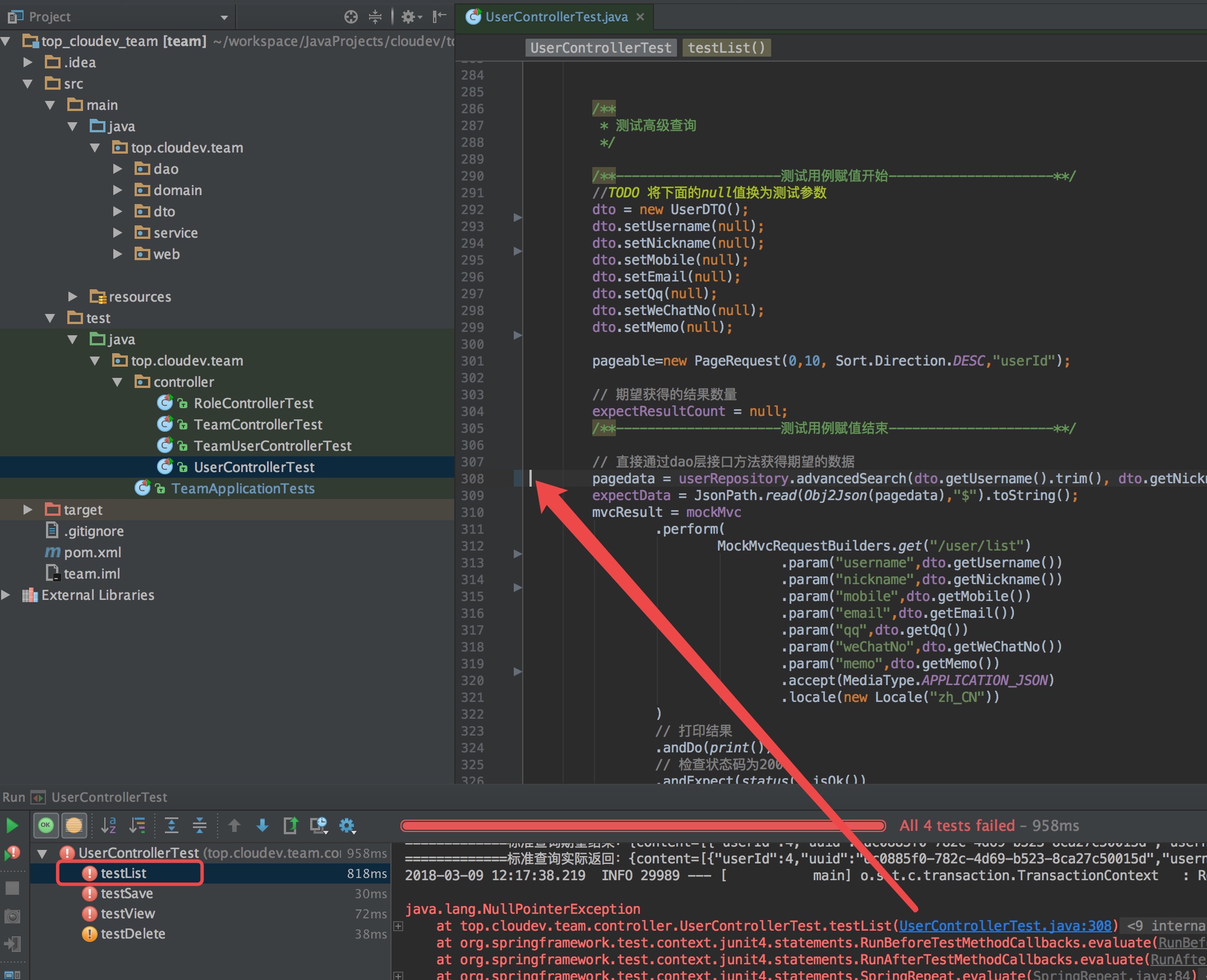 

现在异常代码定位在“测试高级查询”部分了,说明“测试标准查询”的代码已通过测试,当然,更严谨的测试需要测试人员提供更科学的边界值,和多个不同关键字的测试,此处不详述。给“测试高级查询”部分的代码测试用例赋值,赋值前代码为:
        /**
         * 测试高级查询
         */

        /**---------------------测试用例赋值开始---------------------**/
        //TODO 将下面的null值换为测试参数
        dto = new UserDTO();
        dto.setUsername(null);
        dto.setNickname(null);
        dto.setMobile(null);
        dto.setEmail(null);
        dto.setQq(null);
        dto.setWeChatNo(null);
        dto.setMemo(null);

        pageable=new PageRequest(0,10, Sort.Direction.DESC,"userId");

        // 期望获得的结果数量
        expectResultCount = null;
        /**---------------------测试用例赋值结束---------------------**/
赋值后代码:
        /**
         * 测试高级查询
         */

        /**---------------------测试用例赋值开始---------------------**/
        dto = new UserDTO();
        dto.setUsername("Mac");
        dto.setNickname("");
        dto.setMobile("138");
        dto.setEmail("");
        dto.setQq("888");
        dto.setWeChatNo("13888");
        dto.setMemo("");

        pageable=new PageRequest(0,10, Sort.Direction.DESC,"userId");

        // 期望获得的结果数量
        expectResultCount = 1L;
        /**---------------------测试用例赋值结束---------------------**/
现在再次运行“UserControllerTest”单元测试:
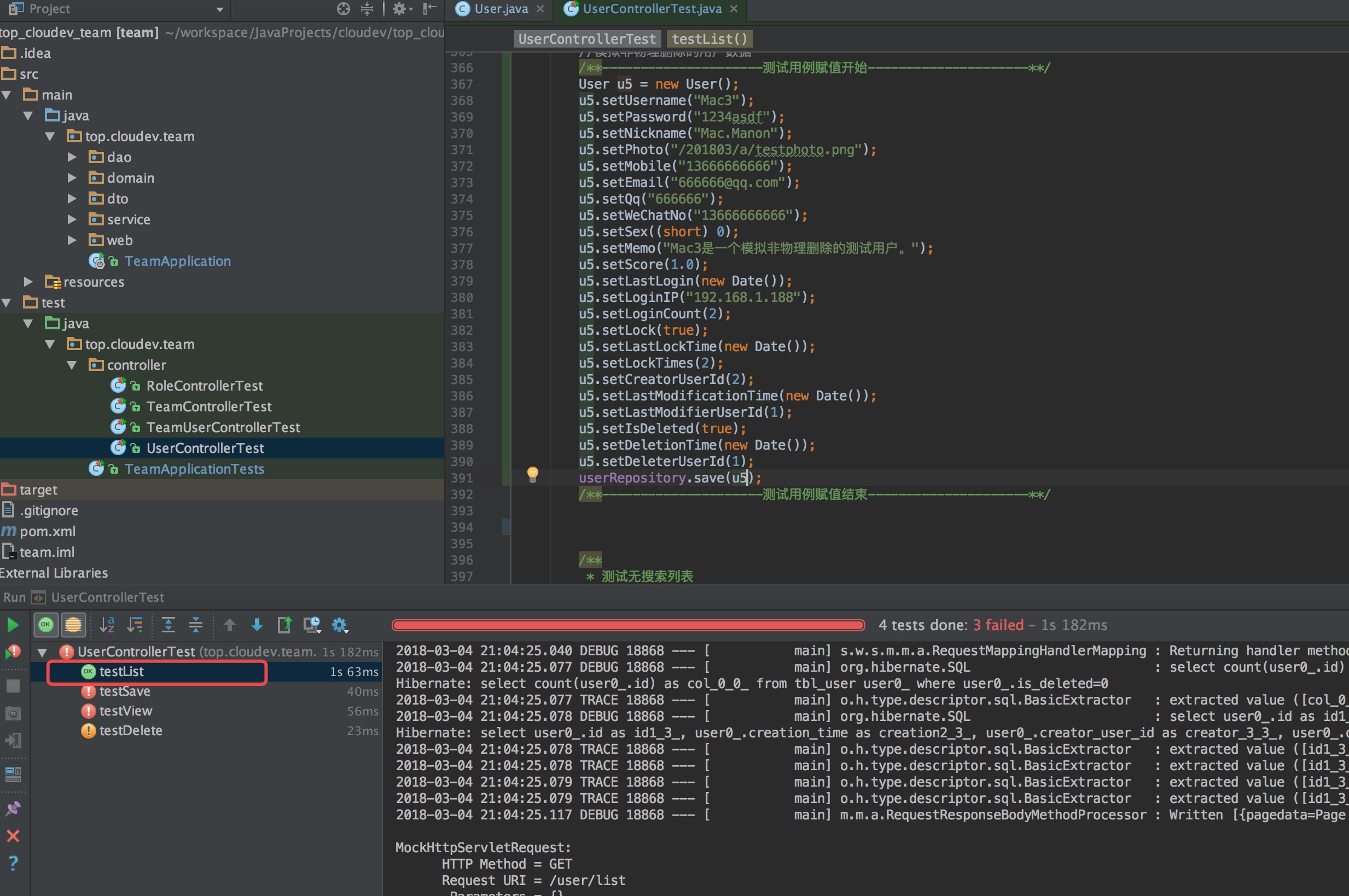 

发现testList方法已变绿,说明list方法已通过测试!
经验总结
1.测试驱动开发从testList开始;
2.在测试testList方法前先考虑列表查询的dto类字段设计,修改DTO类,然后沿着:检查dao接口、服务实现类中“getPageData(UserDTO dto, Pageable pageable)”方法及单元测试类中testList()方法的轨迹,让这些代码适应DTO类字段的变化;
3.用setUp()方法检验领域类的默认值设置;
4.在单元测试类的代码中,从上至下,根据"//TODO"的提示做即可。
测试驱动开发实践2————从testList开始的更多相关文章
- 测试驱动开发实践3————从testList开始
[内容指引] 运行单元测试: 装配一条数据: 模拟更多数据测试列表: 测试无搜索列表: 测试标准查询: 测试高级查询. 一.运行单元测试 我们以文档分类(Category)这个领域类为例,示范如何通过 ...
- 测试驱动开发实践—从testList开始
[内容指引]运行单元测试:装配一条数据:模拟更多数据测试列表:测试无搜索列表:测试标准查询:测试高级查询. 一.运行单元测试 我们以文档分类(Category)这个领域类为例,示范如何通过编写测试用例 ...
- 测试驱动开发实践 - Test-Driven Development(转)
一.前言 不知道大家有没听过“测试先行的开发”这一说法,作为一种开发实践,在过去进行开发时,一般是先开发用户界面或者是类,然后再在此基础上编写测试. 但在TDD中,首先是进行测试用例的编写,然后再进行 ...
- 测试驱动开发实践 - Test-Driven Development
一.前言 不知道大家有没听过“测试先行的开发”这一说法,作为一种开发实践,在过去进行开发时,一般是先开发用户界面或者是类,然后再在此基础上编写测试. 但在TDD中,首先是进行测试用例的编写,然后再进行 ...
- 测试驱动开发实践4————testSave之新增文档分类
[内容指引] 1.确定"新增文档分类"的流程及所需的参数 2.根据业务规则设计测试用例 3.为测试用例赋值并驱动开发 一.确定"新增文档分类"的流程及所需的参数 ...
- 测试驱动开发实践3————testSave之新增用户
内容指引 1.确定新增用户的业务规则 2.根据业务规则设计测试用例 3.为测试用例赋值并驱动开发 一.确定新增用户的规则 1.注册用户允许通过"用户名+密码"."手机号+ ...
- 测试驱动开发实践5————testSave之修改文档分类
[内容指引] 1.确定"修改文档分类"的微服务接口及所需的参数 2.设计测试用例及测试用例合并 3.为测试用例赋值并驱动开发 上一篇我们通过17个测试用例完成了"新增文档 ...
- TDD(测试驱动开发)培训录
2014年我一直从事在敏捷实践咨询项目,这也是我颇有收获的一年,特别是咨询项目的每一点改变,不管是代码质量的提高,还是自组织团队的建设,都能让我们感到欣慰.涉及人的问题都是复杂问题,改变人,改变一个组 ...
- 测试驱动开发(TDD)的思考
极限编程 敏捷开发是一种思想,极限编程也是一种思想,它与敏捷开发某些目标是一致的.只是实现方式不同.测试驱动开发是极限编程的一部分. 1.极限编程这个思路的来源 Kent Beck先生最早在其极限编程 ...
随机推荐
- Flex下拉框
<?xml version="1.0" encoding="utf-8"?> <s:Application xmlns:fx="ht ...
- meta的各种参数
<!DOCTYPE html> <!-- 使用 HTML5 doctype,不区分大小写 --> <html lang="zh-cmn-Hans"&g ...
- 使用AOP的好处
原始代码的写法 既然要通过代码来演示,那必须要有例子,这里我的例子为: 有一个接口Dao有insert.delete.update三个方法,在insert与update被调用的前后,打印调用前的毫秒数 ...
- PC响应式、固宽布局思想
截止目前,国内绝大多数内容为主的网站(知乎,果壳,V2EX,网易新闻等)均使用内容区定宽布局,大多数电商网站(网易考拉,京东,聚美优品)也使用了内容区定宽的布局,也有些网站使用了自适应布局. 如果不明 ...
- JavaScript设计模式(7)-设配器模式
适配器模式 1. 作用: 协调两个不同的接口 2. 适用场景 适配器适用于客户期待的接口与现有 API 提供的接口不兼容这种场景.他只能用来协调语法上的差异问题.适配器所适配的两个方法执行的应该是类似 ...
- C# 高效字符串连接 StringBuilder介绍
在介绍StringBuilder之前,必须要先了解string的特性. string在.NET中属于基本数据类型,也是基本数据类型中唯一的引用类型.字符串可以声明为常量,但它却放在了堆中. 一:不可改 ...
- 自定义WIZ文档模板
WIZ文档模板 1.在wiz笔记里面新建一个笔记,并将其做成一个模板 例子: 2.该作为模板的笔记制作完成后,右键-高级-另存为 导出为html格式 3.将导出的文件和文件夹(有时候只有一个htm文 ...
- Python + request + unittest实现接口测试框架
1.为什么要写代码实现接口自动化 大家知道很多接口测试工具可以实现对接口的测试,如postman.jmeter.fiddler等等,而且使用方便,那么为什么还要写代码实现接口自动化呢?工具虽然方便,但 ...
- java抽象类注意问题
当知道一个类的子类将不同的实现某个方法时,把该类声明为抽象类很有用,可以共用相同的父类方法,不必再定义. 抽象类和抽象方法的关系:含有抽象方法的类一定是抽象类,抽象类里不一定含有抽象方法. 抽象类存在 ...
- 与二叉树有关的编程题的Java代码实现
该文章几乎包含了所有与二叉树相关的基础面试题,其中包括二叉树的四种遍历方法:前序遍历,中序遍历,后续遍历,层次遍历. 算法题包括: 二叉树的序列化和反序列化 给定一颗二叉搜索树,请找出其中的第k大的结 ...