
Entity Framework——配置文件设置
可以使用配置文件或代码(EF6起)配置EF框架。
一、使用配置文件
安装Entity Framework自动生成的配置
当使用VS的NuGet自动安装Entity Framework(本文使用6.2.0)时会自动生成一些代码。在xxx.config中会自动添加一些配置
一个空的配置文件:
<?xml version="1.0" encoding="utf-8"?>

<configuration>

  <startup>

    <supportedRuntime version="v4.0" sku=".NETFramework,Version=v4.5.1" />

  </startup>

</configuration>
安装Entity Framework后配置文件变为:
<?xml version="1.0" encoding="utf-8"?>

<configuration>

  <configSections>

    <!-- For more information on Entity Framework configuration, visit http://go.microsoft.com/fwlink/?LinkID=237468 -->

    <section name="entityFramework" type="System.Data.Entity.Internal.ConfigFile.EntityFrameworkSection, EntityFramework, Version=6.0.0.0, Culture=neutral, PublicKeyToken=b77a5c561934e089" requirePermission="false" />

  </configSections>

  <startup>

    <supportedRuntime version="v4.0" sku=".NETFramework,Version=v4.5.1" />

  </startup>

  <entityFramework>

    <defaultConnectionFactory type="System.Data.Entity.Infrastructure.LocalDbConnectionFactory, EntityFramework">

      <parameters>

        <parameter value="mssqllocaldb" />

      </parameters>

    </defaultConnectionFactory>

    <providers>

      <provider invariantName="System.Data.SqlClient" type="System.Data.Entity.SqlServer.SqlProviderServices, EntityFramework.SqlServer" />

    </providers>

  </entityFramework>

</configuration>
可以看到增加了<configSections>、<entityFramework>配置节,这些配置都是针对微软SqlServer数据库的,如果使用其他数据库还有修改一下。
如果将<configSections>配置节删掉,运行程序会抛异常,异常抛出的位置为DbContext初始化的时候。
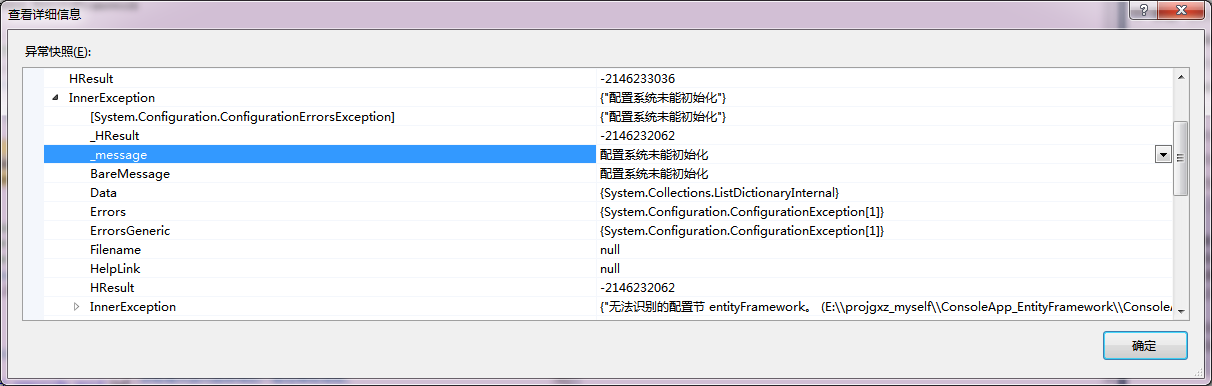
所以<configSections>配置节是必须的,其作用是创建自定义配置节,配置EF框架。默认生成的自定义配置节名称为entityFramework,所以下面的<entityFramework>也是必须的。
自动生成的<entityFramework>配置节中包含了<defaultConnectionFactory>、<providers>这两个配置节。其实只包含<providers>配置节就可以了且是必须的。
<defaultConnectionFactory>配置节的作用是配置code first默认连接工厂。此配置节下的<parameters>用来指定连接工厂构造函数的参数,如果参数是多个可以配置多个。
<providers> 配置节的作用是指定访问数据库的客户端dll(EF6起)。
自此默认的配置解析完了,接下来是非自动生成的配置。
需手动配置的部分
<connectionStrings>配置节用于配置数据库连接字符串,是必须配置的(一定程度上,若不配置则要显示传递数据库连接给上下文)。
<entityFramework>下的<contexts> 配置节是选配的,作用是配置自定义数据库上下文,完成数据库初始化。
<entityFramework>下的<interceptors>配置节配置拦截器(EF6.1起)。
例:
<interceptors>
<interceptor type="XXXX, XX">
<parameters>
<parameter value="param"/>
</parameters>
</interceptor>
</interceptors>
<interceptor>的type逗号前是类名(含命名空间),逗号后是命名空间,<parameters> 配置节配置类构造函数的参数。
<entityFramework>的属性codeConfigurationType配置数据库连接配置,必选。如果连接配置是自定义的扩展自DbConfiguration的类,那么要配置这个自定义类。
二、使用代码完成配置
使用代码完成配置要做到以下几项
1)创建System.Data.Entity.DbConfiguration类的子类
2)在子类构造函数中调用DbConfiguration的方法进行配置。
3) 将继承自DbConfiguration的子类传给DbConfigurationType特性,启用配置
DbConfiguration中的方法
protected internal void SetDefaultConnectionFactory(IDbConnectionFactory connectionFactory);
设置数据库连接工厂,对应<defaultConnectionFactory>配置节
protected internal void AddInterceptor(IDbInterceptor interceptor);
设置数据库拦截器,对应<interceptor>配置节
protected internal void SetExecutionStrategy(string providerInvariantName, Func<IDbExecutionStrategy> getExecutionStrategy);
设置访问数据库的客户端dll,对应<provider>配置节
三、示例(EF6.0.0)
以MySql为例说明只使用配置文件、只使用编码方式、使用配置文件和编码结合的方式完成配置。
EF操作MySql涉及到两个dll:MySql.Data.Entity,MySql.Data.Entity.EF6.dll(适用于.NET Framework 4.0 或.NET Framework 4.5),一般使用MySql.Data.Entity.EF6.dll
使用配置文件
<configuration>

  <configSections>

    <section name="entityFramework" type="System.Data.Entity.Internal.ConfigFile.EntityFrameworkSection, EntityFramework, Version=6.0.0.0, Culture=neutral, PublicKeyToken=b77a5c561934e089" requirePermission="false"/>

  </configSections>

  <startup>

    <supportedRuntime version="v4.0" sku=".NETFramework,Version=v4.5"/>

  </startup>

  <connectionStrings>

    <clear/>

    <!--清除默认的连接字符串,务必加上!!!-->

    <add name="Master" connectionString="database=ef_otestdb;server=192.168.107.13;uid=root;pwd=xxx;port=3306;Character Set=utf8;" providerName="MySql.Data.MySqlClient"/>

    <add name="NoEF" connectionString="database=ef_otestdb;server=192.168.107.12;uid=root;pwd=xxx;port=3306;Character Set=utf8;" providerName="MySql.Data.MySqlClient"/>

  </connectionStrings>

  <entityFramework codeConfigurationType="MySql.Data.Entity.MySqlEFConfiguration, MySql.Data.Entity.EF6">

    <providers>

      <provider invariantName="MySql.Data.MySqlClient" type="MySql.Data.MySqlClient.MySqlProviderServices, MySql.Data.Entity.EF6, Version=6.9.9.0, Culture=neutral, PublicKeyToken=c5687fc88969c44d"></provider>

    </providers>

  </entityFramework>

</configuration>
可以看出:
<configSections>配置节是默认生成的没有变化。
<connectionStrings>配置节配了两个连接字符串,并且使用<clear/>清除默认配置。
<entityFramework>配置节变化较大,数据库客户端为MySql.Data.MySqlClient。codeConfigurationType为MySql.Data.Entity.MySqlEFConfiguration
使用编码配置
    public class CustomDbConfiguration : MySqlEFConfiguration

    {

        public CustomDbConfiguration():base()

        {

            AddInterceptor(new CommandInterceptor(new Logger()));

            SetDatabaseLogFormatter((context, writeAction) => new CustomDatabaseLogFormatter(context, writeAction));

            SetExecutionStrategy(MySqlProviderInvariantName.ProviderName, () => new MySqlExecutionStrategy());

        }

    }

    [DbConfigurationType(typeof(CustomDbConfiguration))]

    public class CustomDbContext : DbContext

    {

        public CustomDbContext()

            : base("name=Master")

        {

            //其他代码

        }

    }
配置文件和编码结合
配置文件部分
<configuration>

  <configSections>

    <section name="entityFramework" type="System.Data.Entity.Internal.ConfigFile.EntityFrameworkSection, EntityFramework, Version=6.0.0.0, Culture=neutral, PublicKeyToken=b77a5c561934e089" requirePermission="false"/>

  </configSections>

  <startup>

    <supportedRuntime version="v4.0" sku=".NETFramework,Version=v4.5"/>

  </startup>

  <connectionStrings>

    <clear/>

    <!--清除默认的连接字符串,务必加上!!!-->

    <add name="Master" connectionString="database=ef_otestdb;server=192.168.107.13;uid=root;pwd=cnki2017;port=3306;Character Set=utf8;" providerName="MySql.Data.MySqlClient"/>

    <add name="NoEF" connectionString="database=ef_otestdb;server=192.168.107.13;uid=root;pwd=cnki2017;port=3306;Character Set=utf8;" providerName="MySql.Data.MySqlClient"/>

  </connectionStrings>

  <entityFramework>

    <providers>

      <provider invariantName="MySql.Data.MySqlClient" type="MySql.Data.MySqlClient.MySqlProviderServices, MySql.Data.Entity.EF6, Version=6.9.9.0, Culture=neutral, PublicKeyToken=c5687fc88969c44d"></provider>

    </providers>

  </entityFramework>

</configuration>
编码部分
public class CustomDbConfiguration : MySqlEFConfiguration

{

        public CustomDbConfiguration():base()

        {

            //AddInterceptor(new CommandInterceptor(new Logger()));

            SetDatabaseLogFormatter((context, writeAction) => new CustomDatabaseLogFormatter(context, writeAction));

            //SetExecutionStrategy(MySqlProviderInvariantName.ProviderName, () => new MySqlExecutionStrategy());

        }

}

[DbConfigurationType(typeof(CustomDbConfiguration))]

    public class CustomDbContext : DbContext

    {

        public CustomDbContext()

            : base("name=Master")

        {

            //this.Configuration.LazyLoadingEnabled = false;

            //new DropCreateDatabaseIfModelChanges<CustomDbContext>()

            //new DropCreateDatabaseAlways<CustomDbContext>()

            Database.SetInitializer<CustomDbContext>(null);

            this.Database.Log = Log;

        }

}
Entity Framework——配置文件设置的更多相关文章
- Entity framework 配置文件,实现类,测试类
配置文件信息App.config: 数据库IP地址为192.168.2.186 ,数据库名为 Eleven-Six , 用户名 123456,密码654321 <?xml version=&qu ...
- Entity Framework 实践系列 —— 搞好关系 - 单相思(单向一对一,one-to-one)【转】
原以为躲入代码世界,就可以不用搞关系,哪知“关系无处不在”.写代码多年之后,终于明白“面向对象的关键是搞好对象之间的关系”.而Entity Framework作为ORM中的明日之星,首当其冲的使命就是 ...
- Entity Framework 6连接Postgresql、SQLite、LocalDB的注意事项和配置文件
Postgresql Postgresql支持Code First的方式自动生成表,不过默认的模式是dbo而不是public,而且还可以自动生成自增主键. <?xml version=" ...
- 《Entity Framework 6 Recipes》中文翻译系列 (14) -----第三章 查询之查询中设置默认值和存储过程返回多结果集
翻译的初衷以及为什么选择<Entity Framework 6 Recipes>来学习,请看本系列开篇 3-6在查询中设置默认值 问题 你有这样一个用例,当查询返回null值时,给相应属性 ...
- Oracle + Entity Framework 更新没有设置主键的表
最近用Entity Framework 开发的时候,发现一个问题,在默认情况下,EF不能对一个没有主键的表进行更新.插入和删除的动作. 那么,应该怎么处理没有主键的表呢? 我们打开这个表的edmx文件 ...
- 关于Entity Framework更新的几种方式以及可能遇到的问题(附加类型“Model”的实体失败,因为相同类型的其他实体已具有相同的主键值)在使用 "Attach" 方法或者将实体的状态设置为 "Unchanged" 或 "Modified" 时如果图形中的任何实体具有冲突键值,则可能会发生上述行为
在日常使用Entity Framework中,数据更新通常会用到.下面就简单封装了一个DBContext类 public partial class EFContext<T> : DbCo ...
- 关于使用Entity Framework时遇到的问题 未找到具有固定名称“System.Data.SqlClient”的 ADO.NET 提供程序的实体框架提供程序。请确保在应用程序配置文件的“entityFramework”节中注册了该提供程序
问题描述: 使用Entity Framework获取数据时报以下错误: 未找到具有固定名称“System.Data.SqlClient”的 ADO.NET 提供程序的实体框架提供程序.请确保在应用程序 ...
- Entity Framework 使用Mysql的配置文件
<?xml version="1.0" encoding="utf-8"?> <configuration> <configSec ...
- Entity Framework教程(第二版)
源起 很多年前刚毕业那阵写过一篇关于Entity Framework的文章,没发首页却得到100+的推荐.可能是当时Entity Framework刚刚发布介绍EF的文章比较少.一晃这么多年过去了,E ...
随机推荐
- mysql-innoDB-事务
事务的隔离级别: READ UNCOMMITTED(未提交读) 在这个级别,事务中的修改,即使没有提交,对其他事务也都是可见的,事务可以读取未提交的数据. READ COMMITTED(提交读) 一个 ...
- 针对php脚本文件执行锁定的代码,避免脚本在同一时间重复运行
<?php//针对php脚本文件执行锁定的代码,避免脚本在同一时间重复运行,http://ken.01h.net/define('PHP_LOCK_FILE', dirname(__FILE__ ...
- linux_samba服务安装
什么是samba服务? 用于Windows和linux系统之间实现共享文件的目的服务 如何配置其服务? Linux端: 搭建服务 1. 安装samba yum install -y samba 2. ...
- php 在foreach中循环数组的时候添加元素的属性
foreach($arr as $k => &$v){ //注意,由于上面遍历的时候写了地址传值符&, //所以下面可以直接给$v 赋值;如果不写&符号,下面这样写是没有 ...
- MySql全文索引
使用索引是数据库性能优化的必备技能之一.在MySQL数据库中,有四种索引:聚集索引(主键索引).普通索引.唯一索引以及我们这里将要介绍的全文索引(FULLTEXT INDEX). 全文索引(也称全文检 ...
- CU社区shell板块awk十三问整理
CU社区shell板块awk十三问整理 一.RS="" 当 RS="" 时,会将\n强制加入到FS变量中,因为RS为空时,是将连续多空行作为分隔符,近似于\n\ ...
- SQL语句-INSERT语句
Insert语句 Insert语句三种写法: mysql> desc students; +-------+-------------+------+-----+---------+------ ...
- SpringMVC源码之Controller查找原理
摘要 本文从源码层面简单讲解SpringMVC的处理器映射环节,也就是查找Controller详细过程. SpringMVC请求流程 Controller查找在上图中对应的步骤1至2的过程 Sprin ...
- Spring源码解析一(框架梳理)
整体架构 打算开始写这个系列,不为上首页,也不为博取多少关注,只有一个目的:梳理知识,扩充思路:废话不多,开始吧.第一步,大家去spring的官方github下面去下载它的源码,具体的自己谷歌,我已经 ...
- 闭包(流畅的python 学习笔记)
什么是闭包 其实,闭包指延伸了作用域的函数,其中包含函数定义体中引用.但是不在定义体中定义的非全局变量.函数是不是匿名的没有关系,关键是它能访问定义体之外定义的非全局变量. 示例 7-8 averag ...