
RocketMQ4.3.X关于设置useEpollNativeSelector = true报错问题
前一阵子刚整理完RocketMQ4.3.x版本的相关配置的工作,接下来就来测试一下改变参数会带来什么好的结果
首先我就选中了useEpollNativeSelector 这个参数
默认这个参数是 false
这个参数的意思就是是否启用Epoll IO模型。Linux环境建议开启
然后我就打开了这个参数试试看看会不会生效
首先是namesrv 弄了一个配置文件指向启动

然后启动namesrv
sh bin/mqnamesrv -c conf/namesrv.conf

很不幸抛出了一个异常
java.lang.IllegalStateException: incompatible event loop type: io.netty.channel.nio.NioEventLoop

	at io.netty.channel.AbstractChannel$AbstractUnsafe.register(AbstractChannel.java:411)

	at io.netty.channel.SingleThreadEventLoop.register(SingleThreadEventLoop.java:72)

	at io.netty.channel.SingleThreadEventLoop.register(SingleThreadEventLoop.java:60)

	at io.netty.channel.MultithreadEventLoopGroup.register(MultithreadEventLoopGroup.java:64)

	at io.netty.bootstrap.AbstractBootstrap.initAndRegister(AbstractBootstrap.java:320)

	at io.netty.bootstrap.AbstractBootstrap.doBind(AbstractBootstrap.java:271)

	at io.netty.bootstrap.AbstractBootstrap.bind(AbstractBootstrap.java:235)

	at org.apache.rocketmq.remoting.netty.NettyRemotingServer.start(NettyRemotingServer.java:212)

	at org.apache.rocketmq.namesrv.NamesrvController.start(NamesrvController.java:156)

	at org.apache.rocketmq.namesrv.NamesrvStartup.start(NamesrvStartup.java:154)

	at org.apache.rocketmq.namesrv.NamesrvStartup.main0(NamesrvStartup.java:58)

	at org.apache.rocketmq.namesrv.NamesrvStartup.main(NamesrvStartup.java:51)
通过抛出的异常追查一下源码
发现在执行构造函数的时候初始化的是下面代码 90-143行
public NettyRemotingServer(final NettyServerConfig nettyServerConfig,

        final ChannelEventListener channelEventListener) {

        super(nettyServerConfig.getServerOnewaySemaphoreValue(), nettyServerConfig.getServerAsyncSemaphoreValue());

        this.serverBootstrap = new ServerBootstrap();

        this.nettyServerConfig = nettyServerConfig;

        this.channelEventListener = channelEventListener;

        int publicThreadNums = nettyServerConfig.getServerCallbackExecutorThreads();

        if (publicThreadNums <= 0) {

            publicThreadNums = 4;

        }

        this.publicExecutor = Executors.newFixedThreadPool(publicThreadNums, new ThreadFactory() {

            private AtomicInteger threadIndex = new AtomicInteger(0);

            @Override

            public Thread newThread(Runnable r) {

                return new Thread(r, "NettyServerPublicExecutor_" + this.threadIndex.incrementAndGet());

            }

        });

        this.eventLoopGroupBoss = new NioEventLoopGroup(1, new ThreadFactory() {

            private AtomicInteger threadIndex = new AtomicInteger(0);

            @Override

            public Thread newThread(Runnable r) {

                return new Thread(r, String.format("NettyBoss_%d", this.threadIndex.incrementAndGet()));

            }

        });

        if (useEpoll()) {

            this.eventLoopGroupSelector = new EpollEventLoopGroup(nettyServerConfig.getServerSelectorThreads(), new ThreadFactory() {

                private AtomicInteger threadIndex = new AtomicInteger(0);

                private int threadTotal = nettyServerConfig.getServerSelectorThreads();

                @Override

                public Thread newThread(Runnable r) {

                    return new Thread(r, String.format("NettyServerEPOLLSelector_%d_%d", threadTotal, this.threadIndex.incrementAndGet()));

                }

            });

        } else {

            this.eventLoopGroupSelector = new NioEventLoopGroup(nettyServerConfig.getServerSelectorThreads(), new ThreadFactory() {

                private AtomicInteger threadIndex = new AtomicInteger(0);

                private int threadTotal = nettyServerConfig.getServerSelectorThreads();

                @Override

                public Thread newThread(Runnable r) {

                    return new Thread(r, String.format("NettyServerNIOSelector_%d_%d", threadTotal, this.threadIndex.incrementAndGet()));

                }

            });

        }

        loadSslContext();

    }
也就是说这里接收链接的线程池 eventLoopGroupBoss 永远都是 NioEventLoopGroup 如果设置了useEpollNativeSelector=true就会初始化EpollEventLoopGroup这个类处理请求
这样就会造成两种线程模型的不兼容状态
导致出现异常 java.lang.IllegalStateException: incompatible event loop type: io.netty.channel.nio.NioEventLoop
按常理说阿里的人不会出现这样的低级错误啊
回头又看了看github的bug列表果然有人提这个问题bug还是开启状态
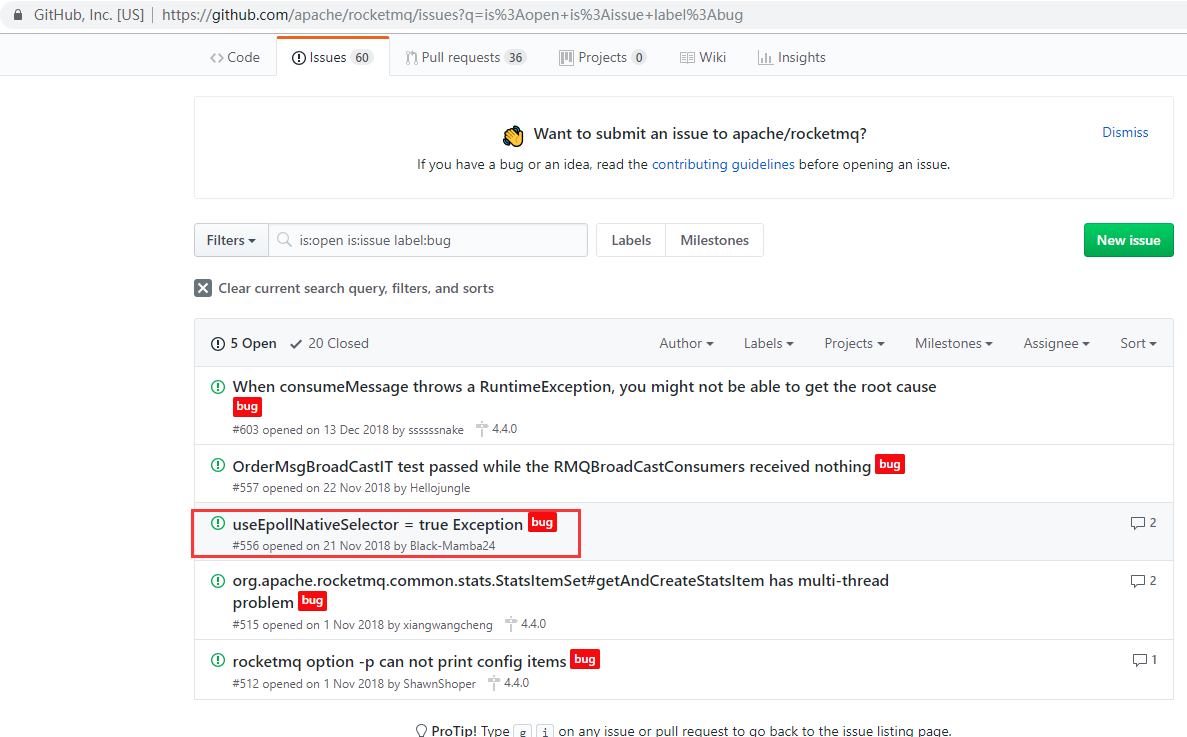
????为什么?
难道是我使用配置有问题吗?还是哪里理解有误那?知道的网友可以告诉我啊!!!!
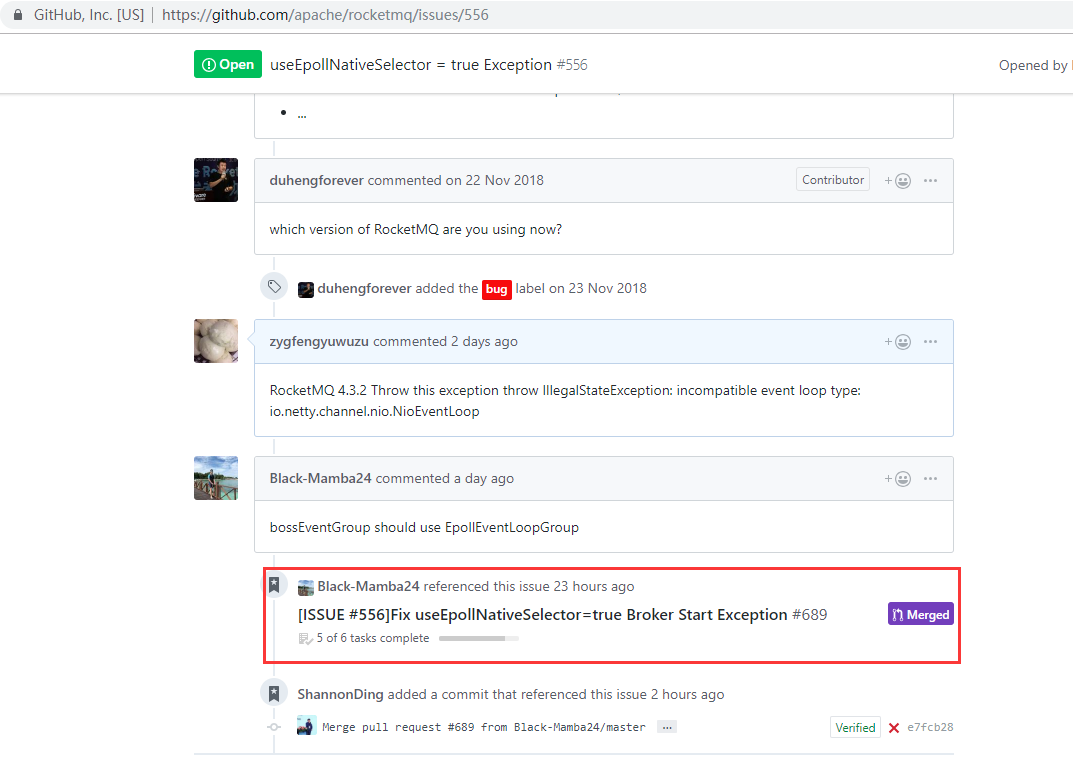
最新消息我也提交了bug维护人员已经修改bug但是要等到4.4.1版本才可以修正

RocketMQ4.3.X关于设置useEpollNativeSelector = true报错问题的更多相关文章
- MySQL 设置root密码报错:mysqladmin: connect to server at 'localhost' failed
MySQL 设置root密码报错:mysqladmin: connect to server at 'localhost' failed 1.安装完MySQL设置root密码报错如下 [root@vm ...
- mysql5.7设置简单密码报错ERROR 1819 (HY000): Your password does not satisfy the current policy requirements
注:本文来源于< mysql5.7设置简单密码报错ERROR 1819 (HY000): Your password does not satisfy the current policy r ...
- Python模块学习之xlrd 读取Excel时传入formatting_info=True报错:NotImplementedError: formatting_info=True not yet implemented
问题:xlrd读取Excel时传入 formatting_info=True 报错 之前我们使用读取xls文件的时候都是使用的xlrd库,但是这个库只能操作 .xls格式,对于后来的 .xlsx的版本 ...
- error_reporting() 设置 PHP 的报错级别并返回当前级别
error_reporting() 设置 PHP 的报错级别并返回当前级别. 语法 error_reporting(report_level) 如果参数 level 未指定,当前报错级别将被返回.下面 ...
- django2.0变动数据库设置外键报错
1.报错TypeError: __init__() missing 1 required positional argument: 'on_delete' django2.0以后创建数据库外键的时候必 ...
- 解决 web.xml is missing and <failOnMissingWebXml> is set to true 报错
在学习maven模块化构建项目的时候遇到了如下报错信息: web.xml is missing and <failOnMissingWebXml> is set to true. 这时候需 ...
- MySQL设置外键报错 #1452 - Cannot add or update a child row: a foreign key constraint fails 解决方法
MySQL数据库,当我尝试在A表中设置B表的主键为外键时,报出错误:#1452 - Cannot add or update a child row: a foreign key constraint ...
- Confluence设置MySQL数据库报错:必须使用'READ-COMMITTED'作为默认隔离级别。
解决方案: mysql -u root -p123456 SET GLOBAL tx_isolation='READ-COMMITTED'; mysql数据库创建 1.设置mysql隔离级别 SET ...
- svn 设置post-commit后 报错svn: Can't convert string from 'UTF-8' to native encoding
文件语言编码和系统冲突导致的错误,设置svn目录下hooks/post-commit加上: export LANG=zh_CN.GB2312 或者: export LANG=zh_CN.UTF-8
随机推荐
- 免费申请使用IBM Cloud Lite(轻量套餐) 续
之前尝试申请了IBM的轻量套餐,过程很简单,操作起来也比较方便,就是能够用到的地方不多,虽说几乎是无限流量且永久免费,我能做的也只是做个小网站 免费用户默认的是轻量应用服务,如果需要功能更多更全的应用 ...
- 浅论各种调试接口(SWD、JTAG、Jlink、Ulink、STlink)的区别
JTAG协议 JTAG(Joint Test Action Group,联合测试行动小组)是一种国际标准测试协议(IEEE 1149.1兼容),主要用于芯片内部测试.现在多数的高级器件都支持JTAG协 ...
- 每日分享!~ JavaScript中面试基础--1,数组检测的方式 2.传统事件绑定和W3C标准绑定事件的区别~
javaScript 那些方式中检测数据类型 typeof typeof isNaN // 结果是function 检测数组的几种方式 instanceof arr instanceof Array( ...
- jdk安装 java环境配置
登录http://www.oracle.com,下载JDK(J2SE) JDK 1.0,1.1,1.2,1.3,1.4 1.5 (JDK5.0) à支持注解.支持泛型 1.6(JDK6.0) à Se ...
- java安装和配置(3.18)
大家好,我是一名笨笨的程序小白,刚刚学习完C#的基本开发,现在要开始学习java了!我希望在博客园里记录下我的学习日记,我也不敢保证自己会讲的东西多么全面,但是都是比较基础的东西,如果对你也有点点的小 ...
- 【视频】ASP.NET Core MVC 2.* 入门
比较初级的入门教程,网址在B站:https://www.bilibili.com/video/av33728783/ 内容如下: 1. ASP.NET Core 简介和开发工具 2. ASP.NET ...
- 设计一个可拔插的 IOC 容器
前言 磨了许久,借助最近的一次通宵上线 cicada 终于更新了 v2.0.0 版本. 之所以大的版本号变为 2,确实是向下不兼容了:主要表现为: 修复了几个反馈的 bug. 灵活的路由方式. 可拔插 ...
- 【Android Studio安装部署系列】五、新建你的第一个项目:HelloWorld
版权声明:本文为HaiyuKing原创文章,转载请注明出处! 概述 新建项目的步骤. 开始创建项目 如果是刚安装Android studio的话,点击Start a new Android Studi ...
- 限定项目的 Node.js 版本
限定项目运行所需的 Node.js 版本可保证项目在一个稳定可预期的环境中运行,减少不必要的故障.甚至有些依赖库只能工作于某些版本下.同时,不加以限制的话,在多人合作的项目中恐怕会引起环境不一致带来的 ...
- 机器学习——决策树,DecisionTreeClassifier参数详解,决策树可视化查看树结构
0.决策树 决策树是一种树型结构,其中每个内部节结点表示在一个属性上的测试,每一个分支代表一个测试输出,每个叶结点代表一种类别. 决策树学习是以实例为基础的归纳学习 决策树学习采用的是自顶向下的递归方 ...