
JFreeChart画图+jsp页面显示实现统计图
1 开发环境:
1、eclipse(可替换)
2、jfreechart-1.0.19
2 说明:
(1) source目录:为 jfreechart的源码目录;不会的主要看这里。因为他的文档是收费的。
(2) lib目录:为包目录,我们需要关注的包为 jfreechart-1.0.10.jar、 gnujaxp.jar和 jcommon-1.0.13.jar这三个包;
(3)根目录下的 jfreechart-1.0.10-demo.jar是例子程序,大家双击后可看到其中有很多例子的运行结果。
3 JavaWeb开发流程
3.1 导入jar包
将jfreechart-1.0.19/lib下面所有jar包导入到“/WEB-INF/lib”目录下
3.2 修改配置文件
在 web.xml文件中增加如下配置,尽量配置在其他优先级不高的servlet配置前面:
<servlet>

  <servlet-name>DisplayChart</servlet-name>

  <servlet-class>

      org.jfree.chart.servlet.DisplayChart   <!--这个固定不变-->

  </servlet-class>

</servlet>

<servlet-mapping>

      <servlet-name>DisplayChart</servlet-name>

      <url-pattern>/DisplayChart</url-pattern>

</servlet-mapping>
3.3 编写jsp文件
<%@ page language="java" contentType="text/html; charset=UTF-8"

    pageEncoding="UTF-8"%>

<%@ page import="org.jfree.data.general.DefaultPieDataset" %>

<%@ page import="org.jfree.chart.ChartFactory" %>

<%@ page import="org.jfree.chart.JFreeChart" %>

<%@ page import="org.jfree.chart.servlet.*" %>

<%@ page import="org.jfree.chart.StandardChartTheme" %>

<%@ page import="java.awt.Font" %>

<%@page import="org.jfree.chart.servlet.ServletUtilities"%>

<%@ page import="org.jfree.chart.plot.PlotOrientation"%>

<%@ page import="org.jfree.data.category.DefaultCategoryDataset"%>

<!DOCTYPE html PUBLIC "-//W3C//DTD HTML 4.01 Transitional//EN" "http://www.w3.org/TR/html4/loose.dtd">

<html>

<head>

<meta http-equiv="Content-Type" content="text/html; charset=UTF-8">

<title>数据分析</title>

</head>

<body>

    <!-- 饼状图 -->

     <%

    DefaultPieDataset dpd = new DefaultPieDataset();

    dpd.setValue("管理人员", );

    dpd.setValue("市场人员", );

    dpd.setValue("开发人员", );

    dpd.setValue("其他人员", );

    //这一段是防止乱码使用的

    StandardChartTheme standardChartTheme=new StandardChartTheme("CN");  //创建主题样式

    standardChartTheme.setExtraLargeFont(new Font("隶书",Font.BOLD,));  //设置标题字体

    standardChartTheme.setRegularFont(new Font("宋书",Font.PLAIN,));    //设置图例的字体

    standardChartTheme.setLargeFont(new Font("宋书",Font.PLAIN,));      //设置轴向的字体

    ChartFactory.setChartTheme(standardChartTheme);                        //应用主题样式

    JFreeChart chart = ChartFactory.createPieChart("某公司组织结构图",dpd, true, false, false);

    String fileName = ServletUtilities.saveChartAsPNG(chart,,,session);

    //ServletUtilities是面向web开发的工具类,返回一个字符串文件名,文件名自动生成,生成好的图片会自动放在服务器(tomcat)的临时文件下(temp)

    String url = request.getContextPath() + "/DisplayChart?filename=" + fileName;

    //根据文件名去临时目录下寻找该图片,这里的/DisplayChart路径要与配置文件里用户自定义的<url-pattern>一致

%>

     <img src="<%= url %>" width="" height="">

    <!-- 柱状图 -->

 <%

     DefaultCategoryDataset dataset = new DefaultCategoryDataset();

     dataset.addValue(0.2, "广州", "猪肉");

     dataset.addValue(0.4, "广州", "牛肉");

     dataset.addValue(0.1, "广州", "鸡肉");

     dataset.addValue(0.1, "广州", "鱼肉");

     // 创建主题样式

     StandardChartTheme standardChartTheme1 = new StandardChartTheme("CN");

     // 设置标题字体

     standardChartTheme1.setExtraLargeFont(new Font("隶书", Font.BOLD, ));

     // 设置图例的字体

     standardChartTheme1.setRegularFont(new Font("宋书", Font.PLAIN, ));

     // 设置轴向的字体

     standardChartTheme1.setLargeFont(new Font("宋书", Font.PLAIN, ));

     // 应用主题样式

     ChartFactory.setChartTheme(standardChartTheme1);

     JFreeChart chart1 = ChartFactory.createBarChart3D("肉类销量统计图",

                       "肉类",

                       "销量百分比(%)",

                       dataset,

                       PlotOrientation.VERTICAL,

                       false,

                       false,

                       false);

     String filename = ServletUtilities.saveChartAsPNG(chart1, , , null, session);

     String graphURL = request.getContextPath() + "/DisplayChart?filename=" + filename;

     System.out.println(graphURL + "\n"+ filename);

 %>

 <img src="<%= graphURL %>"width= height= border= usemap="#<%= filename %>">

</body>

</html>
4 效果图
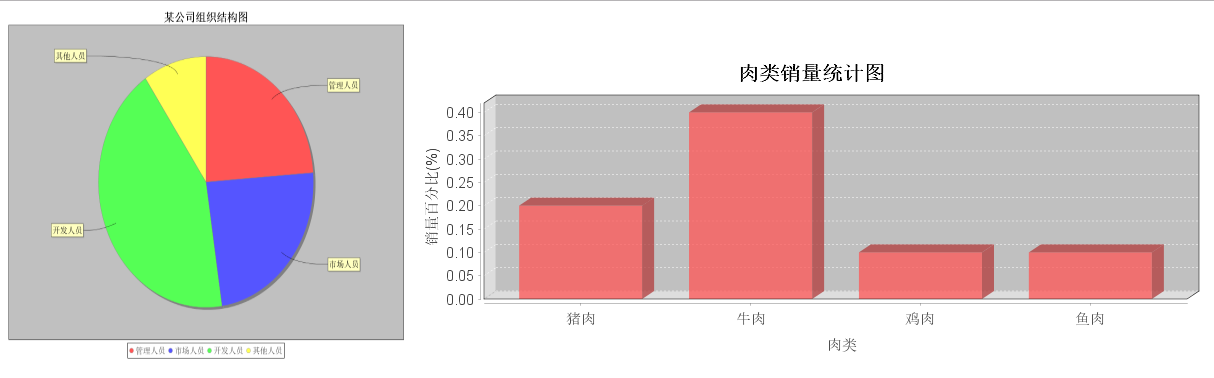
附jar下载地址:http://www.java2s.com/Code/Jar/CatalogJar.htm
JFreeChart画图+jsp页面显示实现统计图的更多相关文章
- jfreechart 在jsp页面显示所画的图片(resin服务器的servelet配置是关键)(图片只过内存)
用的web服务器是resin服务器,在配置web.xml时需要注意,其实resin服务器的web.xml服务器配置和tomcat服务器的配置很像, 1. 我第一次按照自己的想法,想当然的在resin- ...
- 转:jsp页面显示中文乱码解决方案
jsp页面显示中文乱码: jsp页面的编码方式有两个地方需要设置: <%@ page language="java" import="java.util.*&quo ...
- JSP 页面显示sql中数据。el
存储数据库字段. package Bean; /** * Created by Administrator on 2017/5/24. */ public class info { private S ...
- 如何解决JSP页面显示乱码问题
一.JSP页面显示乱码 下面的显示JSP页面(display.jsp)就出现乱码: <html> <head> <title>JSP的中文处理</title& ...
- 通用分页jsp页面显示
注:本章内容都是在上一篇文章 通用分页后台显示:https://www.cnblogs.com/ly-0919/p/11058942.html 的基础上进行改进,所以有许多的类都在上一篇, 带来不便 ...
- jsp页面显示问题
一.在jsp页面的表格中,如果有表格中的某一个元素 内容太长,需要截取显示,方法如下: <%@ taglib prefix="fn" uri="http://jav ...
- JSP页面显示乱码
下面的显示页面(display.jsp)就出现乱码: <html> <head> <title>JSP的中文处理</title> <meta ht ...
- Java从服务器上获取时间,动态在jsp页面显示
Java获取服务器时间,动态显示到jsp页面,大家都是到Java只能获取一次,到页面的时间是静态的,不过通过js和Java的合作,巧妙地实现此功能 本人是给电视做系统,客户要求页面能显示时间,因为电视 ...
- Jsp页面显示时间:<fmt>标签问题
<%@ taglib prefix="fmt" uri="http://java.sun.com/jstl/fmt"%> <%@ taglib ...
随机推荐
- Flask导入静态文件问题
然而如果使用flask开发web,并且需要在本地导入已经写好的css js 文件或者image一系列,这些文件是静态文件,需要另外建一个文件夹static;并且在html文件修改导入方法,exampl ...
- Polaristech 刘洋:基于 OpenResty/Kong 构建边缘计算平台
2019 年 3 月 23 日,OpenResty 社区联合又拍云,举办 OpenResty × Open Talk 全国巡回沙龙·北京站,Polaristech 技术专家刘洋在活动上做了<基于 ...
- 通过JDK常用工具监控Java进程的内存占用情况
目录 1 JDK 工具的使用 2 查看 GC 日志信息 3 添加 JMS 远程监控 Tomcat是一款常用的Web容器, 它是运行在 JVM(Java Virtual Machine) 中的一个Jav ...
- netcore编程之后面对不习惯的xshell黑屏部署,是时候使用jenkins自动化发布工具了
在很久之前net还只能在windows上部署的时候,或许很多创业公司的朋友发布项目还都是人肉部署,反正windows都是可视化的界面,拖拖拉拉,开开关关还不 是特别麻烦...现如今你的项目需要在li ...
- Java实现简易联网坦克对战小游戏
目录 介绍 本项目的Github地址 基础版本 游戏的原理, 图形界面(非重点) 游戏逻辑 网络联机 客户端连接上服务器 定义应用层协议 TankNewMsg TankMoveMsg MissileN ...
- vue slot+传参
插槽分为默认插槽和具名插槽: 默认插槽: //父组件<div> <h3>父组件</h3> <testChild> <div>默认插槽< ...
- 一个非常简单的IMPDP事儿
EXPDP出来的DMP文件包含2个Schema的表,现在要IMPDP到一个Schema里面试了几把都报错,好久不用逻辑导出入,折腾了好久,出现各种错误1.创建目录并授权create or replac ...
- C语言中#undef作用
#undef 作用:取消定义的宏 指令格式:#undef 标识符 1 #include <stdio.h> 2 3 #define MAX 5 4 5 int main() { 6 pri ...
- 秋季学期学习总结&&以及下学期的期待
秋季总结 第一学期已经结束了,下面来分点归纳下知识点: ·基础编程:利用c语言来进行编程 ·分支结构:利用if-else语句和switch语句编程,以及字符型数据的利用 ·循环结构:利用while.d ...
- scrapy-redis 分布式爬虫
为什么要学? Scrapy_redis在scrapy的基础上实现了更多,更强大的功能. 有哪些功能体现? request去重.爬虫持久化.实现分布式爬虫.断点续爬(带爬取的request存在redis ...