
MVC跨域CORS扩展
一般的基于浏览器跨域的主要解决方法有这么几种:1.JSONP 2.IFrame方式 3.通过flash实现 4.CORS跨域资源共享 ,这里我们主要关注的是在MVC里面的CORS跨域,其余的方式大家可以在网上找到相关的知识看一下。
- CORS的原理:
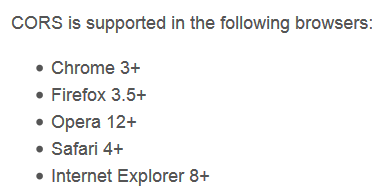
- CORS浏览器支持情况如下图:

一般的针对ASP.NET MVC,cors跨域访问,只需要在web.config中添加如下的内容即可
<system.webServer>
<httpProtocol>
<customHeaders>
<add name="Access-Control-Allow-Origin" value="*" />
<add name="Access-Control-Allow-Headers" value="Content-Type" />
<add name="Access-Control-Allow-Methods" value="GET, POST, PUT, DELETE, OPTIONS" />
</customHeaders>
</httpProtocol>
<handlers>
<remove name="ExtensionlessUrlHandler-Integrated-4.0" />
<remove name="OPTIONSVerbHandler" />
<remove name="TRACEVerbHandler" />
<add name="ExtensionlessUrlHandler-Integrated-4.0" path="*." verb="*" type="System.Web.Handlers.TransferRequestHandler" preCondition="integratedMode,runtimeVersionv4.0" />
</handlers>
</system.webServer>
但是这种全局设置存在局限性,因为你无法有选择性的设置可以跨域访问你本站的站点,所以就想到能不能通过特性标记控制器,或者标记控制器中的方法来设置跨域访问权限。
比如如下的方式
[ControllerAllowOrigin(AllowSites=new string[] { "aa.com" ,"bb.com"})]
public class TestController
{
}
这样你可以设置aa.com,bb.com跨域请求你站点TestController里面的任何数据接口方法
或者是如下方式:
public class TestController
{
[ActionAllowOrigin(AllowSites=new string[] { "aa.com" ,"bb.com"})]
public JsonResult Test()
{
}
}
设置aa.com,bb.com只能跨域请求你站点里面的TestController中的Test方法。
这样的话,我们控制起来就更加灵活方便,允许跨域访问本站的,在AllowSites里面添加地址就行了。
1. 基于控制器的跨域访问设置,这边我定义了一个ControllerAllowOriginAttribute,继承于AuthorizeAttribute
代码如下:
public class ControllerAllowOriginAttribute : AuthorizeAttribute
{
public string[] AllowSites { get; set; }
public override void OnAuthorization(System.Web.Mvc.AuthorizationContext filterContext)
{
AllowOriginAttribute.onExcute(filterContext, AllowSites);
}
}
2.基于方法的跨域访问设置,我定义了一个ActionAllowOriginAttribute,继承于ActionFilterAttribute,
代码如下:
public class ActionAllowOriginAttribute : ActionFilterAttribute
{
public string[] AllowSites { get; set; }
public override void OnActionExecuting(System.Web.Mvc.ActionExecutingContext filterContext)
{
AllowOriginAttribute.onExcute(filterContext, AllowSites);
base.OnActionExecuting(filterContext);
}
}
核心代码其实很简单,就这么几行:
public class AllowOriginAttribute
{
public static void onExcute(ControllerContext context, string[] AllowSites)
{
var origin = context.HttpContext.Request.Headers["Origin"];
Action action = () =>
{
context.HttpContext.Response.AppendHeader("Access-Control-Allow-Origin", origin);
};
if (AllowSites != null && AllowSites.Any())
{
if (AllowSites.Contains(origin))
{
action();
}
}
}
}
其中设置跨域访问权限的代码就是这一段HttpContext.Response.AppendHeader("Access-Control-Allow-Origin", origin);
完整的代码如下:
using System;

using System.Collections.Generic;

using System.Linq;

using System.Web;

using System.Web.Mvc;

namespace IocTEST.Common

{

    public class AllowOriginAttribute

    {

        public static void onExcute(ControllerContext context, string[] AllowSites)

        {

            var origin = context.HttpContext.Request.Headers["Origin"];

            Action action = () =>

            {

                context.HttpContext.Response.AppendHeader("Access-Control-Allow-Origin", origin);

            };

            if (AllowSites != null && AllowSites.Any())

            {

                if (AllowSites.Contains(origin))

                {

                    action();

                }

            }

        }

    }

    public class ActionAllowOriginAttribute : ActionFilterAttribute

    {

        public string[] AllowSites { get; set; }

        public override void OnActionExecuting(System.Web.Mvc.ActionExecutingContext filterContext)

        {

            AllowOriginAttribute.onExcute(filterContext, AllowSites);

            base.OnActionExecuting(filterContext);

        }

    }

    public class ControllerAllowOriginAttribute : AuthorizeAttribute

    {

        public string[] AllowSites { get; set; }

        public override void OnAuthorization(System.Web.Mvc.AuthorizationContext filterContext)

        {

            AllowOriginAttribute.onExcute(filterContext, AllowSites);

        }

    }

}
调用方式
[ControllerAllowOrigin(AllowSites = new string[] { "http://www.cnblogs.com" })]
public class HomeController : Controller
{
public JsonResult Test()
{
return Json(new { name = "aaa" }, JsonRequestBehavior.AllowGet);
}
}
public class HomeController : Controller
{
[ActionAllowOrigin(AllowSites = new string[] { "http://www.cnbeta.com" })]
public JsonResult Test()
{
return Json(new { name = "aaa" }, JsonRequestBehavior.AllowGet);
}
}
测试的时候,可以将需要跨域访问你本地localhost站点的网站打开,然后F12打开firebug,在console里面输入$.post('http://localhost:80/',{},function(){})或者
$.get('http://localhost:80/',{},function(){}) 观察请求状态。
MVC跨域CORS扩展的更多相关文章
- 跨域CORS
一.跨域CORS是什么 当一个资源从与该资源本身所在的服务器的域或端口不同的域或不同的端口请求一个资源时,浏览器会发起一个跨域 HTTP 请求.出于安全考虑,浏览器会限制从脚本内发起的跨域HTTP请求 ...
- netCore2.0 Api 跨域(Cors)
1.在使用netCore2.0 使用WebApi的过程中涉及到了跨域处理. 在Microsoft.AspNetCore.All包中包含跨域Cors的处理,不必单独添加. 2.打开Startup.cs文 ...
- python 全栈开发,Day100(restful 接口,DRF组件,DRF跨域(cors组件))
昨日内容回顾 1. 为什么要做前后端分离? - 前后端交给不同的人来编写,职责划分明确.方便快速开发 - 针对pc,手机,ipad,微信,支付宝... 使用同一个接口 2. 简述http协议? - 基 ...
- IIS Manager 配置文件修该,允许跨域CORS访问
IIS Manager 配置文件修该,允许跨域CORS访问 IIS Manager 的api访问会出现跨域问题,需要 IIS Manager的配置文件中修改. 配置文件的路径:C:\Program F ...
- zuul+security跨域Cors问题解决
zuul+security跨域Cors问题解决 简介 场景 在服务后台都会出现跨域cors问题,不过一般spring解决起来比较方便,在框架+框架的基础上,问题就显得特别明显了,各种冲突,不了解源码的 ...
- 解决dotnet-Angular的跨域(cors)问题
解决dotnet-Angular的跨域(cors)问题 前言 之前学了点 Angular ,打算用 dotnet core 做后端,之前没接触过这方面的东西,理所当然的遇到了跨域问题,之后也解决了,所 ...
- Spring MVC 后端接口支持跨域CORS调用
Spring MVC 从4.2版本开始增加了对CORS的支持,可以全局配置,也可以对类或方法配置:可以通过Java代码,也可以通过xml配置方式. 对于低版本的Spring MVC 可以通过Filte ...
- Asp.Net 跨域,Asp.Net MVC 跨域,Session共享,CORS,Asp.Net CORS,Asp.Net MVC CORS,MVC CORS
比如 http://www.test.com 和 http://m.test.com 一.简单粗暴的方法 Web.Config <system.web> <!--其他配置 省略……- ...
- 关于Spring MVC跨域
1.Sping MVC 3.X跨域 关于跨域问题,主要用的比较多的是cros跨域. 详细介绍请看https://developer.mozilla.org/zh-CN/docs/Web/HTTP/Ac ...
随机推荐
- [解决方案]CREATE DATABASE statement not allowed within multi-statement transaction.
CREATE DATABASE statement not allowed within multi-statement transaction. 刚开始报这个错误的时候,我上度娘搜了一下. 别人是在 ...
- Devexress XPO xpPageSelector 使用
在官网找到的.在这里做个备注. private void simpleButton1_Click(object sender, EventArgs e) { ) return; xpPageSelec ...
- JAVA 读写Excel
ExcelUtil.java package pers.kangxu.datautils.utils; import java.io.File; import java.io.FileInputStr ...
- java获取https网站证书,附带调用https:webservice接口
一.java 获取https网站证书: 1.创建一个java工程,新建InstallCert类,将以下代码复制进去 package com; import java.io.BufferedReader ...
- 如何实现一个php框架系列文章【6】mysql数据库
实现一个mysql数据库封装需要考虑的问题 使用方便性 采用直接sql语句操作方式.只要会写sql语句,那么将没有其他学习成本. uctphp框架提供的dba辅助封装类,用会之后将爱不释手. 使用前需 ...
- 转载:TypeScript 简介与《TypeScript 中文入门教程》
简介 TypeScript是一种由微软开发的自由和开源的编程语言.它是JavaScript的一个超集,而且本质上向这个语言添加了可选的静态类型和基于类的面向对象编程.安德斯·海尔斯伯格,C#的首席架构 ...
- [连载]《C#通讯(串口和网络)框架的设计与实现》- 8.总体控制器的设计
目 录 第八章 总体控制器的设计... 2 8.1 总控制器的职能... 2 8.2 组装和释放部件... 3 8.3 ...
- 用Fiddler模拟低速网络环境
有时候宽频网路用习惯了… 在开发的过程就比较少去考虑最佳化的问题… 但当有人反应说「你的网页好慢」甚至当网路速度慢,会造成你的网页跳出什么啊哩不哒的bug时要如何重现呢? 我们可以用Fiddler 这 ...
- Maven远程仓库的配置
在很多情况下,默认的中央仓库无法满足项目的需求,可能项目需要的构件存在于另外一个远程仓库中,如JBoss Maven仓库.这时,可以在POM中配置该仓库,见代码如下: <!-- 远程仓库的配置 ...
- script标签中defer和async属性的区别
这篇文章来源于JS高级程序设计第三版中关于script标签的介绍,结合查阅的资料写下的学习笔记. 向html页面中插入javascript代码的主要方法就是通过script标签.其中包括两种形式,第一 ...