
爬虫Scrapy框架运用----房天下二手房数据采集
在许多电商和互联网金融的公司为了更好地服务用户,他们需要爬虫工程师对用户的行为数据进行搜集、分析和整合,为人们的行为选择提供更多的参考依据,去服务于人们的行为方式,甚至影响人们的生活方式。我们的scrapy框架就是爬虫行业使用的主流框架,房天下二手房的数据采集就是基于这个框架去进行开发的。
数据采集来源:‘房天下----全国二手房’
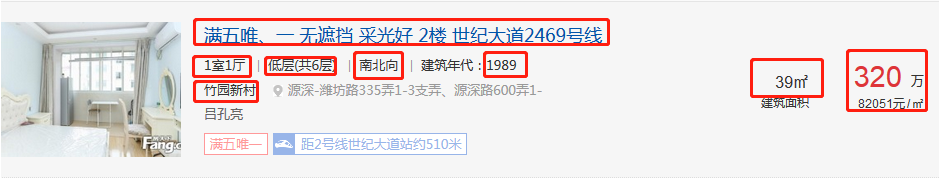
目标数据:省份名、城市名、区域名、房源介绍、房源小区、户型、朝向、楼层、建筑面积、建造时间、单价、楼盘链接
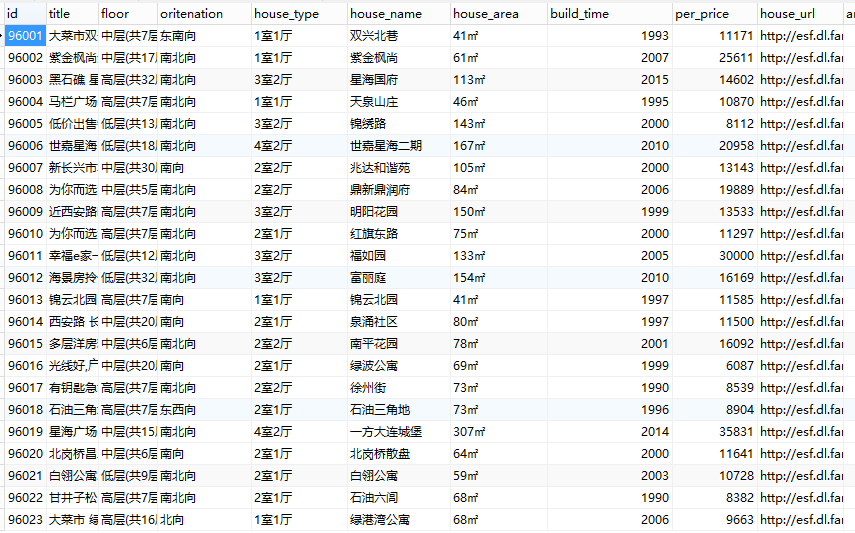
数据库设计:province、city、area、house四张表
爬虫spider部分demo:
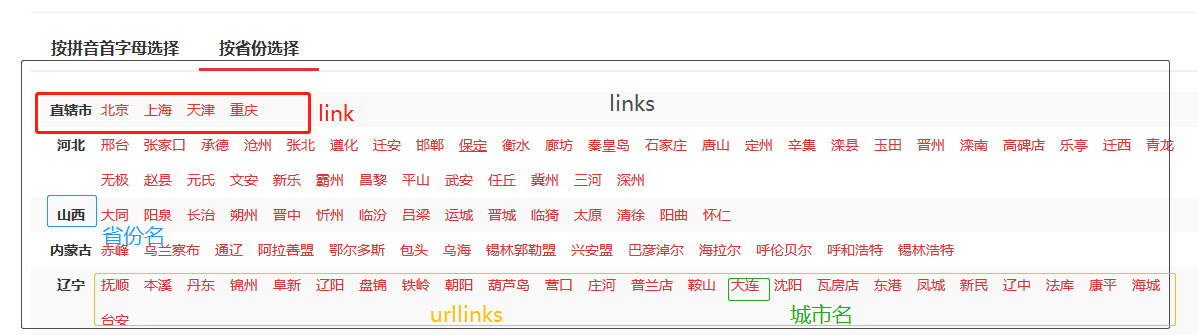
获取省份、城市信息和链接
 #获取省份名字,城市的链接url

     def mycity(self,response):

          #获得关键节点

         links = response.css('#c02 > ul > li')

         for link in links:

             try:

                 province_name=link.xpath('./strong/text()').extract_first()

                 urllinks=link.xpath('./a')

                 for urllink in urllinks:

                     city_url=urllink.xpath('./@href').extract_first()

                     if city_url[-1]=='/':

                         city_url=city_url[:-1]

                     yield scrapy.Request(url=city_url,meta={'province_name':province_name,'city_url':city_url},callback=self.area)

             except Exception:

                 pass
获取区域的链接url和信息
 #获取区域的链接url

     def area(self,response):

         try:

             links=response.css('.qxName a')

             for link in links[1:]:

                 area_url=response.url+link.xpath('@href').extract_first()

                 yield scrapy.Request(url=area_url,meta=response.meta,callback=self.page)

         except Exception:

             pass

获取楼盘房源的信息
     def houselist(self,response):

         item={}

         city_name = response.css('#list_D02_01 > a:nth-child(3)::text').extract_first()

         area_name=response.css('#list_D02_01 > a:nth-child(5)::text').extract_first()

         if city_name:

             item['city_name']=city_name[:-3]

         if area_name:

             item['area_name']=area_name[:-3]

         links=response.xpath('/html/body/div[3]/div[4]/div[5]/dl')

         if  links:

             for link in links:

                 try:

                     item['title']=link.xpath('./dd/p[1]/a/text()').extract_first()

                     house_info=link.xpath('./dd/p[2]/text()').extract()

                     if house_info:

                         item['province_name']=response.meta['province_name']

                         item['house_type']=link.xpath('./dd/p[2]/text()').extract()[0].strip()

                         item['floor']=link.xpath('./dd/p[2]/text()').extract()[1].strip()

                         item['oritenation']=link.xpath('./dd/p[2]/text()').extract()[2].strip()

                         item['build_time']=link.xpath('./dd/p[2]/text()').extract()[3].strip()[5:]

                         item['house_name']=link.xpath('./dd/p[3]/a/span/text()').extract_first()

                         item['house_area']=link.xpath('./dd/div[2]/p[1]/text()').extract_first()

                         item['per_price']=int(link.xpath('./dd/div[3]/p[2]/text()').extract_first()[:-1])

                         list_url = link.xpath('./dd/p[1]/a/@href').extract_first()

                         item['house_url']=response.meta['city_url']+list_url

                         yield item

                 except Exception:

                     pass
 此时就可以运行scrapy crawl+爬虫名,我们就可以爬取到网站的信息,但是我们如何使用这些数据呢,那就要通过pipelines将数据插入到数据库中。
爬虫pipelines部分demo:
 # -*- coding: utf-8 -*-

 # Define your item pipelines here

 #

 # Don't forget to add your pipeline to the ITEM_PIPELINES setting

 # See: https://doc.scrapy.org/en/latest/topics/item-pipeline.html

 import pymysql

 class HousePipeline(object):

     def open_spider(self,spider):

         self.con=pymysql.connect(user='root',passwd='',db='test',host='localhost',port=3306,charset='utf8')

         self.cursor=self.con.cursor(pymysql.cursors.DictCursor)

         return spider

     def process_item(self, item, spider):

         #插入省份表

         province_num=self.cursor.execute('select * from home_province where province_name=%s',(item['province_name'],))

         if province_num:

             province_id=self.cursor.fetchone()['id']

         else:

             sql='insert into home_province(province_name) values(%s)'

             self.cursor.execute(sql,(item['province_name']))

             province_id=self.cursor.lastrowid

             self.con.commit()

         #插入城市表

         ##规避不同省份城市重名的情况

         city_num=self.cursor.execute('select * from home_city where city_name=%s and province_id=%s',(item['city_name'],province_id))

         if city_num:

             city_id=self.cursor.fetchone()['id']

         else:

             sql='insert into home_city(city_name,province_id) values(%s,%s)'

             self.cursor.execute(sql,(item['city_name'],province_id))

             city_id=self.cursor.lastrowid

             self.con.commit()

         #插入区域表

         ##规避不同城市区域重名的情况

         area_num=self.cursor.execute('select * from home_area where area_name=%s and city_id=%s',(item['area_name'],city_id))

         if area_num:

             area_id=self.cursor.fetchone()['id']

         else:

             sql = 'insert into home_area (area_name,city_id,province_id)value(%s,%s,%s)'

             self.cursor.execute(sql,(item['area_name'],city_id,province_id))

             area_id = self.cursor.lastrowid

             self.con.commit()

         #插入楼盘信息表

         house_num=self.cursor.execute('select house_name from home_house where house_name=%s',( item['house_name'],))

         if house_num:

             pass

         else:

             sql = 'insert into home_house(title,house_type,floor,oritenation,build_time,house_name,house_area,per_price,house_url,area_id,city_id,province_id) values(%s,%s,%s,%s,%s,%s,%s,%s,%s,%s,%s,%s)'

             self.cursor.execute(sql, (

             item['title'], item['house_type'], item['floor'], item['oritenation'], item['build_time'],

             item['house_name'], item['house_area'], item['per_price'],item['house_url'], area_id,city_id,province_id,))

             self.con.commit()

         return item

     def close_spider(self,spider):

         self.cursor.close()

         self.con.close()

         return spider
采集数据效果:
爬虫Scrapy框架运用----房天下二手房数据采集的更多相关文章
- python爬虫scrapy框架——人工识别登录知乎倒立文字验证码和数字英文验证码(2)
操作环境:python3 在上一文中python爬虫scrapy框架--人工识别知乎登录知乎倒立文字验证码和数字英文验证码(1)我们已经介绍了用Requests库来登录知乎,本文如果看不懂可以先看之前 ...
- 爬虫scrapy框架之CrawlSpider
爬虫scrapy框架之CrawlSpider 引入 提问:如果想要通过爬虫程序去爬取全站数据的话,有几种实现方法? 方法一:基于Scrapy框架中的Spider的递归爬取进行实现(Request模 ...
- 安装爬虫 scrapy 框架前提条件
安装爬虫 scrapy 框架前提条件 (不然 会 报错) pip install pypiwin32
- 爬虫Ⅱ:scrapy框架
爬虫Ⅱ:scrapy框架 step5: Scrapy框架初识 Scrapy框架的使用 pySpider 什么是框架: 就是一个具有很强通用性且集成了很多功能的项目模板(可以被应用在各种需求中) scr ...
- Python爬虫Scrapy框架入门(2)
本文是跟着大神博客,尝试从网站上爬一堆东西,一堆你懂得的东西 附上原创链接: http://www.cnblogs.com/qiyeboy/p/5428240.html 基本思路是,查看网页元素,填写 ...
- 自己动手实现爬虫scrapy框架思路汇总
这里先简要温习下爬虫实际操作: cd ~/Desktop/spider scrapy startproject lastspider # 创建爬虫工程 cd lastspider/ # 进入工程 sc ...
- 爬虫--Scrapy框架课程介绍
Scrapy框架课程介绍: 框架的简介和基础使用 持久化存储 代理和cookie 日志等级和请求传参 CrawlSpider 基于redis的分布式爬虫 一scrapy框架的简介和基础使用 a) ...
- 爬虫--Scrapy框架的基本使用
流程框架 安装Scrapy: (1)在pycharm里直接就可以进行安装Scrapy (2)若在conda里安装scrapy,需要进入cmd里输入指令conda install scrapy ...
- Python网咯爬虫 — Scrapy框架应用
Scrapy框架 Scrapy是一个高级的爬虫框架,它不仅包括了爬虫的特征,还可以方便地将爬虫数据保存到CSV.Json等文件中. Scrapy用途广泛,可以用于数据挖掘.监测 ...
随机推荐
- 1Nginx+fastdfs分布式文件存储
准备,将所需的软件传到服务器上,服务器的列表如下: fastdfs-nginx-module_v1.15.tar.gz FastDFS_v4.06.tar.gz libevent-2.0.21- ...
- 查看LOV对应查询语句的研究
一.获取当前会话id 1.方法一 tools: Help > About 2.方法二 打开个性化定义界面(如果没有权限,到系统配置文件设置中,查看是否是"隐藏诊断菜单"被设置 ...
- 【Linux驱动】字符设备驱动
一.linux系统将设备分为3类:字符设备.块设备.网络设备.使用驱动程序: 1.字符设备:是指只能一个字节一个字节读写的设备,不能随机读取设备内存中的某一数据,读取数据需要按照先后数据.字符设备是面 ...
- Android的AdapterView及其子类简介-android学习之旅(二十三)
AdapterView简介 AdapterView组件是一类非常重要的组件,AdapterView本身是一根抽象基类,继承于ViewGroup,用法十分相似,只是显示形式不一样,因此同意讲解. Ada ...
- java 单元测试教程(junit)
单元测试概念:最小化测试 比如说你想测试某个类中的一个方法 优点:无须启动整个程序 clipse使用junit教程: (一)配置jar: 1.右键工程选择Build Path 在二级菜单选择 Add ...
- 【算法导论】第i小的元素
第i小的元素 时间复杂度:O(n). 基本思想:和快速排序的思想相似,也是对数组进行递归划分,但是有所差别的是,快速排序会递归处理划分的两边,而随机化的选择算法只选择一边. 具 ...
- JAVA之旅(十四)——静态同步函数的锁是class对象,多线程的单例设计模式,死锁,线程中的通讯以及通讯所带来的安全隐患,等待唤醒机制
JAVA之旅(十四)--静态同步函数的锁是class对象,多线程的单例设计模式,死锁,线程中的通讯以及通讯所带来的安全隐患,等待唤醒机制 JAVA之旅,一路有你,加油! 一.静态同步函数的锁是clas ...
- Mybatis接口编程原理分析(三)
前面两篇博客Mybatis接口编程原理分析(一)和Mybatis接口编程原理分析(二)我们介绍了MapperProxyFactory.MapperProxy和MapperMethod的操作及源码分析, ...
- Dynamics CRM 2013 subgrid刷新后刷新主表单
项目中会遇到这样的需求,会根据subgrid中的数据变化去更新主表单中的某个或多个字段值,一般的做法就是写插件根据subgrid中实体数据的变化在后台更新主表数据库,但后台更新了要反映到前台就得使用刷 ...
- 9.2、Libgdx的输入处理之鼠标、触摸和键盘
(官网:www.libgdx.cn) Libgdx支持的最主要的设备是desktop或浏览器的鼠标支持,Android的触摸屏支持和键盘的支持.我们接下来了解一下. 键盘 用户按下或释放一个按键生成了 ...