
Microsoft AI - Custom Vision in C#
概述
前面一篇 Microsoft AI - Custom Vision 中,我们介绍了 Azure 认知服务中的自定义影像服务:Custom Vision,也介绍了如果通过这个在线服务,可视化的完成项目创建、数据集上传和标注、模型训练、模型评估和测试。我们也提到,除了可以使用可视化在线操作的方式,Custom Vision 也提供了 SDK 来完成整个机器学习过程,两种语言供选择:C# 和 Python,今天我们针对 C# 版本来做一次实际开发操作。
开发过程
准备工作
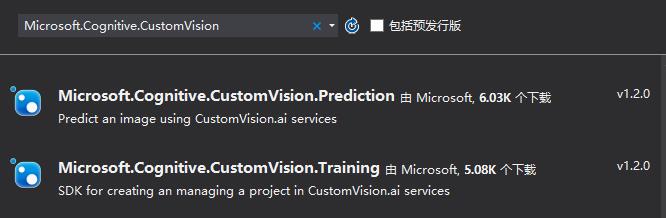
C# Custom Vision SDK 在 GitHub 开源:Microsoft/Cognitive-CustomVision-Windows,这个 SDK 主要分为两部分:Prediction 和 Training,如果不想下载 SourceCode 自己去编译,也可以直接在 VS 中通过 Package Management 安装这两部分的 Nuget package:
- Microsoft.Cognitive.CustomVision.Prediction Install-Package Microsoft.Cognitive.CustomVision.Prediction -Version 1.2.0
- Microsoft.Cognitive.CustomVision.Training Install-Package Microsoft.Cognitive.CustomVision.Training -Version 1.2.0
实际开发
接下来我们创建一个 WPF 工程来实际操作整个 Custom Vision SDK 使用过程:
1. 通过 Nuget Package Management 的安装方式,安装 Prediction 和 Training 两个包,地址如上面准备工作中所示;来看一下包里的 namespace 组成:
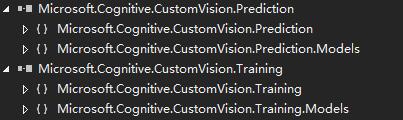
除此之外,还需要安装 Microsoft.Rest.ClientRuntime 的 Nuget,因为 Custom Vision SDK 依赖于它,地址:Install-Package Microsoft.Rest.ClientRuntime -Version 2.3.11
2. Nuget 包安装完成后,在代码中引入以下 Namespace:
using Microsoft.Cognitive.CustomVision.Training;
using Microsoft.Cognitive.CustomVision.Prediction;
using Microsoft.Cognitive.CustomVision.Training.Models;
3. 创建一个 Custom Vision Project:
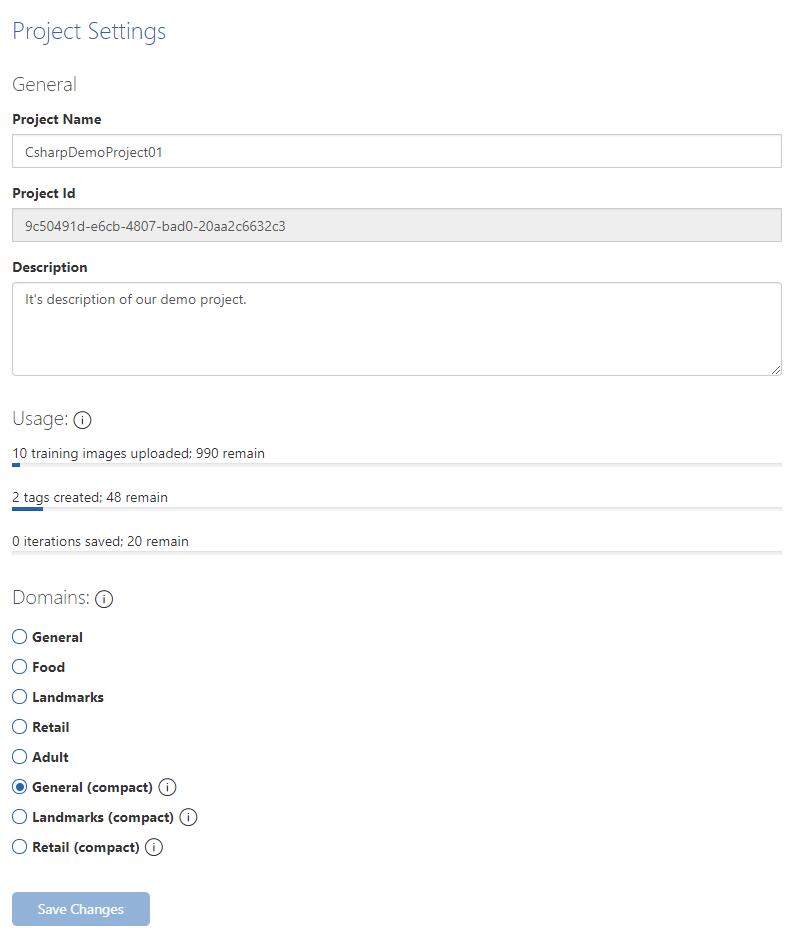
其中 ApiKey 需要替换为开发者在 CustomVision.ai 网站获取的 Training Key;另外 CreateProject 创建时,名字是必填的,描述和域都是选填的;域的类型是 GUID,我翻看了 SDK Doc 和源代码,没有发现对域的 GUID 取值的任何描述,后来在 CustomVision.ai 通过网页调试方法找到了 Domains 字段对应的 GUID,在这里也分享给大家;来看一下代码实现和实现的结果吧:
TrainingApi trainingApi = new TrainingApi() { ApiKey = "replace with your api key" };
Project demoProject = trainingApi.CreateProject(
    "CsharpDemoProject01",
    "It's description of our demo project.",
    new System.Guid("0732100f-1a38-4e49-a514-c9b44c697ab5"));
| 项目类型 | GUID |
| General | ee85a74c-405e-4adc-bb47-ffa8ca0c9f31 |
| Food | c151d5b5-dd07-472a-acc8-15d29dea8518 |
| Landmarks | ca455789-012d-4b50-9fec-5bb63841c793 |
| Retail | b30a91ae-e3c1-4f73-a81e-c270bff27c39 |
| Adult | 45badf75-3591-4f26-a705-45678d3e9f5f |
| General(compact) | 0732100f-1a38-4e49-a514-c9b44c697ab5 |
| Landmarks(compact) | b5cfd229-2ac7-4b2b-8d0a-2b0661344894 |
| Retail(compact) | 6b4faeda-8396-481b-9f8b-177b9fa3097f |
4. 给项目的训练数据集添加标签:
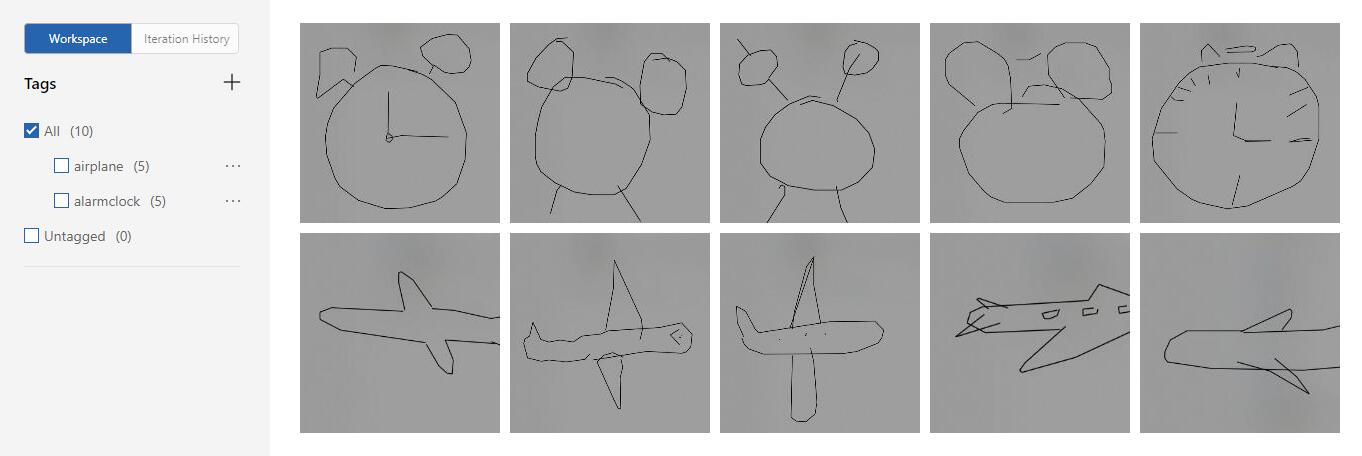
示例中我们添加了两个标签 airplane 和 alarmclock
// create two tags in our demo project
var airplaneTag = trainingApi.CreateTag(demoProject.Id, "airplane");
var alarmclockTag = trainingApi.CreateTag(demoProject.Id, "alarmclock");
5. 上传图片数据集到项目中:
我们在项目 Assets 文件夹存放了两个分类,每个分类各五张图片,示例代码如下:
string[] images = new string[] { "001.jpg", "002.jpg", "003.jpg", "004.jpg", "005.jpg"};
foreach (var image in images)
{
    var storageFile = await StorageFile.GetFileFromApplicationUriAsync(new Uri(string.Format("ms-appx:///Assets/airplane/{0}", image), UriKind.RelativeOrAbsolute));
    using (var stream = await storageFile.OpenAsync(Windows.Storage.FileAccessMode.Read))
    {
        trainingApi.CreateImagesFromData(demoProject.Id, stream.AsStream(), new List<string>() { airplaneTag.Id.ToString() });
    }
}

foreach (var image in images)
{
    var storageFile = await StorageFile.GetFileFromApplicationUriAsync(new Uri(string.Format("ms-appx:///Assets/alarmclock/{0}", image), UriKind.RelativeOrAbsolute));
    using (var stream = await storageFile.OpenAsync(Windows.Storage.FileAccessMode.Read))
    {
        trainingApi.CreateImagesFromData(demoProject.Id, stream.AsStream(), new List<string>() { alarmclockTag.Id.ToString() });
    }
}
验证一下我们添加的标签和数据集
6. 数据集准备完毕,开始训练模型
var iteration = trainingApi.TrainProject(demoProject.Id);
while (iteration.Status == "Training")
{
    iteration = trainingApi.GetIteration(demoProject.Id, iteration.Id);
}
iteration.IsDefault = true;
trainingApi.UpdateIteration(demoProject.Id, iteration.Id, iteration);
训练完成后,我们看看训练结果
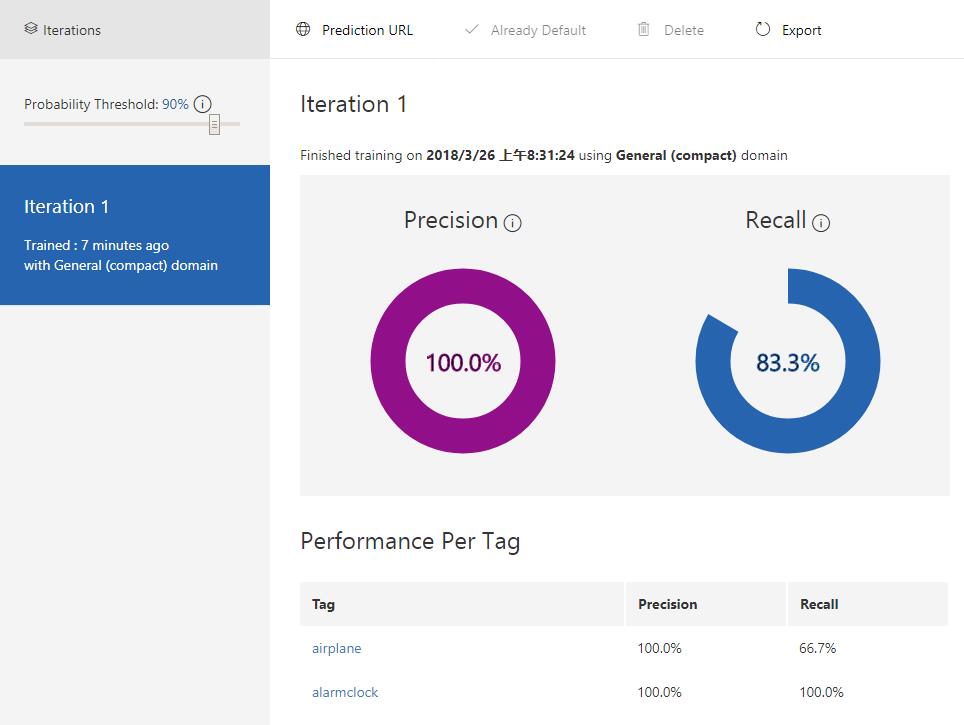
7. 模型训练完毕,开始做模型验证
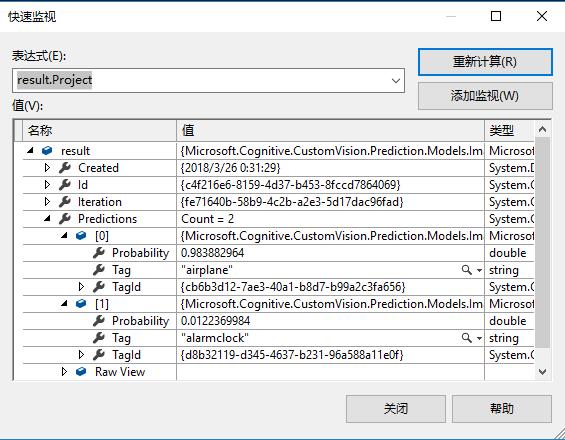
ApiKey 替换为你在 Custom Vision 对应的 Prediction Key,我们使用了一张 airplane 的图片作为测试输入,看看代码和结果:
PredictionEndpoint endpoint = new PredictionEndpoint() { ApiKey = "replace with your prediction key" };
var testFile = await StorageFile.GetFileFromApplicationUriAsync(new Uri(string.Format("ms-appx:///Assets/airplane.jpg", ""), UriKind.RelativeOrAbsolute));
using (var testStream = await testFile.OpenAsync(Windows.Storage.FileAccessMode.Read))
{
    var result = endpoint.PredictImage(demoProject.Id, testStream.AsStream());
}
可以看到,airplane 的概率为 0.98,alarmclock 为 0.01;这个结果符合我们对模型的预期。
总结
到这里就完成了 Custom Vision C# 的实现过程,因为只是简单 Demo 演示,所以训练数据集只取了 10 张图片,只是简单的把代码的实现过程讲解了一下。大家如果感兴趣,可以结合这个基本过程,把上传标签和图片的过程做的更加易交互,比如选取文件夹批量上传和管理等;模型训练的过程也可以再细化,通过代码返回结果监控训练的结果;模型测试也可以把测试结果更直观的反映出来,或者批量处理测试数据,更丰富的展示和管理测试结果,评估数据模型。
非常欢迎大家和我交流 Custom Vision 和 Azure 认知服务相关的技术问题,谢谢大家!
Microsoft AI - Custom Vision in C#的更多相关文章
- Microsoft AI - Custom Vision
概述 前几天的 Windows Developer Day 正式发布了 Windows AI Platform,而作为 Windows AI Platform 的模型定义和训练,更多还是需要借助云端来 ...
- 1小时快速搭建基于Azure Custom Vision和树莓派的鸟类分类和识别应用
1. 引言 最近在微软Learn平台学习Azure认知服务相关的内容,看到了一个有关"使用自定义视觉对濒危鸟类进行分类"的专题,该专题的主要内容就是使用 Azure Custom ...
- Add AI feature to Xamarin.Forms app
Now, AI is one of important technologies.Almost all platforms have API sets of AI. Following list is ...
- AI应用开发实战
AI应用开发实战 出发点 目前,人工智能在语音.文字.图像的识别与解析领域带来了跨越式的发展,各种框架.算法如雨后春笋一般,互联网上随处可见与机器学习有关的学习资源,各大mooc平台.博客.公开课都推 ...
- Modernizing Business Process with Cloud and AI
The world is awash with digital transformation. Every customer and partner that I talk to, across ev ...
- dynamics 365 AI 解决方案 —— 介绍
Digital transformation has been reshaping our world and artificial intelligence (AI) is one of the n ...
- Microsoft Hackathon 2019 留念
参加今年微软的 Hackathon 是 2019 年 7 月份的事情,但是后来各种各样的事情,考托.考G.网申……就给耽搁了.我本来以为自己的记忆力足够好,几个月以后也能写很多东西,然鹅……现在发现好 ...
- Microsoft 机器学习产品体系对比和介绍
Microsoft 提供多种多样的产品选项用于生成.部署和管理机器学习模型. 本文将比较这些产品,并帮助你选择所需的产品,以便最有效地开发机器学习解决方案. 机器学习产品 描述 作用 Azure云端服 ...
- MS Batch AI
微软的Batch AI服务是一项新服务,它可以帮助你在GPU pool上训练和测试机器学习模型,包括深度学习模型.它简化了在当前许多流行的深度学习框架(如TensorFlow.Microsoft认知工 ...
随机推荐
- Ubuntu16.04安装搜狗输入法后有黑边问题的解决方法
apt-get install compton compton -b
- CWnd *和HWnd转换
CWnd *和HWnd转换 CWnd*得到HWnd CWnd wnd; HWND hWnd; hWnd = wnd.m_hWnd; // or ...
- ucos-ii的任务调度机制
1.在ucos-ii中,有这么几张表来管理任务. A.OSTCBPrioTbl[],其结构为OS_TCB指针的数组,其元素个数为64, 每一个元素对应一个任务的优先级,ucos-ii最多可以有64个任 ...
- The struts dispatcher cannot be found
1.错误描述 严重:Servlet.service() for servlet jsp threw exception The struts dispatcher cannot be found.Th ...
- ORA-00922:选项缺失或无效
1.错误描述 ORA-00922:选项缺失或无效 2.错误原因 3.解决办法
- java 堆 栈 常量池
java 堆中保存new 出来的对象(每个对象都包含一个与之对应的class的信息,[class信息存放在方法区]),堆中分配的内存,有虚拟机的自动垃圾回收器管理,栈内存只对其所属线程可见. java ...
- iOS - XMPP Openfire 服务器的搭建
前言 提前下载好相关软件,且安装目录最好安装在全英文路径下.如果路径有中文名,那么可能会出现一些莫名其妙的问题. 提前准备好的软件: jdk-8u91-macosx-x64.dmg mysql-5.7 ...
- python 实现多层目录文件查找
本文针对多层目录下文件的查找. 利用 os模块的基本操作,并利用递归的思想实现了目录多层查找. 代码如下: import os #dir_name: 处理文件的起始目录 def count_file( ...
- java SpringWeb 接收安卓android传来的图片集合及其他信息入库存储
公司是做APP的,进公司一年了还是第一次做安卓的接口 安卓是使用OkGo.post("").addFileParams("key",File); 通过这种方式传 ...
- winform自动更新程序实现
一.问题背景 本地程序在实际项目使用过程中,因为可以操作电脑本地的一些信息,并且对于串口.OPC.并口等数据可以方便的进行收发,虽然现在软件行业看着动不动都是互联网啊啥的,大有Web服务就是高大上的感 ...