
Python模块之 - logging
日志是非常重要的,最近有接触到这个,所以系统的看一下Python这个模块的用法。本文即为Logging模块的用法简介,主要参考文章为Python官方文档,链接见参考列表。
Logging模块构成
组成
主要分为四个部分:
- Loggers:提供应用程序直接使用的接口
- Handlers:将Loggers产生的日志传到指定位置
- Filters:对输出日志进行过滤
- Formatters:控制输出格式
日志级别
| Level | Numeric value | When it’s used |
|---|---|---|
| DEBUG | 10 | Detailed information, typically of interest only when diagnosing problems. |
| INFO | 20 | Confirmation that things are working as expected. |
| WARNING | 30 | An indication that something unexpected happened, or indicative of some problem in the near future (e.g. ‘disk space low’). The software is still working as expected. |
| ERROR | 40 | Due to a more serious problem, the software has not been able to perform some function. |
| CRITICAL | 50 | A serious error, indicating that the program itself may be unable to continue running. |
| NOSET | 0 | getattr(logging, loglevel.upper()) |
默认级别是WARNING,可以使用打印到屏幕上的方式记录,也可以记录到文件中。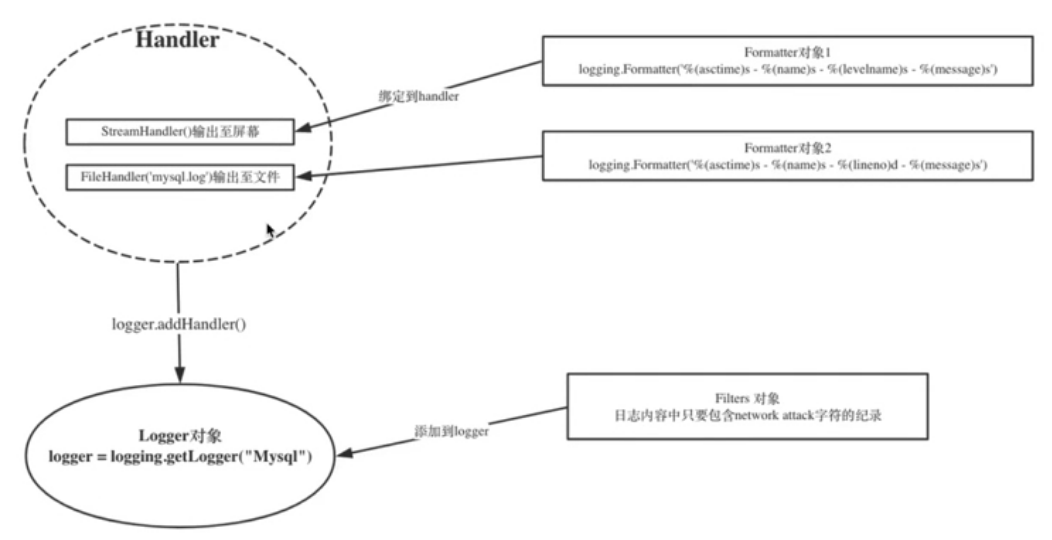
使用示例
下面的代码展示了logging最基本的用法。
 # import logging

 #

 # logging.basicConfig(filename="log.txt",

 #                     level=logging.DEBUG,

 #                     format="%(asctime)s %(message)s",

 #                     datefmt="%Y-%m")

 # logging.debug("SS")

 """

 %(name)s        Logger的名字

 %(levelno)s     数字形式的日志级别

 %(levename)s    文本形式的日志级别

 %(pathname)s    调用日志输出函数的模块的完整路径名,可能没有

 %(filename)s    调用日志输出函数的模块的文件名

 %(module)s      调用日志输出函数的模块名

 %(funcName)s    调用日志输出函数的函数名

 %(lineno)d       调用日志输出函数的语句所在的代码行

 %(created)f     当前时间,用UNIX标准的表示时间的浮点数表示

 %(relativeCreated)d     输出日志信息时的,自Logger创建以来的毫秒数

 %(asctime)s     字符串形式的当前时间,默认格式是"2003-07-08 16:49:45,896",毫秒

 %(thread)d      线程ID,可能没有

 %(threadName)s  线程名,可能没有

 %(process)d     进程ID,可能没有

 %(message)s     用户输出的消息

 """

 # 同时输出到文件,屏幕

 import logging

 class IgnoreBackupLogFilter(logging.Filter):

     """过滤带db backup 的日志"""

     def filter(self, record):  # 固定写法

         # true 不记录

         return "db backup" not in record.getMessage()

 # 1、生成logger对象

 logger = logging.getLogger("web")

 logger.setLevel(logging.DEBUG)  # 默认是warning

 # 1、1 把filter对象添加到logger中

 logger.addFilter(IgnoreBackupLogFilter())

 # 2、生成handler对象

 ch = logging.StreamHandler()

 ch.setLevel(logging.INFO)

 # fh = logging.FileHandler("web.log")  # 写到那个文件下

 from logging import handlers

 fh = handlers.TimedRotatingFileHandler("web.log",when="S",interval=5,backupCount=3)

 fh.setLevel(logging.WARNING)

 # 2.1 把handler对象 绑定到logger

 logger.addHandler(ch)

 logger.addHandler(fh)

 # 3、生成formatter对象

 console_formatter = logging.Formatter("%(asctime)s - %(levelname)s - %(filename)s - %(message)s  ")

 file_formatter = logging.Formatter("%(asctime)s - %(levelname)s - %(lineno)d - %(filename)s - %(message)s  ")

 # 3、1 把formatter对象 绑定到handler对象

 ch.setFormatter(console_formatter)

 fh.setFormatter(file_formatter)

 logger.debug("s")

 logger.info("d")

 logger.warning("g")

 logger.error("a324")

 logger.info("db backup 2314")

 # globl debug

 # console info

 # file warning

 # 全局设置为DEBUG后,console handler 设置为INFO,如果输出的日志级别是debug,那就不输出

 """

 日志自动截断

 """

 # 按文件大小截断

 # from logging import handlers

 # fh = handlers.RotatingFileHandler("web.log", maxBytes=100, backupCount=13)  # 文件最大100个字节,最多保留3个文件,时间最早的删除

 # 按时间长短截断

 # from logging import handlers

 # fh = handlers.TimedRotatingFileHandler("web.log",when="S",interval=5,backupCount=3)
Python模块之 - logging的更多相关文章
- python 模块之-logging
python 模块logging import logging ### 简单使用格式 日志级别等级CRITICAL > ERROR > WARNING > INFO > ...
- python初步学习-python模块之 logging
logging 许多应用程序中都会有日志模块,用于记录系统在运行过程中的一些关键信息,以便于对系统的运行状况进行跟踪.在python中,我们不需要第三方的日志组件,python为我们提供了简单易用.且 ...
- Python模块学习 ---- logging 日志记录
许多应用程序中都会有日志模块,用于记录系统在运行过程中的一些关键信息,以便于对系统的运行状况进行跟踪.在.NET平台中,有非常著名的第三方开源日志组件log4net,c++中,有人们熟悉的log4cp ...
- Python 模块之Logging——常用handlers的使用
一.StreamHandler 流handler——包含在logging模块中的三个handler之一. 能够将日志信息输出到sys.stdout, sys.stderr 或者类文件对象(更确切点,就 ...
- python模块之logging
在现实生活中,记录日志非常重要.银行转账时会有转账记录:飞机飞行过程中,会有黑盒子(飞行数据记录器)记录飞行过程中的一切.如果有出现什么问题,人们可以通过日志数据来搞清楚到底发生了什么.对于系统开发. ...
- 【python模块】——logging
python学习——logging模块
- Python模块:logging、
logging模块: 很多程序都有记录日志的需求,并且日志中包含的信息既有正常的程序访问日志,还可能有错误.警告等信息输出.Python的logging模块提供了标准的日志接口,你可以通过它存储各种格 ...
- python模块学习 logging
1.简单的将日志打印到屏幕 import logging logging.debug('This is debug message') logging.info('This is info messa ...
- python模块:logging
# Copyright 2001-2016 by Vinay Sajip. All Rights Reserved. # # Permission to use, copy, modify, and ...
随机推荐
- Leetcode 27——Remove Element
Given an array and a value, remove all instances of that value in-place and return the new length. D ...
- 每日冲刺报告——Day3(Java-Team)
第三天报告(11.4 周六) 团队:Java-Team 成员: 章辉宇(284) 吴政楠(286) 陈阳(PM:288) 韩华颂(142) 胡志权(143) github地址:https://git ...
- 20162317袁逸灏 第八周实验报告:实验二 Java面向对象程序设计
20162317袁逸灏 第八周实验报告:实验二 Java面向对象程序设计 实验内容 初步掌握单元测试和TDD 理解并掌握面向对象三要素:封装.继承.多态 初步掌握UML建模 熟悉S.O.L.I.D原则 ...
- 201621123040《Java程序设计》第4周学习总结
1.本周学习总结 1.1写出你认为本周学习中比较重要的知识点关键词 关键词:继承 多态性 基本语法 重新定义Override 1.2尝试使用思维导图将这些关键词组织起来.注:思维导图一般不需要出现过多 ...
- 结对编程作业——四则运算GUI程序
毛忠庆 201421122088 赵嘉楠 201421122065 源代码存放位置:https://gitee.com/ouwen0819/SiZeYunSuan.git 题目描述 使用 -n 参数控 ...
- 在linux中关闭防火墙
1) 重启后生效 开启: chkconfig iptables on 关闭: chkconfig iptables off 2) 即时生效,重启后失效 开启: service iptables sta ...
- Beta冲刺Day3
项目进展 李明皇 今天解决的进度 完善了程序的运行逻辑(消息提示框等) 明天安排 前后端联动调试 林翔 今天解决的进度 向微信官方申请登录验证session以维护登录态 明天安排 继续完成维护登录态 ...
- 【iOS】swift 排序Sort函数用法(包含NSDictionary排序)
用了几分钟做的简单翻译 一个例子 直接贴代码,不过多解释 //这是我们的model class imageFile { var fileName = String() var fileID = Int ...
- 在360、UC等浏览器,img不加载原因
问题:图片在360浏览器不被加载,在UC浏览器强制不显示. 前言不多说,直接上图. 360浏览器显示情况: UC浏览器显示情况: 由以上两张截图可以看到,在360浏览器,banner图片处根本没有加载 ...
- Pandas速查手册中文版
本文翻译自文章: Pandas Cheat Sheet - Python for Data Science ,同时添加了部分注解. 对于数据科学家,无论是数据分析还是数据挖掘来说,Pandas是一个非 ...