
软件测试第二周作业 WordCount
本人github地址: https://github.com/wenthehandsome23
| psp阶段 |
预估耗时 (分钟) |
实际耗时 (分钟) |
| 计划 | 30 | 10 |
| 估计这个任务需要多少时间 | 20 | 20 |
| 开发 | 600 | 660 |
| 需求分析 (包括学习新技术) | 40 | 60 |
| 生成设计文档 | 60 | 30 |
| 设计复审 (和同事审核设计文档) | 30 | 20 |
| 代码规范 | 10 | 0 |
| 具体设计 | 50 | 30 |
| 具体编码 | 500 | 600 |
| 基本功能实现 | 150 | 200 |
| 扩展功能实现 | 350 | 400 |
| 测试(自我测试,修改代码,提交修改) | 60 | 50 |
| 报告 | 300 | 300 |
| 代码复审 | 30 | 20 |
| 测试报告 | 60 | 120 |
| 计算工作量 | 5 | 5 |
| 事后总结, 并提出过程改进计划 | 10 | 10 |
| 合计 | ||
一 . 解题思路
在拿到题目后,自己回想了一下,自己学过java,以前学习C语言时做过统计字数的作业,但是类似命令行的操作输入我还没做过,相关接触也就只有在使用虚拟机进行命令行操作时有所了解,于是上网查找了如下内容:
http://blog.csdn.net/mingover/article/details/57083176(java命令行实现的参考)
http://www.jb51.net/article/83792.htm(java命令行实现的参考)
http://blog.csdn.net/huawangxin/article/details/53296918(BufferReader参考使用)
在阅读相关资料后,发觉网上相关程序与题目要求并不符合,比如命令行功能无法实现,以及扩展功能未加入等,但是随后分析了一下需求,发现读取文件进行遍历是最核心的功能,读取文件使用的是BufferReader函数,这也是大部分网上的类似程序普遍使用的函数,因此可以确定我在编程过程中必然会使用到这个函数。
二. 设计过程
大致思路就是先实现基本功能再实现命令行功能最后实现扩展功能,基本功能模块中的行数,字符数统计较为简单,使用简单的累加就可以实现,然而词数统计一开始设计的也比较简单,再后来添加停用词表功能时发现自己还是太年轻,被教做人了,推倒重来进行重写。命令行的实现则全部放入主函数,对输入进行遍历,以空格进行分割,之后判断句子中的成分,调用不同的类。最后关于扩展功能,每一个都单独一个功能函数进行实现,统计其他行数在统计行数的基础上加了判断,停用词表首先读取相关文档,然后新建一个数组,存放文档中读取到的数据,最后从原文档中取消对停用词表内容的计数。
关于——s的内容:递归处理
最后,设计类包括
  countC:字符计数
  countW:单词计数
  countNt: 其他行计数
  buildRes: 文件名前缀
  List<String>: 停用词表设计
  main: 主进程函数
三. 代码说明
根据我的开发过程我逐步阐述我的代码:
public static int countC(String fn){//统计字符数

        BufferedReader reader = null;

        int res=0;

        try {

            reader = new BufferedReader(new FileReader(fn));

            String str = null;

            while ((str = reader.readLine()) != null) {

                res += str.length();

            }

        } catch (FileNotFoundException e) {

            e.printStackTrace();

        } catch (IOException e) {

            e.printStackTrace();

        }finally {

            try {

                reader.close();

            } catch (IOException e) {

                e.printStackTrace();

            }

        }

        return res;

    }
这是统计字符数的代码,十分简单,但是值得注意的是一开始我是把基础功能全部写在一个函数里面,但是后来随着停用词表的功能需要完善,原本的函数会因为参数过多无法正常运行,所以只有重新把三个基础功能分别写三个函数,为了方便,统一返回为res,这说明在开发过程中应该不止着眼于眼前的功能的完善,更应该有一个长远的考量。
public static int countW(String fn,List<String> list){//统计单词书目,

        BufferedReader reader = null;

        int res=0;

        try {

            reader = new BufferedReader(new FileReader(fn));

            String str = null;

            while ((str = reader.readLine()) != null) {

                String[]temp=str.split(" |,");

                for(String s:temp){

                    if(s!=null&&!list.contains(s)){

                        ++res;

                    }

                }

            }
当同时在命令行输入-e -w时,若不做处理,把这两个功能写入一个函数中,很有可能出现冲突报错,所以引入List<String>来统计此表内容,单独将对停用词表的处理写作一个函数,包括了读取文件,返回结果添加文件名作为前缀,因此在单词统计中会判断是否有停用词表并做相应处理。
public static List<String> read(String fn){ //取消统计词表

        List<String> list=new ArrayList<String>();

        BufferedReader reader = null;

        try {

            reader = new BufferedReader(new FileReader(fn));

            StringBuilder sb=new StringBuilder();

            String s=null;

            while((s=reader.readLine())!=null){

                sb.append(s);

                sb.append(" ");

            }

            String[] arr=sb.toString().split(" ");

            Arrays.stream(arr).forEach(x->{

                list.add(x);

            });

        } catch (FileNotFoundException e) {

            e.printStackTrace();

        } catch (IOException e) {

            e.printStackTrace();

        }finally {

            try {

                reader.close();

            } catch (IOException e) {

                e.printStackTrace();

            }

        }

        return list;

    }
public static int[] countNt(String fn){//统计其他行数

        BufferedReader reader = null;

        int res=0;

        int emptyLine=0,codeLine=0,noteLine=0;

        try {

            reader = new BufferedReader(new FileReader(fn));

            String str = null;

            while ((str = reader.readLine()) != null) {

                str=str.trim();

                if(str==null||str.equals("")){

                    emptyLine++;

                }else

                if(str.startsWith("//")) {

                    ++noteLine;

                }else{

                    codeLine++;

                }
鉴于把所有行数统计放入一个函数会大大降低可读性,此处把-a命令行的功能单独写一个函数,并把代码行,空行,注释行都作为返回数组的一部分,在主函数中输出就会方便许多,因为涉及到空行,所以在运行时使用了trim函数,删除每一行中开头和结尾的空格,防止对空格发生误判,把代码行当做空行进行计数。以下为输出函数:
public static String buildRes(String fn,int[] res){//输出部分添加文件名

        StringBuilder sb=new StringBuilder();

        sb.append(fn+",代码行/空行/注释行:"+res[0]+"/"+res[1]+"/"+res[2]);

        return sb.toString();

    }
public static void main(String[] args) {//主进程函数

            int cNum=0,lNum=0,wNum=0;

            int aLine[];

            List<String>list=new LinkedList<String>();

            final String[] p = {"-c", "-a", "-l", "-w", "-o","-s","-e"};

            Scanner sc = new Scanner(System.in);

            System.out.println("Please Enter Your Command:");

            String cmd = sc.nextLine();

            sc.close();

            String[] parame = cmd.split(" ");

            int len = parame.length;

            String inName = null;

            for (int i = 1; i < len; ++i) {

                boolean flag = false;

                for (int j = 0; j < p.length; ++j) {

                    if (parame[i].equals(p[j])) {

                        flag = true;

                        break;

                    }

                }

                if (flag == false) {

                    inName = parame[i];

                    break;

                }

            }

            String outName = null;

            StringBuilder res=new StringBuilder();

            try {

                for (int i = 1; i < len; ++i) {

                    if (parame[i].equals("-c")) {

                       cNum=countC(inName);

                       res.append(buildRes(inName,'c',cNum));

                    } else if (parame[i].equals("-l")) {

                        lNum=countL(inName);

                        res.append(buildRes(inName,'l',lNum));

                    } else if (parame[i].equals("-w")) {

                        if(list.size()==0){

                            for(int j=i+1;j<len;++j){

                                if(parame[j].equals("-e")){

                                    list=read(parame[j+1]);

                                    break;

                                }

                            }

                        }

                        wNum=countW(inName,list);

                        res.append(buildRes(inName,'w',wNum));

                    } else if (parame[i].equals("-o")) {

                        outName = parame[i + 1];

                    } else if (parame[i].equals("-e")) {

                        String stopFile = parame[i + 1];

                        list=read(stopFile);

                    } else if (parame[i].equals("-s")) {

                    } else if (parame[i].equals("-a")) {

                        aLine=countNt(inName);

                        res.append(buildRes(inName,aLine));

                    }

                }

                outName = outName == null ? "result.txt" : outName;

                FileWriter writer = new FileWriter(outName);

                writer.write(res.toString());

                writer.close();

            } catch (IOException e) {

                e.printStackTrace();

            }

        }
主进程函数,把所有的命令行操作单独列出来供后续输入判断,scan进行输入,以空格作为命令行的分割,输入不同的命令行,调用不同的函数,最后再把结果写入目标文件,如果没有注明目标文件,则默认写入result.txt
三. 测试设计过程
在这次项目过程中,我设计了15个测试用例,其中包含了单元测试以及功能测试,以下是代码:
public static void testC(){

        String cmd="wc.exe -l -c 1.txt";

        Javatest.execute(cmd.split(" "));

    }

    public static void testW(){

        String cmd="wc.exe -a -w 1.txt";

        Javatest.execute(cmd.split(" "));

    }

    public static void testO(){

        String cmd="wc.exe 1.txt -a -o 2.txt";

        Javatest.execute(cmd.split(" "));

    }
这部分是单个功能模块的测试,主要看基本功能是否可以顺利完成
    public static void testTri2(){//对多种功能进行测试

        String cmd="wc.exe 1.txt -a -e 3.txt -o 2.txt";

        Javatest.execute(cmd.split(" "));

    }

    public static void testEmptyStopFile(){//对停用词表进行测试

        String cmd="wc.exe 1.txt -e 3.txt -o 2.txt";

        Javatest.execute(cmd.split(" "));

    }

    public static void testE(){//对停用词表以及其他功能进行测试

        String cmd="wc.exe 1.txt -a -c -w -e 3.txt -o 2.txt";

        Javatest.execute(cmd.split(" "));

    }

    public static void testTri1(){//对多种功能进行测试

        String cmd="wc.exe 1.txt -l -w -c -o 2.txt";

        Javatest.execute(cmd.split(" "));

    }

    public static void testS(){//对遍历功能进行测试

        String cmd="wc.exe -s -a -c -w -e 3.txt -o 2.txt";

        Javatest.execute(cmd.split(" "));

    }
这是对扩展功能进行测试,覆盖了主要语句,众所周知,测试的高风险点包括代码中包含分支判定及循环的位置,在测试中采用的语句覆盖的方法覆盖到了所有程序代码语句,用以应对高风险点。
public static void testEmptyFile(){//输入文件为空时测试

        String cmd="wc.exe -a -w -o 2.txt";

        Javatest.execute(cmd.split(" "));

    }

public static void testEmptyStop(){//停用词表为空时测试

        String cmd="wc.exe 1.txt -e";

        Javatest.execute(cmd.split(" "));

    }

public static void testEmptyStop(){//停用词表为空时测试

        String cmd="wc.exe 1.txt -e";

        Javatest.execute(cmd.split(" "));

    }
这是出错情况的测试,包括文件输入为空的情况,说明我还有很多需要完成的完善的地方
public static void utestC(){  //字数统计单元测试

        String name="1.txt";

        if (Javatest.countC(name)!=0){

            System.out.println("true");

        }

    }

    public static void utestW(){  //单词统计单元测试

        String name="1.txt";

        if (Javatest.countW(name,null)!=0){

            System.out.println("true");

        }

    }

    public static void utestL(){  //行数统计单元测试

        String name="1.txt";

        if (Javatest.countL(name)!=0){

            System.out.println("true");

        }

    }

    public static void utestA(){  //其他行数统计单元测试

        String name="1.txt";

        if (Javatest.countNt(name)[0]!=0&&Javatest.countNt(name)[1]!=0&&Javatest.countNt(name)[2]!=0){

            System.out.println("true");

        }

    }

    public static void utestSL(){  //取消词表单元测试

        String name="1.txt";

        if (Javatest.read(name)!=null){

            System.out.println("true");

        }

    }
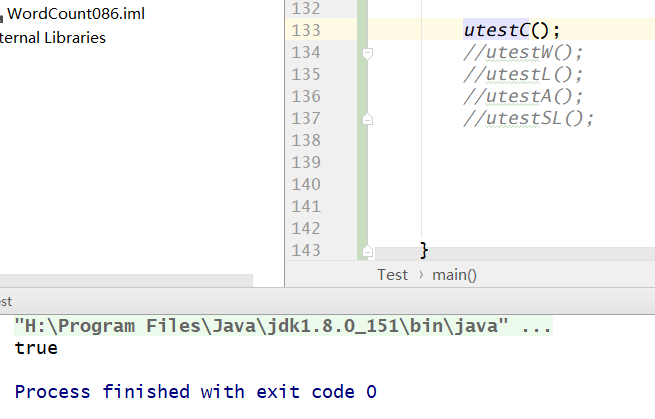
最后是单元测试,确保每一个功能函数可以正常运行,如果该单元正常运行,则返回true,结果如下图:
四. 文献引用:
http://blog.csdn.net/mingover/article/details/57083176(java命令行实现的参考)
http://www.jb51.net/article/83792.htm(java命令行实现的参考)
http://blog.csdn.net/huawangxin/article/details/53296918(BufferReader参考使用)
总结:自己还是太菜了,要多学习啊,感觉一路问了很多大佬,尤其感谢OldBook,对他的指导的感激之情无以言表,以后不止要好好学习测试这门课,还很有必要读一下java的源代码!
软件测试第二周作业 WordCount的更多相关文章
- 软件质量与测试--第二周作业 WordCount
github地址: https://github.com/wzfhuster/software_test_tasks psp表格: PSP2.1 PSP 阶段 预估耗时 (分钟) 实际耗时 (分钟) ...
- 20169212《Linux内核原理与分析》第二周作业
<Linux内核原理与分析>第二周作业 这一周学习了MOOCLinux内核分析的第一讲,计算机是如何工作的?由于本科对相关知识的不熟悉,所以感觉有的知识理解起来了有一定的难度,不过多查查资 ...
- 20169210《Linux内核原理与分析》第二周作业
<Linux内核原理与分析>第二周作业 本周作业分为两部分:第一部分为观看学习视频并完成实验楼实验一:第二部分为看<Linux内核设计与实现>1.2.18章并安装配置内核. 第 ...
- Java第二周作业
Java第二周作业 本周作业: 参考http://www.cnblogs.com/rocedu/p/7911138.html 学习第二三章视频 参考http://www.cnblogs.com/roc ...
- C语言--第二周作业评分和总结(5班)
作业链接:https://edu.cnblogs.com/campus/hljkj/CS2017-5/homework/1026 一.评分要求 要求1 阅读指定博客+阅读收获+例子.(5分) 要求2 ...
- 结队第二次作业——WordCount进阶需求
结队第二次作业--WordCount进阶需求 博客地址 051601135 岳冠宇 博客地址 051604103 陈思孝 博客地址 Github地址 具体分工 队友实现了爬虫功能,我实现了wordco ...
- 2017-2018-1 Java小组-1623 第二周作业
2017-2018-1 Java小组-1623 第二周作业 关于游戏软件的问题 讨论结果 20162301张师瑜 20162305李昱兴 20162306陈是奇 20162308马平川 2016231 ...
- 2017-2018-1 JAVA实验站 第二周作业
2017-2018-1 JAVA实验站 第二周作业 小组成员: 组长 20162318张泰毓 成员 20162303石亚鑫 20162304张浩林 20162307张韵琪 20162321王彪 201 ...
- 2017-2018-1 20179205《Linux内核原理与设计》第二周作业
<Linux内核原理与分析>第二周作业 本周视频学习情况: 通过孟老师的视频教程,大致对风诺依曼体系结构有了一个初步的认识,视频从硬件角度和程序员角度对CPU和Main Memory(内存 ...
随机推荐
- Python 实现单例模式的一些思考
一.问题:Python中如何实现单例模式 单例模式指一个类只能实例化一个对象. 二.解决方案: 所有资料参考于: http://python.jobbole.com/87294/ https://ww ...
- Docker系统四:Dcoker的镜像管理
1. Dcoker镜像初识 $ docker images -a //查看当前所有镜像 REPOSITORY TAG IMAGE ID CREATED SIZE cptactionhank/atlas ...
- hadoop性能调优
1.平衡磁盘利用率 hadoop balancer -Threshold 20 或者 sh $HADOOP_HOME/bin/start-balancer.sh –t 20% 参数20是比例参数,表示 ...
- java 集合框架(十六)Map
一.概述 Map是一个包含键值对的集合,一个map不能有重复的键(key),而且每个键至多只能对应一个值.Map同Collection一样,它的所有通用实现都会提供一个转换器构造函数,接收一个Map类 ...
- C语言中的sizeof函数总结
sizeof函数的结果: 变量:变量所占的字节数. ; printf( 数组:数组所占的字节数. ,,,,}; ] = {,,,,}; printf("size_arr1=%d\n" ...
- win7 vs2012+wdk8.0 搭建wdf驱动开发环境
开发环境搭建:系统:win7 x64工具:vs2012 + WDK8.0插件:wdfcoinstaller.msi(1)先安装vs2012,再安装wdk8.0,这样在打开vs2012时可以创建wind ...
- 学习笔记︱深度学习以及R中并行算法的应用(GPU)
笔记源于一次微课堂,由数据人网主办,英伟达高级工程师ParallerR原创.大牛的博客链接:http://www.parallelr.com/training/ 由于本人白痴,不能全部听懂,所以只能把 ...
- 航空客户价值分析特色LRFMC模型——RFM升级
本文转载自微信公众号TIpDM. 每每以为攀得众山小,可.每每又切实来到起点,大牛们,缓缓脚步来俺笔记葩分享一下吧,please~ --------------------------- 我们说RFM ...
- dojo单柱状图
dojo单柱状图 1.dojo单柱状图源码 column.html: <!DOCTYPE HTML> <html lang="en"> <head&g ...
- strcpy函数
不调用C/C++库函数,编写strcpy()函数. char * my_strcpy(char *strDest,const char *strSrc) { char *p=strDest; whil ...