
mybatis-generator生成逆向工程两种方式
本文博客地址:http://blog.csdn.net/soonfly/article/details/64499423
逆向工程下载
链接:https://pan.baidu.com/s/1YOAq8w-1gex9e-n8wFARpA 密码:op9h
mybatis官方提供了一个逆向工程包,可以针对数据库表自动生成mybatis执行所需要的Pojo、Mapper xml文件、Mapper Interface接口文件。
mybatis-generator有很多种用法:命令行、eclipse/IDEA、Maven插件,其使用原理完全一样。
无论哪种方式,首先要准备两个组件包:mybatis-generator-core-1.X.X.jar 和MySQL-connector-Java-5.X.XX.jar ( 点击下载两个组件)
命令行方式
从这个入手,因为最方便。
1、新建任意目录(D:\A-TWM\Mybatis),把两个组件拷入目录。
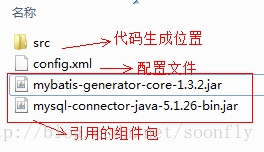
2、新建配置文件,命名:config.xml
补充:下载好的jar包里面有帮助文档,打开后里面有配置文件的模板。
config.xml内容:
<?xml version="1.0" encoding="UTF-8"?>

<!DOCTYPE generatorConfiguration PUBLIC "-//mybatis.org//DTD MyBatis Generator Configuration 1.0//EN" "http://mybatis.org/dtd/mybatis-generator-config_1_0.dtd">

<generatorConfiguration>

    <!-- 数据库驱动包位置 -->

    <classPathEntry location="D:\A-TWM\Mybatis\mysql-connector-java-5.1.26-bin.jar" />

    <context id="sqlGenerate" targetRuntime="MyBatis3">

        <!-- 是否去除自动生成的注释 true:是 : false:否 -->

        <commentGenerator>

            <property name="suppressAllComments" value="true" />

        </commentGenerator>

        <!-- 数据库链接URL、用户名、密码 -->

        <jdbcConnection driverClass="com.mysql.jdbc.Driver"

            connectionURL="jdbc:mysql://localhost:3306/tangwenmingdb?characterEncoding=utf8"

            userId="root" password="root">

        </jdbcConnection>

         <!-- 默认false,把JDBC DECIMAL 和 NUMERIC 类型解析为 Integer;

         为 true时把JDBC DECIMAL和NUMERIC类型解析为java.math.BigDecimal -->

        <javaTypeResolver>

            <property name="forceBigDecimals" value="false" />

        </javaTypeResolver>

        <!-- 生成Pojo包名和位置 -->

        <javaModelGenerator targetPackage="twm.mybatisdemo.pojo"

            targetProject="D:\A-TWM\Mybatis\src">

            <!-- enableSubPackages:是否让schema作为包的后缀 -->

            <property name="enableSubPackages" value="true" />

            <!-- 清理前后的空格 -->

            <property name="trimStrings" value="true" />

        </javaModelGenerator>

        <!-- 生成Mapper映射XML文件位置 -->

        <sqlMapGenerator targetPackage="twm.mybatisdemo.mapper"

            targetProject="D:\A-TWM\Mybatis\src">

            <property name="enableSubPackages" value="true" />

        </sqlMapGenerator>

        <!-- 生成Mapper接口文件位置 -->

        <javaClientGenerator type="XMLMAPPER"

            targetPackage="twm.mybatisdemo.mapper" targetProject="D:\A-TWM\Mybatis\src">

            <property name="enableSubPackages" value="true" />

        </javaClientGenerator>

        <!-- 要生成哪些表(更改tableName和domainObjectName就可以) -->

        <!-- tableName:要生成的表名

        domainObjectName:生成后的实例名

        enableCountByExample:Count语句中加入where条件查询,默认为true开启

        enableUpdateByExample:Update语句中加入where条件查询,默认为true开启

        enableDeleteByExample:Delete语句中加入where条件查询,默认为true开启

        enableSelectByExample:Select多条语句中加入where条件查询,默认为true开启

        selectByExampleQueryId:Select单个对象语句中加入where条件查询,默认为true开启

        -->

        <table tableName="user" domainObjectName="User"

            enableCountByExample="false" enableUpdateByExample="false"

            enableDeleteByExample="false" enableSelectByExample="false"

            selectByExampleQueryId="false" />

        <table tableName="category" />

        <table tableName="order"/>

        <table tableName="product"/>

        <table tableName="order_detail"/>

    </context>

</generatorConfiguration>
如果table里边不配置property,默认将所有字段逆向生成为类属性。
如果有些字段并不想生成为类属性,可以用ignoreColumn标签:
<ignoreColumn column="FRED" />//忽略字段
还可以指定逆向生成时,字段到属性的转换对应关系
<columnOverride column="LONG_VARCHAR_FIELD" jdbcType="VARCHAR" />//无论字段是什么类型,生成的类属性都是varchar。
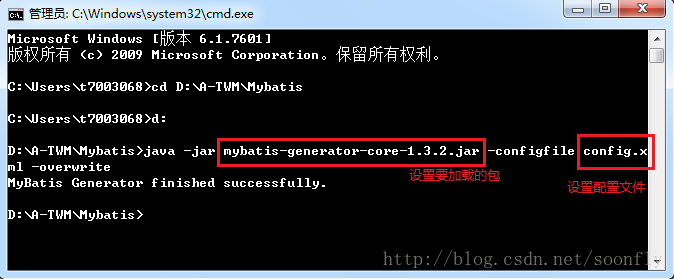
3、通过cmd打开命令窗口
运行:java -jar mybatis-generator-core-1.3.2.jar -configfile config.xml -overwrite
出现MyBatis Generator finished successfully.表示运行成功,将指定生成位置(这里是src)的源码拷入工作项目中即可。
Eclipse方式
1、新建工程、将组件和将配置文件config.xml放到对应的目录
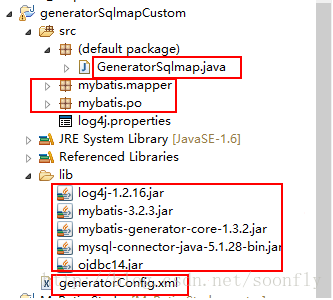
2、在main函数中写代码运行
public static void main(String[] args) throws Exception {

    List<String> warnings = new ArrayList<String>();

    boolean overwrite = true;

    //指向逆向工程配置文件

    File configFile = new File("generatorConfig.xml");

    ConfigurationParser cp = new ConfigurationParser(warnings);

    Configuration config = cp.parseConfiguration(configFile);

    DefaultShellCallback callback = new DefaultShellCallback(overwrite);

    MyBatisGenerator myBatisGenerator = new MyBatisGenerator(config,

            callback, warnings);

    myBatisGenerator.generate(null);

}
3、以application的方式运行就可以了
mybatis-generator生成逆向工程两种方式的更多相关文章
- MyBatis配置数据源的两种方式
---------------------siwuxie095 MyBatis 配置数据源的两种方式 1.配置方 ...
- MyBatis获取参数值的两种方式
MyBatis获取参数值的两种方式:${}和#{} ${}的本质就是字符串拼接,#{}的本质就是占位符赋值 ${}使用字符串拼接的方式拼接sql,若为字符串类型或日期类型的字段进行赋值时,需要手动加单 ...
- mybatis批量保存的两种方式(高效插入)
知识点:mybatis中,批量保存的两种方式 1.使用mybatis foreach标签 2.mybatis ExecutorType.BATCH 参考博客:https://www.jb51.net/ ...
- mybatis Generator生成代码及使用方式
本文原创,转载请注明:http://www.cnblogs.com/fengzheng/p/5889312.html 为什么要有mybatis mybatis 是一个 Java 的 ORM 框架,OR ...
- mybatis调用存储过程的两种方式
先总结和说明一下注意点: 1.如果传入的某个参数可能为空,必须指定jdbcType 2.当传入map作为参数时,必须指定JavaType 3.如果做动态查询(参数为表名,sql关键词),可以使用${} ...
- 数据库链接 mybatis spring data jpa 两种方式
jdbc mybatis spring data jpa dao service webservice jaxrs jaxws springmvc w ...
- Mybatis Dao开发的两种方式(一)
原始Dao的开发方式: 1.创建数据库配置文件db.properties jdbc.driver=com.mysql.jdbc.Driver jdbc.url=jdbc:mysql://localh ...
- mybatis 传递参数的两种方式与模糊匹配 很重要
- mybatis Generator生成代码及使用方式(转载)
转载自:http://www.cnblogs.com/fengzheng/p/5889312.html 文章很棒,很不错,转了.
随机推荐
- [转]Redis作者:深度剖析Redis持久化
From : http://www.iteye.com/news/24675 Redis是一种面向“key-value”类型数据的分布式NoSQL数据库系统,具有高性能.持久存储.适应高并发应用场景等 ...
- python抽象类的实现方式:abc模块
abc:abstract base class 文档:https://docs.python.org/zh-cn/3.7/library/abc.html 参考:https://www.cnblogs ...
- maven与jdk版本不一致报:Unsupported major.minor version 51.0
I recently uninstalled Java 8, to use Java 6 as I want my code/creations to be usable by more people ...
- json schema校验
工作中使用到了json schema格式校验的问题,在网上查了些资料,结合自己的理解记录一下. json schema可以对json结果字符串做出一些约束,例如: 1. 值类型是:array, obj ...
- Sonar本地环境搭建
一个新项目准备上线提测了,为了在提测之前做一下代码走查,同时了解项目目前的质量情况,就在本地搭建了一套sonar环境.搭建的过程中遇到了很多问题,sonar官方已不再维护Eclipse的svn插件,所 ...
- Flask Restful服务简单实现
官网:http://flask.pocoo.org/docs/1.0/quickstart/#routing 1.安装 windows下:pip3 install Flask 具体参照:windows ...
- TRIZ系列-创新原理-13-反过来做原理
反过来做原理表述例如以下: 1)不直接接实施问题指出的动作,而是实施一个相反的动作;(比方用冷却取代加热等):2) 使物体或外部环境移动的部分精巧.或者使精巧的部分移动:3) 把物体上下颠倒.反过来做 ...
- mysql主从备份及原理分析
一.mysql主从备份(复制)的基本原理mysql支持单向.异步复制,复制过程中一个服务器充当主服务器,而一个或多个其它服务器充当从服务器.mysql复制基于主服务器在二进制日志中跟踪所有对数据库的更 ...
- Redis:解决分布式高并发修改同一个Key的问题
本篇文章是通过watch(监控)+mutil(事务)实现应用于在分布式高并发处理等相关场景.下边先通过redis-cli.exe来测试多个线程修改时,遇到问题及解决问题. 高并发下修改同一个key遇到 ...
- capwap学习笔记——capwap的前世今生(转)
公司要做AP和AC,从今天开始学习capwap. 1 capwap的前世今生 1.1 胖AP.瘦AP.AC 传统的WLAN网络都是为企业或家庭内少量移动用户的接入而组建的.因此,只需要一个无线路由器就 ...