
VTK三维点集轮廓凸包提取
碰撞检测问题在虚拟现实、计算机辅助设计与制造、游戏及机器人等领域有着广泛的应用,甚至成为关键技术。而包围盒算法是进行碰撞干涉初步检测的重要方法之一。包围盒算法是一种求解离散点集最优包围空间的方法。基本思想是用体积稍大且特性简单的几何体(称为包围盒)来近似地代替复杂的几何对象。为物体添加包围体的目的是快速的进行碰撞检测或者进行精确的碰撞检测之前进行过滤(即当包围体碰撞,才进行精确碰撞检测和处理)。包围体类型包括球体、轴对齐包围盒(AABB/Axis-aligned bounding box)、有向包围盒(OBB/Oriented bounding box)以及凸壳/凸包(Convex Hull)等。
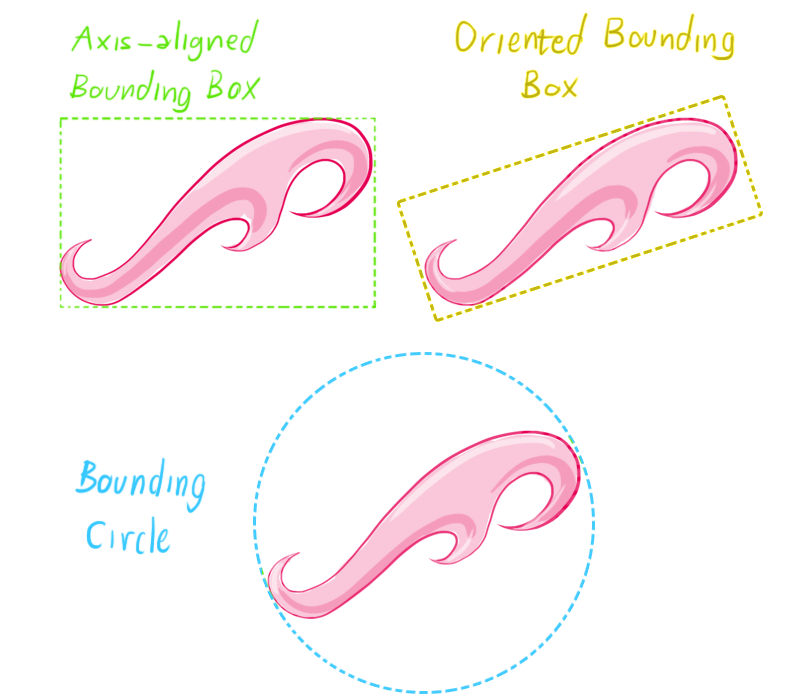
AABB是应用最早的包围盒。它被定义为包含该对象,且边平行于坐标轴的最小六面体。故描述一个AABB,仅需六个标量。AABB构造比较简单,存储空间小,但紧密性差,尤其对不规则几何形体,冗余空间很大,当对象旋转时,无法对其进行相应的旋转。
包围球被定义为包含该对象的最小的球体。确定包围球,首先需分别计算组成对象的基本几何元素集合中所有元素的顶点的x,y,z坐标的均值以确定包围球的球心,再由球心与三个最大值坐标所确定的点间的距离确定半径r。包围球的碰撞检测主要是比较两球间半径和与球心距离的大小。
OBB是较为常用的包围盒类型。它是包含该对象且相对于坐标轴方向任意的最小的长方体。OBB最大特点是它的方向的任意性,这使得它可以根据被包围对象的形状特点尽可能紧密的包围对象,但同时也使得它的相交测试变得复杂。OBB包围盒比AABB包围盒和包围球更加紧密地逼近物体,能比较显著地减少包围体的个数,从而避免了大量包围体之间的相交检测。但OBB之间的相交检测比AABB或包围球体之间的相交检测更费时。
在多维空间中有一群散布各处的点,凸包是包覆这群点的所有外壳当中,表表面积容积最小的一个外壳,而最小的外壳一定是凸的。
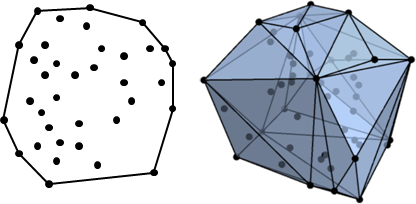
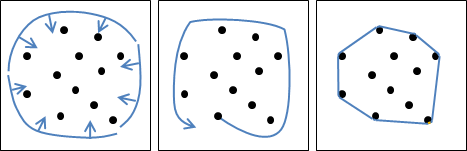
二维平面上的凸包是一个凸多边形,在所有点的外围绕一圈即得凸包。另外,最顶端、最底端、最左端、最右端的点,一定是凸包上的点。
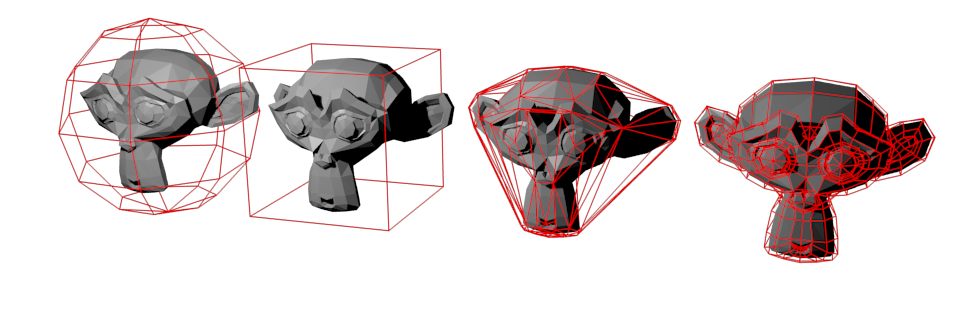
在许多物理引擎或仿真软件中进行碰撞检测和接触力计算时,会需要物体具有一个能代表其碰撞属性的碰撞体(Each object must have a Collision Shape)。碰撞体的形状可以是其真实的三维网格,但这样会影响计算的实时性和效果。这时可以用更简单的几何形状来代表要发生碰撞或接触的物体,比如立方体、球体等。下面是几种碰撞体形状,从左到右为:球体、立方体、凸包、原始网格。前三种包围体和原始网格相比显得不那么精确,但是计算效率更高。
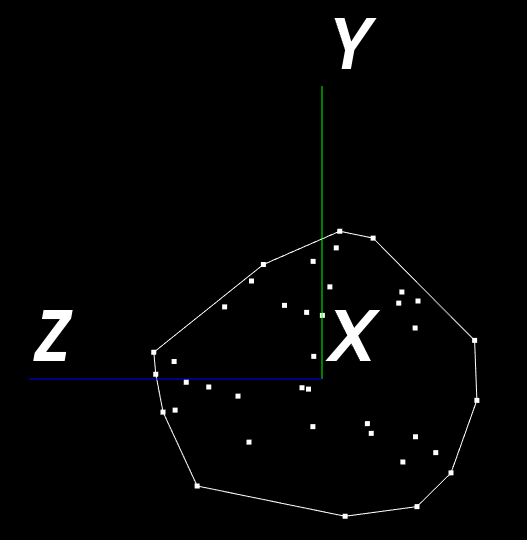
VTK提取凸包使用类vtkPointsProjectedHull,该类可以获取任意点集的最小凸包。输入为点集,输出为包围该点集的最小凸包轮廓点集。下面代码以原点为球心随机生成40个三维点,然后提取凸包并投影到Y-Z平面上(projection along the x axis)
import vtk

pointSource = vtk.vtkPointSource() #  By default location of the points is random within the sphere

pointSource.SetNumberOfPoints(40)

pointSource.Update()

#Create a mapper and actor

mapper = vtk.vtkPolyDataMapper()

mapper.SetInputConnection(pointSource.GetOutputPort())

pointActor = vtk.vtkActor()

pointActor.SetMapper(mapper)

# change the size of actor's points

pointActor.GetProperty().SetPointSize(5)

points = vtk.vtkPointsProjectedHull()

points.DeepCopy(pointSource.GetOutput().GetPoints())

# Returns the number of points in the convex hull of the projection of the points down the positive x-axis

xSize = points.GetSizeCCWHullX()

print "xSize: " , xSize

pts = 2 * xSize * [0]

# Returns the coordinates (y,z) of the points in the convex hull of the projection of the points down the positive x-axis

points.GetCCWHullX(pts, xSize)

xHullPoints = vtk.vtkPoints()

for i in range(xSize):

    yval = pts[2*i]

    zval = pts[2*i + 1]

    print "(y,z) value of point " , i , " : (" , yval, " , " , zval , ")"

    xHullPoints.InsertNextPoint(0.0, yval, zval)

# Insert the first point again to close the loop

xHullPoints.InsertNextPoint(0.0, pts[0], pts[1])

# Display the x hull

xPolyLine = vtk.vtkPolyLine()

xPolyLine.GetPointIds().SetNumberOfIds(xHullPoints.GetNumberOfPoints())

for i in range(xHullPoints.GetNumberOfPoints()):

    xPolyLine.GetPointIds().SetId(i, i)

# Create a cell array to store the lines in and add the lines to it

cells = vtk.vtkCellArray()

cells.InsertNextCell(xPolyLine)

# Create a polydata to store everything in

polyData = vtk.vtkPolyData()

# Add the points to the dataset

polyData.SetPoints(xHullPoints)

# Add the lines to the dataset

polyData.SetLines(cells)

# Setup actor and mapper

xHullMapper = vtk.vtkPolyDataMapper()

xHullMapper.SetInputData(polyData)

xHullActor = vtk.vtkActor()

xHullActor.SetMapper(xHullMapper)

#Create a renderer, render window, and interactor

renderer = vtk.vtkRenderer()

renderWindow = vtk.vtkRenderWindow()

renderWindow.AddRenderer(renderer)

renderWindowInteractor = vtk.vtkRenderWindowInteractor()

renderWindowInteractor.SetRenderWindow(renderWindow)

# Add the actor to the scene

renderer.AddActor(xHullActor)

renderer.AddActor(pointActor)

axesActor = vtk.vtkAxesActor()

axesActor.SetConeRadius(0)

renderer.AddActor(axesActor)

# Rotate camera

renderer.GetActiveCamera().ParallelProjectionOn()

renderer.GetActiveCamera().Azimuth(90)

renderer.ResetCamera()

# Render and interact

renderWindow.Render()

style = vtk.vtkInteractorStyleTrackballCamera()

renderWindowInteractor.SetInteractorStyle(style)

renderWindowInteractor.Start()
输出结果如下:
xSize: 12
(y,z) value of point 0 : ( -0.0582492426038 , -0.422939538956 )
(y,z) value of point 1 : ( 0.105404652655 , -0.416797012091 )
(y,z) value of point 2 : ( 0.384681999683 , -0.139498367906 )
(y,z) value of point 3 : ( 0.403645426035 , -0.0483181998134 )
(y,z) value of point 4 : ( 0.312736421824 , 0.160078570247 )
(y,z) value of point 5 : ( 0.0731690451503 , 0.45936870575 )
(y,z) value of point 6 : ( 0.0130856623873 , 0.45393627882 )
(y,z) value of point 7 : ( -0.090303093195 , 0.434131532907 )
(y,z) value of point 8 : ( -0.292154729366 , 0.340970009565 )
(y,z) value of point 9 : ( -0.374829471111 , -0.0632947012782 )
(y,z) value of point 10 : ( -0.348517596722 , -0.259341210127 )
(y,z) value of point 11 : ( -0.256385087967 , -0.352375864983 )
参考:
VTK/Examples/Cxx/PolyData/PointsProjectedHull
Picking with a physics library
Video Game Physics Tutorial - Part I: An Introduction to Rigid Body Dynamics
Video Game Physics Tutorial - Part II: Collision Detection for Solid Objects
Video Game Physics Tutorial - Part III: Constrained Rigid Body Simulation
VTK三维点集轮廓凸包提取的更多相关文章
- OpenCV成长之路(8):直线、轮廓的提取与描述
基于内容的图像分析的重点是提取出图像中具有代表性的特征,而线条.轮廓.块往往是最能体现特征的几个元素,这篇文章就针对于这几个重要的图像特征,研究它们在OpenCV中的用法,以及做一些简单的基础应用. ...
- OpenCV成长之路:直线、轮廓的提取与描述
http://ronny.blog.51cto.com/8801997/1394139 OpenCV成长之路:直线.轮廓的提取与描述 原创作品,允许转载,转载时请务必以超链接形式标明文章 原始出处 . ...
- 三维点集拟合:平面拟合、RANSAC、ICP算法
ACM算法分类:http://www.kuqin.com/algorithm/20080229/4071.html 一: 拟合一个平面:使用SVD分解,代码里面去找吧 空间平面方程的一般表达式为: A ...
- opencv学习之路(24)、轮廓查找与绘制(三)——凸包
一.简介 二.绘制点集的凸包 #include<opencv2/opencv.hpp> using namespace cv; void main() { //---绘制点集的凸包 Mat ...
- 【OpenCV函数】轮廓提取;轮廓绘制;轮廓面积;外接矩形
FindContours 在二值图像中寻找轮廓 int cvFindContours( CvArr* image, CvMemStorage* storage, CvSeq** first_cont ...
- matlab 提取图像轮廓(图像边缘提取)
利用edge()函数提取图像轮廓,绘制出对象的边界和提取边界坐标信息,matlab实现代码如下: close all;clear all;clc; % 提取图像轮廓,提取图像边缘 I = imread ...
- opencv6.5-imgproc图像处理模块之轮廓
接opencv6.4-imgproc图像处理模块之直方图与模板 这部分的<opencv_tutorial>上都是直接上代码,没有原理部分的解释的. 十一.轮廓 1.图像中找轮廓 /// 转 ...
- OpenCV3入门(十)图像轮廓
1.图像轮廓 1.1图像轮廓与API函数 轮廓是一系列相连的点组成的曲线,代表了物体的基本外形,相对于边缘,轮廓是连续的,边缘并不全部连续.一般地,获取图像轮廓要经过下面几个步骤: 1) 读取 ...
- OpenCV开发笔记(五十六):红胖子8分钟带你深入了解多种图形拟合逼近轮廓(图文并茂+浅显易懂+程序源码)
若该文为原创文章,未经允许不得转载原博主博客地址:https://blog.csdn.net/qq21497936原博主博客导航:https://blog.csdn.net/qq21497936/ar ...
随机推荐
- smb与samba
为了使Windows 主机间的资源能够共享,微软于1980年开发了SMB(Server Message Block)通信协议,并通过SMB通信协议,使网络上各台主机之间能够共享文件.打印机等资源.目前 ...
- Java NIO Channel to Channel Transfers
In Java NIO you can transfer data directly from one channel to another, if one of the channels is a ...
- Go语言之进阶篇TCP相互通信
1.TCP相互通信 服务端示例: tcp_server.go package main import ( "fmt" "net" ) func main() { ...
- go语言之进阶篇正则表达式
正则表达式是一种进行模式匹配和文本操纵的复杂而又强大的工具.虽然正则表达式比纯粹的文本匹配效率低,但是它却更灵活.按照它的语法规则,随需构造出的匹配模式就能够从原始文本中筛选出几乎任何你想要得到的字符 ...
- 10款CSS3按钮 - 程序员再也不用为按钮设计而发愁了...
这次主要给大家分享10款风格各异的CSS3按钮,如果你希望你的页面也能有很炫的样式,那么我相信这10款CSS3按钮就非常适合你,而且每一款都整理了源代码供参考,一起来看看吧. 1.绚丽的CSS3发光按 ...
- 通过js去掉所有的html标签,得到HTML标签中的所有内容
<script> //替换掉所有的 html标签,得到Html标签中的内容 var s="<P><FONT face=宋体 color=#000000> ...
- IntelIj IDEA运行JUnit Test OutOfMemoryError
好久没看到OutOfMemoryError这种错误了,今天跑测试的时候发现总是报错.针对IDEA需要修改几个配置. JUnit Test在运行前,IDEA会build整个项目,这个是喜欢eclipse ...
- 用于文本分类的RNN-Attention网络
用于文本分类的RNN-Attention网络 https://blog.csdn.net/thriving_fcl/article/details/73381217 Attention机制在NLP上最 ...
- 机器学习算法与Python实践之(六)二分k均值聚类
http://blog.csdn.net/zouxy09/article/details/17590137 机器学习算法与Python实践之(六)二分k均值聚类 zouxy09@qq.com http ...
- Axure-Axure RP For Chrome 演示扩展
Axure RP生成的Html原型,其中包含JS文件,在本地进行演示时浏览器IE会弹出安全提醒.谷歌浏览器Chrome则需要在线安装一个Axure的扩展工具才可以演示. Axure RP Extens ...